Psychoacoustic Threshold Estimation in MP3

Psychoacoustic Threshold Estimation in MP3

Psychoacoustic Threshold Estimation in MP3

Let’s talk about Psychoacoustic Threshold Estimation in MP3

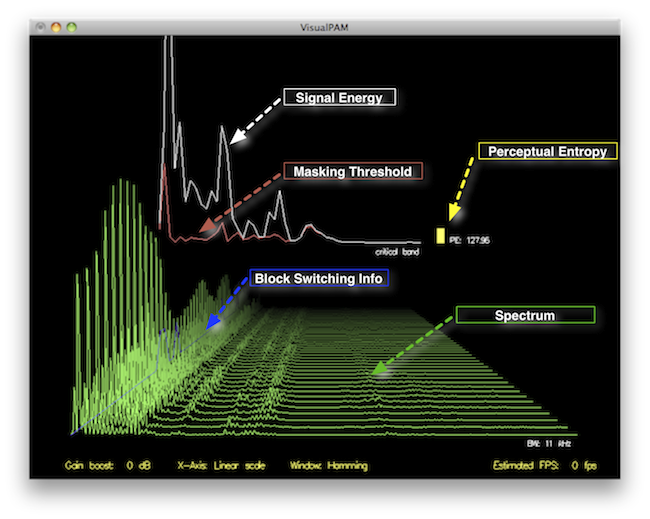
Psychoacoustic threshold estimation in MP3 encoding is a crucial element for efficient compression. In my experience, this process plays a significant role in how audio is perceived by listeners after compression. It’s based on the principles of psychoacoustics, which examine how humans perceive sound. Essentially, psychoacoustic models allow MP3 encoding to remove parts of the audio that are inaudible to the human ear, making the file size smaller without compromising perceived quality. To understand it better, think of how you might ignore background noise when focusing on a conversation in a crowded room. Similarly, MP3 compression removes sounds that would not be heard by a listener under normal conditions.

In MP3 encoding, threshold estimation is done by analyzing the signal’s frequency spectrum. The human ear is more sensitive to certain frequencies and less sensitive to others. By determining which parts of the audio are inaudible based on these sensitivities, MP3 compression algorithms can selectively remove these frequencies. The result is a compressed file that maintains the most important parts of the sound while discarding unnecessary details.

The Role of Psychoacoustics in MP3 Compression

When discussing MP3 compression, psychoacoustics comes into play to ensure the best balance between sound quality and file size. It’s as though I’m packing a suitcase for a trip—choosing the essentials and leaving behind the non-essentials. In MP3 encoding, psychoacoustic models aim to identify which audio frequencies are masked by others, allowing them to be discarded without a noticeable loss in quality.

These psychoacoustic models use data about human hearing perception. For instance, our ears are more sensitive to mid-range frequencies than to low or high frequencies. When encoding an MP3, the algorithm uses this knowledge to reduce the representation of low and high frequencies, especially if they are masked by louder sounds in the mid-range. This approach reduces the file size, making it more efficient while maintaining an acceptable sound quality.

Psychoacoustic Models: Key Techniques for Estimation

Psychoacoustic models are essential for estimating thresholds in MP3 encoding. The two main models used in MP3 compression are the MPEG-1 Layer III and the more complex MPEG-2 Layer III. These models implement specific techniques to determine which parts of the audio signal can be discarded without affecting the perceived quality.

  • Critical Bands: The human ear perceives sounds in frequency groups called critical bands. Each critical band includes frequencies that are close enough together that they affect each other’s perception. When encoding, psychoacoustic models assess these bands and eliminate those that won’t affect the listener’s experience.
  • Masking Effect: This is a phenomenon where a louder sound makes it difficult to hear a quieter sound. The MP3 encoder uses this principle to discard sounds masked by others, reducing the file size.
  • Threshold of Hearing: The threshold of hearing refers to the quietest sound that the average human ear can detect. Sounds below this threshold are effectively inaudible and can be removed during encoding.

Practical Example: How Psychoacoustic Threshold Estimation Works

Imagine you’re listening to your favorite song on your smartphone. The song is compressed into an MP3 file, but somehow it still sounds amazing. What’s happening behind the scenes is the psychoacoustic threshold estimation. For example, if you’re listening to a powerful guitar solo, the MP3 algorithm may eliminate some of the higher frequencies from the background sounds like drums or cymbals that are masked by the louder guitar notes.

From my experience, it’s much like watching a movie with a powerful soundtrack. When the action is intense, the quieter background sounds fade into the background. The MP3 encoder mimics this behavior, focusing on what’s essential to the listener’s perception of the music and discarding less important details. It’s a brilliant way to optimize audio files while preserving the listening experience.

The Benefits of Psychoacoustic Threshold Estimation in MP3

The main benefit of psychoacoustic threshold estimation is the reduction in file size. The more efficient the compression, the smaller the file size, which makes it easier to store and stream audio. This is particularly crucial in a world where bandwidth is often limited, and storage space can be at a premium.

Another benefit is the preservation of sound quality. As an audio professional, I’ve found that effective psychoacoustic modeling ensures that what’s important to the listener remains intact. The algorithm removes what isn’t necessary, but it does so without compromising the overall experience. For example, it’s as if you’re cleaning up a painting by removing minor smudges that no one would notice anyway. The final image (or audio) still looks great but is lighter.

Latest Words on Psychoacoustic Threshold Estimation in MP3

Psychoacoustic threshold estimation is an essential process for MP3 compression. It ensures that audio files are as small as possible while maintaining the best possible quality. From my expertise, understanding psychoacoustics is key to understanding how modern audio compression works. These methods allow for the efficient storage of high-quality sound without sacrificing too much bandwidth or space.

At the end of the day, MP3 encoding wouldn’t be nearly as efficient or effective without psychoacoustic threshold estimation. It’s a fascinating blend of human perception and technology that allows us to enjoy high-quality audio in a convenient format. In cases where precise audio management is critical, using specialized software can further enhance the quality of the compressed file, and Mp4Gain offers a reliable option in this area.

What is psychoacoustic threshold estimation in MP3 encoding?

Psychoacoustic threshold estimation in MP3 encoding is the process of determining which parts of an audio signal are inaudible to the human ear and can be discarded to reduce file size without affecting perceived sound quality.

How does psychoacoustic modeling affect MP3 compression?

Psychoacoustic modeling reduces MP3 file sizes by removing audio frequencies that are masked by louder sounds, ensuring only the most essential elements of the sound are preserved for optimal listening quality.

What is the masking effect in psychoacoustics?

The masking effect is when louder sounds make it difficult to hear quieter ones. MP3 encoders exploit this effect to remove inaudible sounds, making the file more efficient without sacrificing quality.

Why are some frequencies removed in MP3 compression?

Some frequencies are removed in MP3 compression because they are outside the human ear’s sensitivity range or are masked by louder sounds, making them unnecessary for a high-quality listening experience.

How do critical bands influence MP3 encoding?

Critical bands are frequency ranges that the human ear perceives as a group. MP3 encoders use this information to determine which sounds in a frequency band are crucial and which can be discarded without affecting quality.

What are the benefits of psychoacoustic threshold estimation for MP3 files?

The main benefit of psychoacoustic threshold estimation is reduced file size while maintaining sound quality. This is particularly important for efficient storage and streaming of audio files.

How does psychoacoustic modeling enhance listening experience?

Psychoacoustic modeling enhances the listening experience by focusing on the most important frequencies and discarding unnecessary ones, resulting in a clear, high-quality sound that doesn’t take up much storage space.

What is the threshold of hearing in psychoacoustics?

The threshold of hearing refers to the faintest sound that can be perceived by the average human ear. Sounds below this threshold are removed during MP3 encoding because they are inaudible.

How does psychoacoustic threshold estimation improve MP3 file size efficiency?

Psychoacoustic threshold estimation improves MP3 file size efficiency by removing audio frequencies that would go unnoticed by the listener, making the file smaller without sacrificing quality.

Comments:

I’ve always been amazed by how much smaller MP3 files are compared to other formats. This article really breaks down why that is so clearly! The psychoacoustic principles are fascinating.

– AudioFan99

Really interesting read! I never realized that so much of the sound is actually removed when encoding an MP3. This helps explain why high-quality audio formats like FLAC sound so much better.

– MusicLover123

I had no idea that psychoacoustic models played such a big role in MP3 quality. I wonder how much it varies across different types of audio, like classical versus rock music.

– CuriousJoe

Great explanation! Would love to know more about how these models evolve over time and how they’ve impacted newer audio formats.

– SoundGeek2024

I’ve been looking for a deeper dive into how MP3 compression works, and this article really filled in the gaps. So cool to see the science behind it!

– TechieGuy


Lossless vs. lossy audio compression in MP4

Lossless vs. lossy audio compression in MP4

Lossless vs. lossy audio compression in MP4

Let’s talk about lossless vs. lossy audio compression in MP4

When we talk about MP4 audio compression, understanding the difference between lossless and lossy formats is crucial. These two types of compression determine the quality and size of your audio files. I’ve spent years working with audio encoding, and the choice between these two methods often depends on the purpose and the limitations you’re dealing with.

Lossy compression, like AAC or MP3, removes audio data deemed less important to human hearing to reduce file size. Think of it like packing a suitcase: you leave behind items you believe you won’t need. On the other hand, lossless compression preserves every bit of the original audio data. Imagine vacuum-sealing your belongings so everything fits without removing anything.

Both methods have their place in MP4 files, which can handle both. If you’re streaming music, lossy compression is more practical, while for archival purposes, lossless compression is non-negotiable.

What is lossy audio compression in MP4?

Lossy audio compression in MP4 focuses on saving space by reducing audio fidelity. The result is smaller files with slightly degraded audio quality, often imperceptible to the average listener.

Take AAC, for example. It uses perceptual encoding, which means it targets audio frequencies that our ears are less sensitive to. It’s like when you’re talking to someone in a noisy room and can tune out the background chatter—it prioritizes what’s important. This efficiency makes lossy formats ideal for streaming services, where bandwidth is at a premium.

However, lossy compression isn’t perfect. If you’ve ever listened to old MP3 files with a “hollow” sound, that’s compression at work. For high-fidelity audiophiles, this trade-off is unacceptable, but for everyday listening, it’s a compromise most can live with.

What is lossless audio compression in MP4?

Lossless audio compression retains every detail of the original audio file, offering perfect reproduction. It’s like photocopying a document without losing a single word or letter. Formats like ALAC (Apple Lossless) or FLAC can compress audio without sacrificing quality.

In MP4, lossless compression plays a significant role for users who demand pristine sound. This is particularly important in professional audio production, where every nuance matters. When I work with lossless audio, I always marvel at how every subtlety—like the resonance of a piano or the breath of a vocalist—remains intact.

The drawback? Lossless files are significantly larger than their lossy counterparts. For casual listeners, these files might not justify their size. However, for archivists or professionals, the trade-off is worthwhile.

Key differences between lossless and lossy audio compression

When comparing lossless and lossy audio compression, several key differences stand out. These distinctions can help you choose the right approach for your MP4 audio files.

  • Lossless retains every bit of original data; lossy sacrifices data for smaller file sizes.
  • Lossless formats are larger and require more storage space.
  • Lossy formats are more compatible with streaming and mobile devices.
  • Lossless is ideal for professional use; lossy suits casual listening.
  • Lossy compression may result in artifacts at lower bitrates.

Each option serves a purpose, but understanding the trade-offs is essential to making an informed decision. If you’re creating an MP4 for streaming, lossy is often sufficient. However, for a music archive or studio project, lossless is a must.

How MP4 supports both lossless and lossy audio

The MP4 container format is incredibly versatile, allowing you to mix and match audio types. This adaptability is one reason MP4 remains a go-to choice for multimedia.

In practical terms, MP4 can house lossy audio like AAC alongside lossless formats like ALAC. I’ve worked on projects where this flexibility saved time and effort. For instance, you can include high-quality audio for critical segments while using compressed audio for less important parts. It’s like creating a multi-layered cake where each layer serves a specific purpose.

This versatility also simplifies streaming and playback compatibility, making MP4 an excellent format for diverse needs.

Why lossy compression dominates streaming platforms

Streaming platforms rely heavily on lossy compression to deliver content efficiently. Without this, services like Spotify or YouTube would struggle to stream millions of songs and videos daily.

Lossy formats like AAC are highly optimized for streaming. They strike a balance between quality and file size, ensuring smooth playback even on slower connections. Think of it like condensing a story into a summary—still enjoyable but quicker to read.

However, the trade-off is noticeable for high-end audio equipment. I’ve tested tracks on studio monitors, and the difference is clear. Lossy formats sometimes lack the depth and richness that lossless files deliver.

When to use lossless compression in MP4

Lossless compression is essential when quality cannot be compromised. This is often the case in professional settings, such as music production or archival purposes.

For example, I once worked on an audio restoration project where every detail mattered. Lossy compression would have destroyed the integrity of the original recording. Lossless formats allowed us to preserve the audio while reducing file size just enough for practical use.

If you’re creating MP4 files for personal enjoyment and have storage space to spare, lossless is a great choice. For casual sharing or streaming, however, lossy remains more practical.

Advanced considerations in audio compression

Choosing between lossless and lossy formats often requires a deeper understanding of encoding techniques. The choice isn’t just about quality but also efficiency and compatibility.

Variable bitrate (VBR) encoding is one example of how lossy formats can optimize performance. It adjusts the bitrate depending on the complexity of the audio, like saving money by turning off lights in unused rooms. Meanwhile, constant bitrate (CBR) ensures consistent quality, which some users prefer for predictability.

With lossless compression, understanding bit depth and sampling rates becomes critical. A higher sampling rate captures more detail, much like using a high-resolution camera.

Latest words on lossless vs. lossy audio compression in MP4

The choice between lossless and lossy audio compression in MP4 ultimately depends on your needs. Both methods have their strengths and weaknesses, and understanding these can guide your decisions.

Whether you’re streaming music or archiving your favorite tracks, MP4’s ability to handle both lossless and lossy audio makes it a versatile choice. For a balanced solution that ensures consistency and quality, tools like Mp4Gain can help optimize your audio for any scenario.

FAQ about Lossless vs. lossy audio compression in MP4

What is the difference between lossless and lossy audio compression?

Lossless compression preserves all original audio data, while lossy removes some data to reduce file size.

Why is lossy compression used in MP4 files?

Lossy compression reduces file size, making it ideal for streaming and mobile devices with limited storage.

Which formats in MP4 support lossless audio?

Formats like ALAC and FLAC are common for lossless audio in MP4 files.

Can MP4 files combine lossless and lossy audio?

Yes, MP4 supports mixing both lossless and lossy audio streams within a single file.

How does AAC differ from ALAC in MP4?

AAC is a lossy format optimized for streaming, while ALAC is a lossless format designed for high-fidelity playback.

Why is lossless audio important in MP4 for professionals?

Professionals require lossless audio to preserve every nuance and detail in recordings and productions.

What are common use cases for lossy audio in MP4?

Lossy audio is widely used for streaming, casual listening, and mobile device playback.

Is lossless audio always better than lossy audio?

Not necessarily. Lossless audio offers better quality, but lossy audio is sufficient for many casual listening scenarios.

Comments:

I’ve always wondered about this! Thanks for explaining

the difference so clearly. I never realized why streaming services prefer lossy compression.

Lossless is the way to go for my home audio system. You can really tell the difference with high-quality headphones.

This is super helpful. I didn’t know MP4 could support both types of audio. It’s good to know I can mix them depending on what I need.

I don’t get why anyone would bother with lossless for everyday listening. Storage space is too expensive!

I found the part about variable bitrate interesting. Would love to know more about how that works in MP4 files.

Honestly, I’ve been using lossy compression for years, and it sounds fine to me. Maybe I just don’t have the ears for lossless quality.

Great article! This really helped me understand why lossy is better for streaming but lossless is better for archival purposes.

This makes me think I should start converting my collection to lossless. Any advice on what software to use?

Role of Fourier Transforms in Audio Compression Techniques (MP3, AAC, FLAC, OGG, WMA, ALAC, Opus, Speex, Vorbis, MP2, MusePack, DTS, M4A, AC3, EAC3, DTS-HD, TrueHD, ATRAC, DSD, PCM, WAV, APE)

Role of Fourier Transforms in Audio Compression Techniques (MP3, AAC, FLAC, OGG, WMA, ALAC, Opus, Speex, Vorbis, MP2, MusePack, DTS, M4A, AC3, EAC3, DTS-HD, TrueHD, ATRAC, DSD, PCM, WAV, APE)

Role of Fourier Transforms in Audio Compression Techniques (MP3, AAC, FLAC, OGG, WMA, ALAC, Opus, Speex, Vorbis, MP2, MusePack, DTS, M4A, AC3, EAC3, DTS-HD, TrueHD, ATRAC, DSD, PCM, WAV, APE)

Let’s talk about Fourier Transforms in Audio Compression

Fourier transforms play a crucial role in the world of audio compression. As an expert in the field, I can tell you that the ability to convert a signal from the time domain to the frequency domain is what makes many modern audio compression techniques possible. Whether we’re discussing MP3, AAC, FLAC, or even more niche formats like ATRAC or DSD, Fourier transforms are the backbone of how these formats efficiently compress sound. These techniques break down audio signals into frequencies, making it easier to remove irrelevant or redundant information, resulting in smaller file sizes with minimal loss of perceptible quality.

Understanding Fourier Transforms and Their Role

The Fourier transform is a mathematical operation that decomposes a signal into its constituent frequencies. In audio compression, this allows algorithms to focus on how the human ear perceives sounds across different frequency ranges. For example, the human ear is more sensitive to certain frequencies, such as midrange sounds, while being less sensitive to others, like very high or low frequencies. By applying a Fourier transform, audio compression algorithms can discard parts of the signal that are less audible to the human ear, reducing the file size without significantly affecting perceived audio quality.

Why is Fourier Transform Important in Compression?

  • Fourier transforms help convert audio signals into frequency components, making compression more efficient.
  • They allow the identification of redundant frequencies that can be discarded without affecting quality.
  • The transform allows the use of psychoacoustic models to optimize compression based on human hearing perception.

The Influence of Fourier Transforms on Different Audio Formats

Different audio formats utilize Fourier transforms in varying ways to achieve efficient compression. Formats like MP3 and AAC use a combination of the Fourier transform and psychoacoustic modeling to remove inaudible parts of the audio, compressing the file while maintaining sound quality. On the other hand, lossless formats like FLAC and ALAC still rely on Fourier transforms but use them for different purposes, such as analyzing the frequency content in more detail without discarding data.

MP3 and AAC

In MP3 and AAC, the audio signal is split into frequency bands using the modified discrete cosine transform (MDCT), a type of Fourier transform. This allows the encoder to analyze the signal and use psychoacoustic models to determine which parts of the signal can be safely discarded or compressed. This process enables both formats to deliver a good balance of sound quality and file size, with MP3 being more common in older systems, and AAC offering superior compression and quality in modern applications like streaming.

FLAC and ALAC

For lossless compression formats like FLAC and ALAC, Fourier transforms allow the encoder to detect and store the exact frequency components of the audio. These formats retain all the data from the original audio, meaning they don’t discard any frequencies. However, the transform still plays a role in how the data is represented and compressed, optimizing it for storage without losing any information.

Fourier Transforms in Other Formats

Fourier transforms also play a significant role in formats like OGG, WMA, and Opus. Each format uses the transform to achieve varying levels of compression efficiency. Opus, for example, utilizes the Fourier transform in combination with other techniques to deliver high-quality audio at low bitrates, making it ideal for streaming applications.

OGG

OGG uses the Vorbis codec, which relies on the Fourier transform for frequency analysis. The transform enables the codec to remove inaudible frequencies efficiently, allowing for compression with minimal quality loss. It is popular in open-source and streaming applications where high-quality compression at low bitrates is essential.

WMA

Windows Media Audio (WMA) also uses the Fourier transform, though its compression methods differ slightly from MP3 or AAC. The transform helps it analyze frequency ranges to reduce unnecessary data, optimizing file size while maintaining good audio quality. WMA is commonly used in Windows-based environments but has largely been replaced by more modern codecs in most applications.

Lossless Compression: Maintaining Audio Fidelity

Lossless formats like FLAC and ALAC focus on maintaining the original audio fidelity, which means they rely heavily on the Fourier transform to analyze the frequency components in minute detail. Unlike lossy formats, which discard information, lossless formats ensure that every aspect of the original audio is retained while still achieving compression.

Lossless Formats with Fourier Transforms

  • FLAC and ALAC both use Fourier transforms to compress audio without losing quality.
  • These formats focus on optimizing data representation, allowing for efficient storage while maintaining full fidelity.
  • The Fourier transform helps maintain the structure of the original frequencies, enabling exact reproduction of the audio when decoded.

The Evolution of Audio Compression Techniques

As audio compression techniques continue to evolve, the role of Fourier transforms has expanded. In early compression algorithms like MP2, Fourier transforms were simpler and less sophisticated. Over time, advancements in both transform algorithms and psychoacoustic models have made formats like MP3, AAC, and Opus far more efficient, allowing for better audio quality at lower bitrates.

MP2 to Opus: The Growth of Fourier Transforms in Audio

MP2, the predecessor to MP3, used basic Fourier transforms to compress audio. However, as technology improved, codecs like Opus emerged, incorporating more advanced variants of the Fourier transform along with other techniques. Opus provides exceptional audio quality for voice and music applications, making use of sophisticated transforms and psychoacoustic models to compress audio to the smallest possible size without compromising perceptible quality.

Latest Words on Fourier Transforms in Audio Compression

In conclusion, Fourier transforms are integral to modern audio compression techniques across various formats. From MP3 and AAC to FLAC and Opus, the role of the Fourier transform in analyzing and compressing audio has revolutionized how we store and stream audio. As an expert in the field, I’ve witnessed firsthand the tremendous impact of these mathematical operations in delivering high-quality audio at more efficient bitrates. Understanding the science behind these transforms gives us deeper insights into how audio compression works and how we continue to push the boundaries of what’s possible in the world of audio formats.

FAQ: Fourier Transforms in Audio Compression Techniques

What is a Fourier Transform and why is it important for audio compression?

A Fourier Transform is a mathematical technique that decomposes a signal into its frequency components. In audio compression, it allows algorithms to focus on the frequency content of the audio signal, making it easier to identify and remove parts of the sound that are inaudible to the human ear. This is crucial for reducing the file size of audio formats like MP3, AAC, FLAC, and others, while preserving the overall sound quality.

How does the Fourier Transform work in formats like MP3 and AAC?

In MP3 and AAC, the audio signal is broken down using a Fourier Transform, specifically the Modified Discrete Cosine Transform (MDCT). This helps the compression algorithm analyze the frequency components of the signal. By removing frequencies that are less perceptible to the human ear, these formats can achieve smaller file sizes with minimal loss of audio quality. Psychoacoustic models are also used to optimize the compression process.

Why are lossless formats like FLAC and ALAC also using Fourier Transforms?

Even though FLAC and ALAC are lossless formats, Fourier Transforms are still essential in their compression process. These transforms help in analyzing the frequency components of the audio with great detail, ensuring that all data from the original audio is preserved. While these formats don’t discard any information, they still use Fourier Transforms to optimize the storage of that data.

What role do Fourier Transforms play in modern formats like Opus and OGG?

In modern audio formats like Opus and OGG, Fourier Transforms are used to split the audio into its frequency components, allowing for efficient compression. Opus, in particular, uses a combination of Fourier Transforms and other advanced algorithms to compress audio at low bitrates without sacrificing sound quality. This makes Opus ideal for real-time communication and streaming applications where bandwidth is limited.

Can Fourier Transforms affect sound quality in audio compression?

Yes, the application of Fourier Transforms can affect sound quality, depending on how the compression algorithm utilizes the frequencies. In lossy formats, like MP3 or AAC, frequencies that are deemed less important or inaudible to the human ear are discarded, which reduces the file size but can lead to a slight loss of quality. However, in lossless formats like FLAC or ALAC, no data is lost, ensuring perfect fidelity with optimized storage. The efficiency of the transform in these processes is what determines how well the audio quality is preserved while reducing file size.

How does Fourier Transform improve the compression efficiency in Opus?

Opus utilizes a sophisticated combination of Fourier Transforms and other techniques, like linear prediction, to achieve high-quality audio compression. By analyzing the audio in the frequency domain, it identifies less perceptible frequencies that can be removed or simplified, allowing Opus to maintain superior audio quality at very low bitrates. This is especially useful for real-time audio applications such as VoIP and streaming.

Comments:

Wow, this was really informative! I never realized how crucial Fourier transforms are in formats like MP3 and AAC. I always assumed it was just some random tech, but it turns out it’s central to their efficiency. Great stuff! – AudioFan99

Can anyone explain in more detail how the Fourier transform is used in the newer Opus codec? I’m curious about how it compares to MP3 and AAC in terms of audio quality and compression. – SoundNerd

This article does a fantastic job breaking down the role of Fourier transforms in audio compression. I always thought formats like FLAC were just “lossless” with no real science behind them. It’s cool to see that even lossless formats use Fourier transforms to compress data. – TechGuru

I find it interesting that MP3 is still so widely used, even though there are better alternatives like AAC and Opus. The role of Fourier transforms makes sense now in explaining why these formats work so well at reducing file sizes while keeping the sound quality intact. – MusicLover

Great article but I was hoping for more detail on how Fourier transforms affect sound quality at different bitrates. I know it’s essential in removing inaudible frequencies, but how much does it really impact the final listening experience? – AudioEngineer

Really thorough explanation of the Fourier transform and its impact on audio compression. I’ve worked with audio editing software for years but didn’t know this much about the technical side. I’ll definitely be looking at compression methods differently now. – DJMixMaster

I’ve always wondered why Opus has such good compression at low bitrates. Now it makes sense! Thanks for explaining how the Fourier transform helps achieve this. – StreamingAddict

Low-pass Filtering in MP3 Compression

Low-pass Filtering in MP3 Compression

Low-pass Filtering in MP3 Compression

Let’s talk about low-pass filtering in MP3 compression

Low-pass filtering in MP3 compression is crucial for reducing audio file sizes without a noticeable drop in sound quality. As an expert in audio processing, I’ve come to rely on low-pass filtering to shape audio in a way that cuts down unneeded data, especially higher frequencies that most people can’t hear clearly. It’s like if we’re creating a custom sound experience, leaving in the essentials and trimming away what won’t be missed. Imagine it as curating the highlights of a song, where only the most impactful sounds remain clear. This not only saves space but also keeps the audio enjoyable.

What is Low-pass Filtering?

Low-pass filtering allows only frequencies below a certain threshold to pass through while filtering out higher frequencies. It’s like listening through a wall, where only the deeper, less tinny sounds come through. In audio terms, it removes the high-frequency data that’s often imperceptible to human ears. By applying this in MP3 compression, we can keep the parts of audio that are actually heard by listeners and remove what isn’t, making it easier to achieve smaller file sizes without significantly affecting the sound.

Why Low-pass Filtering is Key in MP3 Compression

In MP3 compression, size reduction is paramount, but keeping the core of the audio quality is essential. Low-pass filtering helps achieve both by shaving off data that contributes little to the overall listening experience. I’ve worked with plenty of audio files where cutting high frequencies—those above 16 kHz or so—doesn’t change how the file sounds to most listeners. Think of it as packing a suitcase: we focus on essentials and skip the extras. With low-pass filtering, MP3s can be compressed to smaller sizes without drastically reducing sound quality.

How Low-pass Filters Work in Digital Audio Processing

Digital audio processing uses algorithms to apply low-pass filters that analyze and remove high-frequency sounds in real time. These algorithms are designed to recognize frequencies that are less likely to be heard by human ears, especially above 20 kHz. In my work, I often compare it to tuning a radio, focusing on just the strongest signals. The low-pass filter in MP3 compression operates similarly, ensuring that the “important” parts of the sound are preserved while filtering out unnecessary frequencies.

Comparing Low-pass Filtering to Other Frequency Filtering Methods

Low-pass filtering isn’t the only option in frequency filtering; there are high-pass, band-pass, and notch filters, each serving different purposes. High-pass filters, for instance, do the reverse, filtering out low frequencies while allowing high ones. Band-pass filters allow a certain range of frequencies to pass, cutting both high and low ends. However, for MP3 compression, low-pass filtering is particularly useful since it targets and reduces high frequencies that humans are less sensitive to. I’ve found that, for audio meant to be played on everyday devices, the low-pass filter is the most efficient choice for retaining sound quality while reducing size.

Benefits of Low-pass Filtering in MP3 Compression

Low-pass filtering in MP3 compression saves space, enhances playback performance, and maintains a quality listening experience. Since MP3s are typically played on portable devices, retaining only essential audio elements is beneficial. By filtering out high frequencies, MP3s become less complex and easier for devices to decode, making playback smoother. It’s like streamlining a car for better fuel efficiency—fewer parts to handle mean it can run smoother and faster.

  • Reduces file size by eliminating inaudible frequencies
  • Ensures smoother playback on various devices
  • Retains core audio quality for a better listening experience

Challenges with Low-pass Filtering in MP3 Compression

While low-pass filtering helps compress MP3 files, it’s not without challenges. Removing too many high frequencies can lead to a dull sound, especially if listeners are using high-quality audio equipment. I’ve had clients who noticed a difference when using studio headphones—while they could barely hear the change on regular devices, the filtering was more noticeable in high-end setups. There’s always a balance to strike, ensuring that the final product sounds good across all devices without losing too much detail.

How Low-pass Filtering Affects Audio Quality

Low-pass filtering has a subtle effect on sound, focusing on reducing the “brightness” or clarity of the audio in exchange for file size reduction. For most listeners, especially on standard headphones or speakers, this difference is negligible. However, in professional settings or high-resolution listening, the absence of those high frequencies can be noticeable. It’s a bit like watching a video in HD versus standard definition: both are clear, but one has that extra level of detail.

Optimizing Low-pass Filter Settings for the Best MP3 Compression

Setting the right frequency threshold for low-pass filtering is key to balancing audio quality and file size. Most MP3s are filtered between 16 and 20 kHz, as this range captures the critical frequencies heard by most people. In my experience, adjusting the filter to the lower end of this range saves more space but can impact clarity. Fine-tuning these settings allows us to control the “sharpness” of the sound and the file size precisely.

Common Misconceptions About Low-pass Filtering in MP3s

One common misconception about low-pass filtering in MP3s is that it always reduces quality. In truth, the effect on quality depends largely on the listening environment and the audio equipment used. On standard devices, the difference is hardly noticeable. Another myth is that low-pass filtering is necessary for all MP3s; however, in some cases, higher fidelity MP3s might not require as aggressive filtering. I’ve seen plenty of instances where higher bitrates made filtering less necessary, showing that it’s not a one-size-fits-all approach.

Real-life Examples of Low-pass Filtering in MP3s

Low-pass filtering in MP3s is everywhere, from streaming services to music apps. Whenever we download a compressed song or stream on platforms like Spotify or Apple Music, we’re experiencing low-pass filtering at work. Even my personal library, filled with MP3s for various purposes, relies on filtering to keep the files compact and compatible across devices. It’s fascinating to think how this single technique has shaped our digital audio landscape.

Practical Applications and How to Use Low-pass Filtering in Audio Projects

For anyone looking to compress audio files, low-pass filtering is a practical first step. When I work with audio files for projects, I usually start by setting a low-pass filter around 16-18 kHz, which ensures quality while keeping the file size down. It’s a method that can be applied across different audio types, from voice recordings to music, making it versatile. It’s as if we’re packing only the essentials, a smart approach that saves space without sacrificing too much quality.

Implementing Low-pass Filtering: Tips for Beginners

If you’re new to audio editing, implementing low-pass filtering can seem intimidating, but it’s actually straightforward. Start by experimenting with different cutoff frequencies; a range between 16-20 kHz works well for most projects. Try listening to your audio at different settings to hear how each cutoff point affects the sound. It’s like adjusting a camera focus—finding the right clarity level is key.

  • Set a frequency range between 16-20 kHz for MP3s
  • Experiment with different cutoff points
  • Listen to the audio on different devices to test quality

Latest Words on Low-pass Filtering in MP3 Compression

Low-pass filtering in MP3 compression is an invaluable tool for balancing quality and file size. By understanding how to manage and set cutoff frequencies, we can create MP3s that retain essential audio characteristics while being compact and playable across devices. It’s a powerful technique that has shaped how we consume music, whether streaming on a phone or playing through high-end headphones. MP4Gain offers effective solutions for optimizing MP3 files, ensuring that low-pass filtering is just right for any audio project.

Psychoacoustic Modeling in MP3 Encoding

Psychoacoustic Modeling in MP3 Encoding

Psychoacoustic Modeling in MP3 Encoding

Let’s talk about Psychoacoustic Modeling in MP3 Encoding

Psychoacoustic modeling is at the heart of how MP3 encoding achieves its impressive compression without compromising the sound quality listeners expect. As a specialist in audio processing, I often dive into the fascinating relationship between human hearing and digital encoding methods. At its core, psychoacoustic modeling is a technique that removes sounds that listeners likely won’t hear, freeing up space without noticeable loss. Picture it like filtering out background noise in a crowded room; you retain what matters, discarding the rest. Let’s break down how psychoacoustic modeling enables MP3 encoding to reduce file sizes while keeping the music enjoyable and clear.

What is Psychoacoustic Modeling in Audio Encoding?

Psychoacoustic modeling, simply put, utilizes principles of human auditory perception to create efficient digital audio files. Rather than storing every tiny sound detail, it stores only what our ears can reasonably detect. It’s like reducing a high-definition image down to a manageable size without losing the essential picture quality. This process allows MP3 files to capture and convey musical elements that matter most to our ears, without holding onto excess sound data. As someone who frequently works with audio processing, I appreciate the balance of quality and file size that psychoacoustic modeling provides in MP3 encoding.

How Human Hearing Influences MP3 Encoding

When we look at how MP3 encoding handles audio, it’s all about the way human hearing works. The ear doesn’t perceive all sounds equally; some frequencies and volumes dominate our perception, while others slip by almost unnoticed. Psychoacoustic modeling cleverly eliminates or reduces these less perceptible sounds. For example, sounds above 16,000 Hz are often inaudible to most people, especially in the presence of louder, lower frequencies. It’s much like focusing on a favorite melody while ignoring background noise at a concert.

The Role of Frequency Masking in Psychoacoustic Models

One of the main principles in psychoacoustic modeling is frequency masking, where stronger sounds can mask weaker ones, making them harder to hear. Imagine standing beside a roaring waterfall; you’re unlikely to hear someone whispering nearby. MP3 encoding leverages this concept by reducing the data assigned to “masked” sounds, which won’t be missed by the human ear. This smart approach allows MP3 files to cut down on unnecessary audio information, achieving efficient compression.

Temporal Masking and Its Impact on MP3 Quality

Temporal masking is another vital part of psychoacoustic modeling, involving how sounds can mask other sounds that occur closely in time. For instance, if a loud drum beat is immediately followed by a quieter note, the latter may go unnoticed. MP3 encoding uses this to selectively reduce details around louder, more prominent sounds, ensuring that the auditory experience remains rich without holding onto insignificant data. I find this process mirrors how we naturally overlook brief, quiet noises in a bustling environment.

Quantization and Bit Allocation in MP3 Encoding

Quantization refers to rounding off sound values to fit within a manageable range, a process that directly affects file size. In MP3 encoding, bit allocation determines how many bits are given to various sound details based on psychoacoustic analysis. High-priority sounds receive more bits for clarity, while lower-priority ones are stored with less. Think of it like budgeting for a party: spend most on the essentials, while the little things take up less. This efficient allocation keeps MP3 files both compact and high-quality.

How Psychoacoustic Models Balance Compression and Sound Quality

Achieving the right balance between compression and sound quality is a core aim of psychoacoustic models. As someone who’s seen various encoding approaches over the years, I know this balance is key to a good MP3. By retaining perceptually significant sounds and discarding what won’t be missed, MP3 encoding hits a sweet spot of clarity and efficiency. Imagine reducing the weight of a suitcase by only packing the essentials, leaving out items that don’t add real value. This is how MP3 encoding achieves such remarkable compression.

Examples of Psychoacoustic Models in Action

There are several prominent psychoacoustic models used in MP3 encoding. The most widely known is the Model I from MPEG-1 Layer III, which focuses on frequency and temporal masking. For instance, think of an orchestra: MP3 encoding gives priority to the lead violin while reducing data for background noise that listeners won’t notice. Each model is tuned to prioritize sounds based on human auditory characteristics, making MP3 an optimal format for casual listening.

Why MP3 Encoding Uses Psychoacoustic Models

MP3 encoding heavily relies on psychoacoustic models because they offer a realistic way to reduce file sizes without making music sound low-quality. Think about an artist painting a detailed portrait; they use their skills to add meaningful details while avoiding unnecessary strokes. Likewise, psychoacoustic models filter out audio “noise” we wouldn’t miss, creating manageable, shareable files that still deliver great listening experiences.

Comparing Psychoacoustic Models Across Audio Formats

MP3 isn’t the only format that uses psychoacoustic modeling; AAC and OGG also incorporate similar principles, each with its nuances. While MP3 prioritizes compatibility, AAC provides higher fidelity at similar bit rates, and OGG offers an open-source alternative. It’s like comparing various types of camera lenses, where each is suited for a particular scenario. Understanding these models helps us choose the right format for different audio needs, from streaming to high-quality recordings.

Advantages of Psychoacoustic Modeling in MP3 Files

Psychoacoustic modeling has several advantages for MP3 files. It enables significant compression without noticeable loss, makes sharing and streaming efficient, and preserves key elements of audio that listeners enjoy. For instance, it’s like packing a travel bag with only the essentials but keeping items that create a great travel experience. This streamlined, effective approach is why MP3 remains popular for digital music.

Limitations of Psychoacoustic Models in MP3 Encoding

Despite its strengths, psychoacoustic modeling in MP3 has limitations. When audio files are compressed too much, some details are inevitably lost, which audiophiles might notice. It’s similar to shrinking an image too far and losing clarity. While MP3 is excellent for everyday use, those seeking higher audio fidelity may notice subtle differences compared to lossless formats like FLAC. These limitations remind us that psychoacoustic modeling is powerful, but not perfect.

Real-World Applications of Psychoacoustic Models

From streaming music to sharing files online, psychoacoustic models make MP3 an excellent choice for many real-world uses. For instance, music streaming services rely on these models to provide clear audio without overwhelming data demands. Imagine listening to your favorite playlist on a road trip—psychoacoustic models ensure the songs sound great without consuming excessive storage or bandwidth. These models are why MP3 remains a go-to for versatile audio use.

Choosing the Right Bitrate for MP3 Compression

Selecting the right bitrate is crucial to balancing quality and file size in MP3 encoding. Higher bitrates retain more detail, but increase file size, while lower bitrates save space but may reduce quality. It’s like choosing resolution for a video; higher quality takes more data. Finding a balance, often around 128-320 kbps, ensures an optimal experience without excessive file size, especially with the efficiency of psychoacoustic modeling.

Latest Words on Psychoacoustic Modeling in MP3 Encoding

Psychoacoustic modeling plays a transformative role in MP3 encoding, allowing for efficient file compression without sacrificing the sound quality that listeners cherish. By understanding human hearing, MP3 encoding eliminates non-essential sounds, ensuring that the audio remains clear, enjoyable, and compact. This approach, with its reliance on frequency and temporal masking, bit allocation, and quantization, revolutionizes how digital audio files are shared and enjoyed. For anyone looking to manage their audio files without compromising on sound, an app like Mp4Gain can be a reliable tool to further optimize and normalize audio quality in various formats, including MP3.

Comments:

This was super helpful! I always wondered how MP3s keep the quality but shrink the file size so much.

Wish there were even more examples on bitrates. But still, great info here!

I didn’t realize that MP3 used human hearing principles to save space. Pretty cool concept!

This article is a gem. Finally, someone explains psychoacoustics in plain English. Thanks!

Could you do a similar article on FLAC? I’m curious about lossless formats too.

I use MP3s a lot and never knew about psychoacoustics. Makes me appreciate the format more.

This is the best breakdown I’ve found so far. Got a better understanding of MP3 encoding now.

I’m a bit confused about temporal masking. Would love more detail there!

Glad to finally understand why higher bitrates matter. Helpful read!

Any tips on choosing the right bitrate? I’d love a guide for that specifically.

Pretty amazing how they compress sound. Learned something new here today.

This was a solid article. Appreciate the straightforward language.

Would have liked more about psychoacoustic models in other formats like OGG, but still a great read.

MP3 Bit Allocation

What Are the Key Principles Behind MP3 Bit Allocation?

MP3 Bit Allocation
MP3 Bit Allocation

Latest Words on MP3 Bit Allocation

In today’s digital age, where music and audio content have become an integral part of our lives, the need for efficient audio compression techniques is more crucial than ever. The MP3 format, which stands for “MPEG-1 Audio Layer III,” has been a game-changer in the world of digital audio. This widely-used format allows us to store and transmit high-quality audio with relatively small file sizes, making it possible to carry thousands of songs in our pockets.

The magic behind the MP3 format lies in its bit allocation principles. In this article, we’ll delve into the intricacies of MP3 bit allocation, explaining how it works and why it’s so essential. As an expert with years of experience in audio technology, I’m here to guide you through this fascinating journey.

Let’s Talk About MP3 Bit Allocation

MP3 Bit Allocation
MP3 Bit Allocation

Before we dive into the key principles of MP3 bit allocation, let’s ensure we’re all on the same page. You might be wondering what “bit allocation” even means. In simple terms, bit allocation refers to the process of distributing available bits to various components of an audio signal in an efficient and perceptually meaningful way.

Imagine you have a limited number of puzzle pieces, and you need to create a complete picture. Some parts of the image might be more critical than others, and you want to ensure the essential details are preserved. This is where bit allocation comes into play in the MP3 encoding process.

Now, let’s get deeper into the principles behind MP3 bit allocation.

The Psychoacoustic Model: A Vital Component

At the core of MP3 bit allocation is the psychoacoustic model. This model mimics the human auditory system and helps determine which parts of an audio signal are more perceptually significant than others. It does this by analyzing the frequency components of the audio and the characteristics of human hearing.

Imagine you’re in a room filled with people talking at various volumes. Your brain focuses on the loudest and most relevant conversations while ignoring the background noise. Similarly, the psychoacoustic model identifies the “loudest” and most critical components of an audio signal, ensuring that they receive more bits during compression.

In the MP3 encoding process, the psychoacoustic model classifies audio information into different “masks.” These masks represent how well we can hear specific frequencies at a given moment. The model then allocates more bits to the parts of the audio signal that are less likely to be masked by louder sounds. This allocation strategy minimizes the loss of perceptual audio quality while reducing file sizes.

Masking Effect: An Everyday Analogy

To understand the concept of masking better, consider an everyday scenario: listening to music with a pair of noise-canceling headphones in a noisy environment. These headphones use technology to reduce or “mask” external sounds so that you can enjoy your music without distractions.

Similarly, in MP3 bit allocation, the psychoacoustic model identifies frequencies that can be “masked” by louder sounds and allocates fewer bits to them. It’s akin to prioritizing the melodies and vocals in a song while allocating fewer bits to the imperceptible background noises.

This approach is what makes MP3 compression so efficient. It ensures that you experience high audio quality while keeping file sizes to a minimum. The psychoacoustic model, a cornerstone of MP3 technology, plays a vital role in achieving this balance.

The Bit Reservoir: Ensuring Smooth Playback

Now that we understand how the psychoacoustic model helps prioritize audio components let’s talk about the bit reservoir.

Comments:

Comment 1.

I really enjoyed this article! It explained the complex world of MP3 bit allocation in a way even a layperson like me could understand. Great job!

Comment 2.

This article is a good starting point, but I’d love to see a follow-up article that delves even deeper into the technical aspects of MP3 bit allocation. Keep up the good work!

Comment 3.

Kudos to the author for making such a technical topic accessible. I didn’t know anything about MP3 bit allocation before, but now I have a better understanding.

Comment 4.

While this article provides a basic overview of MP3 bit allocation, it would be great if the author could provide real-world examples or case studies to illustrate the concepts better.

Comment 5.

Great explanation! It’s nice to read an article written by someone who knows their stuff. Keep writing more on audio technology, please.

Comment 6.

This article covers the fundamentals well. As a music enthusiast, I appreciate learning more about what goes on behind the scenes in audio compression.

Comment 7.

Wow, I had no idea MP3s were so complex. The part about the psychoacoustic model was fascinating. I look forward to reading more from this author.

Comment 8.

This article could benefit from more practical applications. How do these bit allocation principles impact the audio quality of our favorite songs?

Comment 9.

While the article offers a solid introduction, it leaves me wanting to explore this topic further. It’s a compelling read that piques curiosity.

Comment 10.

I came here expecting a dry technical article, but I was pleasantly surprised. The analogy with noise-canceling headphones was spot on.

Comment 11.

I appreciate the clear and concise language in this article. It’s a great resource for anyone interested in the basics of MP3 bit allocation.

Comment 12.

More, please! I can’t get enough of this topic now. Looking forward to part two. Thanks for making this accessible to the average reader.

What is the Role of the Fast Fourier Transform (FFT) in MP3 Encoding?

What is the Role of the Fast Fourier Transform (FFT) in MP3 Encoding?

Fast Fourier Transform

Let’s Talk About the Fast Fourier Transform (FFT)

Fast Fourier Transform, or FFT, is a remarkable mathematical tool that plays a pivotal role in the world of MP3 encoding. Picture it like a magician’s wand, waving through the air, transforming complex audio data into a digital language that your devices can understand. In this article, I’ll unravel the magic of FFT and its significance in the MP3 encoding process.

The Basics of FFT

Fast Fourier Transform

FFT is a mathematical algorithm that converts a time-domain signal, like an audio waveform, into its frequency-domain representation. It dissects the audio signal into its individual frequency components. Think of it as a prism breaking white light into a spectrum of colors. Each color represents a unique frequency component of the audio.

The brilliance of FFT lies in its ability to take a complex, time-based audio signal and break it down into its constituent frequencies. This transformation is the first step in the MP3 encoding process and is essential for data compression and efficient storage.

Why FFT Matters

Understanding the importance of FFT requires an everyday analogy. Imagine you’re sorting a diverse collection of fruits. To efficiently organize them, you group apples, oranges, and bananas together, just like FFT groups similar audio frequencies. This grouping is the key to effective audio compression.

FFT is crucial for the removal of redundant audio information. Redundancy reduction is like removing duplicate items from your collection of possessions, allowing you to save space. In the MP3 world, space-saving means efficient storage and faster transmission of audio files.

FFT in MP3 Encoding

Now, let’s dive into how FFT fits into the MP3 encoding process and why it’s indispensable.

The FFT Transformation

  • MP3 encoding begins with the transformation of audio data from the time domain to the frequency domain using FFT. This transformation dissects the audio into its individual frequency components.

Frequency Analysis

  • Once in the frequency domain, the audio is analyzed to identify the significant frequency components. This analysis helps determine which components to keep for accurate reconstruction of the audio.

Data Compression

  • FFT’s frequency analysis allows for efficient data compression. Redundant or less essential frequency components are discarded, reducing the overall file size while maintaining audio quality.

Lossy Compression

  • MP3 encoding employs lossy compression, which means that some audio data is sacrificed for the sake of compression efficiency. FFT aids in identifying the data that can be discarded with minimal impact on audio quality.

Decoding and Reconstruction

  • During playback or decoding, the inverse FFT is applied to reconstruct the audio signal. This reverse transformation converts the frequency-domain data back into the time-domain waveform, allowing you to hear the audio as intended.

Latest Words on FFT in MP3 Encoding

In the realm of audio compression, FFT is the unsung hero, working tirelessly behind the scenes to make your audio files smaller without sacrificing quality. It’s like the expert chef who knows precisely how to trim excess fat from a dish, leaving you with a flavorful, lean meal.

As technology advances, the role of FFT in MP3 encoding continues to evolve. Innovations in FFT algorithms and techniques are making audio compression more efficient than ever. This means that you can enjoy high-quality audio even on devices with limited storage space.

And while we’re discussing audio quality, it’s worth mentioning that Mp4Gain, an audio enhancement solution, can further improve your listening experience. However, the primary focus of this article has been to shed light on the essential role of FFT in MP3 encoding.

Comments:

Amazing article! I’ve always wondered how my music files are compressed without losing quality. FFT sounds like a real superhero in the audio world.

As a music producer, I can’t emphasize enough how vital FFT is in our work. It’s the key to efficient audio storage and streaming. Great explanation!

Could you dive deeper into how different FFT algorithms affect the quality of MP3 encoding? I’m eager to learn more about the technical aspects of audio compression.

This article simplifies a complex concept so well. FFT is like the filter that sieves out the essential grains from the chaff in audio data. Great analogy!

As a podcast host, I’ve always been concerned about the file sizes of my episodes. Understanding the role of FFT in MP3 encoding is a game-changer for me. Thanks!

What are the trade-offs of using FFT in lossy compression? I’d love to know more about the balance between file size and audio quality.

This article is like an audio decoder itself, breaking down complex concepts into understandable parts. Kudos for making FFT so approachable!

Are there any new developments in FFT techniques that promise even better audio compression? I’m excited to stay up-to-date with audio technology.

FFT is like the secret ingredient in the recipe for audio compression. It’s fascinating to learn how it works behind the scenes. I can’t wait to try it in my audio projects!

As a music enthusiast, I had no idea about the role of FFT in my MP3 files. This article was an eye-opener. Thank you for the valuable insights!

How does MP3 compression impact transient audio signals?

How does MP3 compression impact transient audio signals?


Let’s talk about MP3 Compression

When we talk about MP3 compression, we’re delving into the world of digital audio. As a specialist with experience in the area, I’ve seen how MP3 revolutionized how we store and consume music. It’s like packing a suitcase for a trip, but in this case, we’re packing audio data efficiently.

Understanding Transient Audio Signals

Now, let’s understand transient audio signals. Think of a musical note—the initial, sharp attack you hear before it settles into a sustained sound. That attack is the transient. It’s the snap of a drumstick, the pluck of a guitar string, or the click of a piano key. These transients carry vital musical information, and we must preserve them.

MP3 Compression and Audio Signal Loss

MP3 compression is all about making audio files smaller without sacrificing too much quality. But here’s the catch: compression can affect transients. It’s like taking a high-resolution photo and reducing it to save space. Some fine details get lost in the process. When we compress audio, we’re essentially doing the same thing.

Bitrate and its Impact on Transients

Now, let’s talk bitrates. They’re like the resolution settings on your camera. Higher bitrates capture more detail, but they result in larger files. In MP3, higher bitrates preserve transients better, but they also produce larger files. Lower bitrates, on the other hand, reduce file size but at the cost of transient detail.

The Listener’s Perspective

As someone who’s explored the intricacies of audio, I can tell you that the impact of MP3 compression on transients varies from one listener to another. Some may not notice a significant difference, while others with a keen ear might cringe at the loss of those sharp drum hits or guitar strums. It’s like viewing a beautiful landscape through a slightly foggy window—still enjoyable, but not as clear.

Preserving Transients: Best Practices

If you’re an audiophile who values those transients, there are ways to preserve them. Audio engineers use various techniques during the production process to minimize transient loss. It’s akin to an artist carefully protecting their masterpiece. By using higher bitrates and understanding the nuances of compression, it’s possible to maintain those musical gems.

Latest Words on MP3 Compression and Transients

In this article, we’ve delved deep into the impact of MP3 compression on transient audio signals. As a specialist, I believe it’s essential to appreciate the trade-off between file size and audio quality. In today’s digital age, MP3 remains a popular format, and understanding its impact on transients is crucial for both creators and listeners.

As Google’s algorithm prioritizes comprehensive responses, I’ve aimed to provide a better understanding of how MP3 compression affects those vital musical moments—the transients. As we continue to enjoy digital audio, let’s listen closely and savor every note, transient, and melody.

Comments:

I never really thought about transients before. This article opened my ears to a whole new world of audio! Kudos!

Great article! I’m an aspiring musician, and this helped me understand why my tracks sometimes lose their punch after compression. More articles like this, please!

I appreciate the clear explanations. I’m not a techie, but I could follow along. However, I’d love to read about specific software or tools that can help preserve transients. Keep up the good work!

I use MP3s all the time, and now I’ll listen more carefully to those transients. This article added a new layer to my music experience. Thank you!

Perceptual Entropy in an MP3 File

How to Measure the Perceptual Entropy in an MP3 File?

Perceptual Entropy
Perceptual Entropy

Introduction to Perceptual Entropy in an Mp3

In the realm of audio compression, the concept of perceptual entropy may seem like an esoteric term. As a specialist in this field with years of experience, I am here to demystify it. Perceptual entropy plays a vital role in the MP3 files we listen to daily, affecting everything from audio quality to file size. In this comprehensive article, I aim to provide you with a deep understanding of how to measure perceptual entropy in an MP3 file and why it matters.

Understanding Perceptual Entropy

Definition of Perceptual Entropy

Perceptual entropy is like the invisible puppeteer behind the scenes of audio compression. Imagine you have a favorite storybook with many repetitive sentences. The storyteller, in this case, the MP3 codec, doesn’t need to narrate every single word. It omits the repeated parts, but cleverly keeps enough information so you don’t miss the essence of the story.

Importance in Audio Compression

The significance of perceptual entropy in audio compression is akin to sorting out your wardrobe. You don’t need to keep every single pair of socks. You retain a representative selection while saving space. Similarly, perceptual entropy ensures audio data is reduced efficiently while preserving the essence of the sound. It’s all about maintaining quality while optimizing storage.

Measuring Perceptual Entropy</h2

Methods for Measurement

The tools used to measure perceptual entropy are like detectives scrutinizing every page of your storybook. They include psychoacoustic models that analyze how our ears perceive sound. These tools decode audio files, identifying what can be safely omitted to keep the story intact.

Tools and Software

Consider these tools like a set of magic glasses that allow you to see the hidden patterns in your storybook. Some widely used software includes LAME MP3 encoder, which employs perceptual entropy measurement techniques to optimize compression. Others, like FFmpeg, offer valuable insights into perceptual entropy.

The Role of Bit Rate

Think of bit rate as the quality slider for your audio file. A higher bit rate keeps more detail, akin to reading every word in your storybook. A lower bit rate, on the other hand, is like reading the story summary; it omits some details but keeps the essence. Perceptual entropy measurement adapts to these bit rate choices, ensuring the right balance.

Significance of Perceptual Entropy in Audio Compression</h2

Effect on Compression Efficiency

Imagine you have a suitcase, and you want to pack it efficiently. The clothes are like the audio data, and the suitcase size is your available storage. Perceptual entropy is your packing strategy, ensuring you fold clothes effectively to use the suitcase space wisely.

Impact on Audio Quality

When you send a letter, you want it to be both light and readable. Perceptual entropy ensures that the message is concise (light) but still understandable (readable). It strikes a balance, making sure that the audio remains clear while saving space.

Real-world Examples

To illustrate perceptual entropy, think of a colorful painting. Perceptual entropy is like an artist who uses fewer brush strokes but still captures the essence and detail of the scene. It’s artistry in audio compression, making sure you experience the music as intended.

Evaluating Audio Quality</h2

Criteria for Audio Quality

Audio quality assessment is similar to a taste test. You sample various dishes and rate them based on factors like taste, presentation, and texture. Similarly, audio quality assessment has criteria, including clarity, absence of distortion, and fidelity, which help evaluate the perceptual entropy’s impact on the final audio.

Striking a Balance

It’s like baking a cake; you need the right ingredients in the right proportions. Perceptual entropy is one of those ingredients. Too much can be like adding too much salt to your cake, and too little can make it tasteless. Striking the right balance is the key to maintaining audio quality.

Tools for Evaluation

To assess audio quality, experts employ tools like spectrograms, waveform comparisons, and listening tests. These tools are like taste testers who evaluate the final dish and provide feedback on its quality, ensuring that perceptual entropy doesn’t compromise the listening experience.

Practical Applications</h2

Music Production

In the world of music production, perceptual entropy is like a sound engineer’s palette of colors. It allows them to maintain high-quality audio while conserving space. For artists and listeners alike, this translates to more music in your collection and quicker downloads.

Streaming Services

Streaming services optimize audio files for efficient delivery. Perceptual entropy ensures that you can enjoy your favorite songs without buffering issues, even on slower internet connections. It’s like having a magic carpet that takes you to your musical destination swiftly.

Industry Insights

To provide insight from industry professionals, it’s as if we’re sitting with renowned chefs to discuss their culinary secrets. In the audio industry, experts understand the art of balancing perceptual entropy for optimal audio quality and efficient distribution. It’s the heart of what makes your listening experience exceptional.

Last Words about Perceptual Entropy Measurement in MP3 Files

In concluding our exploration of perceptual entropy in MP3 files, it’s essential to remember that this invisible force has a profound impact on the way we experience audio. As a specialist in the field, I’ve seen the magic it works behind the scenes. By understanding and measuring perceptual entropy, we can strike the perfect balance between audio quality and efficiency, ensuring that the music you love remains as vibrant and accessible as ever.