MP3-to-MP4 Transcoding Quality Loss


Free Download Mp4Gain
picture

MP3-to-MP4 Transcoding Quality Loss
MP3-to-MP4 Transcoding Quality Loss

Let’s talk about MP3-to-MP4 transcoding quality loss

When you convert MP3 files to MP4, you might wonder what happens to the audio quality. Transcoding between formats can lead to loss of fidelity if you’re not careful. I’ve spent years working with digital audio, and one thing is clear: understanding how these formats work is essential to minimizing quality loss. Think of it like making a photocopy of a photo—you might get a usable result, but it won’t capture every detail of the original.

MP3 files are already compressed using lossy algorithms, which means some audio data has been permanently removed to reduce file size. When you transcode an MP3 to MP4, which can contain audio and video, you’re essentially re-encoding an already compressed file. This process can amplify artifacts such as muffled sounds, reduced clarity, or background noise.

Why transcoding can cause quality loss

Transcoding quality loss happens because the original MP3 compression removes data, and the MP4 re-encoding process adds its own layer of compression. Each step reduces the amount of audio information available. Imagine shrinking a high-resolution image twice—it may still look good, but the fine details will blur.

MP4 files are designed to handle audio and video streams, often optimized for compatibility with different devices and platforms. However, their compression methods might not preserve the nuances of the original MP3, especially if the settings aren’t properly adjusted.

Factors influencing audio quality during transcoding

Several factors determine how much quality is lost during MP3-to-MP4 transcoding. Understanding these can help you make better decisions.

  • Original MP3 quality: Lower bitrates in the source MP3 file leave less data to preserve during transcoding.
  • Target MP4 settings: Using low bitrates or incompatible codecs in the MP4 can degrade the sound further.
  • Transcoding tools: Some software programs handle compression better than others, reducing artifact buildup.

How to minimize quality loss

Reducing quality loss during MP3-to-MP4 transcoding is possible with the right approach. Over the years, I’ve learned some simple yet effective techniques to preserve audio fidelity.

Start with the highest-quality MP3 you have. If your MP3 file is already heavily compressed, transcoding will magnify the flaws. Aim for bitrates of 256 kbps or higher to ensure there’s enough data to work with.

Choose the right MP4 settings. Use a high audio bitrate (at least 192 kbps) to maintain quality. Selecting a lossless codec like AAC-LC instead of HE-AAC can also make a big difference.

Avoid transcoding more than once. Each conversion strips away more audio data, so working directly with the original file format whenever possible is ideal.

When transcoding is unavoidable

Sometimes, transcoding from MP3 to MP4 is necessary, like when you need to combine audio with video or adapt files for specific devices. In these cases, using the best tools and settings becomes even more critical.

Look for transcoding software that supports advanced settings for both MP3 and MP4. These tools often provide options to adjust bitrates, sample rates, and codecs, giving you greater control over the output quality.

Real-world applications of MP3-to-MP4 transcoding

In my experience, most people need MP3-to-MP4 transcoding for multimedia projects. For example, if you’re creating a slideshow or video montage, you might need to combine audio tracks with visual content. Choosing the right settings ensures your audience hears crisp, clear sound.

Another common use is optimizing files for streaming. MP4’s flexibility with audio and video streams makes it an excellent choice for platforms like YouTube or social media. However, understanding how transcoding affects your audio ensures the final product sounds professional.

Latest words on MP3-to-MP4 transcoding quality loss

Transcoding MP3 to MP4 doesn’t have to mean sacrificing quality if you take the right precautions. Always start with the best source material, select compatible codecs, and adjust settings to suit your needs. With these steps, you can preserve audio fidelity while benefiting from MP4’s versatility. If you need reliable tools for handling transcoding, Mp4Gain offers a simple and effective solution for professional results.

What causes quality loss in MP3-to-MP4 transcoding?

Quality loss occurs because MP3 is already a lossy format. When re-encoded into MP4, additional compression artifacts may appear, further degrading the sound.

Can you avoid quality loss when transcoding?

While complete preservation isn’t possible, you can minimize loss by starting with high-quality MP3s and using appropriate MP4 settings, such as high bitrates and compatible codecs.

What MP4 audio codec is best for preserving quality?

AAC-LC is the best codec for maintaining quality in MP4 files, offering a good balance between efficiency and fidelity.

Does transcoding multiple times worsen audio quality?

Yes, each transcoding pass removes more audio data, compounding quality loss. Avoid multiple conversions whenever possible.

What bitrate should I use for MP4 audio?

For most applications, use at least 192 kbps to maintain quality. Higher bitrates, like 256 kbps, are ideal for professional use.

Can MP4 files use lossless audio?

Yes, MP4 can include lossless audio codecs like ALAC or FLAC, although these increase file size significantly.

How does the sample rate affect transcoding?

Sample rates determine how accurately audio is captured. Mismatched rates between MP3 and MP4 can cause noticeable artifacts.

Should I convert MP3 to MP4 for video projects?

Yes, if combining audio with video. Ensure proper settings to avoid degrading the MP3 audio during conversion.

What are the best tools for MP3-to-MP4 transcoding?

Look for software that allows custom settings for bitrates, codecs, and sample rates, ensuring maximum control over the output.

Can transcoding improve the audio quality of an MP3?

No, transcoding cannot improve quality. Once data is lost during MP3 compression, it cannot be restored.

Comments:

Why does this always seem more complicated than it should be? I tried converting some old MP3s to MP4, and the sound got worse. Thanks for explaining why!

This article is packed with useful information. I didn’t know that using high bitrates could make such a difference. Definitely going to try that next time.

Honestly, I wish you’d go even deeper into the settings part. Which exact MP4 codecs should we avoid?

I work with audio editing, and I can confirm this advice is solid. Transcoding quality loss is a real problem if you don’t use the right settings.

Super helpful! I didn’t realize that re-encoding multiple times would keep degrading the quality. Makes total sense now.

Thanks for this breakdown. It’s good to know about AAC-LC—I’ve been using HE-AAC and wondering why it sounded off.

Wow, I’ve been doing this wrong for years. Thanks for shedding light on how MP3 quality affects the final MP4 output.

I used Mp4Gain for a recent project, and it worked like a charm! Didn’t expect such a difference in sound quality.


Free Download Mp4Gain
picture


Mp4Gain Main Window
picture


Mp4Gain Features
picture


Free Download Mp4Gain
picture

Compression artifacts in MP3 and MP4

Compression artifacts in MP3 and MP4

Compression artifacts in MP3 and MP4

Let’s talk about compression artifacts in MP3 and MP4

When we think about digital audio and video, MP3 and MP4 are the first formats that come to mind. But one challenge that often gets overlooked is compression artifacts. These artifacts degrade audio or video quality, making it less enjoyable or even irritating. As an expert who has worked with audio and video files extensively, I’ve seen firsthand how these artifacts appear and affect the final product. Let me explain this in simple terms and show you how to minimize them for better quality.

Compression artifacts are like smudges on a window—when you reduce file sizes, details get lost, and what remains is distorted. Imagine saving space in your home by squashing boxes; the boxes may fit, but their contents could get damaged. MP3 and MP4 use lossy compression, meaning they throw away data deemed unnecessary, leading to these imperfections.

What are compression artifacts?

Compression artifacts are the unwanted distortions introduced when reducing file sizes. For MP3 audio, this might mean muffled sounds, harsh treble, or missing details. For MP4 video, you might see blocky visuals, color banding, or ghosting effects. These artifacts appear because the algorithms prioritize smaller file sizes over perfect quality.

Take MP3, for instance. To save space, certain sound frequencies are removed, but this often strips richness from the music. It’s like listening to your favorite band through a thin wall—you hear it, but it’s just not the same. MP4 works similarly with video, where fine details, like subtle textures or gradients, are sacrificed.

How do MP3 compression artifacts affect audio quality?

The impact of compression on audio is noticeable, especially if you’re using good headphones or speakers. I’ve often been frustrated by the tinny sound of an MP3 track with a low bitrate. Compression artifacts in audio usually show up as:

  • Metallic, robotic sounds in vocals.
  • Swishing noises during silent or low-volume parts.
  • Lack of bass or muffled instruments.
  • A sudden drop in clarity during complex music sections.

Imagine listening to a symphony orchestra where some instruments disappear or blend unnaturally. That’s the result of lossy compression trying to simplify the sound spectrum.

How do MP4 compression artifacts impact video quality?

With video, compression artifacts are visual glitches that distract from the viewing experience. I’ve seen this happen often in action-packed scenes or dark sequences in movies. Here are common MP4 artifacts:

  • Blocky pixels appearing in fast-moving scenes.
  • Color banding, where gradients appear as harsh lines instead of smooth transitions.
  • Ghosting, where previous frames leave a faint trace.
  • Smudged or blurry details in textures and backgrounds.

Imagine watching a wildlife documentary and noticing the sky isn’t a smooth gradient but has distinct color bands. That’s an artifact caused by over-compression.

Why do compression artifacts occur in MP3 and MP4?

Compression artifacts result from reducing file sizes by discarding redundant or less noticeable data. This process relies on psychoacoustics for MP3 (understanding what sounds humans don’t notice) and visual perception for MP4. However, these algorithms aren’t perfect.

Let’s compare this to summarizing a book. If you cut out too much, you lose important context, leaving the summary fragmented. Similarly, when compression goes too far, artifacts are inevitable.

How to reduce MP3 and MP4 compression artifacts

If you care about quality, there are ways to minimize these issues. Over the years, I’ve experimented with several approaches, and here’s what I recommend:

  • Choose higher bitrates: For MP3s, 320 kbps offers much better sound. For MP4, use higher bitrates to preserve video details.
  • Use lossless formats: When quality matters most, FLAC for audio and ProRes for video are ideal.
  • Opt for advanced codecs: AAC for audio and HEVC (H.265) for video offer better compression efficiency with fewer artifacts.
  • Test playback on high-quality devices: Use good headphones or displays to spot issues before finalizing your files.
  • Avoid multiple compressions: Repeatedly compressing the same file worsens artifacts. Work with original files whenever possible.

How to identify compression artifacts in your files

One skill I’ve developed is spotting compression artifacts quickly. It’s not hard once you know what to look for:

  • For MP3s, listen to cymbals or vocals—they’re often the first to reveal distortions.
  • In MP4s, check fast-moving scenes or areas with gradients like skies or shadows.
  • Compare with uncompressed originals: A/B testing makes artifacts obvious.

It’s like spotting a fake painting—you notice inconsistencies when you compare it to the real thing.

Latest words on compression artifacts in MP3 and MP4

Compression artifacts are a trade-off between convenience and quality. Understanding why they occur and how to reduce them is essential for anyone serious about audio or video. Over the years, I’ve learned that while artifacts can’t always be avoided, careful choices in settings and formats make a big difference.

If you’re struggling with audio and video quality, Mp4Gain offers a reliable way to enhance files and reduce noticeable artifacts. But remember, no software can fully recover what’s lost in extreme compression, so start with the highest quality possible.

FAQs about compression artifacts in MP3 and MP4

What are compression artifacts?

Compression artifacts are distortions or glitches caused by reducing file sizes in audio and video formats like MP3 and MP4. These include sound loss, blocky visuals, and color banding.

How do compression artifacts affect audio?

In audio, artifacts result in metallic sounds, muffled details, or distorted vocals. This happens when certain frequencies are removed during compression.

What causes compression artifacts in MP4 videos?

MP4 artifacts appear due to aggressive compression, leading to blocky visuals, color banding, and ghosting effects. Fast-moving scenes are most affected.

Can I avoid compression artifacts?

You can reduce artifacts by using higher bitrates, lossless formats, and advanced codecs. Avoid compressing files multiple times for best results.

What is the best bitrate to avoid MP3 artifacts?

A bitrate of 320 kbps is ideal for MP3 files. It minimizes artifacts while maintaining reasonable file sizes.

Why do gradients look bad in compressed videos?

Compression reduces data for smooth transitions, resulting in color banding where gradients appear as harsh lines instead of seamless blends.

Is lossy compression always bad?

Lossy compression is not inherently bad. It balances file size and quality but should be used carefully to avoid noticeable artifacts.

Can compression artifacts be fixed?

Artifacts can be reduced but not entirely fixed. Tools like Mp4Gain help enhance quality, but prevention is better than repair.

What is psychoacoustics in MP3 compression?

Psychoacoustics is the science behind MP3 compression, removing sounds the human ear is less likely to notice to save space.

Why are MP4 artifacts worse in fast-moving scenes?

Fast-moving scenes contain more data, making compression harder. Algorithms struggle to maintain detail, causing blocky artifacts.

Comments:

Wow, this explains so much! I’ve always wondered why my music sounds weird on cheap earphones. Now I know it’s compression artifacts. Great article!

Super helpful! But can you talk more about lossless formats like FLAC? I’m curious about how they compare to MP3 and MP4. Thanks!

This is exactly what I needed to read. I’ve been having trouble with blurry textures in my videos, and now I know what’s causing it.

The info is great, but I wish there were more examples of software to fix artifacts. Still, a great read overall!

Honestly, I didn’t know artifacts were a thing until I started editing videos. This article makes it so clear and easy to understand!

Psychoacoustic Modeling in MP3 Encoding

Psychoacoustic Modeling in MP3 Encoding

Psychoacoustic Modeling in MP3 Encoding

Let’s talk about Psychoacoustic Modeling in MP3 Encoding

Psychoacoustic modeling is at the heart of how MP3 encoding achieves its impressive compression without compromising the sound quality listeners expect. As a specialist in audio processing, I often dive into the fascinating relationship between human hearing and digital encoding methods. At its core, psychoacoustic modeling is a technique that removes sounds that listeners likely won’t hear, freeing up space without noticeable loss. Picture it like filtering out background noise in a crowded room; you retain what matters, discarding the rest. Let’s break down how psychoacoustic modeling enables MP3 encoding to reduce file sizes while keeping the music enjoyable and clear.

What is Psychoacoustic Modeling in Audio Encoding?

Psychoacoustic modeling, simply put, utilizes principles of human auditory perception to create efficient digital audio files. Rather than storing every tiny sound detail, it stores only what our ears can reasonably detect. It’s like reducing a high-definition image down to a manageable size without losing the essential picture quality. This process allows MP3 files to capture and convey musical elements that matter most to our ears, without holding onto excess sound data. As someone who frequently works with audio processing, I appreciate the balance of quality and file size that psychoacoustic modeling provides in MP3 encoding.

How Human Hearing Influences MP3 Encoding

When we look at how MP3 encoding handles audio, it’s all about the way human hearing works. The ear doesn’t perceive all sounds equally; some frequencies and volumes dominate our perception, while others slip by almost unnoticed. Psychoacoustic modeling cleverly eliminates or reduces these less perceptible sounds. For example, sounds above 16,000 Hz are often inaudible to most people, especially in the presence of louder, lower frequencies. It’s much like focusing on a favorite melody while ignoring background noise at a concert.

The Role of Frequency Masking in Psychoacoustic Models

One of the main principles in psychoacoustic modeling is frequency masking, where stronger sounds can mask weaker ones, making them harder to hear. Imagine standing beside a roaring waterfall; you’re unlikely to hear someone whispering nearby. MP3 encoding leverages this concept by reducing the data assigned to “masked” sounds, which won’t be missed by the human ear. This smart approach allows MP3 files to cut down on unnecessary audio information, achieving efficient compression.

Temporal Masking and Its Impact on MP3 Quality

Temporal masking is another vital part of psychoacoustic modeling, involving how sounds can mask other sounds that occur closely in time. For instance, if a loud drum beat is immediately followed by a quieter note, the latter may go unnoticed. MP3 encoding uses this to selectively reduce details around louder, more prominent sounds, ensuring that the auditory experience remains rich without holding onto insignificant data. I find this process mirrors how we naturally overlook brief, quiet noises in a bustling environment.

Quantization and Bit Allocation in MP3 Encoding

Quantization refers to rounding off sound values to fit within a manageable range, a process that directly affects file size. In MP3 encoding, bit allocation determines how many bits are given to various sound details based on psychoacoustic analysis. High-priority sounds receive more bits for clarity, while lower-priority ones are stored with less. Think of it like budgeting for a party: spend most on the essentials, while the little things take up less. This efficient allocation keeps MP3 files both compact and high-quality.

How Psychoacoustic Models Balance Compression and Sound Quality

Achieving the right balance between compression and sound quality is a core aim of psychoacoustic models. As someone who’s seen various encoding approaches over the years, I know this balance is key to a good MP3. By retaining perceptually significant sounds and discarding what won’t be missed, MP3 encoding hits a sweet spot of clarity and efficiency. Imagine reducing the weight of a suitcase by only packing the essentials, leaving out items that don’t add real value. This is how MP3 encoding achieves such remarkable compression.

Examples of Psychoacoustic Models in Action

There are several prominent psychoacoustic models used in MP3 encoding. The most widely known is the Model I from MPEG-1 Layer III, which focuses on frequency and temporal masking. For instance, think of an orchestra: MP3 encoding gives priority to the lead violin while reducing data for background noise that listeners won’t notice. Each model is tuned to prioritize sounds based on human auditory characteristics, making MP3 an optimal format for casual listening.

Why MP3 Encoding Uses Psychoacoustic Models

MP3 encoding heavily relies on psychoacoustic models because they offer a realistic way to reduce file sizes without making music sound low-quality. Think about an artist painting a detailed portrait; they use their skills to add meaningful details while avoiding unnecessary strokes. Likewise, psychoacoustic models filter out audio “noise” we wouldn’t miss, creating manageable, shareable files that still deliver great listening experiences.

Comparing Psychoacoustic Models Across Audio Formats

MP3 isn’t the only format that uses psychoacoustic modeling; AAC and OGG also incorporate similar principles, each with its nuances. While MP3 prioritizes compatibility, AAC provides higher fidelity at similar bit rates, and OGG offers an open-source alternative. It’s like comparing various types of camera lenses, where each is suited for a particular scenario. Understanding these models helps us choose the right format for different audio needs, from streaming to high-quality recordings.

Advantages of Psychoacoustic Modeling in MP3 Files

Psychoacoustic modeling has several advantages for MP3 files. It enables significant compression without noticeable loss, makes sharing and streaming efficient, and preserves key elements of audio that listeners enjoy. For instance, it’s like packing a travel bag with only the essentials but keeping items that create a great travel experience. This streamlined, effective approach is why MP3 remains popular for digital music.

Limitations of Psychoacoustic Models in MP3 Encoding

Despite its strengths, psychoacoustic modeling in MP3 has limitations. When audio files are compressed too much, some details are inevitably lost, which audiophiles might notice. It’s similar to shrinking an image too far and losing clarity. While MP3 is excellent for everyday use, those seeking higher audio fidelity may notice subtle differences compared to lossless formats like FLAC. These limitations remind us that psychoacoustic modeling is powerful, but not perfect.

Real-World Applications of Psychoacoustic Models

From streaming music to sharing files online, psychoacoustic models make MP3 an excellent choice for many real-world uses. For instance, music streaming services rely on these models to provide clear audio without overwhelming data demands. Imagine listening to your favorite playlist on a road trip—psychoacoustic models ensure the songs sound great without consuming excessive storage or bandwidth. These models are why MP3 remains a go-to for versatile audio use.

Choosing the Right Bitrate for MP3 Compression

Selecting the right bitrate is crucial to balancing quality and file size in MP3 encoding. Higher bitrates retain more detail, but increase file size, while lower bitrates save space but may reduce quality. It’s like choosing resolution for a video; higher quality takes more data. Finding a balance, often around 128-320 kbps, ensures an optimal experience without excessive file size, especially with the efficiency of psychoacoustic modeling.

Latest Words on Psychoacoustic Modeling in MP3 Encoding

Psychoacoustic modeling plays a transformative role in MP3 encoding, allowing for efficient file compression without sacrificing the sound quality that listeners cherish. By understanding human hearing, MP3 encoding eliminates non-essential sounds, ensuring that the audio remains clear, enjoyable, and compact. This approach, with its reliance on frequency and temporal masking, bit allocation, and quantization, revolutionizes how digital audio files are shared and enjoyed. For anyone looking to manage their audio files without compromising on sound, an app like Mp4Gain can be a reliable tool to further optimize and normalize audio quality in various formats, including MP3.

Comments:

This was super helpful! I always wondered how MP3s keep the quality but shrink the file size so much.

Wish there were even more examples on bitrates. But still, great info here!

I didn’t realize that MP3 used human hearing principles to save space. Pretty cool concept!

This article is a gem. Finally, someone explains psychoacoustics in plain English. Thanks!

Could you do a similar article on FLAC? I’m curious about lossless formats too.

I use MP3s a lot and never knew about psychoacoustics. Makes me appreciate the format more.

This is the best breakdown I’ve found so far. Got a better understanding of MP3 encoding now.

I’m a bit confused about temporal masking. Would love more detail there!

Glad to finally understand why higher bitrates matter. Helpful read!

Any tips on choosing the right bitrate? I’d love a guide for that specifically.

Pretty amazing how they compress sound. Learned something new here today.

This was a solid article. Appreciate the straightforward language.

Would have liked more about psychoacoustic models in other formats like OGG, but still a great read.

Dissecting Audio Lossy Formats

Dissecting Audio Lossy Formats: Technical Mechanisms and Trade-offs

Audio Lossy Formats
Audio Lossy Formats
Audio Lossy Formats
Audio Lossy Formats

Understanding Audio Compression

As an audio enthusiast, I have always been fascinated by the technology behind audio compression. Audio compression is the process of reducing the size of an audio file by removing or reducing redundant or irrelevant information. This is done to make the file smaller and more manageable, especially for streaming and other bandwidth-limited applications.
There are two types of audio compression: lossless and lossy. Lossless compression preserves all of the original audio data, while lossy compression removes some of the data to achieve a smaller file size. Lossy compression is the most common type of audio compression used today, and it is used in a wide range of applications, from music streaming services to podcasting.

Audio Compression Techniques

There are many different techniques used in audio compression, each designed to optimize audio quality and reduce file size. One of the most important techniques is perceptual coding, which involves analyzing the human perception of sound and using that information to remove or reduce irrelevant information.
Another important technique is psychoacoustic modeling, which is used to identify and remove sounds that are not perceptible to the human ear. As the book “The Art of Digital Audio” explains, “Psychoacoustic modeling is a technique that takes advantage of the limitations of human hearing to remove sounds that are not perceptible to the listener.”
In my experience, understanding these techniques and how they work together is essential for optimizing audio quality and reducing file size. By using the right combination of techniques, you can achieve excellent audio quality while minimizing file size.

Audio Compression Trade-offs

One of the key trade-offs of audio compression is the balance between audio quality and file size. As the book “The Audio Programming Book” explains, “The more you compress an audio file, the smaller it becomes, but the more audio quality you lose.”
In my experience, this trade-off is particularly important for musicians and sound engineers. By understanding the trade-offs between audio quality and file size, you can make informed decisions about how to compress your audio files for different applications.
Overall, dissecting audio lossy formats is essential for anyone working with audio. By understanding the technical mechanisms and trade-offs of audio compression, you can optimize your audio quality and file size, making it ideal for a wide range of applications.
Final words:
In conclusion, audio compression is a powerful technology that offers excellent audio quality at reduced file sizes. By understanding the techniques and technologies behind audio compression, you can optimize your audio quality and file size, making it ideal for streaming and other bandwidth-limited applications. And if you’re looking for a powerful tool to help you normalize and convert your audio and video files, be sure to check out mp4gain.

THE MOST COMMON FORMATS FOR MUSIC AND OTHER AUDIO FILES, AND HOW THEY ARE RELATED TO EACH OTHER

THE MOST COMMON FORMATS FOR MUSIC AND OTHER AUDIO FILES, AND HOW THEY ARE RELATED TO EACH OTHER

Music Formats


And for the direct competitors of the universal MP3 format, they can count on a lot today.

Music Formats

Due to continuing inconsistencies in home storage of the WAV format, it was eventually discontinued. But for professional studios, he says, the basics of the job. Especially when recording live vocals or instruments. Just convert the recorded material from WAV to MP3 at the final stage.

music format

However, music can be represented in some other popular formats nowadays. For example, many times (especially the Internet) they use these data types like OGG, AIFF, AMR, etc. But the real competitor of MP3 has become the newest and best audio FLAC etc. Of course, for MP3 you can convert all parameters to the maximum, but the playback quality of FLAC represents much higher. Also, it is a single file and the separation occurs directly on the track due to the player or startup software. In other words, listeners see each track individually, but can switch between playback tracks. For the MP3 format, this also seems possible to merge multiple tracks through it, thus creating a single file. But here it is in this version fast switching between tracks will not be possible (normal fast forward should be used, that’s all).

However, not everything is bad. The fact that music or audiobooks are all popular formats today allows them to be easily converted, even keeping the original parameters of the audio material. Based on this, and for sound processing and conversion and audio editors, almost all programs call converters. Any program of this type (MP3 editor or converter) detects the original and final type of audio files, is unambiguous and can produce direct and reverse transformations. Let’s explain this specific example.

WAVE THEORY AUDIO EDITOR FOR MP3 FILES
Many types of software are used in audio processing today. First, look at the narrow application of so-called audio editors. The most prominent representatives of these can be called giants Sony Audio Forge, Sintrillium Cool Editing Pro, which was later acquired by Adobe and renamed Audition, Acoustica Mixcraft, ACID Pro and many others.

mp3 editor

The principle on which they operate is that, for convenience, all MP3 audio programs have a typical waveform, as originally used for WAV files. This method determines the appearance and opportunity enough to edit any type of conventional audio material in WAV format. Other than that, the fact that you can do basic copy, cut, paste, etc. E., it’s just a matter of getting the frequency characteristics and bitrate changes, not to mention using a lot of extra effects that plug into VSTs via DirectX or a generic host bridge studio thing.

In its simplest form, the conversion can be done using the standard file menu, which contains the line “Save As…” (Save As…) or the export function present in MP3 format. Thus, all the process is reduced to just the final selection of the format (MP3 here as an example) and activation of the recording mode. In this case the conversion will be done automatically saving the current configuration parameters and the frequency characteristics. I don’t like the original version? ?Nothing is easier than changing the format to MP3, pre-specified with higher settings. However, one thing needs to be considered here: if the raw material is of such poor quality that special remediation or even professional tools will not work for audio it is necessary to use Repairs here, the intervention of various filters, etc. D. For the layman, it will cause great difficulties.

As is clear, there is absolutely no difference between the audiobooks we are dealing with: MP3, music or just recorded voice or noise. By the way, audiobooks are supposed to have a much lower sound quality by default. This is understandable, since the file has to take up minimal space and, in general, the perceived sound characteristics of speech are not that important. Finally, is this a professional recording of a particular set of albums?

However, if you use some standard operations, even without specific knowledge, it’s fine to achieve good results, especially since there are such built-in templates, based on any application for specific operations. Of course, it will be very difficult for the first time to achieve a perfect sound, but if you study the plan and understand how it works, it will work like clockwork, and as a result, it will take a lot of time.

About Lossy

About Lossy

Lossy

We all love good music. More recently, the audio CD was good digital music. This is 44100 Hz, stereo, 16 bits (linear) per channel, not compressed in any way, which means, according to Wikipedia, 1411.2 kbps.

Lossy

But at the end of the 20th century, in the era of the birth of multimedia, when music began to be played not only on players, but also on computers, it turned out that the audio CD (that is, naked PCM) is even better. . compress. There was, for example, Microsoft ADPCM, which compressed this case a bit, without losing quality, in WAV files. But generally speaking, the original 44 kHz stereo would still require a lot of space this way. Hence, the quality dropped to 22 kHz mono. One of the first multimedia albums of that time: “Immersion” from the group “Nautilus Pompilius”, is still around, and I did.

So MP3 won. To store and distribute compressed music. At 128 kbps “CD Quality”.

MP3 came up strangely. Technically, this is MPEG-1 Audio Layer 3. A layer for compressing audio data into a modern, progressive standard for storing video data on Video CDs. Just packed in its own .mp3 file format. The video CD is no longer interesting to anyone. The following MPEG-2 standard is used in DVD and digital television broadcasts (not HD). And the next MPEG-4 standard is now used for HD video and continues to evolve.

MP3 was revolutionary. It was (almost) the first lossy compression format. When we don’t try to preserve everything that was in the original signal, but, based on some psychoacoustic model, we cut out what a person is not going to hear anyway, and compress the rest. Like JPEG.

Then I tried digitizing the accumulated audio collection. Compact cassettes (just “cassettes”, but more correctly “compact cassettes”) turned out to be complete shit. The frequency range is such that it makes no sense to sample with more than 22 kHz. There were no reel-to-reel recorders in the house. But vinyl records shook the sound quality. With good equipment, you can draw better quality than a CD. You just need to get rid of the clicks.

And then I realized that MP3 is shit too. At these same 128 kbps, the sound quality suffers greatly. And the scariest thing is that vile metallic hues appear where they shouldn’t be. My ears need at least 192 kbps, and the more the better.

Let’s take a hint from a famous punk rock band in the past. Like FLAC. It is such a modern lossless compression standard that it has successfully replaced WAV. Because it is free.

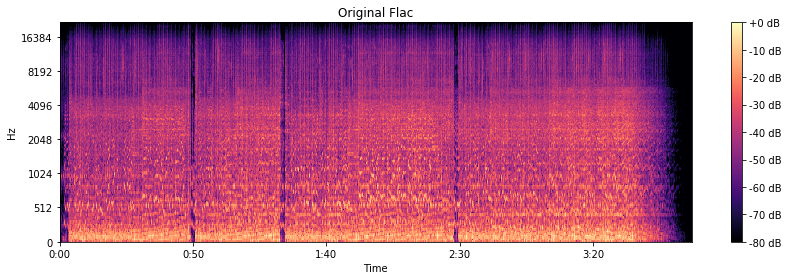
The original is CD quality, so frequencies up to 22 kHz are present as expected.

Original flac

We are going to harvest with FFmpeg, or rather with LAME.

At 320 kbps and 256 kbps, the spectrogram looks almost like the original.

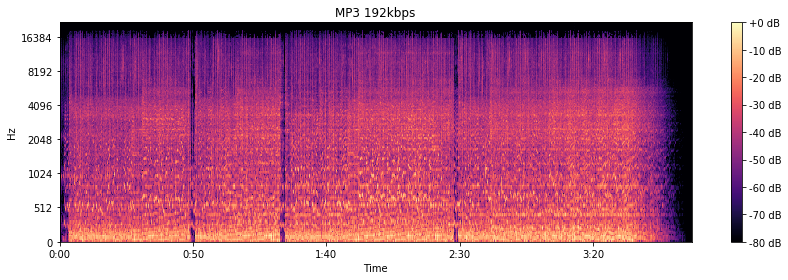
At 192 kbps, there are signs of a 16 kHz cutoff. The spectrogram “darkens”, apparently, the psychoacoustic model has cut something out. By ear, the higher frequency “bursts” really disappeared.

MP3 192 kbps

At the notorious 128 kbit / s, everything is already specifically cut off at 16 kHz. Background sounds are “fuzzy” and begin to bubble. Nothing to do with the original in terms of enjoying the musical details.

MP3 128 kbps

But you can do 64 kbps in MP3. The stereo is gone. Everything gurgles terribly and irritates with completely strange sounds.

In what format and with what quality is music heard on the radio?

In what format and with what quality is music heard on the radio?

Radio most used audio file formats

In fact, we can say that there are currently two main audio formats: lossy (compressed) and lossless (uncompressed). They are classified into many types.

Radio audio file formats

Lossy takes up less disk space, but degrades the quality of the audio track. When compressed using the MPEG protocol (hence the name mp3 – mp4 for files containing video sequences), the hues and transition tones, which are barely noticeable to the ear, are cut off. This makes the file clearer, but it also degrades it. The last place is occupied by the bit rate of that file: the degree of compression of each second of the audio track. The lower the bitrate, the less space the file will occupy and the worse the quality. Thus, a composition of three minutes in mp3 with a bit rate of 320 kilobits per second will occupy up to 3 megabytes on disk; a similar composition with a 96 kilobit bit rate will occupy about 400 kilobytes.

Lossless is as close to the original analog sound as possible *, making it much loved by sound engineers. Lossless formats take up much more disk space even compared to mp3-320. Among these formats, the most common are WAV (standard), FLAC (economic), AIFF (Apple). The former is used most often.

Professional sound recording is done only in uncompressed format. Only with him do sound engineers work.

On the radio, the situation is somewhat more complicated. This is due to the peculiarities of the work of the media, namely, efficiency and commercial profitability. The use of high-capacity servers is expensive and therefore most radio stations encode audio tracks in mp3 format at a bit rate of 256 kilobits per second. However, this is typical mainly of national stations. Equipment purchased from abroad has standard configurations that assume WAV encoding.

Why are software developers focusing on WAV? Because the radio signal cannot propagate without interference. Therefore, the listener still receives a small and sometimes significantly distorted signal. Therefore, broadcasters are faced with a reasonable question: what quality of sound will the listener perceive best: distorted ideal or distorted distortion? For this reason, in Europe and the United States, the WAV standard (AIFF, if the station operates with Apple equipment) is adopted, in Russia – mp3 with a bit rate of 256 kilobits per second.

Analog data transmission is based on the physical properties of sound. The record-playback mechanism is based on the principles of human auditory perception. That is, the sound wave vibrates the membrane (by analogy with the tympanic membrane of the ear) and is fixed with a needle in the carrier in the form in which it was obtained. Reproduced, therefore, also without deviations and changes associated with digital conversion.

The Audio Files category includes compressed and uncompressed audio formats that contain a data signal and can be played by audio programs. This category also includes MIDI files, music scores, and audio project files, which generally do not contain audio data.

The most common extensions are .WAV, .AIF, .MP3, and .MID.

Lossy audio compression

Lossy audio compression

MP3: Lossy compression

I’ll start with the well-known and widely used (though not always loved) MP3 format.

Lossy audio format

This audio format is actively used everywhere and everywhere, where it is needed and where it is not needed. But this does not mean that it is not worthy of the place it occupies in its niche. Very worthy. Although he has been “sitting” in his niche for about two decades, no one has “kicked” him out of there yet. And there were many who wanted to say it. And the main favorite of them is WMA (Windows Media Audio), which was conceived by Microsoft as an alternative to MP3. As a result, it is an alternative and it is, despite the best efforts of the developers. The next character is OGG. Despite the broader possibilities than MP3, for example, it never received widespread acceptance. Although it is compatible with many operating systems. Perhaps, it is worth mentioning the AAC audio format, which was supposed to replace MP3 in the relay. Encoding quality has been improved and compression loss reduced. But Ay.

The main advantage of these formats is their small size. The downside is the loss of quality.

Different formats
In today’s world, you can find a large number of different sound extensions. Let’s remember at a glance:

MP3 (Well where without it?)
WMA
OGG
CAA
And many others
Of course, each of these formats is good, especially MP3, which is probably the most popular format. But today we are not talking about popularity. MP3 and other similar formats, no matter how good they sound, are compressed originals. And even if you set the maximum quality to 320 btrate, it still won’t be of the highest quality. It was compressed, reduced, so there will be certain losses.

What is the best audio format for me?

What is the best audio format for me?

Best Audio File Formats

After all, it’s not always clear which format is best for music. Some services, like Amazon, sell digital music in MP3 format. Although Apple offers song downloads from its iTunes Store in AAC format.

Audio File Formats

So the question arises what formats can your device play. If it is relatively new, it can play lossless formats like FLAC, as well as older lossy formats like MP3 and AAC.

And to add even more confusion, there is the listening factor. How important is sound quality to you?

To help you decide, here are some things you can do.

Check the format compatibility of your portable device

Before deciding on an audio format, the first thing to do is check its compatibility. This can usually be found on the manufacturer’s website or in the specifications section of the user manual (if there is one, of course).

If you are not going to use high quality audiophile equipment in the future, then lossy audio may be sufficient if you are only going to use your laptop. For greater compatibility, the MP3 file format is the safest bet. This is an old algorithm, but it works well. In fact, it is still the most compatible audio format for everyone.

However, if you are ripping tracks from a music CD, for example, it would be wise to keep a lossless copy on your computer / external hard drive and lose it for your laptop as well. This will keep your music safe in the future, even if new formats and hardware show up later.

Consider the bit rate

Bitrate is an important factor to know, especially if you are looking for the best quality music playback. However, the actual bit rate setting depends on the audio format you are using.

For example, the MP3 (MPEG-1 Audio Layer III) format has a bit rate range of 32 to 320 kbps. There are also two encoding methods you can choose from: CBR and VBR. In this case, instead of encoding using the default CBR (constant bit rate) encoding, it is much better to use VBR (variable bit rate) encoding. This is because VBR will provide you with the best file size ratio.

The encoding you use is also an important factor.

Best digital audio formats

Best digital audio formats

Digital Audio Formats

Today, there are several dozen formats (codecs) that are used to represent audio files. Among them, there are no more than a dozen running gear.
Save and read later –

MP3, FLAC, ACC, WAV

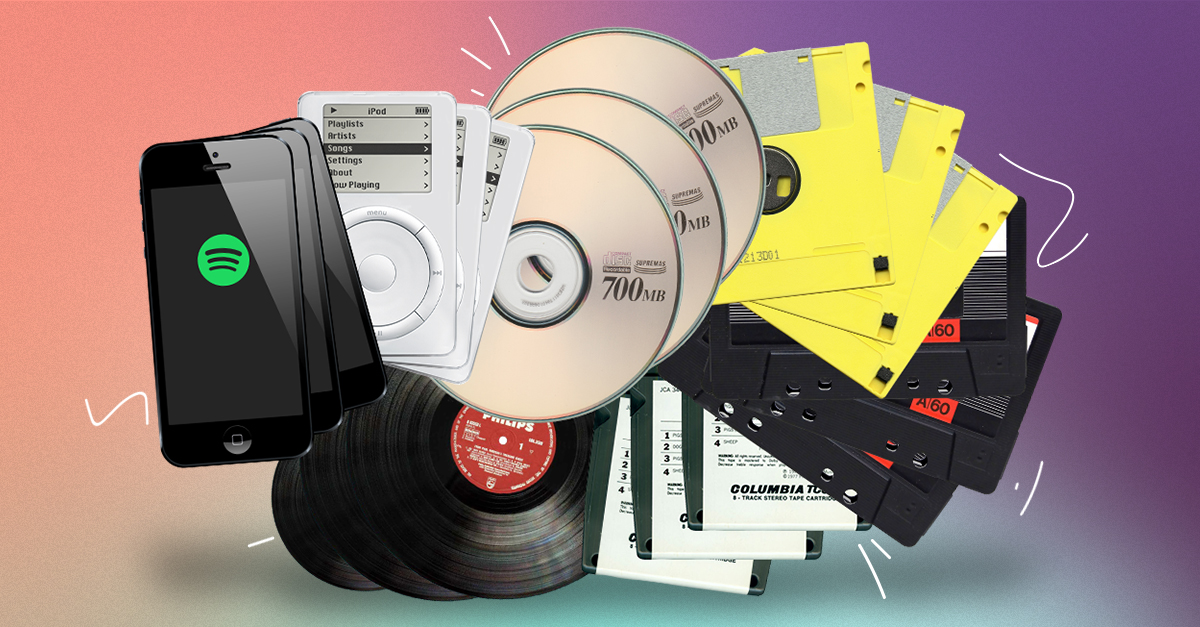
In the 20th century, we choose between the media and the media to play music. Cassettes, vinyl, CD – each multimedia format had its own player, each had its own advantages and disadvantages. In the 21st century, the focus has changed significantly. Playback tools have become omnivorous and you have to choose not the multimedia format, but the format of the audio file.

At a time when digital music had not yet penetrated the computer as it does now, the choice for connoisseurs of high-quality sound was quite simple and straightforward. The most popular CDs, and those who could afford to buy more expensive equipment and discs, opted for SACD or DVD-Audio players, or universal models that play all optical audio disc formats. Now you can get high-quality audio content without buying discs, in which case the whole choice comes down to the format for storing your music.

Today, there are several dozen formats (codecs) that are used to represent audio files. Among them, there are no more than a dozen running gear. Lossy audio compression is most often done using the MP3 (MPEG-1 Layer3) codec, less often the WMA format, which is a proprietary Microsoft development, is used for this purpose; AAC, developed by Apple or available under the GPL-free Ogg Vorbis format. We will not dwell on the topic of compressed audio in detail, we will limit ourselves to a brief description.

Saehan Information Systems F10 – The world’s first mp3 player appeared in 1998 and cost $ 250
The MP3 format and its aforementioned analogues allow you to compress CD quality music material into smaller files (the compression ratio ranges from 2: 1 to 11: 1). As the developers envisioned, compression algorithms should process the audio stream in such a way that the sound of the compressed file does not differ from the original. In fact, you can hear the difference between the sound of a compressed file and an uncompressed original, and the higher the quality class of the equipment, the more obvious these differences become. There is no difficulty in burning a CD to MP3 or getting ready-to-use MP3 files from the Internet or on physical media.

The only specificity of compression files is the ability to incorporate copy protection or unauthorized playback protection (DRM) into them. One of the main initiators and distributors of the technology to protect audio files was Apple, which, however, very early presented a proposal to abandon such solutions and urged all manufacturers of music products to distribute it without protection. Since 2009, music sold on the iTunes Store is not protected. The vast majority of compressed content sold over the Internet and on physical media is also not protected against unauthorized reproduction.

ITunes interface
There are several different formats to store digital music without losing quality. The lossless and uncompressed audio stream is saved to a WAV or AIFF file. In this case, the file type is determined by the type of operating system on which the audio stream is saved. WAV format is a joint development of Microsoft and IBM, and AIFF is the brainchild of Apple. There are also proprietary lossless audio compression formats: Microsoft’s WMA Loseless (also known as WMA9) and Apple’s ALAC. Of these, only the second has become widespread due to the fact that it is almost the only way to listen to high-quality audio from iOS devices.

Another option for storing uncompressed audio content is disc images, which are a single file with the ISO extension, which is an unmodified copy of the content on a digital medium.

The most widely used lossless music compression format is the FLAC (Free Lossless Audio Codec) format. As its name suggests, this format is distributed under a free license, which means that to ensure its support on any audio device, it is not necessary to pay royalties. FLAC allows you to store audio tracks with up to eight channels and a bit depth of up to 32 bits and a virtually unlimited sample rate, allowing it to be used to store any content, including multi-channel HD soundtracks. The popularity of FLAC as a high quality audio compression codec is as great as the popularity of MP3 among compression audio formats. The vast majority of high-quality music is stored and distributed in the FLAC format.