Digital Audio File Formats: Everything You Need to Know

Digital audio file formats have become ubiquitous in the modern era of music and sound. They allow for easy storage, distribution, and manipulation of audio data. However, with so many different formats available, it can be challenging to know which one to use for a particular purpose. This article aims to provide a comprehensive guide to digital audio file formats, explaining what they are, how they work, and which ones are best suited for different use cases.

What Are Digital Audio File Formats?
Digital audio file formats are a type of computer file that contains digital audio data. They are used to store, distribute, and manipulate audio data in a variety of contexts, such as music production, broadcasting, and online streaming. Audio data is typically recorded and stored in an analog format, such as magnetic tape or vinyl records. Digital audio file formats allow this data to be converted into a digital format, which can be stored and manipulated using computers and digital audio software.
There are many different digital audio file formats available, each with its own characteristics and intended uses. Some of the most common formats include:
- MP3
- WAV
- AIFF
- FLAC
- ALAC
- AAC
How Do Digital Audio File Formats Work?
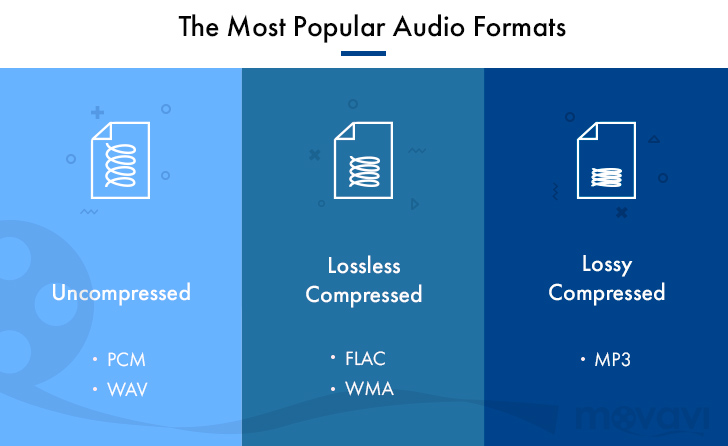
Digital audio file formats work by converting analog audio data into a digital format. This involves sampling the audio data at regular intervals and converting each sample into a binary code that can be stored on a computer. The most common way of doing this is to use pulse-code modulation (PCM), which involves measuring the amplitude of the audio signal at regular intervals and converting it into a binary code.
Once the audio data has been converted into a digital format, it can be stored on a computer in a digital audio file format. Different formats use different encoding schemes to compress the audio data and reduce the file size. Some formats, such as MP3, use lossy compression, which means that some of the audio data is lost during the compression process. Other formats, such as FLAC, use lossless compression, which means that all of the audio data is retained during compression.
Which Digital Audio File Format Should You Use?
The choice of digital audio file format depends on a variety of factors, such as the intended use of the audio data, the desired sound quality, and the available storage space. Some of the most common use cases and the recommended file formats for each are:
Music Production
When producing music, it is essential to use a high-quality, uncompressed audio format to ensure that the final mix sounds as good as possible. The recommended format for music production is WAV or AIFF, which are both uncompressed, lossless formats that retain all of the audio data.
Online Streaming
For online streaming, it is important to use a format that can be streamed easily over the internet without using too much bandwidth. The recommended format for online streaming is MP3, which uses lossy compression to reduce the file size while retaining a high level of sound quality.
High-Resolution Audio
For high-resolution audio, it is important to use a format that can retain all of the audio data without introducing any compression artifacts. The recommended formats for high-resolution audio are FLAC and ALAC, which are both lossless, uncompressed formats.
Streaming Audio Formats
Streaming audio formats have become increasingly popular in recent years, with the rise of music streaming services such as Spotify, Apple Music, and Tidal. These services use various audio formats to stream music over the internet.
MP3
MP3 is one of the most popular audio formats for streaming music due to its small file size and good quality. MP3 is a lossy format, which means that it compresses the audio data by discarding some of the information that is deemed less important to the listener. The resulting file size is much smaller than a lossless format such as WAV or FLAC, but there is a tradeoff in audio quality. Most streaming services use MP3 as the default format for streaming music due to its widespread compatibility and low bandwidth requirements.
AAC
AAC stands for Advanced Audio Coding, and it is a lossy audio codec that is widely used for music streaming and downloading. AAC is the default audio codec for Apple devices and is used by popular music streaming services such as Spotify, Tidal, and YouTube. AAC is similar to MP3 in terms of file size and quality, but it is more efficient in its compression algorithm, resulting in better sound quality at the same bitrate. AAC is also capable of supporting higher bitrates than MP3, making it a popular choice for high-quality streaming.
FLAC
FLAC is a lossless, uncompressed audio format that is popular among audiophiles and music enthusiasts due to its high-quality sound and ability to retain all of the original audio data. While FLAC files are much larger than lossy formats such as MP3 and AAC, they offer superior sound quality that is comparable to the original studio recording. FLAC is not commonly used for streaming due to its large file size, but it is popular for downloading high-quality music files.
ALAC
ALAC stands for Apple Lossless Audio Codec, and it is a lossless audio format that is similar to FLAC but is optimized for use with Apple devices. ALAC is compatible with most Apple devices and can be used with iTunes to download and stream high-quality music. ALAC is not as widely supported as FLAC, but it is a popular choice for Apple users who want to retain the original sound quality of their music files.
Conclusion
Digital audio file formats have come a long way since the early days of digital music, with new formats and technologies continually being developed to improve sound quality and file size. Each format has its advantages and disadvantages, and the choice of format will depend on the intended use of the audio file. For streaming music over the internet, lossy formats such as MP3 and AAC are the most commonly used due to their small file size and widespread compatibility. For high-quality audio, lossless formats such as FLAC and ALAC are recommended to retain all of the original audio data without introducing compression artifacts. Ultimately, the choice of format will depend on the listener’s preferences and the intended use of the audio file.
When it comes to adjusting the volume of your digital audio files, one useful tool is mp4gain. Mp4gain is a software tool that allows you to normalize the volume of your audio files to a consistent level, eliminating the need to adjust the volume manually. This can be particularly useful when dealing with files from different sources that may have different volume levels. Mp4gain is easy to use and can help to improve the listening experience of your digital music collection.