Understanding the Differences between FLAC, MP3, M4A, OGG, and WAV Audio Formats


Free Download Mp4Gain
picture

Understanding the Differences between FLAC, MP3, M4A, OGG, and WAV Audio Formats

Understanding the Differences between FLAC, MP3, M4A, OGG, and WAV Audio Formats


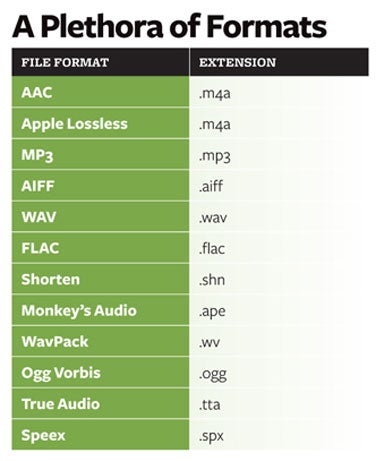
When it comes to digital audio, there are a plethora of different file formats to choose from. Each format has its own set of advantages and disadvantages, making it important to understand the differences between them in order to choose the best option for your needs. In this article, we will take a closer look at five popular audio formats: FLAC, MP3, M4A, OGG, and WAV.

Understanding the Differences between FLAC, MP3, M4A, OGG, and WAV Audio Formats

FLAC

FLAC, or Free Lossless Audio Codec, is a popular open-source format that is known for its lossless compression. This means that, unlike some other formats, FLAC does not lose any audio quality during the compression process. This makes FLAC a great option for audiophiles who want the highest quality audio possible. However, FLAC files are typically larger than other formats, which can be an issue for those with limited storage space.

MP3

MP3, or MPEG Audio Layer III, is one of the most widely used audio formats. It uses a lossy compression method, which means that some audio quality is lost during the compression process. However, MP3 files are significantly smaller than FLAC files, making them a great option for those who want to store a large amount of music on their device. Additionally, the MP3 format is supported by a wide range of devices and software, making it a very convenient option.

M4A

M4A, or MPEG-4 Audio, is a file format that is commonly used for music and other audio files. It is similar to MP3 in that it uses a lossy compression method, but M4A files are typically smaller than MP3 files. Additionally, M4A files can contain advanced features such as chapters and artwork, making them a great option for audiobooks and other spoken-word content. However, it is important to note that not all devices and software support M4A files.

OGG

OGG, or Ogg Vorbis, is a free and open-source format that is similar to MP3 and M4A. It uses a lossy compression method and is known for providing a good balance of audio quality and file size. OGG files are typically smaller than FLAC files but larger than MP3 and M4A files. Additionally, OGG files can contain advanced features such as tags and chapters, making them a great option for audiobooks and other spoken-word content. However, it is important to note that not all devices and software support OGG files.

WAV

WAV, or Waveform Audio File Format, is a popular format that is known for its high audio quality. It is a lossless format, which means that no audio quality is lost during the compression process. However, WAV files are typically larger than other formats, making them an option for those who want the highest quality audio possible but have limited storage space. Additionally, WAV files are supported by a wide range of devices and software, making them a convenient option.


Free Download Mp4Gain
picture


Mp4Gain Main Window
picture


Mp4Gain Features
picture


Free Download Mp4Gain
picture

Why are there so many video and audio formats, and is there a difference?

Why are there so many video and audio formats, and is there a difference?

audio formats

7. VQF format

audio formats

The compression ratio of VQF format can reach 1:18, so under the same circumstances, the volume of compressed VQF file is 30-50% smaller than MP3, which is more convenient for Online streaming and sound quality is excellent with close to CD sound quality (16-bit 44.1kHz stereo). However, VQF has not disclosed technical standards and has not yet become popular.
Supplement: rare

8. Format
FLAC FLAC is lossless audio compression encoding. FLAC is a set of well-known free audio compression codes, which is characterized by lossless compression. Unlike other lossy compression codes, such as MP3 and AAC, it won’t destroy any original audio information, so you can restore the sound quality of music CDs. It is now compatible with many software and hardware audio products. In short, FLAC is similar to MP3, but it is lossless compression, which means that the audio will not lose any information when compressed in FLAC mode. This compression is similar to Zip, but FLAC will give you a higher compression ratio, because FLAC is a compression method specially designed for audio characteristics, and you can use the player to play FLAC compressed files, just like you normally do with your MP3. the files are the same.
Supplement: Lossless format, compared to ape , is larger in size, but has good compatibility, fast encoding speed, and broader player support

9. Format
APE APE is one of the most popular digital music file formats. Unlike lossy compression methods such as MP3, APE is a lossless audio compression technology, which means that after compressing audio data files read from an APE-format audio CD, it can also compress audio data files. APE Restore format files and the restored audio. the files are exactly the same as before the compression without any loss. The file size of APE is about half of that of a CD, but with the popularization of broadband, many music lovers love the APE format, especially for friends who want to stream audio CDs over the network. APE can help them save a lot of resources.
Supplement – lossless compression format, compared to FLAC, the volume is smaller. Encoding is slow.

10. Format
MID MID is the abbreviation of midi, which is its extension, “interface of digital musical instruments”, that is, its real meaning is the name of an interface for different devices to transmit signals. All of our current MIDI music production depends on this interface, and the information transmitted between this interface is also called MIDI information. MIDI was first applied to electronic synthesizers (electronic musical instruments played on keyboards. Due to the inconsistent technical specifications of early electronic synthesizers, it was difficult to link different synthesizers. In August 1983, YAMAHA, ROLAND, KAWAI, and others Well-known electronic musical instruments Instrument manufacturers jointly specified a unified digital musical instrument interface specification, which is the MIDI 1.0 Technical Specification.Since then, a number of electronic synthesizers and electronic musical instruments, such as electronic pianos, have adopted this unified specification. , so that various electronic musical instruments can be linked together to transmit MIDI information and form a true synthetic music performance system.

Why are there so many video and audio formats, and is there a difference?

Why are there so many video and audio formats, and is there a difference?

audio formats
audio formats

3.WAV format

audio formats
audio formats

The WAV format is the oldest digital audio format and is widely supported by the Windows platform and its applications. WAV supports many compression algorithms, supports a variety of audio bits, sampling rates and channels, adopts 44.1 kHz sampling rate and 16 quantization bits, so the sound quality of WAV is almost the same than CD, but WAV format requires too much storage space Not easy to communicate and broadcast.
Supplement: Lossless volume is large

4. Format
ASF ASF is a multimedia playback format formulated by Microsoft, suitable for playback on the Internet.
Supplement: rare format

5. Format
AAC AAC is actually short for Advanced Audio Coding. AAC is part of the MPEG-2 specification. The algorithm used by AAC is different from that of MP3. AAC improves encoding efficiency by combining other features. AAC’s audio algorithm far exceeds some older compression algorithms (like MP3, etc.) in terms of compressibility. It also supports up to 48 audio tracks, 15 low-frequency audio tracks, higher sample rates and bit rates, multi-language support, and higher decoding efficiency. In short, AAC can provide better sound quality on the assumption that MP3 files are 30% smaller.
Added: One of the best lossy formats out there. There are many encodings, faac and nero are common, and the bit rate is up to 448kbps. In terms of hardware support, advanced mp3 and mobile phones are generally supported.

6. Format
Mp3Pro Mp3Pro is an improved version of the Mp3 encoding format. MP3Pro is developed by the Swedish Coding Technology Company, which can also compress the volume of sound files to half the size of the original MP3 format while maintaining the same sound quality. Also, the sound quality of the original MP3 music can be improved basically without changing the file size. You can compress audio files to a lower bit rate and keep the sound quality before compression to the greatest extent possible. MP3pro can achieve full compatibility. The extension of the files compressed by mp3Pro remains .mp3. It can be played on old mp3 players. Old mp3 files can be played on the new mp3pro players.

Why are there so many video and audio formats, and is there a difference?

Why are there so many video and audio formats, and is there a difference?

Audio File Formats
Audio File Formats

I found that there are many video and audio formats, what is the difference between them? Is there a player that supports most audio and video playback formats?

Audio File Formats
Audio File Formats

The difference lies in the encoding method. Original video and audio require a lot of storage space. In the era when the storage device was still in MB as a large drive, various lossy compression encoding formats began to appear. The difference between various encoding formats is the compression ratio. The pros and cons of height and reduction ratio.

Basically, there are more advanced encodings that can provide high-quality audio and video effects with higher compression ratio.

1. Format
MP3 MP3 uses MPEG Audio Layer 3 technology to compress music into a file with a smaller capacity at a compression ratio of 1:10 or even 1:12. Files are compressed to a smaller size. But also very good at keeping the original sound quality. It is precisely because of the small size and high sound quality of MP3 that the MP3 format has become almost synonymous with online music. The music per minute MP3 format is only 1 MB in size, so the size of each song is only 3-4 megabytes.

Supplement: the highest bit rate is 320K, and there is no high frequency part is its default. The sound quality is not high!

2. Format
WMA WMA achieves a higher compression ratio by reducing data traffic while maintaining sound quality. The compression rate can generally reach 1:18, and the generated file size is only half of the corresponding MP3 file. This is very important for models that only assemble 32M. It supports both WMA and RA formats, which means that the 32M space is virtually expanded by 2 times. In addition, WMA can also add copy prevention through the DRM scheme, or add restrictions on playback time and number of playbacks, or even restrictions on playback machines, which can effectively prevent piracy.
Supplement: 128 kbps is the optimal compression ratio of wma, 128 kbps wma = 192 kbps mp3

THE MOST COMMON FORMATS FOR MUSIC AND OTHER AUDIO FILES, AND HOW THEY ARE RELATED TO EACH OTHER

THE MOST COMMON FORMATS FOR MUSIC AND OTHER AUDIO FILES, AND HOW THEY ARE RELATED TO EACH OTHER

Music Formats


And for the direct competitors of the universal MP3 format, they can count on a lot today.

Music Formats

Due to continuing inconsistencies in home storage of the WAV format, it was eventually discontinued. But for professional studios, he says, the basics of the job. Especially when recording live vocals or instruments. Just convert the recorded material from WAV to MP3 at the final stage.

music format

However, music can be represented in some other popular formats nowadays. For example, many times (especially the Internet) they use these data types like OGG, AIFF, AMR, etc. But the real competitor of MP3 has become the newest and best audio FLAC etc. Of course, for MP3 you can convert all parameters to the maximum, but the playback quality of FLAC represents much higher. Also, it is a single file and the separation occurs directly on the track due to the player or startup software. In other words, listeners see each track individually, but can switch between playback tracks. For the MP3 format, this also seems possible to merge multiple tracks through it, thus creating a single file. But here it is in this version fast switching between tracks will not be possible (normal fast forward should be used, that’s all).

However, not everything is bad. The fact that music or audiobooks are all popular formats today allows them to be easily converted, even keeping the original parameters of the audio material. Based on this, and for sound processing and conversion and audio editors, almost all programs call converters. Any program of this type (MP3 editor or converter) detects the original and final type of audio files, is unambiguous and can produce direct and reverse transformations. Let’s explain this specific example.

WAVE THEORY AUDIO EDITOR FOR MP3 FILES
Many types of software are used in audio processing today. First, look at the narrow application of so-called audio editors. The most prominent representatives of these can be called giants Sony Audio Forge, Sintrillium Cool Editing Pro, which was later acquired by Adobe and renamed Audition, Acoustica Mixcraft, ACID Pro and many others.

mp3 editor

The principle on which they operate is that, for convenience, all MP3 audio programs have a typical waveform, as originally used for WAV files. This method determines the appearance and opportunity enough to edit any type of conventional audio material in WAV format. Other than that, the fact that you can do basic copy, cut, paste, etc. E., it’s just a matter of getting the frequency characteristics and bitrate changes, not to mention using a lot of extra effects that plug into VSTs via DirectX or a generic host bridge studio thing.

In its simplest form, the conversion can be done using the standard file menu, which contains the line “Save As…” (Save As…) or the export function present in MP3 format. Thus, all the process is reduced to just the final selection of the format (MP3 here as an example) and activation of the recording mode. In this case the conversion will be done automatically saving the current configuration parameters and the frequency characteristics. I don’t like the original version? ?Nothing is easier than changing the format to MP3, pre-specified with higher settings. However, one thing needs to be considered here: if the raw material is of such poor quality that special remediation or even professional tools will not work for audio it is necessary to use Repairs here, the intervention of various filters, etc. D. For the layman, it will cause great difficulties.

As is clear, there is absolutely no difference between the audiobooks we are dealing with: MP3, music or just recorded voice or noise. By the way, audiobooks are supposed to have a much lower sound quality by default. This is understandable, since the file has to take up minimal space and, in general, the perceived sound characteristics of speech are not that important. Finally, is this a professional recording of a particular set of albums?

However, if you use some standard operations, even without specific knowledge, it’s fine to achieve good results, especially since there are such built-in templates, based on any application for specific operations. Of course, it will be very difficult for the first time to achieve a perfect sound, but if you study the plan and understand how it works, it will work like clockwork, and as a result, it will take a lot of time.

Sound files with loss

Sound files with loss:

MP3 or MPEG-1 Audio Layer 3

It is a standard compressed digital audio format with loss, the loss of information from the mp3 format is not audible by the human ear, so we will not distinguish the difference between an uncompressed audio file and an mp3 file. In addition an mp3 file manages to reduce the size of the sound file without influencing its quality, approximately 1 minute of audio in mp3 format occupies 1 MB with a quality almost equal to the quality of a
CD. These advantages have achieved that the mp3 format can be played in almost all audio players, that is the format par excellence for the exchange through the internet, one of the best options at this time to store music with good quality, and also The audio format that is most used in portable players is a standard and therefore compatibility with all media is guaranteed.
The mp3 audio format allows you to select the quality of the audio that we are going to compress, the CD quality would be equivalent to 128 Kbps (Bit rate), but we can select the compression between 8 Kbps and 320 Kbps taking into account that the higher data transmission (Kbps), more space will occupy the file. The sample rate of the mp3 is between the 16 Hz and 48 KHz ranges. And it only supports 2 channels (stereo).

ACC or Advanced Audio Coding

It is a standard digital audio format as an extension of MPEG-2 compressed with loss, and offers more quality than mp3 and is more stable for the same number of Kbps and the same size. Its compression is based on the same principles as MP3 compression, with the difference that it offers the possibility of using sampling frequencies ranging from 8 Hz to 96 KHz. The coding method automatically adapts the number of Kbps (Bitrate) needed depending on the complexity of the audio transmission at any time. ACC supports a maximum of 48 different channels, which makes it suitable for surround or surround sound and polyphonic sounds, that is, it would be a good option in case of not listening to the audio in any two-channel (stereo) audio system, and in In the case of movies, video or if you have a compatible player, we will reduce the file size. It is more efficient than MP3 in almost all aspects, offers higher quality and smaller files, but does not enjoy the compatibility and popularity of MP3 at the moment. It is compatible with Apple brand devices, iTunes, iPods, Winamp, Ahead Nero, MP4 etc. But there may still be compatibility issues.

Ogg

It is a compressed digital audio format with loss. Normally the Ogg files are compressed with the Vorbis codec, which is a free audio codec that allows maximum flexibility when choosing between the wide range of bitrate according to the complexity of the audio transmission, in the quality-bitrate ratio, It is even with MPEG-2 and in most bitrates it is comparable to the ACC format. This format is intended to encode from 8kHz telephony quality up to 192 KHz high definition quality, and for monaural, stereo, polyphonic, quadraphonic, 5.1, ambisonic and up to 255 discrete channels. The available bitrates range from 32 Kbps to 500 Kbps. The Ogg format offers better sound fidelity between 8 KHz and 48 KHz than the mp3 and its files take up less space. As for compatibility, it is not a format yet as universal as the mp3 but more and more devices and programs recognize it and can work with it.

Real Audio or RM

It is a file format designed for internet transmissions in real time, for example the radios that broadcast online or when a server has a stored sound file and we listen to it without the file being fully loaded or stored on our computer , this is possible thanks to the Buffering process that basically is to receive a sound package in our player in this case (Real Player) while the next one is stored in the temporary folder until it is required by the player. With this system the files cannot be copied. Unlike MP3 encoding that maintains its sampling frequency range (Kbps), coding with Real Audio allows it to be adapted to the user’s reception capacity depending on its internet connection speed. If the user can receive high quality audio packets without interruptions, he sends them, if he does not lower the sampling rate until he can receive them without interruptions even if the audio quality decreases.
WMA or Windows Media Audio

It is a lossy audio compression format although there is also this format with lossless compression.

Understanding digital audio formats

Understanding digital audio formats

When it comes to digitally distributing our music it is important that we understand what they are
the different formats, which are the most used and which are the best in terms of the
Relationship between size and quality.

PCM digital audio

WAVE

The name comes from the acronym waveform audio file format and is a used file
usually on computers with the Windows operating system.
WAV or WAVE files contain audio in LPCM format (Linear Pulse Code
Modulation) This is a way to encode an analog audio signal to the domain
digital by using equidistant samples over time of amplitude values
of the analog signal.
The quantity of samples is given by the sampling rate or sampling rate,
while the amount of possible amplitude values ​​is determined by the
Bit depth or bit rate.
The sampling frequency of the CDAUDIO for example is 44.1 kHz and 16 bits. exist
higher sampling rates such as 48 kHz, 88.2 kHz, 96 kHz up to 192 kHz at
this system.
On the other hand, WAV files are uncompressed audio and are generally used in
stages of recording, editing, mixing and mastering for being of high quality.
The higher the sample rate and the greater the number of bits, the file size will be
our hard drive
In general for professional uses at least a frequency of
44.1 kHz sampling and a depth of 24 bits preferably.
The standard extension for this type of file is: .wav

AIFF

The name comes from Audio Interchange File Format or audio file format
interchangeable, this format was developed by Apple computers and is used to save
and manipulate audio on computers.
It is like WAV a file type without compression or lossles therefore allows
Processing for professional applications such as recording, editing, mixing and
mastering as well as for professional video uses.
Another similarity with WAV files is that it is PCM audio (press code
modulation) that for practical purposes it is the same as the LPCM.
The standard extension for this type of files is .aiff

MP3

Also known as MPEG1 or MPEG2 audio layer, it is a form of coding
of digital audio in which psychoacoustic models discard information from
Audio that is presumed is not audible to most users.
As an example a file created with a resolution of 128 kbits / s is equivalent to 1/11
the size of a file on an audio CD.
The main purpose of using this type of coding is to reduce the size of the
files and be able to send / download faster, especially through
from Internet.
Being a file type reduced in quality IS NOT RECOMMENDED for
recordings, editing, mixing or mastering of professional audio.
For this reason we recommend NOT to use it to send us your clues to
mix / master