Dissecting Audio Lossy Formats


Free Download Mp4Gain
picture

Dissecting Audio Lossy Formats: Technical Mechanisms and Trade-offs


Audio Lossy Formats
Audio Lossy Formats
Audio Lossy Formats
Audio Lossy Formats

Understanding Audio Compression

As an audio enthusiast, I have always been fascinated by the technology behind audio compression. Audio compression is the process of reducing the size of an audio file by removing or reducing redundant or irrelevant information. This is done to make the file smaller and more manageable, especially for streaming and other bandwidth-limited applications.
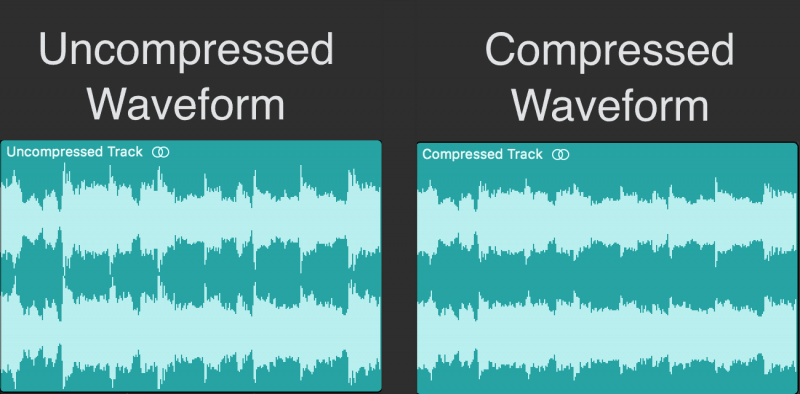
There are two types of audio compression: lossless and lossy. Lossless compression preserves all of the original audio data, while lossy compression removes some of the data to achieve a smaller file size. Lossy compression is the most common type of audio compression used today, and it is used in a wide range of applications, from music streaming services to podcasting.

Audio Compression Techniques

There are many different techniques used in audio compression, each designed to optimize audio quality and reduce file size. One of the most important techniques is perceptual coding, which involves analyzing the human perception of sound and using that information to remove or reduce irrelevant information.
Another important technique is psychoacoustic modeling, which is used to identify and remove sounds that are not perceptible to the human ear. As the book “The Art of Digital Audio” explains, “Psychoacoustic modeling is a technique that takes advantage of the limitations of human hearing to remove sounds that are not perceptible to the listener.”
In my experience, understanding these techniques and how they work together is essential for optimizing audio quality and reducing file size. By using the right combination of techniques, you can achieve excellent audio quality while minimizing file size.

Audio Compression Trade-offs

One of the key trade-offs of audio compression is the balance between audio quality and file size. As the book “The Audio Programming Book” explains, “The more you compress an audio file, the smaller it becomes, but the more audio quality you lose.”
In my experience, this trade-off is particularly important for musicians and sound engineers. By understanding the trade-offs between audio quality and file size, you can make informed decisions about how to compress your audio files for different applications.
Overall, dissecting audio lossy formats is essential for anyone working with audio. By understanding the technical mechanisms and trade-offs of audio compression, you can optimize your audio quality and file size, making it ideal for a wide range of applications.
Final words:
In conclusion, audio compression is a powerful technology that offers excellent audio quality at reduced file sizes. By understanding the techniques and technologies behind audio compression, you can optimize your audio quality and file size, making it ideal for streaming and other bandwidth-limited applications. And if you’re looking for a powerful tool to help you normalize and convert your audio and video files, be sure to check out mp4gain.



Free Download Mp4Gain
picture


Mp4Gain Main Window
picture


Mp4Gain Features
picture


Free Download Mp4Gain
picture

Understanding the Differences between FLAC, MP3, M4A, OGG, and WAV Audio Formats

Understanding the Differences between FLAC, MP3, M4A, OGG, and WAV Audio Formats

Understanding the Differences between FLAC, MP3, M4A, OGG, and WAV Audio Formats


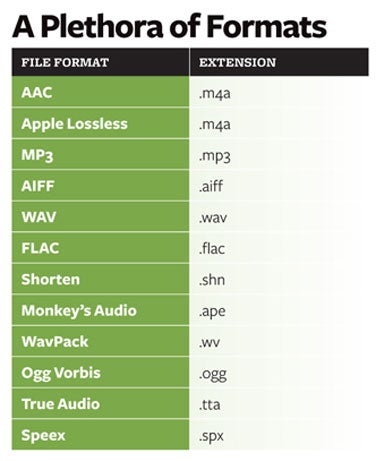
When it comes to digital audio, there are a plethora of different file formats to choose from. Each format has its own set of advantages and disadvantages, making it important to understand the differences between them in order to choose the best option for your needs. In this article, we will take a closer look at five popular audio formats: FLAC, MP3, M4A, OGG, and WAV.

Understanding the Differences between FLAC, MP3, M4A, OGG, and WAV Audio Formats

FLAC

FLAC, or Free Lossless Audio Codec, is a popular open-source format that is known for its lossless compression. This means that, unlike some other formats, FLAC does not lose any audio quality during the compression process. This makes FLAC a great option for audiophiles who want the highest quality audio possible. However, FLAC files are typically larger than other formats, which can be an issue for those with limited storage space.

MP3

MP3, or MPEG Audio Layer III, is one of the most widely used audio formats. It uses a lossy compression method, which means that some audio quality is lost during the compression process. However, MP3 files are significantly smaller than FLAC files, making them a great option for those who want to store a large amount of music on their device. Additionally, the MP3 format is supported by a wide range of devices and software, making it a very convenient option.

M4A

M4A, or MPEG-4 Audio, is a file format that is commonly used for music and other audio files. It is similar to MP3 in that it uses a lossy compression method, but M4A files are typically smaller than MP3 files. Additionally, M4A files can contain advanced features such as chapters and artwork, making them a great option for audiobooks and other spoken-word content. However, it is important to note that not all devices and software support M4A files.

OGG

OGG, or Ogg Vorbis, is a free and open-source format that is similar to MP3 and M4A. It uses a lossy compression method and is known for providing a good balance of audio quality and file size. OGG files are typically smaller than FLAC files but larger than MP3 and M4A files. Additionally, OGG files can contain advanced features such as tags and chapters, making them a great option for audiobooks and other spoken-word content. However, it is important to note that not all devices and software support OGG files.

WAV

WAV, or Waveform Audio File Format, is a popular format that is known for its high audio quality. It is a lossless format, which means that no audio quality is lost during the compression process. However, WAV files are typically larger than other formats, making them an option for those who want the highest quality audio possible but have limited storage space. Additionally, WAV files are supported by a wide range of devices and software, making them a convenient option.

Why are there so many video and audio formats, and is there a difference?

Why are there so many video and audio formats, and is there a difference?

audio formats

7. VQF format

audio formats

The compression ratio of VQF format can reach 1:18, so under the same circumstances, the volume of compressed VQF file is 30-50% smaller than MP3, which is more convenient for Online streaming and sound quality is excellent with close to CD sound quality (16-bit 44.1kHz stereo). However, VQF has not disclosed technical standards and has not yet become popular.
Supplement: rare

8. Format
FLAC FLAC is lossless audio compression encoding. FLAC is a set of well-known free audio compression codes, which is characterized by lossless compression. Unlike other lossy compression codes, such as MP3 and AAC, it won’t destroy any original audio information, so you can restore the sound quality of music CDs. It is now compatible with many software and hardware audio products. In short, FLAC is similar to MP3, but it is lossless compression, which means that the audio will not lose any information when compressed in FLAC mode. This compression is similar to Zip, but FLAC will give you a higher compression ratio, because FLAC is a compression method specially designed for audio characteristics, and you can use the player to play FLAC compressed files, just like you normally do with your MP3. the files are the same.
Supplement: Lossless format, compared to ape , is larger in size, but has good compatibility, fast encoding speed, and broader player support

9. Format
APE APE is one of the most popular digital music file formats. Unlike lossy compression methods such as MP3, APE is a lossless audio compression technology, which means that after compressing audio data files read from an APE-format audio CD, it can also compress audio data files. APE Restore format files and the restored audio. the files are exactly the same as before the compression without any loss. The file size of APE is about half of that of a CD, but with the popularization of broadband, many music lovers love the APE format, especially for friends who want to stream audio CDs over the network. APE can help them save a lot of resources.
Supplement – lossless compression format, compared to FLAC, the volume is smaller. Encoding is slow.

10. Format
MID MID is the abbreviation of midi, which is its extension, “interface of digital musical instruments”, that is, its real meaning is the name of an interface for different devices to transmit signals. All of our current MIDI music production depends on this interface, and the information transmitted between this interface is also called MIDI information. MIDI was first applied to electronic synthesizers (electronic musical instruments played on keyboards. Due to the inconsistent technical specifications of early electronic synthesizers, it was difficult to link different synthesizers. In August 1983, YAMAHA, ROLAND, KAWAI, and others Well-known electronic musical instruments Instrument manufacturers jointly specified a unified digital musical instrument interface specification, which is the MIDI 1.0 Technical Specification.Since then, a number of electronic synthesizers and electronic musical instruments, such as electronic pianos, have adopted this unified specification. , so that various electronic musical instruments can be linked together to transmit MIDI information and form a true synthetic music performance system.

Why are there so many video and audio formats, and is there a difference?

Why are there so many video and audio formats, and is there a difference?

audio formats
audio formats

3.WAV format

audio formats
audio formats

The WAV format is the oldest digital audio format and is widely supported by the Windows platform and its applications. WAV supports many compression algorithms, supports a variety of audio bits, sampling rates and channels, adopts 44.1 kHz sampling rate and 16 quantization bits, so the sound quality of WAV is almost the same than CD, but WAV format requires too much storage space Not easy to communicate and broadcast.
Supplement: Lossless volume is large

4. Format
ASF ASF is a multimedia playback format formulated by Microsoft, suitable for playback on the Internet.
Supplement: rare format

5. Format
AAC AAC is actually short for Advanced Audio Coding. AAC is part of the MPEG-2 specification. The algorithm used by AAC is different from that of MP3. AAC improves encoding efficiency by combining other features. AAC’s audio algorithm far exceeds some older compression algorithms (like MP3, etc.) in terms of compressibility. It also supports up to 48 audio tracks, 15 low-frequency audio tracks, higher sample rates and bit rates, multi-language support, and higher decoding efficiency. In short, AAC can provide better sound quality on the assumption that MP3 files are 30% smaller.
Added: One of the best lossy formats out there. There are many encodings, faac and nero are common, and the bit rate is up to 448kbps. In terms of hardware support, advanced mp3 and mobile phones are generally supported.

6. Format
Mp3Pro Mp3Pro is an improved version of the Mp3 encoding format. MP3Pro is developed by the Swedish Coding Technology Company, which can also compress the volume of sound files to half the size of the original MP3 format while maintaining the same sound quality. Also, the sound quality of the original MP3 music can be improved basically without changing the file size. You can compress audio files to a lower bit rate and keep the sound quality before compression to the greatest extent possible. MP3pro can achieve full compatibility. The extension of the files compressed by mp3Pro remains .mp3. It can be played on old mp3 players. Old mp3 files can be played on the new mp3pro players.

Why are there so many video and audio formats, and is there a difference?

Why are there so many video and audio formats, and is there a difference?

Audio File Formats
Audio File Formats

I found that there are many video and audio formats, what is the difference between them? Is there a player that supports most audio and video playback formats?

Audio File Formats
Audio File Formats

The difference lies in the encoding method. Original video and audio require a lot of storage space. In the era when the storage device was still in MB as a large drive, various lossy compression encoding formats began to appear. The difference between various encoding formats is the compression ratio. The pros and cons of height and reduction ratio.

Basically, there are more advanced encodings that can provide high-quality audio and video effects with higher compression ratio.

1. Format
MP3 MP3 uses MPEG Audio Layer 3 technology to compress music into a file with a smaller capacity at a compression ratio of 1:10 or even 1:12. Files are compressed to a smaller size. But also very good at keeping the original sound quality. It is precisely because of the small size and high sound quality of MP3 that the MP3 format has become almost synonymous with online music. The music per minute MP3 format is only 1 MB in size, so the size of each song is only 3-4 megabytes.

Supplement: the highest bit rate is 320K, and there is no high frequency part is its default. The sound quality is not high!

2. Format
WMA WMA achieves a higher compression ratio by reducing data traffic while maintaining sound quality. The compression rate can generally reach 1:18, and the generated file size is only half of the corresponding MP3 file. This is very important for models that only assemble 32M. It supports both WMA and RA formats, which means that the 32M space is virtually expanded by 2 times. In addition, WMA can also add copy prevention through the DRM scheme, or add restrictions on playback time and number of playbacks, or even restrictions on playback machines, which can effectively prevent piracy.
Supplement: 128 kbps is the optimal compression ratio of wma, 128 kbps wma = 192 kbps mp3

In what format and with what quality is music heard on the radio?

In what format and with what quality is music heard on the radio?

Radio most used audio file formats

In fact, we can say that there are currently two main audio formats: lossy (compressed) and lossless (uncompressed). They are classified into many types.

Radio audio file formats

Lossy takes up less disk space, but degrades the quality of the audio track. When compressed using the MPEG protocol (hence the name mp3 – mp4 for files containing video sequences), the hues and transition tones, which are barely noticeable to the ear, are cut off. This makes the file clearer, but it also degrades it. The last place is occupied by the bit rate of that file: the degree of compression of each second of the audio track. The lower the bitrate, the less space the file will occupy and the worse the quality. Thus, a composition of three minutes in mp3 with a bit rate of 320 kilobits per second will occupy up to 3 megabytes on disk; a similar composition with a 96 kilobit bit rate will occupy about 400 kilobytes.

Lossless is as close to the original analog sound as possible *, making it much loved by sound engineers. Lossless formats take up much more disk space even compared to mp3-320. Among these formats, the most common are WAV (standard), FLAC (economic), AIFF (Apple). The former is used most often.

Professional sound recording is done only in uncompressed format. Only with him do sound engineers work.

On the radio, the situation is somewhat more complicated. This is due to the peculiarities of the work of the media, namely, efficiency and commercial profitability. The use of high-capacity servers is expensive and therefore most radio stations encode audio tracks in mp3 format at a bit rate of 256 kilobits per second. However, this is typical mainly of national stations. Equipment purchased from abroad has standard configurations that assume WAV encoding.

Why are software developers focusing on WAV? Because the radio signal cannot propagate without interference. Therefore, the listener still receives a small and sometimes significantly distorted signal. Therefore, broadcasters are faced with a reasonable question: what quality of sound will the listener perceive best: distorted ideal or distorted distortion? For this reason, in Europe and the United States, the WAV standard (AIFF, if the station operates with Apple equipment) is adopted, in Russia – mp3 with a bit rate of 256 kilobits per second.

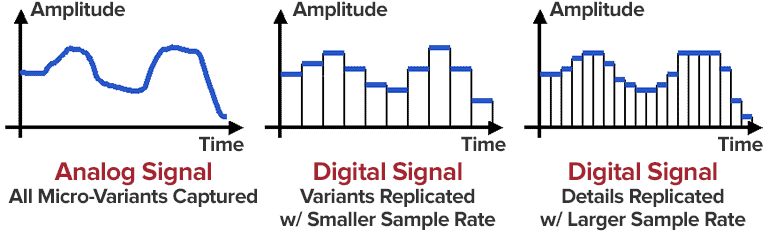
Analog data transmission is based on the physical properties of sound. The record-playback mechanism is based on the principles of human auditory perception. That is, the sound wave vibrates the membrane (by analogy with the tympanic membrane of the ear) and is fixed with a needle in the carrier in the form in which it was obtained. Reproduced, therefore, also without deviations and changes associated with digital conversion.

The Audio Files category includes compressed and uncompressed audio formats that contain a data signal and can be played by audio programs. This category also includes MIDI files, music scores, and audio project files, which generally do not contain audio data.

The most common extensions are .WAV, .AIF, .MP3, and .MID.

Lossy audio compression

Lossy audio compression

MP3: Lossy compression

I’ll start with the well-known and widely used (though not always loved) MP3 format.

Lossy audio format

This audio format is actively used everywhere and everywhere, where it is needed and where it is not needed. But this does not mean that it is not worthy of the place it occupies in its niche. Very worthy. Although he has been “sitting” in his niche for about two decades, no one has “kicked” him out of there yet. And there were many who wanted to say it. And the main favorite of them is WMA (Windows Media Audio), which was conceived by Microsoft as an alternative to MP3. As a result, it is an alternative and it is, despite the best efforts of the developers. The next character is OGG. Despite the broader possibilities than MP3, for example, it never received widespread acceptance. Although it is compatible with many operating systems. Perhaps, it is worth mentioning the AAC audio format, which was supposed to replace MP3 in the relay. Encoding quality has been improved and compression loss reduced. But Ay.

The main advantage of these formats is their small size. The downside is the loss of quality.

Different formats
In today’s world, you can find a large number of different sound extensions. Let’s remember at a glance:

MP3 (Well where without it?)
WMA
OGG
CAA
And many others
Of course, each of these formats is good, especially MP3, which is probably the most popular format. But today we are not talking about popularity. MP3 and other similar formats, no matter how good they sound, are compressed originals. And even if you set the maximum quality to 320 btrate, it still won’t be of the highest quality. It was compressed, reduced, so there will be certain losses.