Understanding the Differences between FLAC, MP3, M4A, OGG, and WAV Audio Formats


Free Download Mp4Gain
picture

Understanding the Differences between FLAC, MP3, M4A, OGG, and WAV Audio Formats

Understanding the Differences between FLAC, MP3, M4A, OGG, and WAV Audio Formats


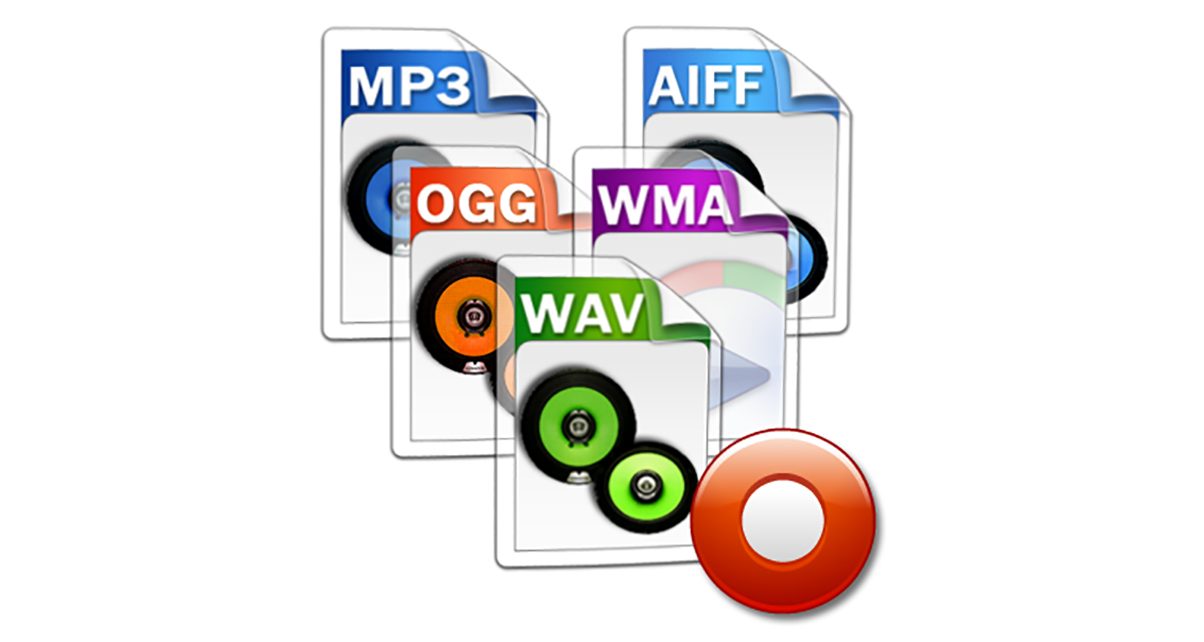
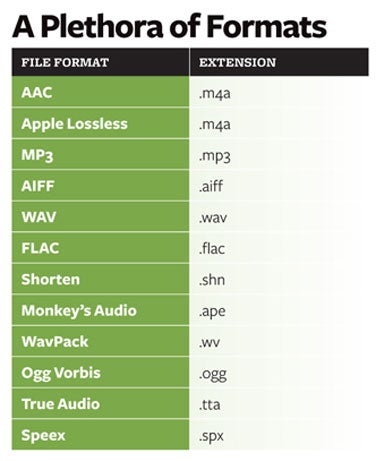
When it comes to digital audio, there are a plethora of different file formats to choose from. Each format has its own set of advantages and disadvantages, making it important to understand the differences between them in order to choose the best option for your needs. In this article, we will take a closer look at five popular audio formats: FLAC, MP3, M4A, OGG, and WAV.

Understanding the Differences between FLAC, MP3, M4A, OGG, and WAV Audio Formats

FLAC

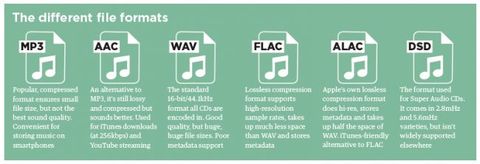
FLAC, or Free Lossless Audio Codec, is a popular open-source format that is known for its lossless compression. This means that, unlike some other formats, FLAC does not lose any audio quality during the compression process. This makes FLAC a great option for audiophiles who want the highest quality audio possible. However, FLAC files are typically larger than other formats, which can be an issue for those with limited storage space.

MP3

MP3, or MPEG Audio Layer III, is one of the most widely used audio formats. It uses a lossy compression method, which means that some audio quality is lost during the compression process. However, MP3 files are significantly smaller than FLAC files, making them a great option for those who want to store a large amount of music on their device. Additionally, the MP3 format is supported by a wide range of devices and software, making it a very convenient option.

M4A

M4A, or MPEG-4 Audio, is a file format that is commonly used for music and other audio files. It is similar to MP3 in that it uses a lossy compression method, but M4A files are typically smaller than MP3 files. Additionally, M4A files can contain advanced features such as chapters and artwork, making them a great option for audiobooks and other spoken-word content. However, it is important to note that not all devices and software support M4A files.

OGG

OGG, or Ogg Vorbis, is a free and open-source format that is similar to MP3 and M4A. It uses a lossy compression method and is known for providing a good balance of audio quality and file size. OGG files are typically smaller than FLAC files but larger than MP3 and M4A files. Additionally, OGG files can contain advanced features such as tags and chapters, making them a great option for audiobooks and other spoken-word content. However, it is important to note that not all devices and software support OGG files.

WAV

WAV, or Waveform Audio File Format, is a popular format that is known for its high audio quality. It is a lossless format, which means that no audio quality is lost during the compression process. However, WAV files are typically larger than other formats, making them an option for those who want the highest quality audio possible but have limited storage space. Additionally, WAV files are supported by a wide range of devices and software, making them a convenient option.


Free Download Mp4Gain
picture


Mp4Gain Main Window
picture


Mp4Gain Features
picture


Free Download Mp4Gain
picture

Why are there so many video and audio formats, and is there a difference?

Why are there so many video and audio formats, and is there a difference?

audio formats

7. VQF format

audio formats

The compression ratio of VQF format can reach 1:18, so under the same circumstances, the volume of compressed VQF file is 30-50% smaller than MP3, which is more convenient for Online streaming and sound quality is excellent with close to CD sound quality (16-bit 44.1kHz stereo). However, VQF has not disclosed technical standards and has not yet become popular.
Supplement: rare

8. Format
FLAC FLAC is lossless audio compression encoding. FLAC is a set of well-known free audio compression codes, which is characterized by lossless compression. Unlike other lossy compression codes, such as MP3 and AAC, it won’t destroy any original audio information, so you can restore the sound quality of music CDs. It is now compatible with many software and hardware audio products. In short, FLAC is similar to MP3, but it is lossless compression, which means that the audio will not lose any information when compressed in FLAC mode. This compression is similar to Zip, but FLAC will give you a higher compression ratio, because FLAC is a compression method specially designed for audio characteristics, and you can use the player to play FLAC compressed files, just like you normally do with your MP3. the files are the same.
Supplement: Lossless format, compared to ape , is larger in size, but has good compatibility, fast encoding speed, and broader player support

9. Format
APE APE is one of the most popular digital music file formats. Unlike lossy compression methods such as MP3, APE is a lossless audio compression technology, which means that after compressing audio data files read from an APE-format audio CD, it can also compress audio data files. APE Restore format files and the restored audio. the files are exactly the same as before the compression without any loss. The file size of APE is about half of that of a CD, but with the popularization of broadband, many music lovers love the APE format, especially for friends who want to stream audio CDs over the network. APE can help them save a lot of resources.
Supplement – lossless compression format, compared to FLAC, the volume is smaller. Encoding is slow.

10. Format
MID MID is the abbreviation of midi, which is its extension, “interface of digital musical instruments”, that is, its real meaning is the name of an interface for different devices to transmit signals. All of our current MIDI music production depends on this interface, and the information transmitted between this interface is also called MIDI information. MIDI was first applied to electronic synthesizers (electronic musical instruments played on keyboards. Due to the inconsistent technical specifications of early electronic synthesizers, it was difficult to link different synthesizers. In August 1983, YAMAHA, ROLAND, KAWAI, and others Well-known electronic musical instruments Instrument manufacturers jointly specified a unified digital musical instrument interface specification, which is the MIDI 1.0 Technical Specification.Since then, a number of electronic synthesizers and electronic musical instruments, such as electronic pianos, have adopted this unified specification. , so that various electronic musical instruments can be linked together to transmit MIDI information and form a true synthetic music performance system.

Why are there so many video and audio formats, and is there a difference?

Why are there so many video and audio formats, and is there a difference?

audio formats
audio formats

3.WAV format

audio formats
audio formats

The WAV format is the oldest digital audio format and is widely supported by the Windows platform and its applications. WAV supports many compression algorithms, supports a variety of audio bits, sampling rates and channels, adopts 44.1 kHz sampling rate and 16 quantization bits, so the sound quality of WAV is almost the same than CD, but WAV format requires too much storage space Not easy to communicate and broadcast.
Supplement: Lossless volume is large

4. Format
ASF ASF is a multimedia playback format formulated by Microsoft, suitable for playback on the Internet.
Supplement: rare format

5. Format
AAC AAC is actually short for Advanced Audio Coding. AAC is part of the MPEG-2 specification. The algorithm used by AAC is different from that of MP3. AAC improves encoding efficiency by combining other features. AAC’s audio algorithm far exceeds some older compression algorithms (like MP3, etc.) in terms of compressibility. It also supports up to 48 audio tracks, 15 low-frequency audio tracks, higher sample rates and bit rates, multi-language support, and higher decoding efficiency. In short, AAC can provide better sound quality on the assumption that MP3 files are 30% smaller.
Added: One of the best lossy formats out there. There are many encodings, faac and nero are common, and the bit rate is up to 448kbps. In terms of hardware support, advanced mp3 and mobile phones are generally supported.

6. Format
Mp3Pro Mp3Pro is an improved version of the Mp3 encoding format. MP3Pro is developed by the Swedish Coding Technology Company, which can also compress the volume of sound files to half the size of the original MP3 format while maintaining the same sound quality. Also, the sound quality of the original MP3 music can be improved basically without changing the file size. You can compress audio files to a lower bit rate and keep the sound quality before compression to the greatest extent possible. MP3pro can achieve full compatibility. The extension of the files compressed by mp3Pro remains .mp3. It can be played on old mp3 players. Old mp3 files can be played on the new mp3pro players.

Why are there so many video and audio formats, and is there a difference?

Why are there so many video and audio formats, and is there a difference?

Audio File Formats
Audio File Formats

I found that there are many video and audio formats, what is the difference between them? Is there a player that supports most audio and video playback formats?

Audio File Formats
Audio File Formats

The difference lies in the encoding method. Original video and audio require a lot of storage space. In the era when the storage device was still in MB as a large drive, various lossy compression encoding formats began to appear. The difference between various encoding formats is the compression ratio. The pros and cons of height and reduction ratio.

Basically, there are more advanced encodings that can provide high-quality audio and video effects with higher compression ratio.

1. Format
MP3 MP3 uses MPEG Audio Layer 3 technology to compress music into a file with a smaller capacity at a compression ratio of 1:10 or even 1:12. Files are compressed to a smaller size. But also very good at keeping the original sound quality. It is precisely because of the small size and high sound quality of MP3 that the MP3 format has become almost synonymous with online music. The music per minute MP3 format is only 1 MB in size, so the size of each song is only 3-4 megabytes.

Supplement: the highest bit rate is 320K, and there is no high frequency part is its default. The sound quality is not high!

2. Format
WMA WMA achieves a higher compression ratio by reducing data traffic while maintaining sound quality. The compression rate can generally reach 1:18, and the generated file size is only half of the corresponding MP3 file. This is very important for models that only assemble 32M. It supports both WMA and RA formats, which means that the 32M space is virtually expanded by 2 times. In addition, WMA can also add copy prevention through the DRM scheme, or add restrictions on playback time and number of playbacks, or even restrictions on playback machines, which can effectively prevent piracy.
Supplement: 128 kbps is the optimal compression ratio of wma, 128 kbps wma = 192 kbps mp3

[Music] File format types Part 3

[Music] File format types Part 3

Audio Formats

Lossless compression format

Audio Files Formats


This format compresses the original data while preserving it.

FLAC
A THE C
During playback, it can be decompressed and returned to the original uncompressed format, so the sound quality is the same as the original data.

Although the file size can be reduced compared to the uncompressed format, it is still about half, so the file size is larger than the lossy compressed format and it takes longer to encode and decode.

Also, at present, it is often not handled by major music distribution sites, and the number of devices that can play it is less than that of uncompressed formats. The most common of these formats is “FLAC”, and Apple uses a unique format called “ALAC”.

FLAC (Free Lossless Audio Codec)
A lossless audio codec developed as open source.

It is not subject to patent restrictions, is not owned by any company, and has no license fees for its use.

Also, the sampling frequency is 1Hz – 655.3kHz (655,350Hz), and the number of quantization bits is 4 to 32 bits, so the so-called high-resolution music (including the frequency elements beyond the range human audible) can also be encoded. . However, since it is lossless, the compression rate is low and the file size is only about half. First of all, iOS 11 now supports playback from the “File” app.

ALAC (Apple Lossless)
Apple Lossless is a lossless compression format developed by Apple for iPod.

It can maintain the same sound quality as a music CD, but the compression ratio is not as good as lossy compression formats like MP3. With lossy compression, the deterioration in sound quality is noticeable, so it may be better to use it for classical music only.

This format was released as open source on October 27, 2011. You can use it freely under the free Apache license.

Relationship between bit depth, sample rate, and bit rate
Music data has numbers like bit depth and sample rate that indicate the amount of music data per second.

And the product of the two is the “bit rate”.

Sampling rate
Also known as the sample rate. Shows how many tens of thousands of sounds are collected per second.

The higher the value, the greater the number of divisions, which results in a smoother sound and improved sound quality.

By the way, the CD is 44100Hz.

Bit depth
Also known as quantization bit count, bid reduction, sample bit count.

This shows how much capacity is given to the split data.

The louder the sound, the better the sound and the sound quality will be improved.

The CD is 16 bit.

Bit rate
It is displayed as bps and shows the amount of data per second.

It is the product of the “sample rate” and the “bit depth” mentioned above.

In the case of a stereo file, there are two sounds, so if you formulate it …

Sampling rate (Hz) x bit depth (bits) x 2 = bit rate (bps)

A high bit rate means that the “sample rate” and “bit depth” are large and the sound quality is good.

By the way, in the case of CD

44100 (Hz) x 16 (bits) x 2 = 1411200 (bps)

Will be.

Why is there so much format
Each has its advantages and disadvantages, and you can make better use of your data by using it correctly.

For example, if you want to save this album with the best sound quality because you don’t care about the amount of data, import it with “WAV” or “AIFF” and save it with the highest possible bit rate. If you have a compatible device, “FLAC” and “ALAC” are also storage saving options.

“Sound quality is secondary! I want to import a lot of songs to my smartphone!” For those who want to import with “MP3”, they can import at as low a bit rate as possible (although 128 kbps or less is not often used as a music file). It may be convenient to use music as data according to the style.

By the way, the Apple Music I use is 256kbps of “AAC”, so it can be said that it is a format that emphasizes the balance between sound quality and data savings.

[Music] File format types Part 2

[Music] File format types Part 2

audio file format

Lossy compression format

audio file format

This compression format is probably the one you use the most.

MP3
CAA
WMA
Vorbis
This is the file format.

“The human audible range is 20Hz ~ 20000Hz”
This file format has the advantage that the file size can be suppressed while maintaining a certain level of sound quality by compressing and truncating the high-frequency part that humans cannot hear.

However, the downside is that the sound quality is lower than the original data.

Among them, “MP3” is the most popular file format, and as a successor, “AAC” is often used, which was created to achieve higher sound quality. Furthermore, “WMA” and “Vorbis” are also in this format.

MP3 (MPEG-1 Audio Layer 3)
It is one of the audio formats used in the “MPEG-1” video compression standard.

It is a popular format and many popular digital audio players support it. If you compress it into this format, you can play it on many players other than iPod.

It is generally said that if you specify a bit rate of 192 kbps or higher for MP3, it will be almost indistinguishable from the original music.

Recently, the capacity of the player has increased, so I think it is good to capture at 320 kbps, which is the highest sound quality of MP3.

There is also a method called VBR (variable bit rate), which efficiently obtains optimal data while changing the bit rate in a song, as opposed to CBR (constant bit rate).

However, when using VBR, the bit rate may be partially higher than necessary depending on the song, and some players may experience problems such as interrupted sound due to insufficient performance.

AAC (advanced audio coding)
It is one of the audio formats used in the “MPEG-2” and “MPEG-4” video compression standards.

ITunes has selected this AAC format as the standard compression format as a highly efficient and superior alternative to MP3.

However, there have been times when compatibility between products was poor in the past, and in rare cases, AAC files created by third-party software may not be playable on iPod. When using the AAC format, the bit rate should be 128 kbps or higher, especially 256 kbps or higher if you want high sound quality. The songs that are managed in the iTunes store are also in AAC format and have the extension “.m4a”.

WMA (Windows Media Audio)
A music compression format developed by Microsoft for the Windows operating system.

It is used in many Windows music distribution software and digital audio players. It is said that the file size can be reduced to half that of MP3 if the sound quality is the same. WMA format files are converted to AAC / MP3 format when imported into iTunes.

However, it is not possible to convert downloaded and purchased songs with copyright protection (DRM) to AAC format / MP3 format.

[Music] File format types

[Music] File format types

Music File Formats

Does everyone like music?

digital-formats

I think many people enjoy music downloading or streaming instead of CD these days, but what kind of format is music stored as data?

I researched the differences, advantages, and disadvantages of each format.

Types of audio compression

For music file format

Uncompressed
Lossy compression
Lossless compression
There are three types:
File-based compression can reduce file size and reduce download time and storage capacity.
Uncompressed format
As the name implies, it is an uncompressed file. The point is the original data.

The most used formats are:

Wav
AIFF
The advantage is the accuracy of the data. However, it also has the disadvantage of a large file size and uses approximately 10MB for a 1 minute audio file.

It is common to use “WAV” for Windows and “AIFF” for Macintosh.

WAV (WAVE)
A standard Windows audio file format established by Microsoft and IBM, also known as the WAVE format.

It is generally uncompressed and has good sound quality, but it is a very large file.

WAV format files are converted to AAC / MP3 format when imported into iTunes. You can specify compression for WAV, but there seem to be not many usage examples.

AIFF (Audio Interchange File Format)
This is a standard Macintosh audio file format established by Apple Inc. Like WAV, it is not compressed and has good sound quality, but it is a very large file. There is also AIFC, an extended format with lossy compression.

Everything you need to know about audio formats.

Everything you need to know about audio formats.

Audio Fomats

Whether you use iTunes or buy and download digital music, you will find a number of terms and abbreviations that describe digital audio files. This alphabet soup can be quite confusing. What are audio file formats or codecs? What is the bit rate and what is the sample rate? What does it mean when the music is “high definition”?

AUDIO FORMAT FILES

This article explains what you need to know about digital audio files. I’ll tell you the difference between lossy and lossless files, explain why bitrate matters (or not), and help you understand the various file formats you can encounter.

Compression: lossy and lossless
When you buy a CD, the audio on the disc is not compressed. You can rip (or import) CDs with iTunes or other software, converting CD audio into digital audio files for use on a computer or portable device. In iTunes, you can copy in two uncompressed formats: WAV and AIFF (other software supports other formats). Both formats simply encapsulate the PCM (Pulse Code Modulation) data stored on CD so that it can be read as audio files on a computer, and their bit rate (you’ll find the one below) is 1411 kbps.

WAV and AIFF files can be quite large. Therefore, digital audio files are compressed to save space. There are two types of compression: lossless and lossy. Lossless includes formats (or codecs for short codec algorithms) such as Apple Lossless and FLAC (Free Lossless Audio Codec). Lossy includes the ubiquitous MP3 and AAC formats. (AAC, which stands for Advanced Audio Coding, is actually MP4, the successor to the old MP3. Although Apple adopted it in the early days of iTunes, Apple was not involved in its creation and does not own the format.)

You can also view other audio formats, although they are less common. These include Ogg Vorbis, Monkey’s Audio, Shorten, and others. Some of these codecs are lossy and some are not. However, if you use iTunes and Apple hardware, you will only find WAV, AIFF, MP3, AAC, and Apple Lossless, at least for music.

iTunes can copy or import audio files in these formats. Select the one you want to use in iTunes> Preferences> General> Import Settings.

When you copy or convert an uncompressed audio file to a lossless format and then play that file back, it is a perfect copy of the original (provided the data was read correctly from the CD). Thus, you can convert from one lossless format to another without quality loss.

However, when you copy to a lossy format, if you later convert the file to another format, it loses some of its quality. This is similar to how a photocopy of a photocopy does not look as good as the original.

Some people prefer lossless formats because they play audio like CDs. Lossy compression is a tradeoff to save space, allowing you to store more music on your portable device or hard drive and speed up downloads. However, most people cannot tell the difference between a CD and a lossy file at high data rates, so if you’re ripping your music to sync to iPhone, lossless files are superfluous.

Lossless ripping is a good way to back up your files as you can convert them to other formats without losing quality. And you can have iTunes automatically convert them to AAC files when syncing. Check out this article for more information on this automatic conversion, as well as other lossless file questions.

Bit rates
The best way to measure the quality of an audio file, relative to its original quality rather than its musical or engineering quality, is to look at its bitrate. The bit rate of audio files is measured in thousands of bits per second or kbps. I mentioned earlier that the CD contains 1411kbps audio, and when you convert that audio into a lossy file, its bitrate is much lower.

The higher the bit rate the better, so a 256 kbps MP3 or AAC file is better than a 128 kbps file. However, this is not the case for lossless files. Lossless file transfer speed depends on the density and volume of your music. Two lossless tracks on the same album can have bit rates of, say, 400 kbps and 900 kbps, but when played back, they reproduce the original CD audio at the same level of quality. Lossless compression uses as many bits as necessary and no more.

What is the best audio format for me?

What is the best audio format for me?

Best Audio File Formats

After all, it’s not always clear which format is best for music. Some services, like Amazon, sell digital music in MP3 format. Although Apple offers song downloads from its iTunes Store in AAC format.

Audio File Formats

So the question arises what formats can your device play. If it is relatively new, it can play lossless formats like FLAC, as well as older lossy formats like MP3 and AAC.

And to add even more confusion, there is the listening factor. How important is sound quality to you?

To help you decide, here are some things you can do.

Check the format compatibility of your portable device

Before deciding on an audio format, the first thing to do is check its compatibility. This can usually be found on the manufacturer’s website or in the specifications section of the user manual (if there is one, of course).

If you are not going to use high quality audiophile equipment in the future, then lossy audio may be sufficient if you are only going to use your laptop. For greater compatibility, the MP3 file format is the safest bet. This is an old algorithm, but it works well. In fact, it is still the most compatible audio format for everyone.

However, if you are ripping tracks from a music CD, for example, it would be wise to keep a lossless copy on your computer / external hard drive and lose it for your laptop as well. This will keep your music safe in the future, even if new formats and hardware show up later.

Consider the bit rate

Bitrate is an important factor to know, especially if you are looking for the best quality music playback. However, the actual bit rate setting depends on the audio format you are using.

For example, the MP3 (MPEG-1 Audio Layer III) format has a bit rate range of 32 to 320 kbps. There are also two encoding methods you can choose from: CBR and VBR. In this case, instead of encoding using the default CBR (constant bit rate) encoding, it is much better to use VBR (variable bit rate) encoding. This is because VBR will provide you with the best file size ratio.

The encoding you use is also an important factor.

Best digital audio formats

Best digital audio formats

Digital Audio Formats

Today, there are several dozen formats (codecs) that are used to represent audio files. Among them, there are no more than a dozen running gear.
Save and read later –

MP3, FLAC, ACC, WAV

In the 20th century, we choose between the media and the media to play music. Cassettes, vinyl, CD – each multimedia format had its own player, each had its own advantages and disadvantages. In the 21st century, the focus has changed significantly. Playback tools have become omnivorous and you have to choose not the multimedia format, but the format of the audio file.

At a time when digital music had not yet penetrated the computer as it does now, the choice for connoisseurs of high-quality sound was quite simple and straightforward. The most popular CDs, and those who could afford to buy more expensive equipment and discs, opted for SACD or DVD-Audio players, or universal models that play all optical audio disc formats. Now you can get high-quality audio content without buying discs, in which case the whole choice comes down to the format for storing your music.

Today, there are several dozen formats (codecs) that are used to represent audio files. Among them, there are no more than a dozen running gear. Lossy audio compression is most often done using the MP3 (MPEG-1 Layer3) codec, less often the WMA format, which is a proprietary Microsoft development, is used for this purpose; AAC, developed by Apple or available under the GPL-free Ogg Vorbis format. We will not dwell on the topic of compressed audio in detail, we will limit ourselves to a brief description.

Saehan Information Systems F10 – The world’s first mp3 player appeared in 1998 and cost $ 250
The MP3 format and its aforementioned analogues allow you to compress CD quality music material into smaller files (the compression ratio ranges from 2: 1 to 11: 1). As the developers envisioned, compression algorithms should process the audio stream in such a way that the sound of the compressed file does not differ from the original. In fact, you can hear the difference between the sound of a compressed file and an uncompressed original, and the higher the quality class of the equipment, the more obvious these differences become. There is no difficulty in burning a CD to MP3 or getting ready-to-use MP3 files from the Internet or on physical media.

The only specificity of compression files is the ability to incorporate copy protection or unauthorized playback protection (DRM) into them. One of the main initiators and distributors of the technology to protect audio files was Apple, which, however, very early presented a proposal to abandon such solutions and urged all manufacturers of music products to distribute it without protection. Since 2009, music sold on the iTunes Store is not protected. The vast majority of compressed content sold over the Internet and on physical media is also not protected against unauthorized reproduction.

ITunes interface
There are several different formats to store digital music without losing quality. The lossless and uncompressed audio stream is saved to a WAV or AIFF file. In this case, the file type is determined by the type of operating system on which the audio stream is saved. WAV format is a joint development of Microsoft and IBM, and AIFF is the brainchild of Apple. There are also proprietary lossless audio compression formats: Microsoft’s WMA Loseless (also known as WMA9) and Apple’s ALAC. Of these, only the second has become widespread due to the fact that it is almost the only way to listen to high-quality audio from iOS devices.

Another option for storing uncompressed audio content is disc images, which are a single file with the ISO extension, which is an unmodified copy of the content on a digital medium.

The most widely used lossless music compression format is the FLAC (Free Lossless Audio Codec) format. As its name suggests, this format is distributed under a free license, which means that to ensure its support on any audio device, it is not necessary to pay royalties. FLAC allows you to store audio tracks with up to eight channels and a bit depth of up to 32 bits and a virtually unlimited sample rate, allowing it to be used to store any content, including multi-channel HD soundtracks. The popularity of FLAC as a high quality audio compression codec is as great as the popularity of MP3 among compression audio formats. The vast majority of high-quality music is stored and distributed in the FLAC format.