[Music] File format types Part 3


Free Download Mp4Gain
picture

[Music] File format types Part 3

Audio Formats

Lossless compression format

Audio Files Formats


This format compresses the original data while preserving it.

FLAC
A THE C
During playback, it can be decompressed and returned to the original uncompressed format, so the sound quality is the same as the original data.

Although the file size can be reduced compared to the uncompressed format, it is still about half, so the file size is larger than the lossy compressed format and it takes longer to encode and decode.

Also, at present, it is often not handled by major music distribution sites, and the number of devices that can play it is less than that of uncompressed formats. The most common of these formats is “FLAC”, and Apple uses a unique format called “ALAC”.

FLAC (Free Lossless Audio Codec)
A lossless audio codec developed as open source.

It is not subject to patent restrictions, is not owned by any company, and has no license fees for its use.

Also, the sampling frequency is 1Hz – 655.3kHz (655,350Hz), and the number of quantization bits is 4 to 32 bits, so the so-called high-resolution music (including the frequency elements beyond the range human audible) can also be encoded. . However, since it is lossless, the compression rate is low and the file size is only about half. First of all, iOS 11 now supports playback from the “File” app.

ALAC (Apple Lossless)
Apple Lossless is a lossless compression format developed by Apple for iPod.

It can maintain the same sound quality as a music CD, but the compression ratio is not as good as lossy compression formats like MP3. With lossy compression, the deterioration in sound quality is noticeable, so it may be better to use it for classical music only.

This format was released as open source on October 27, 2011. You can use it freely under the free Apache license.

Relationship between bit depth, sample rate, and bit rate
Music data has numbers like bit depth and sample rate that indicate the amount of music data per second.

And the product of the two is the “bit rate”.

Sampling rate
Also known as the sample rate. Shows how many tens of thousands of sounds are collected per second.

The higher the value, the greater the number of divisions, which results in a smoother sound and improved sound quality.

By the way, the CD is 44100Hz.

Bit depth
Also known as quantization bit count, bid reduction, sample bit count.

This shows how much capacity is given to the split data.

The louder the sound, the better the sound and the sound quality will be improved.

The CD is 16 bit.

Bit rate
It is displayed as bps and shows the amount of data per second.

It is the product of the “sample rate” and the “bit depth” mentioned above.

In the case of a stereo file, there are two sounds, so if you formulate it …

Sampling rate (Hz) x bit depth (bits) x 2 = bit rate (bps)

A high bit rate means that the “sample rate” and “bit depth” are large and the sound quality is good.

By the way, in the case of CD

44100 (Hz) x 16 (bits) x 2 = 1411200 (bps)

Will be.

Why is there so much format
Each has its advantages and disadvantages, and you can make better use of your data by using it correctly.

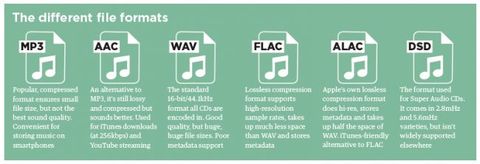
For example, if you want to save this album with the best sound quality because you don’t care about the amount of data, import it with “WAV” or “AIFF” and save it with the highest possible bit rate. If you have a compatible device, “FLAC” and “ALAC” are also storage saving options.

“Sound quality is secondary! I want to import a lot of songs to my smartphone!” For those who want to import with “MP3”, they can import at as low a bit rate as possible (although 128 kbps or less is not often used as a music file). It may be convenient to use music as data according to the style.

By the way, the Apple Music I use is 256kbps of “AAC”, so it can be said that it is a format that emphasizes the balance between sound quality and data savings.


Free Download Mp4Gain
picture


Mp4Gain Main Window
picture


Mp4Gain Features
picture


Free Download Mp4Gain
picture

[Music] File format types Part 2

[Music] File format types Part 2

audio file format

Lossy compression format

audio file format

This compression format is probably the one you use the most.

MP3
CAA
WMA
Vorbis
This is the file format.

“The human audible range is 20Hz ~ 20000Hz”
This file format has the advantage that the file size can be suppressed while maintaining a certain level of sound quality by compressing and truncating the high-frequency part that humans cannot hear.

However, the downside is that the sound quality is lower than the original data.

Among them, “MP3” is the most popular file format, and as a successor, “AAC” is often used, which was created to achieve higher sound quality. Furthermore, “WMA” and “Vorbis” are also in this format.

MP3 (MPEG-1 Audio Layer 3)
It is one of the audio formats used in the “MPEG-1” video compression standard.

It is a popular format and many popular digital audio players support it. If you compress it into this format, you can play it on many players other than iPod.

It is generally said that if you specify a bit rate of 192 kbps or higher for MP3, it will be almost indistinguishable from the original music.

Recently, the capacity of the player has increased, so I think it is good to capture at 320 kbps, which is the highest sound quality of MP3.

There is also a method called VBR (variable bit rate), which efficiently obtains optimal data while changing the bit rate in a song, as opposed to CBR (constant bit rate).

However, when using VBR, the bit rate may be partially higher than necessary depending on the song, and some players may experience problems such as interrupted sound due to insufficient performance.

AAC (advanced audio coding)
It is one of the audio formats used in the “MPEG-2” and “MPEG-4” video compression standards.

ITunes has selected this AAC format as the standard compression format as a highly efficient and superior alternative to MP3.

However, there have been times when compatibility between products was poor in the past, and in rare cases, AAC files created by third-party software may not be playable on iPod. When using the AAC format, the bit rate should be 128 kbps or higher, especially 256 kbps or higher if you want high sound quality. The songs that are managed in the iTunes store are also in AAC format and have the extension “.m4a”.

WMA (Windows Media Audio)
A music compression format developed by Microsoft for the Windows operating system.

It is used in many Windows music distribution software and digital audio players. It is said that the file size can be reduced to half that of MP3 if the sound quality is the same. WMA format files are converted to AAC / MP3 format when imported into iTunes.

However, it is not possible to convert downloaded and purchased songs with copyright protection (DRM) to AAC format / MP3 format.

[Music] File format types

[Music] File format types

Music File Formats

Does everyone like music?

digital-formats

I think many people enjoy music downloading or streaming instead of CD these days, but what kind of format is music stored as data?

I researched the differences, advantages, and disadvantages of each format.

Types of audio compression

For music file format

Uncompressed
Lossy compression
Lossless compression
There are three types:
File-based compression can reduce file size and reduce download time and storage capacity.
Uncompressed format
As the name implies, it is an uncompressed file. The point is the original data.

The most used formats are:

Wav
AIFF
The advantage is the accuracy of the data. However, it also has the disadvantage of a large file size and uses approximately 10MB for a 1 minute audio file.

It is common to use “WAV” for Windows and “AIFF” for Macintosh.

WAV (WAVE)
A standard Windows audio file format established by Microsoft and IBM, also known as the WAVE format.

It is generally uncompressed and has good sound quality, but it is a very large file.

WAV format files are converted to AAC / MP3 format when imported into iTunes. You can specify compression for WAV, but there seem to be not many usage examples.

AIFF (Audio Interchange File Format)
This is a standard Macintosh audio file format established by Apple Inc. Like WAV, it is not compressed and has good sound quality, but it is a very large file. There is also AIFC, an extended format with lossy compression.

Audio file formats

It all starts with Pulse Code Modulation (PCM), the basis for digital audio, which was founded in 1937 and is characterized by two properties: sampling rate for measuring the waveform amplitude and bit depth for measuring possible digital values.

Examples of digital formats for audio sampling are:

– WAV (waveform audio file format)

– MP3, AAC, WMA, Vorbis

– FLAC (Free Lossless Audio Codec) ALAC (Apple Lossless Audio Codec) and APE

WAV:

The same format is used to record audio CDs. Different qualities are available (8-16 bit, 11 to 44 kHz). The higher the quality, the greater the memory usage.

MP3, AAC:

The files. MP3 and AAC are the most common formats when you need to store music on a computer or phone, and exchange or download music on the network and on the Internet. MP3 is a “lossy” format that loses some audio quality to achieve a significant increase in file size. An MP3 has a size of approximately 1 MB per minute.
The difference to lossless formats is that if you convert the file to a less compressed format like WAV, the quality sacrificed during compression will not be restored. For lossy formats such as MP3, the audio quality is measured using the bit rate value, which is generally specified in “192 kbit / s” or “192 kbit / s”.
The higher the bit rate, the more detailed the sound becomes.

FLAC, ALAC, APE:

These formats compress audio using algorithms.
The difference between compressed files and FLAC is that FLAC is specifically designed for audio and therefore has better compression rates without data loss.
As a rule, a .FLAC takes up half of the storage space of a WAV in megabytes and maintains the “CD quality”.
A FLAC can be converted to WAV without loss of quality and is the preferred format for those who want to listen to music with the best quality and great speakers.

Is the audio quality subjective?

In theory no, but in practice it’s very subjective.
To hear real differences between the quality of an audio CD and an MP3 file, you need to use high-end headphones or speakers.
In addition, it also depends on what you are listening to and what type of music, in different formats, can have significant or almost no differences in listening.
If you are looking for the best compromise between file size and quality, you should experiment with the different formats and test whether you have a better experience with MP3 with higher bit rates or even with the playback of FLAC files.

What is the difference between the different audio formats, and which one should I choose?

There are two types of sound quality: lossless and lossless. Lossless music preserves the sound quality of the original source – in most cases, CD – intact, on the other hand, lossy music compresses the file to save space (in exchange for decreasing quality). The following formats are included in lossless formats:

loseless formats

Formats WITHOUT loss of quality:

WAV and AIFF: Both are uncompressed formats, which are exact copies of the original sound source. The two formats have essentially the same quality; They simply store the data differently. AIFF was created by Apple – you’ll see it often in its products – but WAV is much more universal. However, since they are not compressed, they take up too much unnecessary space. Unless you’re editing sound, we don’t need to use this format.

FLAC: Free lossless sound codec – Free Lossless Audio Codec (FLAC). It is the most used lossless codec, it is a good option if we seek to store our music without losing quality. Unlike WAV and AIFF, it uses compression, taking up less space. However, it is still a lossless format, which means that the sound quality is the same as the original source, so it is better to listen to than WAV and AIFF. It is also free and free software, which is useful if you like to take a look at how it works.

Apple lossless (Apple Lossless): Also known as ALAC, it is similar to FLAC. Use compression, although it is made by Apple. Its compression is not as efficient as that of FLAC, so the files will be a bit larger, but it is compatible with iTunes and iOS (FLAC not). Therefore, if you use iTunes or iOS as the main software for listening to music, you should choose this format.

APE: It is a file of very high compression without losses, which means that you will save more space. The quality is the same as FLAC, ALAC and other lossless files, but it is not compatible with most players. On the other hand, it makes the processor work harder to decode when it is so compressed. Generally, I would not recommend using this format unless you are very concerned about space and have a compatible player.

Formats with losses: MP3, AAC, OGG and more

MP3: MPEG Audio Layer III, or MP3 for short, is the most common lossy format. So much that it has become synonymous with music downloads on the internet. It is not the most efficient format of all, but it is undoubtedly the most compatible, making this the first option to choose between lost sounds.

AAC: Advanced Audio Coding, also known as AAC, is similar to MP3, although a bit more efficient. Which means that the files take up less space and with the same sound quality as MP3. And, with Apple’s iTunes making it so popular, it’s as compatible as MP3.

Ogg Vorbis: The Vorbis format, often known as Ogg Vorbis due to the use of the Ogg container, is the free software version to MP3 and AAC. Its main attraction is that it is not restricted by patents, but that does not affect you as a user – in fact, despite being open it is of similar quality, and much less popular than MP3 and AAC, so not all players support it . I do not recommend it unless you are interested in the fact of being open source.

WMA: Windows Media Audio. The proprietary format of Microsoft, similar to MP3 or AAC. It really offers no advantage over the other formats, and is not very well supported.

So which audio format should you use?

Now that we have seen the differences between each format, which one should we use for our music? In general, we recommend using MP3 or AAC. They are compatible with most players, and the quality of both is very similar to that of the original source if it is encoded with a high bit rate. Unless you have specific needs, MP3 and AAc are the most recommended options.

However, there is something to say to store music in lossless formats such as FLAC. Although we probably don’t notice a higher quality, it is good to store music if you plan to convert it to other formats later – since converting from one format with losses to another Lossy (eg, from AAC to MP3) will produce lower quality files. In that case we recommend FLAC. In addition, we can choose the lossless format we want, since converting between formats without losses does not degrade the quality of the file.

As a final conclusion, we can say that one should not become obsessed with the subject. We just have to be sure to choose something widely compatible, not convert between two formats with losses, and enjoy music.

An advantage is that Mp4Gain works with all these fromatos (and more) and you can convert from one to another, without problems or loss of quality, on the contrary, with tools like the Equalizer, you can improve the sound to your liking.