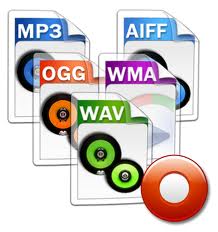
What is an audio file format?


Free Download Mp4Gain
picture

What is an audio file format?

audio file format
audio file format

MP3

audio file format
audio file format

When it comes to downloading music, the MP3 audio file format used to reign supreme.


In fact, this format is so synonymous with mobile music solutions that “MP3 players” are now the common format for audio playback devices.

However, for various reasons, it is less prominent these days. However, it continues. Understanding MP3 files can also help us understand other formats more easily, so we’ll start there.

An MP3 file is a lossy audio file, which means that it discards data that our ears cannot hear. Almost everyone has a hearing range between 2oHz and 20kHz. The upper limit actually decreases with age, but generally speaking, it’s a lie within the range of every noise you hear. Since we know that other frequencies are redundant, MP3 discards all frequencies outside this range.


To save more space, MP3 files use some more tricks. Audio engineers use noise modeling algorithms based on the psychoacoustic effects of the human ear and brain to remove parts of music that we shouldn’t be hearing. For example, the brain cannot distinguish between two frequencies that are next to each other. Also, adult ears have difficulty recognizing the direction of high-frequency sounds. It also starts to lose sensitivity above 16kHz. Also, loud sounds can mask quieter sounds. All of these can be removed, with little noticeable difference in final audience.

Basically, MP3 files remove frequencies that we can’t hear and frequencies that we can hear individually, but not because of how they’re combined in a particular song.

MP3 divides the track into 576 sample frames and uses the Fast Fourier Transform (FFT) to obtain frequency data from these frames. The frequency data is then analyzed to see if there is any opportunity to apply compression rules based on human hearing as described above. If so, these parts are rounded down (quantized) to reduce the bitrate, which helps save space. Data on how to restore each frame to its full sonic representation is stored in a 32-bit header.


The bitrate determines the maximum file size allowed per frame. The more aggressive the compression, the more likely the algorithm will remove things that are audible. Also, this type of filtering and cutting is not perfect, and quantization can leave artifacts that some people may hear. This lossy psychoacoustic compression is followed by lossless Huffman encoding compression similar to .zip files to save even more space.



Free Download Mp4Gain
picture


Mp4Gain Main Window
picture


Mp4Gain Features
picture


Free Download Mp4Gain
picture

Explore 4 main audio formats

Explore 4 main audio formats

audio file formats
audio file formats

Let’s take a look at the main audio formats and the differences between them.

audio file formats
audio file formats

The audio format is directly related to the quality and purpose of the audio track, i.e. where and on what device it will be played and what its purpose is.

However, before discovering the difference between them and choosing the best audio format for your music, you should know what categories they fall under. Let’s go ahead!

Uncompressed audio is like a picture, uncompressed audio is better quality, larger in file size and safer to copy, with nearly the same detail as the original sound.

WAV is the most widely used audio format of this type and reproduces music with precision similar to that of a recording.

compressed audio
When music is compressed, the file is smaller and can be easily stored on your device. Because of this advantage, compressed audio is often more of an option for users.

However, it should be remembered that some audio formats in this category may lose quality depending on the option selected, just like MP3 and AAC .

What is the best audio format?
As we said before, the first step in deciding on an audio format is to know the final objective of the track. Whether it’s for music lessons, performances, karaoke, auditions, or recording versions, you need to understand the pros and cons of each option.

WAV
WAV (Waveform Audio File Format) is an uncompressed format, therefore sufficient storage space is required. This is for those who already work with music, such as experts in the field or users who want to edit audio.

At high fidelity, WAV faithfully reproduces the elements and character of the original soundtrack. Furthermore, this format allows the selection of different bit and sample rates, and can be used on multiple platforms.

FLAC
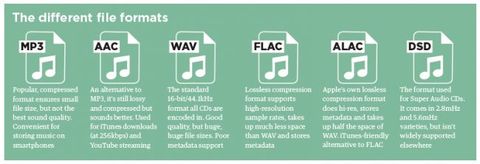
FLAC (Free Lossless Audio Codec) is one of the most widely used compression formats by music lovers today.

Digital audio encoding allows you to preserve its quality, but the resulting file will be smaller. Over the years, this format has become more widely used and is compatible with different devices and platforms.

FLAC is free and open source, ready to use and can be easily played on smartphones and other devices.

MP3
Before deciding on the best audio format, it is worth taking a look at the most famous format in the music world: MP3.

MP3 is one of the main audio compression formats, and has become synonymous with the convenience and efficiency of generating files quickly, with smaller files and a certain level of quality.

Many devices and programs can play this format. But MP3 is difficult to use in professional audio processing and advanced audio editing.

As is known, this format exists on almost all platforms and is ideal for sharing audio.

Another interesting factor is its bit rate, although it is a compressed format, it can vary depending on the user’s goals and improvements in quality.

AAC Like MP3, Advanced Audio Coding (AAC) is a more efficient audio format than its predecessor.

To create smaller files with less storage space, AAC is a great option for users to reduce file size and keep high-quality audio tracks.

[Music] File format types Part 3

[Music] File format types Part 3

Audio Formats

Lossless compression format

Audio Files Formats


This format compresses the original data while preserving it.

FLAC
A THE C
During playback, it can be decompressed and returned to the original uncompressed format, so the sound quality is the same as the original data.

Although the file size can be reduced compared to the uncompressed format, it is still about half, so the file size is larger than the lossy compressed format and it takes longer to encode and decode.

Also, at present, it is often not handled by major music distribution sites, and the number of devices that can play it is less than that of uncompressed formats. The most common of these formats is “FLAC”, and Apple uses a unique format called “ALAC”.

FLAC (Free Lossless Audio Codec)
A lossless audio codec developed as open source.

It is not subject to patent restrictions, is not owned by any company, and has no license fees for its use.

Also, the sampling frequency is 1Hz – 655.3kHz (655,350Hz), and the number of quantization bits is 4 to 32 bits, so the so-called high-resolution music (including the frequency elements beyond the range human audible) can also be encoded. . However, since it is lossless, the compression rate is low and the file size is only about half. First of all, iOS 11 now supports playback from the “File” app.

ALAC (Apple Lossless)
Apple Lossless is a lossless compression format developed by Apple for iPod.

It can maintain the same sound quality as a music CD, but the compression ratio is not as good as lossy compression formats like MP3. With lossy compression, the deterioration in sound quality is noticeable, so it may be better to use it for classical music only.

This format was released as open source on October 27, 2011. You can use it freely under the free Apache license.

Relationship between bit depth, sample rate, and bit rate
Music data has numbers like bit depth and sample rate that indicate the amount of music data per second.

And the product of the two is the “bit rate”.

Sampling rate
Also known as the sample rate. Shows how many tens of thousands of sounds are collected per second.

The higher the value, the greater the number of divisions, which results in a smoother sound and improved sound quality.

By the way, the CD is 44100Hz.

Bit depth
Also known as quantization bit count, bid reduction, sample bit count.

This shows how much capacity is given to the split data.

The louder the sound, the better the sound and the sound quality will be improved.

The CD is 16 bit.

Bit rate
It is displayed as bps and shows the amount of data per second.

It is the product of the “sample rate” and the “bit depth” mentioned above.

In the case of a stereo file, there are two sounds, so if you formulate it …

Sampling rate (Hz) x bit depth (bits) x 2 = bit rate (bps)

A high bit rate means that the “sample rate” and “bit depth” are large and the sound quality is good.

By the way, in the case of CD

44100 (Hz) x 16 (bits) x 2 = 1411200 (bps)

Will be.

Why is there so much format
Each has its advantages and disadvantages, and you can make better use of your data by using it correctly.

For example, if you want to save this album with the best sound quality because you don’t care about the amount of data, import it with “WAV” or “AIFF” and save it with the highest possible bit rate. If you have a compatible device, “FLAC” and “ALAC” are also storage saving options.

“Sound quality is secondary! I want to import a lot of songs to my smartphone!” For those who want to import with “MP3”, they can import at as low a bit rate as possible (although 128 kbps or less is not often used as a music file). It may be convenient to use music as data according to the style.

By the way, the Apple Music I use is 256kbps of “AAC”, so it can be said that it is a format that emphasizes the balance between sound quality and data savings.

[Music] File format types Part 2

[Music] File format types Part 2

audio file format

Lossy compression format

audio file format

This compression format is probably the one you use the most.

MP3
CAA
WMA
Vorbis
This is the file format.

“The human audible range is 20Hz ~ 20000Hz”
This file format has the advantage that the file size can be suppressed while maintaining a certain level of sound quality by compressing and truncating the high-frequency part that humans cannot hear.

However, the downside is that the sound quality is lower than the original data.

Among them, “MP3” is the most popular file format, and as a successor, “AAC” is often used, which was created to achieve higher sound quality. Furthermore, “WMA” and “Vorbis” are also in this format.

MP3 (MPEG-1 Audio Layer 3)
It is one of the audio formats used in the “MPEG-1” video compression standard.

It is a popular format and many popular digital audio players support it. If you compress it into this format, you can play it on many players other than iPod.

It is generally said that if you specify a bit rate of 192 kbps or higher for MP3, it will be almost indistinguishable from the original music.

Recently, the capacity of the player has increased, so I think it is good to capture at 320 kbps, which is the highest sound quality of MP3.

There is also a method called VBR (variable bit rate), which efficiently obtains optimal data while changing the bit rate in a song, as opposed to CBR (constant bit rate).

However, when using VBR, the bit rate may be partially higher than necessary depending on the song, and some players may experience problems such as interrupted sound due to insufficient performance.

AAC (advanced audio coding)
It is one of the audio formats used in the “MPEG-2” and “MPEG-4” video compression standards.

ITunes has selected this AAC format as the standard compression format as a highly efficient and superior alternative to MP3.

However, there have been times when compatibility between products was poor in the past, and in rare cases, AAC files created by third-party software may not be playable on iPod. When using the AAC format, the bit rate should be 128 kbps or higher, especially 256 kbps or higher if you want high sound quality. The songs that are managed in the iTunes store are also in AAC format and have the extension “.m4a”.

WMA (Windows Media Audio)
A music compression format developed by Microsoft for the Windows operating system.

It is used in many Windows music distribution software and digital audio players. It is said that the file size can be reduced to half that of MP3 if the sound quality is the same. WMA format files are converted to AAC / MP3 format when imported into iTunes.

However, it is not possible to convert downloaded and purchased songs with copyright protection (DRM) to AAC format / MP3 format.

[Music] File format types

[Music] File format types

Music File Formats

Does everyone like music?

digital-formats

I think many people enjoy music downloading or streaming instead of CD these days, but what kind of format is music stored as data?

I researched the differences, advantages, and disadvantages of each format.

Types of audio compression

For music file format

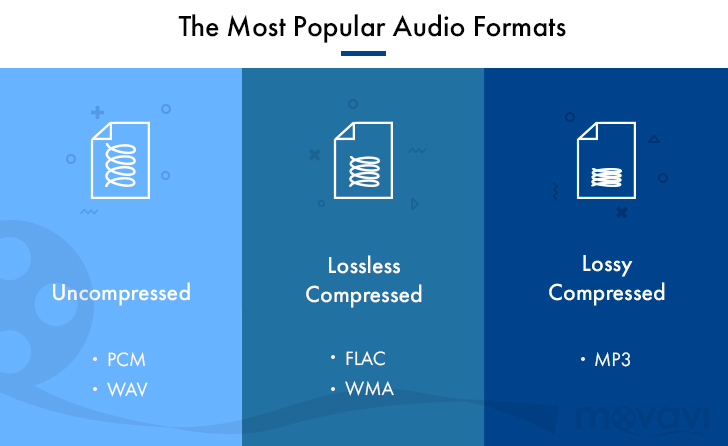
Uncompressed
Lossy compression
Lossless compression
There are three types:
File-based compression can reduce file size and reduce download time and storage capacity.
Uncompressed format
As the name implies, it is an uncompressed file. The point is the original data.

The most used formats are:

Wav
AIFF
The advantage is the accuracy of the data. However, it also has the disadvantage of a large file size and uses approximately 10MB for a 1 minute audio file.

It is common to use “WAV” for Windows and “AIFF” for Macintosh.

WAV (WAVE)
A standard Windows audio file format established by Microsoft and IBM, also known as the WAVE format.

It is generally uncompressed and has good sound quality, but it is a very large file.

WAV format files are converted to AAC / MP3 format when imported into iTunes. You can specify compression for WAV, but there seem to be not many usage examples.

AIFF (Audio Interchange File Format)
This is a standard Macintosh audio file format established by Apple Inc. Like WAV, it is not compressed and has good sound quality, but it is a very large file. There is also AIFC, an extended format with lossy compression.

Everything you need to know about audio formats.

Everything you need to know about audio formats.

Audio Fomats

Whether you use iTunes or buy and download digital music, you will find a number of terms and abbreviations that describe digital audio files. This alphabet soup can be quite confusing. What are audio file formats or codecs? What is the bit rate and what is the sample rate? What does it mean when the music is “high definition”?

AUDIO FORMAT FILES

This article explains what you need to know about digital audio files. I’ll tell you the difference between lossy and lossless files, explain why bitrate matters (or not), and help you understand the various file formats you can encounter.

Compression: lossy and lossless
When you buy a CD, the audio on the disc is not compressed. You can rip (or import) CDs with iTunes or other software, converting CD audio into digital audio files for use on a computer or portable device. In iTunes, you can copy in two uncompressed formats: WAV and AIFF (other software supports other formats). Both formats simply encapsulate the PCM (Pulse Code Modulation) data stored on CD so that it can be read as audio files on a computer, and their bit rate (you’ll find the one below) is 1411 kbps.

WAV and AIFF files can be quite large. Therefore, digital audio files are compressed to save space. There are two types of compression: lossless and lossy. Lossless includes formats (or codecs for short codec algorithms) such as Apple Lossless and FLAC (Free Lossless Audio Codec). Lossy includes the ubiquitous MP3 and AAC formats. (AAC, which stands for Advanced Audio Coding, is actually MP4, the successor to the old MP3. Although Apple adopted it in the early days of iTunes, Apple was not involved in its creation and does not own the format.)

You can also view other audio formats, although they are less common. These include Ogg Vorbis, Monkey’s Audio, Shorten, and others. Some of these codecs are lossy and some are not. However, if you use iTunes and Apple hardware, you will only find WAV, AIFF, MP3, AAC, and Apple Lossless, at least for music.

iTunes can copy or import audio files in these formats. Select the one you want to use in iTunes> Preferences> General> Import Settings.

When you copy or convert an uncompressed audio file to a lossless format and then play that file back, it is a perfect copy of the original (provided the data was read correctly from the CD). Thus, you can convert from one lossless format to another without quality loss.

However, when you copy to a lossy format, if you later convert the file to another format, it loses some of its quality. This is similar to how a photocopy of a photocopy does not look as good as the original.

Some people prefer lossless formats because they play audio like CDs. Lossy compression is a tradeoff to save space, allowing you to store more music on your portable device or hard drive and speed up downloads. However, most people cannot tell the difference between a CD and a lossy file at high data rates, so if you’re ripping your music to sync to iPhone, lossless files are superfluous.

Lossless ripping is a good way to back up your files as you can convert them to other formats without losing quality. And you can have iTunes automatically convert them to AAC files when syncing. Check out this article for more information on this automatic conversion, as well as other lossless file questions.

Bit rates
The best way to measure the quality of an audio file, relative to its original quality rather than its musical or engineering quality, is to look at its bitrate. The bit rate of audio files is measured in thousands of bits per second or kbps. I mentioned earlier that the CD contains 1411kbps audio, and when you convert that audio into a lossy file, its bitrate is much lower.

The higher the bit rate the better, so a 256 kbps MP3 or AAC file is better than a 128 kbps file. However, this is not the case for lossless files. Lossless file transfer speed depends on the density and volume of your music. Two lossless tracks on the same album can have bit rates of, say, 400 kbps and 900 kbps, but when played back, they reproduce the original CD audio at the same level of quality. Lossless compression uses as many bits as necessary and no more.

Audio file formats

It all starts with Pulse Code Modulation (PCM), the basis for digital audio, which was founded in 1937 and is characterized by two properties: sampling rate for measuring the waveform amplitude and bit depth for measuring possible digital values.

Examples of digital formats for audio sampling are:

– WAV (waveform audio file format)

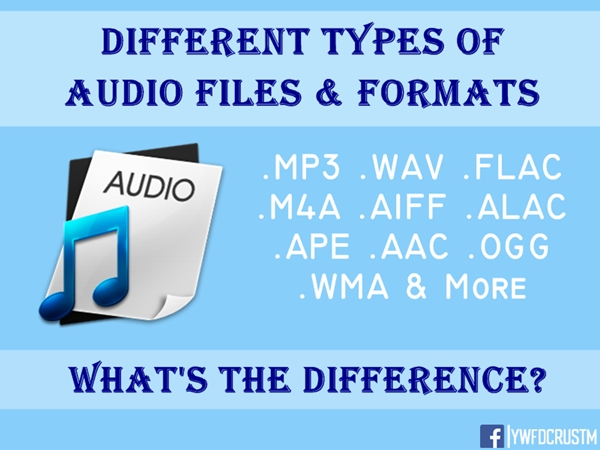
– MP3, AAC, WMA, Vorbis

– FLAC (Free Lossless Audio Codec) ALAC (Apple Lossless Audio Codec) and APE

WAV:

The same format is used to record audio CDs. Different qualities are available (8-16 bit, 11 to 44 kHz). The higher the quality, the greater the memory usage.

MP3, AAC:

The files. MP3 and AAC are the most common formats when you need to store music on a computer or phone, and exchange or download music on the network and on the Internet. MP3 is a “lossy” format that loses some audio quality to achieve a significant increase in file size. An MP3 has a size of approximately 1 MB per minute.
The difference to lossless formats is that if you convert the file to a less compressed format like WAV, the quality sacrificed during compression will not be restored. For lossy formats such as MP3, the audio quality is measured using the bit rate value, which is generally specified in “192 kbit / s” or “192 kbit / s”.
The higher the bit rate, the more detailed the sound becomes.

FLAC, ALAC, APE:

These formats compress audio using algorithms.
The difference between compressed files and FLAC is that FLAC is specifically designed for audio and therefore has better compression rates without data loss.
As a rule, a .FLAC takes up half of the storage space of a WAV in megabytes and maintains the “CD quality”.
A FLAC can be converted to WAV without loss of quality and is the preferred format for those who want to listen to music with the best quality and great speakers.

Is the audio quality subjective?

In theory no, but in practice it’s very subjective.
To hear real differences between the quality of an audio CD and an MP3 file, you need to use high-end headphones or speakers.
In addition, it also depends on what you are listening to and what type of music, in different formats, can have significant or almost no differences in listening.
If you are looking for the best compromise between file size and quality, you should experiment with the different formats and test whether you have a better experience with MP3 with higher bit rates or even with the playback of FLAC files.