[Music] File format types Part 3


Free Download Mp4Gain
picture

[Music] File format types Part 3
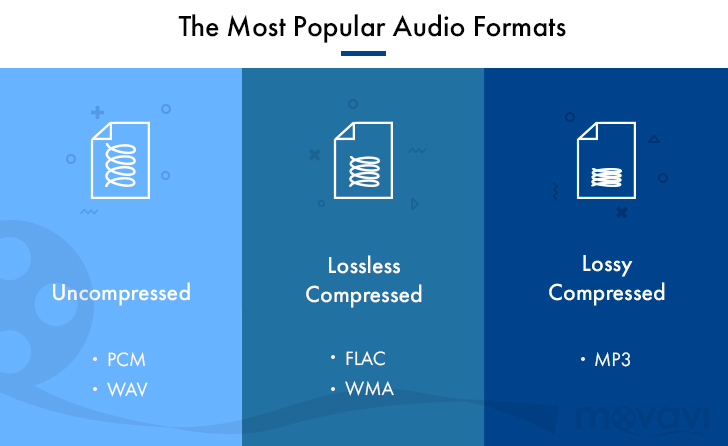
Audio Formats

Lossless compression format

Audio Files Formats


This format compresses the original data while preserving it.

FLAC
A THE C
During playback, it can be decompressed and returned to the original uncompressed format, so the sound quality is the same as the original data.

Although the file size can be reduced compared to the uncompressed format, it is still about half, so the file size is larger than the lossy compressed format and it takes longer to encode and decode.

Also, at present, it is often not handled by major music distribution sites, and the number of devices that can play it is less than that of uncompressed formats. The most common of these formats is “FLAC”, and Apple uses a unique format called “ALAC”.

FLAC (Free Lossless Audio Codec)
A lossless audio codec developed as open source.

It is not subject to patent restrictions, is not owned by any company, and has no license fees for its use.

Also, the sampling frequency is 1Hz – 655.3kHz (655,350Hz), and the number of quantization bits is 4 to 32 bits, so the so-called high-resolution music (including the frequency elements beyond the range human audible) can also be encoded. . However, since it is lossless, the compression rate is low and the file size is only about half. First of all, iOS 11 now supports playback from the “File” app.

ALAC (Apple Lossless)
Apple Lossless is a lossless compression format developed by Apple for iPod.

It can maintain the same sound quality as a music CD, but the compression ratio is not as good as lossy compression formats like MP3. With lossy compression, the deterioration in sound quality is noticeable, so it may be better to use it for classical music only.

This format was released as open source on October 27, 2011. You can use it freely under the free Apache license.

Relationship between bit depth, sample rate, and bit rate
Music data has numbers like bit depth and sample rate that indicate the amount of music data per second.

And the product of the two is the “bit rate”.

Sampling rate
Also known as the sample rate. Shows how many tens of thousands of sounds are collected per second.

The higher the value, the greater the number of divisions, which results in a smoother sound and improved sound quality.

By the way, the CD is 44100Hz.

Bit depth
Also known as quantization bit count, bid reduction, sample bit count.

This shows how much capacity is given to the split data.

The louder the sound, the better the sound and the sound quality will be improved.

The CD is 16 bit.

Bit rate
It is displayed as bps and shows the amount of data per second.

It is the product of the “sample rate” and the “bit depth” mentioned above.

In the case of a stereo file, there are two sounds, so if you formulate it …

Sampling rate (Hz) x bit depth (bits) x 2 = bit rate (bps)

A high bit rate means that the “sample rate” and “bit depth” are large and the sound quality is good.

By the way, in the case of CD

44100 (Hz) x 16 (bits) x 2 = 1411200 (bps)

Will be.

Why is there so much format
Each has its advantages and disadvantages, and you can make better use of your data by using it correctly.

For example, if you want to save this album with the best sound quality because you don’t care about the amount of data, import it with “WAV” or “AIFF” and save it with the highest possible bit rate. If you have a compatible device, “FLAC” and “ALAC” are also storage saving options.

“Sound quality is secondary! I want to import a lot of songs to my smartphone!” For those who want to import with “MP3”, they can import at as low a bit rate as possible (although 128 kbps or less is not often used as a music file). It may be convenient to use music as data according to the style.

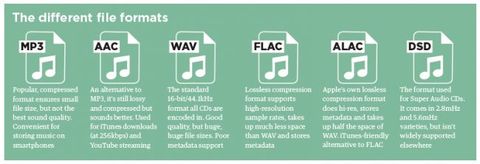
By the way, the Apple Music I use is 256kbps of “AAC”, so it can be said that it is a format that emphasizes the balance between sound quality and data savings.


Free Download Mp4Gain
picture


Mp4Gain Main Window
picture


Mp4Gain Features
picture


Free Download Mp4Gain
picture

[Music] File format types Part 2

[Music] File format types Part 2

audio file format

Lossy compression format

audio file format

This compression format is probably the one you use the most.

MP3
CAA
WMA
Vorbis
This is the file format.

“The human audible range is 20Hz ~ 20000Hz”
This file format has the advantage that the file size can be suppressed while maintaining a certain level of sound quality by compressing and truncating the high-frequency part that humans cannot hear.

However, the downside is that the sound quality is lower than the original data.

Among them, “MP3” is the most popular file format, and as a successor, “AAC” is often used, which was created to achieve higher sound quality. Furthermore, “WMA” and “Vorbis” are also in this format.

MP3 (MPEG-1 Audio Layer 3)
It is one of the audio formats used in the “MPEG-1” video compression standard.

It is a popular format and many popular digital audio players support it. If you compress it into this format, you can play it on many players other than iPod.

It is generally said that if you specify a bit rate of 192 kbps or higher for MP3, it will be almost indistinguishable from the original music.

Recently, the capacity of the player has increased, so I think it is good to capture at 320 kbps, which is the highest sound quality of MP3.

There is also a method called VBR (variable bit rate), which efficiently obtains optimal data while changing the bit rate in a song, as opposed to CBR (constant bit rate).

However, when using VBR, the bit rate may be partially higher than necessary depending on the song, and some players may experience problems such as interrupted sound due to insufficient performance.

AAC (advanced audio coding)
It is one of the audio formats used in the “MPEG-2” and “MPEG-4” video compression standards.

ITunes has selected this AAC format as the standard compression format as a highly efficient and superior alternative to MP3.

However, there have been times when compatibility between products was poor in the past, and in rare cases, AAC files created by third-party software may not be playable on iPod. When using the AAC format, the bit rate should be 128 kbps or higher, especially 256 kbps or higher if you want high sound quality. The songs that are managed in the iTunes store are also in AAC format and have the extension “.m4a”.

WMA (Windows Media Audio)
A music compression format developed by Microsoft for the Windows operating system.

It is used in many Windows music distribution software and digital audio players. It is said that the file size can be reduced to half that of MP3 if the sound quality is the same. WMA format files are converted to AAC / MP3 format when imported into iTunes.

However, it is not possible to convert downloaded and purchased songs with copyright protection (DRM) to AAC format / MP3 format.

[Music] File format types

[Music] File format types

Music File Formats

Does everyone like music?

digital-formats

I think many people enjoy music downloading or streaming instead of CD these days, but what kind of format is music stored as data?

I researched the differences, advantages, and disadvantages of each format.

Types of audio compression

For music file format

Uncompressed
Lossy compression
Lossless compression
There are three types:
File-based compression can reduce file size and reduce download time and storage capacity.
Uncompressed format
As the name implies, it is an uncompressed file. The point is the original data.

The most used formats are:

Wav
AIFF
The advantage is the accuracy of the data. However, it also has the disadvantage of a large file size and uses approximately 10MB for a 1 minute audio file.

It is common to use “WAV” for Windows and “AIFF” for Macintosh.

WAV (WAVE)
A standard Windows audio file format established by Microsoft and IBM, also known as the WAVE format.

It is generally uncompressed and has good sound quality, but it is a very large file.

WAV format files are converted to AAC / MP3 format when imported into iTunes. You can specify compression for WAV, but there seem to be not many usage examples.

AIFF (Audio Interchange File Format)
This is a standard Macintosh audio file format established by Apple Inc. Like WAV, it is not compressed and has good sound quality, but it is a very large file. There is also AIFC, an extended format with lossy compression.

What audio format should I choose?

What audio format should I choose?

Audio File Format

audio format The audio format is usually a measure of the quality of a track. There is a lot of debate about which is the best music format. So I recently witnessed a similar dispute. Not virtual, but real. In general, I decided to write an article about audio formats and try to explain in human language which is the best audio format. I’ll try to avoid abstruse terms and feature descriptions, so as not to hurt the brains of readers again.

Music File Format

I immediately admit that I am not going to sing praises in honor of any particular audio format, just as I am not going to “disappoint” anyone. Let everyone decide for themselves. I will not go into the “jungle” and review the most famous formats of high quality music.

I believe that these disputes are conducted by people, to put it mildly, not well versed in this matter. Because professionals (that is, people who know what they are doing and why they are doing it) will not do it. With today’s abundance of audio formats, anyone who needs it will find what they need. Agree, a dispute between a tractor driver and a driver about which is better – a tractor or a car will look silly. For some purposes a tractor, for others a machine. Here it is the same.

–WAV is rightly considered the highest quality music format. This audio format is not compressed or lossy. Used for recording and processing sound, this is the highest quality sound, as the WAV recording is not compressed. Encoded to any other audio format. Well, as a result, it “weighs” a lot, so it is mainly used for sound recording.

The following are several “interpretations” that can be divided into:

Lossy audio compression

I’ll start with the well-known and widely used (though not always loved) MP3 format. This audio format is actively used everywhere and everywhere, where it is needed and where it is not needed. But this does not mean that it is not worthy of its place in its niche. Very worthy. Although he has been “sitting” in his niche for about two decades, no one has “kicked” him out of there yet. And there were many who wanted to say it. And the main favorite of them is WMA (Windows Media Audio), which was conceived by Microsoft as an alternative to MP3. As a result, it is an alternative and it is, despite the best efforts of the developers. The next character is OGG. Despite the broader possibilities than MP3, for example, it never received widespread acceptance. Although it is compatible with many operating systems. Perhaps the AAC audio format is worth mentioning, which was supposed to replace MP3 in the relay. Encoding quality has been improved and compression loss reduced. But Ay.

The main advantage of these formats is their small size. The downside is the loss of quality.

Lossless audio compression
–FLAC is perhaps the most popular lossless audio format and encoding codec. Music lovers are gradually switching to this format. WavPack competes with it, but it is not that popular. It’s the same story with Apple Lossless, which reduces the size to 60%.

Here the story is exactly the opposite: the quality is better and the size is greater.

Skeptics say that it is almost impossible to distinguish MP3 (320 kbps) from Losless by ear. “And if there is no difference, why pay more?” In fact, on ordinary equipment, it is quite difficult to feel the difference in audio formats, even for music lovers. But there are those who immediately feel this difference (they personally attended the experiment). But when listening to a good device, the difference is huge. The problem is that not everyone can afford a good device.