AAC Format


Free Download Mp4Gain
picture

AAC Format

AAC Format
AAC Format
AAC Format
AAC Format

What is AAC Format?

The Advanced Audio Codec, commonly abbreviated as ACC, is a standardized digital audio compression scheme. It has been designed to achieve better sound quality than MP3 at similar bit rates. Born out of the necessity to enhance audio quality in the era of digital technology, ACC has since become a prominent format in various multimedia applications.
Every format has its unique attributes, and ACC stands out for its efficiency and versatility. Its architecture allows it to retain more sound detail, thereby promising richer audio experiences.

Audio formats play a crucial role in defining the essence of digital media. Choosing the right format can determine the balance between quality and size, a factor paramount to the digital age.
“In the realm of sound, ACC shines bright amidst the myriad of formats.” – The Sound Almanac

Benefits of using ACC audio.

The superiority of ACC over some other traditional formats lies in its myriad advantages. Firstly, it offers a wider frequency range, meaning listeners can hear more details in both the low and high ends of the audio spectrum.
Moreover, it provides a more efficient compression algorithm, allowing for smaller file sizes without sacrificing quality. This makes ACC an excellent choice for streaming services and other platforms where bandwidth and storage are of concern.

Lastly, ACC’s adaptability ensures it can be used across various platforms, ensuring consistent audio quality regardless of the device.
“A great audio format is like a symphony; it brings out the best in every note.” – Digital Media Chronicles

How does AAC compare to MP3?

When one draws a comparison between ACC and MP3, the former often comes out on top in terms of technical prowess. While MP3 revolutionized the music industry in the 90s, ACC has taken the reins in the 21st century by providing enhanced audio clarity.
A key distinction lies in their bit rates. ACC can deliver similar or even better quality than MP3 at a reduced bit rate, making it more efficient and versatile.

However, it’s essential to understand that while ACC might hold technical advantages, MP3’s widespread adoption ensures its presence in most audio applications.
“While MP3 paved the way, ACC refined the path.” – Echoes of the Digital Age

Historical background of AAC format.

Delving into the history, ACC was introduced in 1997 as part of the MPEG-2 standard. Designed to be the successor of MP3, its development was driven by the goal of surpassing the existing audio formats in quality and efficiency.
Throughout its journey, ACC has undergone various enhancements. Each iteration aimed at refining its performance, making it a stalwart in the realm of digital audio.

Today, it stands as a testament to the advancements in audio technology, bridging the past and the present.
“History isn’t just about dates; it’s about innovation, especially in the digital world.” – Auditory Odyssey

Technical specifications of AAC.

ACC’s brilliance is underscored by its technical underpinnings. It supports up to 48 channels, as opposed to MP3’s two channels. Additionally, it boasts a wider frequency range, extending from 8Hz to 96kHz.
Its sampling rates and enhanced compression algorithms ensure a superior audio experience, setting ACC apart from its counterparts.

It’s these technical attributes that allow ACC to retain audio fidelity even at lower bit rates, a hallmark of its design.
“In technology, the devil is in the details, and ACC mastered them all.” – The Digital Revolution

How is AAC used in the modern era?

Today, ACC is ubiquitous. From streaming services to podcasts, its presence can be felt across various multimedia platforms. Its efficiency makes it ideal for applications where bandwidth is paramount, ensuring listeners receive top-tier audio quality.
Moreover, as devices evolve, ACC’s adaptability ensures its seamless integration, cementing its position in the digital realm.

The digital landscape is ever-evolving, and ACC continues to remain at its forefront, owing to its versatility and excellence.
“Modern challenges require modern solutions, and ACC is the answer to today’s audio challenges.” – Tales of the Technological Era

What devices support AAC playback?

Most modern devices, ranging from smartphones to home entertainment systems, support ACC playback. Its widespread acceptance is a testament to its superiority and the industry’s confidence in its capabilities.
Manufacturers realize the importance of sound quality for consumers. By incorporating ACC compatibility, they ensure that listeners get the best audio experience possible, regardless of the device they use.

As technology marches forward, the list of devices that support ACC is only expected to grow.
“In a world filled with noise, it’s the clarity of ACC that shines through.” – Rhythms of the Modern World

Future prospects of AAC technology.

The trajectory of ACC appears promising. As audio requirements become more demanding and listeners more discerning, AAC’s attributes position it as the format of the future.
Developments in audio technology might bring about new formats, but the foundational principles of ACC will likely remain relevant. Its adaptability ensures it can evolve with the times, making it a lasting presence in the audio world.
“The future is but a canvas, and ACC has already painted its masterpiece.” – Soundscapes of Tomorrow

Is AAC the best audio format?

While it’s tempting to label AAC as the best, it’s essential to understand that the “best” is subjective. AAC holds undeniable advantages in terms of efficiency and quality. However, the right format often depends on specific use cases and personal preferences.
That said, in many scenarios, ACC does emerge as the top contender, balancing quality with efficiency like few other formats can.
“Perfection isn’t an end but a journey, and ACC’s journey is nothing short of remarkable.” – The Audio Anthology

Potential drawbacks of AAC.

No technology is without its shortcomings. Some critics argue that while AAC is efficient, it may not always deliver the best quality for audiophiles at higher bit rates compared to other lossless formats.
Additionally, older devices might not support ACC, leading to compatibility issues.

Despite these drawbacks, AAC’s merits often outweigh its limitations, making it a favorite in many applications.
“Every coin has two sides, but it’s the shine that often catches the eye.” – Digital Dilemmas

Final words

The AAC format, with its rich history and technical brilliance, stands as a beacon in the realm of audio technology. Its journey from its inception to its widespread adoption today underscores its significance. As we continue to evolve in the digital age, ACC’s role in shaping our auditory experiences cannot be overstated.


Free Download Mp4Gain
picture


Mp4Gain Main Window
picture


Mp4Gain Features
picture


Free Download Mp4Gain
picture

Digital Audio Quality

Digital Audio Quality

Digital Audio Quality

Data rate refers to the data flow used by a video file in a unit of time, also called bit rate or bit stream rate.

Digital Audio Quality

The popular interpretation is the sampling rate, which is the most important part of image quality control in video encoding. Generally, the units we use are kb/s or Mb/s. Generally speaking, at the same resolution, the higher the code stream of the video file, the lower the compression ratio and the higher the image quality. The higher the code stream, the higher the sampling rate per unit time, the higher the data stream, the higher the accuracy, the closer the processed file is to the original file, the better the image quality, the clearer the image quality and the higher the decoding capability of the playback device is required.

Of course, the larger the code stream, the larger the file size. The calculation formula is file size = time X code rate/8. For example, a 720P RMVB file with a 1 Mbps stream of 90 minutes is common on the Internet and its volume is = 5400 seconds × 1 Mb/8 = 675 MB.

Generally speaking, a video file includes images and sounds, just like an RMVB video file, which contains video information and audio information. Audio and video have their own sampling methods and different bit rates, that is, the same video Audio and video file bit rate is not the same. And what we’re talking about is the bitrate of a video file, which generally refers to the sum of the bitrate of the audio and video information in the video file.

Taking the most popular and familiar RMVB video file in China as an example, VB in RMVB refers to VBR, which is short for Variable Bit Rate. The Chinese meaning is variable bit rate, which means that RMVB adopts dynamic encoding. In this way, a higher sample rate is used for complex dynamic images (singing and dancing, flying cars, wars, actions, etc.), while a lower sample rate is used for static images, and the resources are use rationally to achieve image quality and volume .Effect.

The most fundamental difference between code rate and sample rate is that the code rate is for the source file.


2. Sampling rate

Sample rate (also called sample rate or sample rate) defines the number of samples per second taken from a continuous signal to form a discrete signal, and is expressed in hertz (Hz). Sampling rate refers to the sampling frequency when converting an analog signal to a digital signal, i.e. how many points are sampled per unit of time. How many bits are in the data for a sample point? Bit rate refers to the number of bits (bits) transmitted per second. The unit is bps (bit per second). The higher the bitrate, the more data transmitted and the better the sound quality. Bit rate = sample rate x number of bits used x number of channels.

The sample rate is similar to the number of frames of moving images. For example, the sampling rate of movies is 24 Hz, the sampling rate of PAL format is 25 Hz, and the sampling rate of NTSC format is 30 Hz. When we play back the still images sampled at the same rate as the sampling frequency, we see a continuous image. In the same way, when a CD recorded at a sampling rate of 44.1 kHz is played back at the same rate, a continuous sound can be heard. Obviously, the higher the sample rate, the more coherent the sound will be heard and the picture will be seen. Of course, the sampling rate that human auditory and visual organs can distinguish is limited, which is basically higher than sound sampled at 44.1 kHz, and most people haven’t noticed the difference.

The number of digits in the sound is equivalent to the number of colors on the screen, indicating the amount of data per sample. Of course, the larger the amount of data, the more accurate the playback sound, so as not to confuse the sound. of the teapot with the train whistle. In the same way, it is more clear and precise for the image, so as not to confuse blood and ketchup. However, limited by the function of human organs, 16-bit sound and 24-bit image are basically the limits of ordinary humans, and the highest digits can only be distinguished by instruments.

Detailed Music Format Part 2

Detailed Music Format Part 2

Music Format
Music Format

Music CD

Music Format
Music Format


That is, CD records. A CD can play sound files of approximately 74 minutes. The Windows system comes with a CD player. Also, the software that comes with most sound cards provides CD playback functionality, and even some CD-ROM drives are offline. from computer Can be used as a stand-alone CD player when powered on.

WMA with unlimited potential

In developing its own network media service platform, Microsoft primarily promotes ASF (Audio Streaming Format), which is an open standard that supports data transmission over various networks and protocols. It supports audio, video, and a variety of other types of multimedia. And WMA is short for Windows Media Audio, which is equivalent to an ASF file that contains only audio.
The compression ratio of WMA files can be as high as 1:18 in 80kbps 44kHz mode, which is basically the same as VQF. And the compression speed is doubled compared to MP3. So it should be more competitive than VQF.

Vorbis free music format

To avoid rising royalties charged by MP3 music companies, programmers at GMGI’s iCast company developed a new free music format, Vorbis, that rivals or even exceeds MP3 in sound quality. And it will be released over the internet and can be downloaded for free without worrying about infringement issues. But MP3 has become very popular on the Internet, and Microsoft’s Windows Media technology has also started to spread, and Vorbis’s outlook is still not optimistic.

Other audio formats

AIF/AIFF: A sound file format developed by Apple, supported by the MAC platform, and supports 16-bit stereo at 44.1 kHz.
AU: SUN’s AU Compressed Sound File Format, which only supports 8-bit sound, is a commonly used sound file format on the Internet, mainly created by SUN workstations.
CDA: CD audio track file.
CMF: A MIDI-like sound file developed by CREATIVE.
DSP: Abbreviation for digital signal processing. By improving the signal processing method, sound quality will be greatly improved and songs will be more pleasing to the ear.
S3U: MP3 playback file list
RMI: MIDI Instrument Sequence

Lossy compression:

AAC – Sound quality is second only to MPC at high bit rates and looks good at both high and low bit rates. The encoding speed is too slow!
MPC: Performance is average at low bitrate, not as good as MP3 and OGG encoded by Mp3Pro, sound quality is best at high bitrate, and encoding speed is
fast.OGG: The sound quality is better at a low bitrate, and the same is true at a high bitrate. Encoding is slightly slower.
MP3 (MP3Pro): Sound quality is lower than OGG at low bit rate and other aspects are the same as MP3
WMA: High and low bit rates are average, VBR is not supported and the highest is 192Kbit/s

lossless compression:

FLAC – Worst compression ratio of the four, decent encoding speed, good platform support.
PAC: Slightly slower encoding speed, third in compression ratio, good platform support.
APE: The fastest encoding speed, the best compression rate, and the platform is generally supported.
WV: The encoding speed is very fast, the compression rate is second among the four types, and it is only supported by the Windows platform.

Detailed music format

Detailed music format

Audio File Formats
Audio File Formats

classic wave

Audio File Formats
Audio File Formats

As the most classic Windows media audio format, the WAVE file is widely used, which uses three parameters to represent sound: the number of sampled bits, the sample rate, and the number of channels.
The channels are divided into mono and stereo, and the sample rates are generally 11025 Hz (11 kHz), 22050 Hz (22 kHz), and 44100 Hz (44 kHz). The capacity occupied by the WAVE file = (sampling frequency × sampling bits × channel) × time/8 (1 byte = 8 bits).

traditional mod

MOD is a wavetable-like music format, but its structure is similar to MIDI, it uses real samples, and the volume is small. In the earlier DOS era, MOD was often used as background music for games. Modern mods can contain many audio tracks in many formats, such as S3M, NST, 669, MTM, XM, IT, XT, and RT.

midi music computer

MIDI is short for Musical Instrument Data Interface. Records the sound played by the instrument digitally (each note is recorded as a number), and then synthesizes these records via FM or wavetable during playback: FM synthesis is the sound of the instrument is simulated by mixing the multi-frequency sounds; wavetable synthesis consists of storing the sound samples of the instrument in the wavetable of the sound card and extracting the sound from the wavetable as you play.

Boss Boss MP3

It can be said that MP3 is famous, it uses MPEG Audio Layer 3 technology to compress the sound with a compression ratio of 1:10 or even 1:12, with a sampling rate of 44kHz and a bit rate of 112kbit/s. .
MP3 music is music stored in digital form. If you want to play it, you must have a corresponding digital playback and decoding system. Generally, MP3 digital music is decoded by special software and then restored to a waveform sound signal for playback output. This type of software is called For MP3 players, such as Winamp, etc.

Overlord RA series online

RA, RAM, and RM are Real’s mature network audio formats, using “streaming audio” technology, making them well suited for network streaming. Information such as copyright, singer, producer, mail and song title can be added during production.
RA can be called the supreme lord of multimedia communication on the Internet. It is suitable for streaming on the Internet and is currently the best format for listening to online music online.

VQF with high compression ratio

VQF or TwinVQ is an audio compression technology developed by Nippon Telegraph and Telephone and Yamaha Corporation.
The audio compression rate of VQF is almost twice that of standard MPEG audio and can reach approximately 1:18 or even higher. And popular compression formats like MP3 and RA are usually only around 1:12. But it still won’t affect the sound quality, when VQF compress music at 44kHz-80kbit/s audio sampling rate, its sound quality will be better than 44kHz-128kbit/s MP3, when compress at 44kHz-96kbit/s , the music is close to 44kHz-256kbit/s MP3.

MD minidisc

MD (ie MiniDisc) is a comprehensive portable music format released by SONY in 1992. The compression algorithm it uses is ATRAC technology (the compression ratio is 1:5). MD is divided into Recordable MD (Recordable, with two heads of magnetic head and laser head) and Single Play MD (Prerecorded, only laser head).
The powerful editing function is the strong point of MD. You can quickly select tracks, move tracks, merge, split, delete and edit track titles. It is more personalized than CD and you can have your own MD album at any time. MD products include MD Walkman, MD bedside audio, MD car audio, MD recording deck, MD camera gun and MD driver, etc.

Audio formats

Before going through the different audio formats to identify the best ones for you, it seems right to try to make you understand what digital audio is. In short, it is nothing more than a representation of real sounds through a chain of zeros and ones. The more there is in a file, the closer the digital sound will be to what it represents.

Audio Formats

Better audio formats

It all started with Pulse-Code Modulation (PCM), created in 1937 and characterized by two properties: the sampling frequency to measure the amplitude of the waveform and the bit depth to measure possible digital values. It is basically the faithful conversion of analog audio into a digital file in which no compression is done. The result is a very large audio file, which takes up a lot of space.

Audio Formats

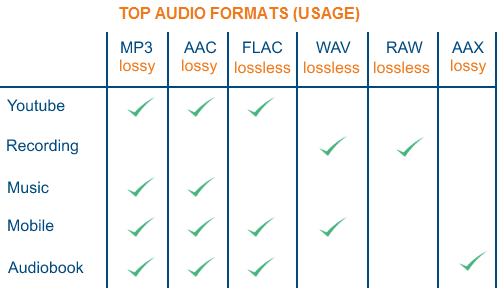
To remedy this, therefore, more or less compressed audio formats have been created that, depending on their characteristics, are divided into two different types: Lossless formats, that is, when the information contained in the final file is identical to that contained in the source file and therefore there is no loss of quality, and lossy formats, for which the information contained in the final file is less than that contained in the source file with the consequent loss of quality but in benefit of the space of necessary storage. For more details, continue reading, below you will find the different audio formats belonging to the categories in question indicated and explained.

Lossless (WAV, AIFF, FLAC and ALAC)

As I told you a few lines above, Lossless audio formats are those that are not compressed or that, despite being subjected to this type of treatment, the final quality remains practically unchanged with respect to the original audio. The main formats that belong to this category are the following: WAV, AIFF, FLACC, ALAC and APE. Let’s see its characteristics in detail.

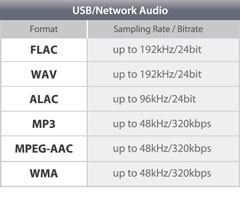
WAV – An acronym for WAVEform audio file format, is a standard that was developed by Microsoft and IBM in 1991. It is the most popular category of apparent audio file format. It is not compressed and is essentially what you get when you rip audio from a music CD with your computer. It takes up a lot of space (1,411 kilobits of information per second of stereo music at 44,100 Hz / 16 bits), but it reproduces sounds faithfully. In terms of quality and quantity of information, it is similar to the AIFF format, which you will find explained below.
AIFF – Short for Audio Interchange File Format, it belongs mainly to the Mac world, it was developed by Apple based on the Electronic Arts Interchange File Format and is particularly suitable for audiophiles and music recorders. It basically has the same characteristics as the WAV format mentioned above, so it is not compressed, so it takes up a lot of space (1,411 Kilobits of information per second of stereo music at 44,100 Hz / 16 bits) and is capable of reproducing sounds with a lot of fidelity.

FLAC: is the abbreviation for Free Lossless Audio Codec. It is an open source codec that is often used to store music CDs on the computer without loss of quality and is compatible with most programs and devices. Compared to the formats that I have already told you about, it has a minimal degree of compression, but most people cannot perceive significant differences compared to a WAV or AIFF file.
ALAC – Short for Apple Lossless Audio Codec, is essentially Apple’s worldwide counterpart to the earlier FLAC format. The quality is good on average but the format is not as efficient as the FLAC in terms of weight. Then keep in mind the fact that not all gamers support it, so unless you have uniquely and exclusively Apple devices, it may not be the best solution to opt for.

Other important but less common audio formats that always belong to the Lossless calorie are Monkey’s Audio (APE) and OptimFROG (OFR). Its characteristics are more or less similar to those of the FLAC and ALAC formats.

Lossy (MP3, AAC, WMA, and Ogg Vorbis)

Now let’s move on to the audio formats belonging to the Lossy category, that is, those always subjected to compression that take up very little space but “sacrifice” a certain degree of audio quality. The main formats in this category are: MP3, AAC, WMA, and Ogg Vorbis. For more information, keep reading, you will find more details about it below.

MP3: in Full Moving Picture Expert Group-1/2 Audio Layer 3, also known as MPEG-1 Audio Layer III or MPEG-2 Audio Layer III.

What are digital audio formats

What are digital audio formats

Digital audio formats are basically containers. And the differences between them are fundamentally in:

Whether or not they are compressed.

If they are compressed, in the quality of compression.

The type of labeling they can support.
Digital audio formats

MP3

It is the best known, popular and most widely used. They are known by their “.mp3” extension.

It was developed by Moving Picture Experts Group, so that it was part of the well-known MPEG-1 and MPEG-2 standards.

Its fundamental characteristic resides in the fact that the technology behind it performs a compression of the sound sequence, resulting in a really small file, which normally occupies half of the original file. To achieve this, the loss of certain sounds is necessary, which supposedly cannot be heard by the human ear.

Audio formats

WAV

Developed by the Microsoft and IBM companies, this format, whose name comes from the acronym WAVE (Waveform Aujdio File Format), is currently one of the audio formats that do not have compression in the data, therefore they present an excellent quality.

They are known by their “.wav” extension.

On the other hand, this format has the peculiarity that it includes support for almost all current audio codecs. This makes WAV one of the most widely used formats in the field of professional sound, since the sound is captured with parameters of 44100 Hz and at 16 bits, the same quality can be obtained as on a CD.

On the contrary, one of the disadvantages of this format is that it has a limitation in recording, since it can only capture a maximum of 6.6 hours in the same file at maximum quality.

Audio formats

AIFF

The AIFF (Audio Interchange File Format) format is very similar to WAV. It was born as an answer from Apple to Microsoft’s WAV, being initially only compatible with MAC computers. Currently it can also be used in Windows.

Due to its characteristics, AIFF, together with FLAC and WAV, are usually the most widely used formats in the professional field of audio.

WMA

The WMA (Windows Media Audio) format is a music file format created by Microsoft.

One of its main characteristics is that those files that have been compressed in WMA format take up less space than MP3 files, which also implies a reduction in their quality. Therefore, it is a lossy audio compression format.

OGG

OGG audio formats are compressed audio files, which means that they have a size that allows them to be transmitted via WIFI, but at the same time they avoid the damages that are usually generated in the compression process.

For example, Spotify uses these OGG formats.

Audio formats

FLAC

When we talk about the FLAC (Free Lossless Audio Codec) format, we are referring to a codec free of audio compression and without loss of quality.

Emerged within the community responsible for the OGG project, FLAC has become one of the WAV format’s strongest competitors, due to its advantages in terms of sound quality.

Its objective is to reduce the size of the original file, eliminating data that is usually known as “waste”, without causing loss of quality.

This is the format used by the Tidal platform, the best high quality audio streaming service.

What is the difference between the different audio formats, and which should I choose?

What is the difference between the different audio formats, and which should I choose?

Lossless formats: WAV, AIFF, FLAC, Apple Lossless and others

In summary, there are two types of sound quality: lossless and lossy. Lossless music preserves the sound quality of the original source – in most cases, CD – intact, on the other hand, lossy music compresses the file to save space (in exchange for decreasing quality). Lossless formats include the following formats:

WAV and AIFF: Both are uncompressed formats, making them exact copies of the original sound source. The two formats are essentially the same quality; they simply store the data differently. AIFF was created by Apple – you will see it often in its products – but WAV is much more universal. However, since they are not compressed, they take up too much unnecessary space. Unless you are editing sound, we do not need to use this format.

FLAC: Free Lossless Audio Codec (FLAC). It is the most used lossless codec, it is a good option if we want to store our music without losing quality. Unlike WAV and AIFF, it uses compression, taking up less space. However, it is still a lossless format, which means that the sound quality is the same as the original source, so it is better for listening than WAV and AIFF. It is also free and free software, which is useful if you like to take a look at how it works.

-Lossless Apple (Apple Lossless): Also known as ALAC, it is similar to FLAC. It uses compression, although it is made by Apple. Its compression is not as efficient as that of FLAC, so the files will be slightly larger, but it is compatible with iTunes and iOS (FLAC not). Therefore, if you use iTunes or iOS as the main software for listening to music, you should choose this format.

APE: It is a very high lossless compression file, which means you will save more space. The quality is the same as FLAC, ALAC and other lossless files, but it is not compatible with most players. On the other hand, it makes the processor work more to decode because it is so compressed. Generally, I would not recommend using this format unless you are very concerned about space and have a compatible player.

Lossy formats: MP3, AAC, OGG and more

For day to day, we are more likely to use lossy formats. They save significantly more space, and if they have a high enough bitrate, it will be very difficult to distinguish the quality of the original source. The most commonly used formats are shown below:

MP3: MPEG Audio Layer III, or MP3 for short, is the most common lossy format. So much so that it has become synonymous with music downloads on the internet. It is not the most efficient f-format of all, but it is certainly the most compatible, making this the first choice of lossy sounds.

AAC: Advanced Audio Coding, also known as AAC, is similar to MP3, although slightly more efficient. Which means that the files take up less space and with the same sound quality as MP3. And, with Apple’s iTunes making it so popular, it’s as compatible as MP3.

Ogg Vorbis: The Vorbis format, often known as Ogg Vorbis due to the use of the Ogg container, is the free software version to MP3 and

AAC. Its main attraction is that it is not restricted by patents, but that does not affect you as a user – in fact, despite being open it is of similar quality, and much less popular than MP3 and AAC, so not all players support it. . I do not recommend it unless you are interested in being open source.

WMA: Windows Media Audio. Microsoft’s proprietary format, similar to MP3 or AAC. It really doesn’t offer any advantage over other formats, and it’s not very well supported.

So which one should you use?

Now that we have seen the differences between each format, which one should we use for our music? In general, we recommend using MP3 or AAC. They are compatible with most players, and the quality of both is very similar to that of the original source if encoded with a high bitrate. Unless you have specific needs, MP3 and AAc are the most recommended options.

However, there is something to be said for storing music in lossless formats like FLAC. Although we probably won’t notice higher quality, it is good for storing music if you plan to convert it to other formats later – as converting from one lossy format to another. Lossy (eg from AAC to MP3) will produce lower quality files.

What audio formats exist? All you need to know.

FLAC, WAV, AIFF, DSD … these are just some of the acronyms you can find when looking for a digital format. They are also accompanied by technical data such as sample rates and bit depth. So many terms can leave you more misplaced than a chicken in a dance. And unless you are an expert in digital sound, the process to choose the audio format that best suits your needs can be a mess. But if they explain it to you, the subject is relatively simple. That is why in Culturasonora we have prepared a complete guide on the different audio formats used.

Audio formats: OGG vs Opus vs FLAC vs ALAC

Nowadays a lot of the music that is heard sounds through online platforms. It is worth talking about the audio formats used by services such as Spotify, Tidal, or Apple Music.
What is the OGG format?
OGG audio formats are like supercharged MP3s. They are compressed audio files, which means that they have a size that allows transmission via WiFi, but at the same time they avoid damage that is usually generated in the compression process. Spotify uses these OGG formats. Depending on how much you want to pay for this service you can listen to them through this portal with different sample rates: from 96 kbps, to Premium 320 kbps files. The audio quality provided by Spotify for Premium users is quite good.
What is the Opus format?
Opus is a new codec that uses the Ogg container. It was developed by the same creators of FLAC, with the help of Mozilla and Skype. It can handle up to 510 kbps and 48 kHz. This new format stands out for its low latency, so it is ideal for online audio streams. Its average latency of 22.5 ms is well below other codecs. It is versatile, open and more and more platforms are adopting it.
What is the FLAC format?
With FLAC audio codecs the sound quality increases with respect to the OGG. They are Lossless, or lossless, audio formats that perform a great trick: they compress file sizes up to 60% without losing quality. In addition, they allow the transmission of sample rates of up to 1,411 kbps, which is much higher than any other audio format. This is the format used by the Tidal platform, the best service for high quality audio transmissions.
What is the ALAC format?
Finally we have the ALAC (Apple Lossless Audio Codec). This format is basically Apple’s alternative to FLAC. It is the format used by Itunes and for Apple Music broadcasts.

What is the difference between the different audio formats, and which one should I choose?

There are two types of sound quality: lossless and lossless. Lossless music preserves the sound quality of the original source – in most cases, CD – intact, on the other hand, lossy music compresses the file to save space (in exchange for decreasing quality). The following formats are included in lossless formats:

loseless formats

Formats WITHOUT loss of quality:

WAV and AIFF: Both are uncompressed formats, which are exact copies of the original sound source. The two formats have essentially the same quality; They simply store the data differently. AIFF was created by Apple – you’ll see it often in its products – but WAV is much more universal. However, since they are not compressed, they take up too much unnecessary space. Unless you’re editing sound, we don’t need to use this format.

FLAC: Free lossless sound codec – Free Lossless Audio Codec (FLAC). It is the most used lossless codec, it is a good option if we seek to store our music without losing quality. Unlike WAV and AIFF, it uses compression, taking up less space. However, it is still a lossless format, which means that the sound quality is the same as the original source, so it is better to listen to than WAV and AIFF. It is also free and free software, which is useful if you like to take a look at how it works.

Apple lossless (Apple Lossless): Also known as ALAC, it is similar to FLAC. Use compression, although it is made by Apple. Its compression is not as efficient as that of FLAC, so the files will be a bit larger, but it is compatible with iTunes and iOS (FLAC not). Therefore, if you use iTunes or iOS as the main software for listening to music, you should choose this format.

APE: It is a file of very high compression without losses, which means that you will save more space. The quality is the same as FLAC, ALAC and other lossless files, but it is not compatible with most players. On the other hand, it makes the processor work harder to decode when it is so compressed. Generally, I would not recommend using this format unless you are very concerned about space and have a compatible player.

Formats with losses: MP3, AAC, OGG and more

MP3: MPEG Audio Layer III, or MP3 for short, is the most common lossy format. So much that it has become synonymous with music downloads on the internet. It is not the most efficient format of all, but it is undoubtedly the most compatible, making this the first option to choose between lost sounds.

AAC: Advanced Audio Coding, also known as AAC, is similar to MP3, although a bit more efficient. Which means that the files take up less space and with the same sound quality as MP3. And, with Apple’s iTunes making it so popular, it’s as compatible as MP3.

Ogg Vorbis: The Vorbis format, often known as Ogg Vorbis due to the use of the Ogg container, is the free software version to MP3 and AAC. Its main attraction is that it is not restricted by patents, but that does not affect you as a user – in fact, despite being open it is of similar quality, and much less popular than MP3 and AAC, so not all players support it . I do not recommend it unless you are interested in the fact of being open source.

WMA: Windows Media Audio. The proprietary format of Microsoft, similar to MP3 or AAC. It really offers no advantage over the other formats, and is not very well supported.

So which audio format should you use?

Now that we have seen the differences between each format, which one should we use for our music? In general, we recommend using MP3 or AAC. They are compatible with most players, and the quality of both is very similar to that of the original source if it is encoded with a high bit rate. Unless you have specific needs, MP3 and AAc are the most recommended options.

However, there is something to say to store music in lossless formats such as FLAC. Although we probably don’t notice a higher quality, it is good to store music if you plan to convert it to other formats later – since converting from one format with losses to another Lossy (eg, from AAC to MP3) will produce lower quality files. In that case we recommend FLAC. In addition, we can choose the lossless format we want, since converting between formats without losses does not degrade the quality of the file.

As a final conclusion, we can say that one should not become obsessed with the subject. We just have to be sure to choose something widely compatible, not convert between two formats with losses, and enjoy music.

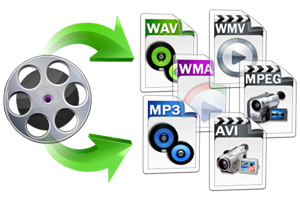
An advantage is that Mp4Gain works with all these fromatos (and more) and you can convert from one to another, without problems or loss of quality, on the contrary, with tools like the Equalizer, you can improve the sound to your liking.