Audio formats


Free Download Mp4Gain
picture

Before going through the different audio formats to identify the best ones for you, it seems right to try to make you understand what digital audio is. In short, it is nothing more than a representation of real sounds through a chain of zeros and ones. The more there is in a file, the closer the digital sound will be to what it represents.

Audio Formats

Better audio formats

It all started with Pulse-Code Modulation (PCM), created in 1937 and characterized by two properties: the sampling frequency to measure the amplitude of the waveform and the bit depth to measure possible digital values. It is basically the faithful conversion of analog audio into a digital file in which no compression is done. The result is a very large audio file, which takes up a lot of space.
Audio Formats

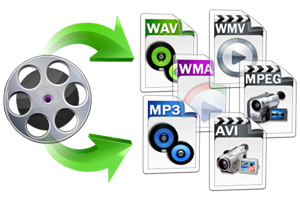
To remedy this, therefore, more or less compressed audio formats have been created that, depending on their characteristics, are divided into two different types: Lossless formats, that is, when the information contained in the final file is identical to that contained in the source file and therefore there is no loss of quality, and lossy formats, for which the information contained in the final file is less than that contained in the source file with the consequent loss of quality but in benefit of the space of necessary storage. For more details, continue reading, below you will find the different audio formats belonging to the categories in question indicated and explained.

Lossless (WAV, AIFF, FLAC and ALAC)

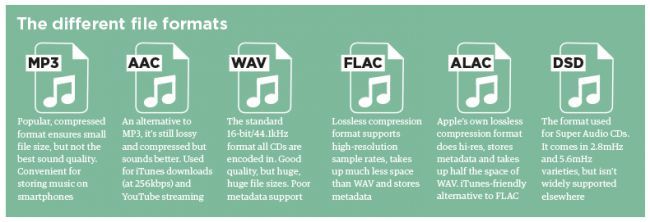
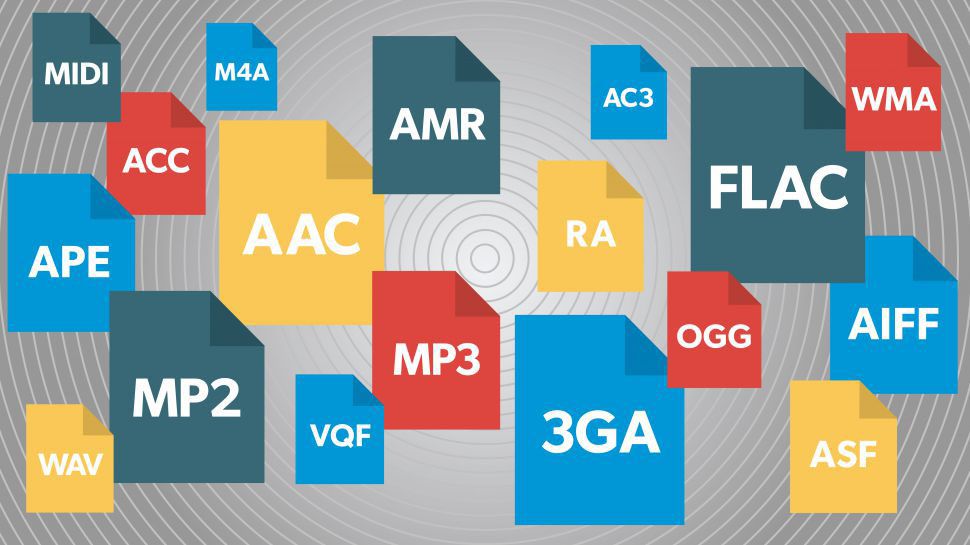
As I told you a few lines above, Lossless audio formats are those that are not compressed or that, despite being subjected to this type of treatment, the final quality remains practically unchanged with respect to the original audio. The main formats that belong to this category are the following: WAV, AIFF, FLACC, ALAC and APE. Let’s see its characteristics in detail.

WAV – An acronym for WAVEform audio file format, is a standard that was developed by Microsoft and IBM in 1991. It is the most popular category of apparent audio file format. It is not compressed and is essentially what you get when you rip audio from a music CD with your computer. It takes up a lot of space (1,411 kilobits of information per second of stereo music at 44,100 Hz / 16 bits), but it reproduces sounds faithfully. In terms of quality and quantity of information, it is similar to the AIFF format, which you will find explained below.
AIFF – Short for Audio Interchange File Format, it belongs mainly to the Mac world, it was developed by Apple based on the Electronic Arts Interchange File Format and is particularly suitable for audiophiles and music recorders. It basically has the same characteristics as the WAV format mentioned above, so it is not compressed, so it takes up a lot of space (1,411 Kilobits of information per second of stereo music at 44,100 Hz / 16 bits) and is capable of reproducing sounds with a lot of fidelity.

FLAC: is the abbreviation for Free Lossless Audio Codec. It is an open source codec that is often used to store music CDs on the computer without loss of quality and is compatible with most programs and devices. Compared to the formats that I have already told you about, it has a minimal degree of compression, but most people cannot perceive significant differences compared to a WAV or AIFF file.
ALAC – Short for Apple Lossless Audio Codec, is essentially Apple’s worldwide counterpart to the earlier FLAC format. The quality is good on average but the format is not as efficient as the FLAC in terms of weight. Then keep in mind the fact that not all gamers support it, so unless you have uniquely and exclusively Apple devices, it may not be the best solution to opt for.

Other important but less common audio formats that always belong to the Lossless calorie are Monkey’s Audio (APE) and OptimFROG (OFR). Its characteristics are more or less similar to those of the FLAC and ALAC formats.

Lossy (MP3, AAC, WMA, and Ogg Vorbis)

Now let’s move on to the audio formats belonging to the Lossy category, that is, those always subjected to compression that take up very little space but “sacrifice” a certain degree of audio quality. The main formats in this category are: MP3, AAC, WMA, and Ogg Vorbis. For more information, keep reading, you will find more details about it below.

MP3: in Full Moving Picture Expert Group-1/2 Audio Layer 3, also known as MPEG-1 Audio Layer III or MPEG-2 Audio Layer III.


Free Download Mp4Gain
picture


Mp4Gain Main Window
picture


Mp4Gain Features
picture


Free Download Mp4Gain
picture

Mp3, the winner

In the era of broadband connections, fiber optics and HD videos on YouTube, MP3 remains the reference format for audio files. We are now so used to listening to music in compressed formats, and often through poor quality playback systems, that it is difficult for us to remember what listening to music really means. The recent evolution from download to hit-and-run streaming has only made the situation worse by further devaluing the value of music. When was the last time you listened to a record from start to finish without interruption, spending those 30-40 minutes on “simple” listening activity?

Audio formats

Premise: This post is not a crusade against Spotify because I use it myself for new releases or to have some background music at work, it is not even an analog vs. digital (or vinyl vs. CD vs. MP3) post because on this topic en Much has already been said. My goal is to make you understand what you are missing, in qualitative terms, if you listen to music in compressed formats.

Audio formats

Sampling and theoretical aspects.

Audio recording on a computer or digital medium assumes that the signal passes through an analog> digital (AD) converter, so that the continuous electrical signal generated by microphones or musical instruments is transformed into a digital signal (series of 0 and 1) This process is called sampling. The final quality of the recording depends on several factors: converter quality, sample rate, and bit depth.

To make an easily understandable comparison: When shooting a movie, the “analog” reality perceived by our eye is stored in a movie that takes 24 frames per second. If we consider the standard of the audio CD (44.1 kHz, 16 bits), for every second of music 44100 pictures are taken from the computer to the continuous electrical signal. If with the sampling frequency we have simply established how many times in a second the waveform will be analyzed, with the bit depth we assign to each sample a numerical value: 2 ^ 16 = 65,536 possible values.

If you wonder how it got to 44,100, I refer you to the Nyquist-Shannon sampling theorem.

When we press the record button on our computer, through the PCM (pulse code modulation) sampling process described above, the files are saved in uncompressed WAV or AIFF format.

Lossless files and lossy files

PCM files take up a lot of space on our hard drives because, as we have seen, there is the data necessary to describe the analog waveform in as much detail as possible. Indicatively, a WAV or AIFF file as audio CD will occupy 10 MB for every minute of music.

To overcome this problem, remember that in the early 2000s storage space cost around $ 10 / GB, while today the price is around $ 0.03 / GB (source): Audio formats have been introduced that , through an algorithm encodes and decodes information, reduces the size of the file. These codecs fall into two categories: formats with lossless compression and formats with lossy compression.

As the name implies, lossless compression indicates a reduction in file weight (usually around 50%) without loss of information. Leaving the world of audio aside for a second, ZIP and RAR files are clear examples of this type of compression: at any time we can “unzip” such a file and have access to the original information again without this no way has changed.

The most common file formats are: FLAC (Free Lossless Audio Codec) and ALAC (Apple Lossless Audio Codec).

Lossy compression, on the other hand, implies that some of the original audio information is somehow removed to obtain a file that weighs even 90% less than the PCM.

By what criteria is information removed without “compromising” the original audio too much? Since our hearing is an imperfect instrument, codecs exploit two principles of psychoacoustics: the minimum threshold of audibility (the human ear does not perceive all frequencies in the range between 20Hz and 20kHZ equally) and masking (a weaker sound). is masked, making it inaudible, by a louder sound.)

Compression algorithms, however advanced, introduce a number of artifacts into audio files that, if played back in discrete quality audio systems, can be easily recognized or at least noticed even by an inexperienced ear. Several studies have shown that an untrained ear does not distinguish the difference between an uncompressed file and an MP3 with a bit rate equal to 256kb / s or more.

The most common lossy formats are: MP3, OGG Vorbis, AAC.

The victory of MP3

Since its introduction in the mid-1990s, MP3 has established itself as the industry-standard consumer format fueled by file-sharing through peer-to-peer channels, where, with slow connections, the heaviest file was the one it was downloaded, the longer it took to obtain it, and since the market introduction of MP3 players in which we tried to store as much music as possible and, therefore, we resorted to very compressed files.

In the transition from the era of downloading to that of small transmission files, they ensure smoother and smoother data transmission.

Despite, therefore, the evolution that has taken place in recent years in the speed of Internet connections and the reduction in the price of storage systems, only in recent years have services been created to buy files from High-quality online audio (HD tracks) or HD streaming services (Tidal).

Examples and audio files.

The main services we use to buy or listen to music use these compression levels (all information is taken from the official websites of each service at the time this publication was written).

Spotify: OGG Vorbis files at 96 kb / s (normal mobile quality), 160 kb / s (normal desktop and web player quality, high mobile quality), 320 kb / s (premium users: high desktop quality, very high quality mobile).
iTunes: By default, CDs are imported into 128 kb / s AAC files. Files in the iTunes Store are of this quality, except for “iTunes Plus” songs converted to AAC at 256 kb / s.
Pandora: 64kb / s AAC (free users), 192kb / s AAC (premium users).
YouTube: HD videos (720 or 1080p) have an audio quality equal to 384kb / s, SD videos (360, 480p) have an audio quality equal to 128kb / s.