Overview in the jungle of audio formats
Size does not necessarily matter, especially with compressed audio files. The deciding factor here is the algorithm that is used during encoding. Meanwhile, there are quite a few, but not all of them harmonize with iTunes, iPod & Co. We provide an overview of supported formats and introduce the general working method of audio compression.

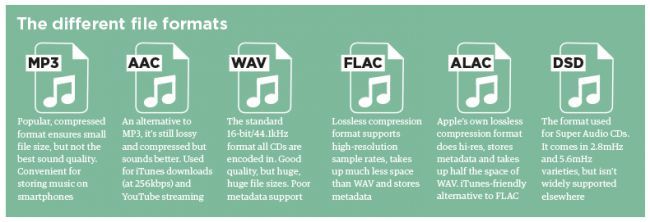
Since Philips introduced the audio CD in 1982, digitally stored music has been ubiquitous. However, since then, the number of digital data formats available has become so great that it is very easy to lose sight of things. There are basically compressed and uncompressed formats. The uncompressed WAV and AIFF formats are mainly used in audio media production due to their file size and high quality of the audio signal, and still on good old audio CDs.
Compression and reduction
Formats like Apple Lossless manage to reduce the amount of data without reducing the quality of the signal. This lossless encoder procedure is called data compression. However, you still have to live with relatively large files. This can quickly lead to difficulties, especially when gaming on mobile devices, as the battery drains very quickly. On a fourth-generation iPod, AAC-compressed music could only be played for three and a half hours in the test. However, when highly compressed audio books were used, it was more than ten hours. The other lossy processes accept a loss of quality in exchange for the advantage of a small file size. Here, the original quality of the music signal cannot be restored during playback. These compression processes make use of certain properties of human hearing to reduce data: the brain simply masks sound signals that are considerably quieter than other sounds that are perceived at the same time. Another effect that has been exploited is that there must be a minimal difference in the frequency of the tones to be able to distinguish them and to be able to perceive them consciously. Here there is also the possibility of saving. The encoder just skips everything within the specified bit rate that the brain would also leave out in its opinion. If the bit rate is set too low in relation to the complexity of the audio signal, you will inevitably notice signal interference, so-called artifacts, during decompression, that is, you will notice that the original has been compressed.
Bit rates for everyone and everything
Lossy encoders, unlike lossless encoders, can compress source material with different bit rates. The results are qualitatively very different. As a general rule, the average listener can no longer distinguish what is heard from the original signal of a bit rate of 160 kbps for MP3 and 128 kbps for AAC. However, this only applies to music; audiobooks, for example, can be compressed much more without incurring excessive losses. Bit rates of 96 kbps are sufficient for good results. Modern versions of encoders, including iTunes, can also compress the audio signal with a variable bit rate (VBR). The complexity of the source material is checked. If a passage is not very elaborately designed, the encoder automatically regulates the bit rate and saves space for more complicated parts. There it increases the bit rate again to improve the result. The option in iTunes to select the encoder settings and the encoder itself can be found in iTunes -> Settings -> Advanced -> Import. From encoder to bit rate to variable bit rate, you can choose the one that best suits your needs and needs from many options.
AIFF
This data format is not compressed and corresponds to the original data on an audio CD. Therefore, a large file size is expected. A music CD usually contains 80 minutes of music with a size of 700 MB. Therefore, this format is a bit difficult to handle. AIFF isn’t doing itself a favor, especially on mobile music players, as the battery capacity drains very quickly.
Wav
In principle, what has been said above also applies to WAV files, the two formats are very similar. This format is also usually uncompressed, but there are also variants with compression.
MP3
The MP3 data format, strictly speaking the MPEG1 Audio Layer 3 standard, was one of the first to achieve high data compression and therefore a reduced file size. In times of Internet connections via modem, it quickly found widespread use. Today’s encoders come with a variety of possible VBR and bit rates, so there is something for every purpose.
Lossless apple
This can be used to create files that have no signal loss compared to the original when played back. However, the files are quite large and the bit rate is usually over 900 kbps. Therefore, this format is less suitable for mobile devices due to the shorter battery life.
AAC and protected AAC
This encoder is a further development of MP3 and generally works better than MP3 encoders. Protected AAC files have rights management (music files purchased from the iTunes Music Store are in this format).
Audible
Audiobooks purchased from Audible.com come in a file format that is a variation of AAC. The files have the extension .m4b. This file format supports bookmarks so you can continue listening to an audiobook where you last left it.
Windows Media Audio on Mac
Since Windows Media Player no longer exists for the Mac operating system, the Flip4Mac company has been offering a QuickTime component that allows you to open Windows Media files directly in QuickTime Player. However, digital rights management files cannot be played. WMA files offered by some internet music stores (eg Musicload.de) cannot be played with this solution. iTunes is also not supported. You can find an installer for the component on our brochure CD under Software -> Mac -> WMA Components 2.2.0.49R.dmg.
OGG Vorbis Audio
The OGG format, which is free of software patents, can be added to iTunes at a later date. The required QuickTime components can be found under Software -> Win -> OGG_xiph-qt-win32-0.1.5.exe or Software -> Mac -> OGG_xiph-qt-0.1.8.dmg on our brochure CD. After installation with the supplied installation program in the respective operating system, both QuickTime and iTunes can play OGG files. However, all iPod and iPhone models still cannot play OGG.