10 Common Audio Formats: Which Format Should I Choose?


Free Download Mp4Gain
picture

10 Common Audio Formats: Which Format Should I Choose?

Audio Formats
Audio Formats

Audio files come in various formats and sizes, in addition to our common MP3, there are AAC, FLAC, OGG, WMA, etc.

Audio Formats
Audio Formats

Why are there so many different audio standards? What format is the best? What should you choose when saving audio files?

In fact, all audio formats can be divided into 3 categories, and once you understand the characteristics of each of these 3 types, you can choose one of the three, and then choose a further subdivided category according to your specific needs.

Comparison of audio formats – operation, equipment – Introduction to 10 common audio formats: which format should I choose?
uncompressed audio format
The uncompressed format preserves the original audio waveform. The so-called original audio waveform refers to the result after the sound is captured and converted to a digital signal for storage. Raw audio waveforms are stored without any post processing. From the results, such an audio file will consume a lot of space. For 24-bit (24-bit) 96 KHz audio, you need about 34 MB of storage space per minute.

Uncompressed audio format: PCM
PCM is short for Pulse-Code Modulation, which is a technical method of simulating sound using digital signals. The sounds that we can hear in nature exist in the form of physical sound waves, and in order to simulate this sound wave with a digital signal, scientists decided to sample it and record it with another wave, which is what we call a pulse.

Therefore, digital audio has two basic concepts: sample rate and bit depth. The so-called sampling rate refers to the speed of how many times the sound is sampled. The so-called bit depth refers to the space occupied by a single sample. In uncompressed formats, the product of the sample rate, bit depth, and audio duration is the space occupied by the digital signal that represents the audio content.

PCM is a format commonly used on CDs and DVDs, but its derivative LPCM is often used in practice. LPCM is short for Linear PCM, which is Linear Pulse Code Modulation. Most PCM files in use today are actually LPCM files, so there is no need to differentiate between them.

Uncompressed audio format: WAV
WAV is short for Waveform Audio File Format, which is a standard audio format developed by Microsoft and IBM in 1991.

Many people think that WAV is an uncompressed audio format, but this is not entirely true. In fact, WAV is a “wrapper” type format, a common format developed by Microsoft to use audio for various platforms. So it is possible for WAV to contain compressed audio, but this is rarely the format of choice when using compression these days.


Free Download Mp4Gain
picture


Mp4Gain Main Window
picture


Mp4Gain Features
picture


Free Download Mp4Gain
picture

What are the common audio formats?

What are the common audio formats?

common audio formats

Most frequent and popular sound formats

common audio formats

05 AAC format

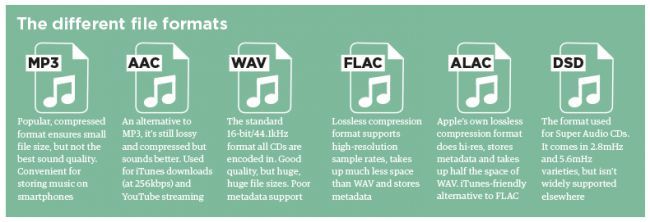
AAC is actually short for Advanced Audio Coding. The algorithm adopted by AAC is different from that of MP3. AAC improves encoding efficiency by combining other features. The AAC audio algorithm far surpasses some previous compression algorithms (such as MP3, etc.) in terms of compression capabilities. In conclusion, AAC can provide better sound quality with 30% smaller file size than MP3 files.

It is one of the best lossy formats out there. There are multiple encodings, with bit rates up to 448 kbps. In terms of hardware support, advanced mobile phones and mp3 players are now generally supported.

06 VQF format

The VQF format is an audio compression technology jointly developed by YAMAHA and NTT. Its compression ratio can reach 1:18. Therefore, under the same circumstances, the compressed VQF file size is 30%-50% smaller than MP3, which is more suitable for online streaming, while the sound quality is excellent, near to CD quality (16-bit, 44.1 kHz stereo). But VQF has not revealed the technical standards, so far it has not become popular.

07 FLAC format

FLAC is short for Free Lossless Audio Codec, which can be interpreted as Chinese lossless audio compression coding, which is characterized by lossless compression. Unlike other lossy compression codes like MP3 and AAC, it can restore the sound quality of music discs. It is now compatible with many software and hardware audio products.
It can be said that FLAC is similar to MP3, but it is losslessly compressed, which means that the audio is compressed in FLAC without losing any information. And you can use the player to play compressed FLAC files, just like playing MP3 files.

08 APE format

APE is one of the most popular digital music file formats. Unlike lossy compression methods like MP3, APE is a lossless audio compression technology, which means that after compressing the audio data file read from the audio CD in APE format, you can also compress the file in APE format. The audio file is exactly the same as before compression, without any loss.

The file size of APE is about half that of CD, which is loved by many music lovers, especially for friends who want to stream audio CDs over the network, APE can help them save a lot of resources.

What are the common audio formats?

What are the common audio formats?

common audio formats

Most frequent and popular sound formats

common audio formats

01 MP3 format

MP3 is one of the most common audio formats. Its full name is Moving Picture Experts Group Audio Layer III. Simply put, MP3 is an audio compression technology that uses MPEG Audio Layer 3 technology to compress music into a smaller capacity file with a compression ratio of 1:10 or even 1:12. Compress files to a lesser extent in small cases. And it keeps the original sound quality very well.

It is precisely because of MP3’s small size and high sound quality that the MP3 format has become almost synonymous with online music. Use an MP3 player to uncompress (decode) MP3 files in real time so that high-quality MP3 music can be played. The highest bitrate is 320K, and the high-frequency part is one size fits all, which is its default.

02 WMA format

The full name of WMA is Windows Media Audio, which is an audio format promoted by Microsoft. The WMA format achieves a higher compression ratio by reducing the data stream while maintaining sound quality. The compression ratio can usually reach 1:18, and the generated file size is only half of the corresponding MP3 file. In addition, WMA can also be added to prevent copying through the DRM scheme, or add restrictions on playback time and playback times, and even restrictions on playback machines, which can effectively prevent piracy.

03 WAV format

WAV format is a lossless sound format developed by Microsoft Corporation, also known as waveform sound file. It is the oldest digital audio format and is widely supported by the Windows platform and its applications. The WAV format supports many compression algorithms, supports a variety of audio bits, sample rates, and channels. It adopts 44.1kHz 16-bit sampling rate. Therefore, the sound quality of WAV is almost the same as that of CD, and it is suitable for uploading to all major music platforms. But the WAV format is bulky and difficult to spread.

04 ASF format

The full name of ASF is Advanced Streaming Format, which is a media playback format developed by Microsoft and is suitable for playback on the Internet.

All the Audio Format Differences: Which One Should You Use?

All the Audio Format Differences: Which One Should You Use?

All the Audio Format

Three classifications of audio formats

All the Audio Format

Characteristics and differences of different audio formats

Which audio format is right for you?

You already know MP3, but what about AAC, FLAC, OGG or WMA? Why are there so many audio file formats and is there any best audio format?

Comparison of audio formats

Audio files come in various types and sizes. While we’re all probably familiar with MP3, what about AAC, FLAC, OGG, or WMA? Why are there so many audio standards? Is there a better audio format? Which ones are important and which ones can be ignored?

All audio formats are divided into three main categories, and once you know what the categories mean, you can choose the format within the categories that best suits your needs.

uncompressed audio format

Uncompressed audio consists of actual sound waves that have been captured and converted to digital format without any additional processing. So uncompressed audio files tend to be the most accurate, but take up a lot of disk space: about 34MB per minute for 24-bit 96KHz stereo.

Audio file format: PCM

PCM stands for Pulse Code Modulation, a digital representation of the original analog audio signal. Analog sounds exist as waveforms. To convert a waveform into digital bits, the sound must be sampled and recorded at specific intervals (or pulses).

This digital audio format has a “sample rate” (how often the samples are made) and a “bit depth” (how many bits are used to represent each sample). There is no compression involved. Digital recordings are almost accurate representations of analog sounds.

Overview in the jungle of audio formats

Overview in the jungle of audio formats

Audio Formats

Size does not necessarily matter, especially with compressed audio files. The deciding factor here is the algorithm that is used during encoding. Meanwhile, there are quite a few, but not all of them harmonize with iTunes, iPod & Co. We provide an overview of supported formats and introduce the general working method of audio compression.

Audio File Formats

Since Philips introduced the audio CD in 1982, digitally stored music has been ubiquitous. However, since then, the number of digital data formats available has become so great that it is very easy to lose sight of things. There are basically compressed and uncompressed formats. The uncompressed WAV and AIFF formats are mainly used in audio media production due to their file size and high quality of the audio signal, and still on good old audio CDs.

Compression and reduction

Formats like Apple Lossless manage to reduce the amount of data without reducing the quality of the signal. This lossless encoder procedure is called data compression. However, you still have to live with relatively large files. This can quickly lead to difficulties, especially when gaming on mobile devices, as the battery drains very quickly. On a fourth-generation iPod, AAC-compressed music could only be played for three and a half hours in the test. However, when highly compressed audio books were used, it was more than ten hours. The other lossy processes accept a loss of quality in exchange for the advantage of a small file size. Here, the original quality of the music signal cannot be restored during playback. These compression processes make use of certain properties of human hearing to reduce data: the brain simply masks sound signals that are considerably quieter than other sounds that are perceived at the same time. Another effect that has been exploited is that there must be a minimal difference in the frequency of the tones to be able to distinguish them and to be able to perceive them consciously. Here there is also the possibility of saving. The encoder just skips everything within the specified bit rate that the brain would also leave out in its opinion. If the bit rate is set too low in relation to the complexity of the audio signal, you will inevitably notice signal interference, so-called artifacts, during decompression, that is, you will notice that the original has been compressed.

Bit rates for everyone and everything
Lossy encoders, unlike lossless encoders, can compress source material with different bit rates. The results are qualitatively very different. As a general rule, the average listener can no longer distinguish what is heard from the original signal of a bit rate of 160 kbps for MP3 and 128 kbps for AAC. However, this only applies to music; audiobooks, for example, can be compressed much more without incurring excessive losses. Bit rates of 96 kbps are sufficient for good results. Modern versions of encoders, including iTunes, can also compress the audio signal with a variable bit rate (VBR). The complexity of the source material is checked. If a passage is not very elaborately designed, the encoder automatically regulates the bit rate and saves space for more complicated parts. There it increases the bit rate again to improve the result. The option in iTunes to select the encoder settings and the encoder itself can be found in iTunes -> Settings -> Advanced -> Import. From encoder to bit rate to variable bit rate, you can choose the one that best suits your needs and needs from many options.

AIFF
This data format is not compressed and corresponds to the original data on an audio CD. Therefore, a large file size is expected. A music CD usually contains 80 minutes of music with a size of 700 MB. Therefore, this format is a bit difficult to handle. AIFF isn’t doing itself a favor, especially on mobile music players, as the battery capacity drains very quickly.

Wav
In principle, what has been said above also applies to WAV files, the two formats are very similar. This format is also usually uncompressed, but there are also variants with compression.

MP3
The MP3 data format, strictly speaking the MPEG1 Audio Layer 3 standard, was one of the first to achieve high data compression and therefore a reduced file size. In times of Internet connections via modem, it quickly found widespread use. Today’s encoders come with a variety of possible VBR and bit rates, so there is something for every purpose.

Lossless apple
This can be used to create files that have no signal loss compared to the original when played back. However, the files are quite large and the bit rate is usually over 900 kbps. Therefore, this format is less suitable for mobile devices due to the shorter battery life.

AAC and protected AAC
This encoder is a further development of MP3 and generally works better than MP3 encoders. Protected AAC files have rights management (music files purchased from the iTunes Music Store are in this format).

Audible
Audiobooks purchased from Audible.com come in a file format that is a variation of AAC. The files have the extension .m4b. This file format supports bookmarks so you can continue listening to an audiobook where you last left it.

Windows Media Audio on Mac
Since Windows Media Player no longer exists for the Mac operating system, the Flip4Mac company has been offering a QuickTime component that allows you to open Windows Media files directly in QuickTime Player. However, digital rights management files cannot be played. WMA files offered by some internet music stores (eg Musicload.de) cannot be played with this solution. iTunes is also not supported. You can find an installer for the component on our brochure CD under Software -> Mac -> WMA Components 2.2.0.49R.dmg.

OGG Vorbis Audio
The OGG format, which is free of software patents, can be added to iTunes at a later date. The required QuickTime components can be found under Software -> Win -> OGG_xiph-qt-win32-0.1.5.exe or Software -> Mac -> OGG_xiph-qt-0.1.8.dmg on our brochure CD. After installation with the supplied installation program in the respective operating system, both QuickTime and iTunes can play OGG files. However, all iPod and iPhone models still cannot play OGG.

Understanding digital audio formats

Understanding digital audio formats

When it comes to digitally distributing our music it is important that we understand what they are
the different formats, which are the most used and which are the best in terms of the
Relationship between size and quality.

PCM digital audio

WAVE

The name comes from the acronym waveform audio file format and is a used file
usually on computers with the Windows operating system.
WAV or WAVE files contain audio in LPCM format (Linear Pulse Code
Modulation) This is a way to encode an analog audio signal to the domain
digital by using equidistant samples over time of amplitude values
of the analog signal.
The quantity of samples is given by the sampling rate or sampling rate,
while the amount of possible amplitude values ​​is determined by the
Bit depth or bit rate.
The sampling frequency of the CDAUDIO for example is 44.1 kHz and 16 bits. exist
higher sampling rates such as 48 kHz, 88.2 kHz, 96 kHz up to 192 kHz at
this system.
On the other hand, WAV files are uncompressed audio and are generally used in
stages of recording, editing, mixing and mastering for being of high quality.
The higher the sample rate and the greater the number of bits, the file size will be
our hard drive
In general for professional uses at least a frequency of
44.1 kHz sampling and a depth of 24 bits preferably.
The standard extension for this type of file is: .wav

AIFF

The name comes from Audio Interchange File Format or audio file format
interchangeable, this format was developed by Apple computers and is used to save
and manipulate audio on computers.
It is like WAV a file type without compression or lossles therefore allows
Processing for professional applications such as recording, editing, mixing and
mastering as well as for professional video uses.
Another similarity with WAV files is that it is PCM audio (press code
modulation) that for practical purposes it is the same as the LPCM.
The standard extension for this type of files is .aiff

MP3

Also known as MPEG1 or MPEG2 audio layer, it is a form of coding
of digital audio in which psychoacoustic models discard information from
Audio that is presumed is not audible to most users.
As an example a file created with a resolution of 128 kbits / s is equivalent to 1/11
the size of a file on an audio CD.
The main purpose of using this type of coding is to reduce the size of the
files and be able to send / download faster, especially through
from Internet.
Being a file type reduced in quality IS NOT RECOMMENDED for
recordings, editing, mixing or mastering of professional audio.
For this reason we recommend NOT to use it to send us your clues to
mix / master

What is the best audio format for listening to music?

What is the best audio format for listening to music?

Although the MP3 format is the most popular of all available audio formats, it is not the only one, some such as FLAC, WMA, OGG and others, have features that, depending on what you want, can be very useful in certain occasions

Here I show you a summary of what to expect when you are looking for the best audio format to listen to music.

As a general rule, we can classify audio formats into two categories: those that retain all quality and those that lead to loss of quality in sound or information.

Those who retain all audio quality come from pure sources such as CDs, while those who lose quality sacrifice this information to save space.

Formats that preserve audio quality:

FLAC: Free Lossless Audio Codec or FLAC, for its acronym in English, is one of the formats that best preserves audio quality. Its compression algorithm is excellent and does not generate quality losses, it is open source and the file size when compressed is much smaller
Apple Lossless: known as ALAC is very similar to FLAC, but not as efficient as this, so these files are larger, although they have the unconditional support of iOS, which FLAC does not have

APE: The problem with this format is that it is not very compatible with the vast majority of players, but it is similar to the FLAC or ALAC format in terms of audio quality. Being very compressed makes the computer’s processor work faster so it is not recommended in low power computing equipment
WAV and AIFF: they are not compression formats, but exact copies of the original content, differing in the way they save the data. While AIFF was created by Apple, WAV is more universal, but both take too much disk space.

Formats with loss of audio quality:

MP3: MPEG Audio Layer III or MP3, as we all know them, is the most common format you can find
ACC: is more efficient than MP3, files in this format are smaller and is very popular on iTunes
OGG Vorbis: it is a free and open source alternative to MP3 and ACC, it is not restricted by patents but not supported by many players
WMA: this is the proprietary format of Microsoft very similar to MP3, without great advantages over the others
Which audio format to choose
You may be interested: «It’s proven: classical music modifies your genes and makes you smarter»
It is more recommended to choose MP3 or AAC, since many players support them, in addition, if they are encoded with a high bitrate they are almost indistinguishable from the original source. However, if what you want is to burn your music, I recommend formats like FLAC, then you can convert everything to other formats without losing audio quality.