Mp3, the winner


Free Download Mp4Gain
picture

In the era of broadband connections, fiber optics and HD videos on YouTube, MP3 remains the reference format for audio files. We are now so used to listening to music in compressed formats, and often through poor quality playback systems, that it is difficult for us to remember what listening to music really means. The recent evolution from download to hit-and-run streaming has only made the situation worse by further devaluing the value of music. When was the last time you listened to a record from start to finish without interruption, spending those 30-40 minutes on “simple” listening activity?
Audio formats

Premise: This post is not a crusade against Spotify because I use it myself for new releases or to have some background music at work, it is not even an analog vs. digital (or vinyl vs. CD vs. MP3) post because on this topic en Much has already been said. My goal is to make you understand what you are missing, in qualitative terms, if you listen to music in compressed formats.
Audio formats

Sampling and theoretical aspects.

Audio recording on a computer or digital medium assumes that the signal passes through an analog> digital (AD) converter, so that the continuous electrical signal generated by microphones or musical instruments is transformed into a digital signal (series of 0 and 1) This process is called sampling. The final quality of the recording depends on several factors: converter quality, sample rate, and bit depth.

To make an easily understandable comparison: When shooting a movie, the “analog” reality perceived by our eye is stored in a movie that takes 24 frames per second. If we consider the standard of the audio CD (44.1 kHz, 16 bits), for every second of music 44100 pictures are taken from the computer to the continuous electrical signal. If with the sampling frequency we have simply established how many times in a second the waveform will be analyzed, with the bit depth we assign to each sample a numerical value: 2 ^ 16 = 65,536 possible values.

If you wonder how it got to 44,100, I refer you to the Nyquist-Shannon sampling theorem.

When we press the record button on our computer, through the PCM (pulse code modulation) sampling process described above, the files are saved in uncompressed WAV or AIFF format.

Lossless files and lossy files

PCM files take up a lot of space on our hard drives because, as we have seen, there is the data necessary to describe the analog waveform in as much detail as possible. Indicatively, a WAV or AIFF file as audio CD will occupy 10 MB for every minute of music.

To overcome this problem, remember that in the early 2000s storage space cost around $ 10 / GB, while today the price is around $ 0.03 / GB (source): Audio formats have been introduced that , through an algorithm encodes and decodes information, reduces the size of the file. These codecs fall into two categories: formats with lossless compression and formats with lossy compression.

As the name implies, lossless compression indicates a reduction in file weight (usually around 50%) without loss of information. Leaving the world of audio aside for a second, ZIP and RAR files are clear examples of this type of compression: at any time we can “unzip” such a file and have access to the original information again without this no way has changed.

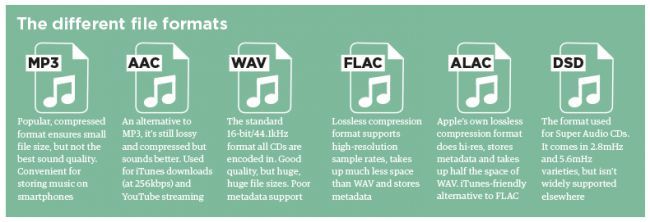
The most common file formats are: FLAC (Free Lossless Audio Codec) and ALAC (Apple Lossless Audio Codec).

Lossy compression, on the other hand, implies that some of the original audio information is somehow removed to obtain a file that weighs even 90% less than the PCM.

By what criteria is information removed without “compromising” the original audio too much? Since our hearing is an imperfect instrument, codecs exploit two principles of psychoacoustics: the minimum threshold of audibility (the human ear does not perceive all frequencies in the range between 20Hz and 20kHZ equally) and masking (a weaker sound). is masked, making it inaudible, by a louder sound.)

Compression algorithms, however advanced, introduce a number of artifacts into audio files that, if played back in discrete quality audio systems, can be easily recognized or at least noticed even by an inexperienced ear. Several studies have shown that an untrained ear does not distinguish the difference between an uncompressed file and an MP3 with a bit rate equal to 256kb / s or more.

The most common lossy formats are: MP3, OGG Vorbis, AAC.

The victory of MP3

Since its introduction in the mid-1990s, MP3 has established itself as the industry-standard consumer format fueled by file-sharing through peer-to-peer channels, where, with slow connections, the heaviest file was the one it was downloaded, the longer it took to obtain it, and since the market introduction of MP3 players in which we tried to store as much music as possible and, therefore, we resorted to very compressed files.

In the transition from the era of downloading to that of small transmission files, they ensure smoother and smoother data transmission.

Despite, therefore, the evolution that has taken place in recent years in the speed of Internet connections and the reduction in the price of storage systems, only in recent years have services been created to buy files from High-quality online audio (HD tracks) or HD streaming services (Tidal).

Examples and audio files.

The main services we use to buy or listen to music use these compression levels (all information is taken from the official websites of each service at the time this publication was written).

Spotify: OGG Vorbis files at 96 kb / s (normal mobile quality), 160 kb / s (normal desktop and web player quality, high mobile quality), 320 kb / s (premium users: high desktop quality, very high quality mobile).
iTunes: By default, CDs are imported into 128 kb / s AAC files. Files in the iTunes Store are of this quality, except for “iTunes Plus” songs converted to AAC at 256 kb / s.
Pandora: 64kb / s AAC (free users), 192kb / s AAC (premium users).
YouTube: HD videos (720 or 1080p) have an audio quality equal to 384kb / s, SD videos (360, 480p) have an audio quality equal to 128kb / s.


Free Download Mp4Gain
picture


Mp4Gain Main Window
picture


Mp4Gain Features
picture


Free Download Mp4Gain
picture

Choose the sound format well into 2020

Although many dematerialized music rhymes with MP3, it is recommended to take a tour of the owner in existing dematerialized formats to choose the audio format well when digitizing their CD / Vinyl.

What is an audio format?

An audio format is to simplify a kind of container where dematerialized music is stored: it is important to choose it carefully when ripping a CD, because its properties will directly affect the quality of the file created.

audio formats

Therefore, selecting audio format is a crucial step and it is advisable to guarantee three things with priority: the quality, functionality, and the fact that they are standard and legible on a maximum of devices, whether on a PC or MAC computer, but also on your smartphone / car radio …

It is also important to understand that in general, and although there are exceptions, the choice of audio format consists of placing the cursor in the middle between the quality on the one hand and the space occupied by the media on the other. storage.

audio format

Choose audio format: which challengers?

select aac-ogg-wma mp3 audio format
The 4 semi-amazing audio formats with destructive compression.

MP3:
Give glory where honor is due. MP3 is just as popular as it is underrated: it will have done a lot for dematerialized music by itself and has enabled millions of people around the world to discover a new way to listen to their music.

MP3 is a format of strong and destructive compression, in other words, a large part of the musical signal will be suppressed (priority, frequencies inaudible to the human ear … but not only!), And therefore offers a quality that only becomes good for from 256/320 kbps.

Is this a good opportunity today? Not being the best from a quality standpoint, choosing mp3 audio format today allows you to be sure that you can listen to it on all devices released for 10 years. MP3 is dematerialized music, what jeans should wear: versatility and the highest “acceptance rate” in the world.

Note that it is also advisable to choose mp3 audio format if you have limited storage space on a smartphone, for example because it is (in the company of AAC / WMA / OGG) the type of format that requires least space.

AAC:
This format is similar to “Apple MP3”. It has the same qualities and shortcomings as the previous one with some details: slightly better at the same speed, on the other hand it is far less standard: except for the fact that manufacturers have made explicit agreements (and pay because they require a license) , we find in Practice much fewer AAC compliant devices.

So it should be avoided unless you only have Apple products around you (even the car radio? I doubt it) and even in this case they are all perfectly mp3 compatible.

WMA
If AAC is Apple’s MP3, WMA Microsoft is MP3. Even less widespread because it doesn’t benefit from iTunes / Music Store / iPOD steamroller (who still remembers Zune’s iPod killer? Miscrosoft)

Again, forget the same qualities and shortcomings as MP3, but even less standard, therefore urgent. I even advise you to convert your existing WMA files to MP3 at a similar or slightly higher bit rate to ensure durability. Therefore, choosing WMA audio format today is not a good idea.

OGG:
We also find it under the name “vorbis”, we also have an mp3 clone here, except it is compatible with the free world (understand free) a bit in the same format as Linux.

Ogg is a completely free format unlike the previous ones, but despite this it is very confidential and is generally used only by those who take a pro-free dogmatic stance. While this position is quite respectable, selecting OGG audio format in 2014/2015 does not seem like a good idea because it is not widely distributed and above all it is like MP3, a destructive format.

WAV:
WAV is the first format on the list that does not deteriorate the quality extracted from the CD, and therefore offers an identical bit rate of 1411 kbps and therefore provides optimal quality.

However, the format shows its age and is limited in several ways: no space optimization (one second of silence = one second of noise) and no metadata or album cover management.

Therefore, choosing Wav audio format is similar to generating very heavy files and simply impossible to organize properly in a music database.

An overview of the main audio formats that can be found on your computer

Codec for mp3, mpc, flac, mono, ogg vorbis and more.

For convenience, audio formats can be divided into unprofitable (unprofitable) and unprofitable (or unprofitable without losing quality).

The idea of ​​loss formats (most common among ordinary users) stems from the idea that the human ear misunderstands all the sounds that are in a standard WAV file at 44,100 samples per second.

In this way (as in the JPG format of the images) we will drop the high frequencies, which are thought to be less different from our hearing. The more these frequencies are reduced, the more space is allocated to our track (for example, 3 MB instead of 6 MB for a few minutes of song or much more) … but it also degrades the quality of the result, as the cut frequencies are no longer so “inaudible”.

Converting to WAV from lossy formats does not provide any benefit (unless you have to process the track and save it several times, in which case the quality loss will be limited to the first step); There are also programs that are able to bring some of these high frequencies back into our tracks, such as Steinberg Clean Plus or others (such as the first versions of Easy CD Creator or other, even more professional ones), but by doing the job properly , more than No they can do a lot.

Unbearable (lossy) formats try to reduce the space occupied by the track without touching the sound; the degree of compression will be much less than the loss, but there will be no loss of quality. If it is converted back to WAV (possibly processed), the sound will be identical to the previous one.

wav

To listen to audio tracks in various formats, we recommend using audio players that can support different formats, such as AIMP and Foobar2000.

Lost audio formats (lossy quality)

WMA (.wma): Windows Media audio format, compressed and very similar to mp3. Microsoft audio compression format. Files compressed in this format are approximately 20% smaller than MP3 files

MP3 (.mp3) is briefly suitable for the MPEG 1 III layer and identifies audio files that use this algorithm. This is a standard that removes inaudible sounds from the human ear. This way the 128 kbps mp3 track takes up 1/11 of its space in .wav or audio CD format.
Some rate 128-bit bits as “CD quality”; In fact, the frequencies that are reduced to save hard disk space are not so “inaudible”. 192 The results are starting to get good and at only 320 kbps we can talk about the quality of CDs … Until a few years ago the quality of mp3 was considered high, but now with the advent of more modern sound cards, 24 bits: we continue to use mp3 compared to other formats like like ogg or mpc, more for its diffusion and compatibility than the quality of the result. A 600 MB album in wav format will take up about 50 MB in 128 mp3 format.

To convert an audio track to mp3, it’s a good idea to use the Lame mp3 codec (free) in all the best conversion programs (download).

AAC audio format

AAC (.aac and .mp4): A lossy format that delivers high quality (currently the highest among lossy formats), at least one step higher than mp3. A feature of this format is the ability to protect DRM from being freely copied from one platform to another (unless applications are used to protect it).

AC3 (ac3). This is the audio format used by DVDs. We usually find it at 384 kbps (and 6 channels), but it is also possible that you only have it at 2 channels and lower speeds. One of the free programs that supports it (and allows, for example, to reduce the bit rate) is BeLight (Besweet).

OGG VORBIS (.ogg) is a great open source codec. It is able to give better results than mp3, especially at low bit rates (higher quality, less space), which is less than 128 kbps (download). It is compatible with virtually all audio players (both software and audio).

MusePack (.mpc): Very large output format, especially at high bit rates (more than 192 kbps and above). The results are much better than mp3: just listen to one 192 kbps mp3 encoded track and one mpc track at the same bit rate to immediately feel the difference (in some cases without words …). Many people considered this to be the best lossy audio format, at least until mp4 was released. It is compatible with WinAmp through plug-ins and, on average, with more advanced players such as Foobar 2000.

Digital audio formats

Digital audio formats

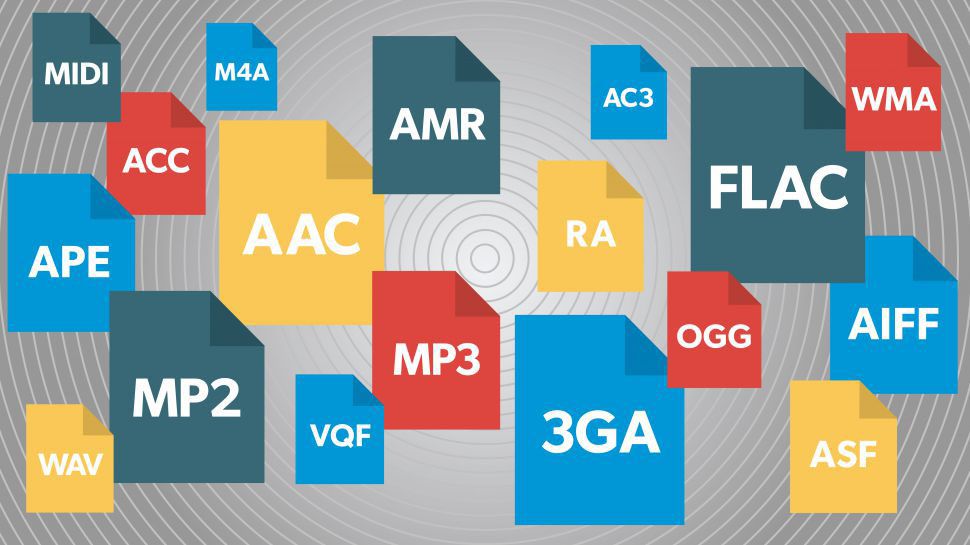
Below is a non-exhaustive list of the most widely used digital audio formats.

AIFF – Audio Exchange File Format

Apple uses a standard audio format. This can be considered the wav equivalent of a mac environment. Audio data is organized according to PCM encoding and is not compressed. There is also a condensed option defined as AIFF-C or AIFC.

AAC – Advanced Audio Encoding

This format is based on MPEG2 and MPEG4 lossy compression standards. It was created as a successor to the mp3 format, which uses a slightly better algorithm. This allows you to get slightly better quality for the same speed.

ALAC – Apple Lossless Audio Codec

This is Apple’s lossless audio format. Also called ALE (Apple Lossless Encoder).

ATRAC (.mp3) – acoustic coding of adaptive transformation

Old Sony audio format with ATRAC compression. Files always have a .mp3 extension, but you need the ATRAC3 driver to open them. MiniDisc was a commercial advertising product that took advantage of this type of format. The codec was later improved by subsequent enhancements such as ATRAC3 (1999), ATRAC3plus (2002), and ATRAC Advanced Lossless (2006).

AS

This is the standard audio format used by Sun, Unix, and Java operating systems. Data encoding can be PCM (uncompressed) or compressed with μ-law, a-law G729 codecs. The Au audio format was introduced by Sun Microsystems. It was a format used on NeXT systems and early websites. Initially, the file did not have a header (the original data from the file) because the encoding was unique: 8 bits with µ-law compression and a sampling rate of 8000 Hz. The latest version of this format contains a header consisting of six blocks. 32 bits, an optional block of information, and finally audio data.

flac

FLAC is a free lossless audio codec

It is an audio codec with lossy compression (without losing information). Data compression can reach 50-60% without losing quality.

M4P

It is a patented version of the MP4 AAC format with a DRM (Digital Rights Management) system developed by Apple to download music from the iTunes Music Store.

MPEG-4 Part 14 or MP4 (formerly ISO / IEC 14496-14: 2003) is a storage medium for multimedia data. It is mainly used to store audio / video data, but can also be used to store other types of data, such as still images and subtitles. Like all modern formats, this format allows data to be sent over the Internet in real time: this feature is implemented by adding a data path for transmission control. The only extension for files that use this codec is .mp4.

mp3

MP3 – MPEG layer III audio recording

It is currently the most widely used audio format. The MPEG-1 or MPEG-2 III audio layer, commonly referred to as MP3, is a patented lossy format. It is used for digital music use at the user (non-professional) level.

OGG

It is an open source container that supports a variety of formats, the best known being the Vorbis audio format. This format offers MP3-like audio compression, but is less common. The big difference with mp3 is the absolute free format. In terms of performance, with the same parameters, Vorbis is slightly more efficient than MP3.

The Ogg cache can handle multiple independent streams at the same time: audio, video, text (such as subtitles), and additional data (metadata).

RA and RM

This is a format developed by Real Audio to transmit audio over the Internet. The .Ra format allows you to store all the audio files you want to transfer in one file. The codec enables transmission from very low quality to high accuracy.

RAW

A RAW file can contain any type of data, but in reality it is mainly used for PCM-encoded (uncompressed) audio data. Thus, unlike the uncompressed audio format (wav, aiff), a flat file does not contain headers with information about the data itself (usually the header contains information about: sampling rate, quantitative bits, channels, type of markup used for the ideas). A typical file extension for this type is: .raw, .pcm, without the extension.

Vox

This audio format uses Dialogic ADPCM (Adaptive Differential Pulse Code Modulation). This performs 4. compression. Vox files are similar to wave files, except that they do not have a header, so you need to specify frequency information.

Better audio formats

You have decided to digitize the music tracks in your audio CD collection by transferring everything to your computer. You started to examine the possibility of converting it into a format that is more convenient for you.

audio formats

With a little experience in this area, however, you would like to get some advice on the subject so you can make the best decision. How do you say? Things are exactly the same and you want to know if I can help you by giving you the best audio formats? Of course yes, that’s exactly what he wanted to do.

audio formats

If you allow me a few minutes of your free time, I can actually use threads and characters to tell you which audio formats are most popular, what strengths and weaknesses they have and what purposes they may be more or less convenient for. Contact. Condition to choose those who you think are actually right for you. To complete the information and give you an even more comprehensive overview of the topic, I will also indicate at the end of the article which tools you can use to carry out various conversion processes. You will find that once you have read this manual, there is no longer any doubt about what to do.

In order to? How about putting the conversation aside and finally getting to the point? Yes? Excellent! So I suggest that you don’t waste any more time and immediately focus on the topic. Make yourself comfortable in front of your trusted computer and read everything below. I am sure you can say that you are happy and satisfied with what you have learned. As always, I hope you enjoy reading.

What are the digital audio formats?

What are the digital audio formats?

PCM, Wav, Aiff. Compression. Mp3, Ogg, Wma.

Working with digital audio is almost a chore for puzzle specialists. Since audio is saved on the computer and all computer files have extensions, we have to interpret each acronym and abbreviation.

The extension is the end of the file after the name and period. It is used to know what type of file it is, whether it is a text, a video or an audio. There are many extensions and they are all sure to sound familiar to you: WAV, RM, MP3, WMA, OGG … Let’s play, then, to decipher puzzles and see what each of these acronyms means.


 UNCOMPRESSED DIGITAL AUDIO FILES

.PCM

It is not a file type or format, but a technique of transforming analog to digital audio without any compression. (1) Therefore, we do not see audios with the pcm extension. We work with PCM when digitizing, but we always keep files with one of these extensions:

.WAV: (Wave, wave in English)

It is the most widely used uncompressed digital audio format. It belongs to Microsoft / IBM.

.AIFF: (Audio Interchange File Format)

It is similar to WAV but for Apple Macintosh or MAC computers.

.CDA

: These are the audio tracks recorded on Compact Disc that also use the PCM system.

All uncompressed files are large. Approximately 10 megabytes for every minute of audio. These are the formats used to store audio at a professional level since the quality is very good. But when we don’t need that much quality and we’re short on space, it’s time to use file compression.

 AUDIO COMPRESSION

Compressing is reducing and whenever we reduce we lose something. The same is true for digital audio. The latest advances have allowed compression to be done with the least possible loss of quality, but there always are. Against that, much has been gained in reducing the size of the files.

While a 4-minute audio in WAV format takes approximately 40 megabytes, that same audio, compressed to MP3, can reduce its weight to 4 megabytes, 10 times less. And apparently, they sound the same. (2)

SAVE WITHOUT COMPRESSING

When working in production, it is always recorded in WAV, without compression. In that same way it is edited and mixed. If the final result of the edition is an audio to be uploaded on the Web or saved on the hard drive of a computer, we can compress it to mp3 but with a quality of no less than 160 kbps.

If, on the contrary, the production has as its final destination to be recorded on a CD, never compress, always leave the audio in WAV and burn it that way on the CD.

1. How does compression work?

It is not about wrinkling or crushing the audio. Most audio compression systems take advantage of a “defect” in our ears to reduce file size. It is called masking.

Masking is a property of the human ear that prevents it from distinguishing two frequencies close together within the same range, one masking the other. For example, if a sound with a frequency of 12 Khz and another of 12.2 Khz sounds at the same time in a song, we could remove one of the two without being noticed when listening to it.

In this way, the compressor “subtracts” the masked frequencies, which reduces the number of bytes. And fewer bytes in computing translates into smaller files, but not shorter. The song, when compressed, lasts as long as it is uncompressed.

2. Quality of compressed files

We saw in the previous question that digital audio has two parameters: the sampling frequency (the optimum is 44.1 Khz.) And the resolution or size of each sample (8 or 16 bits). By compressing, we add a third parameter to these two, the bitrate. It is the amount of kilobytes per second (kbps) and refers to the quality of the compression.

• A lower number of Kbps, more compression, smaller file size, but lower quality.

• A higher number of Kbps, less compression, larger file size and more quality.

A compressed audio at 128 Kbps has a higher compression level than a 256 Kbps one. That means that 128 is a smaller file and less quality than 256. Although you must have a cat’s ear to distinguish between both!

VARIABLE OR CONSTANT BIT

Some files have a constant bit rate per second (CBR Constant Bit Rate) and others have a variable one (VBR Variable Bit Rate). The constant is always the same for all audio, for example 128 kilobytes per second. In the variable method, what the compressor does is use more bits when there are parts of the audio where there are more frequencies and it cannot mask all of them.


COMPRESSED FILE FORMATS

Mp3 (MPEG-1 Audio Layer 3)

It achieves high compressions without much loss, although it all depends on the quality of the compression we use. 128 Kbps and below is not recommended.

Although mp3 is the most widely used compression standard, especially for audio on Web pages, the great drawback is its patent. So any player or editing software that wants to use it has to pay for it.

.OGG (Vorbis)

As a result of this patent, the Xiph.org Foundation developed in 2002 a completely free codec (5) for audio compression. Similar in characteristics to mp3, it is beginning to be used a lot on the Web and in some players since manufacturers do not have to pay the costs of the patent. At this point, it is difficult to completely replace the mp3 but it is eating up a lot of ground.

.AAC (Advanced Audio Coding)

The compression level is higher than mp3 (MPEG-1) without major loss of quality. AAC is one of the codecs used in the new MPEG-4 compression standard. This audio format is used in players like the iPod and in some of the new digital radio systems. AAC is shaping up to be the successor to the mp3.

.RAM (also RM or RA)

They are the files of the Real Network company for audio. The problem is that its reproduction and edition is very limited to software from the same company and few others.

.WMA (Windows Media Audio)

It is Windows’ bet on compressed formats. It is like a WAV, but smaller and less quality. While mp3 and ogg files are played by almost all players and editors, the same is not the case with wma files, so it is rarely used.

. AA3 (ATRAC – Adaptive Transform Acoustic Coding)

Format invented by Sony. It is the one used by minidisc recorder-players.

Understanding digital audio formats

Understanding digital audio formats

When it comes to digitally distributing our music it is important that we understand what they are
the different formats, which are the most used and which are the best in terms of the
Relationship between size and quality.

PCM digital audio

WAVE

The name comes from the acronym waveform audio file format and is a used file
usually on computers with the Windows operating system.
WAV or WAVE files contain audio in LPCM format (Linear Pulse Code
Modulation) This is a way to encode an analog audio signal to the domain
digital by using equidistant samples over time of amplitude values
of the analog signal.
The quantity of samples is given by the sampling rate or sampling rate,
while the amount of possible amplitude values ​​is determined by the
Bit depth or bit rate.
The sampling frequency of the CDAUDIO for example is 44.1 kHz and 16 bits. exist
higher sampling rates such as 48 kHz, 88.2 kHz, 96 kHz up to 192 kHz at
this system.
On the other hand, WAV files are uncompressed audio and are generally used in
stages of recording, editing, mixing and mastering for being of high quality.
The higher the sample rate and the greater the number of bits, the file size will be
our hard drive
In general for professional uses at least a frequency of
44.1 kHz sampling and a depth of 24 bits preferably.
The standard extension for this type of file is: .wav

AIFF

The name comes from Audio Interchange File Format or audio file format
interchangeable, this format was developed by Apple computers and is used to save
and manipulate audio on computers.
It is like WAV a file type without compression or lossles therefore allows
Processing for professional applications such as recording, editing, mixing and
mastering as well as for professional video uses.
Another similarity with WAV files is that it is PCM audio (press code
modulation) that for practical purposes it is the same as the LPCM.
The standard extension for this type of files is .aiff

MP3

Also known as MPEG1 or MPEG2 audio layer, it is a form of coding
of digital audio in which psychoacoustic models discard information from
Audio that is presumed is not audible to most users.
As an example a file created with a resolution of 128 kbits / s is equivalent to 1/11
the size of a file on an audio CD.
The main purpose of using this type of coding is to reduce the size of the
files and be able to send / download faster, especially through
from Internet.
Being a file type reduced in quality IS NOT RECOMMENDED for
recordings, editing, mixing or mastering of professional audio.
For this reason we recommend NOT to use it to send us your clues to
mix / master