The best popular audio formats


Free Download Mp4Gain
picture

The best popular audio formats

Audio Formats

I looked around the forest of audio formats for normal use and chose the 5 most important ones. It is true that, in part, a bit simplified, a bit rough in presentation. I refrain from differentiating the exact settings of the respective codecs, that would be too complex.

I also don’t want to get into the nasty topic of DRM. The most important one I dropped is probably Vorbis. . Of course, I assume that the correct settings are used when encoding and that a high quality level is selected.

Audio formats

1st place:
MP3 (MPEG-1 Audio Layer 3)

The most widespread digital format, with good encoding (for example, with LAME) in high bit rates, a format of the highest quality and transparency.

Quality (4.5 / 5 points)
Popularity (5/5 points)
Compression (4/5 points)
Total: 13.5

2nd place:
AAC (advanced audio coding)

It became famous especially for its use in the Apple iPod, a codec that has small advantages over MP3 at low bit rates due to technical developments.

Quality (4/5 points)
Popularity (4.5 / 5 points)
Compression (4.5 / 5 points)
Total: 13

3rd place:
WMA (Windows Media Audio)

Windows proprietary format. Of course, Microsoft has the reins here, so variable format doesn’t run on all playback devices. Otherwise, no major strengths and weaknesses and, for example, the standard format with Napster.

Quality (4/5 points)
Popularity (4/5 points)
Compression (4/5 points)

Total: 12

4th place:
FLAC (Free Lossless Audio Codec) !!

As the only lossless codec on this list. FLAC works in something like a ZIP program: the original can be restored from the compressed file by approximately 50% without restrictions. In times of low hard disk space, a real alternative, especially since many playback devices can play this format. My winner of hearts, the popularity will certainly increase in the future.

Quality (5/5 points)
Popularity (3.5 / 5 points)
Compression (3/5 points)

Total: 11.5

5th place:
Wav

The original format of the normal audio CD data. Impeccable quality and still widespread thanks to the well-known compact disc. It actually started out of the competition because it’s completely unzipped.

Quality (5/5 points)
Popularity (5/5 points)
Compression (0/5 points)
Total: 10


Free Download Mp4Gain
picture


Mp4Gain Main Window
picture


Mp4Gain Features
picture


Free Download Mp4Gain
picture

Better audio formats

audio formats

You have decided to digitize the music tracks in your audio CD collection by transferring everything to your computer, and in doing so you have begun to evaluate the possibility of converting them to a more pleasant format for you. However, having little experience in this regard, you would like to receive some advice on the subject so that you can make the best decision. How to say Things are exactly this way and would you like to know if I can help you by indicating what are the best audio formats? Of course yes, that was exactly what he intended to do.

If you allow me a few minutes of your free time, I can actually tell you, by thread and by sign, what are the most popular audio formats in circulation, their strengths and weaknesses and for what uses they may be more or less convenient to contact . condition to opt for those that you think may actually be right for you. To complete the information and to give you an even more complete description of the matter, at the end of the article it will also be my concern to indicate what tools you can use to perform various conversion operations. You will see that after reading this guide, you will no longer have any doubts about what to do.

So? How about putting the talk aside and finally getting to the heart of the matter? You? Brilliant! Therefore, I suggest not wasting any more time and immediately start focusing on the topic. Get comfortable in front of your trusted computer and read everything below. I am sure you can say that you are happy and satisfied with what you have learned. I wish you, as always, happy reading.

What is the best audio format?

What is the best audio format?

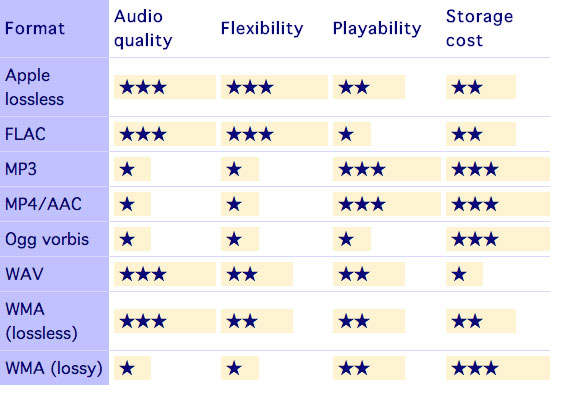
Many are known, but there is always the question of which is the best audio format. The main and most recognized for listening to music are MP3, Wav, FLAC and Ogg.

But, to choose the best audio format, you must first know that they have multiple conformations, and you can always choose the best one. Music always goes everywhere, at home in front of the computer, in a living room with a hi-fi system, with headphones on public transport or when playing sports. Music that gives a special meaning to each moment and that encourages when heard.

There are many ways to enjoy it, but it is usually always done in digital format. Within the audio files, there is a great variety and normally many still use MP3 for convenience. But there are alternatives that are less popular and that seek to offer a different and higher quality experience. For those who do not know it, there are a number of main sound systems.

The best audio format

Beyond that the MP3 format is the most popular of all available audio formats, it is not the only one. Some others like “FLAC”, “WMA”, “OGG” have certain characteristics that, depending on what you want, can be very useful on certain occasions.

In technology, audio formats can generally be classified into 2 categories. There are those that retain all the quality and those that lead to quality losses in sound or information.

Those that preserve the quality of the audio are those that come from pure sources such as CDs. This is how those who lose quality and sacrifice this information are to save space.

Formats that preserve audio quality

“FLAC” is Free Lossless Audio Codec or “FLAC”. It is one of the formats that best preserves the audio quality and its compression algorithm is excellent. It is open source, does not generate quality losses and the size of the file because it is compressed, is much smaller.

Apple Lossless is known as “ALAC” and is very similar to “FLAC”. The difference is that it is not as efficient, so these files are larger, although they still have the unconditional support of iOS, something that “FLAC” does not have.

“APE” is another and although the problem with this format is that it is not compatible with the vast majority of players, it is considered similar to the “FLAC” or “ALAC” format in terms of audio quality. As it is highly compressed, it makes the computer’s processor work faster and therefore it is not recommended to use it in low-power computing equipment.

“WAV” and “AIFF” are not compression formats, but rather exact copies of the original content and differ in the way they save data. “AIFF” was created by Apple and “WAV” is more universal, but both have too much disk space.

Formats with loss of audio quality

MP3, MPEG Audio Layer III or MP3, as many already know them, is the most common format that can be found. “ACC” is very popular on iTunes and is considered more efficient than MP3 since files in this format are smaller.

OGG Vorbis is one of the free and open source alternatives to MP3 and ACC. It is not restricted by patents, but it is also not supported by many players. WMA is Microsoft’s proprietary format and is very similar to MP3, but without great advantages over the others.

Which audio format to choose?

The one that is most recommended to choose is the “MP3” or “AAC”, since many players support them. Furthermore, if they are encoded with a high bitrate, they can hardly be distinguished from the original source. However, if what you want is to burn the music, formats such as “FLAC” are recommended, because then you can convert everything to other formats, without losing the audio quality.

Once the audio formats are known, when choosing, the differences between each one must be taken into account. In general, what experts recommend is to use “MP3” or “AAC” since they are compatible with most players and the quality of both is very similar to that of the original source, especially if it is encoded with a high bit rate. Unless you have a specific need, “MP3” and “AAC” are the most advisable options.

However, one thing to know is that to store music in lossless formats, there is no such thing as “FLAC”. You probably won’t notice a higher quality, but it’s good for storing music if you plan to convert it to other formats later. In these cases, “FLAC” is always recommended, and it is also possible to choose the format without loss or degradation of file quality.

As a final conclusion, it can be said that you should not be obsessed with the subject, but you just have to be sure of what you want and choose.

What are the digital audio formats?

What are the digital audio formats?

PCM, Wav, Aiff. Compression. Mp3, Ogg, Wma.

Working with digital audio is almost a chore for puzzle specialists. Since audio is saved on the computer and all computer files have extensions, we have to interpret each acronym and abbreviation.

The extension is the end of the file after the name and period. It is used to know what type of file it is, whether it is a text, a video or an audio. There are many extensions and they are all sure to sound familiar to you: WAV, RM, MP3, WMA, OGG … Let’s play, then, to decipher puzzles and see what each of these acronyms means.
 

 UNCOMPRESSED DIGITAL AUDIO FILES

.PCM

It is not a file type or format, but a technique of transforming analog to digital audio without any compression. (1) Therefore, we do not see audios with the pcm extension. We work with PCM when digitizing, but we always keep files with one of these extensions:

.WAV: (Wave, wave in English)

It is the most widely used uncompressed digital audio format. It belongs to Microsoft / IBM.

.AIFF: (Audio Interchange File Format)

It is similar to WAV but for Apple Macintosh or MAC computers.

.CDA

: These are the audio tracks recorded on Compact Disc that also use the PCM system.

All uncompressed files are large. Approximately 10 megabytes for every minute of audio. These are the formats used to store audio at a professional level since the quality is very good. But when we don’t need that much quality and we’re short on space, it’s time to use file compression.

 AUDIO COMPRESSION

Compressing is reducing and whenever we reduce we lose something. The same is true for digital audio. The latest advances have allowed compression to be done with the least possible loss of quality, but there always are. Against that, much has been gained in reducing the size of the files.

While a 4-minute audio in WAV format takes approximately 40 megabytes, that same audio, compressed to MP3, can reduce its weight to 4 megabytes, 10 times less. And apparently, they sound the same. (2)

SAVE WITHOUT COMPRESSING

When working in production, it is always recorded in WAV, without compression. In that same way it is edited and mixed. If the final result of the edition is an audio to be uploaded on the Web or saved on the hard drive of a computer, we can compress it to mp3 but with a quality of no less than 160 kbps.

If, on the contrary, the production has as its final destination to be recorded on a CD, never compress, always leave the audio in WAV and burn it that way on the CD.

1. How does compression work?

It is not about wrinkling or crushing the audio. Most audio compression systems take advantage of a “defect” in our ears to reduce file size. It is called masking.

Masking is a property of the human ear that prevents it from distinguishing two frequencies close together within the same range, one masking the other. For example, if a sound with a frequency of 12 Khz and another of 12.2 Khz sounds at the same time in a song, we could remove one of the two without being noticed when listening to it.

In this way, the compressor “subtracts” the masked frequencies, which reduces the number of bytes. And fewer bytes in computing translates into smaller files, but not shorter. The song, when compressed, lasts as long as it is uncompressed.

2. Quality of compressed files

We saw in the previous question that digital audio has two parameters: the sampling frequency (the optimum is 44.1 Khz.) And the resolution or size of each sample (8 or 16 bits). By compressing, we add a third parameter to these two, the bitrate. It is the amount of kilobytes per second (kbps) and refers to the quality of the compression.

• A lower number of Kbps, more compression, smaller file size, but lower quality.

• A higher number of Kbps, less compression, larger file size and more quality.

A compressed audio at 128 Kbps has a higher compression level than a 256 Kbps one. That means that 128 is a smaller file and less quality than 256. Although you must have a cat’s ear to distinguish between both!

VARIABLE OR CONSTANT BIT

Some files have a constant bit rate per second (CBR Constant Bit Rate) and others have a variable one (VBR Variable Bit Rate). The constant is always the same for all audio, for example 128 kilobytes per second. In the variable method, what the compressor does is use more bits when there are parts of the audio where there are more frequencies and it cannot mask all of them.


COMPRESSED FILE FORMATS

Mp3 (MPEG-1 Audio Layer 3)

It achieves high compressions without much loss, although it all depends on the quality of the compression we use. 128 Kbps and below is not recommended.

Although mp3 is the most widely used compression standard, especially for audio on Web pages, the great drawback is its patent. So any player or editing software that wants to use it has to pay for it.

.OGG (Vorbis)

As a result of this patent, the Xiph.org Foundation developed in 2002 a completely free codec (5) for audio compression. Similar in characteristics to mp3, it is beginning to be used a lot on the Web and in some players since manufacturers do not have to pay the costs of the patent. At this point, it is difficult to completely replace the mp3 but it is eating up a lot of ground.

.AAC (Advanced Audio Coding)

The compression level is higher than mp3 (MPEG-1) without major loss of quality. AAC is one of the codecs used in the new MPEG-4 compression standard. This audio format is used in players like the iPod and in some of the new digital radio systems. AAC is shaping up to be the successor to the mp3.

.RAM (also RM or RA)

They are the files of the Real Network company for audio. The problem is that its reproduction and edition is very limited to software from the same company and few others.

.WMA (Windows Media Audio)

It is Windows’ bet on compressed formats. It is like a WAV, but smaller and less quality. While mp3 and ogg files are played by almost all players and editors, the same is not the case with wma files, so it is rarely used.

. AA3 (ATRAC – Adaptive Transform Acoustic Coding)

Format invented by Sony. It is the one used by minidisc recorder-players.

Most important audio formats

Most important audio formats

MP3

MPEG Audio Layer III
-Compressed digital format with loss.
-Its compression size: 11 to 1
-Compresses the audio using a lossy algorithm to obtain a smaller size, decoding the signal, allowing less bits to be consumed, which translates into less weight and less quality.
-Extension: .MP3
-Good compatibility. Can be played on almost all audio players
-Easily distributable online
-Better quality-space ratio
-Loss of the original sound, implies a decrease in quality throughout the format
-Supports two channels
-Distortion in frequency bands where the brightness and sparkle (5000hz-20000hz) are located.
-Increase in the bass and subwoofer frequencies (250hz – 40hz) due to the dynamic compression of the sound that causes a different equalization from the original recording.
-present patterns between tracks

AAC

Advanced Audio Coding
– Lossy compressed digital format
-It is an audio compression system developed by the Fraunhoffer Institute, AT&T, Sony and Dolby Laboratories.
– It is an audio broadband coding algorithm with higher performance than MP3.
-Extension: .m4a, .m4b, .m4p, .m4v, .m4r, .3gp, .mp4, .aac
-Play files from the hard disk of a computer with a quality that can be similar to the CD using significantly less space than an mp3.
-This system increases the quality of the mp3.
-Loss of original sound
-Subject to patent

WAV

Waveform audio format
-Uncompressed digital format.
– Windows own format
– Used to store sounds on PC, supports mono and stereo files at various resolutions and sampling rates
– Extension is .wav
-High sound quality
-Provides faithful listening to the audio
-It works in Windows applications and in common equipment with a CD player.

– Includes support for almost all current audio codecs
– Compatible to convert into various formats by means of the appropriate software.Example switching from Wav to Mp3
-It takes up a lot of disk space
-Poor quality-space ratio
-Difficult to distribute online due to the weight of the file
-Allows to capture in the same file up to 6 hours

FLAC

Free Lossless Audio Codec
– Lossless compressed format

-Extension: .flac
-Higher quality in high fidelity equipment
-Information is continuous between separate tracks
-It does not delete information from the original content
-It is an open source format.
-Code and decode quickly
-It takes up a lot of disk space
-It is not supported by all portable players

AIFF

Audio Interchange File Format
-Uncompressed format without loss.
– Format typical of native applications of Mac OS X for example iTunes
-Extension: .aiff or .aif.
-High sound quality
-Requires large storage space

OGG VORBIS

-Compressed format loss
– Stream-oriented container, which means that
can be written and read in one step, making it suitable
for streaming on the internet.
– Free software version to MP3 and AAC.
– Intended to allow maximum encoder flexibility
Extension: .ogg
-It is free, open and not patented
-Similar to MP3
-Good value for space
-Improved same-size MP3 quality.
-It is not supported by all players
-Loss of original sound

WMA

Windows Media Audio
– Lossy audio compression format, although there is a more recent lossless development
-Windows version to compress audio
-Extension: .wma
-Ideal for real-time streaming
-Reduce size of large files
– Inclusion of support in Windows Media Player
-Lower quality
-It takes space
Real Audio
-Media player with various functions and Internet connection tools
Example: listening to music and watching videos hosted on the Internet (streaming), and creating and playing extensive playlists.

– Ideal for live streaming over the network due to its streming ability
– the coding allows adapting it to the user’s reception capacity depending on their internet connection speed.
-Can be used in different operating systems (Windows, Linux, Mac OS)
– Ability to transfer files to other multimedia devices
-Reduction in file sizes

-Incompatibility with some browsers
-High RAM consumption

APE

– Lossless compressed format
-Extension: .ape
-Save space
-High quality
-Better file compression rate
-It is not compatible with most players.
-Slow to compress and decompress files