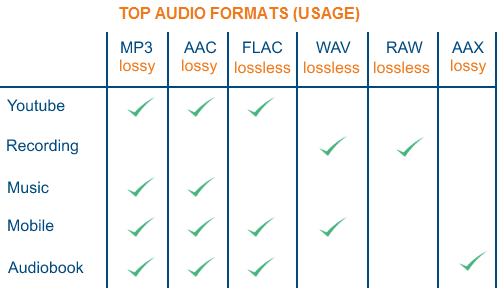
The audio formats with the best sound quality


Free Download Mp4Gain
picture

The audio formats with the best sound quality

audio formats
audio formats

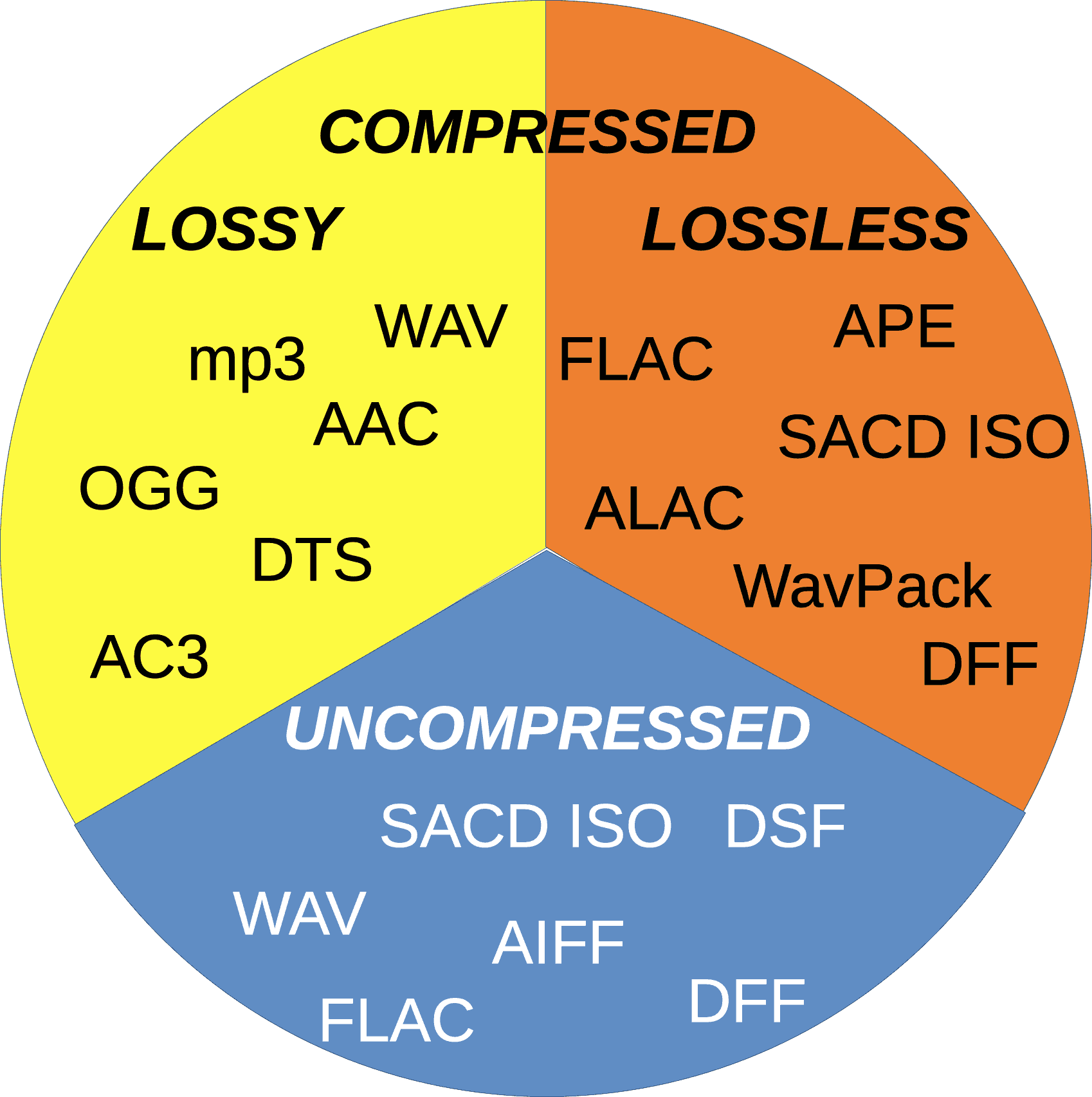
First of all, divide all types of music files into three parts as follows:

audio formats
audio formats


Uncompressed file formats: .WAV, .AIFF

Lossless compression formats: .FLAC, .ALAC (Apple Lossless)

Destructive compression formats: .MP3, .AAC, .WMA, .OGG

Below are their respective advantages and disadvantages.


1. Uncompressed file format
Uncompressed music files are just like the concept of Raw files. Essentially no compression will of course have the best sound quality. (The sample rate and bit rate of the original recording are also very important. If the compressed music file is converted to an uncompressed file, the music won’t magically improve the sound quality.)

The most common disadvantage of uncompressed files is the file size. Generally, the file size of a song is around 25 ~ 40 MB. While that capacity is no longer an issue for cloud hard drives, it is still an issue for email. Also big (25MB max for Gmail attachments). Also, some portable music players or devices may not be able to play such music files.

Advantages: original sound reproduction, no compression, lossless, easier to use in post production

Disadvantages: large file format, fewer supported devices


2. Lossless compression format
The term “compressed and lossless” seems contradictory, but compression does not necessarily affect sound quality. More precisely, it’s more like “compressed to save space”. It’s like compressing a high quality file into a .ZIP and decompressing it when you want to use it, the quality of the file will not be affected.

Therefore, this type of file has a compressed capacity, but the file will be decompressed during playback to restore sound quality. Although the concept of reducing capacity without affecting sound quality is great, the downside is that support for this format is extremely low and in order to decompress the file during playback, an additional codec is required to use it, and it will. also take some performance.

Advantages: small file capacity (about 1/2 ~ 1/3 lossless files), good sound quality

Disadvantages: Decompression can eat performance when used, and support from hardware or software is extremely low


3. Destructive compression format
The destructive compression format is currently the most common music file format, the main reason is that it has the greatest compatibility with portable devices (mobile phones, MP3 players, etc.), and the files are small and have a space of limited storage. , users can store more music (compressed capacity is about one-tenth of lossless sound quality), and most of the music provided by today’s streaming media is files in this format. There is always a price to pay for smaller files. Compared to lossless formats, this destructive compression will affect the audio range that the original sound can present and will cause some distortion. So, to be safe, keep the compression rate above 320 kbps as much as possible.


Free Download Mp4Gain
picture


Mp4Gain Main Window
picture


Mp4Gain Features
picture


Free Download Mp4Gain
picture

Detailed music format

Detailed music format

Audio File Formats
Audio File Formats

classic wave

Audio File Formats
Audio File Formats

As the most classic Windows media audio format, the WAVE file is widely used, which uses three parameters to represent sound: the number of sampled bits, the sample rate, and the number of channels.
The channels are divided into mono and stereo, and the sample rates are generally 11025 Hz (11 kHz), 22050 Hz (22 kHz), and 44100 Hz (44 kHz). The capacity occupied by the WAVE file = (sampling frequency × sampling bits × channel) × time/8 (1 byte = 8 bits).

traditional mod

MOD is a wavetable-like music format, but its structure is similar to MIDI, it uses real samples, and the volume is small. In the earlier DOS era, MOD was often used as background music for games. Modern mods can contain many audio tracks in many formats, such as S3M, NST, 669, MTM, XM, IT, XT, and RT.

midi music computer

MIDI is short for Musical Instrument Data Interface. Records the sound played by the instrument digitally (each note is recorded as a number), and then synthesizes these records via FM or wavetable during playback: FM synthesis is the sound of the instrument is simulated by mixing the multi-frequency sounds; wavetable synthesis consists of storing the sound samples of the instrument in the wavetable of the sound card and extracting the sound from the wavetable as you play.

Boss Boss MP3

It can be said that MP3 is famous, it uses MPEG Audio Layer 3 technology to compress the sound with a compression ratio of 1:10 or even 1:12, with a sampling rate of 44kHz and a bit rate of 112kbit/s. .
MP3 music is music stored in digital form. If you want to play it, you must have a corresponding digital playback and decoding system. Generally, MP3 digital music is decoded by special software and then restored to a waveform sound signal for playback output. This type of software is called For MP3 players, such as Winamp, etc.

Overlord RA series online

RA, RAM, and RM are Real’s mature network audio formats, using “streaming audio” technology, making them well suited for network streaming. Information such as copyright, singer, producer, mail and song title can be added during production.
RA can be called the supreme lord of multimedia communication on the Internet. It is suitable for streaming on the Internet and is currently the best format for listening to online music online.

VQF with high compression ratio

VQF or TwinVQ is an audio compression technology developed by Nippon Telegraph and Telephone and Yamaha Corporation.
The audio compression rate of VQF is almost twice that of standard MPEG audio and can reach approximately 1:18 or even higher. And popular compression formats like MP3 and RA are usually only around 1:12. But it still won’t affect the sound quality, when VQF compress music at 44kHz-80kbit/s audio sampling rate, its sound quality will be better than 44kHz-128kbit/s MP3, when compress at 44kHz-96kbit/s , the music is close to 44kHz-256kbit/s MP3.

MD minidisc

MD (ie MiniDisc) is a comprehensive portable music format released by SONY in 1992. The compression algorithm it uses is ATRAC technology (the compression ratio is 1:5). MD is divided into Recordable MD (Recordable, with two heads of magnetic head and laser head) and Single Play MD (Prerecorded, only laser head).
The powerful editing function is the strong point of MD. You can quickly select tracks, move tracks, merge, split, delete and edit track titles. It is more personalized than CD and you can have your own MD album at any time. MD products include MD Walkman, MD bedside audio, MD car audio, MD recording deck, MD camera gun and MD driver, etc.

What audio format should I choose?

What audio format should I choose?

Best Audio Format

The audio format is usually a measure of the quality of a track. There is a lot of debate about which is the best music format. So I recently witnessed a similar dispute. Not virtual, but real. In general, I decided to write an article on audio formats and human language to try to explain what is the best audio format. I’ll try to avoid abstruse terms and feature descriptions, so as not to hurt the brains of readers again.

BEST AUDIO FORMAT

Right away, I admit that I will not sing praises in honor of any particular audio format, just as I will not “skip” anyone. Let everyone decide for themselves. I will not go into the “jungle” and review the most famous formats of high quality music.

I believe that these disputes are conducted by people, to put it mildly, not well versed in this matter. Because professionals (that is, people who know what they are doing and why they are doing it) will not do it. With today’s abundance of audio formats, anyone who needs it will find what they need. Agree, a dispute between a tractor driver and a driver about which is better – a tractor or a car will look silly. For some purposes a tractor, for others a machine. Here it is the same.

WAV is rightly considered the highest quality music format. This audio format is not compressed or lossy. Used for recording and processing sound, this is the highest quality sound, as the WAV recording is not compressed. Encoded to any other audio format. Well, as a result, it “weighs” a lot, which is why it’s mainly used for sound recording.

The following are several “interpretations” that can be divided into:

Lossy audio compression

I’ll start with the well-known and widely used (though not always loved) MP3 format. This audio format is actively used everywhere and everywhere, where it is needed and where it is not needed. But this does not mean that it is not worthy of the place it occupies in its niche. Very worthy. Although he has been “sitting” in his niche for about two decades, no one has “kicked” him out of there yet. And there were many who wanted to say it. And the main favorite of them is WMA (Windows Media Audio), which was conceived by Microsoft as an alternative to MP3. As a result, it is an alternative and it is, despite the best efforts of the developers. The next character is OGG. Despite the broader possibilities than MP3, for example, it never received widespread acceptance. Although it is compatible with many operating systems. Perhaps, it is worth mentioning the AAC audio format, which was supposed to replace MP3 in the relay. Encoding quality has been improved and compression loss reduced. But Ay.

The main advantage of these formats is their small size. The downside is the loss of quality.

Lossless audio compression

FLAC is perhaps the most popular lossless audio format and encoding codec. Music lovers are gradually switching to this format. WavPack competes with it, but it is not that popular. It’s the same story with Apple Lossless, which reduces the size to 60%.

Here the story is exactly the opposite: the quality is better and the size is greater.

Skeptics say that it is almost impossible to distinguish MP3 (320 kbps) from Losless by ear. “And if there is no difference, why pay more?” In fact, it is quite difficult to feel the difference in audio formats on common equipment, even for music lovers. But there are those who immediately feel this difference (they personally attended the experiment). But when listening to a good device, the difference is huge. The problem is that not everyone can afford a good device.

What is the best quality music format?

What is the best quality music format?

Best audio file format

There are many different audio formats. The most widely used formats are MP3 (MPEG-2 Audio Layer III) and WAV. The type of format is usually determined by the file extension (what comes after the period in the file name .mp3, .wav, .ogg, .wma)

Best Audio Format

A codec is a specific algorithm for encoding and compressing data in an audio format. For some file types, the codec is uniquely defined. For example, the mp3 format always uses the MPEG Layer-3 codec, while the mp4 format can use different codecs.

Often the concepts of codec and format are used in the same sense. Especially when the format always uses the same codec. But sometimes it is important to distinguish between the concepts of formats and codecs. For convenience, the format can be considered to be a kind of container in which an audio or video signal can be recorded using a specific codec.

Some formats, like mp4 or flv, can contain audio and video streams.

If you don’t know which program to open a particular audio format, we recommend that you use our audio converter. Supports almost all formats.

Codecs are divided into two types, depending on the type of compression:

Lossless sound quality

This group of formats records and encodes audio in such a way that by decoding it it can be accurately restored.

The most popular lossless encoding formats are:

FLAC (Free Lossless Audio Codec)
APE (mono audio)
ALAC (Apple Lossless Audio Codec)
Loss of sound quality (lossy)

Lossy compression modifies the sound. For example, frequencies inaudible to the human ear are eliminated. The decoded file will differ from the original in terms of the information recorded on it, but it will sound almost the same.

Popular lossy formats:

Learn more about popular audio formats
WAV is one of the first audio formats. Typically used to store uncompressed audio (PCM) recordings that are identical in sound quality to CD (audio-CD) recordings. On average, a minute of sound in wav format takes about 10 megabytes. Often an audio CD is ripped and then converted to mp3 using an audio converter.

MP3 (MPEG Layer-3) is the most widely used audio format in the world. MP3, like many other lossy formats, truncates audio that the human ear cannot hear, thus reducing file size. At the moment, mp3 is not the best format in terms of the relationship between file size and sound quality, but due to its prevalence and compatibility with most devices, many people store their records in it.

WMA (Windows Media Audio) is a proprietary format of Microsoft. Initially, this format was presented as a substitute for MP3, which according to Microsoft has higher compression characteristics. But this fact has been questioned by some independent tests. The WMA format also supports DRM data protection.

OGG is an open format that supports encoding of audio with various codecs. The most widely used codec in ogg is Vorbis. In terms of compression quality, the format is comparable to MP3, but less common in terms of media player and audio player support.

AAC is a proprietary audio format that has more capabilities (number of channels, sample rates) compared to mp3 and offers slightly better sound, with the same file size. At the moment, aac is one of the highest quality lossy audio encoding algorithms. The format is compatible with most devices. A file of this format can have the extensions aac, mp4, m4a, m4b, m4p, m4r.

FLAC is a popular lossless compression format. It does not change the audio stream and the sound encoded with it is identical to the original. It is often used for listening to sound in high-end sound systems. It has limited support for devices and players, so generally for listening to flac on the player, it is pre-converted.

Choose the best format to compress audio data

Choose the best format to compress audio data: MP3, AAC or WavPack?

Best Audio Format

Choose the best format to compress audio data: MP3, AAC or WavPack?
If not lossless, then a cat? MP3, AAC, what else? Previously, we have already studied music compression algorithms several times, it is time to compare the most valuable ones.

Best Audio Format

Amicably, you’d need to give up lossy codecs entirely, but it’s always interesting to draw the line where quantity turns into quality. Also, even a lossy codec can surprise you with something, you’ll see. In this review, it was decided not to play around with different VBR modes, but to immediately stop at the maximum bitrate with a constant value of 320 kb / s. Today, with modern laptop capacity, asking for an extra 10MB for album capacity at the risk of losing quality? For what? In general, even with older codecs, the 320 kb / s stream ensures the absence of characteristic artifacts with nasty jingles. The first part of the review will be devoted to comparing the growth of artifacts using RMAA software, in the second part, the subjective experience of the listener in real phonograms is presented.

Comparative frequency response of three lossy formats relative to original WAV
If the last time the iPad Mini was used as a sound source, now, to improve accuracy, we take any iron influence out of the brackets, and then all the distortion analysis will be done exclusively in the digital domain, without conversion to analog as RMAA provides such an opportunity.To do this, we generate a test sample in WAV in RMAA, then handle it one by one in various lossy codecs. Then we will convert WAV from them again, so that the program can “recognize” the file and evaluate deviations from the original template. Now let’s look at how high frequencies are cut and distortion increases, giving the sound an unpleasant color. By the way, there won’t be that many. In general, at a bit rate of 320 kb / s, it will not be so easy to detect something harmful by ear. It’s not even about artifacts, but maybe a bit of “boring” of the sound compared to the original. The phonogram seems to fade a bit, it loses its mobility due to the alteration of transient processes after psychoacoustic processing. But it will not always be possible to clearly record this difference, it depends on the specific track.
MP3: Avalanche Distortion Let’s start with the most popular format. MP3 is a monster from the Fraunhofer Institute that has taken over the Earth. Because of this, nowadays no one thinks of using pure WAV for sound recording. Even if they rip out the defaced YouTube audio, they still rip it back down to MP3, and even at an obscene 128kb / s bit rate. We will not do that, and for the test we will use the most current version of the LAME 3.100 encoder with an insane preset and 320 kb / s bit rate. In the first figure, it was seen that the spectrum in MP3 is expected to experience oscillations in the HF region and eventually filter into the 20 kHz limit. Of course, this is the limit of the synthetic test; in a real music signal, it will probably be even lower. The size of the dynamic range in the MP3 file has not changed compared to the original. Those. The LAME 3,100 encoder at 320 kb / s does not add any noise to the recording.

1 kHz waveform distortion when encoded in MP3 compared to original WAV
Converting a single 1 kHz signal to MP3 showed the appearance of many small harmonic distortions. And although formally their participation is small (0.0009%), that is, one and a half to two times less than in the exhaust of a good DAC: in the dynamic spectrum of a real phonogram, their number will grow in an avalanche and in an unpredictable order. Furthermore, the “thickening” of the base of the strait at the original 1 kHz peak indicates certain problems, fouling with parasitic oscillations. This characteristic is clearly illustrated by the 100 Hz “square” wave after conversion to MP3. As you can see, its outline loses its definition along the horizontal axis. All of this ultimately has a negative effect on listening fatigue when listening to MP3s, unfortunately even the highest bit rates.

100 Hz “square” wave after conversion to MP3 (top) and AAC (bottom)
AAC: Increase the noise, but keep it clean A more precise way operates the AAS algorithm, which is actively used by Apple, and not only by it. Digital TV broadcasters work with this audio codec and furthermore AAC is included in the MPEG-4 container package.The square wave after conversion to AAC retains its shape, although base distortion and distortion also occurred. harmonics around the 1 kHz peak, although less noticeably than MP3. At the same time, AAC demonstrates a 1 dB higher measured noise level. What does it mean: intermediate recording on a cassette or what? No, the AAC algorithm probably uses something like noise shaping, a great invention that allows you to reduce quantization errors when mixing a pseudo-random noise signal. Again, it’s not just about drowning out the distortion below the noise floor, but using more sophisticated math. To illustrate, let’s look at the artifacts around the so-called 11.025 kHz jitter test. Why this particular frequency? Because the multiple harmonic of this peak falls exactly on the upper limit of the 44 kHz digital stream spectrum, and all the rest will be outside of it. Small spurious peaks, especially those that are symmetrical with respect to pitch (modulation products, “sidebands”) – these are the grains of jitter.

AAC (top) and MP3 (bottom) jitter test stability
As you can see, Fool-MP3 saved a low noise level, but generated more high frequency fluctuations (more noticeable to the ear), and AAC raised the noise a bit, but avoided clutter in the rest of the spectrum. But the WavPack encoder does even bigger tricks with noise shaping.
WavPack: Keep Frequency, Change Bit Width In general, if it comes immediately and very briefly, today’s WavPack encoder math belongs to the most flexible and cool protocols for audio enthusiasts, no kidding. Unlike FLAC, it can support 32-bit computation (I recommended it for creating lossless vinyl rips). Furthermore, in WavPack you can even package a DSD file without converting it to PCM. In this case, the file size will be much smaller than the original dsf. But we will talk about lossless WavPack some other time, but for now we will consider the unique principle of how the WavPack codec works at a loss. In one of my reviews, I showed that in several cases when compressing lossy it makes sense to reduce not the sample rate , but directly the bit depth of the signal (that is, below 24 or 16 bits), carefully mixing the dither (that is, a special noise profile to reduce quantization errors). WavPack went in exactly this glorious way, without touching on discretion and frequency in general, but changing the bit depth, which is now a dynamic value, describing the loudness level of the signal. A bit like the DSD principle, right? It is noteworthy that when converting to a lossy WavPack, you can also save a parallel “correction” file, with which it will be possible to fully restore the original, down to the last bit. It is true that in this case it will not work to save disk space, since the size of said pair will still correspond to the original without loss. However, the functionality of the protocol is still impressive, the bitrate of our test file was set at 320 kb / s to compare it to the maximum of our MP3 and AAC, but theoretically in WavPack it can be set even higher.


The best popular audio formats

The best popular audio formats

Audio Formats

I looked around the forest of audio formats for normal use and chose the 5 most important ones. It is true that, in part, a bit simplified, a bit rough in presentation. I refrain from differentiating the exact settings of the respective codecs, that would be too complex.

I also don’t want to get into the nasty topic of DRM. The most important one I dropped is probably Vorbis. . Of course, I assume that the correct settings are used when encoding and that a high quality level is selected.

Audio formats

1st place:
MP3 (MPEG-1 Audio Layer 3)

The most widespread digital format, with good encoding (for example, with LAME) in high bit rates, a format of the highest quality and transparency.

Quality (4.5 / 5 points)
Popularity (5/5 points)
Compression (4/5 points)
Total: 13.5

2nd place:
AAC (advanced audio coding)

It became famous especially for its use in the Apple iPod, a codec that has small advantages over MP3 at low bit rates due to technical developments.

Quality (4/5 points)
Popularity (4.5 / 5 points)
Compression (4.5 / 5 points)
Total: 13

3rd place:
WMA (Windows Media Audio)

Windows proprietary format. Of course, Microsoft has the reins here, so variable format doesn’t run on all playback devices. Otherwise, no major strengths and weaknesses and, for example, the standard format with Napster.

Quality (4/5 points)
Popularity (4/5 points)
Compression (4/5 points)

Total: 12

4th place:
FLAC (Free Lossless Audio Codec) !!

As the only lossless codec on this list. FLAC works in something like a ZIP program: the original can be restored from the compressed file by approximately 50% without restrictions. In times of low hard disk space, a real alternative, especially since many playback devices can play this format. My winner of hearts, the popularity will certainly increase in the future.

Quality (5/5 points)
Popularity (3.5 / 5 points)
Compression (3/5 points)

Total: 11.5

5th place:
Wav

The original format of the normal audio CD data. Impeccable quality and still widespread thanks to the well-known compact disc. It actually started out of the competition because it’s completely unzipped.

Quality (5/5 points)
Popularity (5/5 points)
Compression (0/5 points)
Total: 10

All about all audio file formats

Dematerialized music has evolved considerably for almost 15 years and has played an important role in the daily life of every individual. We’ve all heard more or less about FLAC, MP3, WAV, etc.! Few people really know the difference between each size, its pros and cons …

audio formats

This article is intended to enlighten you to make the best possible choice for extracting and compressing your audio files.

There are different types of layouts that can be grouped into several large families:

– uncompressed files

-lossless compressed files

– Lossy compressed files

audio formats

-Uncompressed files

WAV: WAV (Waveform Audio File Format) is an audio file format created by Microsoft for Windows. This format is usually an uncompressed container. Therefore, an audio CD with a duration of about 80 minutes in WAV weighs plus or minus 800 MB

Advantages: the file remains in its original form, no loss of information (no loss)

Disadvantages: The WAV file is an uncompressed format that gives it a large size and therefore takes up more space in the storage space.

AIFF – Audio Interchange File Format (AIFF) is the Mac OS equivalent of the WAV format. Therefore, it has the same characteristics as this. The pros and cons of this format are the same as for WAV.

– Lossless compressed files

FLAC: The FLAC (Free Lossless Audio Codec) format is without doubt the most beneficial file for the user. Firstly, in terms of WAV and AIFF, this format is a lossless format, ie the digitization of the file does not imply any loss of information from the audio spectrum. The file is scanned and returned as is. The second advantage of this format is the size it occupies in the storage space. Nondestructive compression is applied to this type of format as a ZIP file, making the scanned file about 2 times less space than a WAV file. Therefore, for 80 minutes of music on CD, the occupied space will be approximately 400 MB. Finally, this format is universal, compatible with most multimedia players, it is compatible with all operating systems except iOS,

Advantages: file size, identical reproduction of the original file during scanning, free and compatible with almost all media players and operating systems

– Disadvantages: none

ALAC: The ALAC (Apple Lossless Audio Codec) format is simply the Apple equivalent of the FLAC file.

– Lossy compressed files

MP3: The MP3 format (Mpeg Layer 3) is a well-known format. It is a format with destructive compression, that is, a recording from which musical information has been removed thanks to the so-called psychoacoustic compression algorithm (taking into account the peculiarities of the human ear), so that less scanning is needed to create a lighter file to obtain . This format is most commonly used for dematerialized music, as it allows a significant space saving in the storage space with a size of about 150 MB for an 80 minute CD. Compression can be more or less destructive depending on the speed used, which can range from 4: 1 (320 Kbits / sec) to 12: 1 (128 Kbits / sec).

-Advantages: it takes up little space on the hard disk and does not affect the quality of the songs with a dynamic range and a limited variety of timbres

– Disadvantages: paid MP3 license, destructive compression for “richer” songs.

AAC: The AAC (Advanced Audio Coding) format is a format close to the MP3 format, but provides additional definition with an identical compression rate. Apple uses this specific format in the iTunes Store, but also on YouTube. the extension can be written in various forms, such as .AAC, .M4A or MP4

-Advantages: better compression quality than MP3

-Cons: compressed file format at a loss

Which format for digital music should you choose?

AAC, MP3, MP3 Pro, Ogg Vorbis, WMA. In the digital age, choosing one or the other of these standards is not easy. Especially since their properties lend them to one use instead of another. Detailed review

codec

Which format for digital music should you choose?


MP3 is far from alone in the world. Feeling that compressed digital music is likely to change the record market, many developers have begun designing formats designed to offer the best compromise between the amount of data used and the sound quality. Thus, AAC for Apple, WMA from Microsoft and other OGG Vorbis communities were born. So many standards that have their advantages and disadvantages and that it is advisable to know them well before choosing the most appropriate coding software for your needs.

audio formats

First, remember that an audio CD uses uncompressed data. Music is digitized on its surface at a rate of 44,100 samples per minute. Second, each of these samples is encoded in 16 bits (2 bytes) and in stereo. This gives a total of 176 KB per Second music, or about 10 MB per second. Minute. Even if an increasing number of Internet users use broadband, websites that sell music for download cannot afford to offer 40-minute four-minute songs. Compression formats allow this amount of data to be shared by a factor ranging from 8 to 15, with little or no loss of quality.

All of these compression algorithms work on the same principle: eliminate frequencies that the human ear does not perceive at all, or very little, and level the frequencies close to each other for identical values ​​to increase compression. These are the so-called “destructive” algorithms. In other words, when converting a compressed audio file from an audio CD to an audio CD format, the resulting data will not be the same as the original file. Depending on the formats and needs, compression may be more or less important. It is defined by what is called bitrate, that is, the flow of information per. Second of music. It can range from 32 kbps (kilobits per second) to 320 kbps. Detailed review of the different formats.

audio formats

MP3

Commonly designed by the Fraunhofer Institute and Thomson and standardized in 1992, it is a derivative of audio compression used for MPEG-1 format videos (MP3 also stands for MPEG-1 Audio Layer 3).
This is the format offered by the main configuration panel. In fact, we can define a bit rate (“bit rate” in jargon) that ranges from 32 to 320 kbps. From 128 Kbps the sound quality becomes enough to encode songs. At 192 Kbps, the quality is similar to an audio CD. At this compression rate, one minute of music equals 1.4 MB of data. But it is also possible to choose a variable bit rate called VBR (variable bit rate). In this case, the encoder increases the compression ratio in less complex music regions, reducing the size of the final file slightly. The benefit depends largely on the type of song: 5 to 10% with an extract from classical or jazz music, not much with rock or rap.
The great advantage of MP3 remains its compatibility with all portable audio players, but also certain hi-fi systems, car radios and DVD players in the living room. Almost universal, it appears on all free download sites such as Kazaa or eDonkey. On the other hand, this format sinks slightly at the level of high frequency recovery and is therefore less suitable for e.g. Classical music.
Free MP3 encoding software includes WinAmp and MusicMatch JukeBox. Lastly, note that there are several MP3 coding algorithms, with “Fraunhofer” being the most widely used, and “Lame” being the most effective, with the latter being especially compatible with Pinnacle’s CDex.

WMA

Launched in 1999 by Microsoft, WMA (Windows Media Audio) was only intended to counter the rise of MP3. With compelling arguments. By utilizing the features of the human ear more effectively in the audible spectrum, WMA is able to eliminate frequencies that are truly useless while maintaining certain high frequencies that affect sound quality. The relatively efficient compression algorithm maintains a quality that corresponds to an audio CD with a 128 kbps bit rate, or 1 MB per second. Minute of a song.
Completely free of charge, WMA also has the advantage of having an encoder built into Windows Media Player. An effective way to ensure the spread of this support. Especially since this format is linked to precise copyright management (DRM or Digital Right Management) that allows, for example, to define a limited useful life of files or prohibit recording options. That’s why some music download sites use it. Many digital audio players also support WMA and reputable shareware such as WinAmp allows encoding in this format.

AAC

Contrary to belief, AAC (Advanced Audio Coding) is not a format developed by Apple, but by a consortium that includes the Fraunhofer Institute (father of MP3), Sony and even Dolby. Prestigious names that grow well. In fact, AAC is arguably the most efficient compression algorithm. Unlike MP3 and WMA, it is not based on MPEG-1 but on MPEG-4 (the format behind DivX). This choice seems to have paid off as it allows you to get a better compromise between compression ratio and sound quality. That’s why at AAC we get the equivalent of audio CD quality with a bit rate of only 96 kbps. In addition, as with WMA, the DRM (copyright management) features and the ability to control sounds on 48 different channels,
We found AAC on the Apple iTunes online music site and on your iPod player. But it is also integrated into software like WinAmp.

OGG Vorbis

OGG Vorbis is in audio compression format, as Linux is in operating systems. In fact, it is an “open” format whose source codes are public and can be customized and changed by anyone. It’s still a pretty effective format. At 128 kbps, we reach the quality level of an audio CD (1 MB in 1 minute). The compression structure of OGG format is also significantly different from MP3, WMA and other AACs. Segmenting audio sources into successive packets, the compression algorithm works first on each packet independently of the others. This allows you to not really have weakness at certain frequencies and to maintain the same quality regardless of the type of music.
In addition, polyphony features allow playback of up to 255 audio channels (sic). The package structure also makes it very suitable for streaming on the Internet, especially for online radios. Open, OGG Vorbis needed to evolve quickly and maybe move closer to AAC in terms of performance.

What is the best file format for listening to music?

Digitizing music involves compressing the original sound that may distort the work. AAC, MP3, WMA or Wav: which of these formats offers the best representation?

Best audio format

If we are not aware of or no longer aware of the quality of today’s music in its digital form, it is often because our audio rendering tools are so poor. This is due to the speakers that come with desktops or built-in laptops, but also to the headphones / earphones that come with MP3 players, which are mostly entry-level products. On the other hand, for those with high performance equipment, listening to poorly recorded or poorly coded songs quickly becomes unpleasant.

best audio format

Therefore, choosing the best audio format for the same recording is best for fun. Today, there are 5 main audio file formats: AAC (promoted by Apple, iPod and iPhone in mind), WMA (promoted by Microsoft), MP3, Wav and Ogg (the last three are neutral).

In addition to the file format, there is another criterion called the compression ratio. The more a file is compressed, the more it removes the frequency bands in the music and therefore potentially small nuances that enrich the listening. The compression ratio is expressed in the number of bits, the basic computing unit. Values ​​range from 56 Kbits / s (56,000 bits per second, minimum quality for radio or podcasts) to 320 Kbits / s. The lower the number, the more compressed and small the file will be, but the less comfortable it is to listen to.

The sampling frequency is also important. This value is expressed in Hz and must be as large as possible to preserve the shape of the original audio signal and therefore the accuracy of the recording. In general, we prefer a file with a sampling rate for CD quality (44,100 Hz), but we also found lower quality files (22,000 Hz).

The study from the Musiclassics studio.

This online digital music sales site dedicated exclusively to classical music launched a modernization of its interface during 2009. On this occasion, the question arose about the best audio formats that its customers could offer. To make it right, the site invited 15 people (bloggers, musicians, fans, audiophiles) to a listening session in a professional studio. They had to judge from 1 to 5 the quality of 4 different musical excerpts representative of the diversity of classical music (voice, violin, piano, orchestra and heart), coded in 6 different ways: MP3 320 Kbps, Wav, WMA 192 Kbps and 320 Kbps, AAC 192 Kbps and 320 Kbps. Here are the results of this study:

Examine listening results
File formats average rating received (out of 5)
MP3 320 Kbps ……………… 3.1
Wav ………………………………. 3.5
WMA 192 Kbps …………… 3.7
AAC 192 Kbps ……………. 3.8
AAC 320 Kbps ……………. 3.8
WMA 320 Kbps …………. 4.0

Since formats compressed at 128 Kbps or less have not been studied, the difference in ratings is relatively small. However, the MP3 format, even compressed at 320 Kbps, is the worst with a significant difference. More surprisingly, the CD (Wav file) is located behind the WMA and AAC formats. These files seem to change the rendering slightly. It is observed that the difference in notation between the 192 and 320 Kbps compression is not significant.

But too bad MusiClassics did not want to integrate the free and open OGG file format into these results. However, we noticed that as a consumer it would be better to choose 192 Kbps AAC or WMA files instead of 320 Kbps MP3 and 192 192 Kbps MP3. 128 Kbps files would score less than 3/5, which is not satisfactory.

What is the best audio format?

What is the best audio format?

Many are known, but there is always the question of what is the best audio format. The main and most recognized for listening to music are MP3, Wav, FLAC and Ogg.

But, to choose the best audio format, you must first know that they have several conformations, and you can always choose the best. Music always goes everywhere, at home in front of the computer, in a living room with a hi-fi system, with headphones on public transport or when playing a sport. Music that gives a special meaning at all times and that encourages listening.

best audio format

There are many ways to take advantage of it, but this is usually done in digital format. In audio files, there is a wide variety and normally many still use MP3 for convenience. But there are less popular alternatives that seek to provide a different, better experience. For those who do not know it, there are a number of main sound systems.

The best audio format

Beyond the fact that the MP3 format is the most popular of all the audio formats available, it is not the only one. Some others like “FLAC”, “WMA”, “OGG” have certain characteristics which, depending on what you want, can be very useful on certain occasions.

In technology, audio formats can generally be classified into 2 categories. There are those which preserve all the quality and those which involve losses of quality of the sound or information.

Those that preserve the quality of the audio are those that come from pure sources such as CDs. This is how those who lose quality and sacrifice this information must save space.

Audio quality formats

“FLAC” is a lossless audio codec or “FLAC”. It is one of the formats that best preserves audio quality and its compression algorithm is excellent. It is open source, does not generate quality losses and the file size because it is compressed, is much smaller.

best audio format
lossless

Apple Lossless is known as “ALAC” and is very similar to “FLAC”. The difference is that it is not as efficient, so these files are larger, although they still have unconditional support for iOS, which “FLAC” does not.

“APE” is another and although the problem with this format is that it is not compatible with the vast majority of players, it is considered to be similar to the “FLAC” or “ALAC” format in terms of audio quality. . As it is highly compressed, it accelerates the functioning of the computer’s processor and it is therefore not recommended to use it in low-consumption computer equipment.

“WAV” and “AIFF” are not compression formats, but rather exact copies of the original content and differ in the way they record the data. “AIFF” was created by Apple and “WAV” is more universal, but both have too much disk space.

Formats with loss of audio quality

MP3, MPEG Audio Layer III or MP3, as many people already know, is the most common format that can be found. “ACC” is very popular on iTunes and is considered more efficient than MP3 because files in this format are smaller.

OGG Vorbis is one of the free and open source alternatives to MP3 and ACC. It is not limited by patents, but it is also not supported by many players. WMA is Microsoft’s proprietary format and is very similar to MP3, but without much advantage over the others.

best audio formats

Which audio format to choose?

The most recommended is “MP3” or “AAC” because many players support it. In addition, if they are encoded with a high bit rate, they can hardly be distinguished from the original source. However, if you want to burn music, formats like “FLAC” are recommended, because you can then convert everything to other formats without losing audio quality.

Once the audio formats are known, when choosing, the differences between each must be taken into account. In general, what the experts recommend is to use “MP3” or “AAC” as they are compatible with most players and the quality of both is very similar to that of the original source, especially if it is encoded with a high bit rate. Unless you have a specific need, “MP3” and “AAC” are the most recommended options.

However, one thing to know is that to store music in lossless formats, there is no “FLAC”. You probably won’t notice any higher quality, but it’s good for storing music if you plan to convert it to other formats later. In these cases, “FLAC” is always recommended, and it is also possible to choose the format without loss or degradation of quality