What audio format should I choose?


Free Download Mp4Gain
picture

What audio format should I choose?

Best Audio Format

The audio format is usually a measure of the quality of a track. There is a lot of debate about which is the best music format. So I recently witnessed a similar dispute. Not virtual, but real. In general, I decided to write an article on audio formats and human language to try to explain what is the best audio format. I’ll try to avoid abstruse terms and feature descriptions, so as not to hurt the brains of readers again.

BEST AUDIO FORMAT

Right away, I admit that I will not sing praises in honor of any particular audio format, just as I will not “skip” anyone. Let everyone decide for themselves. I will not go into the “jungle” and review the most famous formats of high quality music.

I believe that these disputes are conducted by people, to put it mildly, not well versed in this matter. Because professionals (that is, people who know what they are doing and why they are doing it) will not do it. With today’s abundance of audio formats, anyone who needs it will find what they need. Agree, a dispute between a tractor driver and a driver about which is better – a tractor or a car will look silly. For some purposes a tractor, for others a machine. Here it is the same.

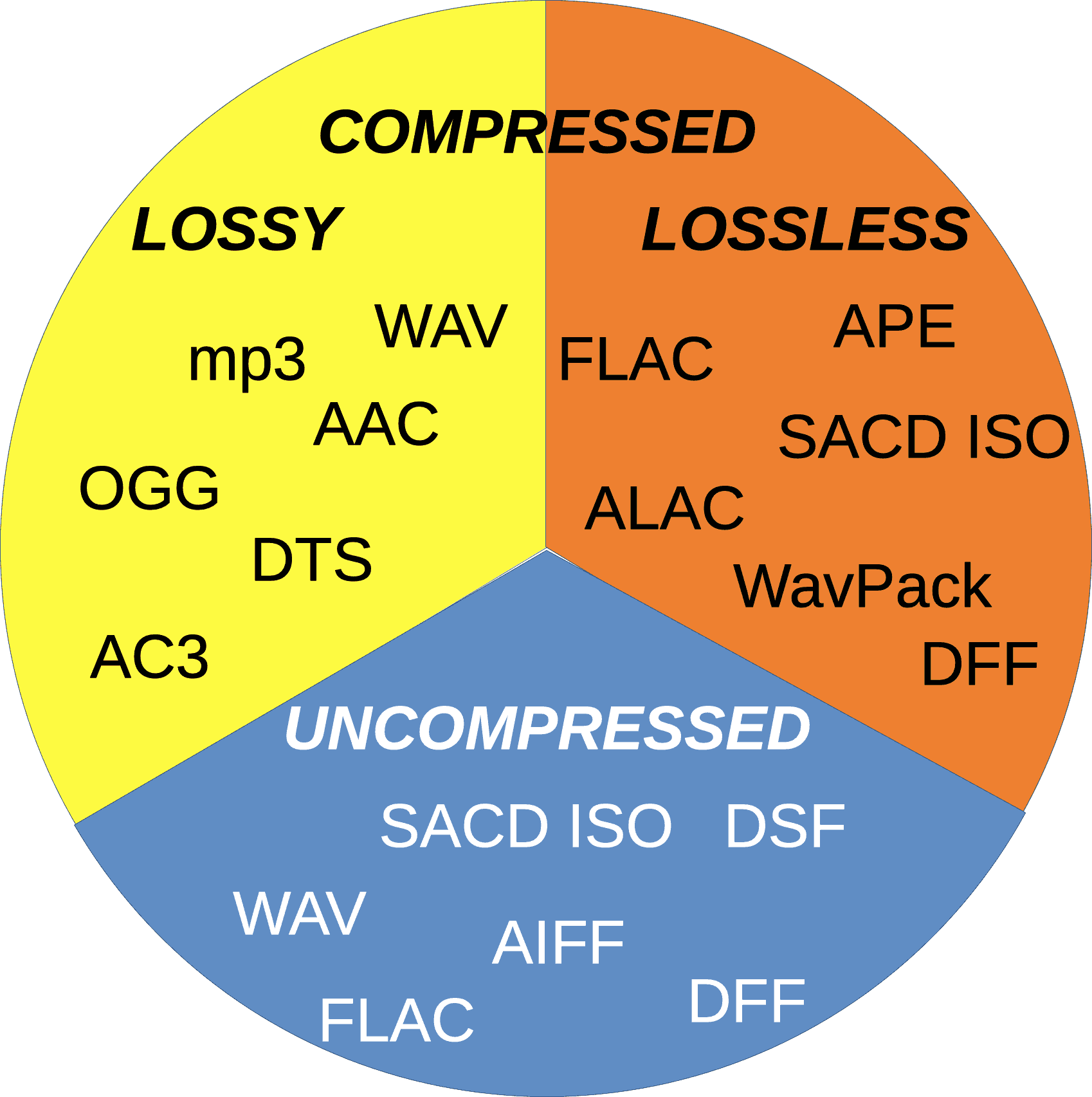
WAV is rightly considered the highest quality music format. This audio format is not compressed or lossy. Used for recording and processing sound, this is the highest quality sound, as the WAV recording is not compressed. Encoded to any other audio format. Well, as a result, it “weighs” a lot, which is why it’s mainly used for sound recording.

The following are several “interpretations” that can be divided into:

Lossy audio compression

I’ll start with the well-known and widely used (though not always loved) MP3 format. This audio format is actively used everywhere and everywhere, where it is needed and where it is not needed. But this does not mean that it is not worthy of the place it occupies in its niche. Very worthy. Although he has been “sitting” in his niche for about two decades, no one has “kicked” him out of there yet. And there were many who wanted to say it. And the main favorite of them is WMA (Windows Media Audio), which was conceived by Microsoft as an alternative to MP3. As a result, it is an alternative and it is, despite the best efforts of the developers. The next character is OGG. Despite the broader possibilities than MP3, for example, it never received widespread acceptance. Although it is compatible with many operating systems. Perhaps, it is worth mentioning the AAC audio format, which was supposed to replace MP3 in the relay. Encoding quality has been improved and compression loss reduced. But Ay.

The main advantage of these formats is their small size. The downside is the loss of quality.

Lossless audio compression

FLAC is perhaps the most popular lossless audio format and encoding codec. Music lovers are gradually switching to this format. WavPack competes with it, but it is not that popular. It’s the same story with Apple Lossless, which reduces the size to 60%.

Here the story is exactly the opposite: the quality is better and the size is greater.

Skeptics say that it is almost impossible to distinguish MP3 (320 kbps) from Losless by ear. “And if there is no difference, why pay more?” In fact, it is quite difficult to feel the difference in audio formats on common equipment, even for music lovers. But there are those who immediately feel this difference (they personally attended the experiment). But when listening to a good device, the difference is huge. The problem is that not everyone can afford a good device.


Free Download Mp4Gain
picture


Mp4Gain Main Window
picture


Mp4Gain Features
picture


Free Download Mp4Gain
picture

What is the best quality music format?

What is the best quality music format?

Best audio file format

There are many different audio formats. The most widely used formats are MP3 (MPEG-2 Audio Layer III) and WAV. The type of format is usually determined by the file extension (what comes after the period in the file name .mp3, .wav, .ogg, .wma)

Best Audio Format

A codec is a specific algorithm for encoding and compressing data in an audio format. For some file types, the codec is uniquely defined. For example, the mp3 format always uses the MPEG Layer-3 codec, while the mp4 format can use different codecs.

Often the concepts of codec and format are used in the same sense. Especially when the format always uses the same codec. But sometimes it is important to distinguish between the concepts of formats and codecs. For convenience, the format can be considered to be a kind of container in which an audio or video signal can be recorded using a specific codec.

Some formats, like mp4 or flv, can contain audio and video streams.

If you don’t know which program to open a particular audio format, we recommend that you use our audio converter. Supports almost all formats.

Codecs are divided into two types, depending on the type of compression:

Lossless sound quality

This group of formats records and encodes audio in such a way that by decoding it it can be accurately restored.

The most popular lossless encoding formats are:

FLAC (Free Lossless Audio Codec)
APE (mono audio)
ALAC (Apple Lossless Audio Codec)
Loss of sound quality (lossy)

Lossy compression modifies the sound. For example, frequencies inaudible to the human ear are eliminated. The decoded file will differ from the original in terms of the information recorded on it, but it will sound almost the same.

Popular lossy formats:

Learn more about popular audio formats
WAV is one of the first audio formats. Typically used to store uncompressed audio (PCM) recordings that are identical in sound quality to CD (audio-CD) recordings. On average, a minute of sound in wav format takes about 10 megabytes. Often an audio CD is ripped and then converted to mp3 using an audio converter.

MP3 (MPEG Layer-3) is the most widely used audio format in the world. MP3, like many other lossy formats, truncates audio that the human ear cannot hear, thus reducing file size. At the moment, mp3 is not the best format in terms of the relationship between file size and sound quality, but due to its prevalence and compatibility with most devices, many people store their records in it.

WMA (Windows Media Audio) is a proprietary format of Microsoft. Initially, this format was presented as a substitute for MP3, which according to Microsoft has higher compression characteristics. But this fact has been questioned by some independent tests. The WMA format also supports DRM data protection.

OGG is an open format that supports encoding of audio with various codecs. The most widely used codec in ogg is Vorbis. In terms of compression quality, the format is comparable to MP3, but less common in terms of media player and audio player support.

AAC is a proprietary audio format that has more capabilities (number of channels, sample rates) compared to mp3 and offers slightly better sound, with the same file size. At the moment, aac is one of the highest quality lossy audio encoding algorithms. The format is compatible with most devices. A file of this format can have the extensions aac, mp4, m4a, m4b, m4p, m4r.

FLAC is a popular lossless compression format. It does not change the audio stream and the sound encoded with it is identical to the original. It is often used for listening to sound in high-end sound systems. It has limited support for devices and players, so generally for listening to flac on the player, it is pre-converted.

Choose the best format to compress audio data

Choose the best format to compress audio data: MP3, AAC or WavPack?

Best Audio Format

Choose the best format to compress audio data: MP3, AAC or WavPack?
If not lossless, then a cat? MP3, AAC, what else? Previously, we have already studied music compression algorithms several times, it is time to compare the most valuable ones.

Best Audio Format

Amicably, you’d need to give up lossy codecs entirely, but it’s always interesting to draw the line where quantity turns into quality. Also, even a lossy codec can surprise you with something, you’ll see. In this review, it was decided not to play around with different VBR modes, but to immediately stop at the maximum bitrate with a constant value of 320 kb / s. Today, with modern laptop capacity, asking for an extra 10MB for album capacity at the risk of losing quality? For what? In general, even with older codecs, the 320 kb / s stream ensures the absence of characteristic artifacts with nasty jingles. The first part of the review will be devoted to comparing the growth of artifacts using RMAA software, in the second part, the subjective experience of the listener in real phonograms is presented.

Comparative frequency response of three lossy formats relative to original WAV
If the last time the iPad Mini was used as a sound source, now, to improve accuracy, we take any iron influence out of the brackets, and then all the distortion analysis will be done exclusively in the digital domain, without conversion to analog as RMAA provides such an opportunity.To do this, we generate a test sample in WAV in RMAA, then handle it one by one in various lossy codecs. Then we will convert WAV from them again, so that the program can “recognize” the file and evaluate deviations from the original template. Now let’s look at how high frequencies are cut and distortion increases, giving the sound an unpleasant color. By the way, there won’t be that many. In general, at a bit rate of 320 kb / s, it will not be so easy to detect something harmful by ear. It’s not even about artifacts, but maybe a bit of “boring” of the sound compared to the original. The phonogram seems to fade a bit, it loses its mobility due to the alteration of transient processes after psychoacoustic processing. But it will not always be possible to clearly record this difference, it depends on the specific track.
MP3: Avalanche Distortion Let’s start with the most popular format. MP3 is a monster from the Fraunhofer Institute that has taken over the Earth. Because of this, nowadays no one thinks of using pure WAV for sound recording. Even if they rip out the defaced YouTube audio, they still rip it back down to MP3, and even at an obscene 128kb / s bit rate. We will not do that, and for the test we will use the most current version of the LAME 3.100 encoder with an insane preset and 320 kb / s bit rate. In the first figure, it was seen that the spectrum in MP3 is expected to experience oscillations in the HF region and eventually filter into the 20 kHz limit. Of course, this is the limit of the synthetic test; in a real music signal, it will probably be even lower. The size of the dynamic range in the MP3 file has not changed compared to the original. Those. The LAME 3,100 encoder at 320 kb / s does not add any noise to the recording.

1 kHz waveform distortion when encoded in MP3 compared to original WAV
Converting a single 1 kHz signal to MP3 showed the appearance of many small harmonic distortions. And although formally their participation is small (0.0009%), that is, one and a half to two times less than in the exhaust of a good DAC: in the dynamic spectrum of a real phonogram, their number will grow in an avalanche and in an unpredictable order. Furthermore, the “thickening” of the base of the strait at the original 1 kHz peak indicates certain problems, fouling with parasitic oscillations. This characteristic is clearly illustrated by the 100 Hz “square” wave after conversion to MP3. As you can see, its outline loses its definition along the horizontal axis. All of this ultimately has a negative effect on listening fatigue when listening to MP3s, unfortunately even the highest bit rates.

100 Hz “square” wave after conversion to MP3 (top) and AAC (bottom)
AAC: Increase the noise, but keep it clean A more precise way operates the AAS algorithm, which is actively used by Apple, and not only by it. Digital TV broadcasters work with this audio codec and furthermore AAC is included in the MPEG-4 container package.The square wave after conversion to AAC retains its shape, although base distortion and distortion also occurred. harmonics around the 1 kHz peak, although less noticeably than MP3. At the same time, AAC demonstrates a 1 dB higher measured noise level. What does it mean: intermediate recording on a cassette or what? No, the AAC algorithm probably uses something like noise shaping, a great invention that allows you to reduce quantization errors when mixing a pseudo-random noise signal. Again, it’s not just about drowning out the distortion below the noise floor, but using more sophisticated math. To illustrate, let’s look at the artifacts around the so-called 11.025 kHz jitter test. Why this particular frequency? Because the multiple harmonic of this peak falls exactly on the upper limit of the 44 kHz digital stream spectrum, and all the rest will be outside of it. Small spurious peaks, especially those that are symmetrical with respect to pitch (modulation products, “sidebands”) – these are the grains of jitter.

AAC (top) and MP3 (bottom) jitter test stability
As you can see, Fool-MP3 saved a low noise level, but generated more high frequency fluctuations (more noticeable to the ear), and AAC raised the noise a bit, but avoided clutter in the rest of the spectrum. But the WavPack encoder does even bigger tricks with noise shaping.
WavPack: Keep Frequency, Change Bit Width In general, if it comes immediately and very briefly, today’s WavPack encoder math belongs to the most flexible and cool protocols for audio enthusiasts, no kidding. Unlike FLAC, it can support 32-bit computation (I recommended it for creating lossless vinyl rips). Furthermore, in WavPack you can even package a DSD file without converting it to PCM. In this case, the file size will be much smaller than the original dsf. But we will talk about lossless WavPack some other time, but for now we will consider the unique principle of how the WavPack codec works at a loss. In one of my reviews, I showed that in several cases when compressing lossy it makes sense to reduce not the sample rate , but directly the bit depth of the signal (that is, below 24 or 16 bits), carefully mixing the dither (that is, a special noise profile to reduce quantization errors). WavPack went in exactly this glorious way, without touching on discretion and frequency in general, but changing the bit depth, which is now a dynamic value, describing the loudness level of the signal. A bit like the DSD principle, right? It is noteworthy that when converting to a lossy WavPack, you can also save a parallel “correction” file, with which it will be possible to fully restore the original, down to the last bit. It is true that in this case it will not work to save disk space, since the size of said pair will still correspond to the original without loss. However, the functionality of the protocol is still impressive, the bitrate of our test file was set at 320 kb / s to compare it to the maximum of our MP3 and AAC, but theoretically in WavPack it can be set even higher.