Audio & Video Converter


Free Download Mp4Gain
picture

Audio & Video Converter

Audio & Video Converter

Let’s talk about Audio & Video Converters

I’ve spent years knee-deep in the world of audio and video, and let me tell you, converters are like the Swiss Army knives of media. Think of it like this: you have a toy car that only runs on square batteries, but all you have are round ones. An audio/video converter is like that adapter you need to make your round batteries fit into the square hole. It takes one file type and transforms it into another so you can play it on different devices or software. From my experience, I can tell you this is a lifesaver when dealing with different file formats. Remember that time I tried to play a home movie on my friend’s older computer? It wouldn’t work because the file type wasn’t compatible. A quick conversion later, and movie night was saved! This isn’t just about convenience; it’s about accessibility and making sure your media works where you need it to.

Understanding Audio & Video File Formats

In my experience, understanding file formats is like knowing the different languages of the world. An MP4 is like English, widely understood. A MOV might be like French, understood by some, but not all. And then you have more specialized formats like AVI or FLAC, which are like rarer dialects. Just as you need a translator to understand a different language, you need a converter to understand a different file format. Each format uses a specific way to store the audio and video data, kind of like how different languages use different alphabets.

Why Use an Audio & Video Converter?

I’ve found several reasons why audio and video converters are so essential in today’s digital world. They’re not just for techies; they’re for everyone.

  • Device Compatibility:

    My old MP3 player couldn’t handle FLAC files, so I converted them to MP3. Imagine trying to fit a giant puzzle piece into a tiny slot—it just doesn’t work. Conversion makes sure your media “fits” your device.

  • File Size Reduction:

    Large video files can clog up your computer like too many toys crammed into a small box. Converting to a smaller file size, like going from a huge stuffed animal to a small action figure, frees up space.

  • Optimizing for the Web:

    Some video formats are too large for smooth streaming. Converting to a web-friendly format is like swapping a bulky textbook for a lightweight e-reader – much easier to handle online.

  • Extracting Audio:

    Ever loved the music in a video? A converter lets you extract the audio, like pulling the delicious filling out of a pastry, so you can enjoy it separately.

Choosing the Right Audio & Video Converter

From my years working with audio and video, the right converter is key. It’s like choosing the right tool for the job—you wouldn’t use a hammer to paint a wall. Look for features like batch conversion (converting multiple files at once, like baking a whole batch of cookies instead of one at a time), support for a wide range of formats (having all the right tools in your toolbox), and a user-friendly interface (like having clear instructions).

Key Features of a Good Audio & Video Converter

A good converter should be versatile and easy to use. Based on my experience, here’s what to look for:

  • Format Support:

    The more formats it supports, the more flexible it is. It’s like having a universal travel adapter instead of one for each country.

  • Customizable Settings:

    Think of this like adjusting the seasoning in a recipe. You can tweak things like bitrate and resolution to get the output you want.

  • Fast Conversion Speed:

    Nobody likes waiting, especially when dealing with large files. A fast converter is like having a super-speedy delivery service – you get your package quickly.

  • User-Friendly Interface:

    A good interface should be intuitive, like a well-organized kitchen where everything is easy to find.

Common Audio & Video Conversion Challenges and Solutions

Even with the best tools, you might encounter some bumps in the road. Here are some common challenges I’ve faced and how I’ve overcome them:

  • Loss of Quality:

    Sometimes converting a file can slightly reduce its quality, like a photocopy that’s not quite as sharp as the original. Choosing the right settings and formats can minimize this.

  • Large File Sizes:

    Converting to certain formats can result in surprisingly large files, like packing a suitcase and finding it’s heavier than you expected. Experimenting with different settings can help manage file size.

  • Compatibility Issues:

    Even after conversion, you might still run into compatibility problems, like trying to use a key that doesn’t fit the lock. Checking device specifications and trying different formats can often solve this.

Advanced Tips for Audio & Video Conversion

Over time, I’ve learned some tricks to get the most out of audio and video conversion:

  • Batch Conversion:

    This time-saver lets you convert multiple files at once, like baking a whole tray of cookies instead of one by one.

  • Presets:

    Presets offer optimized settings for different devices, like having pre-made outfits for different occasions.

  • Custom Settings:

    For more control, explore custom settings, like tailoring a suit to fit perfectly.

The Future of Audio & Video Conversion

The landscape of audio and video is always evolving. From where I stand, I see cloud-based conversion and AI-powered enhancements becoming even more prominent. Imagine having a robot assistant that automatically optimizes your files for any device—that’s the kind of future we’re heading towards.

Latest words on Audio & Video Converters

I’ve shared my knowledge and experience with audio and video converters, from the basics to advanced tips. Remember, choosing the right tool and understanding the nuances of different formats can greatly enhance your media experience. Whether it’s for compatibility, size reduction, or simply extracting audio, converters are indispensable tools in today’s digital world. MP4Gain is a solution that can help with your audio and video conversion needs.

FAQ about Audio & Video Converter

What are the most common audio formats?

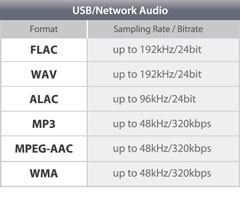
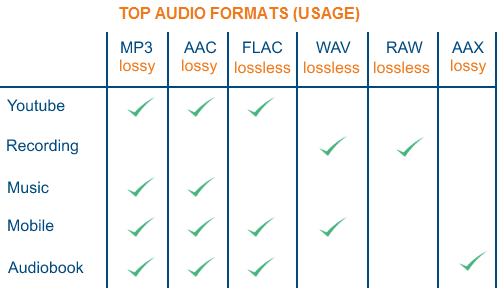
Common audio formats include MP3, WAV, FLAC, AAC, and WMA. In my experience, MP3 is the most widely compatible, like a universal key.

What are the most common video formats?

Common video formats include MP4, MOV, AVI, MKV, and WMV. MP4 is a popular choice due to its wide compatibility and efficient compression.

Why would I want to convert a video to a smaller file size?

Smaller files take up less storage space and are easier to share online. Think of it like packing a light suitcase instead of a heavy trunk.

Can I extract audio from a video?

Yes, most converters allow you to extract the audio track from a video file, saving it as a separate audio file, like taking the toy out of a cereal box.

How do I choose the right audio/video converter?

Consider factors like format support, conversion speed, ease of use, and any additional features you need.

What is bitrate?

Bitrate refers to the amount of data used per second in audio and video. A higher bitrate generally means better quality but larger file size.

What is resolution?

Resolution refers to the number of pixels in a video image. Higher resolution means a sharper image.

What is a codec?

A codec is a piece of software that encodes and decodes audio and video data. Think of it like a secret code for your media.

Why might a converted file lose quality?

Some conversion processes involve compression, which can slightly reduce the quality. Choosing the right settings can help minimize this.

What are some advanced tips for audio/video conversion?

Consider using batch conversion for multiple files, exploring presets for specific devices, and experimenting with custom settings for fine-tuning.

Comments:

Wow, this article cleared up so much for me! I’ve always been confused about different file formats. Thanks for explaining it so clearly! – TechNewbie

Great article! I’m a video editor and I’m always dealing with different formats. This was a helpful refresher. – FilmFanatic

I wish you had gone a little deeper into the technical aspects of codecs. Maybe a future article could cover that? – CodecNerd

Super helpful! I finally understand why my videos weren’t playing on my phone. Thanks for the tips! – MobileUser

This is the best explanation of audio and video conversion I’ve ever read. Simple and straightforward. – ClearExplanations

I have a question — what’s the best format for uploading videos to YouTube? – YouTuberWannabe

I agree, excellent article! I had no clue there were so many different file types, thought it was just mp4 lol – MusicLover22

I’m having trouble converting my old home movies to a digital format. Any advice? – MemoryKeeper

Hey man good info but maybe you can put like a video tutorial next time, would be epic. – VisualLearner

This stuff seems complicated, but you explained it really well! Thanks! – ConfusedNoMore


Free Download Mp4Gain
picture


Mp4Gain Main Window
picture


Mp4Gain Features
picture


Free Download Mp4Gain
picture

Digital Audio Quality

Digital Audio Quality

Digital Audio Quality

Data rate refers to the data flow used by a video file in a unit of time, also called bit rate or bit stream rate.

Digital Audio Quality

The popular interpretation is the sampling rate, which is the most important part of image quality control in video encoding. Generally, the units we use are kb/s or Mb/s. Generally speaking, at the same resolution, the higher the code stream of the video file, the lower the compression ratio and the higher the image quality. The higher the code stream, the higher the sampling rate per unit time, the higher the data stream, the higher the accuracy, the closer the processed file is to the original file, the better the image quality, the clearer the image quality and the higher the decoding capability of the playback device is required.

Of course, the larger the code stream, the larger the file size. The calculation formula is file size = time X code rate/8. For example, a 720P RMVB file with a 1 Mbps stream of 90 minutes is common on the Internet and its volume is = 5400 seconds × 1 Mb/8 = 675 MB.

Generally speaking, a video file includes images and sounds, just like an RMVB video file, which contains video information and audio information. Audio and video have their own sampling methods and different bit rates, that is, the same video Audio and video file bit rate is not the same. And what we’re talking about is the bitrate of a video file, which generally refers to the sum of the bitrate of the audio and video information in the video file.

Taking the most popular and familiar RMVB video file in China as an example, VB in RMVB refers to VBR, which is short for Variable Bit Rate. The Chinese meaning is variable bit rate, which means that RMVB adopts dynamic encoding. In this way, a higher sample rate is used for complex dynamic images (singing and dancing, flying cars, wars, actions, etc.), while a lower sample rate is used for static images, and the resources are use rationally to achieve image quality and volume .Effect.

The most fundamental difference between code rate and sample rate is that the code rate is for the source file.


2. Sampling rate

Sample rate (also called sample rate or sample rate) defines the number of samples per second taken from a continuous signal to form a discrete signal, and is expressed in hertz (Hz). Sampling rate refers to the sampling frequency when converting an analog signal to a digital signal, i.e. how many points are sampled per unit of time. How many bits are in the data for a sample point? Bit rate refers to the number of bits (bits) transmitted per second. The unit is bps (bit per second). The higher the bitrate, the more data transmitted and the better the sound quality. Bit rate = sample rate x number of bits used x number of channels.

The sample rate is similar to the number of frames of moving images. For example, the sampling rate of movies is 24 Hz, the sampling rate of PAL format is 25 Hz, and the sampling rate of NTSC format is 30 Hz. When we play back the still images sampled at the same rate as the sampling frequency, we see a continuous image. In the same way, when a CD recorded at a sampling rate of 44.1 kHz is played back at the same rate, a continuous sound can be heard. Obviously, the higher the sample rate, the more coherent the sound will be heard and the picture will be seen. Of course, the sampling rate that human auditory and visual organs can distinguish is limited, which is basically higher than sound sampled at 44.1 kHz, and most people haven’t noticed the difference.

The number of digits in the sound is equivalent to the number of colors on the screen, indicating the amount of data per sample. Of course, the larger the amount of data, the more accurate the playback sound, so as not to confuse the sound. of the teapot with the train whistle. In the same way, it is more clear and precise for the image, so as not to confuse blood and ketchup. However, limited by the function of human organs, 16-bit sound and 24-bit image are basically the limits of ordinary humans, and the highest digits can only be distinguished by instruments.

Detailed Music Format Part 2

Detailed Music Format Part 2

Music Format
Music Format

Music CD

Music Format
Music Format


That is, CD records. A CD can play sound files of approximately 74 minutes. The Windows system comes with a CD player. Also, the software that comes with most sound cards provides CD playback functionality, and even some CD-ROM drives are offline. from computer Can be used as a stand-alone CD player when powered on.

WMA with unlimited potential

In developing its own network media service platform, Microsoft primarily promotes ASF (Audio Streaming Format), which is an open standard that supports data transmission over various networks and protocols. It supports audio, video, and a variety of other types of multimedia. And WMA is short for Windows Media Audio, which is equivalent to an ASF file that contains only audio.
The compression ratio of WMA files can be as high as 1:18 in 80kbps 44kHz mode, which is basically the same as VQF. And the compression speed is doubled compared to MP3. So it should be more competitive than VQF.

Vorbis free music format

To avoid rising royalties charged by MP3 music companies, programmers at GMGI’s iCast company developed a new free music format, Vorbis, that rivals or even exceeds MP3 in sound quality. And it will be released over the internet and can be downloaded for free without worrying about infringement issues. But MP3 has become very popular on the Internet, and Microsoft’s Windows Media technology has also started to spread, and Vorbis’s outlook is still not optimistic.

Other audio formats

AIF/AIFF: A sound file format developed by Apple, supported by the MAC platform, and supports 16-bit stereo at 44.1 kHz.
AU: SUN’s AU Compressed Sound File Format, which only supports 8-bit sound, is a commonly used sound file format on the Internet, mainly created by SUN workstations.
CDA: CD audio track file.
CMF: A MIDI-like sound file developed by CREATIVE.
DSP: Abbreviation for digital signal processing. By improving the signal processing method, sound quality will be greatly improved and songs will be more pleasing to the ear.
S3U: MP3 playback file list
RMI: MIDI Instrument Sequence

Lossy compression:

AAC – Sound quality is second only to MPC at high bit rates and looks good at both high and low bit rates. The encoding speed is too slow!
MPC: Performance is average at low bitrate, not as good as MP3 and OGG encoded by Mp3Pro, sound quality is best at high bitrate, and encoding speed is
fast.OGG: The sound quality is better at a low bitrate, and the same is true at a high bitrate. Encoding is slightly slower.
MP3 (MP3Pro): Sound quality is lower than OGG at low bit rate and other aspects are the same as MP3
WMA: High and low bit rates are average, VBR is not supported and the highest is 192Kbit/s

lossless compression:

FLAC – Worst compression ratio of the four, decent encoding speed, good platform support.
PAC: Slightly slower encoding speed, third in compression ratio, good platform support.
APE: The fastest encoding speed, the best compression rate, and the platform is generally supported.
WV: The encoding speed is very fast, the compression rate is second among the four types, and it is only supported by the Windows platform.

Detailed music format

Detailed music format

Audio File Formats
Audio File Formats

classic wave

Audio File Formats
Audio File Formats

As the most classic Windows media audio format, the WAVE file is widely used, which uses three parameters to represent sound: the number of sampled bits, the sample rate, and the number of channels.
The channels are divided into mono and stereo, and the sample rates are generally 11025 Hz (11 kHz), 22050 Hz (22 kHz), and 44100 Hz (44 kHz). The capacity occupied by the WAVE file = (sampling frequency × sampling bits × channel) × time/8 (1 byte = 8 bits).

traditional mod

MOD is a wavetable-like music format, but its structure is similar to MIDI, it uses real samples, and the volume is small. In the earlier DOS era, MOD was often used as background music for games. Modern mods can contain many audio tracks in many formats, such as S3M, NST, 669, MTM, XM, IT, XT, and RT.

midi music computer

MIDI is short for Musical Instrument Data Interface. Records the sound played by the instrument digitally (each note is recorded as a number), and then synthesizes these records via FM or wavetable during playback: FM synthesis is the sound of the instrument is simulated by mixing the multi-frequency sounds; wavetable synthesis consists of storing the sound samples of the instrument in the wavetable of the sound card and extracting the sound from the wavetable as you play.

Boss Boss MP3

It can be said that MP3 is famous, it uses MPEG Audio Layer 3 technology to compress the sound with a compression ratio of 1:10 or even 1:12, with a sampling rate of 44kHz and a bit rate of 112kbit/s. .
MP3 music is music stored in digital form. If you want to play it, you must have a corresponding digital playback and decoding system. Generally, MP3 digital music is decoded by special software and then restored to a waveform sound signal for playback output. This type of software is called For MP3 players, such as Winamp, etc.

Overlord RA series online

RA, RAM, and RM are Real’s mature network audio formats, using “streaming audio” technology, making them well suited for network streaming. Information such as copyright, singer, producer, mail and song title can be added during production.
RA can be called the supreme lord of multimedia communication on the Internet. It is suitable for streaming on the Internet and is currently the best format for listening to online music online.

VQF with high compression ratio

VQF or TwinVQ is an audio compression technology developed by Nippon Telegraph and Telephone and Yamaha Corporation.
The audio compression rate of VQF is almost twice that of standard MPEG audio and can reach approximately 1:18 or even higher. And popular compression formats like MP3 and RA are usually only around 1:12. But it still won’t affect the sound quality, when VQF compress music at 44kHz-80kbit/s audio sampling rate, its sound quality will be better than 44kHz-128kbit/s MP3, when compress at 44kHz-96kbit/s , the music is close to 44kHz-256kbit/s MP3.

MD minidisc

MD (ie MiniDisc) is a comprehensive portable music format released by SONY in 1992. The compression algorithm it uses is ATRAC technology (the compression ratio is 1:5). MD is divided into Recordable MD (Recordable, with two heads of magnetic head and laser head) and Single Play MD (Prerecorded, only laser head).
The powerful editing function is the strong point of MD. You can quickly select tracks, move tracks, merge, split, delete and edit track titles. It is more personalized than CD and you can have your own MD album at any time. MD products include MD Walkman, MD bedside audio, MD car audio, MD recording deck, MD camera gun and MD driver, etc.