Lossless Audio Archiving


Free Download Mp4Gain
picture

Lossless Audio Archiving: Preserving Sound Fidelity for the Ages

Lossless Audio
Lossless Audio
Lossless Audio
Lossless Audio

The Importance of Lossless Audio Archiving

As a passionate audiophile and expert in preserving audio fidelity, I firmly believe in the significance of lossless audio archiving. It is a meticulous process that ensures the long-term preservation of audio recordings without compromising their original quality. In this article, I will delve into the essence of lossless audio archiving and highlight its importance in safeguarding the integrity and richness of sound for future generations.

Understanding Lossless Audio Compression

Lossless audio compression is a technique that reduces the file size of audio recordings without sacrificing any audio data. Unlike lossy compression, which discards certain audio information, lossless compression algorithms retain all the original data, allowing for perfect reconstruction of the audio signal. This preservation of every nuance and detail is crucial for archiving purposes, as it guarantees an exact replica of the original recording.

The Process of Lossless Audio Archiving

When embarking on the journey of lossless audio archiving, several key steps must be followed to ensure the highest quality preservation:

Selection of Suitable File Formats

Choosing the right file format is paramount in lossless audio archiving. Formats such as FLAC (Free Lossless Audio Codec) and ALAC (Apple Lossless Audio Codec) are widely recognized as ideal choices for maintaining audio fidelity. These formats employ sophisticated algorithms that compress audio data while preserving every bit of information, resulting in files that are significantly smaller in size without any loss of quality.

Digitization of Analog Audio Sources

For analog audio sources, such as vinyl records or cassette tapes, a meticulous digitization process is necessary to convert them into digital formats. High-quality analog-to-digital converters (ADCs) are utilized to capture the analog audio signal with utmost precision and accuracy, ensuring a faithful representation of the original recording.

Metadata Organization and Tagging

Proper metadata organization and tagging play a crucial role in lossless audio archiving. Metadata includes information such as artist names, album titles, track numbers, and other relevant details. Organizing this information accurately not only helps in cataloging the audio collection but also facilitates easy retrieval and navigation.

Redundant Storage and Backup

Preserving audio fidelity necessitates redundancy in storage and backup. Multiple copies of the archived files should be maintained across different storage mediums, including external hard drives, network-attached storage (NAS) systems, and cloud storage services. Regular backups are essential to guard against any potential data loss or hardware failure.

Long-Term Preservation Strategies

Lossless audio archiving is not a one-time endeavor but an ongoing commitment. Implementing long-term preservation strategies ensures that the archived audio remains accessible and usable for years to come. Regular data integrity checks, format migration when necessary, and periodic re-evaluation of storage solutions are vital components of a comprehensive preservation strategy.

Preserving the Future of Audio Fidelity

In conclusion, lossless audio archiving is an essential practice for audiophiles, professionals, and institutions seeking to preserve the highest quality sound recordings. By understanding the significance of lossless compression, following a meticulous archiving process, and implementing long-term preservation strategies, we can safeguard the integrity and richness of audio for future generations to enjoy. Let us continue to cherish and protect the legacy of exceptional sound quality.



Free Download Mp4Gain
picture


Mp4Gain Main Window
picture


Mp4Gain Features
picture


Free Download Mp4Gain
picture

The Advantages of Lossless Audio Formats: FLAC and ALAC

The Advantages of Lossless Audio Formats: FLAC and ALAC

FLAC and ALAC
FLAC and ALAC
FLAC and ALAC
FLAC and ALAC

As an expert in audio optimization, I am always on the lookout for formats that deliver exceptional sound quality without compromising on file size. In this article, I will delve into the world of lossless audio formats, with a specific focus on two popular options: FLAC and ALAC. These formats have gained significant popularity among audiophiles and music enthusiasts for their ability to preserve the original audio quality while offering efficient compression. Join me as we explore the advantages of these lossless audio formats and why they should be your top choice.

Superior Sound Quality

When it comes to lossless audio formats, the primary concern is maintaining the utmost sound quality. FLAC and ALAC excel in this regard, as they employ compression algorithms that preserve every detail of the original audio recording. Whether it’s the rich harmonies of a symphony orchestra or the subtle nuances in a vocalist’s performance, these formats ensure an immersive and authentic listening experience. With FLAC and ALAC, you can indulge in music the way it was intended to be heard, without any compromise on audio fidelity.

Efficient Compression

Efficient compression is another remarkable advantage of lossless audio formats like FLAC and ALAC. These formats utilize sophisticated compression techniques that significantly reduce file sizes while retaining all the audio data. This means you can store more music on your devices without sacrificing quality or resorting to lower-bitrate alternatives. Whether you have a vast music library or limited storage space, FLAC and ALAC offer a practical solution to keep your favorite tracks accessible at all times.

Wide Compatibility

One of the key considerations when choosing an audio format is its compatibility with different devices and platforms. FLAC and ALAC have gained widespread support across various software and hardware ecosystems. Many popular media players, portable devices, and operating systems are compatible with these formats, ensuring seamless playback without the need for additional conversions or transcoding. Whether you’re using a Mac, Windows, or mobile device, FLAC and ALAC guarantee a hassle-free listening experience.

Versatility and Metadata Support

Versatility is an essential aspect of lossless audio formats, and FLAC and ALAC don’t disappoint. Apart from delivering exceptional audio quality, these formats also support a range of metadata. You can embed album art, track information, lyrics, and other relevant details within the audio files themselves. This ensures that your music collection remains organized and easily searchable across different platforms and media players. With FLAC and ALAC, it’s not just about the audio; it’s about creating a comprehensive and immersive musical experience.

Archival and Future-Proofing

For audiophiles and music collectors, archival is a crucial consideration. FLAC and ALAC are ideal for archiving purposes as they provide a reliable and future-proof solution. By choosing these formats, you can preserve your music collection in its original quality for years to come, ensuring that your favorite albums and tracks withstand the test of time. Moreover, since FLAC and ALAC have gained widespread acceptance, it’s highly likely that they will continue to be supported by future audio systems and technologies.

Smooth Integration with Existing Libraries

If you already have an extensive collection of audio files in other formats, the transition to FLAC or ALAC can be seamless. Both formats support transcoding, allowing you to convert your existing audio files into lossless formats without any loss of quality. This ensures that you can integrate FLAC and ALAC files seamlessly with your existing music library, avoiding any disruptions in your listening experience. With their wide compatibility and transcoding capabilities, FLAC and ALAC offer a convenient pathway to upgrade your audio collection.

Community and Support

FLAC and ALAC have garnered a passionate and dedicated community of supporters, comprising audio enthusiasts, music professionals, and developers. This active community ensures ongoing support, updates, and development for the formats, assuring users that they are investing in a long-term and reliable audio solution. Whether you seek advice, troubleshooting, or simply want to connect with like-minded individuals, the FLAC and ALAC community is always there to assist and share their expertise.

Streaming and Online Distribution

With the rise of music streaming platforms and online distribution, the demand for lossless audio formats has also increased. Many streaming services and online stores now offer FLAC as a preferred option for audiophiles, ensuring that you can enjoy your favorite music in its original quality, streamed directly to your devices. This development not only reinforces the advantages of lossless formats but also opens up new avenues for artists, allowing them to deliver their music to fans with uncompromised fidelity.

Preservation of Music History

Lossless audio formats like FLAC and ALAC play a crucial role in the preservation of music history. They allow us to digitize and archive classic recordings, ensuring that future generations can enjoy the same musical experiences as previous ones. By opting for FLAC and ALAC, you contribute to the preservation of cultural heritage and ensure that the legacy of iconic musicians and compositions lives on.

Audiophile-Grade Experience

Lastly, but certainly not least, FLAC and ALAC offer an unparalleled audiophile-grade experience. These formats cater to the discerning ears of audiophiles who crave the utmost audio quality. Whether you’re using high-end headphones, a dedicated audio setup, or a premium sound system, FLAC and ALAC provide the fidelity and richness necessary to truly appreciate the intricacies of the music. With their lossless nature and superior sound reproduction, these formats elevate your listening experience to new heights.

In conclusion, FLAC and ALAC stand out as the go-to choices for anyone seeking lossless audio formats. With their superior sound quality, efficient compression, wide compatibility, and versatile features, they offer an unmatched audio experience. Whether you’re an audiophile, music collector, or simply someone who values exceptional sound, FLAC and ALAC provide the perfect combination of fidelity and convenience. Embrace the advantages of lossless audio formats and let your music shine in its full glory.

The Benefits of Lossless Audio Formats

The Benefits of Lossless Audio Formats

Lossless Audio Formats

Lossless Audio Formats Explained

As an audiophile, I always strive to achieve the highest possible quality of sound. Lossless audio formats such as FLAC, ALAC, and WAV are my go-to choices when it comes to digital music. These formats use audio compression algorithms that preserve all the original audio data while reducing the file size. This means that the music you listen to sounds exactly as the artist intended it, without any loss of quality.
When I first discovered lossless audio formats, I was blown away by the difference in sound quality compared to lossy formats like MP3. The music was clearer, more detailed, and had a wider dynamic range. The benefits of lossless audio formats are not just limited to the listening experience, they also have practical benefits. Lossless files take up less storage space on your device than uncompressed audio files like WAV, and can be easily streamed over the internet without compromising quality.

As the famous musician David Byrne once said, “Lossless audio formats offer an uncompromising listening experience that allows you to hear every nuance of a recording. It’s like hearing the music for the first time.”

The Advantages of FLAC and ALAC

FLAC and ALAC are two of the most popular lossless audio formats. They are both open-source and free to use, which means they have a wide range of support across different devices and software. FLAC has become the de facto standard for lossless audio on the internet, while ALAC is the preferred format for Apple devices.
One of the biggest advantages of FLAC and ALAC is their ability to handle high-resolution audio. These formats can handle audio at up to 24-bit/192kHz, which is significantly higher than the 16-bit/44.1kHz standard of CD-quality audio. This means that you can listen to your favorite music with even greater detail and clarity.

In addition, FLAC and ALAC both have robust error correction capabilities. This means that if a file is corrupted during download or transfer, the audio data can still be recovered without any loss of quality. This is a major advantage over lossy formats like MP3, which cannot recover from data errors.

The Benefits of WAV

WAV is a lossless audio format that has been around since the early days of digital audio. It is the standard format for audio CDs, and is widely used in professional audio production. One of the main benefits of WAV is its compatibility with a wide range of hardware and software.
WAV files are uncompressed, which means that they retain all the original audio data. This makes them ideal for situations where maximum audio quality is required, such as mastering and archiving. In addition, WAV files can be edited without any loss of quality, making them the preferred format for audio engineers and producers.

As the great music producer Rick Rubin once said, “WAV files are the gold standard for audio quality. They offer the most accurate representation of the original recording, and are essential for anyone serious about music production.”

Final Words

In conclusion, lossless audio formats offer a superior listening experience compared to lossy formats like MP3. Whether you choose FLAC, ALAC, or WAV, you can be sure that you are getting the best possible sound quality. As an audiophile, I highly recommend using lossless audio formats for your music collection. And if you’re looking for a reliable and efficient way to normalize and convert your audio files, MP4Gain is the perfect solution.

lossless sound quality

lossless sound quality

lossless sound quality

The principle of these audio compression methods is to keep as much as possible the parts that are easy to hear for the human ear.

lossless sound quality


In the main constant bit rate (CBR) mode, audible data in the audio is removed and it is easier for the human ear to hear. The more information that is retained for the part, the less information that is retained for the less audible part. As sound complexity increases, the degree of sound quality degradation becomes more apparent. For example, when listening to pure human music voice performances and performances combined with background music, pure The degree of degradation of the compressed music of the human voice is less obvious than that of the original file.

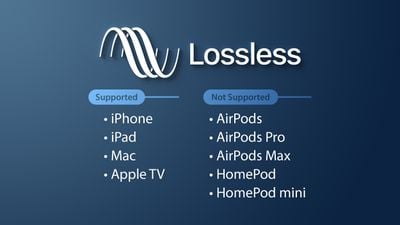
As for the lossless sound quality provided by today’s streaming platform, there are many formats, but strictly speaking, these formats, including flac and ALAC, belong to lossless compression (non-destructive data compression) rather than quality. lossless sound in a narrow sense, but due to its performance it is almost the same as WAVE, but the file is small, the decoding speed is fast, and it can be used in streaming services, so it is also a representative format of lossless sound quality that has entered the era without CD support, and it is also the current music streaming service.

Also, MQA like Tidal is a more controversial format, because although MQA is lossless audio compression in a broad sense, it focuses on driving high-quality music files that are above CD quality at a size similar to those of CD quality flac files. , but it can also be restored to the original high-quality audio format, but the controversial point is whether the higher compression ratio can maintain the same real auditory sense as the original high-quality audio has always been controversial. At the same time, MQA requires a specific device to perform hardware decoding. Yes, many devices can only decode MQA through software.

▲Currently called Hi-Res Audio generally refers to sound quality higher than that of a CD, but to be certified, the device must support the processing capability of the 24-bit 96kHz format.

However, since MP3 and AAC are previously planned destructive music compression formats, their purpose is to compress CD-level sound quality into smaller files, so most encoding specifications are presented in one presentation. CD-level 16-bit 44.1 kHz or 16-bit 48 kHz; but MQA is a format with a small file size that locks in high sound quality requirements. Basically, the MQA format will be music equivalent to 24-bit PCM or higher.

lossless sound quality

lossless sound quality

lossless sound quality

Although lossless sound quality and high-quality streaming services have appeared on the market for a while

lossless sound quality

Like Apple isn’t the first to make true wireless earbuds, but it has ridden the wave of the market, with Apple’s launch of so-called hi-fi. compressed sound quality in Apple Music. In fact, after the lossless compression commonly known in the audio industry, lossless sound quality and high sound quality have instantly become a hot topic for many people to discuss, but whether the benefits of quality Lossless sound systems are really Obviously, the author will devote some space from theoretical concepts to practical levels. The difference is a simple overview, but the following arguments focus on easy understanding, so some of the descriptions are not entirely accurate.

What is lossless sound quality? What is the sound quality of the music we usually listen to?
The photo mentions * Introduction to KKBOX sound quality (including format), release year, sound quality, including numbers, KKBox, streaming media, Hi-Res Audio and Hi-Fi

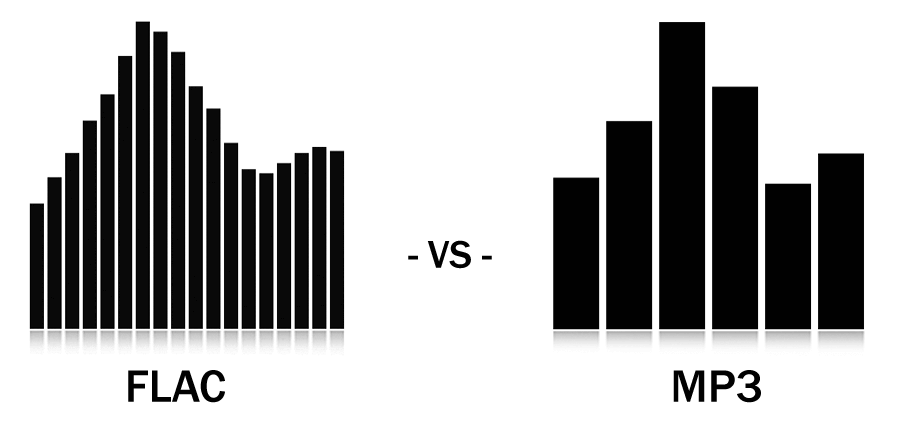
▲ Both AAC and MP3 are destructive compression, while FLAC and ALAC are lossless compression

Before we get into the details, let’s talk about what is called lossless sound quality; From the author’s concept and cognition, the so-called lossless sound quality is a relative word rather than an absolute word. The main source is the relative word born due to the appearance of the MP3 music compression format; after the music industry went digital, digital music files were generally recorded via PCM encoding, and WAVE files were generally used on CDs. The time and space situation that MP3 was born into was because hard drive capacity was generally small at the time. To store a large amount of music data in storage space, you probably need to compress the files.

The reason why MP3 cannot be called a lossless format is because it essentially compresses the original WAVE in a way that limits the bitrate by combining concepts like the psychology of sound. The bitrate compression mode, compared to the bitrate of the original WAVE file, compresses at least in a range of 1:4 to 12:1. The higher the bitrate, the greater the amount of retained information. For example, AAC format also adopts similar audio psychology for compression, but the efficiency is better than MP3. Therefore, most of the lossless sound quality of most streaming platforms currently uses AAC as the mainstream.

Are your ears worthy of your headphones?

Are your ears worthy of your headphones?…

Audio Quality
Audio Quality

The process of human hearing sound is very complicated.

Audio Quality
Audio Quality

But compared to the metaphysics of headphones and audio, the complexity of the human ear is basically not worth mentioning. But before we get into whether Beats is shallow, whether Sony is good, and whether headphone noise reduction is good for your ears, let’s take a look at what we’re talking about when it comes to sound quality. It may be that when you feel that the sound quality of a certain headset is not good, the problem is in your ears or in the sound file itself.

01 What is sound quality?

The essence of music and sound is the vibration of air, and sound quality is generally attributed to three aspects: volume, pitch, and timbre.

Everyone knows the volume and the tone is Do Re Mi Fa Sol La Ti. And what is the tone?

The American National Standards Institute defines timbre as “…a sensory attribute by which a listener can judge that two tones of the same volume and pitch are not the same.” We can tell the difference between a guitar playing a 440Hz tone and a piano playing a 440Hz tone.

The sound reproduced by different headphones is different, and the timbre is also different. However, in terms of volume, different headphones will also have a certain volume difference due to different internal circuitry; as for the tone, there is no obvious change without accident.

02Digital recording and analog recording

There is no doubt that pre-CD audio carriers: magnetic tapes, vinyl records, etc., are all analog recording products. The word “analog” is also translated as “analog”, in short, it restores and reproduces the vibration in the air at that moment in a physical way. Whether it’s vinyl or tape, physical features such as bumps, depressions, or magnetic dust splits on tape or disc are used to restore the vibrance detail of the audio.

But in the age of CDs and computers, all audio vibrations are converted to 0 or 1 on the surface of the disc and go into the so-called binary algorithm. After decoding, it is restored to physical vibration.

In popular music recordings, there are probably three most common formats:

44.1 kHz, 16-bit waveform

320kb mp3

128kb mp3

Mp3, is it the best format for music and sound?

Mp3, is it the best format for music and sound?

best format for music and sound

People are looking for the best audio and video quality in 2022, what is it?

best format for music and sound

If you are seriously looking for high-quality audio and video, we advise you to stay away from the data-throwing fundamentalists and adopt a more practical attitude.

First of all you must ask yourself, on which devices will you listen to the audio or see the videos.

We have listened to dozens of fundamentalists who use numbers and certain statements as dogmas and have turned even this discussion of quality into a dogma.

And that is diametrically different from the simple my real aspiration to really enjoy the best audio and video quality that your equipment can deliver and that your eyes and ears are capable of detecting.

Mathematical statements are useless if you do not have an HD computer to listen to your audios and watch your videos.

Nor if the extreme is reached where the difference is already indistinguishable for 99.99% of the population.

It is fully demonstrated that for 99.99% of the population, even for those who have auditory training, an mp3 with 320 kbps and 48000 as sample rate is indistinguishable from a WAV or FLAC.

You can improve your audio with Mp4Gain regardless if you decide to continue using mp3s or prefer to switch to FLAC (Mp4Gain can convert and use these and other formats like ogg, m4a, etc)

In short, the discussion of sound quality should be based more on actually hearing the best possible audio and not a fundamentalist discussion about numbers.

The audio formats with the best sound quality

The audio formats with the best sound quality

audio formats


In addition, when editing, because some details have been compressed and sacrificed, the editing space is relatively small.

audio formats

It should be noted that the sound quality will be compromised every time these formats are output. After too many output programs, the quality can be terrible, so the number of times of recompression and conversion should be reduced.

Pros: small file size, maximum device compatibility

Disadvantages: destructive compression leads to loss of sound quality, less spatial flexibility for reissue


Resume
When it comes to sound files for editing, it’s ideal to work with uncompressed formats like .WAV or .AIFF. Such a format allows users to get the greatest degree of tolerance and freedom when editing, and most of these file formats are still supported, regardless of software or equipment. Also, when the video is output at the end of the project, the music file will still be compressed, so it’s ideal to use a file format with higher sound quality from the start, which is ideal for a project that needs to go through post-edit layers. But if it is based on the premise of convenient, fast and easy-to-use transmission, .MP3 can still meet your needs without sacrificing sound quality.

Mp4Gain is a program that allows you not only to normalize the audio of your sound or cvideo files, but also to improve the quality and offers you to perform a whole series of modifications so that you have better audio quality used.

The audio formats with the best sound quality

The audio formats with the best sound quality

audio formats
audio formats

First of all, divide all types of music files into three parts as follows:

audio formats
audio formats


Uncompressed file formats: .WAV, .AIFF

Lossless compression formats: .FLAC, .ALAC (Apple Lossless)

Destructive compression formats: .MP3, .AAC, .WMA, .OGG

Below are their respective advantages and disadvantages.


1. Uncompressed file format
Uncompressed music files are just like the concept of Raw files. Essentially no compression will of course have the best sound quality. (The sample rate and bit rate of the original recording are also very important. If the compressed music file is converted to an uncompressed file, the music won’t magically improve the sound quality.)

The most common disadvantage of uncompressed files is the file size. Generally, the file size of a song is around 25 ~ 40 MB. While that capacity is no longer an issue for cloud hard drives, it is still an issue for email. Also big (25MB max for Gmail attachments). Also, some portable music players or devices may not be able to play such music files.

Advantages: original sound reproduction, no compression, lossless, easier to use in post production

Disadvantages: large file format, fewer supported devices


2. Lossless compression format
The term “compressed and lossless” seems contradictory, but compression does not necessarily affect sound quality. More precisely, it’s more like “compressed to save space”. It’s like compressing a high quality file into a .ZIP and decompressing it when you want to use it, the quality of the file will not be affected.

Therefore, this type of file has a compressed capacity, but the file will be decompressed during playback to restore sound quality. Although the concept of reducing capacity without affecting sound quality is great, the downside is that support for this format is extremely low and in order to decompress the file during playback, an additional codec is required to use it, and it will. also take some performance.

Advantages: small file capacity (about 1/2 ~ 1/3 lossless files), good sound quality

Disadvantages: Decompression can eat performance when used, and support from hardware or software is extremely low


3. Destructive compression format
The destructive compression format is currently the most common music file format, the main reason is that it has the greatest compatibility with portable devices (mobile phones, MP3 players, etc.), and the files are small and have a space of limited storage. , users can store more music (compressed capacity is about one-tenth of lossless sound quality), and most of the music provided by today’s streaming media is files in this format. There is always a price to pay for smaller files. Compared to lossless formats, this destructive compression will affect the audio range that the original sound can present and will cause some distortion. So, to be safe, keep the compression rate above 320 kbps as much as possible.

Digital Audio Quality

Digital Audio Quality

Digital Audio Quality

Data rate refers to the data flow used by a video file in a unit of time, also called bit rate or bit stream rate.

Digital Audio Quality

The popular interpretation is the sampling rate, which is the most important part of image quality control in video encoding. Generally, the units we use are kb/s or Mb/s. Generally speaking, at the same resolution, the higher the code stream of the video file, the lower the compression ratio and the higher the image quality. The higher the code stream, the higher the sampling rate per unit time, the higher the data stream, the higher the accuracy, the closer the processed file is to the original file, the better the image quality, the clearer the image quality and the higher the decoding capability of the playback device is required.

Of course, the larger the code stream, the larger the file size. The calculation formula is file size = time X code rate/8. For example, a 720P RMVB file with a 1 Mbps stream of 90 minutes is common on the Internet and its volume is = 5400 seconds × 1 Mb/8 = 675 MB.

Generally speaking, a video file includes images and sounds, just like an RMVB video file, which contains video information and audio information. Audio and video have their own sampling methods and different bit rates, that is, the same video Audio and video file bit rate is not the same. And what we’re talking about is the bitrate of a video file, which generally refers to the sum of the bitrate of the audio and video information in the video file.

Taking the most popular and familiar RMVB video file in China as an example, VB in RMVB refers to VBR, which is short for Variable Bit Rate. The Chinese meaning is variable bit rate, which means that RMVB adopts dynamic encoding. In this way, a higher sample rate is used for complex dynamic images (singing and dancing, flying cars, wars, actions, etc.), while a lower sample rate is used for static images, and the resources are use rationally to achieve image quality and volume .Effect.

The most fundamental difference between code rate and sample rate is that the code rate is for the source file.


2. Sampling rate

Sample rate (also called sample rate or sample rate) defines the number of samples per second taken from a continuous signal to form a discrete signal, and is expressed in hertz (Hz). Sampling rate refers to the sampling frequency when converting an analog signal to a digital signal, i.e. how many points are sampled per unit of time. How many bits are in the data for a sample point? Bit rate refers to the number of bits (bits) transmitted per second. The unit is bps (bit per second). The higher the bitrate, the more data transmitted and the better the sound quality. Bit rate = sample rate x number of bits used x number of channels.

The sample rate is similar to the number of frames of moving images. For example, the sampling rate of movies is 24 Hz, the sampling rate of PAL format is 25 Hz, and the sampling rate of NTSC format is 30 Hz. When we play back the still images sampled at the same rate as the sampling frequency, we see a continuous image. In the same way, when a CD recorded at a sampling rate of 44.1 kHz is played back at the same rate, a continuous sound can be heard. Obviously, the higher the sample rate, the more coherent the sound will be heard and the picture will be seen. Of course, the sampling rate that human auditory and visual organs can distinguish is limited, which is basically higher than sound sampled at 44.1 kHz, and most people haven’t noticed the difference.

The number of digits in the sound is equivalent to the number of colors on the screen, indicating the amount of data per sample. Of course, the larger the amount of data, the more accurate the playback sound, so as not to confuse the sound. of the teapot with the train whistle. In the same way, it is more clear and precise for the image, so as not to confuse blood and ketchup. However, limited by the function of human organs, 16-bit sound and 24-bit image are basically the limits of ordinary humans, and the highest digits can only be distinguished by instruments.