Lossless Audio Archiving


Free Download Mp4Gain
picture

Lossless Audio Archiving: Preserving Sound Fidelity for the Ages

Lossless Audio
Lossless Audio
Lossless Audio
Lossless Audio

The Importance of Lossless Audio Archiving

As a passionate audiophile and expert in preserving audio fidelity, I firmly believe in the significance of lossless audio archiving. It is a meticulous process that ensures the long-term preservation of audio recordings without compromising their original quality. In this article, I will delve into the essence of lossless audio archiving and highlight its importance in safeguarding the integrity and richness of sound for future generations.

Understanding Lossless Audio Compression

Lossless audio compression is a technique that reduces the file size of audio recordings without sacrificing any audio data. Unlike lossy compression, which discards certain audio information, lossless compression algorithms retain all the original data, allowing for perfect reconstruction of the audio signal. This preservation of every nuance and detail is crucial for archiving purposes, as it guarantees an exact replica of the original recording.

The Process of Lossless Audio Archiving

When embarking on the journey of lossless audio archiving, several key steps must be followed to ensure the highest quality preservation:

Selection of Suitable File Formats

Choosing the right file format is paramount in lossless audio archiving. Formats such as FLAC (Free Lossless Audio Codec) and ALAC (Apple Lossless Audio Codec) are widely recognized as ideal choices for maintaining audio fidelity. These formats employ sophisticated algorithms that compress audio data while preserving every bit of information, resulting in files that are significantly smaller in size without any loss of quality.

Digitization of Analog Audio Sources

For analog audio sources, such as vinyl records or cassette tapes, a meticulous digitization process is necessary to convert them into digital formats. High-quality analog-to-digital converters (ADCs) are utilized to capture the analog audio signal with utmost precision and accuracy, ensuring a faithful representation of the original recording.

Metadata Organization and Tagging

Proper metadata organization and tagging play a crucial role in lossless audio archiving. Metadata includes information such as artist names, album titles, track numbers, and other relevant details. Organizing this information accurately not only helps in cataloging the audio collection but also facilitates easy retrieval and navigation.

Redundant Storage and Backup

Preserving audio fidelity necessitates redundancy in storage and backup. Multiple copies of the archived files should be maintained across different storage mediums, including external hard drives, network-attached storage (NAS) systems, and cloud storage services. Regular backups are essential to guard against any potential data loss or hardware failure.

Long-Term Preservation Strategies

Lossless audio archiving is not a one-time endeavor but an ongoing commitment. Implementing long-term preservation strategies ensures that the archived audio remains accessible and usable for years to come. Regular data integrity checks, format migration when necessary, and periodic re-evaluation of storage solutions are vital components of a comprehensive preservation strategy.

Preserving the Future of Audio Fidelity

In conclusion, lossless audio archiving is an essential practice for audiophiles, professionals, and institutions seeking to preserve the highest quality sound recordings. By understanding the significance of lossless compression, following a meticulous archiving process, and implementing long-term preservation strategies, we can safeguard the integrity and richness of audio for future generations to enjoy. Let us continue to cherish and protect the legacy of exceptional sound quality.


Free Download Mp4Gain
picture


Mp4Gain Main Window
picture


Mp4Gain Features
picture


Free Download Mp4Gain
picture

FLAC, WAV, MP3, DSD, ALAC … What audio format should I use?

You probably know the famous MP3 audio format. There’s even a good chance that you only use it on a daily basis. But did you know that it is possible to take your music to the next level thanks to other audio formats? If the terms FLAC, DSD, sample rate, or even lossless don’t mean anything to you, then you’ve come to the right place. Designed specifically for newbies, this guide tells you everything you need to know about the basics of digital audio.

soundwave

FLAC, DSD, ALAC … Listening to a debate between audiophiles can seem difficult when you do not know this universe and the many acronyms that refer to it. But if you try the adventure, you will not regret it. Say goodbye to your boring and lifeless MP3s and hello to quality music. Trust us, your ears will thank you!

Sample Rate and Bit Depth: The Basics of Digital Music

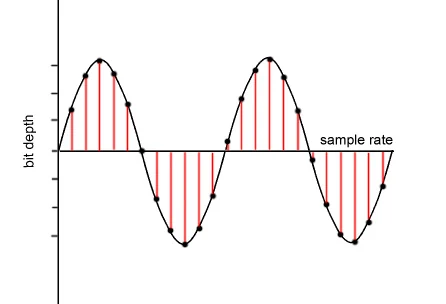
Before knocking you out (we promise we won’t hit too hard) with barbaric acronyms in every way, let’s first focus on two essential notions of modern audio, namely sampling rate and bit depth. These two elements give an idea of ​​the recording precision of a song.

but depth

As you know, computers run on bits, which are sets of 0 and 1. During a passage in the studio, music produced by an artist must be digitized, therefore transformed into 0 and 1 in order to be recorded on CD or transmitted to through transmission services. This is where the sampling rate and bit depth come into play.

Take the example of a CD. Our beloved empanadas are recorded in 16-bit / 44.1 kHz. The 44.1 kHz sampling rate means that the music produced by our musician is analyzed 44,100 times per second by studio recording devices. As for the bit depth, it gives an indication of the number of information recorded during this same period. The greater the depth, the more information will be encoded at the end.

However, CD quality is not the best in the world, even if it far exceeds MP3. Thus, we find 24-bit / 192 kHz recordings. The DSD goes even further with a frequency that rises to several MHz. But for simplicity, just remember that the higher the values ​​described above, the more accurate the recording will be in your sound reproduction.

Lossy formats: MP3, AAC, OGG

In general, there are two types of formats in the audio world: lossy, lossy in English, and lossy, or lossless. If you want the best audio quality, stay away from compressed formats.

The best known of all is MP3. True dinosaur in the audio world, this type of file was developed at a time when the capacities of our hard drives were determined in MB and not in TB. Therefore, we had to compress the recordings as much as possible, even if that meant putting quality aside.

It is true that MP3 encoded music weighs only a few megabytes. But the applied algorithm is very aggressive, it simply cuts the frequencies considered inaudible by the human ear. In fact, MP3 loses many audible parts. To get an idea, click the link below, you will hear these famous truncated parts. The pieces seem flat, devoid of life. Listening can even become unpleasant after several tens of minutes. Suffice it to say that, apart from its small size, MP3 is no longer really interesting in our time if we are looking for quality music.

To make things better, Apple, meanwhile, released another audio format, AAC, for advanced audio encoding. This is also a lossy format which therefore loses details during data compression. However, the algorithm used is more efficient, cutting fewer important frequencies, at least on paper. In absolute terms, the difference from MP3 is not necessarily stark and the debate has been raging for years in the audiophile environment to find out if the AAC format is really better than MP3.

Finally, there is also the OGG Vorbis, another lossy compressed format. Like AAC, it is supposed to work better than MP3. This is the type of file Spotify uses. Her interest is to enable efficient transmission while reducing quality. However, the songs encoded in this format are not fabulous. The ideal is really to become lossless.

Audio formats

Audio formats

Compression

Compressions are systems for reducing the file size by using different types of algorithms and / or encodings.

compressed audio

There are two types of compression: lossless (compression), which compresses the file without deleting information. Decompression can therefore exactly return the original and lossy (lossy) compression, eliminating redundant parts that are considered irrelevant or irrelevant and the decompression does not return to the original.
It is clear that the first system preserves the integrity of the original, but less compressed, while the second implies a loss of quality, but compresses much more, in proportion to the degree of loss one is willing to accept. Let’s look at a few examples.

Lossless compression

Lossless compression is based on reducing the redundancy typical of human production.

human perception
For example, in a book dedicated to experimental music, the phrase “experimental music” is repeated many times with 19 characters. At this point, simply replace it with a symbol that is normally not included in the text, e.g. ‘# 1 #’ to reduce a term from 19 characters to one of 3 and store 16 characters for each occurrence. Actually we have to say “for every occurrence after the first”, because in order to unpack the text, we also have to create an index of the substitutions in which it is written in this case
# 1 # = “experimental music”.
Obviously, many other words or phrases are repeated several times in the book, and each of them can be replaced by a symbol such as # 2 #, # 3 #, …, # n #, where n is a progressive number, which ultimately makes significant savings.
The Lempel-Ziv (LZ) algorithm uses a similar system, the derivatives of which underlie many modern lossless compression programs, including the well-known ZIP.
In fact, the ancestor of many lossless encoders is the so-called Huffman coding. It is a redundancy elimination system that was developed in 1952 by the researcher of the same name, then an MIT student. His algorithm solves the problem of encoding a series of strings (string = any character set) as compactly as possible, taking into account the frequency with which strings occur: the most common is assigned the shortest symbol in to maximize compression. Here is a good example dealing with Huffman coding issues.

Another type of lossless compression, which is always based on reducing redundancy, is the so-called Run Length Encoding (RLE), which works in a very simple way. Suppose we have the following string of 20 characters
ABBBBBBBBBCDEEEEFGGG

By applying the RLE it will
A 9BCD * * * 4EF 3G

for a total of 13 characters with a saving of 35%.
In practice, a code consisting of the character and the number of repetitions was inserted instead of the repeated characters. The asterisk indicates that the following is the number of repetitions and is not part of the chain (this is of course the basic principle; the details of the coding may vary).
Of course, this system is not productive with text, but it is the case with images where long stripes of the same color are fairly common.

Lossy compression

Lossy compression is based on the elimination of the information components that are considered to be more or less irrelevant depending on the compression level required. At low compression levels, only the really irrelevant details are removed, while at higher levels, the sensitive details are also removed.
An example that is not audio is the encoding of JPEG images, in which nuances are eliminated by assigning neighboring pixel groups the same color if their difference is less than a value that is proportional to the degree of compression. On this page you can see the effect of the size reduction and the corresponding loss of quality when increasing the compression levels.

Further information on compression on Wikipedia (free, community-created encyclopedia) can be found here in English. Wikipedia also exists in Italian, but the content is smaller.
First class compressed audio formats
Lossless (lossless)
These formats work similarly to zip. You compress the content without removing anything. At the time of listening, it is necessary to perform a decompression and to return to the original in one of the linear formats already shown.
Since it is lossless compression, the comparison between these codecs is not made in