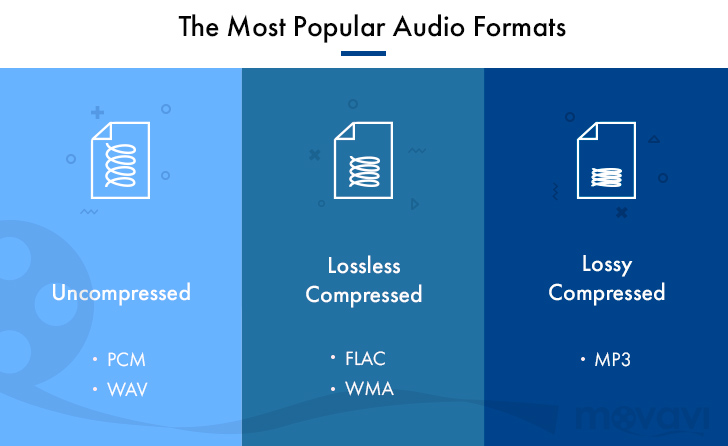
MP3, a German invention? In fact, it’s true: the world’s most famous digital audio format was developed in Germany. The compression process, patented in 1987, contributed significantly to the massive distribution of music on the still young Internet. However, there were and are many other audio formats. Some of them, unlike MP3, are even lossless.
The beginning of the MP3 era
As early as the early 1980s, the Fraunhofer Institute in Erlangen began work on a digital compression process for audio and video data, known as MPEG encoding. The standard was first published in late 1991. Patents that were registered before or since have expired, so the format is now freely usable.
MP3 became world famous and is now synonymous with the triumph of digitally stored music. There is no doubt that this and other audio formats made the widespread diffusion of music over the Internet possible in the first place and thus revolutionized the music business. Anyone who has witnessed the beginnings of digital music will surely remember file-sharing platforms. These platforms would never have grown so fast if it hadn’t been for file formats like MP3, which keep the required amount of data very small. The download servers were able to provide thousands of tracks and download time was limited even without a DSL connection.
Lossy audio formats
To fully immerse yourself in the world of digital music formats, it is important to understand the basic principle behind audio compression. Lossy processes include almost all common formats today, such as MP3, AAC, OGG or WMA. In this context, “lossy” means that the digital audio format contains less data than the same piece of music in the original sound carrier. Usually this is not a problem at all, because the human ear has a very limited auditory field anyway. This covers roughly the 20 Hz to 20 kHz frequency range. This is exactly what the researchers at the Fraunhofer Institute took advantage of and eventually discovered that the human ear cannot reliably distinguish an MP3 file compressed to one-tenth of the original from the original material.
But it doesn’t seem so easy if you believe in music purists. They claim that there is a clear difference, even if you only perceive it unconsciously. Not listening consciously does not necessarily mean that one does not perceive sounds. MP3 critics complain that the narrowing of the frequency spectrum reduces listening pleasure and that the generation that grew up with it no longer knows what recorded music can actually sound like.
MP3 was quickly followed by other, sometimes better, formats. By the time Napster had to shut down in 2001, music downloads had reached half of society and legal download options soon followed in droves. One of the best known providers of legal music downloads to this day is Apple’s iTunes Store. The Californian computer giant did not develop the AAC (Advanced Audio Coding) format, but rather relied on it from the beginning and thus contributed greatly to its spread.
Sample rate is crucial for MP3, AAC
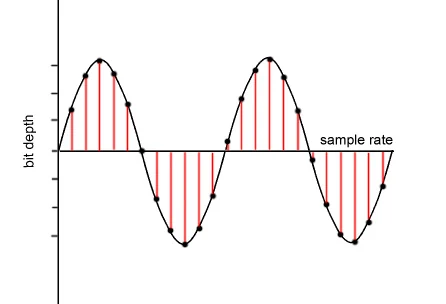
Even the most beautiful piece of music sounds bad if the sample rate is too low. This determines which frequency ranges are left out when the original file is scanned, that is, it is not compressed. The sample rate, also called the sample rate or bit rate, is specified in kilobits per second. It is crucial for the quality of the audio file. Acceptable stereo quality can be achieved in AAC format from 64 kbit / s. 96 kbit / s roughly corresponds to FM quality, and from 128 kbit / s upwards it goes to CD. Today most AAC files are 192 kbit / s or 224 kbit / s, in the iTunes Store even 256 kbit / s. This corresponds to a very good sound quality, at least for a lossy audio format.
It looks a bit different with an MP3 file: bit rates above 128 kbit / s are needed here to achieve relatively good quality. For a higher standard quality, you must use at least 192 kbit / s. Amazon offers MP3 in dynamic quality around 256 kbit / s, while other platforms also offer downloads with the maximum MP3 sample rate of 320 kbit / s. These sound very good by MP3 standards.