How does the bit depth impact the dynamic range and audio fidelity in digital formats?
audio bit depthaudio bit depth
Bit depth’s influence on dynamic range and audio quality
I remember when I first started learning about digital audio formats, I was curious about how bit depth affected the overall sound quality. It turns out that bit depth plays a significant role in determining the dynamic range and audio fidelity of digital audio files. The higher the bit depth, the more accurately the audio signal can be represented, resulting in a more detailed and accurate sound.
As a musician, I’ve always been fascinated by the science behind sound. I once read a quote from the famous composer John Cage that said, “There is no such thing as an empty space or an empty time. There is always something to see, something to hear.” This idea resonates with me, as it highlights the importance of capturing every nuance of sound in digital audio formats.
In my experience, working with higher bit depths has allowed me to create richer, more immersive audio experiences for my listeners. The increased dynamic range and audio fidelity make a noticeable difference in the final product.
How bit depth affects audio fidelity in digital formats
When I first started experimenting with digital audio, I didn’t realize how crucial bit depth was to the overall sound quality. Bit depth refers to the number of bits used to represent each audio sample in a digital file. The more bits used, the greater the audio fidelity, as there are more possible values to represent the audio signal.
I recall watching a documentary about the history of digital audio, where an expert explained that “the higher the bit depth, the closer the digital representation is to the original analog signal.” This made me realize the importance of using higher bit depths to achieve the best possible audio quality.
In my own projects, I’ve found that using a higher bit depth results in a more accurate and detailed sound. It’s especially noticeable when working with complex audio material, where the nuances of the sound can be more easily captured and preserved.
The role of bit depth in digital audio dynamic range
Dynamic range is another critical aspect of digital audio quality that is directly influenced by bit depth. The dynamic range refers to the difference between the quietest and loudest parts of an audio signal. A higher bit depth allows for a greater dynamic range, as there are more possible values to represent the varying levels of loudness.
I’ve always been a fan of movies with powerful soundtracks, and I remember a quote from the film “Amadeus” that stuck with me: “Music is not just about notes, but also the spaces between them.” This idea applies to dynamic range as well, as it’s essential to capture the full spectrum of sound, from the quietest whispers to the loudest explosions.
In my own audio projects, I’ve noticed that working with higher bit depths allows me to create more dynamic and expressive soundscapes. The increased dynamic range provides a more immersive and engaging listening experience for my audience.
Final words
In conclusion, bit depth plays a crucial role in determining the dynamic range and audio fidelity of digital audio formats. A higher bit depth allows for a more accurate representation of the audio signal, resulting in a more detailed and immersive sound. As a musician and audio enthusiast, I’ve found that working with higher bit depths has significantly improved the quality of my projects.
If you’re looking to enhance the audio quality of your own projects, I highly recommend using a tool like mp4gain. While it’s not free or open-source, and only runs on Windows, it’s a powerful normalizer and converter for major audio and video formats. With its integrated equalizer, mp4gain can help you achieve the best possible audio quality for your projects.
Digital audio bit depth refers to the number of bits used to represent each sample in a digital audio signal. Bit depth is a crucial aspect of digital audio because it affects the accuracy and dynamic range of the signal.
In digital audio, sound is captured and processed as a series of discrete samples, with each sample representing the amplitude of the sound wave at a specific point in time. The bit depth determines the number of possible amplitude values that can be represented in each sample.
How Does Bit Depth Affect Audio Quality?
The higher the bit depth, the more accurately the digital audio signal can represent the original analog waveform. A higher bit depth allows for a greater dynamic range, which means that the quietest sounds can be represented with more accuracy, and the loudest sounds can be represented without distortion.
For example, a 16-bit audio signal can represent 65,536 possible amplitude values, while a 24-bit audio signal can represent 16,777,216 possible amplitude values. This means that a 24-bit audio signal can capture a wider range of dynamic levels and is capable of greater accuracy and detail than a 16-bit audio signal.
What is the Relationship Between Bit Depth and Signal-to-Noise Ratio?
As the bit depth increases, the signal-to-noise ratio (SNR) also increases. SNR is the ratio between the desired signal (the audio) and the background noise.
A higher bit depth means that there are more possible amplitude values for each sample, which reduces the amount of quantization noise in the signal. Quantization noise is a type of distortion that occurs when the analog signal is converted to digital.
How is Bit Depth Measured?
Bit depth is measured in bits per sample. Common bit depths in digital audio include 16-bit, 24-bit, and 32-bit.
What is Dithering?
Dithering is a process used to reduce the distortion caused by quantization error in digital audio. When an analog signal is digitized, the conversion process rounds the amplitude of each sample to the nearest possible value.
Dithering adds a small amount of random noise to the signal before it is quantized, which allows for a smoother transition between amplitude values and reduces the audible effects of quantization error.
What is the Difference Between Bit Depth and Sample Rate?
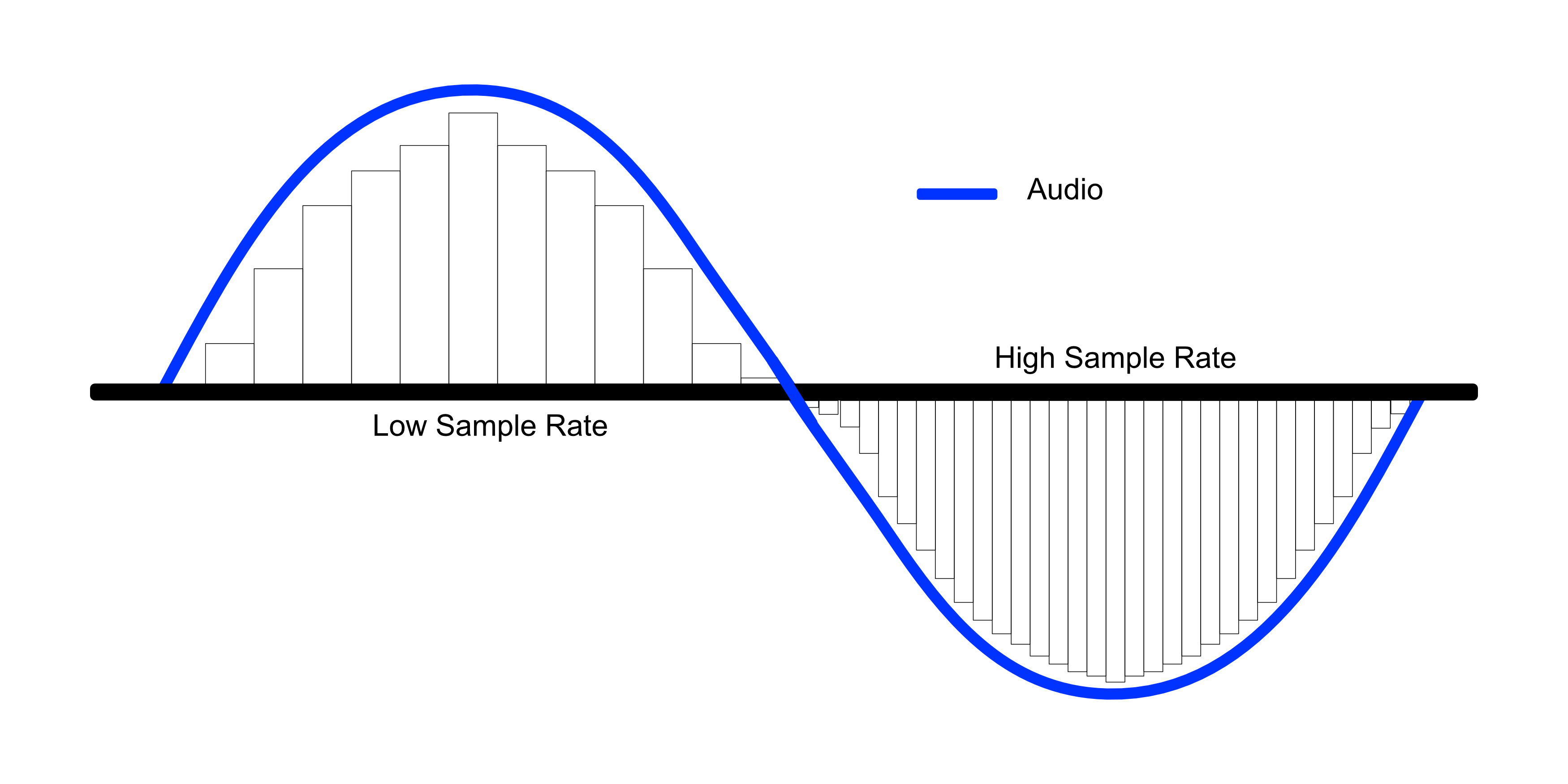
While bit depth determines the number of possible amplitude values in each sample, sample rate determines the number of samples taken per second. A higher sample rate allows for greater accuracy in capturing the original analog waveform, but it does not affect the dynamic range or accuracy of each individual sample.
What is the Ideal Bit Depth for Recording and Mixing?
The ideal bit depth for recording and mixing depends on the intended use of the final product. For most applications, a bit depth of 24 bits is considered to be sufficient, as it provides a wide dynamic range and high accuracy.
However, for applications that require extreme accuracy and detail, such as classical music recording, a higher bit depth may be necessary.
What is the Relationship Between Bit Depth and File Size?
As the bit depth increases, the file size of the digital audio also increases. This is because a higher bit depth requires more storage space to represent the additional amplitude values.
What is the Relationship Between Bit Depth and Processing Power?
Higher bit depths require more processing power to manipulate and process. This is because the additional amplitude values must be calculated and stored in memory.
What Happens When a High Bit-Depth Audio File is Converted to a Lower Bit-Depth Format?
When a high bit-depth audio file is converted to a lower bit-depth format, the result is a loss of some of the original audio data. This is because the lower bit-depth format has fewer bits to represent the audio data, which means that some of the information is lost in the conversion process.
For example, if a 24-bit audio file is converted to a 16-bit format, the conversion process will discard the least significant 8 bits of each sample. This can result in a loss of some of the subtle nuances and details in the audio, which can be particularly noticeable in quiet passages or when the audio is heavily processed.
It’s worth noting that some audio formats, such as MP3 and AAC, use lossy compression to reduce the file size. This means that even if the original file was at a high bit-depth, converting it to a lower bit-depth format such as MP3 will result in a further loss of data due to the compression algorithm.
What is Dithering and How Does it Help with Bit Depth Reduction?
Dithering is a technique used to reduce the impact of bit-depth reduction when converting high-resolution audio to a lower resolution format. It works by adding a small amount of random noise to the audio signal before it is truncated to the lower bit depth.
This noise effectively masks the truncation distortion, allowing the audio to retain some of its original detail and clarity. Dithering is particularly useful when converting from a higher bit-depth format to a lower bit-depth format, as it can help to mitigate the loss of information that would otherwise occur.
How Does Bit Depth Affect Audio Quality?
The bit depth of an audio file can have a significant impact on its perceived quality. Generally speaking, higher bit-depth files can capture more detail and nuance in the audio, resulting in a more accurate and realistic reproduction of the original recording.
For example, a 16-bit audio file has a maximum dynamic range of 96 dB, while a 24-bit file has a maximum dynamic range of 144 dB. This means that a 24-bit file can capture much quieter sounds and much louder sounds than a 16-bit file, resulting in a more accurate representation of the original recording.
That being said, the impact of bit depth on perceived audio quality can vary depending on a number of factors, including the quality of the recording equipment, the mastering process, and the listening environment.
What is the Difference Between Bit Depth and Sample Rate?
While bit depth and sample rate are both important aspects of digital audio, they refer to different things. Bit depth refers to the number of bits used to represent each sample in an audio file, while sample rate refers to the number of samples per second that are taken to create the audio file.
In other words, bit depth determines the level of detail captured in each sample, while sample rate determines the temporal resolution of the audio. Both bit depth and sample rate can have an impact on the perceived quality of an audio file, and both are important considerations when working with digital audio.
What is the Best Bit Depth for Audio Production?
The best bit depth for audio production depends on a number of factors, including the specific needs of the project and the available hardware and software. In general, however, a bit depth of 24 bits is considered to be a good choice for most recording and production purposes.
This is because a 24-bit depth provides a high level of detail and dynamic range, while also being widely supported by modern recording equipment and software. That being said, there may be situations where a lower bit depth may be sufficient. For example, if the final audio product will only be distributed online or through streaming services, a 16-bit depth may be acceptable as it will still provide decent quality while reducing file size and download times. Additionally, if the recording environment is not optimal and contains a high level of background noise, a lower bit depth may actually be preferable as it can help mask the noise.
How does bit depth affect audio quality?
Bit depth plays a critical role in determining the quality of digital audio recordings. The higher the bit depth, the greater the dynamic range and level of detail that can be captured in a recording. This results in a more accurate and faithful reproduction of the original sound source. In contrast, a lower bit depth may result in a loss of detail and accuracy, leading to a less faithful reproduction of the original sound.
Can bit depth be converted after recording?
While it is possible to convert the bit depth of a digital audio file after recording, it is generally not recommended. This is because bit depth conversion can result in a loss of information and a decrease in overall audio quality. If possible, it is best to record at the desired bit depth from the start to ensure the highest possible quality.
What are some common bit depths used in digital audio?
The most common bit depths used in digital audio are 16-bit, 24-bit, and 32-bit. 16-bit is the standard for CDs and is widely used in digital audio recording for distribution on streaming platforms. 24-bit is increasingly becoming the standard for professional recording due to its high level of detail and dynamic range. 32-bit is relatively new and provides an even greater level of detail and dynamic range, but is not yet widely supported by all recording equipment and software.
Does bit depth affect the final file size of an audio recording?
Yes, bit depth does affect the final file size of an audio recording. A higher bit depth requires more data to represent each sample, resulting in larger file sizes. For example, a 24-bit audio file will be larger than a 16-bit audio file of the same duration and sample rate.
What is dithering in relation to bit depth?
Dithering is a technique used to reduce the audible effects of quantization distortion when converting from a higher bit depth to a lower bit depth. When reducing the bit depth, some of the information from the original recording must be discarded. This can result in audible distortion and noise. Dithering adds a small amount of random noise to the audio signal to mask this distortion and make it less audible.
Can different bit depths be mixed in the same audio project?
Yes, different bit depths can be mixed in the same audio project. However, it is important to note that mixing different bit depths can result in a loss of quality for the higher bit depth audio. When mixing different bit depths, it is best to convert all audio to the same bit depth before mixing to ensure the highest possible quality.
What is the relationship between bit depth and sample rate?
Bit depth and sample rate are both important factors in determining the quality of digital audio recordings. Bit depth refers to the number of bits used to represent each sample, while sample rate refers to the number of samples taken per second. Higher bit depths and sample rates result in higher quality recordings with greater detail and accuracy.
Can bit depth affect the sound of analog audio recordings?
No, bit depth does not affect the sound of analog audio recordings. Bit depth only applies to digital audio recordings.
Compressing a digital audio with loss is to reduce the size of an audio file.
Codecs are used to reduce the size of the files. Some of the operations that codecs can perform to reduce file sizes are as follows:
Reduce the bit rate of the original sound so that the audio takes up less space.
Remove sounds at frequencies that are not noticeable by the human ear.
Elimination of redundancies of the audio signal.
They can reduce the number of existing channels by transforming a surround sound to Stereo.
Reduce the number of bits per sample.
Etc.
Note: The compression process of an audio is extremely complex. In addition, each codec applies different methodologies to compress the size of an audio.
Obviously during the compression process there will be a loss in audio quality. The higher the weight reduction of the compressed file, the higher the loss of quality.
UTILITIES THAT YOU HAVE TO COMPRESS AN AUDIO
Obviously compressing an audio has certain utilities. Some of them are as detailed below:
The space needed to store the songs on our hard drive will be much smaller. Although hard drives are cheap and their storage capacity is large, it is not feasible and / or practical to store all of our songs without loss.
We can pass the audio files to third parties in a much more convenient and fast way. After compressing a music song we can pass it by email or other means without any problem.
It seems that the trend in the very near future will be to consume video and audio via streaming. Therefore the compression of video and audio is very important. If we offer a web service in which we provide streaming audio, it is essential to compress the audio to save bandwidth and so that customers can play it at home without problems.
Select the compressed audio file format
There are numerous types of compressed file format with loss. Some of the most popular are the following:
.mp3
.ogg
.wma
.m4a
.aac
Depending on the needs, it may be useful to select one format or another.
However in my case I recommend using the mp3 or ogg file format. The reasons are as follows:
The .mp3 files do not stand out for providing the best audio quality. However, the .mp3 format is the most universally extended.
Any music player is capable of playing the .mp3 file format. You cannot say the same of the other file formats.
Everyone is able to play audio in .mp3 format. Even people with little knowledge technologically speaking.
If someone does not want to use the .mp3 format because they think the quality is not enough, or because it is a proprietary format, I recommend using .ogg. In the following link you can find the advantages and disadvantages of the .ogg files with respect to the .mp3 files.
Select the audio compression codec (encoder)
Once the file format is selected we must be aware of the codec that we will use to perform the audio compression.
In the case that we want to compress in the .mp3 file format there are the following codecs:
FHC: It’s the first codec that existed. At present this codec has become obsolete. Its compression time is very high and does not support variable bit rate.
Xing: It is the fastest encoder and allows you to obtain files with a variable bit rate (VBR). However, the quality level offered by this type of encoder is lower than Blade and Lame.
Blade: Until Lame’s appearance was the best option. It is slightly slower than Xing, but the quality levels obtained are much better. Currently this host has a problem and it does not support variable bit rates.
Lame: It is available under the GNU license and is also the best host available today. It supports variable bit rates, is fast and the quality obtained is better than in the rest of the encoders.