How does the bit depth impact the dynamic range and audio fidelity in digital formats?
audio bit depthaudio bit depth
Bit depth’s influence on dynamic range and audio quality
I remember when I first started learning about digital audio formats, I was curious about how bit depth affected the overall sound quality. It turns out that bit depth plays a significant role in determining the dynamic range and audio fidelity of digital audio files. The higher the bit depth, the more accurately the audio signal can be represented, resulting in a more detailed and accurate sound.
As a musician, I’ve always been fascinated by the science behind sound. I once read a quote from the famous composer John Cage that said, “There is no such thing as an empty space or an empty time. There is always something to see, something to hear.” This idea resonates with me, as it highlights the importance of capturing every nuance of sound in digital audio formats.
In my experience, working with higher bit depths has allowed me to create richer, more immersive audio experiences for my listeners. The increased dynamic range and audio fidelity make a noticeable difference in the final product.
How bit depth affects audio fidelity in digital formats
When I first started experimenting with digital audio, I didn’t realize how crucial bit depth was to the overall sound quality. Bit depth refers to the number of bits used to represent each audio sample in a digital file. The more bits used, the greater the audio fidelity, as there are more possible values to represent the audio signal.
I recall watching a documentary about the history of digital audio, where an expert explained that “the higher the bit depth, the closer the digital representation is to the original analog signal.” This made me realize the importance of using higher bit depths to achieve the best possible audio quality.
In my own projects, I’ve found that using a higher bit depth results in a more accurate and detailed sound. It’s especially noticeable when working with complex audio material, where the nuances of the sound can be more easily captured and preserved.
The role of bit depth in digital audio dynamic range
Dynamic range is another critical aspect of digital audio quality that is directly influenced by bit depth. The dynamic range refers to the difference between the quietest and loudest parts of an audio signal. A higher bit depth allows for a greater dynamic range, as there are more possible values to represent the varying levels of loudness.
I’ve always been a fan of movies with powerful soundtracks, and I remember a quote from the film “Amadeus” that stuck with me: “Music is not just about notes, but also the spaces between them.” This idea applies to dynamic range as well, as it’s essential to capture the full spectrum of sound, from the quietest whispers to the loudest explosions.
In my own audio projects, I’ve noticed that working with higher bit depths allows me to create more dynamic and expressive soundscapes. The increased dynamic range provides a more immersive and engaging listening experience for my audience.
Final words
In conclusion, bit depth plays a crucial role in determining the dynamic range and audio fidelity of digital audio formats. A higher bit depth allows for a more accurate representation of the audio signal, resulting in a more detailed and immersive sound. As a musician and audio enthusiast, I’ve found that working with higher bit depths has significantly improved the quality of my projects.
If you’re looking to enhance the audio quality of your own projects, I highly recommend using a tool like mp4gain. While it’s not free or open-source, and only runs on Windows, it’s a powerful normalizer and converter for major audio and video formats. With its integrated equalizer, mp4gain can help you achieve the best possible audio quality for your projects.
What is the relationship between audio and video bit depth?
audio and video bit depthaudio and video bit depth
Audio Bit Depth and Video Bit Depth
Audio and video quality are two essential components of any multimedia content. Bit depth is one of the key factors that determine the quality of audio and video content. The bit depth of audio refers to the number of bits used to represent the amplitude of a sound wave. In contrast, video bit depth refers to the number of bits used to represent the color and brightness of each pixel in an image or video frame.
The higher the bit depth, the more accurately the audio or video content can be represented. A higher bit depth allows for a greater dynamic range and more subtle variations in sound or image. In general, a higher bit depth is desirable for both audio and video content.
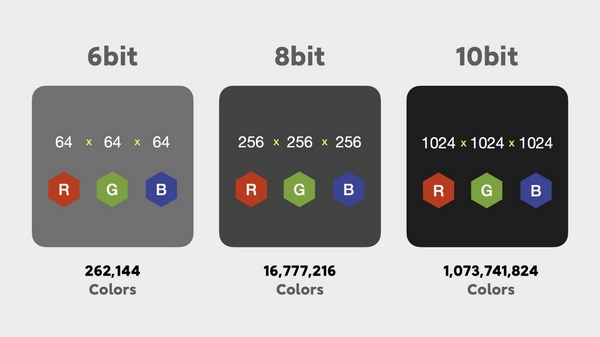
As a personal experience, I have worked with audio and video editing for several years, and I have noticed a significant improvement in quality when using a higher bit depth. I often use a bit depth of 24 bits for audio and 10 bits for video when working on high-quality content.
Audio and Video Synchronization
The synchronization between audio and video is crucial for creating a seamless multimedia experience. When the audio and video are out of sync, it can be distracting and diminish the overall quality of the content.
The bit depth of both audio and video can affect the synchronization. For example, if the audio has a higher bit depth than the video, the audio may appear to be out of sync with the video. This can occur because the audio takes longer to process due to the higher bit depth. To avoid this issue, it is essential to ensure that both the audio and video have the same bit depth.
As a personal tip, I recommend using software that allows for precise synchronization adjustments. I have found that the use of keyframes and markers can significantly improve the accuracy of synchronization between audio and video.
Audio and Video Codecs and File Formats
Audio and video codecs and file formats can also affect the bit depth and overall quality of multimedia content. A codec is a software program that compresses and decompresses audio or video data, while a file format determines how the compressed data is stored.
Lossy codecs, such as MP3 and H.264, compress audio and video data by discarding information deemed unnecessary. This can result in a lower bit depth and lower overall quality. In contrast, lossless codecs, such as FLAC and ProRes, maintain the original quality by compressing the data without discarding any information.
As a personal preference, I usually work with lossless codecs and file formats when editing audio and video content. However, it is essential to consider the intended use and distribution of the content when choosing codecs and file formats. For example, lossy codecs are often used for streaming and web distribution due to their smaller file sizes.
Final Words
In conclusion, bit depth is a critical factor in determining the quality of audio and video content. A higher bit depth allows for greater accuracy and dynamic range. Ensuring that the audio and video have the same bit depth is crucial for synchronization. Codecs and file formats can also affect the bit depth and overall quality of multimedia content. Choosing the right codecs and file formats depends on the intended use and distribution of the content.
Remember that mp4gain is a great solution to normalize and convert audio and video files to ensure they have the same bit depth and quality.
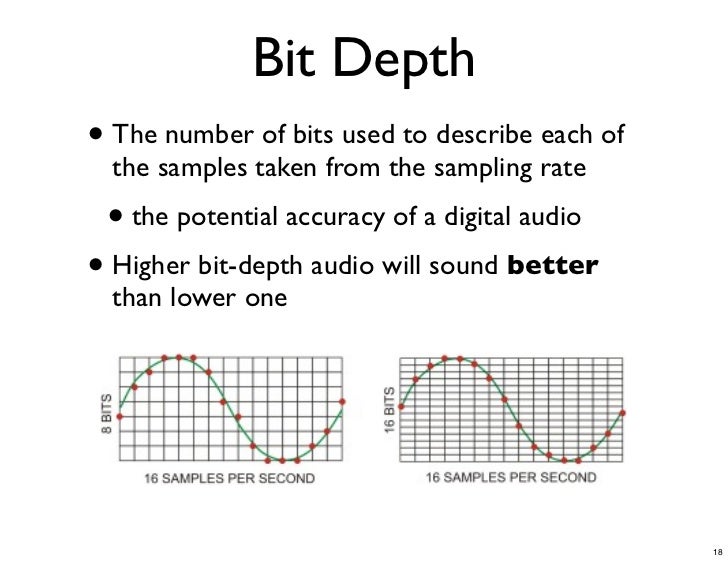
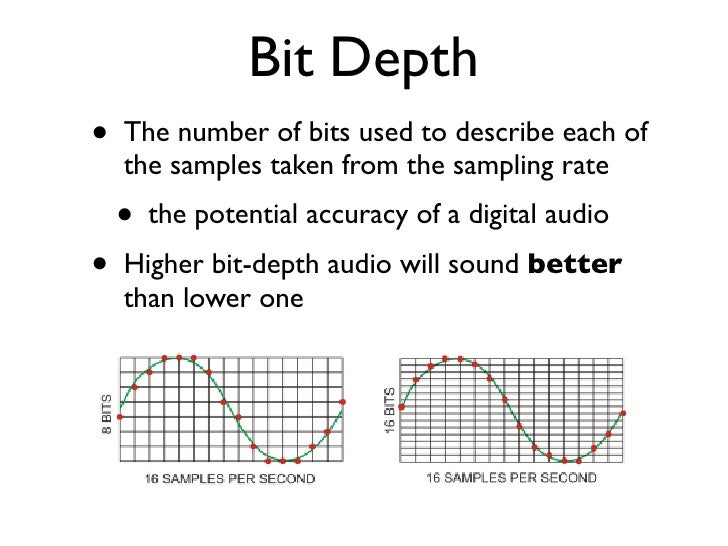
Digital audio bit depth refers to the number of bits used to represent each sample in a digital audio signal. Bit depth is a crucial aspect of digital audio because it affects the accuracy and dynamic range of the signal.
In digital audio, sound is captured and processed as a series of discrete samples, with each sample representing the amplitude of the sound wave at a specific point in time. The bit depth determines the number of possible amplitude values that can be represented in each sample.
How Does Bit Depth Affect Audio Quality?
The higher the bit depth, the more accurately the digital audio signal can represent the original analog waveform. A higher bit depth allows for a greater dynamic range, which means that the quietest sounds can be represented with more accuracy, and the loudest sounds can be represented without distortion.
For example, a 16-bit audio signal can represent 65,536 possible amplitude values, while a 24-bit audio signal can represent 16,777,216 possible amplitude values. This means that a 24-bit audio signal can capture a wider range of dynamic levels and is capable of greater accuracy and detail than a 16-bit audio signal.
What is the Relationship Between Bit Depth and Signal-to-Noise Ratio?
As the bit depth increases, the signal-to-noise ratio (SNR) also increases. SNR is the ratio between the desired signal (the audio) and the background noise.
A higher bit depth means that there are more possible amplitude values for each sample, which reduces the amount of quantization noise in the signal. Quantization noise is a type of distortion that occurs when the analog signal is converted to digital.
How is Bit Depth Measured?
Bit depth is measured in bits per sample. Common bit depths in digital audio include 16-bit, 24-bit, and 32-bit.
What is Dithering?
Dithering is a process used to reduce the distortion caused by quantization error in digital audio. When an analog signal is digitized, the conversion process rounds the amplitude of each sample to the nearest possible value.
Dithering adds a small amount of random noise to the signal before it is quantized, which allows for a smoother transition between amplitude values and reduces the audible effects of quantization error.
What is the Difference Between Bit Depth and Sample Rate?
While bit depth determines the number of possible amplitude values in each sample, sample rate determines the number of samples taken per second. A higher sample rate allows for greater accuracy in capturing the original analog waveform, but it does not affect the dynamic range or accuracy of each individual sample.
What is the Ideal Bit Depth for Recording and Mixing?
The ideal bit depth for recording and mixing depends on the intended use of the final product. For most applications, a bit depth of 24 bits is considered to be sufficient, as it provides a wide dynamic range and high accuracy.
However, for applications that require extreme accuracy and detail, such as classical music recording, a higher bit depth may be necessary.
What is the Relationship Between Bit Depth and File Size?
As the bit depth increases, the file size of the digital audio also increases. This is because a higher bit depth requires more storage space to represent the additional amplitude values.
What is the Relationship Between Bit Depth and Processing Power?
Higher bit depths require more processing power to manipulate and process. This is because the additional amplitude values must be calculated and stored in memory.
What Happens When a High Bit-Depth Audio File is Converted to a Lower Bit-Depth Format?
When a high bit-depth audio file is converted to a lower bit-depth format, the result is a loss of some of the original audio data. This is because the lower bit-depth format has fewer bits to represent the audio data, which means that some of the information is lost in the conversion process.
For example, if a 24-bit audio file is converted to a 16-bit format, the conversion process will discard the least significant 8 bits of each sample. This can result in a loss of some of the subtle nuances and details in the audio, which can be particularly noticeable in quiet passages or when the audio is heavily processed.
It’s worth noting that some audio formats, such as MP3 and AAC, use lossy compression to reduce the file size. This means that even if the original file was at a high bit-depth, converting it to a lower bit-depth format such as MP3 will result in a further loss of data due to the compression algorithm.
What is Dithering and How Does it Help with Bit Depth Reduction?
Dithering is a technique used to reduce the impact of bit-depth reduction when converting high-resolution audio to a lower resolution format. It works by adding a small amount of random noise to the audio signal before it is truncated to the lower bit depth.
This noise effectively masks the truncation distortion, allowing the audio to retain some of its original detail and clarity. Dithering is particularly useful when converting from a higher bit-depth format to a lower bit-depth format, as it can help to mitigate the loss of information that would otherwise occur.
How Does Bit Depth Affect Audio Quality?
The bit depth of an audio file can have a significant impact on its perceived quality. Generally speaking, higher bit-depth files can capture more detail and nuance in the audio, resulting in a more accurate and realistic reproduction of the original recording.
For example, a 16-bit audio file has a maximum dynamic range of 96 dB, while a 24-bit file has a maximum dynamic range of 144 dB. This means that a 24-bit file can capture much quieter sounds and much louder sounds than a 16-bit file, resulting in a more accurate representation of the original recording.
That being said, the impact of bit depth on perceived audio quality can vary depending on a number of factors, including the quality of the recording equipment, the mastering process, and the listening environment.
What is the Difference Between Bit Depth and Sample Rate?
While bit depth and sample rate are both important aspects of digital audio, they refer to different things. Bit depth refers to the number of bits used to represent each sample in an audio file, while sample rate refers to the number of samples per second that are taken to create the audio file.
In other words, bit depth determines the level of detail captured in each sample, while sample rate determines the temporal resolution of the audio. Both bit depth and sample rate can have an impact on the perceived quality of an audio file, and both are important considerations when working with digital audio.
What is the Best Bit Depth for Audio Production?
The best bit depth for audio production depends on a number of factors, including the specific needs of the project and the available hardware and software. In general, however, a bit depth of 24 bits is considered to be a good choice for most recording and production purposes.
This is because a 24-bit depth provides a high level of detail and dynamic range, while also being widely supported by modern recording equipment and software. That being said, there may be situations where a lower bit depth may be sufficient. For example, if the final audio product will only be distributed online or through streaming services, a 16-bit depth may be acceptable as it will still provide decent quality while reducing file size and download times. Additionally, if the recording environment is not optimal and contains a high level of background noise, a lower bit depth may actually be preferable as it can help mask the noise.
How does bit depth affect audio quality?
Bit depth plays a critical role in determining the quality of digital audio recordings. The higher the bit depth, the greater the dynamic range and level of detail that can be captured in a recording. This results in a more accurate and faithful reproduction of the original sound source. In contrast, a lower bit depth may result in a loss of detail and accuracy, leading to a less faithful reproduction of the original sound.
Can bit depth be converted after recording?
While it is possible to convert the bit depth of a digital audio file after recording, it is generally not recommended. This is because bit depth conversion can result in a loss of information and a decrease in overall audio quality. If possible, it is best to record at the desired bit depth from the start to ensure the highest possible quality.
What are some common bit depths used in digital audio?
The most common bit depths used in digital audio are 16-bit, 24-bit, and 32-bit. 16-bit is the standard for CDs and is widely used in digital audio recording for distribution on streaming platforms. 24-bit is increasingly becoming the standard for professional recording due to its high level of detail and dynamic range. 32-bit is relatively new and provides an even greater level of detail and dynamic range, but is not yet widely supported by all recording equipment and software.
Does bit depth affect the final file size of an audio recording?
Yes, bit depth does affect the final file size of an audio recording. A higher bit depth requires more data to represent each sample, resulting in larger file sizes. For example, a 24-bit audio file will be larger than a 16-bit audio file of the same duration and sample rate.
What is dithering in relation to bit depth?
Dithering is a technique used to reduce the audible effects of quantization distortion when converting from a higher bit depth to a lower bit depth. When reducing the bit depth, some of the information from the original recording must be discarded. This can result in audible distortion and noise. Dithering adds a small amount of random noise to the audio signal to mask this distortion and make it less audible.
Can different bit depths be mixed in the same audio project?
Yes, different bit depths can be mixed in the same audio project. However, it is important to note that mixing different bit depths can result in a loss of quality for the higher bit depth audio. When mixing different bit depths, it is best to convert all audio to the same bit depth before mixing to ensure the highest possible quality.
What is the relationship between bit depth and sample rate?
Bit depth and sample rate are both important factors in determining the quality of digital audio recordings. Bit depth refers to the number of bits used to represent each sample, while sample rate refers to the number of samples taken per second. Higher bit depths and sample rates result in higher quality recordings with greater detail and accuracy.
Can bit depth affect the sound of analog audio recordings?
No, bit depth does not affect the sound of analog audio recordings. Bit depth only applies to digital audio recordings.
(a) Regarding bit depth. Bit depth is also called sampling bit depth, and the bit depth of the audio determines the dynamic range.
Bit depth
Our common 16-bit (16-bit) can record a dynamic range of about 96 decibels. Well, roughly you can know that each bit can record about 6 decibels of sound. Similarly, the 20-bit recordable dynamic range is about 120 dB; 24 bits is about 144 dB.
If we define 0dB as the maximum value, then the sound amplitude is calculated by extension down, then the dynamic range of CD audio is “-96dB ~ 0dB”, and so on, the dynamic range of 24Bit HD-Audio high – the audio definition is “-144dB~0dB”. It can be seen that at higher bit depths, a greater dynamic range is available and lower levels of detail can be recorded.
(2) Regarding the sampling frequency.
What is the most intuitive effect of sample rate? Affects the expressiveness of the sound’s frequency range. The higher the sample rate, the larger the frequency range that can be expressed. 44.1KHz sampling rate can express the frequency range from 0Hz to 22050Hz; 48KHz sampling rate can express the frequency range from 0Hz to 24000Hz; 96KHz sampling frequency can express the frequency range from 0Hz to 48000Hz. The average frequency range that the human ear can hear is about 20Hz-20000Hz.
Combining the two above, if you see a parameter:
16Bit 44.1KHz, means this digital audio can express “96dB dynamic range” and “0Hz-22050Hz” frequency range;
24Bit 48KHz, which means this digital audio can express “144dB dynamic range” and “0Hz-24000Hz” frequency range.
(3) Audio bit rate, also called bitrate or bit rate.
Bit rate refers to the amount of information that can pass through a data stream per second, and can also be understood as: how many bits of data per second are used to represent.
In principle, the higher the audio bitrate, the better the quality.
However, in the case of lossy compressed audio, different compression algorithms, even at the same bitrate, can lead to completely different sound quality results.
Typical Representative: WMA 96kbps audio format sound quality is obviously better than MP3 96kbps sound quality. Why is this so? Differences in data usage due to different compression algorithms. For another example, if MP3 is compressed below 48kbps, it’s already terrible, and if it’s AAC audio format, the sound quality is obviously better than MP3 at the same 48kbps bitrate.
For lossless compressed audio, even though the bitrate is completely different, the final sound quality is the same. For example, if the same WAV file is compressed in FLAC format and APE format, the bit rate of the output file is not the same, but the sound quality is the same. Even in the same format, the compression level is different and the bitrate is completely different, but the end result, the sound quality remains the same (but when encoding and decoding, the CPU usage is different and the encoding time is also different).
Mp3, what is bit depth and how does it affect the quality of an mp3?
Bit-Depth
Bitrate is not the same as bit depth
Bit-Depth
We have explained in previous articles that sound is a wave that propagates through the air. And the act of digitizing it is based, on the one hand, on the number of samples that are taken, in order to be able to draw it with enough gfidelity, but that, if we have an X,Y graph, represents only one of the axes.
The other axis is represented by the depth, that is, we already have how many samples are taken per second, but we need to have on the other side, how many possibilities we have to “capture” the data that each sample captures.
If we have a bit depth of 16 then we will have a little more than 250 different values to draw the wave.
If instead we use a bit depth of 24 bits, we will have millions of different values. Which allows us in treoria to have much greater detail or fidelity.
All this is what the theory tells us. It’s like with colors, with a bit depth of 16 bits we will have 250+ options to describe, let’s say a green color, instead with 24b we will have millions of possible variants.
Obviously the first thing we will have to ask ourselves is if the device is capable of reproducing millions of different colors or variants in sound.
We must also ask ourselves if the human ear will be able to pick up these differences.
Even, and we won’t dwell on it, “noise” plays an important role here.
We would say that in general terms for the sound a bit depth equal to or greater than 16 is already enough to have an important quality.
I wrote it in the DTM project file settings and audio interface spec column, but I don’t understand the meaning …
This time, we will answer those questions.
Here’s a quick rundown of “What is a Bit Rate / Sample Rate ?,” Explained by Professional Drummer / Engineer / Producer Ed Thorne.
Once you know this, you will be able to export the sound source in the appropriate format and you will be able to understand the criteria for the equipment that you will buy in the future.
Please take a look to the end!
What is bit-deapth?
Bit depth refers to the range in which the dynamics (inflection) of the sound can be processed.
For example, if the bit depth is “16 bit”, the range up to 96 dB can be reproduced and processed from the silent state.
96dB is all about the volume when the audience is excited at the live venue.
On the other hand, if the bit depth is “24 bit”, the 144 dB dynamics can be reproduced and processed.
144dB is roughly the volume of a jet airplane.
Dynamics in the age of streaming
Not long ago, there were no limits to volume like today’s streaming services like YouTube and Spotify.
The louder the sound, the better the music itself, which is why producers always wanted to make it louder and bigger than any other music.
Today, many platforms where you can listen to music have volume restrictions, so the idea that “the more music you can play loud sounds, the better” has changed, and times have changed.
So, in this age, 16-bit or 24-bit might not make much of a difference.
The amount of data also changes
By the way, if the bit depth is high, the amount of data will change as well.
When recording a lot, you may want to consider this a bit.
What is the sample rate?
Next, I will explain the sample rate.
The sample rate is like the “resolution” of the audio.
The higher the sample rate, the more samples per second = you can hear better.
Requires double sample rate
One thing to note here is that you need twice the sample rate to hear sound at that frequency.
For example, if you want to hear a 1000 Hz (1 kHz) sound accurately and clearly, the sampling frequency must be at least 2000 Hz (2 kHz).
If the sample rate is less than twice the value of the sound you want to hear, “aliasing” will occur and the sound will not be processed accurately, such as crackle or noise.
To understand bit depth (width), we first look at bits.
Short for binary digit, a bit is a separate component of a binary code, either 1 or 0.
The more bits used, the more possible combinations. For example …
As you can see from the table below, 16 combinations can be made from 4 bits.
4 bits
When used to encode information, each number is assigned a value.
As the number of bits increases, the number of possible values grows exponentially.
4 bits = 16 possible values
8 bits = 256 possible values
16 bits = 16536 possible values
24 bits = 16777215 possible values
In digital audio, each value is assigned to the amplitudes of the sound wave.
The higher the bit depth, the greater the difference between loud and quiet sound … and the greater the dynamic range of the recording.
As a general rule of thumb, with each “beat”, the dynamic range increases by 6 dB.
For example :
4 bits = 24 dB
8 bits = 48 dB
16 bits = 96 dB
24 bits = 144 dB
In general, this means … more bit depth results in less noise …
Because by adding headroom, the desired signal can be recorded more clearly in relation to noise.
small and large drill depth
Further away…
5. Quantization error
It sounds amazing that there are almost 17 million values in 24-bit recordings, right?
However, this is much less than the infinite number of possible values that exist in an analog signal.
In almost all samples, the true value is somewhere between the two possible values. The converter simply rounds (quantizes) them to the nearest value.
The result is a distortion known as quantization error, which occurs in two stages of the recording process:
at first, during analog to digital conversion
at the end, during mastering
During mastering, the sample rate and bit depth of the final track are often reduced when converted to the final digital format (CD, mp3, etc.).
When this happens, some information is removed and re-quantized, further distorting the sound.
To solve this problem, the following was invented …
6. Dithering
When converting a 24-bit file to a 16-bit file, dithering is used to hide most of the resulting distortion.
Adding “pseudo-random noise” to the audio signal.
Since this concept is difficult to visualize when talking about sound, it is usually explained using pictures.
It works like this:
When a color photo is converted to black and white, it is mathematically calculated which color pixel should be black and which pixel should be white.
Also how the quantization of digital audio samples is calculated.
As you can see from the illustration below, the above image looks like shit, doesn’t it?
hesitate
But thanks to dithering …
a small amount of white pixels are accidentally inserted into the black areas …
a small number of black pixels accidentally get into the white areas …
And by adding this “pseudo-random noise” to the image, the “after” image looks much better. The concept of audio dithering is similar to this.
Further away…
7. Delay time
A MAJOR FAULT of modern digital studios is the delay that builds up in the signal flow, especially in DAWs.
Taking all the calculations into account, it takes anywhere from a few milliseconds to several millisecond TENS for the audio signal to exit the system.
The 0-11 millisecond delay is so short that the average person wouldn’t even notice it.
With a delay of 11 to 22 milliseconds, you will hear an annoying slapback, a short delay that takes some getting used to.
With a delay of more than 22 milliseconds, it is almost impossible to play or sing along with the track.
In a typical digital signal chain, there are 4 stages that affect the resulting delay time:
analog to digital conversion
DAW buffering
complement delay
digital to analog conversion
A / D and D / A conversion are the 2 smallest negative effects that add a maximum of 5 milliseconds to latency.
When a signal reaches the ADC from a preamplifier, compressor, console output, synthesizer, it represents electromagnetic oscillations.
That is, a certain wave with a variable voltage (very small values) reaches the input of the ADC. To save a signal to a file, it must be “digitized,” that is, encoded by ones and zeros. The result is a graph of the wave on the computer screen.
Even the best transducer has an error, because there are no intermediate values between zero and one, and the wave graph will only consist of vertical and horizontal segments, with no oblique lines. The graphical representation of the wave will be influenced by the pitch (oscillation frequency), its timbre (waveform) and the volume (amplitude). A high-quality ADC must correctly transmit all these parameters to the recording system.
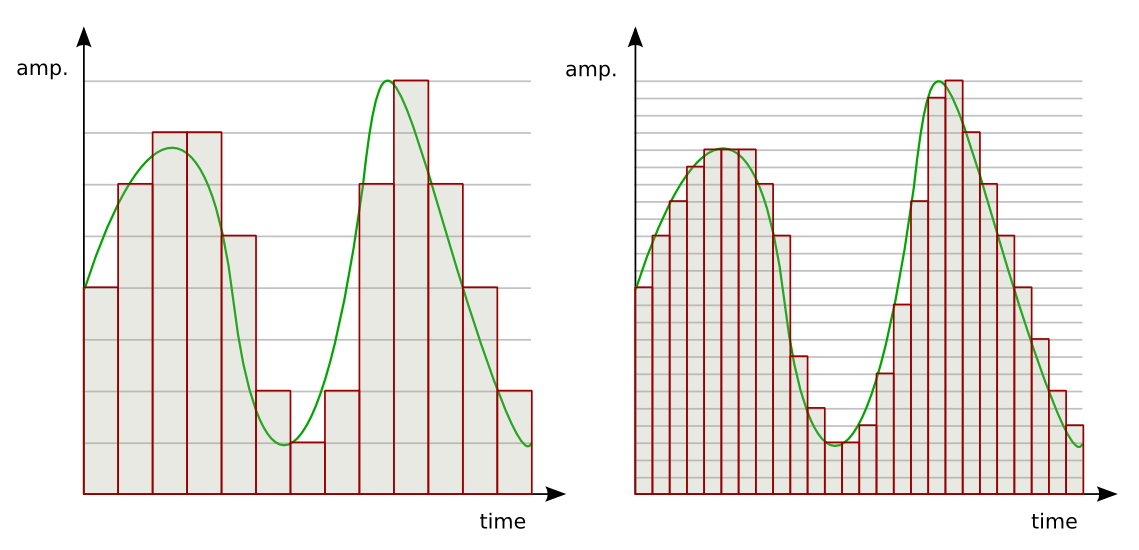
So the sound enters the system discreetly, that is, divided into small segments. The precision of encoding an analog signal in a digital environment depends on the size of these segments. The smaller the horizontal and vertical discrete units, the more accurate the scan will be.
Sampling rate
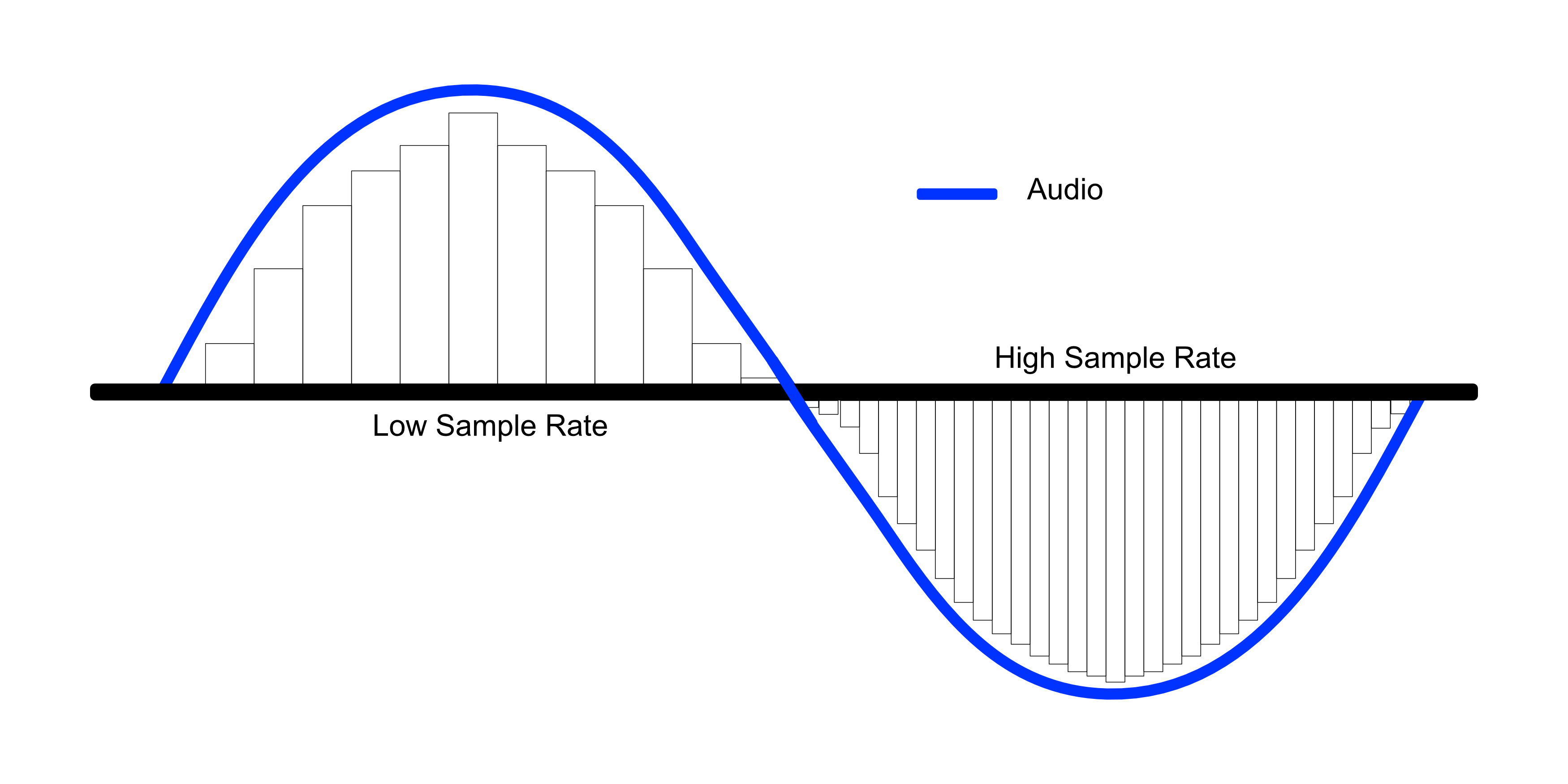
Splitting the wave horizontally gives us an idea of the sample rate or sample rate. The more often the ADC detects changes in waveform values, the higher the sample rate. In reality, a sample is a discrete unit segment, the smallest unit of sound. The shorter it is, the higher the sample rate.
For example, a sample rate of 44.1 kHz indicates that there are 44,100 samples per second of recording. We can edit the wave, taking a segment with a duration of 1/44100 seconds as the minimum editing element. As the sample rate increases to 48 kHz, this section drops to 1/48000 of a second, allowing for more accurate impact.
Each sample is the same length as the previous one. For proper sound reproduction, the file and system sample rates must be identical. When an audio track with a different sample rate than the host (program) sample is added to the project, it must be converted.
If you play a file with a higher frequency on a lower system, it will sound slower than it should, and vice versa. Converting a signal from one frequency to another always produces distortion. To “reshape” the sound to the new sample rate, the system must divide the samples into smaller pieces and reassemble them into a single wave. Such a process can lead, at best, to simply blur the sound, at worst, to the appearance of clicks.
Of course, in the built-in speakers of a home laptop, the difference will not be noticeable. But when it comes to working with sound at a professional level, sample rate coordination is necessary.
It is not recommended to change the sample rate within the same project. A justification for higher sampling could be, for example, the need to process the file with algorithms or plugins that work better at high frequencies. Since a higher sample rate means dividing into smaller samples, the processing precision will be higher and the result will be of better quality. But it is also impossible to guarantee the effectiveness of this method: in each case the result will be individual. It is necessary to evaluate each time what is more important: the effect of processing at a higher resolution or the negative impact of the conversion.
If for some reason, after completing the job at 48 kHz, you need to convert the signal to 44.1 kHz, save the original file in case you need to re-manipulate the material (for example, for alternative mastering). Processing at a higher sample rate will produce a better effect than processing at a lower sample rate.
Audio sample rate and bit depth – simple and understandable language
Even if you are not dealing directly with digital sound recording, you will be interested!
Are you new to the world of digital music? Not sure what all these designations and complex numbers mean?
Hmm, no wonder! After all, every day there is more and more information. And knowing everything is almost impossible.
Yes, this is not necessary! You need to know the essentials.
Sample rate and bit depth are sound engineering concepts that you should know if you decide to make music in a computer environment.
Even if you haven’t had to record music in a virtual environment yet, but have dealt with audio (be it on a portable digital player, a player on a computer, or elsewhere), you may have seen some numbers in the properties of audio: “16 bit, 24 bit, 44100 Hz, 48000 Hz …”
The material is presented briefly and is accessible even to the uninitiated. Just the essentials.
So what are sample rate and bit depth? What is it for?
To begin with, that in different sources you can find: Sample rate and Sample rate. The abbreviations are equivalent. Call it what you like the most.
And bit and bit depth. It’s the same, the same, it just sounds different.
So.
Sampling frequency …
All inanimate music (music produced by a computer, music center, etc., that is, not live) has this parameter. This is the number of samples per second. Without going into details, I will say that 44100 Hz is optimal for humans. Since at a higher value, the sounds to be sampled will be practically inaccessible to our ears, we simply won’t hear them, because they will be out of earshot.
Discrete means discontinuous. That is, the sampling process is the processing of each bit of information one by one (that is, discretely and not all at once). In our case, this happens 44100 times per second. By Nyquist’s theorem, the required sampling rate for normal perception should be twice the hearing threshold. Since an average person listens up to 16 KHz (KiloHz or 16000 Hz), and something (normal for a healthy young person) up to 20 KHz, the sampling frequency was determined at 44.1 KHz (44100 Hz), that is, twice the threshold. audibility of the human ear. Why not 40 kHz (40,000 Hz)? Taken with margin (nobody canceled errors and noise on the route and after the CD release).
Bit depth is a kind of resolution of these same samples. Why am I calling this permission? Just so you prefer to understand by analogy what is what.
Grab your monitor – the higher the resolution, the better the picture, right? At low resolution you will see individual pixels and the eye will no longer be happy as before. I smile
Bitness is dynamic range – that is, the oscillation of your audio up and down (in terms of volume, power, so to speak), the nuances of performance.
The higher the audio bit rate, the more space the audio will occupy on your hard drive (on your computer); keep in mind.
For projects that are important to you, I advise you to use 24 bits and a sample rate of 48000 Hz. THIS IS A STANDARD. Then, for CD output, it will be possible to downgrade the data to 16 bits and 44.1 kHz.
But some people prefer to work in 24/96 (24 Bits – bit depth, 96 KHz – sample rate) or 24 / 88.2. The taste and the color …
For most projects, 16 / 44.1 is adequate (16 bit – bit depth, 44100 Hz is equivalent to 44.1 KHz – sample rate).
Sample rate and bit depth go directly next to each other and never go together. That is their destiny. They are friends in life, I smile
For the most boring and for those who find it quite difficult, I will explain again. Let me give you an analogy with a camera and images:
The sample rate is the number of photos you can take per second …
Audio sample rate and bit depth – simple and understandable language
And Bitness is the quality they will have …
Audio sample rate and bit depth – simple and understandable language
It is quite simple. At first, all of these sound engineering terms and expressions are misleading. I remember it and I know it.
When a signal reaches the ADC from a preamplifier, compressor, console output, synthesizer, it represents electromagnetic oscillations. That is, a certain wave with variable voltage (very small values) reaches the input of the ADC. To save a signal to a file, it must be “digitized,” that is, encoded by ones and zeros. The result is a graph of the wave on the computer screen.
Even the best converter has an error, because there are no intermediate values between zero and one, and the wave graph will consist of only vertical and horizontal segments, with no oblique lines. The graphical representation of the wave will be influenced by the pitch (oscillation frequency), its timbre (waveform) and the volume (amplitude). A high-quality ADC must correctly transmit all these parameters to the recording system.
So the sound enters the system discreetly, that is, divided into small segments. The precision of encoding an analog signal in a digital environment depends on the size of these segments. The smaller the horizontal and vertical discrete units, the more accurate the scan will be.
Sampling rate
Splitting the wave horizontally gives us an idea of the sample rate or sample rate. The more often the ADC detects changes in waveform values, the higher the sample rate. In reality, a sample is a discrete unit segment, the smallest unit of sound. The shorter it is, the higher the sample rate.
For example, a sample rate of 44.1 kHz indicates that there are 44,100 samples per second of recording. We can edit the wave, taking a segment with a duration of 1/44100 seconds as the minimum editing element. As the sample rate increases to 48 kHz, this section drops to 1/48000 of a second, allowing for more accurate impact.
Sample rate match
Each sample is the same length as the previous one. For proper sound reproduction, the file and system sample rates must be identical. When an audio track with a different sample rate than the host (program) sample is added to the project, it must be converted.
If you play a higher frequency file on a lower system, it will sound slower than it should and vice versa. Converting a signal from one frequency to another always produces distortion. To “reshape” the sound for a new sample rate, the system must divide the samples into smaller pieces and reassemble them into a single wave. Such a process can lead, at best, to simply blurring the sound, at worst, to the appearance of clicks.
Of course, in the built-in speakers of a home laptop, the difference will not be noticeable. But when it comes to working with sound at a professional level, sample rate coordination is necessary.
It is not recommended to change the sample rate within the same project. A justification for higher sampling could be, for example, the need to process the file with algorithms or plugins that work better at high frequencies. Since a higher sample rate means dividing into smaller samples, the processing precision will be higher and the result will be of better quality. But it is also impossible to guarantee the effectiveness of this method: in each case the result will be individual. It is necessary to evaluate each time what is more important: the effect of processing at a higher resolution or the negative effect of conversion.
If for some reason, after completing the job at 48 kHz, you need to convert the signal to 44.1 kHz, save the original file in case you need to re-manipulate the material (for example, for alternative mastering). Processing at a higher sample rate will provide a better effect than processing at a lower sample rate.
Sound capacity
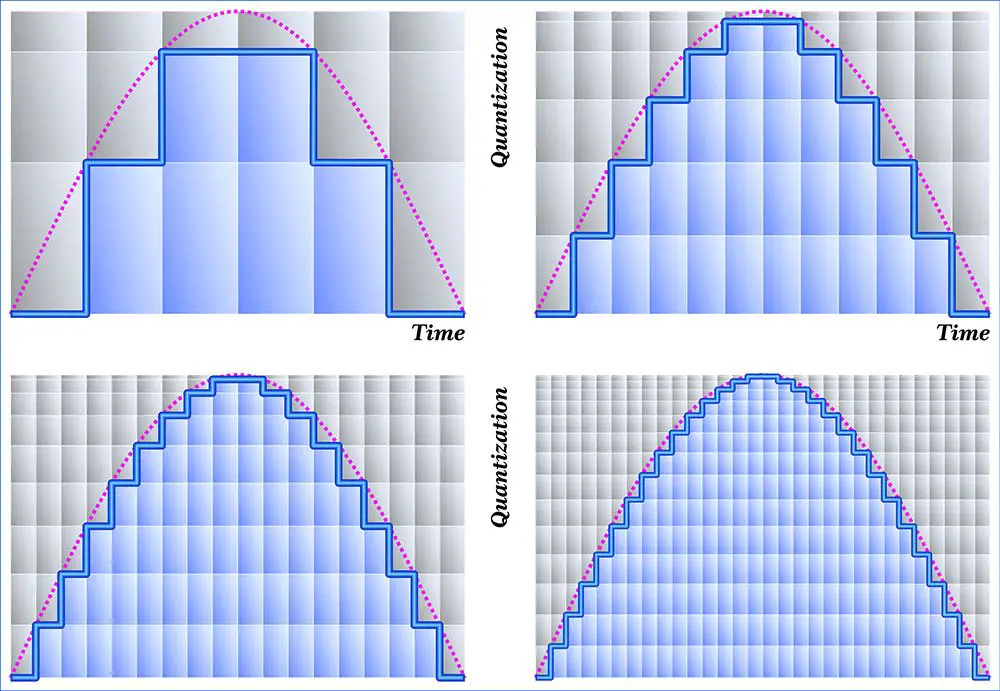
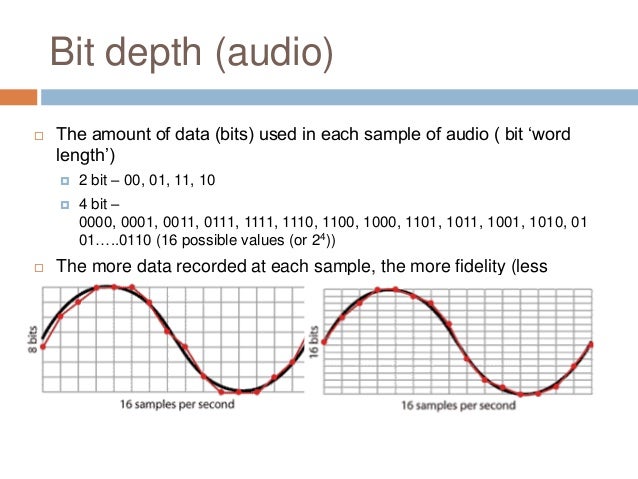
If the horizontal division of a wave gives us an idea of the sampling frequency, then the vertical sampling is the bit depth, which is responsible for the reliable transmission of the dynamic elements of the register. The more “steps” the converter can correct, the higher the bit depth of the recorded sound file.
For example, a wave over a period of time may move one step from 0 to 16, or perhaps four – 4 units per step. A more accurate representation would be 16 steps by one. The number of steps the wave is divided into vertically is the bit depth.
The higher the bit depth of the converter, the more reliably it will transmit signals of different volume levels.