What are “bit depth” and “sample rate”?


Free Download Mp4Gain
picture

What are “bit depth” and “sample rate”?

Bit Depth

I wrote it in the DTM project file settings and audio interface spec column, but I don’t understand the meaning …
Sample Rate

This time, we will answer those questions.

Here’s a quick rundown of “What is a Bit Rate / Sample Rate ?,” Explained by Professional Drummer / Engineer / Producer Ed Thorne.

Once you know this, you will be able to export the sound source in the appropriate format and you will be able to understand the criteria for the equipment that you will buy in the future.

Please take a look to the end!

What is bit-deapth?

Bit depth refers to the range in which the dynamics (inflection) of the sound can be processed.

For example, if the bit depth is “16 bit”, the range up to 96 dB can be reproduced and processed from the silent state.

96dB is all about the volume when the audience is excited at the live venue.

On the other hand, if the bit depth is “24 bit”, the 144 dB dynamics can be reproduced and processed.

144dB is roughly the volume of a jet airplane.

Dynamics in the age of streaming

Not long ago, there were no limits to volume like today’s streaming services like YouTube and Spotify.

The louder the sound, the better the music itself, which is why producers always wanted to make it louder and bigger than any other music.

Today, many platforms where you can listen to music have volume restrictions, so the idea that “the more music you can play loud sounds, the better” has changed, and times have changed.

So, in this age, 16-bit or 24-bit might not make much of a difference.

The amount of data also changes

By the way, if the bit depth is high, the amount of data will change as well.

When recording a lot, you may want to consider this a bit.

What is the sample rate?

Next, I will explain the sample rate.

The sample rate is like the “resolution” of the audio.

The higher the sample rate, the more samples per second = you can hear better.

Requires double sample rate

One thing to note here is that you need twice the sample rate to hear sound at that frequency.

For example, if you want to hear a 1000 Hz (1 kHz) sound accurately and clearly, the sampling frequency must be at least 2000 Hz (2 kHz).

If the sample rate is less than twice the value of the sound you want to hear, “aliasing” will occur and the sound will not be processed accurately, such as crackle or noise.


Free Download Mp4Gain
picture


Mp4Gain Main Window
picture


Mp4Gain Features
picture


Free Download Mp4Gain
picture

What is bit depth?

What is bit depth?

Bit Depth

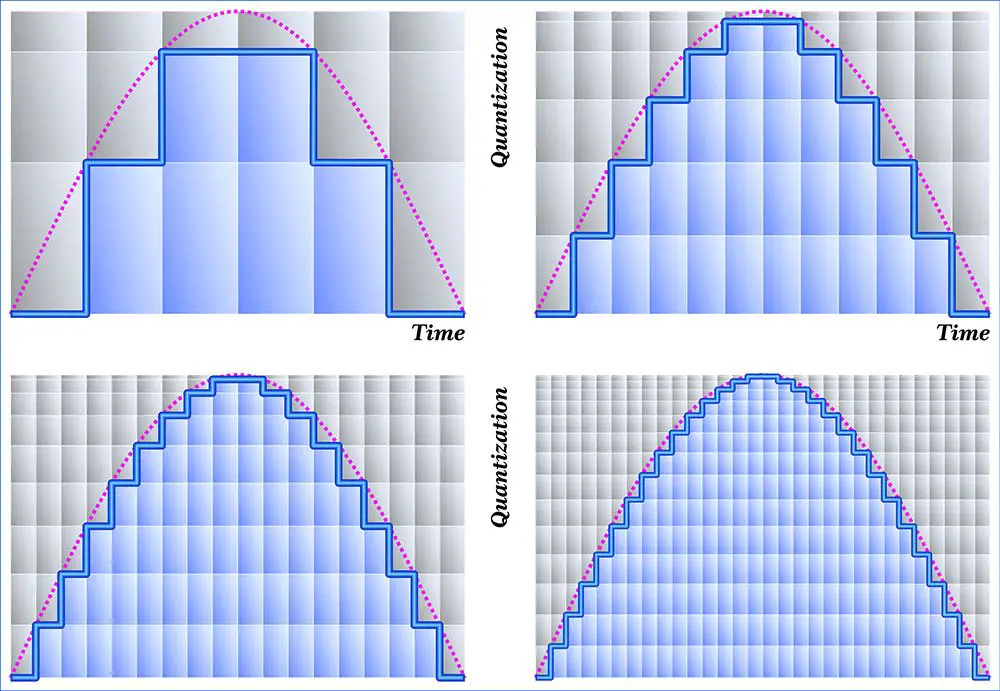
Describes the resolution of the sound data captured and stored in a value bit depth audio file called In Digital Audio.

Bit Depth

Higher audio bit depth indicates more detailed recording.

Similarly, for image and video files, the bit depth is used to determine the resolution of the image. The higher the bit depth (for example, 24-bit compared to 16-bit), the better the image.

Bit depth vs. bit rate
Bit depths are often confused with bit rates, but they are different. Bit rate is measured in kilobits / second and is the data throughput per second when playing audio, not the resolution of each individual sample that makes up the audio waveform.

Bit depth is the sample format or audio resolution.

For more information on the difference between bit rate and bit depth, see an overview of these two concepts.

Bit depth and sound quality
The unit of measure for bit depth is a binary number (bit). For every 1-bit increment, the precision doubles. The bit range is an important integer that determines how good the recording sounds.

If the bit depth is too low, the recording will not be accurate and you will lose a lot of quiet sound. Stored in a music library converted from analog audio to digital audio signals using MP 3 S pulse code modulation (PCM) at high bit depths, it contains a wider frequency spectrum than frequencies encoded at low bit depths.

High bit depth recordings are much more accurate when played back, especially in areas of the song that contain quiet harmonics. If the bit depth is too low, the frequency will be lost and the recording will be of poor quality.

Bit depth is relevant only within the range of the PCM signal. Lossy compressed audio format has no bit depth.

Bit depth and dynamic range
Having the correct bit depth is an important aspect to consider in reducing the amount of background noise. All recordings have a degree of signal interference called background noise, which is kept to a minimum at a sufficiently high bit depth. This phenomenon occurs because the dynamic range (the difference between the loudest and lowest sounds) is much higher than the background noise, and that difference can minimize noise.

Bit depth also determines the volume of the recording. For each bit of increase, the dynamic range increases by approximately 6 decibels. The Audio CD format uses a bit depth of 16. This corresponds to a dynamic range of 96 dB. With an If DVD or Blu-ray bit depth of 24, the sound quality is high and you get a dynamic range of 144 dB.