What are “bit depth” and “sample rate”?


Free Download Mp4Gain
picture

What are “bit depth” and “sample rate”?

Bit Depth

I wrote it in the DTM project file settings and audio interface spec column, but I don’t understand the meaning …
Sample Rate

This time, we will answer those questions.

Here’s a quick rundown of “What is a Bit Rate / Sample Rate ?,” Explained by Professional Drummer / Engineer / Producer Ed Thorne.

Once you know this, you will be able to export the sound source in the appropriate format and you will be able to understand the criteria for the equipment that you will buy in the future.

Please take a look to the end!

What is bit-deapth?

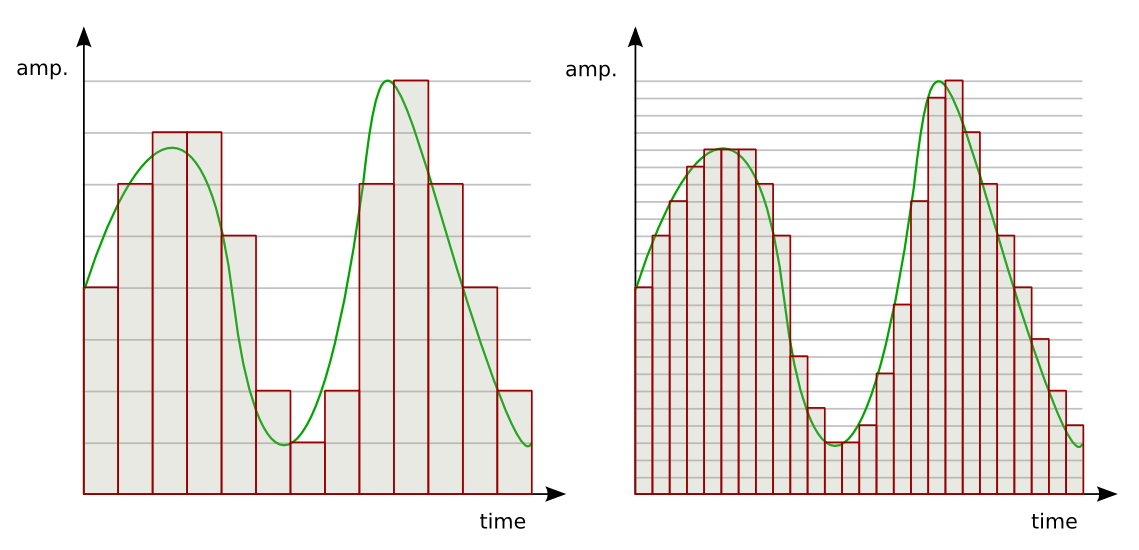
Bit depth refers to the range in which the dynamics (inflection) of the sound can be processed.

For example, if the bit depth is “16 bit”, the range up to 96 dB can be reproduced and processed from the silent state.

96dB is all about the volume when the audience is excited at the live venue.

On the other hand, if the bit depth is “24 bit”, the 144 dB dynamics can be reproduced and processed.

144dB is roughly the volume of a jet airplane.

Dynamics in the age of streaming

Not long ago, there were no limits to volume like today’s streaming services like YouTube and Spotify.

The louder the sound, the better the music itself, which is why producers always wanted to make it louder and bigger than any other music.

Today, many platforms where you can listen to music have volume restrictions, so the idea that “the more music you can play loud sounds, the better” has changed, and times have changed.

So, in this age, 16-bit or 24-bit might not make much of a difference.

The amount of data also changes

By the way, if the bit depth is high, the amount of data will change as well.

When recording a lot, you may want to consider this a bit.

What is the sample rate?

Next, I will explain the sample rate.

The sample rate is like the “resolution” of the audio.

The higher the sample rate, the more samples per second = you can hear better.

Requires double sample rate

One thing to note here is that you need twice the sample rate to hear sound at that frequency.

For example, if you want to hear a 1000 Hz (1 kHz) sound accurately and clearly, the sampling frequency must be at least 2000 Hz (2 kHz).

If the sample rate is less than twice the value of the sound you want to hear, “aliasing” will occur and the sound will not be processed accurately, such as crackle or noise.


Free Download Mp4Gain
picture


Mp4Gain Main Window
picture


Mp4Gain Features
picture


Free Download Mp4Gain
picture

What is bit depth?

What is bit depth?

Bit Depth

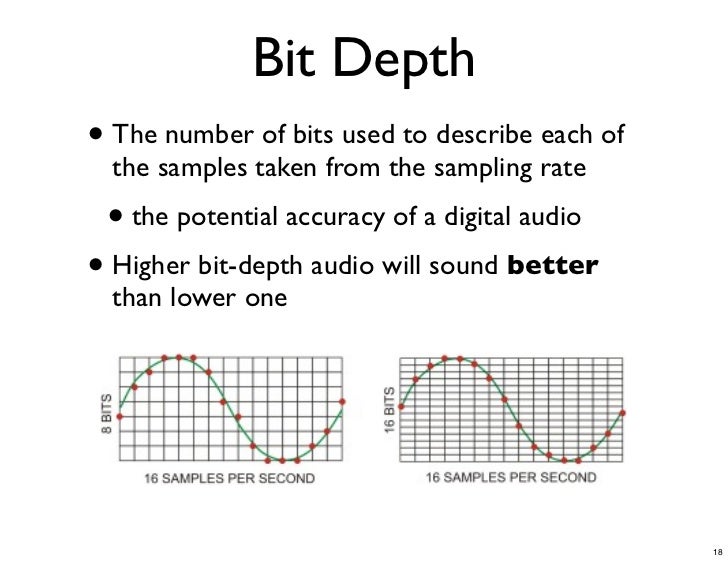
Describes the resolution of the sound data captured and stored in a value bit depth audio file called In Digital Audio.

Bit Depth

Higher audio bit depth indicates more detailed recording.

Similarly, for image and video files, the bit depth is used to determine the resolution of the image. The higher the bit depth (for example, 24-bit compared to 16-bit), the better the image.

Bit depth vs. bit rate
Bit depths are often confused with bit rates, but they are different. Bit rate is measured in kilobits / second and is the data throughput per second when playing audio, not the resolution of each individual sample that makes up the audio waveform.

Bit depth is the sample format or audio resolution.

For more information on the difference between bit rate and bit depth, see an overview of these two concepts.

Bit depth and sound quality
The unit of measure for bit depth is a binary number (bit). For every 1-bit increment, the precision doubles. The bit range is an important integer that determines how good the recording sounds.

If the bit depth is too low, the recording will not be accurate and you will lose a lot of quiet sound. Stored in a music library converted from analog audio to digital audio signals using MP 3 S pulse code modulation (PCM) at high bit depths, it contains a wider frequency spectrum than frequencies encoded at low bit depths.

High bit depth recordings are much more accurate when played back, especially in areas of the song that contain quiet harmonics. If the bit depth is too low, the frequency will be lost and the recording will be of poor quality.

Bit depth is relevant only within the range of the PCM signal. Lossy compressed audio format has no bit depth.

Bit depth and dynamic range
Having the correct bit depth is an important aspect to consider in reducing the amount of background noise. All recordings have a degree of signal interference called background noise, which is kept to a minimum at a sufficiently high bit depth. This phenomenon occurs because the dynamic range (the difference between the loudest and lowest sounds) is much higher than the background noise, and that difference can minimize noise.

Bit depth also determines the volume of the recording. For each bit of increase, the dynamic range increases by approximately 6 decibels. The Audio CD format uses a bit depth of 16. This corresponds to a dynamic range of 96 dB. With an If DVD or Blu-ray bit depth of 24, the sound quality is high and you get a dynamic range of 144 dB.

Bit depth

Bit depth

Bit depth

To understand bit depth (width), we first look at bits.

Bit depth

Short for binary digit, a bit is a separate component of a binary code, either 1 or 0.

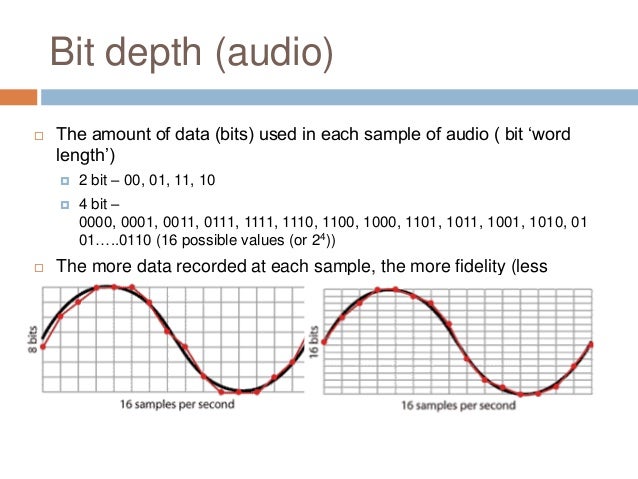
The more bits used, the more possible combinations. For example …

As you can see from the table below, 16 combinations can be made from 4 bits.

4 bits

When used to encode information, each number is assigned a value.

As the number of bits increases, the number of possible values ​​grows exponentially.

4 bits = 16 possible values
8 bits = 256 possible values
16 bits = 16536 possible values
24 bits = 16777215 possible values
In digital audio, each value is assigned to the amplitudes of the sound wave.

The higher the bit depth, the greater the difference between loud and quiet sound … and the greater the dynamic range of the recording.

As a general rule of thumb, with each “beat”, the dynamic range increases by 6 dB.

For example :

4 bits = 24 dB
8 bits = 48 dB
16 bits = 96 dB
24 bits = 144 dB
In general, this means … more bit depth results in less noise …

Because by adding headroom, the desired signal can be recorded more clearly in relation to noise.

small and large drill depth

Further away…

5. Quantization error
It sounds amazing that there are almost 17 million values ​​in 24-bit recordings, right?

However, this is much less than the infinite number of possible values ​​that exist in an analog signal.

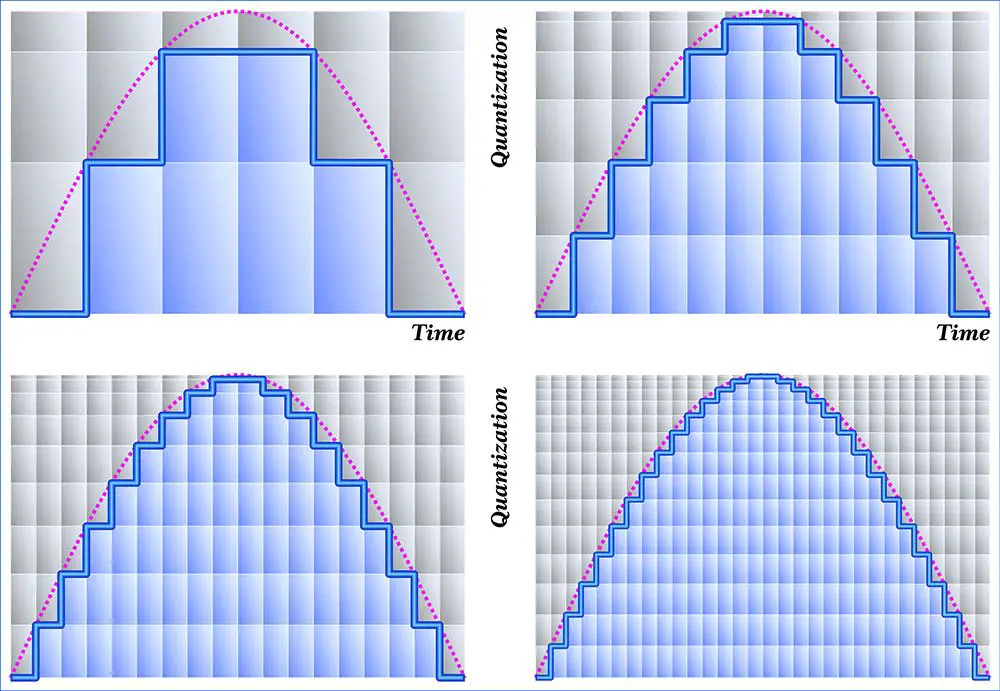
In almost all samples, the true value is somewhere between the two possible values. The converter simply rounds (quantizes) them to the nearest value.

The result is a distortion known as quantization error, which occurs in two stages of the recording process:

at first, during analog to digital conversion
at the end, during mastering
During mastering, the sample rate and bit depth of the final track are often reduced when converted to the final digital format (CD, mp3, etc.).

When this happens, some information is removed and re-quantized, further distorting the sound.

To solve this problem, the following was invented …

6. Dithering
When converting a 24-bit file to a 16-bit file, dithering is used to hide most of the resulting distortion.

Adding “pseudo-random noise” to the audio signal.

Since this concept is difficult to visualize when talking about sound, it is usually explained using pictures.

It works like this:

When a color photo is converted to black and white, it is mathematically calculated which color pixel should be black and which pixel should be white.

Also how the quantization of digital audio samples is calculated.

As you can see from the illustration below, the above image looks like shit, doesn’t it?

hesitate

But thanks to dithering …

a small amount of white pixels are accidentally inserted into the black areas …
a small number of black pixels accidentally get into the white areas …
And by adding this “pseudo-random noise” to the image, the “after” image looks much better. The concept of audio dithering is similar to this.

Further away…

7. Delay time
A MAJOR FAULT of modern digital studios is the delay that builds up in the signal flow, especially in DAWs.

Taking all the calculations into account, it takes anywhere from a few milliseconds to several millisecond TENS for the audio signal to exit the system.

The 0-11 millisecond delay is so short that the average person wouldn’t even notice it.
With a delay of 11 to 22 milliseconds, you will hear an annoying slapback, a short delay that takes some getting used to.
With a delay of more than 22 milliseconds, it is almost impossible to play or sing along with the track.
In a typical digital signal chain, there are 4 stages that affect the resulting delay time:

analog to digital conversion
DAW buffering
complement delay
digital to analog conversion
A / D and D / A conversion are the 2 smallest negative effects that add a maximum of 5 milliseconds to latency.

Sample rate and bit depth

Sample rate and bit depth

bit depth

When a signal reaches the ADC from a preamplifier, compressor, console output, synthesizer, it represents electromagnetic oscillations.

Bit depth

That is, a certain wave with a variable voltage (very small values) reaches the input of the ADC. To save a signal to a file, it must be “digitized,” that is, encoded by ones and zeros. The result is a graph of the wave on the computer screen.

Even the best transducer has an error, because there are no intermediate values ​​between zero and one, and the wave graph will only consist of vertical and horizontal segments, with no oblique lines. The graphical representation of the wave will be influenced by the pitch (oscillation frequency), its timbre (waveform) and the volume (amplitude). A high-quality ADC must correctly transmit all these parameters to the recording system.

So the sound enters the system discreetly, that is, divided into small segments. The precision of encoding an analog signal in a digital environment depends on the size of these segments. The smaller the horizontal and vertical discrete units, the more accurate the scan will be.

Sampling rate

Splitting the wave horizontally gives us an idea of ​​the sample rate or sample rate. The more often the ADC detects changes in waveform values, the higher the sample rate. In reality, a sample is a discrete unit segment, the smallest unit of sound. The shorter it is, the higher the sample rate.

For example, a sample rate of 44.1 kHz indicates that there are 44,100 samples per second of recording. We can edit the wave, taking a segment with a duration of 1/44100 seconds as the minimum editing element. As the sample rate increases to 48 kHz, this section drops to 1/48000 of a second, allowing for more accurate impact.

Each sample is the same length as the previous one. For proper sound reproduction, the file and system sample rates must be identical. When an audio track with a different sample rate than the host (program) sample is added to the project, it must be converted.

If you play a file with a higher frequency on a lower system, it will sound slower than it should, and vice versa. Converting a signal from one frequency to another always produces distortion. To “reshape” the sound to the new sample rate, the system must divide the samples into smaller pieces and reassemble them into a single wave. Such a process can lead, at best, to simply blur the sound, at worst, to the appearance of clicks.

Of course, in the built-in speakers of a home laptop, the difference will not be noticeable. But when it comes to working with sound at a professional level, sample rate coordination is necessary.

It is not recommended to change the sample rate within the same project. A justification for higher sampling could be, for example, the need to process the file with algorithms or plugins that work better at high frequencies. Since a higher sample rate means dividing into smaller samples, the processing precision will be higher and the result will be of better quality. But it is also impossible to guarantee the effectiveness of this method: in each case the result will be individual. It is necessary to evaluate each time what is more important: the effect of processing at a higher resolution or the negative impact of the conversion.

If for some reason, after completing the job at 48 kHz, you need to convert the signal to 44.1 kHz, save the original file in case you need to re-manipulate the material (for example, for alternative mastering). Processing at a higher sample rate will produce a better effect than processing at a lower sample rate.