What are “bit depth” and “sample rate”?


Free Download Mp4Gain
picture

What are “bit depth” and “sample rate”?

Bit Depth

I wrote it in the DTM project file settings and audio interface spec column, but I don’t understand the meaning …
Sample Rate

This time, we will answer those questions.

Here’s a quick rundown of “What is a Bit Rate / Sample Rate ?,” Explained by Professional Drummer / Engineer / Producer Ed Thorne.

Once you know this, you will be able to export the sound source in the appropriate format and you will be able to understand the criteria for the equipment that you will buy in the future.

Please take a look to the end!

What is bit-deapth?

Bit depth refers to the range in which the dynamics (inflection) of the sound can be processed.

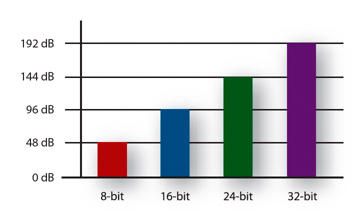
For example, if the bit depth is “16 bit”, the range up to 96 dB can be reproduced and processed from the silent state.

96dB is all about the volume when the audience is excited at the live venue.

On the other hand, if the bit depth is “24 bit”, the 144 dB dynamics can be reproduced and processed.

144dB is roughly the volume of a jet airplane.

Dynamics in the age of streaming

Not long ago, there were no limits to volume like today’s streaming services like YouTube and Spotify.

The louder the sound, the better the music itself, which is why producers always wanted to make it louder and bigger than any other music.

Today, many platforms where you can listen to music have volume restrictions, so the idea that “the more music you can play loud sounds, the better” has changed, and times have changed.

So, in this age, 16-bit or 24-bit might not make much of a difference.

The amount of data also changes

By the way, if the bit depth is high, the amount of data will change as well.

When recording a lot, you may want to consider this a bit.

What is the sample rate?

Next, I will explain the sample rate.

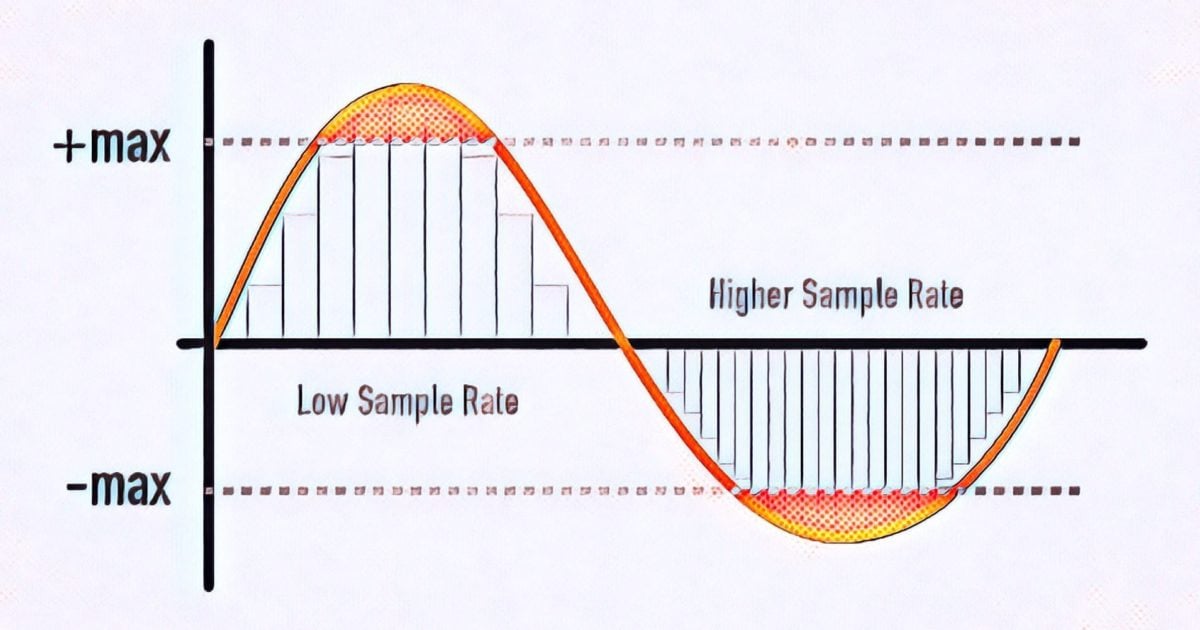
The sample rate is like the “resolution” of the audio.

The higher the sample rate, the more samples per second = you can hear better.

Requires double sample rate

One thing to note here is that you need twice the sample rate to hear sound at that frequency.

For example, if you want to hear a 1000 Hz (1 kHz) sound accurately and clearly, the sampling frequency must be at least 2000 Hz (2 kHz).

If the sample rate is less than twice the value of the sound you want to hear, “aliasing” will occur and the sound will not be processed accurately, such as crackle or noise.


Free Download Mp4Gain
picture


Mp4Gain Main Window
picture


Mp4Gain Features
picture


Free Download Mp4Gain
picture

Bit depth

Bit depth

Bit depth

To understand bit depth (width), we first look at bits.

Bit depth

Short for binary digit, a bit is a separate component of a binary code, either 1 or 0.

The more bits used, the more possible combinations. For example …

As you can see from the table below, 16 combinations can be made from 4 bits.

4 bits

When used to encode information, each number is assigned a value.

As the number of bits increases, the number of possible values ​​grows exponentially.

4 bits = 16 possible values
8 bits = 256 possible values
16 bits = 16536 possible values
24 bits = 16777215 possible values
In digital audio, each value is assigned to the amplitudes of the sound wave.

The higher the bit depth, the greater the difference between loud and quiet sound … and the greater the dynamic range of the recording.

As a general rule of thumb, with each “beat”, the dynamic range increases by 6 dB.

For example :

4 bits = 24 dB
8 bits = 48 dB
16 bits = 96 dB
24 bits = 144 dB
In general, this means … more bit depth results in less noise …

Because by adding headroom, the desired signal can be recorded more clearly in relation to noise.

small and large drill depth

Further away…

5. Quantization error
It sounds amazing that there are almost 17 million values ​​in 24-bit recordings, right?

However, this is much less than the infinite number of possible values ​​that exist in an analog signal.

In almost all samples, the true value is somewhere between the two possible values. The converter simply rounds (quantizes) them to the nearest value.

The result is a distortion known as quantization error, which occurs in two stages of the recording process:

at first, during analog to digital conversion
at the end, during mastering
During mastering, the sample rate and bit depth of the final track are often reduced when converted to the final digital format (CD, mp3, etc.).

When this happens, some information is removed and re-quantized, further distorting the sound.

To solve this problem, the following was invented …

6. Dithering
When converting a 24-bit file to a 16-bit file, dithering is used to hide most of the resulting distortion.

Adding “pseudo-random noise” to the audio signal.

Since this concept is difficult to visualize when talking about sound, it is usually explained using pictures.

It works like this:

When a color photo is converted to black and white, it is mathematically calculated which color pixel should be black and which pixel should be white.

Also how the quantization of digital audio samples is calculated.

As you can see from the illustration below, the above image looks like shit, doesn’t it?

hesitate

But thanks to dithering …

a small amount of white pixels are accidentally inserted into the black areas …
a small number of black pixels accidentally get into the white areas …
And by adding this “pseudo-random noise” to the image, the “after” image looks much better. The concept of audio dithering is similar to this.

Further away…

7. Delay time
A MAJOR FAULT of modern digital studios is the delay that builds up in the signal flow, especially in DAWs.

Taking all the calculations into account, it takes anywhere from a few milliseconds to several millisecond TENS for the audio signal to exit the system.

The 0-11 millisecond delay is so short that the average person wouldn’t even notice it.
With a delay of 11 to 22 milliseconds, you will hear an annoying slapback, a short delay that takes some getting used to.
With a delay of more than 22 milliseconds, it is almost impossible to play or sing along with the track.
In a typical digital signal chain, there are 4 stages that affect the resulting delay time:

analog to digital conversion
DAW buffering
complement delay
digital to analog conversion
A / D and D / A conversion are the 2 smallest negative effects that add a maximum of 5 milliseconds to latency.

Sample rate and bit depth

Sample rate and bit depth

bit depth

When a signal reaches the ADC from a preamplifier, compressor, console output, synthesizer, it represents electromagnetic oscillations.

Bit depth

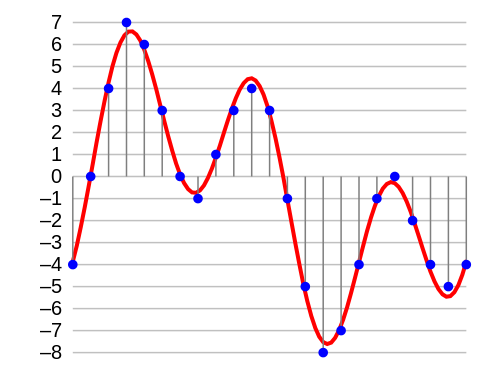
That is, a certain wave with a variable voltage (very small values) reaches the input of the ADC. To save a signal to a file, it must be “digitized,” that is, encoded by ones and zeros. The result is a graph of the wave on the computer screen.

Even the best transducer has an error, because there are no intermediate values ​​between zero and one, and the wave graph will only consist of vertical and horizontal segments, with no oblique lines. The graphical representation of the wave will be influenced by the pitch (oscillation frequency), its timbre (waveform) and the volume (amplitude). A high-quality ADC must correctly transmit all these parameters to the recording system.

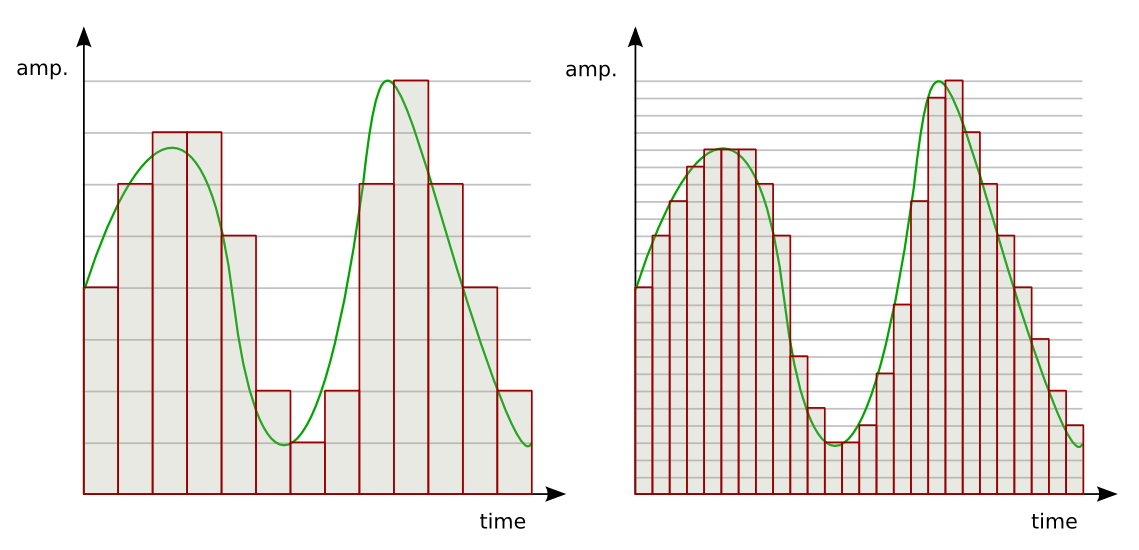
So the sound enters the system discreetly, that is, divided into small segments. The precision of encoding an analog signal in a digital environment depends on the size of these segments. The smaller the horizontal and vertical discrete units, the more accurate the scan will be.

Sampling rate

Splitting the wave horizontally gives us an idea of ​​the sample rate or sample rate. The more often the ADC detects changes in waveform values, the higher the sample rate. In reality, a sample is a discrete unit segment, the smallest unit of sound. The shorter it is, the higher the sample rate.

For example, a sample rate of 44.1 kHz indicates that there are 44,100 samples per second of recording. We can edit the wave, taking a segment with a duration of 1/44100 seconds as the minimum editing element. As the sample rate increases to 48 kHz, this section drops to 1/48000 of a second, allowing for more accurate impact.

Each sample is the same length as the previous one. For proper sound reproduction, the file and system sample rates must be identical. When an audio track with a different sample rate than the host (program) sample is added to the project, it must be converted.

If you play a file with a higher frequency on a lower system, it will sound slower than it should, and vice versa. Converting a signal from one frequency to another always produces distortion. To “reshape” the sound to the new sample rate, the system must divide the samples into smaller pieces and reassemble them into a single wave. Such a process can lead, at best, to simply blur the sound, at worst, to the appearance of clicks.

Of course, in the built-in speakers of a home laptop, the difference will not be noticeable. But when it comes to working with sound at a professional level, sample rate coordination is necessary.

It is not recommended to change the sample rate within the same project. A justification for higher sampling could be, for example, the need to process the file with algorithms or plugins that work better at high frequencies. Since a higher sample rate means dividing into smaller samples, the processing precision will be higher and the result will be of better quality. But it is also impossible to guarantee the effectiveness of this method: in each case the result will be individual. It is necessary to evaluate each time what is more important: the effect of processing at a higher resolution or the negative impact of the conversion.

If for some reason, after completing the job at 48 kHz, you need to convert the signal to 44.1 kHz, save the original file in case you need to re-manipulate the material (for example, for alternative mastering). Processing at a higher sample rate will produce a better effect than processing at a lower sample rate.

What is the sample rate? What is bit depth?

What is the sample rate? What is bit depth?

Bit Depth


Audio sample rate and bit depth – simple and understandable language

bit depth

Even if you are not dealing directly with digital sound recording, you will be interested!

Are you new to the world of digital music? Not sure what all these designations and complex numbers mean?

Hmm, no wonder! After all, every day there is more and more information. And knowing everything is almost impossible.

Yes, this is not necessary! You need to know the essentials.

Sample rate and bit depth are sound engineering concepts that you should know if you decide to make music in a computer environment.

Even if you haven’t had to record music in a virtual environment yet, but have dealt with audio (be it on a portable digital player, a player on a computer, or elsewhere), you may have seen some numbers in the properties of audio: “16 bit, 24 bit, 44100 Hz, 48000 Hz …”

The material is presented briefly and is accessible even to the uninitiated. Just the essentials.

So what are sample rate and bit depth? What is it for?

To begin with, that in different sources you can find: Sample rate and Sample rate. The abbreviations are equivalent. Call it what you like the most.

And bit and bit depth. It’s the same, the same, it just sounds different.

So.

Sampling frequency …

All inanimate music (music produced by a computer, music center, etc., that is, not live) has this parameter. This is the number of samples per second. Without going into details, I will say that 44100 Hz is optimal for humans. Since at a higher value, the sounds to be sampled will be practically inaccessible to our ears, we simply won’t hear them, because they will be out of earshot.

Discrete means discontinuous. That is, the sampling process is the processing of each bit of information one by one (that is, discretely and not all at once). In our case, this happens 44100 times per second. By Nyquist’s theorem, the required sampling rate for normal perception should be twice the hearing threshold. Since an average person listens up to 16 KHz (KiloHz or 16000 Hz), and something (normal for a healthy young person) up to 20 KHz, the sampling frequency was determined at 44.1 KHz (44100 Hz), that is, twice the threshold. audibility of the human ear. Why not 40 kHz (40,000 Hz)? Taken with margin (nobody canceled errors and noise on the route and after the CD release).

Bit depth is a kind of resolution of these same samples. Why am I calling this permission? Just so you prefer to understand by analogy what is what.

Grab your monitor – the higher the resolution, the better the picture, right? At low resolution you will see individual pixels and the eye will no longer be happy as before. I smile

Bitness is dynamic range – that is, the oscillation of your audio up and down (in terms of volume, power, so to speak), the nuances of performance.

The higher the audio bit rate, the more space the audio will occupy on your hard drive (on your computer); keep in mind.

For projects that are important to you, I advise you to use 24 bits and a sample rate of 48000 Hz. THIS IS A STANDARD. Then, for CD output, it will be possible to downgrade the data to 16 bits and 44.1 kHz.

But some people prefer to work in 24/96 (24 Bits – bit depth, 96 KHz – sample rate) or 24 / 88.2. The taste and the color …

For most projects, 16 / 44.1 is adequate (16 bit – bit depth, 44100 Hz is equivalent to 44.1 KHz – sample rate).

Sample rate and bit depth go directly next to each other and never go together. That is their destiny. They are friends in life, I smile

For the most boring and for those who find it quite difficult, I will explain again. Let me give you an analogy with a camera and images:

The sample rate is the number of photos you can take per second …

Audio sample rate and bit depth – simple and understandable language

And Bitness is the quality they will have …

Audio sample rate and bit depth – simple and understandable language

It is quite simple. At first, all of these sound engineering terms and expressions are misleading. I remember it and I know it.

Sample rate and bit depth

Sample rate and bit depth

Bit Depth

When a signal reaches the ADC from a preamplifier, compressor, console output, synthesizer, it represents electromagnetic oscillations. That is, a certain wave with variable voltage (very small values) reaches the input of the ADC. To save a signal to a file, it must be “digitized,” that is, encoded by ones and zeros. The result is a graph of the wave on the computer screen.

Bit Depth

Even the best converter has an error, because there are no intermediate values ​​between zero and one, and the wave graph will consist of only vertical and horizontal segments, with no oblique lines. The graphical representation of the wave will be influenced by the pitch (oscillation frequency), its timbre (waveform) and the volume (amplitude). A high-quality ADC must correctly transmit all these parameters to the recording system.

So the sound enters the system discreetly, that is, divided into small segments. The precision of encoding an analog signal in a digital environment depends on the size of these segments. The smaller the horizontal and vertical discrete units, the more accurate the scan will be.

Sampling rate

Splitting the wave horizontally gives us an idea of ​​the sample rate or sample rate. The more often the ADC detects changes in waveform values, the higher the sample rate. In reality, a sample is a discrete unit segment, the smallest unit of sound. The shorter it is, the higher the sample rate.

For example, a sample rate of 44.1 kHz indicates that there are 44,100 samples per second of recording. We can edit the wave, taking a segment with a duration of 1/44100 seconds as the minimum editing element. As the sample rate increases to 48 kHz, this section drops to 1/48000 of a second, allowing for more accurate impact.

Sample rate match

Each sample is the same length as the previous one. For proper sound reproduction, the file and system sample rates must be identical. When an audio track with a different sample rate than the host (program) sample is added to the project, it must be converted.

If you play a higher frequency file on a lower system, it will sound slower than it should and vice versa. Converting a signal from one frequency to another always produces distortion. To “reshape” the sound for a new sample rate, the system must divide the samples into smaller pieces and reassemble them into a single wave. Such a process can lead, at best, to simply blurring the sound, at worst, to the appearance of clicks.

Of course, in the built-in speakers of a home laptop, the difference will not be noticeable. But when it comes to working with sound at a professional level, sample rate coordination is necessary.

It is not recommended to change the sample rate within the same project. A justification for higher sampling could be, for example, the need to process the file with algorithms or plugins that work better at high frequencies. Since a higher sample rate means dividing into smaller samples, the processing precision will be higher and the result will be of better quality. But it is also impossible to guarantee the effectiveness of this method: in each case the result will be individual. It is necessary to evaluate each time what is more important: the effect of processing at a higher resolution or the negative effect of conversion.

If for some reason, after completing the job at 48 kHz, you need to convert the signal to 44.1 kHz, save the original file in case you need to re-manipulate the material (for example, for alternative mastering). Processing at a higher sample rate will provide a better effect than processing at a lower sample rate.

Sound capacity

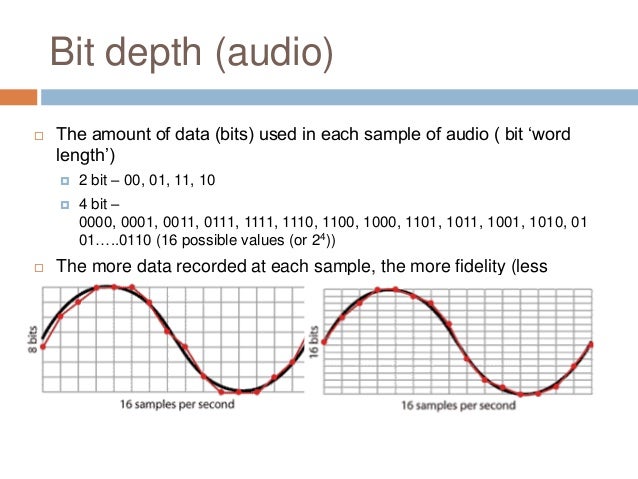
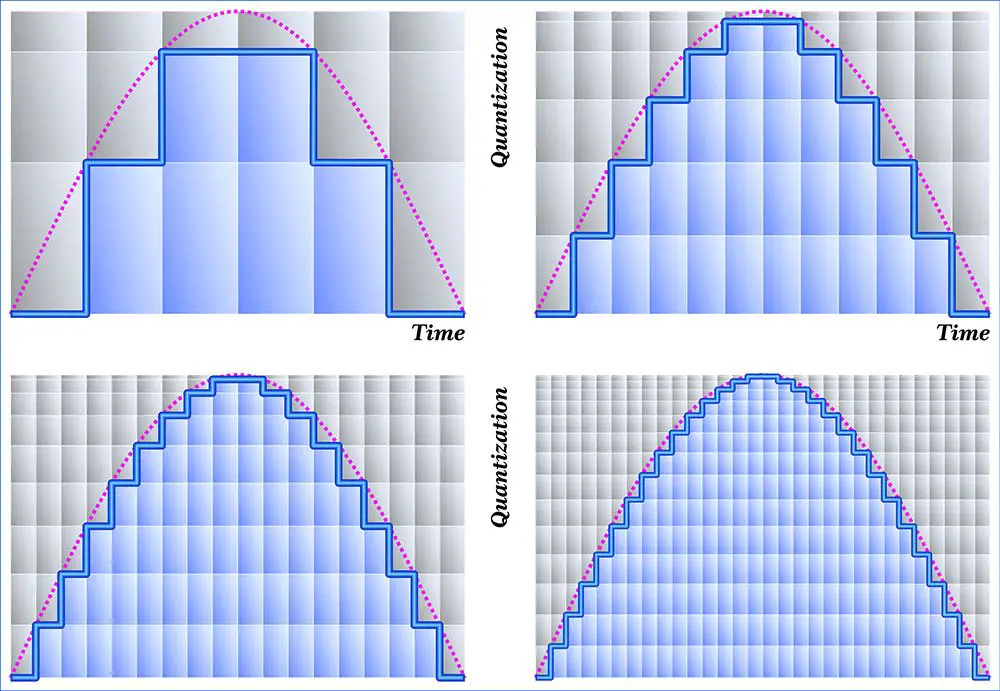
If the horizontal division of a wave gives us an idea of ​​the sampling frequency, then the vertical sampling is the bit depth, which is responsible for the reliable transmission of the dynamic elements of the register. The more “steps” the converter can correct, the higher the bit depth of the recorded sound file.

For example, a wave over a period of time may move one step from 0 to 16, or perhaps four – 4 units per step. A more accurate representation would be 16 steps by one. The number of steps the wave is divided into vertically is the bit depth.

The higher the bit depth of the converter, the more reliably it will transmit signals of different volume levels.

Sample Rate and Bit Depth: What Do They Mean for Your Sound Quality?

If you’re recording music with a  digital recorder, you’ve probably come across the terms sample rate and bit depth. These are the two main factors that determine the level of detail in the sound. The sample rate determines the frequency range of your recording and the bit depth determines the dynamic range. Read on to find out which settings are the best to use for your productions.

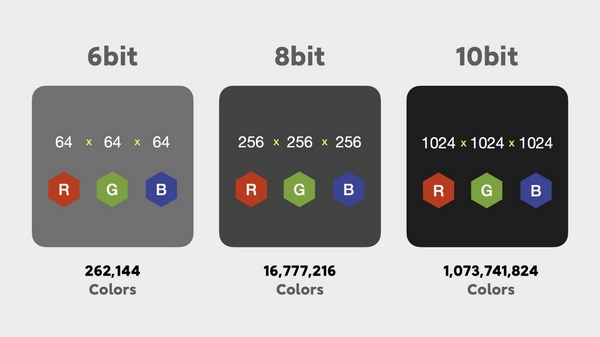
bit depth example in colors

Bit depth example in colors

Sample rate in bit-depth

Sample rate: audio pixels

Bit Depth

You can compare the sampling frequency of a digital signal with the number of pixels in a digital photo. As with digital photos, digital sound is divided into very small parts. With photos, those pieces are called pixels and with sound samples. The sampling frequency is expressed in kilohertz (KHz). The standard sampling frequency for CD is, for example, 44.1 kHz. That means that every second of your recording consists of 44,100 samples. Unlike photos, you will not hear any “blocks” at very low sample rates. The sound becomes mainly muffled.

Why 44.1 kHz?

In the late 1970s, Sony and Philips decided to choose 44.1 KHz as the default sample rate for their digital audio devices. That number may seem random, but there is definitely an idea behind it. The sample rate must be at least twice the highest rate you want to capture. If the sample rate is lower, the converters may misinterpret the super high frequencies. This phenomenon is called “aliasing.” Since, in theory, the human ear can detect frequencies from 20 Hz to 20 kHz, the sampling frequency should be at least 40 kHz. The additional 4.1 kHz is intended as a kind of buffer for the low-pass filter that is used to prevent aliasing above 20 kHz.

Why higher than 44.1 kHz?

Audio interfaces and DAWs often offer the ability to record at much higher sample rates, sometimes up to 192 kHz. This has several advantages. For example, the low pass filter mentioned above can be set much more gradually. Also, with the extension of time and the change of pitch, the noise will disturb you less. Keep in mind that the higher the sample rate, the larger your audio files will be. Plug-ins also require a lot more computing power from your computer at higher sample rates.

Hit my parts

So the sample rate tells us how many pieces the recording is made of. But how many different pieces can we choose from? In other words: in how many steps do we go from the softest sample to the hardest sample? We determine this with the bit depth. With most DAW and audio interfaces, you can choose between 16-bit or 24-bit. If you make very smooth recordings at a low bit depth, you have the possibility that the softer passages will disappear in the noise and you may even get distortion.

99 problems but a little is not one

The standard bit depth for CDs is 16 bits, which gives us a dynamic range of 96 dB. That’s a considerable improvement compared to say tape (+/- 80 dB), but in the studio world, 24-bit is generally chosen. With the 144 dB that we have then in dynamic range, we hardly really have to worry about the noise that the digital medium adds to the signal. In fact, it’s better to record and mix a little too low than too high.

What is sample rate and bit depth

BIT DEPTH

-translated from eurpean language-

Bit Depth

As a digital music producer, you will soon come into contact with the terms Sample Rate and Bit Depth. These terms are often experienced as complicated and are also used interchangeably. Starting today, you will no longer have to make those mistakes, because you have LesinProducing and we will do our best to explain it to you as well as possible. So here we go!

Bit Depth

As a digital music producer, you work 99% of your time on your computer or laptop. In order to record and edit sounds with a computer, the sound must be translated into the digital language that a computer understands, that is, “binary codes” (with all those zeros and ones).

SAMPLE RATE

Sample Rate Image A movie is actually a complete series of images that are put together, which our brain then interprets as a moving image. This is how it works with digital audio. Digital audio is basically a series of snapshots, which our brain experiences as one continuous sound. The frequency with which snapshots of the audio are taken, we express it in “Sampling frequency”. The greater the number of snapshots taken, the more detailed the result. In the world of digital audio recording, 44.1 kHz and 48 kHz are / were the most common sample rates. “But what exactly does 44.1 kHz mean?” I heard you think!

44.1 kHz means 44,100 “snapshots” that are taken per second. At 48 kHz this is 48,000 “snapshots” per second. Today you come across sound cards that support recordings of up to 96 kHz or even 192 kHz. That’s respectively 96,000 and 192,000 “snapshots” per second.

Okay, so far, because I know you have a few questions on your mind right now. Let’s see if we can answer your questions right away:

Question 1: If my sound card supports 96kHz recording, for example, where can I configure this?
Answer: In Cubase you can set the sample rate in Project -> Project Settings. In Logic X, do this in File -> Project Settings -> Audio.

Question 2: Is the difference between 44.1 kHz and 96 kHz audible?
Answer: The difference between 44.1 kHz and 96 kHz is almost inaudible.

Question 3: If we don’t experience / hear 92 kHz as “better”, what good is it?
Answer: To answer this question, we are introducing a new term, the “Nyquist Frequency”. Simple explanation: generally people can hear frequencies from 20Hz to 20,000Hz (= 20kHz). If you want to record a 20 kHz sound source, it must have a sampling frequency of at least 40 kHz. The “Nyquist frequency” of the 40 kHz sample rate, in this case 20 kHz. In this setting, 20 kHz is the highest frequency that can be recorded with a 40 kHz sample rate. Some musical instruments are said to have a higher range than our hearing (20 kHz). According to some, it is important to record these instruments as well as possible, although these instruments contain frequencies that we do not hear directly at first, but that we can feel / experience. If you want to achieve this,

Question 4: Why not record everything at the highest possible sample rate?
Answer: One reason is that the higher the sample rate, the larger the storage space. For example, if you need 5 MB of storage space for a few seconds of audio at a sampling rate of 48 kHz, you will need no less than 4 times more storage space for the same seconds at 192 kHz, that is, 20 MB.

BIT DEPTH

When Sample Rate takes vertical “snapshots”, the bit depth is based on the resolution (sharpness of the translation). Easy said; the higher the bit depth of the “digital translation”, the sharper the “translated” result. The result is a nice smooth waveform at higher bit depth. So you can take 44,100 “snapshots” with the sample rate, but if the resolution (depth of supply) is not sharp enough, the result will not be a smooth waveform. Bit depth is also about dynamic range. With each +1 bit, a dynamic range of + 6dB is added. For example, a 16-bit bit depth has a 96 dB dynamic range, and a 24-bit has a 144 dB dynamic range. For CDs, use 16-bit and for DVDs, 24-bit.

Bit depth, an important factor almost unknown

Bit depth, an important factor almost unknown

Very often we see people talking about topics that are important, like bitrate for example. Most of the time without understanding exactly what that means. Sometimes they even do trial and error and for various reasons it may be that the result they obtain is misleading, since they are not considering that modifying the bitrate without looking at the sample rate and the bit depth, is to act blindly and therefore the Results will always be misleading and we should not draw definitive conclusions from them.

We have detected that many people instead of giving a reading that allows them to understand what bitrate, sample rate or bit depth are, prefer to manipulate them without understanding them and, based on the result of one or two songs, they often reach conclusions. wrong about what is the right combination.

Bitrate

It is bitrate It is the amount of information that passes per second, that is, the amount of detail that an audio file can contain in a video. The bigger the bitrate means what will be passing more information per second; therefore the file will be bigger but it will contain more details, which will give it a higher quality. We will put an example to understand it very easily. Images that we have a great draftsman or painter and that we ask him to make a portrait of a person but we tell him that I can only use 5 colors and he cannot mix them.

As a result we will obtain practically a caricature and not a portrait itself. In other words, it will have less quality if we understand quality to be a faithful copy of the original.+

On the other hand, if that same painter asks you to make a portrait, but we stop using the entire color palette, you will be able to make a very realistic portrait, of very high quality, very faithful to the original.

Why did this happen? Because it contains much more information. There are many more shades. That explains exactly how bitrate affects the quality of a video or audio file.

Sample rate

When we record a video, for example, it is as if we were taking a series of photographs and then quickly saw them one after the other and that would give us the illusion of movement. In exactly the same way that cartoons worked in ancient times. Obviously if we only use three drawings per second the quality of the cartoon will be very low because you will see a series of jumps and not an action continues. If instead we use 24 drawings per second we will see a very high quality cartoon where we will seem to see an action continue without any Jump.

The sample rate is the number of samples per second that are taken to form a video or an audio file. Audio on a professional CD uses 44100 samples per second. If we lower that quantity we will notice a loss of quality and if we increase it to more than 44100 samples we will be able to obtain a very high quality HD.

Bit depth

The bit depth determines how many “steps” the curve or wave will contain that will contain our audio or video file. Obviously, the more steps the wave pattern has, it will be more faithful and, on the contrary, if it contains few steps, the wave pattern will be very rough.

So here we are understanding the importance of bit depth that for example in music affects even the dynamics of music. That is, how much can the volume of an instrument rise and fall in different passages. At different bit depth rates we will obtain different levels of decibels

Bit depth: definition

Bit depth: definition

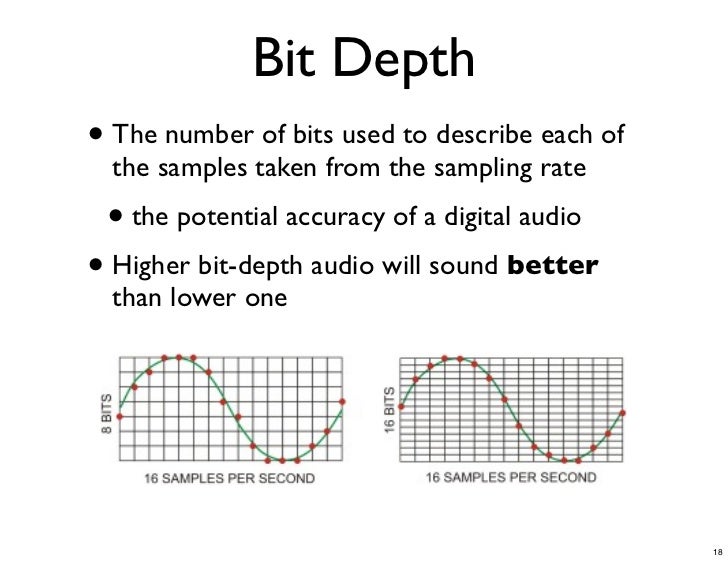
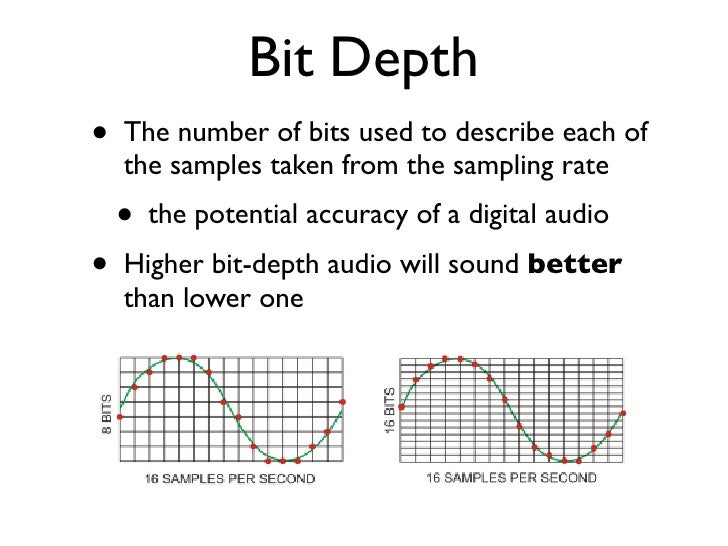
In digital audio, the bit depth is the number of bits of information in each sample and is closely linked to the resolution of the audio. Unlike an analog signal, which is periodic and is made up of infinite points, digital audio is a discrete signal since it is made up of a finite number of points. Use binary numbers (bits) to determine the number of states available to represent the strength of each audio sample and thus represent the signal. “The quality of the representation generally increases as this number of states increases. For example, […] recording of high-fidelity music is obtained on a CD with 65,536 levels of amplitude. The number of possible states of an n-digit (n-bit) binary system is E = 2 ^ n. ” 1. In summary, it is the resolution, in terms of amplitude, that a digitized signal will have. Determine the dynamic range that said signal has. In the following image we can see how a signal is represented in 4-bit depth. 4 bits generate 16 possible values ​​on the vertical axis.

Requirements

A very important aspect to keep in mind is that at a greater bit depth we are going to need more resources to process the audio and more memory to save it. This is because we will have more information. The size of our audio file will be given by the following account:

Number of bits * Sample rate * number of seconds in duration [* 2 (if it is a stereo signal)]

So, for example, the size of a second of audio on a CD, which works with a depth of 16 bits and a sampling rate of 44,100Hz / second is going to be given by the following account:

1 second = 16 * 44100 * 2 (since it is stereo)

1 second = 1411200 bits (0.1764 Mb)

Comparing different bit depths

In the following table we can compare the dynamic range (in decibels) and the number of possible amplitude values ​​of a digitized signal with different bit depths.


Obviously, the higher the number of bits, the higher the states are possible. The following example compares two pieces of music, leading them to a 16-bit to 4-bit transition. The first piece works in more depth, and the transition is much more noticeable, the result in 4-bits is perceived as the effect of “aliasing”. In the second piece, less dynamic range is used, so the transition it undergoes is almost imperceptible to the ear.

Dynamic Range and Bit Depth, those great strangers

Many times we listen to songs and they seem like absolute songs and other times they seem like a waste of time. To some extent it is because of the music that is heard. But today we are going a little further. I dare say that part of the fact that we end up liking it is due to the fact that there are two concepts that have not been taken into account in production lately.

I mean the Dynamic Range.

What is it? Well, it’s just the difference between the highest possible peaks and the noise threshold. Yes, there is always a noise basis, even in the best soundproof studio. And how does that affect what you hear is a great song? Very easy, since this variation in amplitude influences the sound intensity, how the song flows, the difference between strong and weak. The specific nominal amplitude of each equipment must also be taken into account, which is called the dynamic ceiling or Headroom. Normally it stays at 120Db, since it is the limit that integrated circuits allow. What we hear from all this is the SNR, signal noise ratio, that is, the relationship between residual noise and the average signal of the subject.

If we transfer this to our tasks as musicians, it means that no frequency that we are using within our theme should be fixed, which is called average, and that too much compression is bad too, since it can crush the sound, since applying a compressor decrease dynamic differences. This also includes mixing and normalization (which we will talk about later) where some resources can help us to make our theme cover the widest dynamic range in all its frequencies. For example: If the amplitude of the mid frequencies is reduced, approximately the frequencies of 250Hz, it is possible to boost frequencies of 5KHz.

Another resource that sometimes we fail when we are playing a synthesizer, whether analog or digital, or when we are mixing is Bit Depth or Bit Resolution / Quantization.

Bit Depth is the amplitude of variations of a sound wave. Translated into Christian, the number of bits recorded per sample. This affects the previously explained concept, dynamic range, since the greater the bit depth, the greater the possibility of working with wide dynamic ranges, which is called the rule-of-thumb. Since for example, if we work with 8-bit synthesizers, which are so fashionable, we are saying that this synthesizer, the wave that sends the output, only allows to register 256 variations in the amplitude of the wave. Let’s remember that 8 bits = 2 to 8. With this I don’t mean that an 8-bit synthesizer is bad, each one does its job, but there are many cases where pears are asked from the elm, when we all know that you have to go to the pear tree. I would like to emphasize this concept especially for we use analog synthesizers, drum machines, samplers. Since the bit depth within a PCM, the digital representation of an analog sound, recreates the maximum dynamic range, which means that the sound will be more real.

So let us return to the question asked above. How does this affect my theme to sound good? Well the bit depth limits the amount of dynamic range and signal noise ratio. This means that if we cover a higher bit resolution we will be able to interact with more precision within the theme that we are composing and therefore improve the output signal of the set.

Even so, I am sorry to be this party pooper, the bit depth problem comes from the fact that nowadays we use a format that has very low and bad compression, such as MP3 or WMA. Although you export at 24 bits, it does not mean that the MP3 / WMA has a bit depth of 24 bits, since you have mastered them at 24 bits but then it has been compressed and that is where it fails. This also happens even if we copy directly to a CD, since CDs are burned at 16 bits.