What is the sample rate? What is bit depth?


Free Download Mp4Gain
picture

What is the sample rate? What is bit depth?

Bit Depth


Audio sample rate and bit depth – simple and understandable language
bit depth

Even if you are not dealing directly with digital sound recording, you will be interested!

Are you new to the world of digital music? Not sure what all these designations and complex numbers mean?

Hmm, no wonder! After all, every day there is more and more information. And knowing everything is almost impossible.

Yes, this is not necessary! You need to know the essentials.

Sample rate and bit depth are sound engineering concepts that you should know if you decide to make music in a computer environment.

Even if you haven’t had to record music in a virtual environment yet, but have dealt with audio (be it on a portable digital player, a player on a computer, or elsewhere), you may have seen some numbers in the properties of audio: “16 bit, 24 bit, 44100 Hz, 48000 Hz …”

The material is presented briefly and is accessible even to the uninitiated. Just the essentials.

So what are sample rate and bit depth? What is it for?

To begin with, that in different sources you can find: Sample rate and Sample rate. The abbreviations are equivalent. Call it what you like the most.

And bit and bit depth. It’s the same, the same, it just sounds different.

So.

Sampling frequency …

All inanimate music (music produced by a computer, music center, etc., that is, not live) has this parameter. This is the number of samples per second. Without going into details, I will say that 44100 Hz is optimal for humans. Since at a higher value, the sounds to be sampled will be practically inaccessible to our ears, we simply won’t hear them, because they will be out of earshot.

Discrete means discontinuous. That is, the sampling process is the processing of each bit of information one by one (that is, discretely and not all at once). In our case, this happens 44100 times per second. By Nyquist’s theorem, the required sampling rate for normal perception should be twice the hearing threshold. Since an average person listens up to 16 KHz (KiloHz or 16000 Hz), and something (normal for a healthy young person) up to 20 KHz, the sampling frequency was determined at 44.1 KHz (44100 Hz), that is, twice the threshold. audibility of the human ear. Why not 40 kHz (40,000 Hz)? Taken with margin (nobody canceled errors and noise on the route and after the CD release).

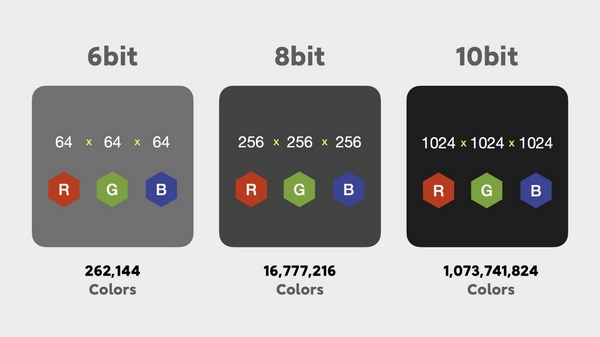
Bit depth is a kind of resolution of these same samples. Why am I calling this permission? Just so you prefer to understand by analogy what is what.

Grab your monitor – the higher the resolution, the better the picture, right? At low resolution you will see individual pixels and the eye will no longer be happy as before. I smile

Bitness is dynamic range – that is, the oscillation of your audio up and down (in terms of volume, power, so to speak), the nuances of performance.

The higher the audio bit rate, the more space the audio will occupy on your hard drive (on your computer); keep in mind.

For projects that are important to you, I advise you to use 24 bits and a sample rate of 48000 Hz. THIS IS A STANDARD. Then, for CD output, it will be possible to downgrade the data to 16 bits and 44.1 kHz.

But some people prefer to work in 24/96 (24 Bits – bit depth, 96 KHz – sample rate) or 24 / 88.2. The taste and the color …

For most projects, 16 / 44.1 is adequate (16 bit – bit depth, 44100 Hz is equivalent to 44.1 KHz – sample rate).

Sample rate and bit depth go directly next to each other and never go together. That is their destiny. They are friends in life, I smile

For the most boring and for those who find it quite difficult, I will explain again. Let me give you an analogy with a camera and images:

The sample rate is the number of photos you can take per second …

Audio sample rate and bit depth – simple and understandable language

And Bitness is the quality they will have …

Audio sample rate and bit depth – simple and understandable language

It is quite simple. At first, all of these sound engineering terms and expressions are misleading. I remember it and I know it.


Free Download Mp4Gain
picture


Mp4Gain Main Window
picture


Mp4Gain Features
picture


Free Download Mp4Gain
picture

Sample rate and bit depth

Sample rate and bit depth

Bit Depth

When a signal reaches the ADC from a preamplifier, compressor, console output, synthesizer, it represents electromagnetic oscillations. That is, a certain wave with variable voltage (very small values) reaches the input of the ADC. To save a signal to a file, it must be “digitized,” that is, encoded by ones and zeros. The result is a graph of the wave on the computer screen.

Bit Depth

Even the best converter has an error, because there are no intermediate values ​​between zero and one, and the wave graph will consist of only vertical and horizontal segments, with no oblique lines. The graphical representation of the wave will be influenced by the pitch (oscillation frequency), its timbre (waveform) and the volume (amplitude). A high-quality ADC must correctly transmit all these parameters to the recording system.

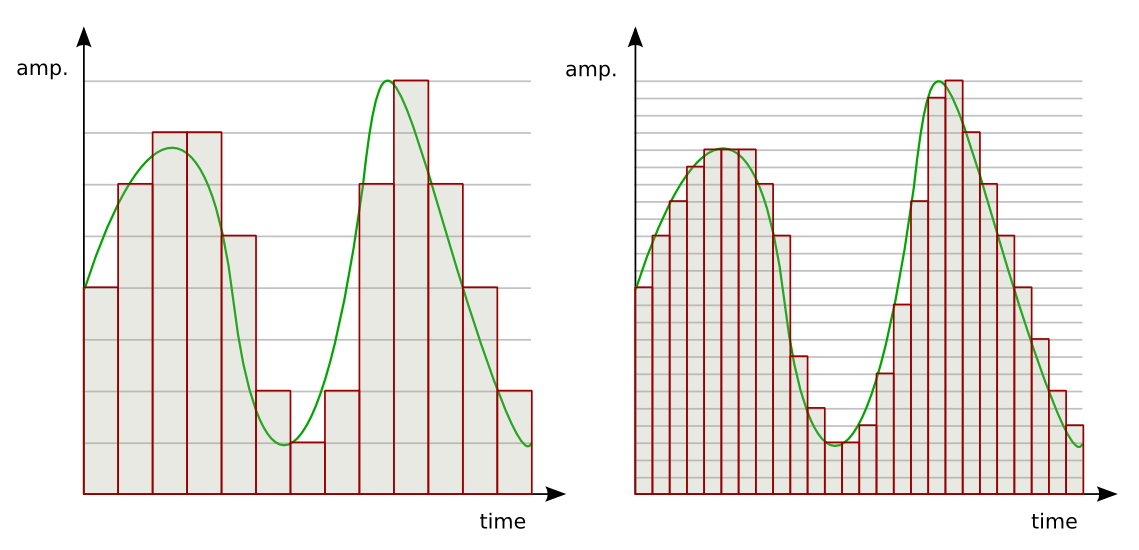
So the sound enters the system discreetly, that is, divided into small segments. The precision of encoding an analog signal in a digital environment depends on the size of these segments. The smaller the horizontal and vertical discrete units, the more accurate the scan will be.

Sampling rate

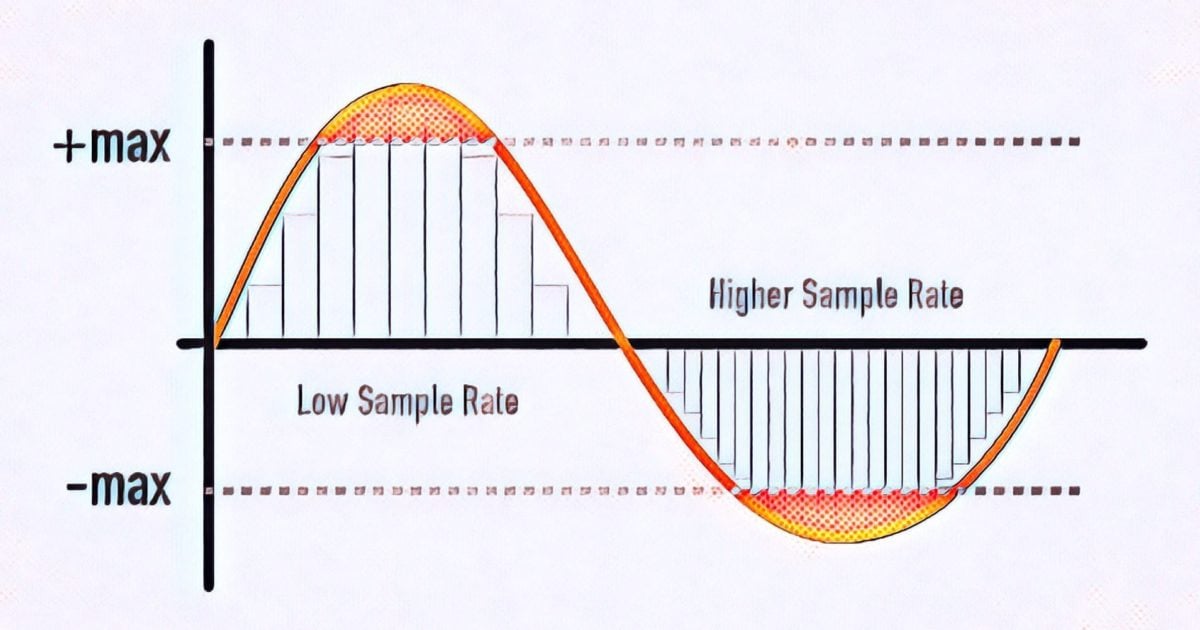
Splitting the wave horizontally gives us an idea of ​​the sample rate or sample rate. The more often the ADC detects changes in waveform values, the higher the sample rate. In reality, a sample is a discrete unit segment, the smallest unit of sound. The shorter it is, the higher the sample rate.

For example, a sample rate of 44.1 kHz indicates that there are 44,100 samples per second of recording. We can edit the wave, taking a segment with a duration of 1/44100 seconds as the minimum editing element. As the sample rate increases to 48 kHz, this section drops to 1/48000 of a second, allowing for more accurate impact.

Sample rate match

Each sample is the same length as the previous one. For proper sound reproduction, the file and system sample rates must be identical. When an audio track with a different sample rate than the host (program) sample is added to the project, it must be converted.

If you play a higher frequency file on a lower system, it will sound slower than it should and vice versa. Converting a signal from one frequency to another always produces distortion. To “reshape” the sound for a new sample rate, the system must divide the samples into smaller pieces and reassemble them into a single wave. Such a process can lead, at best, to simply blurring the sound, at worst, to the appearance of clicks.

Of course, in the built-in speakers of a home laptop, the difference will not be noticeable. But when it comes to working with sound at a professional level, sample rate coordination is necessary.

It is not recommended to change the sample rate within the same project. A justification for higher sampling could be, for example, the need to process the file with algorithms or plugins that work better at high frequencies. Since a higher sample rate means dividing into smaller samples, the processing precision will be higher and the result will be of better quality. But it is also impossible to guarantee the effectiveness of this method: in each case the result will be individual. It is necessary to evaluate each time what is more important: the effect of processing at a higher resolution or the negative effect of conversion.

If for some reason, after completing the job at 48 kHz, you need to convert the signal to 44.1 kHz, save the original file in case you need to re-manipulate the material (for example, for alternative mastering). Processing at a higher sample rate will provide a better effect than processing at a lower sample rate.

Sound capacity

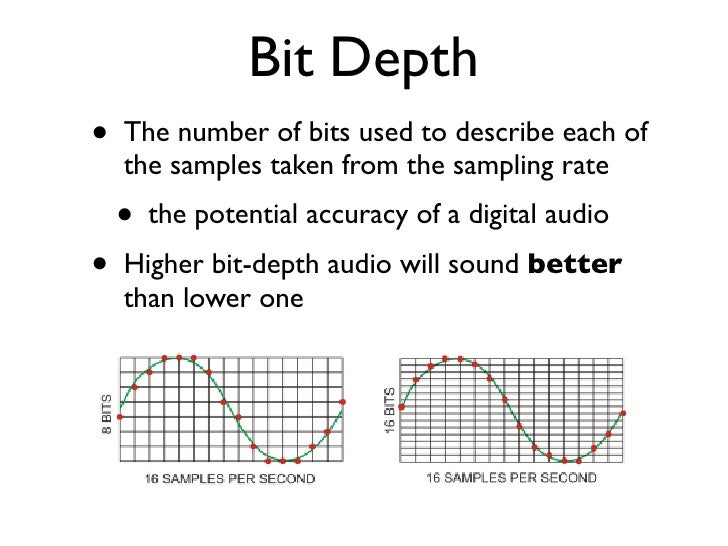
If the horizontal division of a wave gives us an idea of ​​the sampling frequency, then the vertical sampling is the bit depth, which is responsible for the reliable transmission of the dynamic elements of the register. The more “steps” the converter can correct, the higher the bit depth of the recorded sound file.

For example, a wave over a period of time may move one step from 0 to 16, or perhaps four – 4 units per step. A more accurate representation would be 16 steps by one. The number of steps the wave is divided into vertically is the bit depth.

The higher the bit depth of the converter, the more reliably it will transmit signals of different volume levels.

Sample Rate and Bit Depth: What Do They Mean for Your Sound Quality?

If you’re recording music with a  digital recorder, you’ve probably come across the terms sample rate and bit depth. These are the two main factors that determine the level of detail in the sound. The sample rate determines the frequency range of your recording and the bit depth determines the dynamic range. Read on to find out which settings are the best to use for your productions.

bit depth example in colors

Bit depth example in colors

Sample rate in bit-depth

Sample rate: audio pixels

Bit Depth

You can compare the sampling frequency of a digital signal with the number of pixels in a digital photo. As with digital photos, digital sound is divided into very small parts. With photos, those pieces are called pixels and with sound samples. The sampling frequency is expressed in kilohertz (KHz). The standard sampling frequency for CD is, for example, 44.1 kHz. That means that every second of your recording consists of 44,100 samples. Unlike photos, you will not hear any “blocks” at very low sample rates. The sound becomes mainly muffled.

Why 44.1 kHz?

In the late 1970s, Sony and Philips decided to choose 44.1 KHz as the default sample rate for their digital audio devices. That number may seem random, but there is definitely an idea behind it. The sample rate must be at least twice the highest rate you want to capture. If the sample rate is lower, the converters may misinterpret the super high frequencies. This phenomenon is called “aliasing.” Since, in theory, the human ear can detect frequencies from 20 Hz to 20 kHz, the sampling frequency should be at least 40 kHz. The additional 4.1 kHz is intended as a kind of buffer for the low-pass filter that is used to prevent aliasing above 20 kHz.

Why higher than 44.1 kHz?

Audio interfaces and DAWs often offer the ability to record at much higher sample rates, sometimes up to 192 kHz. This has several advantages. For example, the low pass filter mentioned above can be set much more gradually. Also, with the extension of time and the change of pitch, the noise will disturb you less. Keep in mind that the higher the sample rate, the larger your audio files will be. Plug-ins also require a lot more computing power from your computer at higher sample rates.

Hit my parts

So the sample rate tells us how many pieces the recording is made of. But how many different pieces can we choose from? In other words: in how many steps do we go from the softest sample to the hardest sample? We determine this with the bit depth. With most DAW and audio interfaces, you can choose between 16-bit or 24-bit. If you make very smooth recordings at a low bit depth, you have the possibility that the softer passages will disappear in the noise and you may even get distortion.

99 problems but a little is not one

The standard bit depth for CDs is 16 bits, which gives us a dynamic range of 96 dB. That’s a considerable improvement compared to say tape (+/- 80 dB), but in the studio world, 24-bit is generally chosen. With the 144 dB that we have then in dynamic range, we hardly really have to worry about the noise that the digital medium adds to the signal. In fact, it’s better to record and mix a little too low than too high.

What is sample rate and bit depth

BIT DEPTH

-translated from eurpean language-

Bit Depth

As a digital music producer, you will soon come into contact with the terms Sample Rate and Bit Depth. These terms are often experienced as complicated and are also used interchangeably. Starting today, you will no longer have to make those mistakes, because you have LesinProducing and we will do our best to explain it to you as well as possible. So here we go!

Bit Depth

As a digital music producer, you work 99% of your time on your computer or laptop. In order to record and edit sounds with a computer, the sound must be translated into the digital language that a computer understands, that is, “binary codes” (with all those zeros and ones).

SAMPLE RATE

Sample Rate Image A movie is actually a complete series of images that are put together, which our brain then interprets as a moving image. This is how it works with digital audio. Digital audio is basically a series of snapshots, which our brain experiences as one continuous sound. The frequency with which snapshots of the audio are taken, we express it in “Sampling frequency”. The greater the number of snapshots taken, the more detailed the result. In the world of digital audio recording, 44.1 kHz and 48 kHz are / were the most common sample rates. “But what exactly does 44.1 kHz mean?” I heard you think!

44.1 kHz means 44,100 “snapshots” that are taken per second. At 48 kHz this is 48,000 “snapshots” per second. Today you come across sound cards that support recordings of up to 96 kHz or even 192 kHz. That’s respectively 96,000 and 192,000 “snapshots” per second.

Okay, so far, because I know you have a few questions on your mind right now. Let’s see if we can answer your questions right away:

Question 1: If my sound card supports 96kHz recording, for example, where can I configure this?
Answer: In Cubase you can set the sample rate in Project -> Project Settings. In Logic X, do this in File -> Project Settings -> Audio.

Question 2: Is the difference between 44.1 kHz and 96 kHz audible?
Answer: The difference between 44.1 kHz and 96 kHz is almost inaudible.

Question 3: If we don’t experience / hear 92 kHz as “better”, what good is it?
Answer: To answer this question, we are introducing a new term, the “Nyquist Frequency”. Simple explanation: generally people can hear frequencies from 20Hz to 20,000Hz (= 20kHz). If you want to record a 20 kHz sound source, it must have a sampling frequency of at least 40 kHz. The “Nyquist frequency” of the 40 kHz sample rate, in this case 20 kHz. In this setting, 20 kHz is the highest frequency that can be recorded with a 40 kHz sample rate. Some musical instruments are said to have a higher range than our hearing (20 kHz). According to some, it is important to record these instruments as well as possible, although these instruments contain frequencies that we do not hear directly at first, but that we can feel / experience. If you want to achieve this,

Question 4: Why not record everything at the highest possible sample rate?
Answer: One reason is that the higher the sample rate, the larger the storage space. For example, if you need 5 MB of storage space for a few seconds of audio at a sampling rate of 48 kHz, you will need no less than 4 times more storage space for the same seconds at 192 kHz, that is, 20 MB.

BIT DEPTH

When Sample Rate takes vertical “snapshots”, the bit depth is based on the resolution (sharpness of the translation). Easy said; the higher the bit depth of the “digital translation”, the sharper the “translated” result. The result is a nice smooth waveform at higher bit depth. So you can take 44,100 “snapshots” with the sample rate, but if the resolution (depth of supply) is not sharp enough, the result will not be a smooth waveform. Bit depth is also about dynamic range. With each +1 bit, a dynamic range of + 6dB is added. For example, a 16-bit bit depth has a 96 dB dynamic range, and a 24-bit has a 144 dB dynamic range. For CDs, use 16-bit and for DVDs, 24-bit.