Sample rate and bit depth


Free Download Mp4Gain
picture

Sample rate and bit depth

Sample Rate Bit Depth

When describing digital recording devices, two fundamental concepts are used: sample rate and bit depth. In this article, we will see what it is.

Sample Rate, Bit Depth

Sampling rate
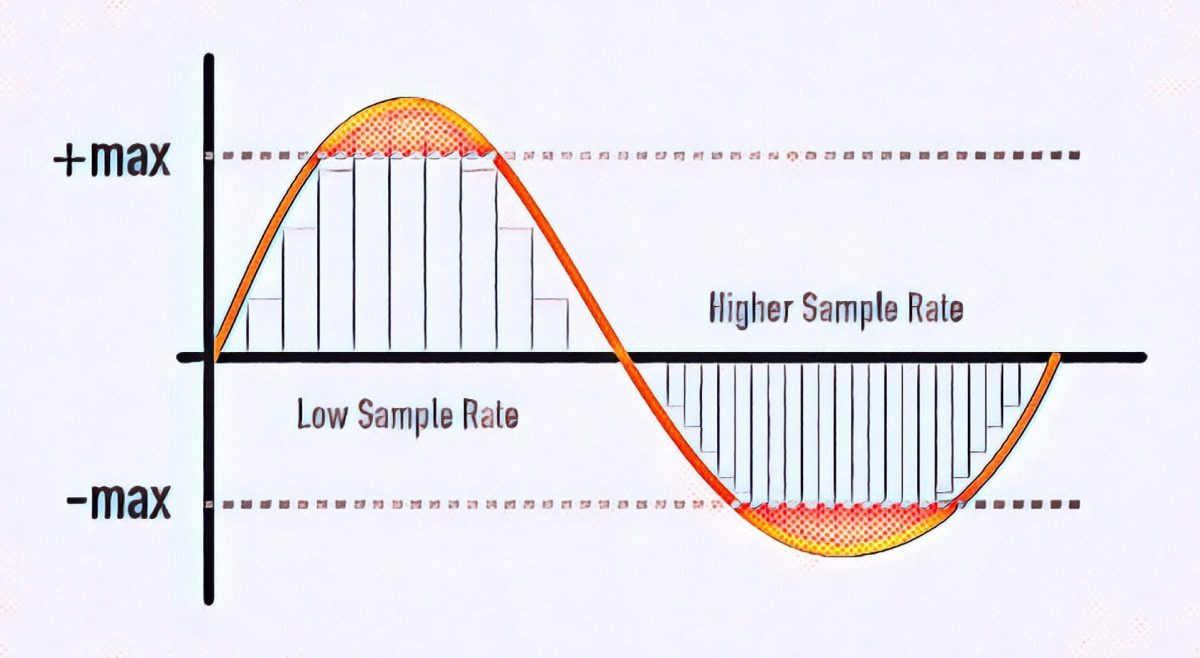
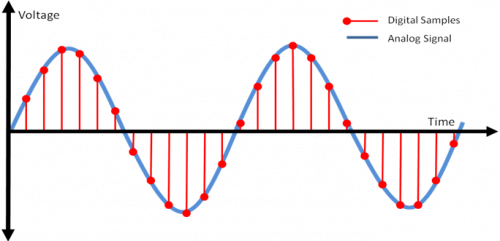
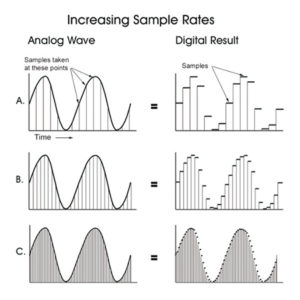
The sample rate is the rate at which the logger captures samples of the input signal. When recording sound in digital form, in fact, individual samples or, in other words, the sound intensity values ​​are recorded at separate points in time.

The sample rate for recording devices is usually the following standard values: 44.1 kHz; 48 kHz and 96 kHz. The higher the sample rate, the more samples will be taken in 1 second and the better the digital sound quality we will get as a result.

What is the meaning of these numbers? They mean the number of times the recorder reads the sound intensity of the input signal per second. The sample rate is measured in kilohertz (kHz), 1 kHz = 1000 samples per second.

For example, if the recording is carried out at a sampling frequency of 48 kHz, this means that the sound recorder measures and records the sound intensity value 48,000 times per second.

This amount may seem unimaginably huge, but a phenomenon called the Nyquist frequency is worth remembering here. The Nyquist frequency is named after the person who first discovered it. Defines the highest sound frequency that can be recorded at a given sample rate.

In short, the maximum tone that can be digitally fed is about half the sample rate.

Therefore, when recording at a sampling frequency of 48 kHz, the maximum audio frequency that can be recorded is 24 kHz. This is sufficient, considering that the human ear hears frequencies on average from 20 Hz to 20 kHz.

Bit depth
When talking about digital recording devices, you can often hear the words “16-bit”, “24-bit”, and so on. Some mean the number of information units with which the value of each sample obtained from the digital recording can be represented.

The higher the value of this number, the more accurately you can record the value of each sample and the higher the sound quality you will get as a result.

Do not think that the greater the number of bits, that is, the greater the bit depth, the greater the intensity value that can be set. Here is meant representation precision.

Modern recorders are typically 24-bit wide. It should be noted that recording with a large bit depth takes up a lot of space on the storage device, but this is not so important, because modern media has a huge volume and is becoming more and more affordable.


Free Download Mp4Gain
picture


Mp4Gain Main Window
picture


Mp4Gain Features
picture


Free Download Mp4Gain
picture

Bit depth: definition

Bit depth: definition

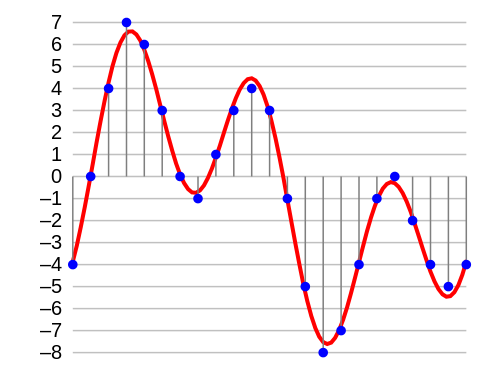
In digital audio, the bit depth is the number of bits of information in each sample and is closely linked to the resolution of the audio. Unlike an analog signal, which is periodic and is made up of infinite points, digital audio is a discrete signal since it is made up of a finite number of points. Use binary numbers (bits) to determine the number of states available to represent the strength of each audio sample and thus represent the signal. “The quality of the representation generally increases as this number of states increases. For example, […] recording of high-fidelity music is obtained on a CD with 65,536 levels of amplitude. The number of possible states of an n-digit (n-bit) binary system is E = 2 ^ n. ” 1. In summary, it is the resolution, in terms of amplitude, that a digitized signal will have. Determine the dynamic range that said signal has. In the following image we can see how a signal is represented in 4-bit depth. 4 bits generate 16 possible values ​​on the vertical axis.

Requirements

A very important aspect to keep in mind is that at a greater bit depth we are going to need more resources to process the audio and more memory to save it. This is because we will have more information. The size of our audio file will be given by the following account:

Number of bits * Sample rate * number of seconds in duration [* 2 (if it is a stereo signal)]

So, for example, the size of a second of audio on a CD, which works with a depth of 16 bits and a sampling rate of 44,100Hz / second is going to be given by the following account:

1 second = 16 * 44100 * 2 (since it is stereo)

1 second = 1411200 bits (0.1764 Mb)

Comparing different bit depths

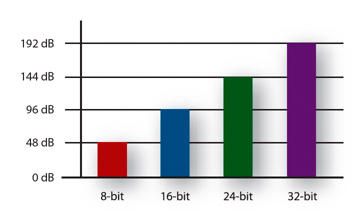
In the following table we can compare the dynamic range (in decibels) and the number of possible amplitude values ​​of a digitized signal with different bit depths.


Obviously, the higher the number of bits, the higher the states are possible. The following example compares two pieces of music, leading them to a 16-bit to 4-bit transition. The first piece works in more depth, and the transition is much more noticeable, the result in 4-bits is perceived as the effect of “aliasing”. In the second piece, less dynamic range is used, so the transition it undergoes is almost imperceptible to the ear.

Bit Depth explanation

Definition

In digital audio, the bit depth is the number of information bits of each sample and is closely linked to the resolution of the audio. Unlike an analog signal, which is periodic and is composed of infinite points, digital audio is a discrete signal since it is composed of a finite number of points. Use binary numbers (bits) to determine the number of available states to represent the strength of each audio sample and thus represent the signal. “The quality of the representation increases, in general, when this number of states is increased. For example, […] high-fidelity music recording is obtained on a CD with 65,536 amplitude levels. The number of possible states of a binary system of n digits (n bits) is E = 2 ^ n. ” 1. In summary, it is the resolution, in terms of amplitude, that will have a digitized signal. Determine the dynamic range of that signal. In the following image we can see how a signal is represented in 4 bits of depth. 4 bits generate 16 possible values ​​on the vertical axis.

Aspects to consider

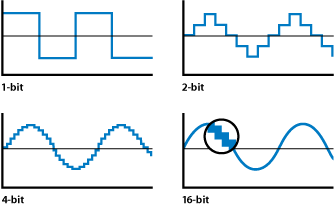
The accuracy of each sample is determined by its bit depth. Then, the higher the bit depth, the higher the resolution in the digitized signal. In addition, the greater the bit depth, the greater the dynamic range for the signal because it will have more points to represent the amplitude of each audio sample. It follows that low levels of bit depth can affect the shape of the wave and thus not achieve a good representation of the original wave because there are fewer possible points to represent it. For example, in the following graph we can see a sinusoid represented with different bit depths. A depth of 1 bit will generate a wave more similar to the square wave (depending on the quantification) because we only have two possible points on the vertical axis.

Requirements

A very important aspect to keep in mind is that at greater bit depth we will need more resources to process the audio and more memory to save it. This is because we will have more information. The size of our audio file will be given by the following account:

Bit number * Sample rate * number of seconds duration [* 2 (if stereo signal)]

Then, for example, the size of a second of audio on a CD, which works with a depth of 16 bits and a sampling frequency of 44,100Hz / second will be given by the following account:

1 second = 16 * 44100 * 2 (since it is stereo)

1 second = 1411200 bits (0.1764 Mb)

Sample Rate and Bit Depth

In sound and audio software and hardware specifications we are often told about processing capacities of up to 96kHz and 64bit operation, but what do these issues really mean? And how do they affect the quality of our sound?

Sample Rate and Frequency Range

The sampling rate is the frequency with which the A / D converter (analog to digital) measures the levels of a signal, the samples are broadly analogous to a series of snapshots. If the converter takes ten samples of the signal every second, it would have a sampling rate of 10 Hz.
The frequency range that an A / D converter (present on a sound card for example) can capture is determined by the sampling frequency, or sampling rate. However, in this there is a strict law that may seem unintuitive: the maximum frequency that can be captured is only half of the sampling frequency. A sampling rate of 10 Hz can capture a maximum frequency of 5 Hz, not 10 Hz. The reason is that, without double the samples of a sound source, some of the oscillations of the signal are lost.
But what happens if there are frequencies higher than the capacity of our sampling frequency in the captured analog audio signal? Aliasing then occurs, phenomena that occur when the highest sampling frequency that has been sampled is higher than the frequencies that can be accurately captured by the A / D converter. Aliasing adds distortion to the audio signal artificially, adding lower frequencies to higher partials. Aliasing can occur in a digital audio system as a result of a poorly designed A / D converter, but you are much more likely to hear it when you play high notes from a software-based synthesizer. If the synthesizer does not use an antialiasing technology, the high notes have the possibility of becoming random groups of tones that have no relation to the key note you are playing.

The researchers at Bell Laboratory are familiar with this problem since 1920 and conceptualized the principle as the Nyquist-Shannon sampling theorem. The theorem is simple: to sample the frequency value of x correctly, you need a sampling frequency of at least twice x. (The maximum frequency at which it can be sampled without aliasing at a certain sampling rate is thus the so-called Nyquist frequency.) So why do we need the sampling rate to be twice as fast as the most frequency? high to be recorded? Because each ordinary period of a waveform includes an upward and a downward oscillation. If the A / D converter takes less than two samples per period, it cannot capture the entire oscillation. In order to capture each “up” and “down” state, you need to take at least two samples from each period. Thus, the sampling rate has to be twice the highest frequency that must be recorded.

According to the Nyquist-Shannon theorem, to sample frequencies that are in the upper limit of the human ear (around 22000 Hz), you need a sampling frequency of around 44000 Hz, which is, not by chance, the rate Normal sampling for commercial audio CDs, 44100 Hz.

This obviously allows you to sample the frequencies from the top of the range of our ear, but what happens when the frequencies of the signal that reach the A / D converter exceed the maximum frequency limit of 22 kHz? They fold into the audible spectrum as distortion, so the A / D converters incorporate an anti-aliasing filter that eliminates these high partials, before the audio is converted to digital format.

AUDIO WHY SEND MY WAV FILES TO 16 BITS, 44,100HZ?

Many will ask, what do we mean by the technical term of 44,100Hz at 16 bits? That term refers to the coding standard with which the compact disc was marketed in the 80’s.

The quality of a compact disc has a depth (bit depth) of 16 bits and a sampling rate of 44.1 kHz, which means that it is the standard quality with which your music will be played from the physical format. But what is the depth and frequency of sampling? Why not handle a higher quality coding such as 24-bit at 96kHz?

Bit depth:

In digital audio using pulse code modulation (MIC or PCM by Pulse Code Modulation), it is the number of bits of information for each sampling and corresponds directly to the resolution of each sampling. Examples of this: The compact disc which uses 16 bits per sampling, DVD Audio and Blu Ray which support 24 bits per sampling. Bit depth is only applicable to lossless (loseless) files and not to compressed (lossy) files such as mp3, wma, etc. With 16-bit audio, there are 65,536 possible levels. With all the higher resolution bits, the number of levels is doubled. By the time we reach 24 bits, we actually have 16777216 levels. Remember that we are talking about a frozen audio segment in an instant of time.

Sample depth:

Pulse code modulation (MIC or PCM by Pulse Code Modulation) is a modulation procedure used to transform an analog signal into a bit sequence. The unit of measure commonly used is Hertz (Hz).

When it is necessary to capture the entire range of human ear capacity (20-20,000 Hz) such as recording studio music, or various types of acoustic events, audio waves are usually recorded at 44,100 Hz, 48,000 Hz, 88,200 Hz or 96,000 Hz. Sampling frequencies of more than 50,000 Hz or 60,000 Hz do not provide useful information to human ears, although the difference is small, in 96,000 Hz sampling it is effective eliminating distortion.

Why send my WAV files at 16 bits, 44,100Hz?

To hear the difference between your music in 16 bits at 44,100Hz and 24bits 96,000Hz you must have a decent professional audio system or professional headphones, have a well-trained ear and this without counting the noise or noise that exists around you, However, if you want to compare both formats, the difference is imperceptible in low-end headphones, speakers of a stereo coppel or the speakers of your macintosh.

It also greatly influences the mixing and production made during the recordings by the audio engineer when capturing the instruments in their raw state. This greatly influences your WAV files to be heard well in their final mix at 44.1KhZ 16 bits or 96kHz at 24 bits.

The society of audio engineers recommend 48,000 Hz for most applications however they give recognition to 44,1000 Hz for the compact disc and its various applications. In any case, it is recommended for its average consumption in digital media a coding at 44,100 Hz at 16 bits to make up your music in a compact disc format and also for digital distributions … although spotify, itunes, etc … compress your music in mp3 format to 128kbps, a minimum and lousy quality.

WAV is a lossless digital audio format (loseless) and are raw audio files which you can request from your audio engineer at no cost when you finish mixing your tracks.

Some details of the sample rate

For many years it was thought that the sample rate or sampling frequency did not decisively influence the final quality of the digital audio; There are currently several engineers who record in 44.1K or 48K without really knowing why they do it. With the advent of new and better computers, interfaces, ports and protocols, 88.2K, 96K and up to 192K entered the discussion table on the best sample rate to use. It has always been the subject of discussion between engineers and audiophiles; some argued that they did hear the difference between different sample rates and others that did not, and the topic has been subjected to millions of A / B tests with very high quality equipment, causing all kinds of opinions found and uncompromising, fights and friendships of years broken
samplerate

While this is a basic issue of digital audio, it is always surrounded by a halo of mystery, mysticism and magic (like every sound theme), which is well worth clarifying.

 What is the sample rate?

This topic, although it occurs in the first or second class of digital audio, is not always understood correctly. In scholastic thinking, sample rate is defined as the amount of audio samples transported and taken per second. Since this is a unit of measurement over a second and with events that occur cyclically, the Hertz (1 / Frequency) is used as a unit. Obviously we cannot talk about this subject without referring to the Nyquist sampling theorem, which was tested by Shannon almost twenty years after its publication and in which it is stated that for a signal of limited bandwidth (B) (for example, a vibraphone reaches 14.917Hz), the sampling frequency must be twice its bandwidth (2 * B). Then, taking the previous example, we can say that: 2 * B → 2 * 14.917Hz → The sampling frequency for 14.917Hz should be 29.834Hz. This would be equivalent to 29,834 samples per second (1/29, 834) to be able to regenerate the signal of a vibraphone without error. Hence, it is taken that the highest frequency that human beings listen to is 20kHz and if we apply Nyquist it should be 40kHz, but it takes 44.1kHz to meet the demanding ears and for a matter of multiples.

44.1K or 48K to 88.2K or 96K, the correct division

At the dawn of the digital audio era, Nyquist was used to use the sampling resolution of 44.1K, used at that time audio CD format that played at 16bit / 44.1kHz. With the advent of DVD and Blu Ray as video and audio formats, resolutions such as 24Bits / 48K or 24Bits / 96kHz began to be used. Although for many years there were recordings that were made in 24Bits / 88.2kHz or 24Bits / 96kHz, at a certain time of mastering, before sending it to the disk duplicator, the audio suffered a mutilation that reduced it to 16Bits / 44.1kHz as It was ordered by the CD format. This process should be carried out with equipment specially designed for this function and in stages so that the audio did not suffer a very noticeable cut and the bad conversion was evidenced. Although the old and dear Dither was applied since then to compensate for this process (something like “grain” in the cinema. Watch a film without “grain” and it will look like HD even though it was filmed in 1980 on tape and goes to notice until the makeup of the actor and the assembly of the special effects, something otherwise disagreeable).

Generally, to prevent the audio from mutilating or applying several conversions that degrade it, it was decided at what resolution to record before pressing the REC button (we will not mention those that come down directly with your DAW from 24Bits / 96kHz to 16Bits / 44.1kHz in one step to export the audio … there is a place reserved especially for them in hell). If the audio was going to end on CD, a 88.2kHz sample rate was generally applied, since at the time of mastering, with the symmetric re-sampling at “half”, it was 44.1kHz.

Sounds better?

The subjective point of this is that we expect recordings to “sound” better at a higher sample rate. The reality is that if we record in high sample rates, with very good sampling, our sound will not “sound better”, but will be more detailed. Obviously, if our sound source is bad, our microphones and preamps too and so on, no matter how much we record at 192K, the result will not be the best. Now, if we use a good sound source, good audio chain and a good converter, everything will be obviously good. But don’t confuse; We are talking about detail here, not if it will sound more “warm,” “fat,” or “full-bodied.” This translates into a more homogeneous capture of the entire frequency spectrum, both audible and non-audible.
sample rate

CPU, disk and plug-ins

Obviously, having a higher sample rate means that our processor must do more calculations, since it has to process more samples (or audio samples). Depending on the amount of plug-ins that we use before a multitrack in high resolution, our use of both DSP and native processors (the computer equipment), will increase significantly, making it very difficult or impossible to work. There are several options to overcome this problem, from buying more processor or DSP, using fewer processes or external equipment (hybrid mixing), to borrowing a machine. The only option that should never go through our minds is to lower the resolution of the audio, process and upload it again. The serious problem that comes with this is a cut in the audio, which is not reversible and what is limited and trimmed, so it stays.

Another aspect to consider is that the storage speed must be in accordance with the audio resolution we use. Suppose we want to record at 24Bits / 96kHz; The transfer rate would be: 2304kbits / second. Now, calculating the amount of tracks, we should use a disc that really reaches us in speed for this transfer rate (topic to be developed in another article).

In these times, storage size is not a problem, but speed is. Having three terabyte disk drives are generally used for 5400 rpm dish disks; the least that should be used if they are not solid state disks, would be 7200 rpm plate disc drives. Obviously, with 5400 rpm discs, we would have a third reduction in the final transfer speed and reading and writing possibilities called “iops” (in out per second or in and out per second), which have a certain number, depending on the disk, capacity and arrangement of the same (RAID) which, depending on how much we demand in the resolution of the audio, amount of channels, processing (plug-ins) and expected latency (if we record with real-time monitoring), we will surely face some problems like “clicks” and / or “pops” in our audio.

Clock

The importance of using a good clock (or clock) and being in sync with all the elements that belong to our audio chain is vital. Recall that a few articles ago we have exposed this topic in detail, but it should be reinforced in this article. Several ADC and DAC converters of economic interfaces do not perform sampling and quantization in the correct or expected manner; External clocks or protocols such as Dante help the synchronization between several devices to be correct and improve the audio quality. Much of the final quality of our work in audio is in this part of the process and it is important that if we take our work and passion seriously, we begin to pay attention to these kinds of details that are generally overlooked.