Mp3: Audio Bit Depth, Sample Rate and Bit Rate


Free Download Mp4Gain
picture

Mp3: Audio Bit Depth, Sample Rate and Bit Rate

Bit depth
Bit depth

(a) Regarding bit depth. Bit depth is also called sampling bit depth, and the bit depth of the audio determines the dynamic range.

Bit depth
Bit depth

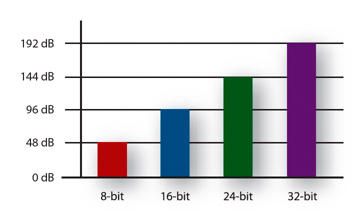
Our common 16-bit (16-bit) can record a dynamic range of about 96 decibels. Well, roughly you can know that each bit can record about 6 decibels of sound. Similarly, the 20-bit recordable dynamic range is about 120 dB; 24 bits is about 144 dB.

If we define 0dB as the maximum value, then the sound amplitude is calculated by extension down, then the dynamic range of CD audio is “-96dB ~ 0dB”, and so on, the dynamic range of 24Bit HD-Audio high – the audio definition is “-144dB~0dB”. It can be seen that at higher bit depths, a greater dynamic range is available and lower levels of detail can be recorded.


(2) Regarding the sampling frequency.

What is the most intuitive effect of sample rate? Affects the expressiveness of the sound’s frequency range. The higher the sample rate, the larger the frequency range that can be expressed. 44.1KHz sampling rate can express the frequency range from 0Hz to 22050Hz; 48KHz sampling rate can express the frequency range from 0Hz to 24000Hz; 96KHz sampling frequency can express the frequency range from 0Hz to 48000Hz. The average frequency range that the human ear can hear is about 20Hz-20000Hz.

Combining the two above, if you see a parameter:

16Bit 44.1KHz, means this digital audio can express “96dB dynamic range” and “0Hz-22050Hz” frequency range;

24Bit 48KHz, which means this digital audio can express “144dB dynamic range” and “0Hz-24000Hz” frequency range.


(3) Audio bit rate, also called bitrate or bit rate.

Bit rate refers to the amount of information that can pass through a data stream per second, and can also be understood as: how many bits of data per second are used to represent.

In principle, the higher the audio bitrate, the better the quality.

However, in the case of lossy compressed audio, different compression algorithms, even at the same bitrate, can lead to completely different sound quality results.

Typical Representative: WMA 96kbps audio format sound quality is obviously better than MP3 96kbps sound quality. Why is this so? Differences in data usage due to different compression algorithms. For another example, if MP3 is compressed below 48kbps, it’s already terrible, and if it’s AAC audio format, the sound quality is obviously better than MP3 at the same 48kbps bitrate.

For lossless compressed audio, even though the bitrate is completely different, the final sound quality is the same. For example, if the same WAV file is compressed in FLAC format and APE format, the bit rate of the output file is not the same, but the sound quality is the same. Even in the same format, the compression level is different and the bitrate is completely different, but the end result, the sound quality remains the same (but when encoding and decoding, the CPU usage is different and the encoding time is also different).


Free Download Mp4Gain
picture


Mp4Gain Main Window
picture


Mp4Gain Features
picture


Free Download Mp4Gain
picture

Mp3, what is bit depth and how does it affect the quality of an mp3?

Mp3, what is bit depth and how does it affect the quality of an mp3?

Bit-Depth
Bit-Depth

Bitrate is not the same as bit depth

Bit-Depth
Bit-Depth

We have explained in previous articles that sound is a wave that propagates through the air. And the act of digitizing it is based, on the one hand, on the number of samples that are taken, in order to be able to draw it with enough gfidelity, but that, if we have an X,Y graph, represents only one of the axes.
The other axis is represented by the depth, that is, we already have how many samples are taken per second, but we need to have on the other side, how many possibilities we have to “capture” the data that each sample captures.

If we have a bit depth of 16 then we will have a little more than 250 different values ​​to draw the wave.

If instead we use a bit depth of 24 bits, we will have millions of different values. Which allows us in treoria to have much greater detail or fidelity.

All this is what the theory tells us. It’s like with colors, with a bit depth of 16 bits we will have 250+ options to describe, let’s say a green color, instead with 24b we will have millions of possible variants.

Obviously the first thing we will have to ask ourselves is if the device is capable of reproducing millions of different colors or variants in sound.

We must also ask ourselves if the human ear will be able to pick up these differences.

Even, and we won’t dwell on it, “noise” plays an important role here.

We would say that in general terms for the sound a bit depth equal to or greater than 16 is already enough to have an important quality.

Bit depth, an important factor almost unknown

Bit depth, an important factor almost unknown

Very often we see people talking about topics that are important, like bitrate for example. Most of the time without understanding exactly what that means. Sometimes they even do trial and error and for various reasons it may be that the result they obtain is misleading, since they are not considering that modifying the bitrate without looking at the sample rate and the bit depth, is to act blindly and therefore the Results will always be misleading and we should not draw definitive conclusions from them.

We have detected that many people instead of giving a reading that allows them to understand what bitrate, sample rate or bit depth are, prefer to manipulate them without understanding them and, based on the result of one or two songs, they often reach conclusions. wrong about what is the right combination.

Bitrate

It is bitrate It is the amount of information that passes per second, that is, the amount of detail that an audio file can contain in a video. The bigger the bitrate means what will be passing more information per second; therefore the file will be bigger but it will contain more details, which will give it a higher quality. We will put an example to understand it very easily. Images that we have a great draftsman or painter and that we ask him to make a portrait of a person but we tell him that I can only use 5 colors and he cannot mix them.

As a result we will obtain practically a caricature and not a portrait itself. In other words, it will have less quality if we understand quality to be a faithful copy of the original.+

On the other hand, if that same painter asks you to make a portrait, but we stop using the entire color palette, you will be able to make a very realistic portrait, of very high quality, very faithful to the original.

Why did this happen? Because it contains much more information. There are many more shades. That explains exactly how bitrate affects the quality of a video or audio file.

Sample rate

When we record a video, for example, it is as if we were taking a series of photographs and then quickly saw them one after the other and that would give us the illusion of movement. In exactly the same way that cartoons worked in ancient times. Obviously if we only use three drawings per second the quality of the cartoon will be very low because you will see a series of jumps and not an action continues. If instead we use 24 drawings per second we will see a very high quality cartoon where we will seem to see an action continue without any Jump.

The sample rate is the number of samples per second that are taken to form a video or an audio file. Audio on a professional CD uses 44100 samples per second. If we lower that quantity we will notice a loss of quality and if we increase it to more than 44100 samples we will be able to obtain a very high quality HD.

Bit depth

The bit depth determines how many “steps” the curve or wave will contain that will contain our audio or video file. Obviously, the more steps the wave pattern has, it will be more faithful and, on the contrary, if it contains few steps, the wave pattern will be very rough.

So here we are understanding the importance of bit depth that for example in music affects even the dynamics of music. That is, how much can the volume of an instrument rise and fall in different passages. At different bit depth rates we will obtain different levels of decibels

Bit depth: definition

Bit depth: definition

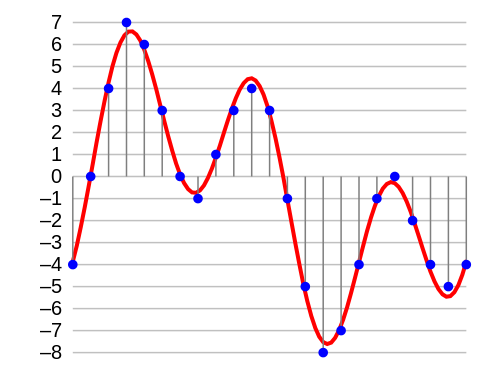
In digital audio, the bit depth is the number of bits of information in each sample and is closely linked to the resolution of the audio. Unlike an analog signal, which is periodic and is made up of infinite points, digital audio is a discrete signal since it is made up of a finite number of points. Use binary numbers (bits) to determine the number of states available to represent the strength of each audio sample and thus represent the signal. “The quality of the representation generally increases as this number of states increases. For example, […] recording of high-fidelity music is obtained on a CD with 65,536 levels of amplitude. The number of possible states of an n-digit (n-bit) binary system is E = 2 ^ n. ” 1. In summary, it is the resolution, in terms of amplitude, that a digitized signal will have. Determine the dynamic range that said signal has. In the following image we can see how a signal is represented in 4-bit depth. 4 bits generate 16 possible values ​​on the vertical axis.

Requirements

A very important aspect to keep in mind is that at a greater bit depth we are going to need more resources to process the audio and more memory to save it. This is because we will have more information. The size of our audio file will be given by the following account:

Number of bits * Sample rate * number of seconds in duration [* 2 (if it is a stereo signal)]

So, for example, the size of a second of audio on a CD, which works with a depth of 16 bits and a sampling rate of 44,100Hz / second is going to be given by the following account:

1 second = 16 * 44100 * 2 (since it is stereo)

1 second = 1411200 bits (0.1764 Mb)

Comparing different bit depths

In the following table we can compare the dynamic range (in decibels) and the number of possible amplitude values ​​of a digitized signal with different bit depths.


Obviously, the higher the number of bits, the higher the states are possible. The following example compares two pieces of music, leading them to a 16-bit to 4-bit transition. The first piece works in more depth, and the transition is much more noticeable, the result in 4-bits is perceived as the effect of “aliasing”. In the second piece, less dynamic range is used, so the transition it undergoes is almost imperceptible to the ear.