Mp3: Audio Bit Depth, Sample Rate and Bit Rate

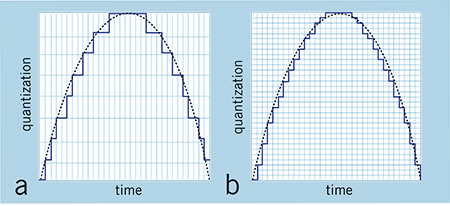
(a) Regarding bit depth. Bit depth is also called sampling bit depth, and the bit depth of the audio determines the dynamic range.

Our common 16-bit (16-bit) can record a dynamic range of about 96 decibels. Well, roughly you can know that each bit can record about 6 decibels of sound. Similarly, the 20-bit recordable dynamic range is about 120 dB; 24 bits is about 144 dB.
If we define 0dB as the maximum value, then the sound amplitude is calculated by extension down, then the dynamic range of CD audio is “-96dB ~ 0dB”, and so on, the dynamic range of 24Bit HD-Audio high – the audio definition is “-144dB~0dB”. It can be seen that at higher bit depths, a greater dynamic range is available and lower levels of detail can be recorded.
(2) Regarding the sampling frequency.
What is the most intuitive effect of sample rate? Affects the expressiveness of the sound’s frequency range. The higher the sample rate, the larger the frequency range that can be expressed. 44.1KHz sampling rate can express the frequency range from 0Hz to 22050Hz; 48KHz sampling rate can express the frequency range from 0Hz to 24000Hz; 96KHz sampling frequency can express the frequency range from 0Hz to 48000Hz. The average frequency range that the human ear can hear is about 20Hz-20000Hz.
Combining the two above, if you see a parameter:
16Bit 44.1KHz, means this digital audio can express “96dB dynamic range” and “0Hz-22050Hz” frequency range;
24Bit 48KHz, which means this digital audio can express “144dB dynamic range” and “0Hz-24000Hz” frequency range.
(3) Audio bit rate, also called bitrate or bit rate.
Bit rate refers to the amount of information that can pass through a data stream per second, and can also be understood as: how many bits of data per second are used to represent.
In principle, the higher the audio bitrate, the better the quality.
However, in the case of lossy compressed audio, different compression algorithms, even at the same bitrate, can lead to completely different sound quality results.
Typical Representative: WMA 96kbps audio format sound quality is obviously better than MP3 96kbps sound quality. Why is this so? Differences in data usage due to different compression algorithms. For another example, if MP3 is compressed below 48kbps, it’s already terrible, and if it’s AAC audio format, the sound quality is obviously better than MP3 at the same 48kbps bitrate.
For lossless compressed audio, even though the bitrate is completely different, the final sound quality is the same. For example, if the same WAV file is compressed in FLAC format and APE format, the bit rate of the output file is not the same, but the sound quality is the same. Even in the same format, the compression level is different and the bitrate is completely different, but the end result, the sound quality remains the same (but when encoding and decoding, the CPU usage is different and the encoding time is also different).