Digital Audio Bit Depth: Understanding the Basics


Free Download Mp4Gain
picture

Digital Audio Bit Depth: Understanding the Basics

Audio Bit Depth
Audio Bit Depth
Audio Bit Depth
Audio Bit Depth

What is Digital Audio Bit Depth?

Digital audio bit depth refers to the number of bits used to represent each sample in a digital audio signal. Bit depth is a crucial aspect of digital audio because it affects the accuracy and dynamic range of the signal.

In digital audio, sound is captured and processed as a series of discrete samples, with each sample representing the amplitude of the sound wave at a specific point in time. The bit depth determines the number of possible amplitude values that can be represented in each sample.

How Does Bit Depth Affect Audio Quality?

The higher the bit depth, the more accurately the digital audio signal can represent the original analog waveform. A higher bit depth allows for a greater dynamic range, which means that the quietest sounds can be represented with more accuracy, and the loudest sounds can be represented without distortion.

For example, a 16-bit audio signal can represent 65,536 possible amplitude values, while a 24-bit audio signal can represent 16,777,216 possible amplitude values. This means that a 24-bit audio signal can capture a wider range of dynamic levels and is capable of greater accuracy and detail than a 16-bit audio signal.

What is the Relationship Between Bit Depth and Signal-to-Noise Ratio?

As the bit depth increases, the signal-to-noise ratio (SNR) also increases. SNR is the ratio between the desired signal (the audio) and the background noise.

A higher bit depth means that there are more possible amplitude values for each sample, which reduces the amount of quantization noise in the signal. Quantization noise is a type of distortion that occurs when the analog signal is converted to digital.

How is Bit Depth Measured?

Bit depth is measured in bits per sample. Common bit depths in digital audio include 16-bit, 24-bit, and 32-bit.

What is Dithering?

Dithering is a process used to reduce the distortion caused by quantization error in digital audio. When an analog signal is digitized, the conversion process rounds the amplitude of each sample to the nearest possible value.

Dithering adds a small amount of random noise to the signal before it is quantized, which allows for a smoother transition between amplitude values and reduces the audible effects of quantization error.

What is the Difference Between Bit Depth and Sample Rate?

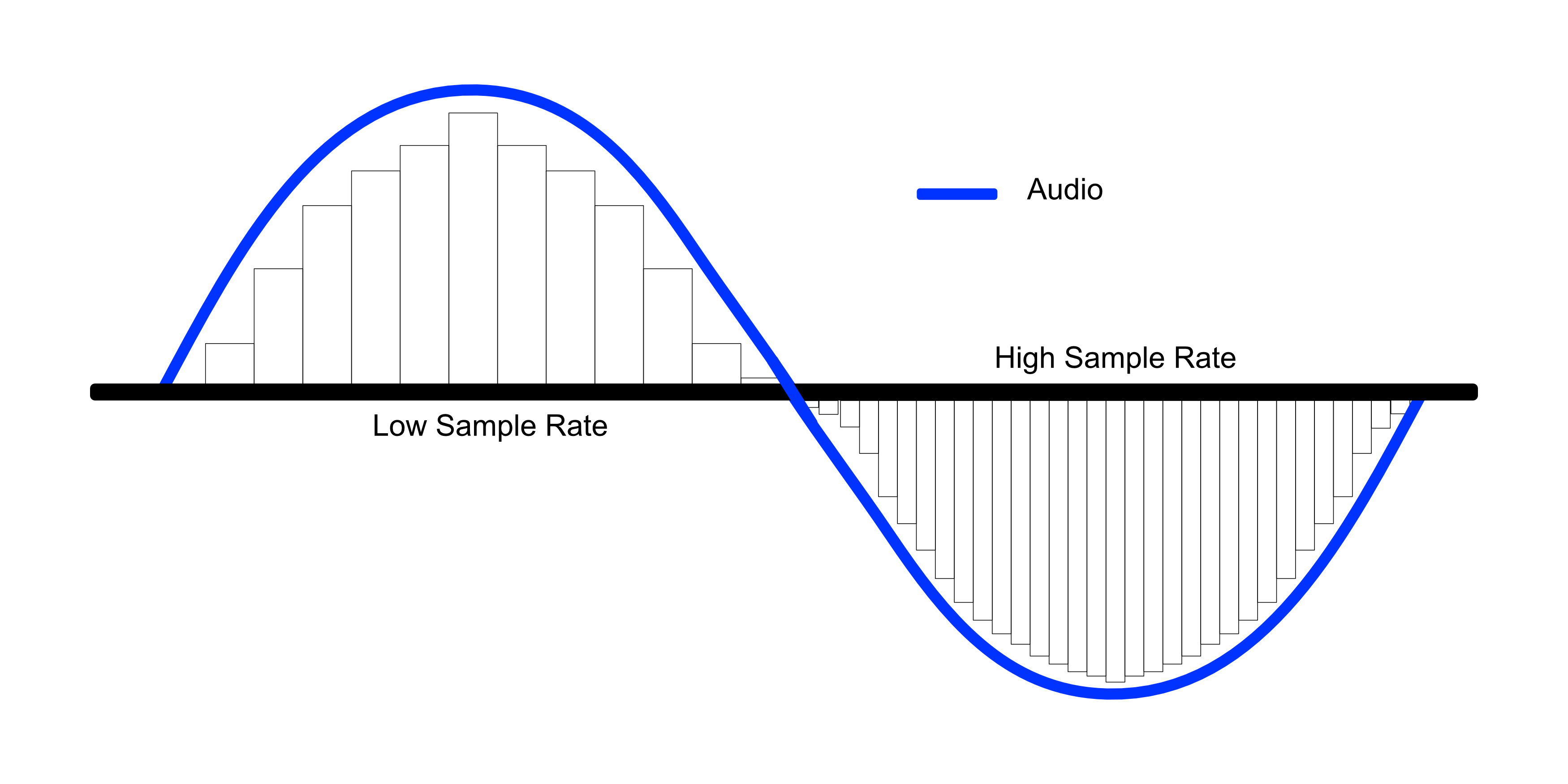
While bit depth determines the number of possible amplitude values in each sample, sample rate determines the number of samples taken per second. A higher sample rate allows for greater accuracy in capturing the original analog waveform, but it does not affect the dynamic range or accuracy of each individual sample.

What is the Ideal Bit Depth for Recording and Mixing?

The ideal bit depth for recording and mixing depends on the intended use of the final product. For most applications, a bit depth of 24 bits is considered to be sufficient, as it provides a wide dynamic range and high accuracy.

However, for applications that require extreme accuracy and detail, such as classical music recording, a higher bit depth may be necessary.

What is the Relationship Between Bit Depth and File Size?

As the bit depth increases, the file size of the digital audio also increases. This is because a higher bit depth requires more storage space to represent the additional amplitude values.

What is the Relationship Between Bit Depth and Processing Power?

Higher bit depths require more processing power to manipulate and process. This is because the additional amplitude values must be calculated and stored in memory.

What Happens When a High Bit-Depth Audio File is Converted to a Lower Bit-Depth Format?

When a high bit-depth audio file is converted to a lower bit-depth format, the result is a loss of some of the original audio data. This is because the lower bit-depth format has fewer bits to represent the audio data, which means that some of the information is lost in the conversion process.

For example, if a 24-bit audio file is converted to a 16-bit format, the conversion process will discard the least significant 8 bits of each sample. This can result in a loss of some of the subtle nuances and details in the audio, which can be particularly noticeable in quiet passages or when the audio is heavily processed.

It’s worth noting that some audio formats, such as MP3 and AAC, use lossy compression to reduce the file size. This means that even if the original file was at a high bit-depth, converting it to a lower bit-depth format such as MP3 will result in a further loss of data due to the compression algorithm.

What is Dithering and How Does it Help with Bit Depth Reduction?

Dithering is a technique used to reduce the impact of bit-depth reduction when converting high-resolution audio to a lower resolution format. It works by adding a small amount of random noise to the audio signal before it is truncated to the lower bit depth.

This noise effectively masks the truncation distortion, allowing the audio to retain some of its original detail and clarity. Dithering is particularly useful when converting from a higher bit-depth format to a lower bit-depth format, as it can help to mitigate the loss of information that would otherwise occur.

How Does Bit Depth Affect Audio Quality?

The bit depth of an audio file can have a significant impact on its perceived quality. Generally speaking, higher bit-depth files can capture more detail and nuance in the audio, resulting in a more accurate and realistic reproduction of the original recording.

For example, a 16-bit audio file has a maximum dynamic range of 96 dB, while a 24-bit file has a maximum dynamic range of 144 dB. This means that a 24-bit file can capture much quieter sounds and much louder sounds than a 16-bit file, resulting in a more accurate representation of the original recording.

That being said, the impact of bit depth on perceived audio quality can vary depending on a number of factors, including the quality of the recording equipment, the mastering process, and the listening environment.

What is the Difference Between Bit Depth and Sample Rate?

While bit depth and sample rate are both important aspects of digital audio, they refer to different things. Bit depth refers to the number of bits used to represent each sample in an audio file, while sample rate refers to the number of samples per second that are taken to create the audio file.

In other words, bit depth determines the level of detail captured in each sample, while sample rate determines the temporal resolution of the audio. Both bit depth and sample rate can have an impact on the perceived quality of an audio file, and both are important considerations when working with digital audio.

What is the Best Bit Depth for Audio Production?

The best bit depth for audio production depends on a number of factors, including the specific needs of the project and the available hardware and software. In general, however, a bit depth of 24 bits is considered to be a good choice for most recording and production purposes.

This is because a 24-bit depth provides a high level of detail and dynamic range, while also being widely supported by modern recording equipment and software. That being said, there may be situations where a lower bit depth may be sufficient. For example, if the final audio product will only be distributed online or through streaming services, a 16-bit depth may be acceptable as it will still provide decent quality while reducing file size and download times. Additionally, if the recording environment is not optimal and contains a high level of background noise, a lower bit depth may actually be preferable as it can help mask the noise.

How does bit depth affect audio quality?

Bit depth plays a critical role in determining the quality of digital audio recordings. The higher the bit depth, the greater the dynamic range and level of detail that can be captured in a recording. This results in a more accurate and faithful reproduction of the original sound source. In contrast, a lower bit depth may result in a loss of detail and accuracy, leading to a less faithful reproduction of the original sound.

Can bit depth be converted after recording?

While it is possible to convert the bit depth of a digital audio file after recording, it is generally not recommended. This is because bit depth conversion can result in a loss of information and a decrease in overall audio quality. If possible, it is best to record at the desired bit depth from the start to ensure the highest possible quality.

What are some common bit depths used in digital audio?

The most common bit depths used in digital audio are 16-bit, 24-bit, and 32-bit. 16-bit is the standard for CDs and is widely used in digital audio recording for distribution on streaming platforms. 24-bit is increasingly becoming the standard for professional recording due to its high level of detail and dynamic range. 32-bit is relatively new and provides an even greater level of detail and dynamic range, but is not yet widely supported by all recording equipment and software.

Does bit depth affect the final file size of an audio recording?

Yes, bit depth does affect the final file size of an audio recording. A higher bit depth requires more data to represent each sample, resulting in larger file sizes. For example, a 24-bit audio file will be larger than a 16-bit audio file of the same duration and sample rate.

What is dithering in relation to bit depth?

Dithering is a technique used to reduce the audible effects of quantization distortion when converting from a higher bit depth to a lower bit depth. When reducing the bit depth, some of the information from the original recording must be discarded. This can result in audible distortion and noise. Dithering adds a small amount of random noise to the audio signal to mask this distortion and make it less audible.

Can different bit depths be mixed in the same audio project?

Yes, different bit depths can be mixed in the same audio project. However, it is important to note that mixing different bit depths can result in a loss of quality for the higher bit depth audio. When mixing different bit depths, it is best to convert all audio to the same bit depth before mixing to ensure the highest possible quality.

What is the relationship between bit depth and sample rate?

Bit depth and sample rate are both important factors in determining the quality of digital audio recordings. Bit depth refers to the number of bits used to represent each sample, while sample rate refers to the number of samples taken per second. Higher bit depths and sample rates result in higher quality recordings with greater detail and accuracy.

Can bit depth affect the sound of analog audio recordings?

No, bit depth does not affect the sound of analog audio recordings. Bit depth only applies to digital audio recordings.


Free Download Mp4Gain
picture


Mp4Gain Main Window
picture


Mp4Gain Features
picture


Free Download Mp4Gain
picture

The higher the bitrate, the higher the sound quality and the larger the file size.

The higher the bitrate, the higher the sound quality and the larger the file size.

audio bit rate
audio bit rate

but the quality of the source file determines the final quality.

audio bit rate
audio bit rate

From highest to lowest, the sound quality will be worse, but from lowest to highest, the sound quality will remain unchanged at most, but the file will be larger.Many

General mp3 are good with bit rate around 128, and also 3-4 BM in size.

The bitrate, choosing it, directly affects the size of your mp3 file and the listening experience. High compression ratio has high distortion, and low compression ratio has low distortion, but how do we find a balance point that we can accept on both counts? This requires careful exploration in the experiment. Considering that the sound quality of low bitrate files is not suitable for playing music, the minimum set is 128kbps, and four fixed bitrate files of 128, 192, 256 and 320 are used for comparison. and try.

The compression ratio of 128 kbps is still relatively rough, and the high-frequency part is highly distorted after compression. It sounds hollow, wrinkled, rough, and there are often flickering sounds. Misunderstanding, the compressed volume of a 3 minute 39 piece of music is 3414 Kb. Although the volume is not large, the sound is not satisfactory, and there are relatively large defects.

192kbps bit rate compression effect is much better than 128. First of all, the sound is solid, at least there is no empty feeling, the high-frequency distortion is also much less, the sound is compact, the noise is small and clean, and achieve relatively ideal listening The sound effect, just because the compression is still relatively strong, the detail performance is still not very good, the texture of musical instruments, especially instruments of wind, it is still very hard, unreal and lacks musicality. The compressed size is 5123kb, and I think the compression ratio is 128~ It is better to use it in a mp3 player with a capacity of ~256m, which can not only satisfy the basic sense of hearing, but also is suitable in size.128m can store about 95 minutes of music, and 256m can double to 190 minutes of music.

The 256 kbps compression rate is naturally a step higher than 192 in terms of sound quality. Take the first 10 seconds of the track, the low frequency of the cello is obviously less grainy, and the sound is more smooth and natural, with texture and texture. It is also clearer, with much more detail, the rendering of the atmosphere is more prominent, the rotation of parts in the following songs is also more expressive, the clarity of large and small signals is also improved, and the sound is more detailed and lasting. But at the same time, the file size has also increased to 6831kb, which is still affordable for a 256m mp3 player. It is not difficult to know by calculation. According to the bit rate of 256, about 135 minutes of music can be stored. Generally speaking, it is enough, 128m is a bit less and can only support a little over an hour, so it is recommended to use 192 bitrate for 128m.

320 kbps is the maximum bitrate that lame can provide. The final file generated is 8592kb which is about 8.4M. Compared to the 37M of the wav file the compression ratio is basically 4.5:1 but the generated mp3 file sounds very distorted Now on Compared with other 320 bit rate, the natural advantage is obvious, the tone, details, etc. are very delicate, basically achieve the sound quality of the original CD copy, especially in the CD player with playback function from mp3, the basic No difference, but I use relatively high-end earplugs with high resolution, plus my experience and skill with music and equipment, I can still hear a lot of differences compared to wav files, first Instead, the compressed mp3 sounds a bit The crunch feeling is relatively dry on the whole. Without the wav file, it sounds fresh and dynamic. In terms of final details, nuances and sense of space, the separation is not as high as the quality of the wav file, but it is quite close in terms of timbre, but the performance is poor and the digital flavor is relatively strong. So if you are using a miniature hard drive player like an iPod, I recommend you use 320kbps compression ratio, which can get the best listening experience. Of course listening to wav directly is the best~

The bit rate directly affects the sound quality.

The bit rate directly affects the sound quality.

audio bit rate
audio bit rate

High bitrate is good and low bitrate is bad.

audio bit rate
audio bit rate

The code rate is the number of data bits transmitted per unit of time during data transmission. Generally, the unit we use is kbps, that is, kilobits per second.

The popular understanding is the sampling rate. The higher the sampling rate per unit time, the higher the precision, and the processed file is closer to the original file, but the file size is proportional to the sampling rate, so almost all encoding formats pay attention. It’s about how to use the lowest code rate to achieve the least distortion. The cbr (fixed code rate) and vbr (variable code rate) derived from this core are all articles in this regard, but things are not absolute, in terms of audio, the higher the bit rate, the lower the compressed ratio, the smaller the sound quality loss and the closer it is to the sound quality of the audio source.
The information in the computer is represented by binary 0 and 1, and each 0 or 1 is called a bit, which is represented by lowercase b, that is, bit (bit); uppercase B represents byte, ie byte, one byte = Eight bits, ie 1B=8b; the capital K in front stands for thousand, that is, thousand bits (Kb) or kilobytes (KB). Indicates the size of the file, usually using bytes (KB) to indicate the size of the file.

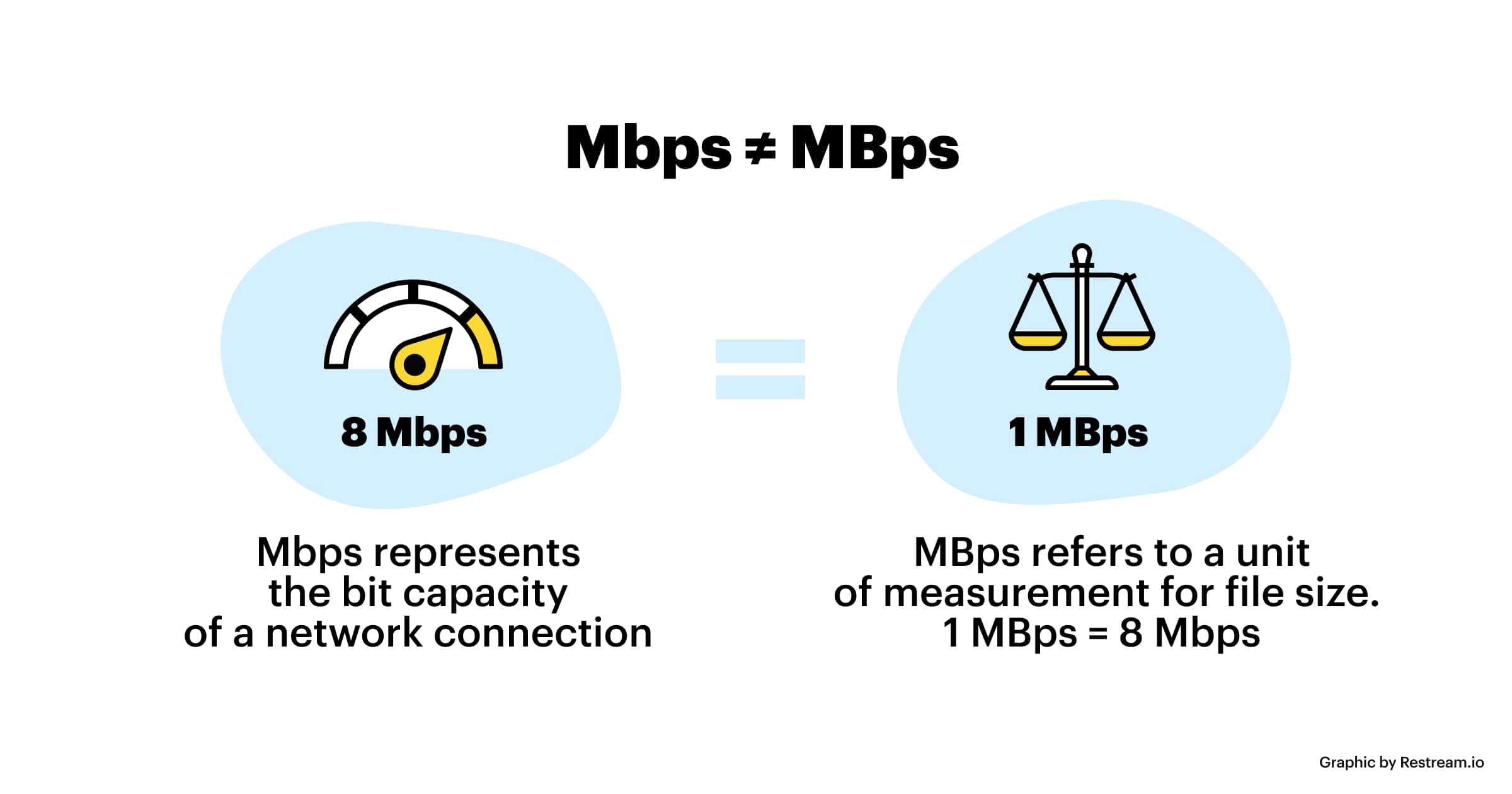
Kbps: The first thing to understand is that ps refers to /s, which is every second. Kbps refers to the speed of the network, that is, how many thousands of bits of information are transmitted per second (K means thousands of bits, Kb means how many thousands of bits), it is expressed in kb (kilobit), and in the case KBps means how many kilobytes are transferred per second. 1KBps = 8Kbps. The Internet speed of ADSL is 512 Kbps. If converted to bytes, it is 512/8 = 64 KBps (that is, 64 kilobytes per second).

A frame is a still image, and continuous frames form an animation, like a television image.
We normally say the number of frames. Simply put, it is the number of image frames transmitted in 1 second. It can also be understood that the graphics processor can update several times per second, usually expressed in fps (Frames Per Second). Each frame is a still image, and showing frames in rapid succession creates the illusion of movement. Higher frame rates result in smoother, more realistic animations. The more frames per second (fps), the smoother the motion is displayed.

What is the bitrate of the music?
It can also be called bit rate, which is nothing more than the amount of data reproduced per second by a type of music, the unit is expressed in bits, that is, binary bits. bps is the bit rate. b is bit, s is second, p is per, and one byte is equal to 8 binary bits. That is, the file size of a 4-minute song at 128bps is calculated as (128/8)*4*60=3840kB=3.8MB, which means that the same song with the same bit rate (bps) will not no matter what format (such as mp3 wma) The capacity is basically the same, which can only represent a transmission rate, not the sound quality. Due to different compression engines, the sound quality of different formats varies a lot. However, for the same format, the higher the bitrate, the larger the file and the better the sound quality.

What is the sample rate of the music?
Sampling rate refers to the number of samples per unit of time. The sampling rate is 44KHz, which means the number of samples per second is 44K, which means that 44,000 pieces of data are used to describe the sound waveform in 1 second. That is, the higher the sample rate, the better the sound quality. But he and bitrate are two completely different concepts.

Mp3: Audio Bit Depth, Sample Rate and Bit Rate

Mp3: Audio Bit Depth, Sample Rate and Bit Rate

Bit depth
Bit depth

(a) Regarding bit depth. Bit depth is also called sampling bit depth, and the bit depth of the audio determines the dynamic range.

Bit depth
Bit depth

Our common 16-bit (16-bit) can record a dynamic range of about 96 decibels. Well, roughly you can know that each bit can record about 6 decibels of sound. Similarly, the 20-bit recordable dynamic range is about 120 dB; 24 bits is about 144 dB.

If we define 0dB as the maximum value, then the sound amplitude is calculated by extension down, then the dynamic range of CD audio is “-96dB ~ 0dB”, and so on, the dynamic range of 24Bit HD-Audio high – the audio definition is “-144dB~0dB”. It can be seen that at higher bit depths, a greater dynamic range is available and lower levels of detail can be recorded.


(2) Regarding the sampling frequency.

What is the most intuitive effect of sample rate? Affects the expressiveness of the sound’s frequency range. The higher the sample rate, the larger the frequency range that can be expressed. 44.1KHz sampling rate can express the frequency range from 0Hz to 22050Hz; 48KHz sampling rate can express the frequency range from 0Hz to 24000Hz; 96KHz sampling frequency can express the frequency range from 0Hz to 48000Hz. The average frequency range that the human ear can hear is about 20Hz-20000Hz.

Combining the two above, if you see a parameter:

16Bit 44.1KHz, means this digital audio can express “96dB dynamic range” and “0Hz-22050Hz” frequency range;

24Bit 48KHz, which means this digital audio can express “144dB dynamic range” and “0Hz-24000Hz” frequency range.


(3) Audio bit rate, also called bitrate or bit rate.

Bit rate refers to the amount of information that can pass through a data stream per second, and can also be understood as: how many bits of data per second are used to represent.

In principle, the higher the audio bitrate, the better the quality.

However, in the case of lossy compressed audio, different compression algorithms, even at the same bitrate, can lead to completely different sound quality results.

Typical Representative: WMA 96kbps audio format sound quality is obviously better than MP3 96kbps sound quality. Why is this so? Differences in data usage due to different compression algorithms. For another example, if MP3 is compressed below 48kbps, it’s already terrible, and if it’s AAC audio format, the sound quality is obviously better than MP3 at the same 48kbps bitrate.

For lossless compressed audio, even though the bitrate is completely different, the final sound quality is the same. For example, if the same WAV file is compressed in FLAC format and APE format, the bit rate of the output file is not the same, but the sound quality is the same. Even in the same format, the compression level is different and the bitrate is completely different, but the end result, the sound quality remains the same (but when encoding and decoding, the CPU usage is different and the encoding time is also different).

Mp3, what is bit depth and how does it affect the quality of an mp3?

Mp3, what is bit depth and how does it affect the quality of an mp3?

Bit-Depth
Bit-Depth

Bitrate is not the same as bit depth

Bit-Depth
Bit-Depth

We have explained in previous articles that sound is a wave that propagates through the air. And the act of digitizing it is based, on the one hand, on the number of samples that are taken, in order to be able to draw it with enough gfidelity, but that, if we have an X,Y graph, represents only one of the axes.
The other axis is represented by the depth, that is, we already have how many samples are taken per second, but we need to have on the other side, how many possibilities we have to “capture” the data that each sample captures.

If we have a bit depth of 16 then we will have a little more than 250 different values ​​to draw the wave.

If instead we use a bit depth of 24 bits, we will have millions of different values. Which allows us in treoria to have much greater detail or fidelity.

All this is what the theory tells us. It’s like with colors, with a bit depth of 16 bits we will have 250+ options to describe, let’s say a green color, instead with 24b we will have millions of possible variants.

Obviously the first thing we will have to ask ourselves is if the device is capable of reproducing millions of different colors or variants in sound.

We must also ask ourselves if the human ear will be able to pick up these differences.

Even, and we won’t dwell on it, “noise” plays an important role here.

We would say that in general terms for the sound a bit depth equal to or greater than 16 is already enough to have an important quality.

Bitrate Part 2

Bitrate Part 2

bitrate

The amount of information transmitted through the channel per unit of time is called the bit rate, and the unit is bits per second (bit/s), called the bit rate.

BITRATE

Bitrate is often used in communications as a synonym for connection speed, transmission speed, channel capacity, peak throughput, and digital bandwidth capacity. The higher the bit rate, the higher the data transfer. Bit rate in video refers to the sampling rate at which an analog signal is converted to a digital signal [4] . Video file quality is often measured in terms of bitrate. [4] .
Distinction of conceptedit transmission
Baud rate is also known as waveform rate or modulation rate. The code for a data unit is represented by a finite combination of numbers, each of which is a symbol (or code point). In electrical communication, an electrical waveform is often used to represent one or more symbols. Waveforms with different characteristics may represent different symbol values ​​or symbol combination values, and the duration of the waveform corresponds to the duration of the symbol or symbol combination it represents. Obviously, the shorter the duration of an electrical waveform, the more waveforms are transmitted in a unit of time, or the more data is transmitted, that is, the higher the data rate. Therefore, we can define the baud rate as follows: In the process of data transmission, the number of waveforms transmitted per unit time on the line is the baud rate, and its unit is “baud” [5] .
“Bit rate” and “baud rate” are speed units defined in two different concepts, and it is often easy to confuse them when you are not careful. When binary waveform is used, baud rate and bit rate have the same value, but their meanings are different [5] .
Difference: Both bit rate and baud rate are units that measure the transmission rate of a modem. In data transmission, data information is represented by binary numbers “0” and “1”, and each binary number is called 1 bit. The number of bits transmitted through the channel per unit of time is called the bit rate, expressed in bits per second, usually abbreviated as bit/s. The number of symbols transmitted through the channel per unit of time is called the baud rate, also called the modulation rate. Bit rate and baud rate are consistent only when modulated with two values. For example, in quadrature modulation, every two bits of the data signal form a symbol, and there are 4 values: 00, 01, 10 and 11, which represent the phase changes of the 4 types of carrier signals respectively, for Therefore, send such a symbol. It is equivalent to transmitting two bits of data, and the baud rate is equivalent to half the bit rate. The usual transmission rates of 300, 600, 1200 and 9600, etc., refer to the baud rate, which indicates that the number of binary numbers transmitted per unit of time is 300, 600, 1200 and 9600 [6] .

Bit rate

Bit rate

Bitrate

Bit rate refers to the number of bits (bit) transmitted per unit of time, in bps (bit per second).

bit rate

Bit rate is also known as “binary bit rate”, commonly known as “code rate”. Indicates the number of bits transmitted per unit of time. It is used to measure the transmission speed of digital information, often written as bit/sec. According to the number of bits occupied by each image storage frame and the transmission bit rate, the digital image information transmission speed can be calculated [1].
In modern digital communication, the transmission volume of digitized video and other information is large, so it is often measured in kilobits per second or megabits per second, which are written as kbit/sec (or kbps) and Mbit/sec. (or Mbps respectively). ). For example, the amount of information digitized from an ordinary color TV signal can reach 216 Mbit/sec. A good digital broadcast channel can transmit dozens of color TV programs, and its capacity can reach several gigabits or gigabits per second (written as Gbit/sec or Gbps) [1] .
Bitrate is often used to measure the quality of video files.
flexibility edit stream
Because each network is unique and each access line has different conditions (such as length, attenuation, crosstalk environment, etc.), access lines from different telephone companies must support different data rates. For ADSL and VDSL modems, it is best to set the data rate to one of many possible data rates. For example, DMT-based ADSL and VDSL can theoretically change the tariff at fine intervals, and CAP-based RADSL (Rate Adaptive ADSL) also provides some flexibility in tariff configuration [2].
However, telephone companies may want to limit xDSL service to a small set of rates sufficient to provide a variety of services. If a limited set of tariffs can be adapted to a wide range of services, then the management of the services in this case is simpler than in the case of variable tariffs. Telephone companies want the choice of modem speed to be under the control of the network, not the user [2] .
In this mode, the selection of the transmission rate set of the xDSL network must be prudent. In this case, there is a possibility that two adjacent systems receive traffic at very different rates and the system must be able to handle such a situation. The other model, the “best match” approach using adaptive rate ADSL (similar to a voiceband modem), is more beneficial to new network operators and Internet Service Providers (ISPs) [2] .
Transmission control method
Most bit rate control schemes consist of two parts. Part of the encoded bit stream output by the encoder is fed into a buffer. For a constant bitrate channel, the data in the buffer is fetched at a constant rate, and if the buffer is large enough, the bitrate variation caused by the MPEG picture type, etc. can be smoothed out. This is necessary for both constant bit rate transmission and variable bit rate transmission in general. However, in practice, the buffer size is always limited. The buffering process will bring a delay to the system, and this delay is proportional to the size of the buffer. Latency is often a serious issue for real-time image communication, so buffers should be kept as small as possible. That is, long-term fluctuations in bitrate due to changes in scene content or changes, etc. they cannot be softened in this way, so another part is needed. This is to send some measure of the output bitrate to the encoder to control the encoding process, thus changing the output bitrate [3] .

Sample rate and bit rate of MP3 Part 2

Sample rate and bit rate of MP3 Part 2

BIT RATE

The number of digits in the sound is equivalent to the number of colors on the screen, indicating the amount of data per sample.

bit rate

Of course, the larger the amount of data, the more accurate the playback sound, so as not to confuse the sound. of the teapot with the train whistle. In the same way, it is more clear and precise for the image, so as not to confuse blood and ketchup. [However, limited by the function of human organs, 16-bit sound and 24-bit image are basically the limits of ordinary humans, and the higher digits can only be distinguished by instruments. For example, the phone has 7-bit sound sampled at 3 kHz and the CD has 16-bit sound sampled at 44.1 kHz, so the CD is clearer than the phone. ]

When you understand the above two concepts, bitrate is easy to understand. Take the phone as an example, 3000 samples per second, each sample is 7 bits, then the phone’s bit rate is 21000. And the CD is 44100 samples per second, two channels, each sample is 13 bit PCM encoded, so the CD bit rate is 44100*2*13=1146600, which means the CD data volume per second is about 144KB. the capacity of a CD is 74 minutes equal to 4440 seconds, which is 639360KB=640MB.

Sound is actually a type of energy wave, so it also has the characteristics of frequency and amplitude, with frequency corresponding to the time axis and amplitude corresponding to the level axis. The wave is infinitely smooth, and the string can be considered to be made up of innumerable points. Since the storage space is relatively limited, in the process of digital encoding, the points of the string must be sampled. The sampling process consists of extracting the frequency value of a certain point. Obviously, the more points that are extracted in one second, the richer the frequency information that can be obtained. To restore the waveform, there must be two sampling points in one vibration. The highest frequency that can be felt is 20kHz, so to meet the auditory requirements of the human ear, at least 40k samples per second, expressed at 40kHz, and this 40kHz is the sample rate. Our common CD has a sample rate of 44.1 kHz. It is not enough to have only frequency information, we must also obtain and quantify the energy value of this frequency to represent the strength of the signal. The number of quantization levels is an integer power of 2, and the sample size of our common CD bit is 16 bits, that is, 2 to the power of 16. Sample size is harder to understand than bit rate. sampling, because it makes it seem abstract. For a simple example: suppose a wave is sampled 8 times, and the energy values ​​corresponding to the sampling points are A1-A8, but we only use 2-bit sampling size, as a result we can only keep the 4 point values ​​in A1-A8 and discard the other 4. If we use the 3bit sample size, all 8 point information is recorded. The higher the sample rate and sample size values, the closer the recorded waveform is to the original signal.

MP3 sample rate and bit rate

MP3 sample rate and bit rate

Bit Rate

When we listen to mp3 and watch movies, we will notice two parameters.

BIT RATE

The most common ones are 44.1 KHz sample rate and 192 Kbps bit rate. So what is the sample rate and what is the bit rate? What is the relationship between them? Explain:

The process of converting an analog audio signal to a digital audio signal is called sampling. In a nutshell, how many data points does it take to record a 1 second long sound via waveform sampling. For example: the sound sample rate of 44.1 KHz is equivalent to spending 44,000 data points to describe the sound waveform for 1 second. In principle, the higher the sample rate, the better the sound quality; sampling frequency is generally divided into three levels: 22.05KHz, 44.1KHz and 48KHz; 22.05KHz can only achieve FM radio sound quality, and 44.1KHz is the theoretical limit of CD sound quality, 48KHz has reached DVD quality.

Sampling rate refers to the sampling frequency when converting sound (analog signal) to mp3 (digital signal), i.e. how many data points are sampled per unit of time. (The data for a sample point is 8 (or even more) bits long.)

Bit rate refers to the number of bits (bits) transmitted per second. The unit is bps (bit per second). The higher the bitrate, the more data transmitted and the better the sound quality.

It can be said that the sample rate and bit rate are like the horizontal and vertical coordinates on the coordinate axis. The sampling frequency on the abscissa represents the data points sampled per second. The bit rate on the ordinate represents the precision when quantizing analog quantities with digital quantities.

The sample rate is similar to the number of frames of moving images. For example, the sampling rate of movies is 24 Hz, the sampling rate of PAL format is 25 Hz, and the sampling rate of NTSC format is 30 Hz. When we play back the still images sampled at the same rate as the sampling frequency, we see a continuous image. In the same way, when a CD recorded at a sampling rate of 44.1 kHz is played back at the same rate, a continuous sound can be heard. Obviously, the higher the sample rate, the more coherent the sound will be heard and the picture will be seen. [Of course, the sampling rate that human auditory and visual organs can distinguish is limited, which is basically higher than sound sampled at 44.1kHZ, and most people haven’t noticed the difference. ]

Quality (bit rate)

Quality (bit rate)

Bit Rate

In multimedia technology, quality is often used to judge the effect of audio, and quality here is actually bitrate.

Bit Rate

1. Introduction
2 sound control
3 encoding mode
Introductionedit transmission
The term quality is widely used.
In multimedia technology, quality is often used to judge the effect of audio, and quality here is actually bitrate.
On WINDOWS it is called “bit rate” and on some players it is described as ” bit rate “.
Quality refers to the bit rate at which digital sound is converted from analog to digital format. The higher the bitrate, the better the quality of the restored sound.
sound control edit stream
16 Kbps = phone quality
24 Kbps = increase phone quality, shortwave transmission, longwave transmission, European standard medium wave transmission
40 Kbps = American standard medium wave transmission
56Kbps=Voice
64 Kbps = boost voice (best bitrate setting for cell phone ringtones, best setting for cell phone mono MP3 players)
112 Kbps = FM stereo broadcast FM 128 Kbps = tape (best setting for mobile phone stereo MP3 player, best setting for low-end MP3 player)
160 Kbps = HIFI high fidelity (best setting for mid to high end MP3 players)
192Kbps=CD (best setting for high-end MP3 players)
256Kbps=Studio Music Studio (for music enthusiasts)
In fact, with the advancement of technology, the quality of music is also getting higher and higher, the highest quality of MP3 is 320Kbps, but some formats can achieve higher sound quality.
For example, the emerging APE audio format can provide real audiophile level lossless sound quality and smaller volume than WAV format, and its quality is usually 550kbps-950kbps.
encoding modeedit stream
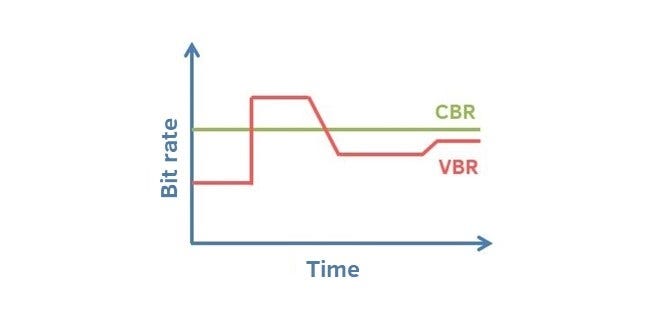
VBR (Variable Bitrate) Dynamic Bitrate means there is no fixed bitrate. The compression software immediately determines which bitrate to use based on the audio data being compressed. This is a method that takes quality as a premise and takes file size into account The recommended encoding mode;
ABR Average Bit Rate (Average Bit Rate) is an interpolation parameter of VBR. LAME created this encoding mode in response to the low file volume ratio of CBR and the variable size of files generated by VBR. Within the specified file size, ABR takes every 50 frames (about 1 second for 30 frames) as a segment. High-frequency and insensitive frequencies use relatively low traffic, and low-frequency and large dynamic performance use high traffic, which can be used as VBR and CBR, a compromise option.
CBR (constant bitrate), constant bitrate means the file has one bitrate from start to finish. Compared to VBR and ABR, the compressed file size is very large and the sound quality will not improve significantly compared to VBR and ABR.