How does the bit depth impact the dynamic range and audio fidelity in digital formats?
audio bit depthaudio bit depth
Bit depth’s influence on dynamic range and audio quality
I remember when I first started learning about digital audio formats, I was curious about how bit depth affected the overall sound quality. It turns out that bit depth plays a significant role in determining the dynamic range and audio fidelity of digital audio files. The higher the bit depth, the more accurately the audio signal can be represented, resulting in a more detailed and accurate sound.
As a musician, I’ve always been fascinated by the science behind sound. I once read a quote from the famous composer John Cage that said, “There is no such thing as an empty space or an empty time. There is always something to see, something to hear.” This idea resonates with me, as it highlights the importance of capturing every nuance of sound in digital audio formats.
In my experience, working with higher bit depths has allowed me to create richer, more immersive audio experiences for my listeners. The increased dynamic range and audio fidelity make a noticeable difference in the final product.
How bit depth affects audio fidelity in digital formats
When I first started experimenting with digital audio, I didn’t realize how crucial bit depth was to the overall sound quality. Bit depth refers to the number of bits used to represent each audio sample in a digital file. The more bits used, the greater the audio fidelity, as there are more possible values to represent the audio signal.
I recall watching a documentary about the history of digital audio, where an expert explained that “the higher the bit depth, the closer the digital representation is to the original analog signal.” This made me realize the importance of using higher bit depths to achieve the best possible audio quality.
In my own projects, I’ve found that using a higher bit depth results in a more accurate and detailed sound. It’s especially noticeable when working with complex audio material, where the nuances of the sound can be more easily captured and preserved.
The role of bit depth in digital audio dynamic range
Dynamic range is another critical aspect of digital audio quality that is directly influenced by bit depth. The dynamic range refers to the difference between the quietest and loudest parts of an audio signal. A higher bit depth allows for a greater dynamic range, as there are more possible values to represent the varying levels of loudness.
I’ve always been a fan of movies with powerful soundtracks, and I remember a quote from the film “Amadeus” that stuck with me: “Music is not just about notes, but also the spaces between them.” This idea applies to dynamic range as well, as it’s essential to capture the full spectrum of sound, from the quietest whispers to the loudest explosions.
In my own audio projects, I’ve noticed that working with higher bit depths allows me to create more dynamic and expressive soundscapes. The increased dynamic range provides a more immersive and engaging listening experience for my audience.
Final words
In conclusion, bit depth plays a crucial role in determining the dynamic range and audio fidelity of digital audio formats. A higher bit depth allows for a more accurate representation of the audio signal, resulting in a more detailed and immersive sound. As a musician and audio enthusiast, I’ve found that working with higher bit depths has significantly improved the quality of my projects.
If you’re looking to enhance the audio quality of your own projects, I highly recommend using a tool like mp4gain. While it’s not free or open-source, and only runs on Windows, it’s a powerful normalizer and converter for major audio and video formats. With its integrated equalizer, mp4gain can help you achieve the best possible audio quality for your projects.
Digital audio bit depth refers to the number of bits used to represent each sample in a digital audio signal. Bit depth is a crucial aspect of digital audio because it affects the accuracy and dynamic range of the signal.
In digital audio, sound is captured and processed as a series of discrete samples, with each sample representing the amplitude of the sound wave at a specific point in time. The bit depth determines the number of possible amplitude values that can be represented in each sample.
How Does Bit Depth Affect Audio Quality?
The higher the bit depth, the more accurately the digital audio signal can represent the original analog waveform. A higher bit depth allows for a greater dynamic range, which means that the quietest sounds can be represented with more accuracy, and the loudest sounds can be represented without distortion.
For example, a 16-bit audio signal can represent 65,536 possible amplitude values, while a 24-bit audio signal can represent 16,777,216 possible amplitude values. This means that a 24-bit audio signal can capture a wider range of dynamic levels and is capable of greater accuracy and detail than a 16-bit audio signal.
What is the Relationship Between Bit Depth and Signal-to-Noise Ratio?
As the bit depth increases, the signal-to-noise ratio (SNR) also increases. SNR is the ratio between the desired signal (the audio) and the background noise.
A higher bit depth means that there are more possible amplitude values for each sample, which reduces the amount of quantization noise in the signal. Quantization noise is a type of distortion that occurs when the analog signal is converted to digital.
How is Bit Depth Measured?
Bit depth is measured in bits per sample. Common bit depths in digital audio include 16-bit, 24-bit, and 32-bit.
What is Dithering?
Dithering is a process used to reduce the distortion caused by quantization error in digital audio. When an analog signal is digitized, the conversion process rounds the amplitude of each sample to the nearest possible value.
Dithering adds a small amount of random noise to the signal before it is quantized, which allows for a smoother transition between amplitude values and reduces the audible effects of quantization error.
What is the Difference Between Bit Depth and Sample Rate?
While bit depth determines the number of possible amplitude values in each sample, sample rate determines the number of samples taken per second. A higher sample rate allows for greater accuracy in capturing the original analog waveform, but it does not affect the dynamic range or accuracy of each individual sample.
What is the Ideal Bit Depth for Recording and Mixing?
The ideal bit depth for recording and mixing depends on the intended use of the final product. For most applications, a bit depth of 24 bits is considered to be sufficient, as it provides a wide dynamic range and high accuracy.
However, for applications that require extreme accuracy and detail, such as classical music recording, a higher bit depth may be necessary.
What is the Relationship Between Bit Depth and File Size?
As the bit depth increases, the file size of the digital audio also increases. This is because a higher bit depth requires more storage space to represent the additional amplitude values.
What is the Relationship Between Bit Depth and Processing Power?
Higher bit depths require more processing power to manipulate and process. This is because the additional amplitude values must be calculated and stored in memory.
What Happens When a High Bit-Depth Audio File is Converted to a Lower Bit-Depth Format?
When a high bit-depth audio file is converted to a lower bit-depth format, the result is a loss of some of the original audio data. This is because the lower bit-depth format has fewer bits to represent the audio data, which means that some of the information is lost in the conversion process.
For example, if a 24-bit audio file is converted to a 16-bit format, the conversion process will discard the least significant 8 bits of each sample. This can result in a loss of some of the subtle nuances and details in the audio, which can be particularly noticeable in quiet passages or when the audio is heavily processed.
It’s worth noting that some audio formats, such as MP3 and AAC, use lossy compression to reduce the file size. This means that even if the original file was at a high bit-depth, converting it to a lower bit-depth format such as MP3 will result in a further loss of data due to the compression algorithm.
What is Dithering and How Does it Help with Bit Depth Reduction?
Dithering is a technique used to reduce the impact of bit-depth reduction when converting high-resolution audio to a lower resolution format. It works by adding a small amount of random noise to the audio signal before it is truncated to the lower bit depth.
This noise effectively masks the truncation distortion, allowing the audio to retain some of its original detail and clarity. Dithering is particularly useful when converting from a higher bit-depth format to a lower bit-depth format, as it can help to mitigate the loss of information that would otherwise occur.
How Does Bit Depth Affect Audio Quality?
The bit depth of an audio file can have a significant impact on its perceived quality. Generally speaking, higher bit-depth files can capture more detail and nuance in the audio, resulting in a more accurate and realistic reproduction of the original recording.
For example, a 16-bit audio file has a maximum dynamic range of 96 dB, while a 24-bit file has a maximum dynamic range of 144 dB. This means that a 24-bit file can capture much quieter sounds and much louder sounds than a 16-bit file, resulting in a more accurate representation of the original recording.
That being said, the impact of bit depth on perceived audio quality can vary depending on a number of factors, including the quality of the recording equipment, the mastering process, and the listening environment.
What is the Difference Between Bit Depth and Sample Rate?
While bit depth and sample rate are both important aspects of digital audio, they refer to different things. Bit depth refers to the number of bits used to represent each sample in an audio file, while sample rate refers to the number of samples per second that are taken to create the audio file.
In other words, bit depth determines the level of detail captured in each sample, while sample rate determines the temporal resolution of the audio. Both bit depth and sample rate can have an impact on the perceived quality of an audio file, and both are important considerations when working with digital audio.
What is the Best Bit Depth for Audio Production?
The best bit depth for audio production depends on a number of factors, including the specific needs of the project and the available hardware and software. In general, however, a bit depth of 24 bits is considered to be a good choice for most recording and production purposes.
This is because a 24-bit depth provides a high level of detail and dynamic range, while also being widely supported by modern recording equipment and software. That being said, there may be situations where a lower bit depth may be sufficient. For example, if the final audio product will only be distributed online or through streaming services, a 16-bit depth may be acceptable as it will still provide decent quality while reducing file size and download times. Additionally, if the recording environment is not optimal and contains a high level of background noise, a lower bit depth may actually be preferable as it can help mask the noise.
How does bit depth affect audio quality?
Bit depth plays a critical role in determining the quality of digital audio recordings. The higher the bit depth, the greater the dynamic range and level of detail that can be captured in a recording. This results in a more accurate and faithful reproduction of the original sound source. In contrast, a lower bit depth may result in a loss of detail and accuracy, leading to a less faithful reproduction of the original sound.
Can bit depth be converted after recording?
While it is possible to convert the bit depth of a digital audio file after recording, it is generally not recommended. This is because bit depth conversion can result in a loss of information and a decrease in overall audio quality. If possible, it is best to record at the desired bit depth from the start to ensure the highest possible quality.
What are some common bit depths used in digital audio?
The most common bit depths used in digital audio are 16-bit, 24-bit, and 32-bit. 16-bit is the standard for CDs and is widely used in digital audio recording for distribution on streaming platforms. 24-bit is increasingly becoming the standard for professional recording due to its high level of detail and dynamic range. 32-bit is relatively new and provides an even greater level of detail and dynamic range, but is not yet widely supported by all recording equipment and software.
Does bit depth affect the final file size of an audio recording?
Yes, bit depth does affect the final file size of an audio recording. A higher bit depth requires more data to represent each sample, resulting in larger file sizes. For example, a 24-bit audio file will be larger than a 16-bit audio file of the same duration and sample rate.
What is dithering in relation to bit depth?
Dithering is a technique used to reduce the audible effects of quantization distortion when converting from a higher bit depth to a lower bit depth. When reducing the bit depth, some of the information from the original recording must be discarded. This can result in audible distortion and noise. Dithering adds a small amount of random noise to the audio signal to mask this distortion and make it less audible.
Can different bit depths be mixed in the same audio project?
Yes, different bit depths can be mixed in the same audio project. However, it is important to note that mixing different bit depths can result in a loss of quality for the higher bit depth audio. When mixing different bit depths, it is best to convert all audio to the same bit depth before mixing to ensure the highest possible quality.
What is the relationship between bit depth and sample rate?
Bit depth and sample rate are both important factors in determining the quality of digital audio recordings. Bit depth refers to the number of bits used to represent each sample, while sample rate refers to the number of samples taken per second. Higher bit depths and sample rates result in higher quality recordings with greater detail and accuracy.
Can bit depth affect the sound of analog audio recordings?
No, bit depth does not affect the sound of analog audio recordings. Bit depth only applies to digital audio recordings.
Mp3, what is bit depth and how does it affect the quality of an mp3?
Bit-Depth
Bitrate is not the same as bit depth
Bit-Depth
We have explained in previous articles that sound is a wave that propagates through the air. And the act of digitizing it is based, on the one hand, on the number of samples that are taken, in order to be able to draw it with enough gfidelity, but that, if we have an X,Y graph, represents only one of the axes.
The other axis is represented by the depth, that is, we already have how many samples are taken per second, but we need to have on the other side, how many possibilities we have to “capture” the data that each sample captures.
If we have a bit depth of 16 then we will have a little more than 250 different values to draw the wave.
If instead we use a bit depth of 24 bits, we will have millions of different values. Which allows us in treoria to have much greater detail or fidelity.
All this is what the theory tells us. It’s like with colors, with a bit depth of 16 bits we will have 250+ options to describe, let’s say a green color, instead with 24b we will have millions of possible variants.
Obviously the first thing we will have to ask ourselves is if the device is capable of reproducing millions of different colors or variants in sound.
We must also ask ourselves if the human ear will be able to pick up these differences.
Even, and we won’t dwell on it, “noise” plays an important role here.
We would say that in general terms for the sound a bit depth equal to or greater than 16 is already enough to have an important quality.
In digital audio using pulse code modulation (PCM), bit depth is the number of bits of information in each sample and corresponds directly to the resolution of each sample. Examples of bit depths include digital audio CD, which uses 16 bits per sample, and DVD-Audio and Blu-ray Disc, which can support up to 24 bits per sample.
In basic implementations, changes in bit depth mainly affect the noise floor due to quantization error, that is, signal-to-noise ratio (SNR) and dynamic range. However, techniques such as dithering, noise shaping, and oversampling mitigate these effects without changing the color depth. Bit depth also affects baud rate and file size. Bit depth is only relevant with respect to digital PCM signal. Non-PCM formats, such as lossy compression formats, have no associated bit depth.
Binary representation A PCM signal is a sequence of digital audio samples containing data that provides the information necessary to reconstruct the original analog signal. Each sample represents the amplitude of the signal at a specific point in time, and the samples are evenly distributed over time.
Amplitude: This is the only information that is explicitly stored in the sample and is usually stored as an integer or a number with a floating point number, encoded as a binary number with a fixed number of digits: the depth of sample bits, also called word length. or word size. Resolution indicates the number of discrete values that can be represented in a range of analog values. The resolution of binary integers increases exponentially with increasing word length. Adding one bit doubles the resolution, adding twice doubles the resolution, and so on. The number of possible values that can be represented by an integer bit depth can be calculated using 2 n, where n is the bit depth. Thus, a 16-bit system has a resolution of 65,536 (2 16) possible values.
PCM integer audio data is usually stored as signed numbers in binary complement format. Many audio file formats and Digital Audio Workstations (DAWs) now support PCM formats with floating point samples. Both the WAV file format and the AIFF file format support floating point representations. Unlike integers, whose bit structure is a single series of bits, a floating point number consists of separate fields, which are mathematically linked to form a number. The most common standard is IEEE 754, which consists of three fields: the sign bit, which indicates whether the number is positive or negative, the exponent, and the mantissa, which is increased by the exponent. Mantissa is expressed as a binary fraction in IEEE base two floating point format.
Floating point The resolution of floating point samples is less easy than that of integer samples because the floating point values are not uniformly distributed. In floating point representation, the space between two adjacent values is proportional to the value. This significantly increases the SNR in an integer system because the precision of a high-level signal will be the same as the precision of an identical signal at a lower level.
The tradeoff between floating point and integer values is that the distance between large floating point values is greater than the space between large integer values of the same bit depth. Rounding a large floating point number results in more error than rounding a small floating point number, while rounding a whole number always results in the same level of error.
In other words, the integers have a uniform rounding, always rounding the least significant bit to 0 or 1, and the floating point has a uniform signal-to-noise ratio, the quantization noise level is always proportional to the signal level. The floating point noise floor will increase as the signal increases and will decrease as the signal decreases, resulting in audible drift if the bit depth is small enough.
The comparison with the digital or film camera is not completely random: the sampling frequency of the audio signals, that is, the frequency of the samples per unit of time (usually given per second), is comparable to the frame rate per second from a film camera. The number of pixels in each individual image could be equated with the bit depth: HD movies “look better” than Super 8 movies. The higher the number of pixels on the sensor and the more often a photo is taken, more precisely, the “light to be recorded”, the landscape, can be digitally reproduced.
Bit depth
Fortunately for us, a certain Harry Nyquist inspired a certain Claude Shannon long ago to support him with a theorem (a theoretical statement or theorem) that stated that an audio signal at twice the frequency must be sampled uniformly to match. with the original signal. to be able to rebuild sufficiently. Limiting the bandwidth of audible frequencies practically frees us from our hearing, which is basically only capable of consciously perceiving frequencies between a maximum of 20 Hz and 20,000 Hz.
The expense of completely and exactly reconstructing the analog output signal is theoretically infinite, since digital signals are discontinuous by nature in any case, while analog signals are always continuous. Unfortunately, it is inevitable that digital information is only suitable for rough storage of analog signals. The starting signal is “rough”, good word, right? Nyquist’s theorem also applies to digital cameras: they also deal with frequencies, that is, those of light.
digital audio
For signals up to 20 kHz more or less relevant to humans, a sampling frequency of 40 kHz is sufficient according to the aforementioned theorem. The 44.1 kHz sample rate common for CD quality comes from the 1970s or Sony’s “pulse code modulation (PCM) process for storing digital signals on video tapes. Later, Sony developed the Red Book standard for audio CDs with Philips.
The frequency, which is slightly wider by an additional 4000 Hz than twice that audible to humans, has its origin in the simplest possible filters, which are intended to remove so-called aliasing effects from the audible range of the reconstructed analog signal. during digitization: the wider this “corridor”, the simpler the filter technology.
PCM pulse code modulation method
Exactly 44.1 kHz got out of this, because sample rate converters can be more easily designed (used for studio technology or data carrier transfer) if the sample rate is an integer multiple of the output frequency. The output frequency here was the 60 Hz network frequency used for video digitization with 525 lines to digitize the TV signal. Changing 60 Hz would have been very laborious, it stuck. It is not a coincidence that multiplying 525 by an integer factor results in a frequency greater than 44,000 Hz, which we want to achieve to keep filters for anti-aliasing simple: the next largest integer that is divisible by 525 is 44,100. The multiplication factor is 84, as a whole number is desired, which should not interest us otherwise.
Understand what bit depth is, how it works, and how this feature will affect the quality of music during auditions;
Currently, many of those who are looking for quality audio or quality music keep mentioning “Hi-Res”, FLAC 24-bit, and MQA (Master Quality Audio) files. This is a growing trend in high-end smartphones that are trying to offer higher audio quality both in their DAC and in support of advanced Bluetooth audio codecs like LDAC, developed by Sony. Additionally, there are music streaming services that promise lossless audio quality, like Tidal.
The promise made by audio equipment manufacturers, developers of audio streaming and music streaming formats, is simple: superior audio quality due to the increased amount of data, also known as bit depth or English bit depth . There are 24 bits of 1 and 0 versus 16 bits on the CD. Of course, these high-resolution files are more expensive due to their quality, but the more bits, the better the result will be when listening to music, right?
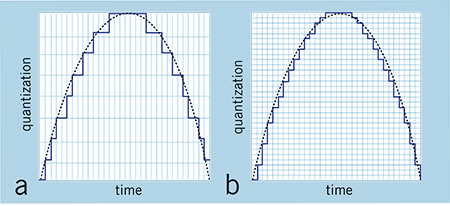
Low resolution audio is usually displayed using a jagged wave graph (with ladders). Source: soundguys
Low resolution audio is usually displayed using a jagged wave graph (with ladders). Source: soundguys
Well, the answer to the previous question is: not necessarily. The argument for a value in increasing bit depth is not based on something scientific, but on the distortion of what is actually happening and the exploitation of consumer ignorance about the media they are consuming. That is, it is a fact that stores selling 24-bit tracks reap far more benefits than a real improvement in promised sound quality.
Bit depth and sound quality.
The greatest example of companies selling 24-bit audio is the demonstration of a jagged sine wave, like stairs. When we look at a file that has a resolution of 16 bits, we see an irregular line, but when we look at the same song in 24 bits, it seems to be a practically smooth line, with better definition. It is a basic visual illustration, but depending on the person’s knowledge of the subject, he can be easily fooled.
Why use 24-bit or more audio files?
The utility of using a high-level bit depth applies to studios, because with each filter and conversion that is applied, the background noise increases. This increase in noise occurs due to the insertion of a new wave, as explained above. In other words, when using a higher bit depth level, the sound engineer prevents the original audio from generating noise by manipulating it for mixing and mastering.
However, remember that this will be more useful for audio production and not for the listener, as explained above.
conclusion
What will make the difference will be the balance between the sounds made in the mastering and not the bit depth itself, since the 16 bits of the CD are already more than enough for music listeners.
Sound is a continuous signal. To be stored with computer systems
it must be sampled, thus obtaining a digital signal.
The parameters that characterize the sampling are basically three:
The sample rate
Bit depth
The number of channels
these parameters influence both the space occupied and the quality of the audio file
digital obtained.
Sampling rate
The sampling frequency is the measurement expressed in Hertz (Hz) of the number
of times per second in which an analog signal is measured and stored
in digital form.
The higher the sampling rate, the more the sequence of the samples
digital will be close to that of the original analog waveform.
Low sampling rates limit the frequency range that is
can record, which in turn can generate a recording that
poorly reproduces the original sound.
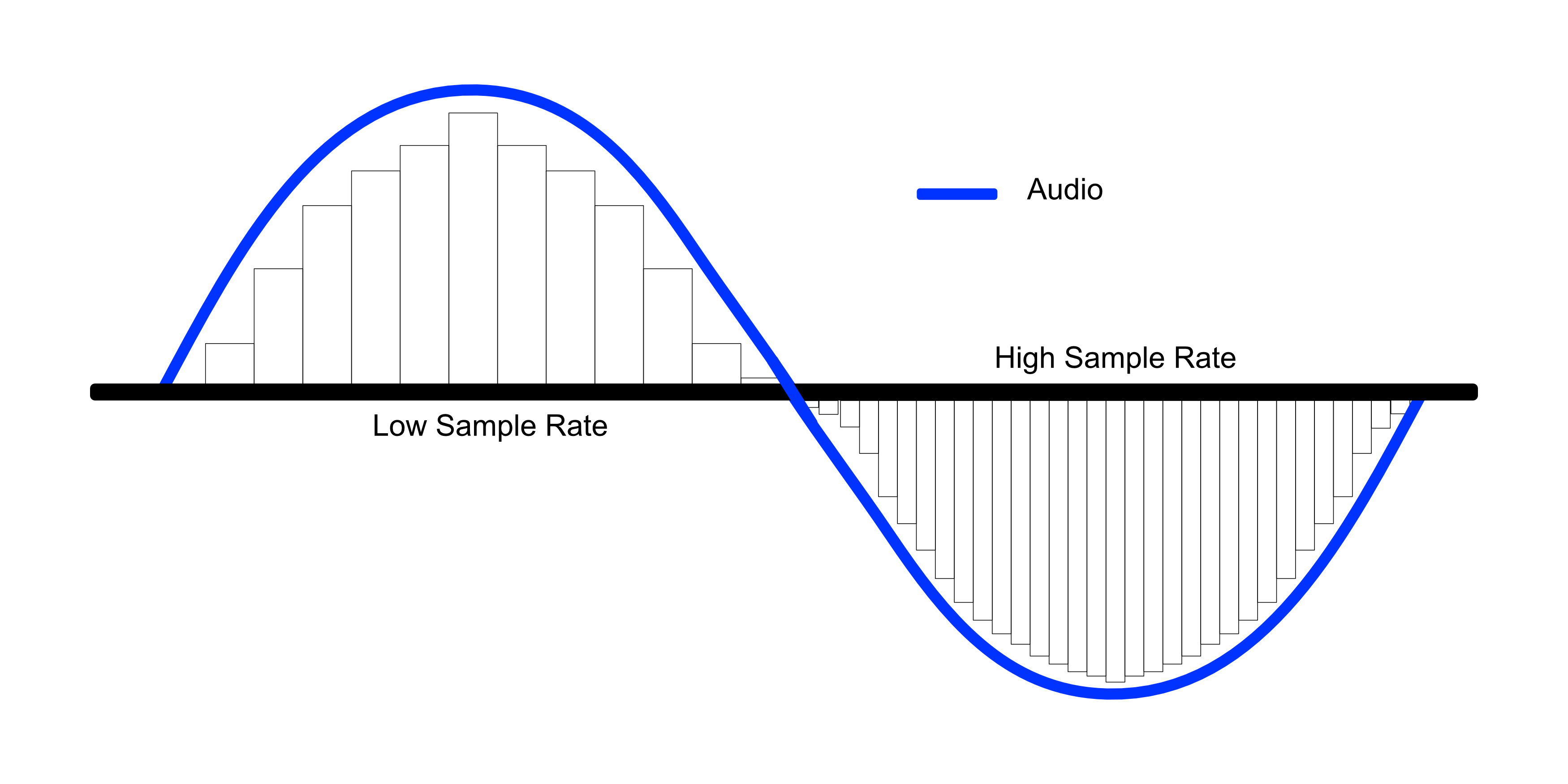
Two sampling frequencies:
A. Low sampling rate,
which distorts the wave of the original sound
B. High sampling rate,
which perfectly reproduces the wave of
original sound
To reproduce a certain frequency, the sampling frequency
it must be at least double it (Nyquist theorem).
For example, audio CDs have a sampling rate of 44.100 Hz,
so they can reproduce frequencies up to 22.050 Hz, which are hardly found
beyond the limit of human perception of 20,000 Hz.
The following table shows the most common sampling rates for
digital audio.
Bit depth
The bit depth represents the number of bits used to store a
single digital sample.
When a sound wave is sampled, each sample is assigned
the amplitude value closest to the original wave amplitude. A depth
in high bits it provides as many amplitude values as possible, which results in a
greater dynamic range (the difference in decibels between the maximum volume that the component can sustain without
distort the waves and the background noise it produces), lower and higher background noise
fidelity.
For example if you use 8 bits you have 256 possible values (28
) that, being
relatively few, offer less sound quality than a
tape; if instead 16 bits per sample are used, 65536 values are obtained
possible (216).
The most common examples are the audio CD, recorded in 16 bit, and the DVD, which
supports up to 24 bit depth.
Compression formats
Hand in hand with the advent of digitalization, multimedia applications have
they are increasingly widespread until they become commonplace. One of
multimedia features is certainly the use of digital audio
vowel and sound. The biggest obstacle associated with digitizing audio is
the large size of the files that are produced, which puts them at
sector operators (especially those linked to the internet) the problem of
reduce the space occupied by the data to obtain the double advantage of:
save in terms of memory occupation;
save in terms of transfer time on the network.
For this reason, speaking of digitizing the audio, it is necessary to speak
also of data compression techniques. The compression techniques of the
data, of whatever nature they are, are divided into:
lossless: compress data through a lossless process
of information that takes advantage of redundancies in data encoding
lossy: compress data through a lossy process
of information that takes advantage of redundancies in the use of data.
Lossless formats
Lossless compression formats are more suitable for archiving rather than
to reproduction, since most of them require complete
decompression before they can be played.
One of the most common lossless compression formats is FLAC (Free Lossless Audio Codec).
Lossy formats
Lossy compression formats use compression algorithms capable of
drastically reduce the amount of data required to store a sound,
guaranteeing however an acceptable and faithful reproduction of the original file uncompressed.
Very often we see people talking about topics that are important, like bitrate for example. Most of the time without understanding exactly what that means. Sometimes they even do trial and error and for various reasons it may be that the result they obtain is misleading, since they are not considering that modifying the bitrate without looking at the sample rate and the bit depth, is to act blindly and therefore the Results will always be misleading and we should not draw definitive conclusions from them.
We have detected that many people instead of giving a reading that allows them to understand what bitrate, sample rate or bit depth are, prefer to manipulate them without understanding them and, based on the result of one or two songs, they often reach conclusions. wrong about what is the right combination.
Bitrate
It is bitrate It is the amount of information that passes per second, that is, the amount of detail that an audio file can contain in a video. The bigger the bitrate means what will be passing more information per second; therefore the file will be bigger but it will contain more details, which will give it a higher quality. We will put an example to understand it very easily. Images that we have a great draftsman or painter and that we ask him to make a portrait of a person but we tell him that I can only use 5 colors and he cannot mix them.
As a result we will obtain practically a caricature and not a portrait itself. In other words, it will have less quality if we understand quality to be a faithful copy of the original.+
On the other hand, if that same painter asks you to make a portrait, but we stop using the entire color palette, you will be able to make a very realistic portrait, of very high quality, very faithful to the original.
Why did this happen? Because it contains much more information. There are many more shades. That explains exactly how bitrate affects the quality of a video or audio file.
Sample rate
When we record a video, for example, it is as if we were taking a series of photographs and then quickly saw them one after the other and that would give us the illusion of movement. In exactly the same way that cartoons worked in ancient times. Obviously if we only use three drawings per second the quality of the cartoon will be very low because you will see a series of jumps and not an action continues. If instead we use 24 drawings per second we will see a very high quality cartoon where we will seem to see an action continue without any Jump.
The sample rate is the number of samples per second that are taken to form a video or an audio file. Audio on a professional CD uses 44100 samples per second. If we lower that quantity we will notice a loss of quality and if we increase it to more than 44100 samples we will be able to obtain a very high quality HD.
Bit depth
The bit depth determines how many “steps” the curve or wave will contain that will contain our audio or video file. Obviously, the more steps the wave pattern has, it will be more faithful and, on the contrary, if it contains few steps, the wave pattern will be very rough.
So here we are understanding the importance of bit depth that for example in music affects even the dynamics of music. That is, how much can the volume of an instrument rise and fall in different passages. At different bit depth rates we will obtain different levels of decibels