Digital Audio Bit Depth: Understanding the Basics


Free Download Mp4Gain
picture

Digital Audio Bit Depth: Understanding the Basics

Audio Bit Depth
Audio Bit Depth
Audio Bit Depth
Audio Bit Depth

What is Digital Audio Bit Depth?

Digital audio bit depth refers to the number of bits used to represent each sample in a digital audio signal. Bit depth is a crucial aspect of digital audio because it affects the accuracy and dynamic range of the signal.

In digital audio, sound is captured and processed as a series of discrete samples, with each sample representing the amplitude of the sound wave at a specific point in time. The bit depth determines the number of possible amplitude values that can be represented in each sample.

How Does Bit Depth Affect Audio Quality?

The higher the bit depth, the more accurately the digital audio signal can represent the original analog waveform. A higher bit depth allows for a greater dynamic range, which means that the quietest sounds can be represented with more accuracy, and the loudest sounds can be represented without distortion.

For example, a 16-bit audio signal can represent 65,536 possible amplitude values, while a 24-bit audio signal can represent 16,777,216 possible amplitude values. This means that a 24-bit audio signal can capture a wider range of dynamic levels and is capable of greater accuracy and detail than a 16-bit audio signal.

What is the Relationship Between Bit Depth and Signal-to-Noise Ratio?

As the bit depth increases, the signal-to-noise ratio (SNR) also increases. SNR is the ratio between the desired signal (the audio) and the background noise.

A higher bit depth means that there are more possible amplitude values for each sample, which reduces the amount of quantization noise in the signal. Quantization noise is a type of distortion that occurs when the analog signal is converted to digital.

How is Bit Depth Measured?

Bit depth is measured in bits per sample. Common bit depths in digital audio include 16-bit, 24-bit, and 32-bit.

What is Dithering?

Dithering is a process used to reduce the distortion caused by quantization error in digital audio. When an analog signal is digitized, the conversion process rounds the amplitude of each sample to the nearest possible value.

Dithering adds a small amount of random noise to the signal before it is quantized, which allows for a smoother transition between amplitude values and reduces the audible effects of quantization error.

What is the Difference Between Bit Depth and Sample Rate?

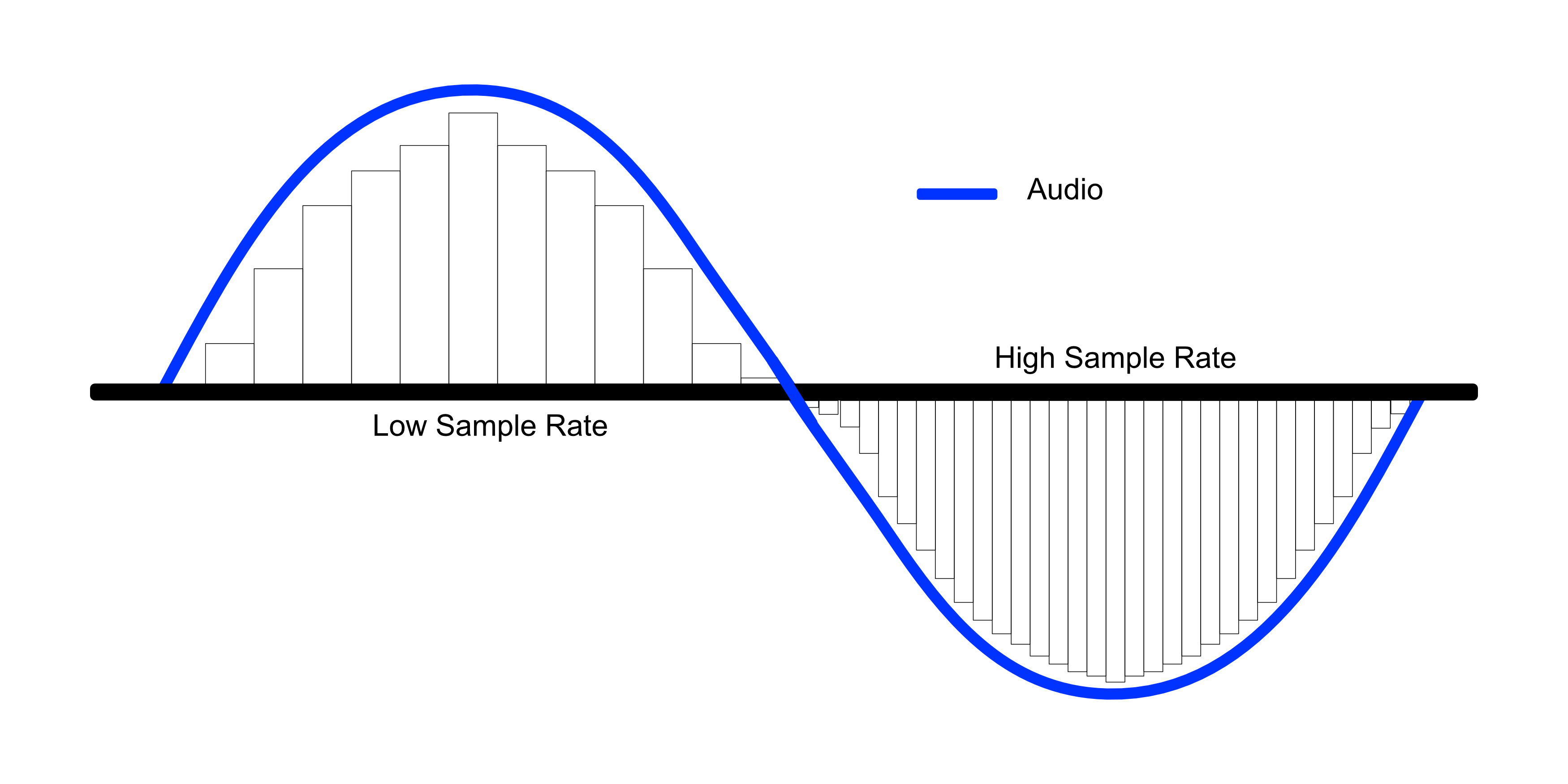
While bit depth determines the number of possible amplitude values in each sample, sample rate determines the number of samples taken per second. A higher sample rate allows for greater accuracy in capturing the original analog waveform, but it does not affect the dynamic range or accuracy of each individual sample.

What is the Ideal Bit Depth for Recording and Mixing?

The ideal bit depth for recording and mixing depends on the intended use of the final product. For most applications, a bit depth of 24 bits is considered to be sufficient, as it provides a wide dynamic range and high accuracy.

However, for applications that require extreme accuracy and detail, such as classical music recording, a higher bit depth may be necessary.

What is the Relationship Between Bit Depth and File Size?

As the bit depth increases, the file size of the digital audio also increases. This is because a higher bit depth requires more storage space to represent the additional amplitude values.

What is the Relationship Between Bit Depth and Processing Power?

Higher bit depths require more processing power to manipulate and process. This is because the additional amplitude values must be calculated and stored in memory.

What Happens When a High Bit-Depth Audio File is Converted to a Lower Bit-Depth Format?

When a high bit-depth audio file is converted to a lower bit-depth format, the result is a loss of some of the original audio data. This is because the lower bit-depth format has fewer bits to represent the audio data, which means that some of the information is lost in the conversion process.

For example, if a 24-bit audio file is converted to a 16-bit format, the conversion process will discard the least significant 8 bits of each sample. This can result in a loss of some of the subtle nuances and details in the audio, which can be particularly noticeable in quiet passages or when the audio is heavily processed.

It’s worth noting that some audio formats, such as MP3 and AAC, use lossy compression to reduce the file size. This means that even if the original file was at a high bit-depth, converting it to a lower bit-depth format such as MP3 will result in a further loss of data due to the compression algorithm.

What is Dithering and How Does it Help with Bit Depth Reduction?

Dithering is a technique used to reduce the impact of bit-depth reduction when converting high-resolution audio to a lower resolution format. It works by adding a small amount of random noise to the audio signal before it is truncated to the lower bit depth.

This noise effectively masks the truncation distortion, allowing the audio to retain some of its original detail and clarity. Dithering is particularly useful when converting from a higher bit-depth format to a lower bit-depth format, as it can help to mitigate the loss of information that would otherwise occur.

How Does Bit Depth Affect Audio Quality?

The bit depth of an audio file can have a significant impact on its perceived quality. Generally speaking, higher bit-depth files can capture more detail and nuance in the audio, resulting in a more accurate and realistic reproduction of the original recording.

For example, a 16-bit audio file has a maximum dynamic range of 96 dB, while a 24-bit file has a maximum dynamic range of 144 dB. This means that a 24-bit file can capture much quieter sounds and much louder sounds than a 16-bit file, resulting in a more accurate representation of the original recording.

That being said, the impact of bit depth on perceived audio quality can vary depending on a number of factors, including the quality of the recording equipment, the mastering process, and the listening environment.

What is the Difference Between Bit Depth and Sample Rate?

While bit depth and sample rate are both important aspects of digital audio, they refer to different things. Bit depth refers to the number of bits used to represent each sample in an audio file, while sample rate refers to the number of samples per second that are taken to create the audio file.

In other words, bit depth determines the level of detail captured in each sample, while sample rate determines the temporal resolution of the audio. Both bit depth and sample rate can have an impact on the perceived quality of an audio file, and both are important considerations when working with digital audio.

What is the Best Bit Depth for Audio Production?

The best bit depth for audio production depends on a number of factors, including the specific needs of the project and the available hardware and software. In general, however, a bit depth of 24 bits is considered to be a good choice for most recording and production purposes.

This is because a 24-bit depth provides a high level of detail and dynamic range, while also being widely supported by modern recording equipment and software. That being said, there may be situations where a lower bit depth may be sufficient. For example, if the final audio product will only be distributed online or through streaming services, a 16-bit depth may be acceptable as it will still provide decent quality while reducing file size and download times. Additionally, if the recording environment is not optimal and contains a high level of background noise, a lower bit depth may actually be preferable as it can help mask the noise.

How does bit depth affect audio quality?

Bit depth plays a critical role in determining the quality of digital audio recordings. The higher the bit depth, the greater the dynamic range and level of detail that can be captured in a recording. This results in a more accurate and faithful reproduction of the original sound source. In contrast, a lower bit depth may result in a loss of detail and accuracy, leading to a less faithful reproduction of the original sound.

Can bit depth be converted after recording?

While it is possible to convert the bit depth of a digital audio file after recording, it is generally not recommended. This is because bit depth conversion can result in a loss of information and a decrease in overall audio quality. If possible, it is best to record at the desired bit depth from the start to ensure the highest possible quality.

What are some common bit depths used in digital audio?

The most common bit depths used in digital audio are 16-bit, 24-bit, and 32-bit. 16-bit is the standard for CDs and is widely used in digital audio recording for distribution on streaming platforms. 24-bit is increasingly becoming the standard for professional recording due to its high level of detail and dynamic range. 32-bit is relatively new and provides an even greater level of detail and dynamic range, but is not yet widely supported by all recording equipment and software.

Does bit depth affect the final file size of an audio recording?

Yes, bit depth does affect the final file size of an audio recording. A higher bit depth requires more data to represent each sample, resulting in larger file sizes. For example, a 24-bit audio file will be larger than a 16-bit audio file of the same duration and sample rate.

What is dithering in relation to bit depth?

Dithering is a technique used to reduce the audible effects of quantization distortion when converting from a higher bit depth to a lower bit depth. When reducing the bit depth, some of the information from the original recording must be discarded. This can result in audible distortion and noise. Dithering adds a small amount of random noise to the audio signal to mask this distortion and make it less audible.

Can different bit depths be mixed in the same audio project?

Yes, different bit depths can be mixed in the same audio project. However, it is important to note that mixing different bit depths can result in a loss of quality for the higher bit depth audio. When mixing different bit depths, it is best to convert all audio to the same bit depth before mixing to ensure the highest possible quality.

What is the relationship between bit depth and sample rate?

Bit depth and sample rate are both important factors in determining the quality of digital audio recordings. Bit depth refers to the number of bits used to represent each sample, while sample rate refers to the number of samples taken per second. Higher bit depths and sample rates result in higher quality recordings with greater detail and accuracy.

Can bit depth affect the sound of analog audio recordings?

No, bit depth does not affect the sound of analog audio recordings. Bit depth only applies to digital audio recordings.


Free Download Mp4Gain
picture


Mp4Gain Main Window
picture


Mp4Gain Features
picture


Free Download Mp4Gain
picture

Mp3, what is bit depth and how does it affect the quality of an mp3?

Mp3, what is bit depth and how does it affect the quality of an mp3?

Bit-Depth
Bit-Depth

Bitrate is not the same as bit depth

Bit-Depth
Bit-Depth

We have explained in previous articles that sound is a wave that propagates through the air. And the act of digitizing it is based, on the one hand, on the number of samples that are taken, in order to be able to draw it with enough gfidelity, but that, if we have an X,Y graph, represents only one of the axes.
The other axis is represented by the depth, that is, we already have how many samples are taken per second, but we need to have on the other side, how many possibilities we have to “capture” the data that each sample captures.

If we have a bit depth of 16 then we will have a little more than 250 different values ​​to draw the wave.

If instead we use a bit depth of 24 bits, we will have millions of different values. Which allows us in treoria to have much greater detail or fidelity.

All this is what the theory tells us. It’s like with colors, with a bit depth of 16 bits we will have 250+ options to describe, let’s say a green color, instead with 24b we will have millions of possible variants.

Obviously the first thing we will have to ask ourselves is if the device is capable of reproducing millions of different colors or variants in sound.

We must also ask ourselves if the human ear will be able to pick up these differences.

Even, and we won’t dwell on it, “noise” plays an important role here.

We would say that in general terms for the sound a bit depth equal to or greater than 16 is already enough to have an important quality.

What do the bits, bit rate and sample rate of an audio file mean?

What do the bits, bit rate and sample rate of an audio file mean?

bits, bit rate and sample rate

For example, the common mp3 format audio source

bits, bit rate and sample rate

In order to store a continuous physical signal (well, tell me about Planck’s constant…) in a computer, it must be converted to a digital signal. In acoustics, a digital signal is a digital representation of the amplitude of the sound wave at any moment.

Sound waves are longitudinal waves, which are difficult to draw. The following figure is replaced by transverse waves (the concept of longitudinal waves is the phenomenon that the density of air or other media changes regularly due to energy. The peaks represent high density, the troughs represent low density, and the horizontal line is the average density, i.e. silent state)


Using high school physics, waves contain two dimensions, one is intensity and the other is time. “Number of digits” indicates how many levels sound waves are divided into from the strongest to the weakest; “Sampling Rate” determines the precision of the time axis or the sampling density, that is, the length of time represented by each red dot, and the code rate is one second The number of dots on the clock, multiplied by the space that each point occupies.
So the so-called 24 bits consist of dividing the intensity of the sound wave by 2 at power level 24, occupying 3 bytes of space. Obviously, the finer the grade, the more details are restored.

The sample rate is generally 44100 Hz for CD (Hertz = times/second), 48000 Hz for DVD, and 96000 Hz as standard. As with the number of digits, the more points you get in a single second, the more details you retrieve. Why does CD take this value? Because the hearing range of the human ear is generally believed to be between 20 and 20,000 Hz. A peak and a trough need to be represented, and at least two sampling points are required. Therefore, the CD can represent the sound of 22050 Hz at most, but this sound does not have any detail, because if there are only two peak and valley points, the average waveform is completely lost. Therefore, there will be a higher sampling rate.

If it’s in a lossless uncompressed format, the bit rate is strictly equal to the number of bits * sample rate * number of channels. And typically, the MP3 bitrate you can see just represents how much capacity the format needs to describe this one second of audio.

MP3 is lossy compression. In the compression process, some information is lost, but the lost information cannot be represented by the number of bits and the sampling rate. Generally, the higher the code rate, the less information is lost. Mathematically, bitrate and sound quality are proportional. As for whether you can hear it or not, it depends on many factors. The MP3 algorithm is not complicated, of course, to understand it you have to learn what the Fourier transform is.

There is also lossless compression (representing APE, FLAC, etc.), which also has a bitrate, and this bitrate has nothing to do with sound quality. It also describes how much capacity the file uses to describe one second of audio content, but the same audio content can be compressed to different sizes (compression ratios), similar to zip compression ratios. No matter how big you compress it, in the end it can be restored to the same file. So if you see someone looking for a lossless bitrate, you can basically conclude that the product is a bad pen.

Does MP3 quality depend on how much KBPS is the bitrate?

Does MP3 quality depend on how much KBPS is the bitrate?

MP3 quality
MP3 quality

KBPS = fast bitrate, the read speed must be to play this file smoothly,
because mp3, a common streaming format on the internet, can be downloaded while listening.

MP3 quality
MP3 quality

If the download speed is slower than the playback speed, it will stop. (LAG), and the bit rate
refers to the minimum required download speed, but since the lower the required download speed,
the higher the compression required, and MP3 is a destructive compression format, so the bitrate
also
will affect the quality of the file. Bitrate is not the biggest influencer on overall sound quality, but the main influencing factors are sample rate and bit depth. The
sample rate refers to the number of times your computer records the sound per unit of time. Usually,
the sample rate used for a CD is 44100MHz, so
you can get good quality by setting the file to this, but remember that the bitrate should be set to 96KBPS or higher.
Reduce distortion.

Normalize the volume and loudness of an mp3 or a video easily

Normalize the volume and loudness of an mp3 or a video easily

Normalize the volume and loudness of an mp3 or a video easily

It’s absolutely easy if we use Mp4Gain, it only takes one click of a button and all audio and video files are volume normalized.

Normalize the volume and loudness of an mp3 or a video easily

Today we find many problems with this volume issue because they are compressed by different compressors and above all using different bitrate and sample rate settings.

People don’t realize how important this whole issue is, but Mp4Gain solves it automatically. Not only through bitrate and samplerate, but also by making a deep analysis of each frame and optimizing each frequency band, so that the result is magnificent.

The largest number of inquiries we receive by email refer to that difference in volume levels in the mp3s and also between the mp4s.

And what we have been able to corroborate is that, to a large extent, many are due to having been encoded with wrong settings, for example a very low bitrate.

Because the bitrate implies the amount of information or detail that the audio or video can pass per second and this translates into the detail that a video has, for example. Which immediately affects the quality of the aforementioned video.

Mp4Gain is the solution to normalization problems.

Non-professional and easy to understand popular science on sample rate, bit depth, bit rate and lossless – Part 2

Non-professional and easy to understand popular science on sample rate, bit depth, bit rate and lossless – Part 2

sample rate, bit depth, bit rate and lossless

Bit rate kbps (kp/s)

sample rate, bit depth, bit rate and lossless

In lossless uncompressed formats (such as .wav), bit rate = sample rate x bit depth x number of channels. In lossy compression (for example, .mp3), the bitrate does not equal this formula, because the original information has been destroyed. The bitrate describes the amount of information about the audio in one second, so the total size of the sound file is the bitrate x the total duration. The bit rate is also called the bit rate and the unit is the bit rate (bps, bit per second). Usually 128kbps and 320kbps are bit rates when listening to songs, of which 320kbps is the highest bit rate of mp3 format. But compared to wav file with 44.1 kHz sample rate and 16 bit bit depth (calculate two channel bit rate is 44.1 x 16 x 2 = 1411.2 kbps), it is far from the same. After compression, the bit rate has changed. Bitrate in lossless compression has nothing to do with sound quality, and bitrate in lossy compression is positively correlated with sound quality.


lossless compression
Lossless compression refers to compression (conversion) between formats without loss. Regardless of the format that is compressed (converted), the sound quality is the same and can be restored to the same original file. Lossless generally refers to lossless compression, and there is no such thing as lossless code rate. The compression of various formats corresponds to an algorithm (or encoding), and a decoder is required to decode during playback, and different decoders can also affect the integrity of the decompressed file. Common lossless formats are:

wav – A Microsoft sound file format, which is the closest uncompressed format to real sound (followed by midi), supporting multiple sample rates and multiple quantization precisions. All lossless formats are essentially wav compression, which is converted back to wav when played.

flac: Free Lossless Audio Coded, which is an international general format, characterized by high compression ratio and mature encoding algorithm. When the flac file is damaged, it can still be played normally. Furthermore, this format is also the first lossless format widely supported by hardware.

monkey: The file format converted from CD ripping using Monkey’s audio software, but the advantage is not prominent and decoding is slow.

wma-lossless: It is also produced by Microsoft. It is characterized by a high compression ratio, but it has not become mainstream.

aiff: Produced by Apple, it is the standard audio format on Apple computers.

DSD: I don’t know much about Sony Dafa and I can’t appreciate the spicy culture.


lossy compression
Lossy compression refers to the loss of sound information during the compression process, and the lost sound cannot be represented by the sample rate and number of bits. But the feature is that the compressed file becomes very small and is often used in streaming media. Common lossy formats are:

mp3: A complex algorithm developed to simulate human hearing, known as a “psychoacoustic model”. It improves the compression ratio, lowers the bit rate, and reduces the footprint by extracting some frequency bands in the audio, but at the same time, the details of the sound, such as the emotion of the human voice, the reverberation in the later stage, etc., have been deformed. It is also difficult to distinguish wav and mp3 quickly if you listen blindly and need to use equipment. MP3 is currently the most popular audio compression format, which can best preserve the sound quality before compression.

wma: Microsoft’s masterpiece, characterized by lower bitrate (such as 64kbps), wma can get smaller volume under the same sound quality conditions as mp3. And at ultra-low bit rates (like 16 kbps), wma sound quality is much better than mp3.

aac: The storage format for sound files on Apple computers.

ogg – Completely free, open, and patent-free, but less popular.

Non-professional and easy to understand popular science on sample rate, bit depth, bit rate and lossless

Non-professional and easy to understand popular science on sample rate, bit depth, bit rate and lossless

sample rate, bit depth, bit rate and lossless

HZ sampling rate

sample rate, bit depth, bit rate and lossless

The sound from the outside world is an analog signal, which is converted to a digital signal represented by 0 and 1 in the digital device and then stored. Digital signals are discrete, so sampling rate refers to the number of samples per second. The higher the sample rate, the more realistic the restored sound will be. Since the hearing range of the human ear is 20 Hz to 20 kHz, according to Shannon’s sampling theorem (also called Nyquist’s sampling theorem), in theory, audio formats with a sampling frequency greater than 40 kHz they can be called lossless formats. However, the sound obtained at the 40 kHz sampling rate does not have any detail and all frequencies are only sampled with a peak and a valley. The sample rate of general professional equipment is 44.1 kHz. 44.1 kHz is the lowest sample rate in professional audio, also known as “CD-quality sound” (22.05 kHz sample rate is broadcast-quality sound). There are 96kHz, 192kHz, etc., more detailed of course, hearing the details at these higher sample rates is ear and equipment dependent.


bit depth
To reproduce sound as accurately as possible, a high sample rate is not enough. Describes a sample point, the horizontal axis (time) represents the sample rate and the vertical axis (amplitude) represents the bit depth. 16bit means that 16 bits (2 bytes) are used to represent the level of the sample point (in general, it is proportional to volume) The degree of precision that can be achieved when encoding, i.e. the vertical axis is divided into 16 parts Describe the level, such as -3dB and -3.1415926dB accuracy difference. Similarly, there are 20 bits and 24 bits. 16-bit is considered to be the lowest bit depth standard in the field of professional audio and, like the 44.1 kHz sample rate, is the common standard for consumer and professional audio products. Bit depth is also directly related to the size of the signal-to-noise ratio, which directly affects the overall dynamic range of the recorded signal.

Bit rate and audio quality

Bit rate and audio quality

Bit rate and audio quality

Audio and video quality

Bit rate and audio quality

We know that there are two types of compression, called lossy, which discards information to make the file smaller, and lossless, which simply uses zip-type compression to reduce the size.

The quality of the audio depends on the number of bits that can be transmitted per second.

Let’s understand this concept well, it’s simple.

If the audio file has a certain amount of information and we can transmit ALL of it, then we will obtain a very high quality and there will be no loss of information.

On the other hand, if we must discard more data because we can only transmit a small amount, quality will necessarily be lost.

For this reason, the amount of information collected by the sample rate and the number of bits that can be transmitted per second go hand in hand. It will be useless to have a very good samplerate if the bitrate is low and forces us to transmit only a small portion of the abundant data available.

Many times when encoding a file, of any format, information is lost either by using a poor encoder or by mutilating the wrong settings.

Mp4Gain is highly efficient at all of this and uses the best settings for you to get the best quality, both when encoding and converting.