Digital Audio Bit Depth: Understanding the Basics


Free Download Mp4Gain
picture

Digital Audio Bit Depth: Understanding the Basics

Audio Bit Depth
Audio Bit Depth
Audio Bit Depth
Audio Bit Depth

What is Digital Audio Bit Depth?

Digital audio bit depth refers to the number of bits used to represent each sample in a digital audio signal. Bit depth is a crucial aspect of digital audio because it affects the accuracy and dynamic range of the signal.

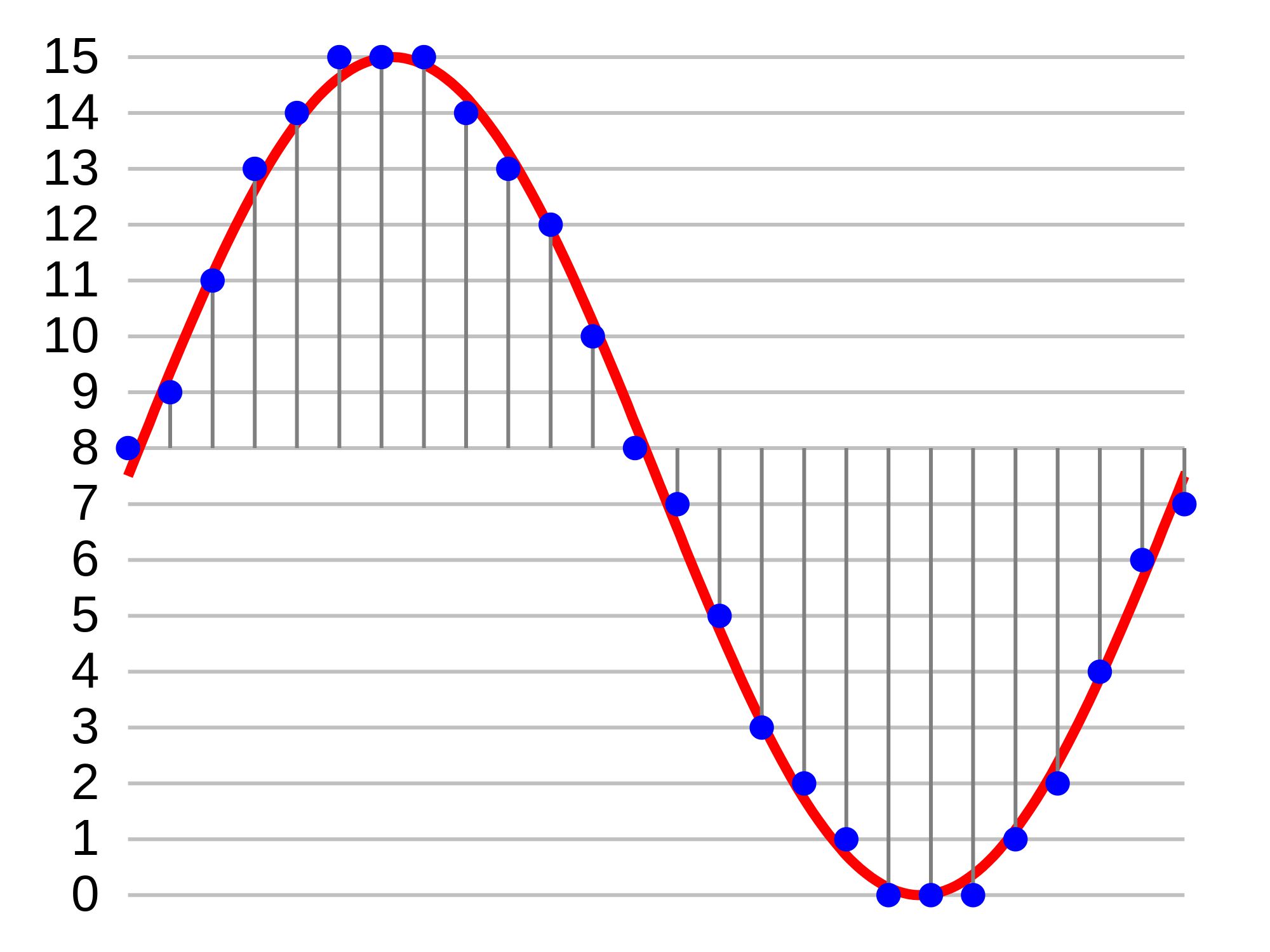
In digital audio, sound is captured and processed as a series of discrete samples, with each sample representing the amplitude of the sound wave at a specific point in time. The bit depth determines the number of possible amplitude values that can be represented in each sample.

How Does Bit Depth Affect Audio Quality?

The higher the bit depth, the more accurately the digital audio signal can represent the original analog waveform. A higher bit depth allows for a greater dynamic range, which means that the quietest sounds can be represented with more accuracy, and the loudest sounds can be represented without distortion.

For example, a 16-bit audio signal can represent 65,536 possible amplitude values, while a 24-bit audio signal can represent 16,777,216 possible amplitude values. This means that a 24-bit audio signal can capture a wider range of dynamic levels and is capable of greater accuracy and detail than a 16-bit audio signal.

What is the Relationship Between Bit Depth and Signal-to-Noise Ratio?

As the bit depth increases, the signal-to-noise ratio (SNR) also increases. SNR is the ratio between the desired signal (the audio) and the background noise.

A higher bit depth means that there are more possible amplitude values for each sample, which reduces the amount of quantization noise in the signal. Quantization noise is a type of distortion that occurs when the analog signal is converted to digital.

How is Bit Depth Measured?

Bit depth is measured in bits per sample. Common bit depths in digital audio include 16-bit, 24-bit, and 32-bit.

What is Dithering?

Dithering is a process used to reduce the distortion caused by quantization error in digital audio. When an analog signal is digitized, the conversion process rounds the amplitude of each sample to the nearest possible value.

Dithering adds a small amount of random noise to the signal before it is quantized, which allows for a smoother transition between amplitude values and reduces the audible effects of quantization error.

What is the Difference Between Bit Depth and Sample Rate?

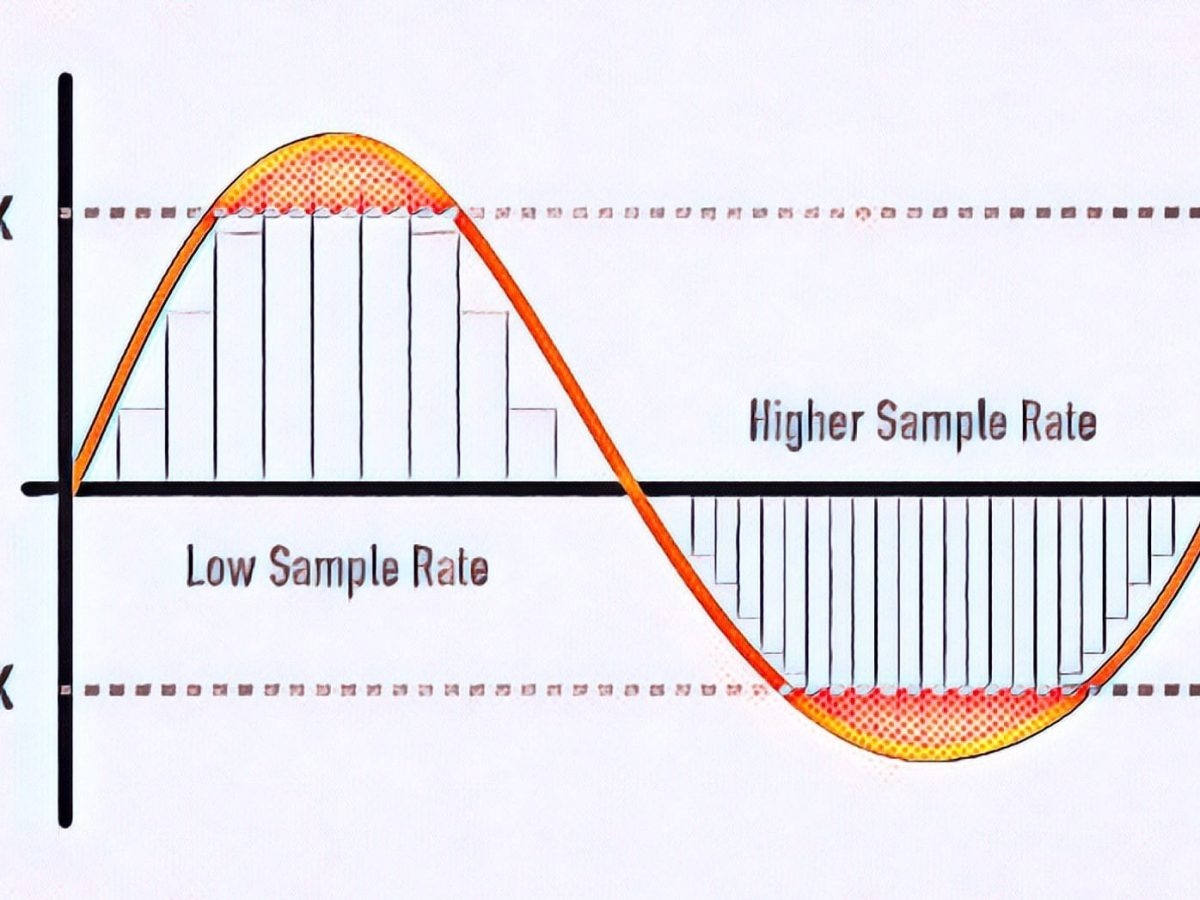
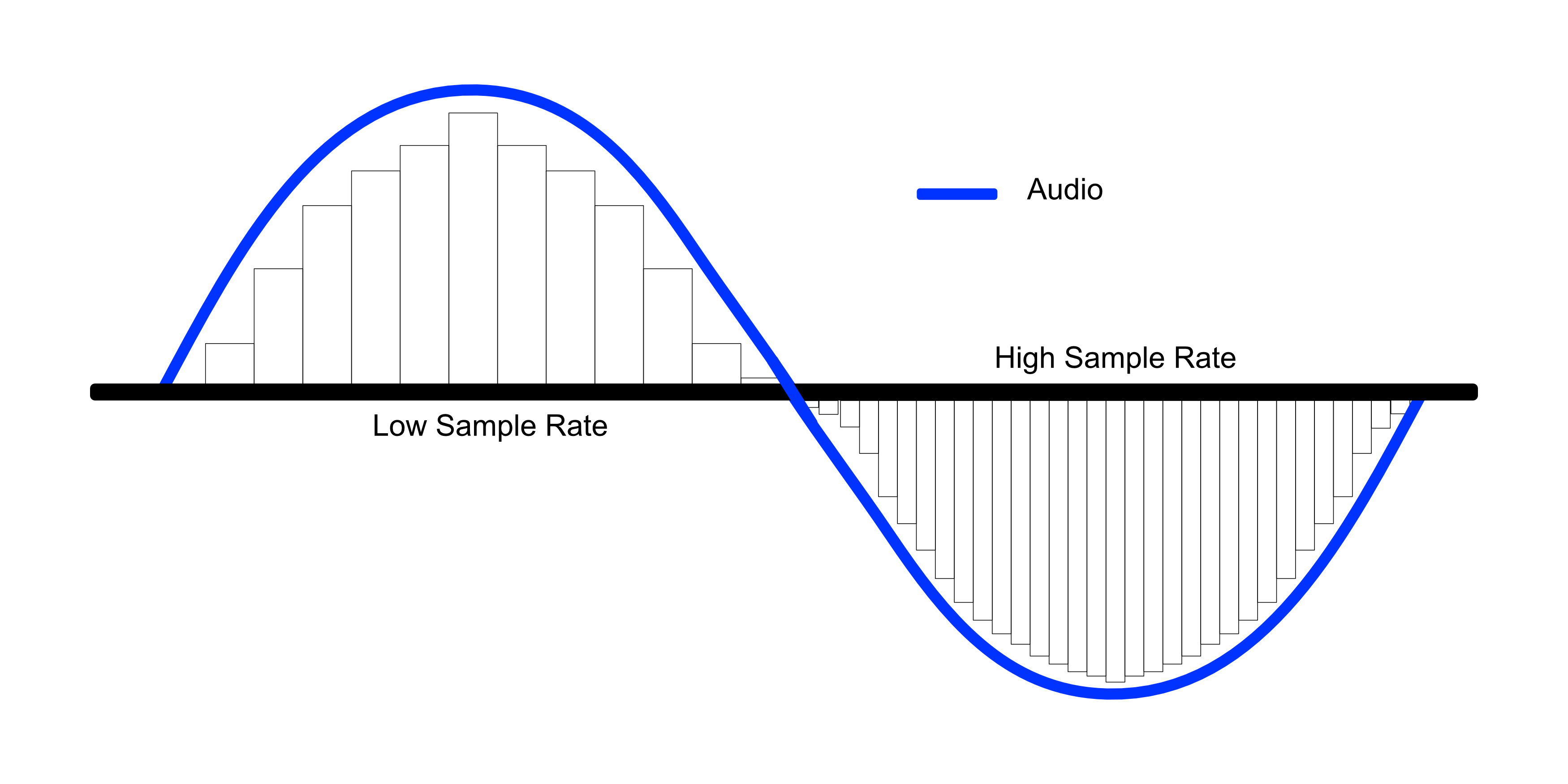
While bit depth determines the number of possible amplitude values in each sample, sample rate determines the number of samples taken per second. A higher sample rate allows for greater accuracy in capturing the original analog waveform, but it does not affect the dynamic range or accuracy of each individual sample.

What is the Ideal Bit Depth for Recording and Mixing?

The ideal bit depth for recording and mixing depends on the intended use of the final product. For most applications, a bit depth of 24 bits is considered to be sufficient, as it provides a wide dynamic range and high accuracy.

However, for applications that require extreme accuracy and detail, such as classical music recording, a higher bit depth may be necessary.

What is the Relationship Between Bit Depth and File Size?

As the bit depth increases, the file size of the digital audio also increases. This is because a higher bit depth requires more storage space to represent the additional amplitude values.

What is the Relationship Between Bit Depth and Processing Power?

Higher bit depths require more processing power to manipulate and process. This is because the additional amplitude values must be calculated and stored in memory.

What Happens When a High Bit-Depth Audio File is Converted to a Lower Bit-Depth Format?

When a high bit-depth audio file is converted to a lower bit-depth format, the result is a loss of some of the original audio data. This is because the lower bit-depth format has fewer bits to represent the audio data, which means that some of the information is lost in the conversion process.

For example, if a 24-bit audio file is converted to a 16-bit format, the conversion process will discard the least significant 8 bits of each sample. This can result in a loss of some of the subtle nuances and details in the audio, which can be particularly noticeable in quiet passages or when the audio is heavily processed.

It’s worth noting that some audio formats, such as MP3 and AAC, use lossy compression to reduce the file size. This means that even if the original file was at a high bit-depth, converting it to a lower bit-depth format such as MP3 will result in a further loss of data due to the compression algorithm.

What is Dithering and How Does it Help with Bit Depth Reduction?

Dithering is a technique used to reduce the impact of bit-depth reduction when converting high-resolution audio to a lower resolution format. It works by adding a small amount of random noise to the audio signal before it is truncated to the lower bit depth.

This noise effectively masks the truncation distortion, allowing the audio to retain some of its original detail and clarity. Dithering is particularly useful when converting from a higher bit-depth format to a lower bit-depth format, as it can help to mitigate the loss of information that would otherwise occur.

How Does Bit Depth Affect Audio Quality?

The bit depth of an audio file can have a significant impact on its perceived quality. Generally speaking, higher bit-depth files can capture more detail and nuance in the audio, resulting in a more accurate and realistic reproduction of the original recording.

For example, a 16-bit audio file has a maximum dynamic range of 96 dB, while a 24-bit file has a maximum dynamic range of 144 dB. This means that a 24-bit file can capture much quieter sounds and much louder sounds than a 16-bit file, resulting in a more accurate representation of the original recording.

That being said, the impact of bit depth on perceived audio quality can vary depending on a number of factors, including the quality of the recording equipment, the mastering process, and the listening environment.

What is the Difference Between Bit Depth and Sample Rate?

While bit depth and sample rate are both important aspects of digital audio, they refer to different things. Bit depth refers to the number of bits used to represent each sample in an audio file, while sample rate refers to the number of samples per second that are taken to create the audio file.

In other words, bit depth determines the level of detail captured in each sample, while sample rate determines the temporal resolution of the audio. Both bit depth and sample rate can have an impact on the perceived quality of an audio file, and both are important considerations when working with digital audio.

What is the Best Bit Depth for Audio Production?

The best bit depth for audio production depends on a number of factors, including the specific needs of the project and the available hardware and software. In general, however, a bit depth of 24 bits is considered to be a good choice for most recording and production purposes.

This is because a 24-bit depth provides a high level of detail and dynamic range, while also being widely supported by modern recording equipment and software. That being said, there may be situations where a lower bit depth may be sufficient. For example, if the final audio product will only be distributed online or through streaming services, a 16-bit depth may be acceptable as it will still provide decent quality while reducing file size and download times. Additionally, if the recording environment is not optimal and contains a high level of background noise, a lower bit depth may actually be preferable as it can help mask the noise.

How does bit depth affect audio quality?

Bit depth plays a critical role in determining the quality of digital audio recordings. The higher the bit depth, the greater the dynamic range and level of detail that can be captured in a recording. This results in a more accurate and faithful reproduction of the original sound source. In contrast, a lower bit depth may result in a loss of detail and accuracy, leading to a less faithful reproduction of the original sound.

Can bit depth be converted after recording?

While it is possible to convert the bit depth of a digital audio file after recording, it is generally not recommended. This is because bit depth conversion can result in a loss of information and a decrease in overall audio quality. If possible, it is best to record at the desired bit depth from the start to ensure the highest possible quality.

What are some common bit depths used in digital audio?

The most common bit depths used in digital audio are 16-bit, 24-bit, and 32-bit. 16-bit is the standard for CDs and is widely used in digital audio recording for distribution on streaming platforms. 24-bit is increasingly becoming the standard for professional recording due to its high level of detail and dynamic range. 32-bit is relatively new and provides an even greater level of detail and dynamic range, but is not yet widely supported by all recording equipment and software.

Does bit depth affect the final file size of an audio recording?

Yes, bit depth does affect the final file size of an audio recording. A higher bit depth requires more data to represent each sample, resulting in larger file sizes. For example, a 24-bit audio file will be larger than a 16-bit audio file of the same duration and sample rate.

What is dithering in relation to bit depth?

Dithering is a technique used to reduce the audible effects of quantization distortion when converting from a higher bit depth to a lower bit depth. When reducing the bit depth, some of the information from the original recording must be discarded. This can result in audible distortion and noise. Dithering adds a small amount of random noise to the audio signal to mask this distortion and make it less audible.

Can different bit depths be mixed in the same audio project?

Yes, different bit depths can be mixed in the same audio project. However, it is important to note that mixing different bit depths can result in a loss of quality for the higher bit depth audio. When mixing different bit depths, it is best to convert all audio to the same bit depth before mixing to ensure the highest possible quality.

What is the relationship between bit depth and sample rate?

Bit depth and sample rate are both important factors in determining the quality of digital audio recordings. Bit depth refers to the number of bits used to represent each sample, while sample rate refers to the number of samples taken per second. Higher bit depths and sample rates result in higher quality recordings with greater detail and accuracy.

Can bit depth affect the sound of analog audio recordings?

No, bit depth does not affect the sound of analog audio recordings. Bit depth only applies to digital audio recordings.


Free Download Mp4Gain
picture


Mp4Gain Main Window
picture


Mp4Gain Features
picture


Free Download Mp4Gain
picture

Definition of sampling bits, sampling rate and bit rate in audio (transfer) Part 3

Definition of sampling bits, sampling rate and bit rate in audio (transfer) Part 3

sampling bits
sampling bits

1. Why do many professional standards reach 24bit/192KHz?

sampling bits
sampling bits

It is now common to use the 48kHz or 96kHz recording rate in engineering, and only convert to the 44.1kHz CD format during the final mastering process, which reduces distortion caused by multiple sample rate conversions.

In the field of computing, the AC97 specification, which is an audio hardware codec standard, only specifies 48 kHz. This causes nearly all input and output signals to be resampled (the professional term is called sample rate conversion, or SRC). SRC generally causes loss of sound quality, and the simpler (ie poorer) SRC algorithms can cause significant deterioration of sound quality. But this is already a fait accompli.

2. Since 44K is enough, why use 192KHZ to record?

First of all, 20kHz is just the hearing threshold for most people, i.e. the human ear is very insensitive to sounds above 20kHz. Insensitivity to attention does not mean a total inability to perceive. The tones of most musical instruments (especially pianos and strings) are rich in higher harmonics, known in musical terms as higher harmonics. CD audio with a cutoff frequency of 22.05 kHz gives people who are used to listening to real instruments an unnatural feel, especially in the high frequencies, because the Nyquist cutoff frequency distorts the signal from harmonics. of higher frequencies.

Second, digital recordings often require post-processing. Audio processing can introduce more distortion into the signal, including signal distortion, spectral aliasing, and more. If the original signal is only sampled at 44.1 kHz during recording, it must be upsampled before post-processing to expand the sample rate. Since this expansion is “fake”, there is really no more useful original signal, and the quality of the upsampling algorithm will also affect the distortion of the original recording signal, so this approach is undesirable. Therefore, it is common practice to sample at a higher frequency.

In today’s fully professional digital recording studios, recording, mixing and mastering are no longer compliant with the CD standard, instead the HD audio standard is preferred. which:

Use 24Bit 48KHz, 24Bit 96KHz, 24Bit 192KHz three specifications to record, of course, 24Bit 48KHz is used by some small recording studios, because their processor resources are limited. And all the big recording studios use 24bit 96KHz and 24bit 192KHz for recording.

So what are the benefits of such a recording specification?

1. Comply with HD audio standard, which is also the main standard in the future. The finished product can be directly applied to HDCD, DVD-Audio, Blu-ray disc, digital music download business and digital player business to media.

2. Fully take care of the digital video and video business, and the multi-channel film and video will adopt the HD audio specification. Including the use of portable mobile digital video equipment.

3. Fully take care of the consumer audio playback business, such as: Intel HD-Audio audio standard, AC97 audio codec, MP3 / mp4 / phone / game console portable audio highest quality audio playback.

Currently, the highest quality standard in the professional recording industry is: 24 bits deeper than a specific point, 192000 Hz sampling rate, referred to as “24 bits/192 KHz”. Of course, this standard will continue to improve in the future, and it is also possible to move towards 32Bit 384KHz.

In fact, the (genuine) products sold in the current CD market are usually HDCD discs at the lowest level, when you buy discs, you find that they are basically HDCD logos, that is, a CD contains two audio tracks: Normal CD track and HDCD track. The CD track records a 16-bit signal at 44.1 KHz (this is the compatible content on this disc, considering early CD players), and the HDCD track records a 24-bit signal at 96 KHz ( this is the main content of the disc). Ordinary CD players can only play CD audio track signals, and HDCD audio tracks require an HDCD player to play (in fact, most DVD players today can play HDCDs, and modern computers work even better).

Definition of sampling bits, sampling rate and bit rate in audio (transfer) Part 2

Definition of sampling bits, sampling rate and bit rate in audio (transfer) Part 2

sampling bits
sampling bits

Bitrate values ​​compared to real audio:

sampling bits
sampling bits

16 Kbps = phone quality
24 Kbps = increase phone quality, shortwave transmission, longwave transmission, European standard medium wave transmission
40 Kbps = American standard medium wave transmission
56Kbps=Voice
64 Kbps = boost voice (best bitrate setting for cell phone ringtones, best setting for cell phone mono MP3 players)
112 Kbps = FM stereo FM transmission
128 Kbps = tape (best setting for a mobile phone stereo MP3 player, best setting for a low-end MP3 player)
160 Kbps = HIFI high fidelity (best setting for mid to high end MP3 players)
192Kbps=CD (best setting for high-end MP3 players)
256Kbps=Studio Music Studio (for music enthusiasts)
In fact, with the advancement of technology, the bitrate is also getting higher and higher, the maximum bitrate of MP3 is 320Kbps, but some formats can reach higher bitrates and superior sound quality.
For example, the emerging APE audio format can provide true audiophile lossless sound quality and smaller volume than WAV format, and its bit rate is usually 550kbps—–950kbps.
Common coding patterns:

Dynamic bit rate VBR (Variable Bitrate), ie there is no fixed bit rate. The compression software immediately determines which bitrate to use based on the audio data during compression. This is a method that takes into account the quality of the file. and file size The recommended encoding mode;
ABR (Average Bit Rate) Average Bit Rate is an interpolation parameter of VBR. LAME created this encoding mode in response to the low file volume ratio of CBR and the variable size of files generated by VBR. Within the specified file size, ABR takes every 50 frames (about 1 second for 30 frames) as a segment. A relatively low flow rate is used for low frequency and insensitive frequencies, and a high flow rate is used for high frequencies and high dynamic performance. It can be used as VBR and CBR, a compromise option.
CBR (constant bit rate), constant bit rate, means that the file has a bit rate from start to finish. Compared to VBR and ABR, the compressed file size is very large and the sound quality will not improve significantly compared to VBR and ABR.
In simple terms:

In a nutshell, sample rate and bit rate are like horizontal and vertical coordinates on the coordinate axis.

The sampling rate on the abscissa represents the number of samples per second.

The bit rate on the ordinate represents the precision when quantizing analog quantities with digital quantities.

The sample rate is similar to the number of frames of moving images. For example, the sampling rate of movies is 24 Hz, the sampling rate of PAL format is 25 Hz, and the sampling rate of NTSC format is 30 Hz. When we play back the still images sampled at the same rate as the sampling frequency, we see a continuous image. In the same way, when a CD recorded at a sampling rate of 44.1 kHz is played back at the same rate, a continuous sound can be heard. Obviously, the higher the sample rate, the more coherent the sound will be heard and the picture will be seen. Of course, the sampling rate that human auditory and visual organs can distinguish is limited, which is basically higher than sound sampled at 44.1 kHz, and most people haven’t noticed the difference.

The number of digits in the sound is equivalent to the number of colors on the screen, indicating the amount of data per sample. Of course, the larger the amount of data, the more accurate the playback sound, so as not to confuse the sound. of the teapot with the train whistle. In the same way, it is more clear and precise for the image, so as not to confuse blood and ketchup. However, limited by the function of human organs, 16-bit sound and 24-bit image are basically the limits of ordinary humans, and the highest digits can only be distinguished by instruments. For example, the phone has 7-bit sound sampled at 3 kHz and the CD has 16-bit sound sampled at 44.1 kHz, so the CD is clearer than the phone.

Definition of sampling bits, sampling rate and bit rate in audio (transfer)

Definition of sampling bits, sampling rate and bit rate in audio (transfer)

sampling bits
sampling bits

Number of samples (sample size):

sampling bits
sampling bits

The number of sampling bits can be understood as the resolution of the sound processed by the capture card. The higher the value, the higher the resolution and the more realistic the sound recorded and played back. The first thing we need to know: sound files on the computer are represented by the numbers 0 and 1. So the essence of recording on the computer is to convert the analog sound signal into a digital signal. On the contrary, during playback, the digital signal is restored to an analog sound signal output. The capture card bit refers to the binary digits of the digital sound signal used by the capture card when capturing and playing sound files. The bits on the capture card objectively reflect the accuracy of the digital sound signal’s description of the input sound signal. 8 bits represent the eighth power of 2–256 and 16 bits represent the sixteenth power of 2–64K. For comparison, for the same musical data, a 16-bit sound card can divide it into 64,000 precision units for processing, while an 8-bit sound card can only process 256 precision units, resulting in a large loss of signal. sampling effect is naturally incomparable.

It is usually said in the market, 16bit/24bit/32bit. The higher the value, the better the sound.

Sampling rate:

Sample rate (also called sample rate or sample rate) defines the number of samples per second taken from a continuous signal to form a discrete signal, and is expressed in hertz (Hz). The inverse of the sample rate is called the sample period or sample time, which is the time interval between samples. The sampling theorem states that the sampling frequency must be greater than twice the bandwidth of the sampled signal. Another equivalent statement is that the Nyquist frequency must be greater than the bandwidth of the sampled signal.

If the signal bandwidth is 100 Hz, the sample rate must be greater than 200 Hz to avoid aliasing.

In other words, the sampling frequency must be at least twice the frequency of the largest frequency component of the signal; otherwise the original signal cannot be recovered from the signal samples. Oversampling refers to the sampling rate that exceeds twice the bandwidth of the signal, so that the poorly performing analog anti-aliasing filter can be replaced with a digital filter.

Bit rate:

Bitrate refers to the sampling rate at which digital sound is converted from analog to digital format. The higher the sampling rate, the better the quality of the restored sound. As a benchmark for the efficiency of digital music compression, bit rate indicates the rate of the number of bits bps (bit per second, bits per second) transmitted per unit of time (1 second). Kbps (in layman’s terms is 1000 bits per second) is usually used as the unit. The digital music bitrate on CD is 1411.2 kbps (ie, to record 1 second of CD music, 1411.2 × 1024 bits of data are required). time unit (1 second) The amount of data (BIT) is large, which means the sound quality of the music file is good. However, when the BITRATE is high, the file size increases, which will occupy a large amount of memory capacity. they are 32-256 Kbps. Of course, the wider the rate, the better, but 320 Kbps is the highest level at the moment.

Sample rate and bit depth

The comparison with the digital or film camera is not completely random: the sampling frequency of the audio signals, that is, the frequency of the samples per unit of time (usually given per second), is comparable to the frame rate per second from a film camera. The number of pixels in each individual image could be equated with the bit depth: HD movies “look better” than Super 8 movies. The higher the number of pixels on the sensor and the more often a photo is taken, more precisely, the “light to be recorded”, the landscape, can be digitally reproduced.

Bit Depth

Bit depth

Fortunately for us, a certain Harry Nyquist inspired a certain Claude Shannon long ago to support him with a theorem (a theoretical statement or theorem) that stated that an audio signal at twice the frequency must be sampled uniformly to match. with the original signal. to be able to rebuild sufficiently. Limiting the bandwidth of audible frequencies practically frees us from our hearing, which is basically only capable of consciously perceiving frequencies between a maximum of 20 Hz and 20,000 Hz.

Sample rate

The expense of completely and exactly reconstructing the analog output signal is theoretically infinite, since digital signals are discontinuous by nature in any case, while analog signals are always continuous. Unfortunately, it is inevitable that digital information is only suitable for rough storage of analog signals. The starting signal is “rough”, good word, right? Nyquist’s theorem also applies to digital cameras: they also deal with frequencies, that is, those of light.

digital audio

For signals up to 20 kHz more or less relevant to humans, a sampling frequency of 40 kHz is sufficient according to the aforementioned theorem. The 44.1 kHz sample rate common for CD quality comes from the 1970s or Sony’s “pulse code modulation (PCM) process for storing digital signals on video tapes. Later, Sony developed the Red Book standard for audio CDs with Philips.

The frequency, which is slightly wider by an additional 4000 Hz than twice that audible to humans, has its origin in the simplest possible filters, which are intended to remove so-called aliasing effects from the audible range of the reconstructed analog signal. during digitization: the wider this “corridor”, the simpler the filter technology.

PCM pulse code modulation method

Exactly 44.1 kHz got out of this, because sample rate converters can be more easily designed (used for studio technology or data carrier transfer) if the sample rate is an integer multiple of the output frequency. The output frequency here was the 60 Hz network frequency used for video digitization with 525 lines to digitize the TV signal. Changing 60 Hz would have been very laborious, it stuck. It is not a coincidence that multiplying 525 by an integer factor results in a frequency greater than 44,000 Hz, which we want to achieve to keep filters for anti-aliasing simple: the next largest integer that is divisible by 525 is 44,100. The multiplication factor is 84, as a whole number is desired, which should not interest us otherwise.