Digital Audio Basics: Sampling Rate and Bit Depth


Free Download Mp4Gain
picture

Digital Audio Basics: Sampling Rate and Bit Depth

Digital Audio Basics: Sampling Rate and Bit Depth

How does the sampling rate affect digital audio quality?

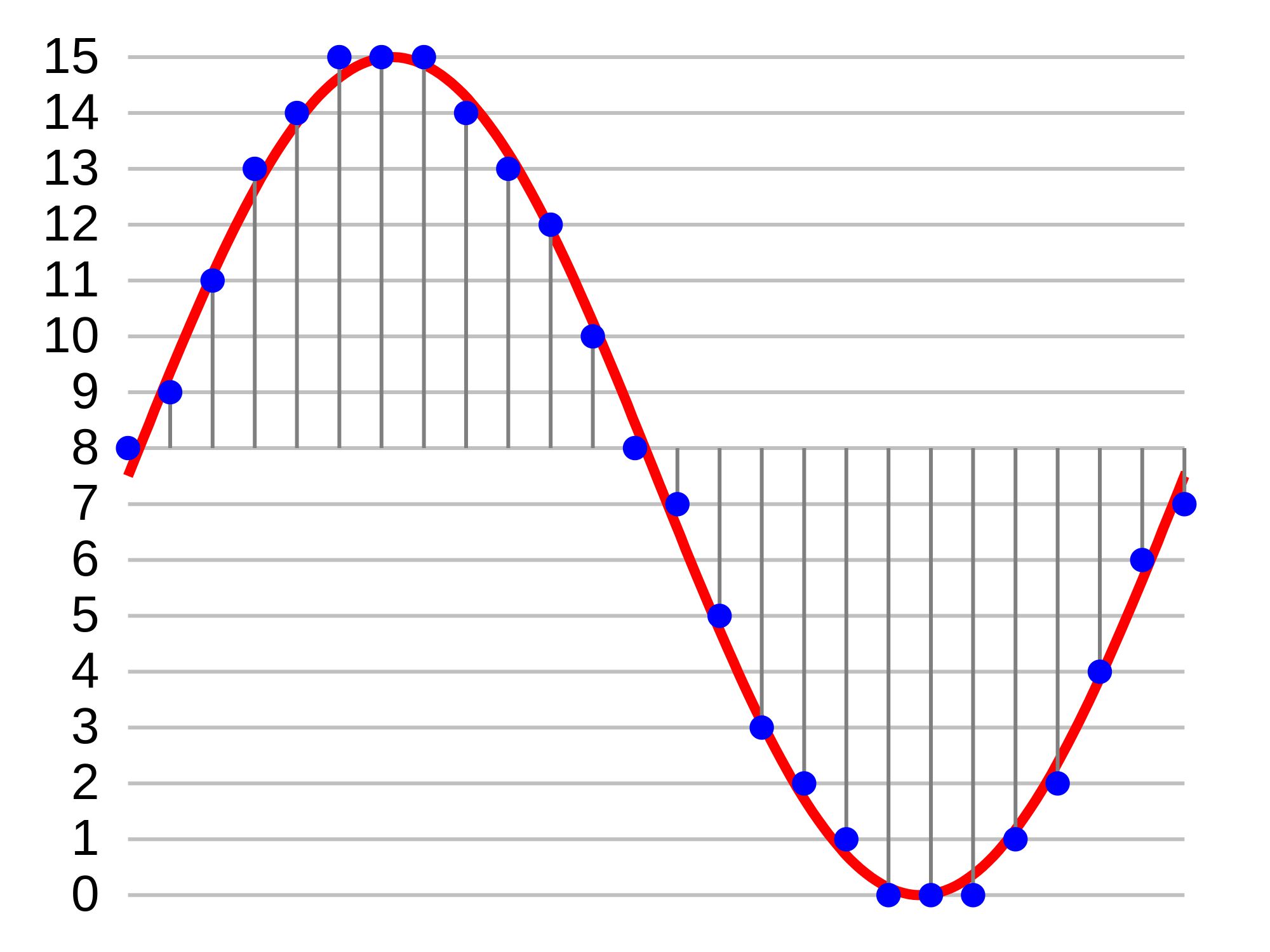
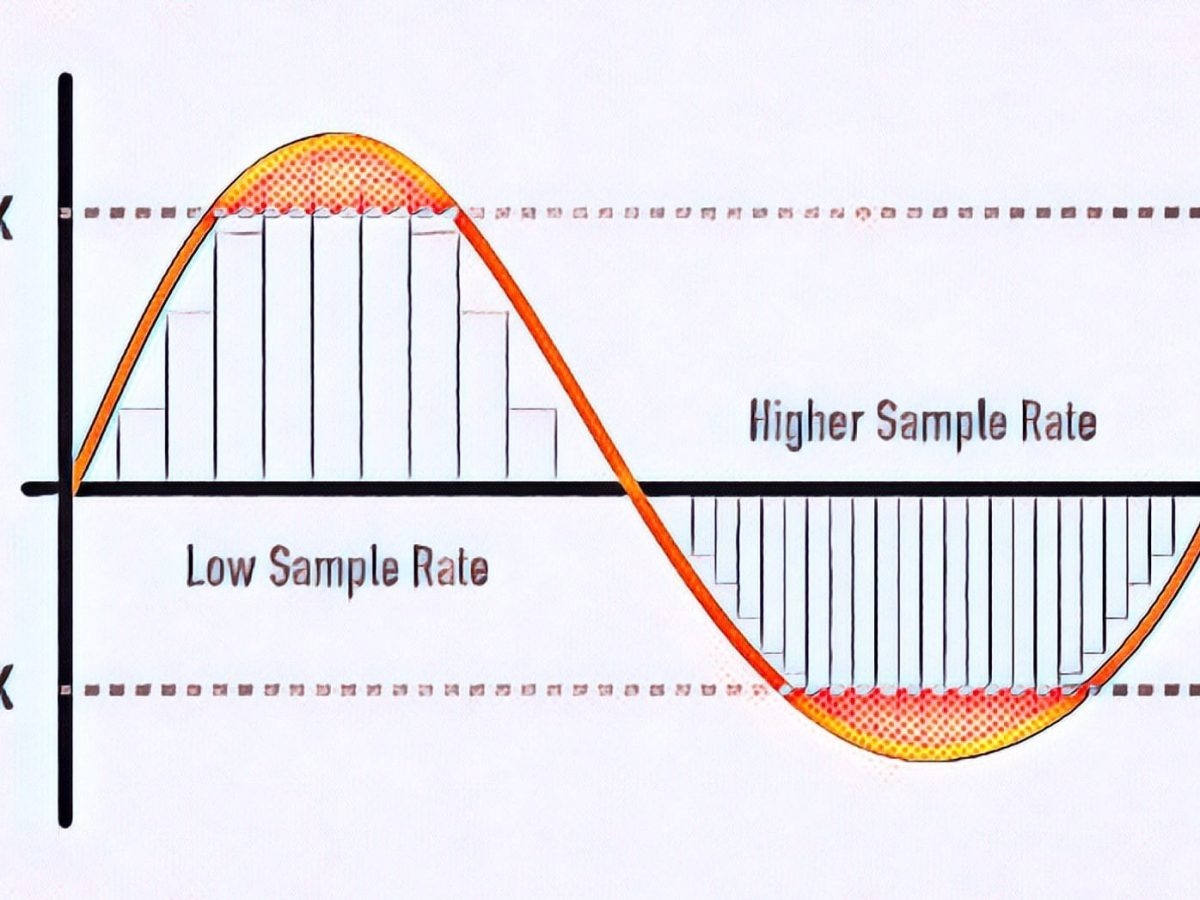
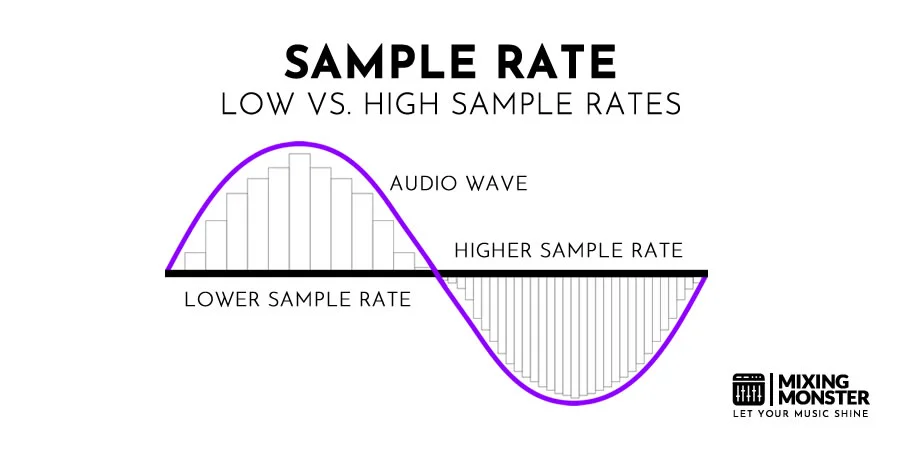
When it comes to digital audio, the sampling rate plays a crucial role in determining the quality of the sound. The sampling rate refers to the number of samples taken per second to represent the analog audio signal digitally. A higher sampling rate captures more details and provides a more accurate representation of the original sound wave.

Let’s take the example of CD-quality audio, which has a standard sampling rate of 44.1 kHz. This means that 44,100 samples are taken every second to record the audio. With a higher sampling rate, a wider frequency range can be captured, resulting in better audio fidelity and a more immersive listening experience. However, it’s important to note that increasing the sampling rate also requires more storage space.

Benefits of higher sampling rates

Higher sampling rates, such as 96 kHz or 192 kHz, offer several benefits for audio enthusiasts and professionals. Firstly, they allow for more accurate representation of high-frequency sounds, resulting in improved clarity and detail in the audio. Secondly, a higher sampling rate provides greater headroom for digital processing and effects, allowing for more precise manipulation of the sound.

Factors to consider when choosing a sampling rate

While higher sampling rates offer improved audio quality, there are a few factors to consider when choosing the appropriate sampling rate for your needs. Firstly, the capabilities of your audio playback devices and equipment should be taken into account. Not all devices support high sampling rates, and using a higher sampling rate without compatible hardware may not yield the desired benefits.

Additionally, the nature of the audio content should be considered. For example, music production and professional audio mastering often make use of higher sampling rates to capture the intricacies of the sound. On the other hand, for casual listening or streaming, a standard sampling rate like 44.1 kHz may suffice.

Understanding the significance of bit depth in digital audio

Bit depth is another crucial aspect of digital audio that directly impacts the dynamic range and accuracy of the sound reproduction. It refers to the number of bits used to represent each sample in a digital audio file. A higher bit depth allows for more precise quantization and results in a greater dynamic range.

Commonly used bit depths in audio production include 16-bit and 24-bit. A 16-bit audio file can represent 65,536 discrete volume levels, while a 24-bit audio file can represent a staggering 16,777,216 levels. This greater dynamic range enables the reproduction of softer and louder sounds with more accuracy, reducing the potential for quantization noise and distortion.

The impact of bit depth on audio resolution

Bit depth directly affects the resolution of the audio signal. A higher bit depth provides finer resolution and allows for more subtle details to be captured in the recording. This is particularly important when working with audio that has a wide dynamic range, such as classical music or film soundtracks.

Choosing the appropriate bit depth

The choice of bit depth depends on the nature of the audio content and the intended usage. For most consumer applications, a 16-bit depth is sufficient to deliver high-quality audio. However, for professional audio production or situations that demand the utmost accuracy, a 24-bit depth is recommended.

It’s worth noting that higher bit depths also result in larger file sizes, as more data is required to represent each sample. Therefore, considerations such as available storage space and transmission bandwidth should be taken into account when selecting the appropriate bit depth.

Final Words

Understanding the basics of digital audio, including sampling rate and bit depth, is essential for anyone seeking to optimize their audio experience. By choosing the right sampling rate and bit depth, you can ensure that your digital audio files accurately capture and reproduce the nuances of the original sound, whether you are an audio professional or an avid music lover.

Remember, when it comes to sampling rate, higher rates offer increased fidelity and clarity, but it’s essential to consider compatibility and storage requirements. Similarly, higher bit depths provide greater dynamic range and resolution, but the choice should be based on the nature of the audio content and intended use.

By mastering the fundamentals of digital audio, you can unlock a world of rich and immersive sound, enhancing your enjoyment of music, movies, and other multimedia experiences.


Free Download Mp4Gain
picture


Mp4Gain Main Window
picture


Mp4Gain Features
picture


Free Download Mp4Gain
picture

Definition of sampling bits, sampling rate and bit rate in audio (transfer) Part 3

Definition of sampling bits, sampling rate and bit rate in audio (transfer) Part 3

sampling bits
sampling bits

1. Why do many professional standards reach 24bit/192KHz?

sampling bits
sampling bits

It is now common to use the 48kHz or 96kHz recording rate in engineering, and only convert to the 44.1kHz CD format during the final mastering process, which reduces distortion caused by multiple sample rate conversions.

In the field of computing, the AC97 specification, which is an audio hardware codec standard, only specifies 48 kHz. This causes nearly all input and output signals to be resampled (the professional term is called sample rate conversion, or SRC). SRC generally causes loss of sound quality, and the simpler (ie poorer) SRC algorithms can cause significant deterioration of sound quality. But this is already a fait accompli.

2. Since 44K is enough, why use 192KHZ to record?

First of all, 20kHz is just the hearing threshold for most people, i.e. the human ear is very insensitive to sounds above 20kHz. Insensitivity to attention does not mean a total inability to perceive. The tones of most musical instruments (especially pianos and strings) are rich in higher harmonics, known in musical terms as higher harmonics. CD audio with a cutoff frequency of 22.05 kHz gives people who are used to listening to real instruments an unnatural feel, especially in the high frequencies, because the Nyquist cutoff frequency distorts the signal from harmonics. of higher frequencies.

Second, digital recordings often require post-processing. Audio processing can introduce more distortion into the signal, including signal distortion, spectral aliasing, and more. If the original signal is only sampled at 44.1 kHz during recording, it must be upsampled before post-processing to expand the sample rate. Since this expansion is “fake”, there is really no more useful original signal, and the quality of the upsampling algorithm will also affect the distortion of the original recording signal, so this approach is undesirable. Therefore, it is common practice to sample at a higher frequency.

In today’s fully professional digital recording studios, recording, mixing and mastering are no longer compliant with the CD standard, instead the HD audio standard is preferred. which:

Use 24Bit 48KHz, 24Bit 96KHz, 24Bit 192KHz three specifications to record, of course, 24Bit 48KHz is used by some small recording studios, because their processor resources are limited. And all the big recording studios use 24bit 96KHz and 24bit 192KHz for recording.

So what are the benefits of such a recording specification?

1. Comply with HD audio standard, which is also the main standard in the future. The finished product can be directly applied to HDCD, DVD-Audio, Blu-ray disc, digital music download business and digital player business to media.

2. Fully take care of the digital video and video business, and the multi-channel film and video will adopt the HD audio specification. Including the use of portable mobile digital video equipment.

3. Fully take care of the consumer audio playback business, such as: Intel HD-Audio audio standard, AC97 audio codec, MP3 / mp4 / phone / game console portable audio highest quality audio playback.

Currently, the highest quality standard in the professional recording industry is: 24 bits deeper than a specific point, 192000 Hz sampling rate, referred to as “24 bits/192 KHz”. Of course, this standard will continue to improve in the future, and it is also possible to move towards 32Bit 384KHz.

In fact, the (genuine) products sold in the current CD market are usually HDCD discs at the lowest level, when you buy discs, you find that they are basically HDCD logos, that is, a CD contains two audio tracks: Normal CD track and HDCD track. The CD track records a 16-bit signal at 44.1 KHz (this is the compatible content on this disc, considering early CD players), and the HDCD track records a 24-bit signal at 96 KHz ( this is the main content of the disc). Ordinary CD players can only play CD audio track signals, and HDCD audio tracks require an HDCD player to play (in fact, most DVD players today can play HDCDs, and modern computers work even better).

Definition of sampling bits, sampling rate and bit rate in audio (transfer) Part 2

Definition of sampling bits, sampling rate and bit rate in audio (transfer) Part 2

sampling bits
sampling bits

Bitrate values ​​compared to real audio:

sampling bits
sampling bits

16 Kbps = phone quality
24 Kbps = increase phone quality, shortwave transmission, longwave transmission, European standard medium wave transmission
40 Kbps = American standard medium wave transmission
56Kbps=Voice
64 Kbps = boost voice (best bitrate setting for cell phone ringtones, best setting for cell phone mono MP3 players)
112 Kbps = FM stereo FM transmission
128 Kbps = tape (best setting for a mobile phone stereo MP3 player, best setting for a low-end MP3 player)
160 Kbps = HIFI high fidelity (best setting for mid to high end MP3 players)
192Kbps=CD (best setting for high-end MP3 players)
256Kbps=Studio Music Studio (for music enthusiasts)
In fact, with the advancement of technology, the bitrate is also getting higher and higher, the maximum bitrate of MP3 is 320Kbps, but some formats can reach higher bitrates and superior sound quality.
For example, the emerging APE audio format can provide true audiophile lossless sound quality and smaller volume than WAV format, and its bit rate is usually 550kbps—–950kbps.
Common coding patterns:

Dynamic bit rate VBR (Variable Bitrate), ie there is no fixed bit rate. The compression software immediately determines which bitrate to use based on the audio data during compression. This is a method that takes into account the quality of the file. and file size The recommended encoding mode;
ABR (Average Bit Rate) Average Bit Rate is an interpolation parameter of VBR. LAME created this encoding mode in response to the low file volume ratio of CBR and the variable size of files generated by VBR. Within the specified file size, ABR takes every 50 frames (about 1 second for 30 frames) as a segment. A relatively low flow rate is used for low frequency and insensitive frequencies, and a high flow rate is used for high frequencies and high dynamic performance. It can be used as VBR and CBR, a compromise option.
CBR (constant bit rate), constant bit rate, means that the file has a bit rate from start to finish. Compared to VBR and ABR, the compressed file size is very large and the sound quality will not improve significantly compared to VBR and ABR.
In simple terms:

In a nutshell, sample rate and bit rate are like horizontal and vertical coordinates on the coordinate axis.

The sampling rate on the abscissa represents the number of samples per second.

The bit rate on the ordinate represents the precision when quantizing analog quantities with digital quantities.

The sample rate is similar to the number of frames of moving images. For example, the sampling rate of movies is 24 Hz, the sampling rate of PAL format is 25 Hz, and the sampling rate of NTSC format is 30 Hz. When we play back the still images sampled at the same rate as the sampling frequency, we see a continuous image. In the same way, when a CD recorded at a sampling rate of 44.1 kHz is played back at the same rate, a continuous sound can be heard. Obviously, the higher the sample rate, the more coherent the sound will be heard and the picture will be seen. Of course, the sampling rate that human auditory and visual organs can distinguish is limited, which is basically higher than sound sampled at 44.1 kHz, and most people haven’t noticed the difference.

The number of digits in the sound is equivalent to the number of colors on the screen, indicating the amount of data per sample. Of course, the larger the amount of data, the more accurate the playback sound, so as not to confuse the sound. of the teapot with the train whistle. In the same way, it is more clear and precise for the image, so as not to confuse blood and ketchup. However, limited by the function of human organs, 16-bit sound and 24-bit image are basically the limits of ordinary humans, and the highest digits can only be distinguished by instruments. For example, the phone has 7-bit sound sampled at 3 kHz and the CD has 16-bit sound sampled at 44.1 kHz, so the CD is clearer than the phone.

Definition of sampling bits, sampling rate and bit rate in audio (transfer)

Definition of sampling bits, sampling rate and bit rate in audio (transfer)

sampling bits
sampling bits

Number of samples (sample size):

sampling bits
sampling bits

The number of sampling bits can be understood as the resolution of the sound processed by the capture card. The higher the value, the higher the resolution and the more realistic the sound recorded and played back. The first thing we need to know: sound files on the computer are represented by the numbers 0 and 1. So the essence of recording on the computer is to convert the analog sound signal into a digital signal. On the contrary, during playback, the digital signal is restored to an analog sound signal output. The capture card bit refers to the binary digits of the digital sound signal used by the capture card when capturing and playing sound files. The bits on the capture card objectively reflect the accuracy of the digital sound signal’s description of the input sound signal. 8 bits represent the eighth power of 2–256 and 16 bits represent the sixteenth power of 2–64K. For comparison, for the same musical data, a 16-bit sound card can divide it into 64,000 precision units for processing, while an 8-bit sound card can only process 256 precision units, resulting in a large loss of signal. sampling effect is naturally incomparable.

It is usually said in the market, 16bit/24bit/32bit. The higher the value, the better the sound.

Sampling rate:

Sample rate (also called sample rate or sample rate) defines the number of samples per second taken from a continuous signal to form a discrete signal, and is expressed in hertz (Hz). The inverse of the sample rate is called the sample period or sample time, which is the time interval between samples. The sampling theorem states that the sampling frequency must be greater than twice the bandwidth of the sampled signal. Another equivalent statement is that the Nyquist frequency must be greater than the bandwidth of the sampled signal.

If the signal bandwidth is 100 Hz, the sample rate must be greater than 200 Hz to avoid aliasing.

In other words, the sampling frequency must be at least twice the frequency of the largest frequency component of the signal; otherwise the original signal cannot be recovered from the signal samples. Oversampling refers to the sampling rate that exceeds twice the bandwidth of the signal, so that the poorly performing analog anti-aliasing filter can be replaced with a digital filter.

Bit rate:

Bitrate refers to the sampling rate at which digital sound is converted from analog to digital format. The higher the sampling rate, the better the quality of the restored sound. As a benchmark for the efficiency of digital music compression, bit rate indicates the rate of the number of bits bps (bit per second, bits per second) transmitted per unit of time (1 second). Kbps (in layman’s terms is 1000 bits per second) is usually used as the unit. The digital music bitrate on CD is 1411.2 kbps (ie, to record 1 second of CD music, 1411.2 × 1024 bits of data are required). time unit (1 second) The amount of data (BIT) is large, which means the sound quality of the music file is good. However, when the BITRATE is high, the file size increases, which will occupy a large amount of memory capacity. they are 32-256 Kbps. Of course, the wider the rate, the better, but 320 Kbps is the highest level at the moment.

Sampling, sampling frequency

Sampling, sampling frequency

Sampling frequency

Discretization (discretization frequency – ing.) – transcoding an analog signal into digital by reading the characteristics of the signal at a given moment and converting it into a digital data matrix (approx. 100010110).

Sample Rate

The sampling rate is a parameter that allows you to know the number of calls to an analog (or digital) signal in a given period of time (usually one second), to record frequencies in digital form or to convert to an analog signal.

If we rely on Kotelnikov’s theorem, then to record a lossless signal, a sample rate is required that is two or more times greater than the maximum sound frequency of the played track. That is, in theory 44,100 Hz will be sufficient for most recordings, which is more than 2 times higher than the threshold for human audible frequencies, but this is not entirely true.

The higher the sampling frequency, the more accurately the sound will be reproduced in an analog or digital signal. However, the more conversions made from analog to digital and vice versa, the more the precision and quality of the original signal recording will be lost.

The maximum sample rate for 2010 was 2,822,400 Hz and was compliant with the Super Audio CD (SACD) standard. Most multimedia centers, home theater systems have DACs (digital-to-analog converters) and ADCs (analog-to-digital converters) with a sample rate of 192,000 Hz.

To convert a signal into analog, special chips are used: DACs (digital to analog converters). To convert the signal to digital, ADCs (analog to digital converters) are used.

These microchips and chipsets have a variety of characteristics other than sample rate, such as THD, the amount of interference introduced by the transformation, the number of possible false errors, no saving a digital signal, and so on.