
Digital Audio Basics: Sampling Rate and Bit Depth

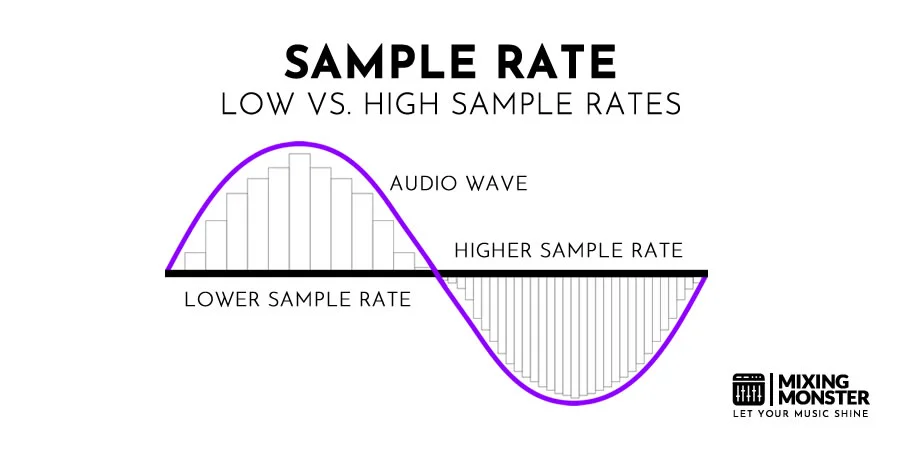
How does the sampling rate affect digital audio quality?
When it comes to digital audio, the sampling rate plays a crucial role in determining the quality of the sound. The sampling rate refers to the number of samples taken per second to represent the analog audio signal digitally. A higher sampling rate captures more details and provides a more accurate representation of the original sound wave.
Let’s take the example of CD-quality audio, which has a standard sampling rate of 44.1 kHz. This means that 44,100 samples are taken every second to record the audio. With a higher sampling rate, a wider frequency range can be captured, resulting in better audio fidelity and a more immersive listening experience. However, it’s important to note that increasing the sampling rate also requires more storage space.
Benefits of higher sampling rates
Higher sampling rates, such as 96 kHz or 192 kHz, offer several benefits for audio enthusiasts and professionals. Firstly, they allow for more accurate representation of high-frequency sounds, resulting in improved clarity and detail in the audio. Secondly, a higher sampling rate provides greater headroom for digital processing and effects, allowing for more precise manipulation of the sound.
Factors to consider when choosing a sampling rate
While higher sampling rates offer improved audio quality, there are a few factors to consider when choosing the appropriate sampling rate for your needs. Firstly, the capabilities of your audio playback devices and equipment should be taken into account. Not all devices support high sampling rates, and using a higher sampling rate without compatible hardware may not yield the desired benefits.
Additionally, the nature of the audio content should be considered. For example, music production and professional audio mastering often make use of higher sampling rates to capture the intricacies of the sound. On the other hand, for casual listening or streaming, a standard sampling rate like 44.1 kHz may suffice.
Understanding the significance of bit depth in digital audio
Bit depth is another crucial aspect of digital audio that directly impacts the dynamic range and accuracy of the sound reproduction. It refers to the number of bits used to represent each sample in a digital audio file. A higher bit depth allows for more precise quantization and results in a greater dynamic range.
Commonly used bit depths in audio production include 16-bit and 24-bit. A 16-bit audio file can represent 65,536 discrete volume levels, while a 24-bit audio file can represent a staggering 16,777,216 levels. This greater dynamic range enables the reproduction of softer and louder sounds with more accuracy, reducing the potential for quantization noise and distortion.
The impact of bit depth on audio resolution
Bit depth directly affects the resolution of the audio signal. A higher bit depth provides finer resolution and allows for more subtle details to be captured in the recording. This is particularly important when working with audio that has a wide dynamic range, such as classical music or film soundtracks.
Choosing the appropriate bit depth
The choice of bit depth depends on the nature of the audio content and the intended usage. For most consumer applications, a 16-bit depth is sufficient to deliver high-quality audio. However, for professional audio production or situations that demand the utmost accuracy, a 24-bit depth is recommended.
It’s worth noting that higher bit depths also result in larger file sizes, as more data is required to represent each sample. Therefore, considerations such as available storage space and transmission bandwidth should be taken into account when selecting the appropriate bit depth.
Final Words
Understanding the basics of digital audio, including sampling rate and bit depth, is essential for anyone seeking to optimize their audio experience. By choosing the right sampling rate and bit depth, you can ensure that your digital audio files accurately capture and reproduce the nuances of the original sound, whether you are an audio professional or an avid music lover.
Remember, when it comes to sampling rate, higher rates offer increased fidelity and clarity, but it’s essential to consider compatibility and storage requirements. Similarly, higher bit depths provide greater dynamic range and resolution, but the choice should be based on the nature of the audio content and intended use.
By mastering the fundamentals of digital audio, you can unlock a world of rich and immersive sound, enhancing your enjoyment of music, movies, and other multimedia experiences.


