Digital Audio Basics: Sampling Rate and Bit Depth


Free Download Mp4Gain
picture

Digital Audio Basics: Sampling Rate and Bit Depth

Digital Audio Basics: Sampling Rate and Bit Depth

How does the sampling rate affect digital audio quality?

When it comes to digital audio, the sampling rate plays a crucial role in determining the quality of the sound. The sampling rate refers to the number of samples taken per second to represent the analog audio signal digitally. A higher sampling rate captures more details and provides a more accurate representation of the original sound wave.

Let’s take the example of CD-quality audio, which has a standard sampling rate of 44.1 kHz. This means that 44,100 samples are taken every second to record the audio. With a higher sampling rate, a wider frequency range can be captured, resulting in better audio fidelity and a more immersive listening experience. However, it’s important to note that increasing the sampling rate also requires more storage space.

Benefits of higher sampling rates

Higher sampling rates, such as 96 kHz or 192 kHz, offer several benefits for audio enthusiasts and professionals. Firstly, they allow for more accurate representation of high-frequency sounds, resulting in improved clarity and detail in the audio. Secondly, a higher sampling rate provides greater headroom for digital processing and effects, allowing for more precise manipulation of the sound.

Factors to consider when choosing a sampling rate

While higher sampling rates offer improved audio quality, there are a few factors to consider when choosing the appropriate sampling rate for your needs. Firstly, the capabilities of your audio playback devices and equipment should be taken into account. Not all devices support high sampling rates, and using a higher sampling rate without compatible hardware may not yield the desired benefits.

Additionally, the nature of the audio content should be considered. For example, music production and professional audio mastering often make use of higher sampling rates to capture the intricacies of the sound. On the other hand, for casual listening or streaming, a standard sampling rate like 44.1 kHz may suffice.

Understanding the significance of bit depth in digital audio

Bit depth is another crucial aspect of digital audio that directly impacts the dynamic range and accuracy of the sound reproduction. It refers to the number of bits used to represent each sample in a digital audio file. A higher bit depth allows for more precise quantization and results in a greater dynamic range.

Commonly used bit depths in audio production include 16-bit and 24-bit. A 16-bit audio file can represent 65,536 discrete volume levels, while a 24-bit audio file can represent a staggering 16,777,216 levels. This greater dynamic range enables the reproduction of softer and louder sounds with more accuracy, reducing the potential for quantization noise and distortion.

The impact of bit depth on audio resolution

Bit depth directly affects the resolution of the audio signal. A higher bit depth provides finer resolution and allows for more subtle details to be captured in the recording. This is particularly important when working with audio that has a wide dynamic range, such as classical music or film soundtracks.

Choosing the appropriate bit depth

The choice of bit depth depends on the nature of the audio content and the intended usage. For most consumer applications, a 16-bit depth is sufficient to deliver high-quality audio. However, for professional audio production or situations that demand the utmost accuracy, a 24-bit depth is recommended.

It’s worth noting that higher bit depths also result in larger file sizes, as more data is required to represent each sample. Therefore, considerations such as available storage space and transmission bandwidth should be taken into account when selecting the appropriate bit depth.

Final Words

Understanding the basics of digital audio, including sampling rate and bit depth, is essential for anyone seeking to optimize their audio experience. By choosing the right sampling rate and bit depth, you can ensure that your digital audio files accurately capture and reproduce the nuances of the original sound, whether you are an audio professional or an avid music lover.

Remember, when it comes to sampling rate, higher rates offer increased fidelity and clarity, but it’s essential to consider compatibility and storage requirements. Similarly, higher bit depths provide greater dynamic range and resolution, but the choice should be based on the nature of the audio content and intended use.

By mastering the fundamentals of digital audio, you can unlock a world of rich and immersive sound, enhancing your enjoyment of music, movies, and other multimedia experiences.


Free Download Mp4Gain
picture


Mp4Gain Main Window
picture


Mp4Gain Features
picture


Free Download Mp4Gain
picture

Sampling, sampling frequency

Sampling, sampling frequency

Sampling frequency

Discretization (discretization frequency – ing.) – transcoding an analog signal into digital by reading the characteristics of the signal at a given moment and converting it into a digital data matrix (approx. 100010110).

Sample Rate

The sampling rate is a parameter that allows you to know the number of calls to an analog (or digital) signal in a given period of time (usually one second), to record frequencies in digital form or to convert to an analog signal.

If we rely on Kotelnikov’s theorem, then to record a lossless signal, a sample rate is required that is two or more times greater than the maximum sound frequency of the played track. That is, in theory 44,100 Hz will be sufficient for most recordings, which is more than 2 times higher than the threshold for human audible frequencies, but this is not entirely true.

The higher the sampling frequency, the more accurately the sound will be reproduced in an analog or digital signal. However, the more conversions made from analog to digital and vice versa, the more the precision and quality of the original signal recording will be lost.

The maximum sample rate for 2010 was 2,822,400 Hz and was compliant with the Super Audio CD (SACD) standard. Most multimedia centers, home theater systems have DACs (digital-to-analog converters) and ADCs (analog-to-digital converters) with a sample rate of 192,000 Hz.

To convert a signal into analog, special chips are used: DACs (digital to analog converters). To convert the signal to digital, ADCs (analog to digital converters) are used.

These microchips and chipsets have a variety of characteristics other than sample rate, such as THD, the amount of interference introduced by the transformation, the number of possible false errors, no saving a digital signal, and so on.

Sampling frequency

To convert a so-called analog audio to digital, we use a process called: sampling. Sampling is done on a converter (or sound card). The principle is to take regular snapshots, which are the measurements of the analog signal voltage, and transform them into digital data whose language is numbers (numbers).

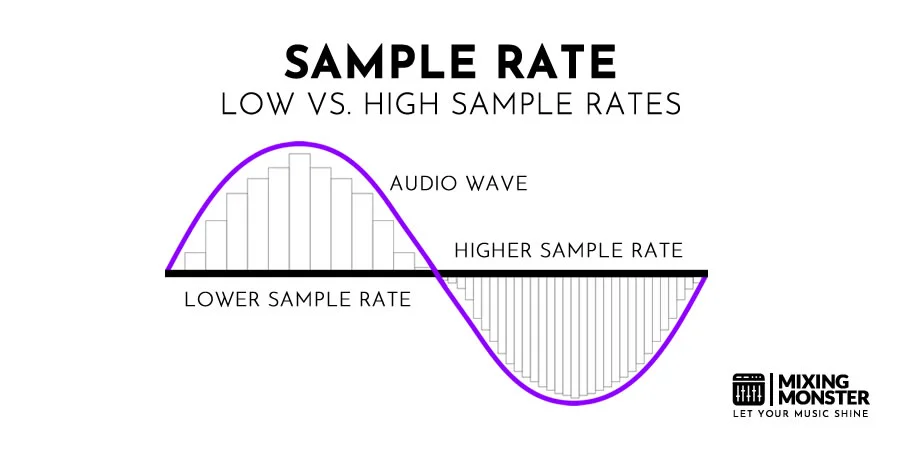
Here is a diagram representing the samples included in the amplitude of a sound wave. The number of samples in this wave defines the sampling frequency or sampling frequency.

La frecuencia de muestreo

Sampling frequency

The sampling rate is expressed in hertz (Hz) or (kHz). The following values ​​are commonly found: 44,100 Hz, 48,000 Hz, 96,000 Hz, 192,000 Hz. The CD and the digital world standard are 44,100 Hz. This means that for every second, there are 44,100 samples. (samples) reproduced. The higher the sample rate (number of “snapshots” of the audio taken per second), the more accurate the analysis and coding of the music in digital data. The sampling rate affects the audio frequency range from the lowest to the highest pitch that can be stored.

Sampling frequency
16-bit / 44.1 kHz coding was the best quality available when the CD was released in the early 1980s, but things have changed, and we can now record and distribute music at higher bit-depth levels and sample rates. These formats have been used in studio recordings and for mastering for many years.

High-resolution audio (HRA) matches any recording format above the 16-bit / 44.1 kHz standard for CDs, and HRA recordings usually use 24-bit encoding, providing a greater dynamic range than CD and sampling rates up to 192 kHz . This is the pinnacle of HRA business records. First and foremost, it’s about getting as close as possible to the sound heard in the studio.

Which sampling rates should you choose?

In order to capture the smallest details at high frequencies, we need to try more frequently. The way it works is that a given sampling rate can accurately detect audio frequencies down to just under half its value. For example, a sample rate of 48 kHz can accurately detect audio frequencies as low as just below 24 kHz. This limit for half the sampling frequency is called the Nyquist frequency and is named after one of the engineers who developed the calculation behind the sampling principle.

La frecuencia de muestreo

The human ear can generally hear in the following spectrum: 20 Hz – 20,000 Hz. As we have just seen, for no obvious loss, the sampling rate must be at least twice as high as the maximum frequency contained in the audio when digitizing. The sampling rate must be at least 40,000 Hz for a correct result for our ears.

This is why 44 100 Hz resolution is the most widely used because it allows us to cover the spectrum up to 22 050 Hz. We even benefit from a small margin because we could have rounded up to 40,000 Hz, but it also means that if you export your music at a sampling rate higher than 44,100 Hz, your ear can’t hear the difference.

Anti alias filters

The first thing an analogue to digital converter does to analogue audio before sampling is to filter all frequencies above the Nyquist limit of the desired sampling frequency. If not filtered, all frequencies above Nyquist are injected again into the sample. This is called an alias effect.

Fortunately, almost all converters on the market today have implemented high-quality anti-aliasing filters. As a result, it seems undesirable aliasing effects are not, and all frequencies below the Nyquist recorded accurately. In most cases, as long as you use a good quality converter and a sampling rate of at least 44.1 Khz, you can record all frequencies in the area of ​​human hearing in an orderly manner. Since the analog to digital converter measures each sample, you have to assign a number to that sample, as that is what makes it digital instead of analog.

How about sound cards up to 192,000 Hz?
There are two benefits to working at a very high frequency:

The first is that the drivers for your sound card (especially professional converters) will be optimized for a given sampling rate. In general, the ASIO drivers for your drives are optimized to the maximum sample rate it offers: 96,000 Hz and 192,000 Hz in most cases. This may be surprising, but it will have less delay and more relief for the microprocessor with a higher sample rate.