Digital Audio Basics: Sampling Rate and Bit Depth


Free Download Mp4Gain
picture

Digital Audio Basics: Sampling Rate and Bit Depth

Digital Audio Basics: Sampling Rate and Bit Depth

How does the sampling rate affect digital audio quality?

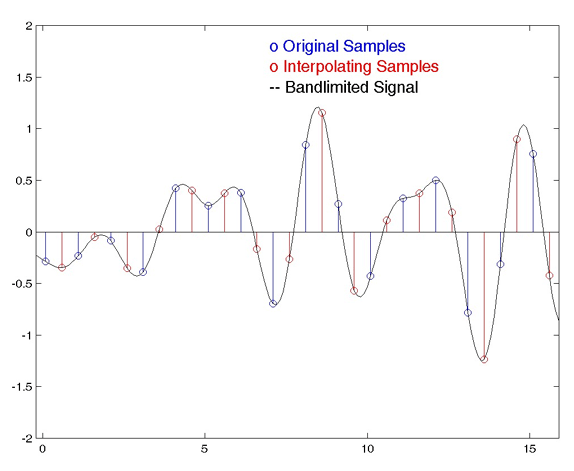
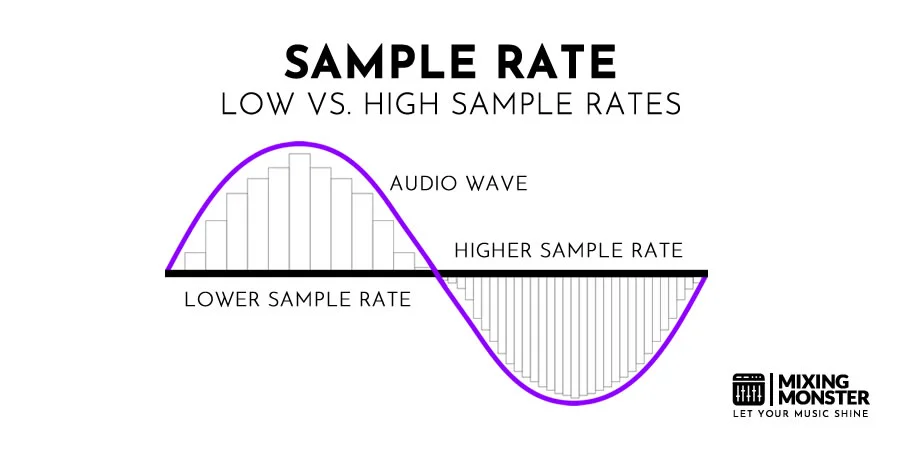
When it comes to digital audio, the sampling rate plays a crucial role in determining the quality of the sound. The sampling rate refers to the number of samples taken per second to represent the analog audio signal digitally. A higher sampling rate captures more details and provides a more accurate representation of the original sound wave.

Let’s take the example of CD-quality audio, which has a standard sampling rate of 44.1 kHz. This means that 44,100 samples are taken every second to record the audio. With a higher sampling rate, a wider frequency range can be captured, resulting in better audio fidelity and a more immersive listening experience. However, it’s important to note that increasing the sampling rate also requires more storage space.

Benefits of higher sampling rates

Higher sampling rates, such as 96 kHz or 192 kHz, offer several benefits for audio enthusiasts and professionals. Firstly, they allow for more accurate representation of high-frequency sounds, resulting in improved clarity and detail in the audio. Secondly, a higher sampling rate provides greater headroom for digital processing and effects, allowing for more precise manipulation of the sound.

Factors to consider when choosing a sampling rate

While higher sampling rates offer improved audio quality, there are a few factors to consider when choosing the appropriate sampling rate for your needs. Firstly, the capabilities of your audio playback devices and equipment should be taken into account. Not all devices support high sampling rates, and using a higher sampling rate without compatible hardware may not yield the desired benefits.

Additionally, the nature of the audio content should be considered. For example, music production and professional audio mastering often make use of higher sampling rates to capture the intricacies of the sound. On the other hand, for casual listening or streaming, a standard sampling rate like 44.1 kHz may suffice.

Understanding the significance of bit depth in digital audio

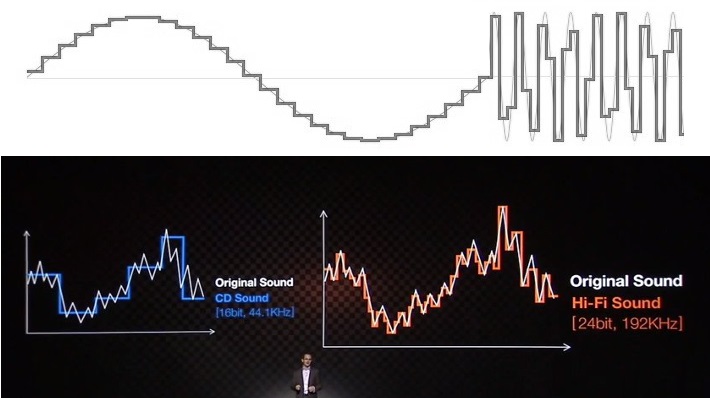
Bit depth is another crucial aspect of digital audio that directly impacts the dynamic range and accuracy of the sound reproduction. It refers to the number of bits used to represent each sample in a digital audio file. A higher bit depth allows for more precise quantization and results in a greater dynamic range.

Commonly used bit depths in audio production include 16-bit and 24-bit. A 16-bit audio file can represent 65,536 discrete volume levels, while a 24-bit audio file can represent a staggering 16,777,216 levels. This greater dynamic range enables the reproduction of softer and louder sounds with more accuracy, reducing the potential for quantization noise and distortion.

The impact of bit depth on audio resolution

Bit depth directly affects the resolution of the audio signal. A higher bit depth provides finer resolution and allows for more subtle details to be captured in the recording. This is particularly important when working with audio that has a wide dynamic range, such as classical music or film soundtracks.

Choosing the appropriate bit depth

The choice of bit depth depends on the nature of the audio content and the intended usage. For most consumer applications, a 16-bit depth is sufficient to deliver high-quality audio. However, for professional audio production or situations that demand the utmost accuracy, a 24-bit depth is recommended.

It’s worth noting that higher bit depths also result in larger file sizes, as more data is required to represent each sample. Therefore, considerations such as available storage space and transmission bandwidth should be taken into account when selecting the appropriate bit depth.

Final Words

Understanding the basics of digital audio, including sampling rate and bit depth, is essential for anyone seeking to optimize their audio experience. By choosing the right sampling rate and bit depth, you can ensure that your digital audio files accurately capture and reproduce the nuances of the original sound, whether you are an audio professional or an avid music lover.

Remember, when it comes to sampling rate, higher rates offer increased fidelity and clarity, but it’s essential to consider compatibility and storage requirements. Similarly, higher bit depths provide greater dynamic range and resolution, but the choice should be based on the nature of the audio content and intended use.

By mastering the fundamentals of digital audio, you can unlock a world of rich and immersive sound, enhancing your enjoyment of music, movies, and other multimedia experiences.


Free Download Mp4Gain
picture


Mp4Gain Main Window
picture


Mp4Gain Features
picture


Free Download Mp4Gain
picture

Audio Sample Sizes: 8-bit vs. 16-bit

Audio Sample Sizes: 8-bit vs. 16-bit

Audio Sample Sizes: 8-bit vs. 16-bit

Is a 16-bit or 24-bit audio better? - Quora

What is the difference between 8-bit and 16-bit audio sample sizes?

When it comes to audio recording and production, the choice of sample size plays a crucial role in determining the quality and accuracy of the sound. The two most common sample sizes are 8-bit and 16-bit. While they may seem similar, they have significant differences that impact the fidelity and dynamic range of audio recordings. Let’s delve into the dissimilarities between 8-bit and 16-bit audio sample sizes.

Starting with 8-bit audio, it represents a relatively lower resolution compared to 16-bit. With 8-bit sample size, the audio waveform is divided into 256 discrete levels, resulting in a limited dynamic range. This means that the audio can capture a narrower range of volume variations and may exhibit noticeable quantization noise in quiet or subtle passages. However, 8-bit audio can still be suitable for certain applications where the focus is on smaller file sizes or specific stylistic effects.

On the other hand, 16-bit audio offers a higher resolution and a greater dynamic range compared to 8-bit. With 16-bit sample size, the audio waveform is divided into 65,536 discrete levels, providing more precise representation of the original sound. This higher resolution allows for capturing a wider range of volume variations with greater accuracy, resulting in improved fidelity and reduced quantization noise. 16-bit audio is commonly used in professional music production, mastering, and high-quality audio recordings.

Advantages of 16-bit audio sample size

One significant advantage of using 16-bit audio sample size is the enhanced dynamic range it offers. The wider range of volume levels allows for more detailed and accurate representation of the original sound, resulting in higher fidelity recordings. This is particularly crucial in situations where capturing subtle nuances and preserving the dynamics of the audio is important, such as in music production or audio mastering.

Furthermore, 16-bit audio provides a greater signal-to-noise ratio compared to 8-bit audio. The increased resolution reduces quantization noise, resulting in cleaner recordings, especially in quiet or low-level passages. This allows for capturing more intricate details and ensuring a more natural and immersive audio experience.

Considerations for using 8-bit audio sample size

Although 8-bit audio may not offer the same level of fidelity and dynamic range as 16-bit audio, it can still be suitable for certain applications. One advantage of 8-bit audio is its smaller file size, which can be beneficial in situations where storage or bandwidth limitations exist. Additionally, the inherent quantization noise and limited dynamic range of 8-bit audio can be creatively used to achieve specific stylistic effects or emulate vintage sounds.

However, it is important to consider the intended purpose and context when deciding to use 8-bit audio. In scenarios where high fidelity and accurate reproduction of the sound are essential, such as professional music production or critical audio recordings, it is recommended to opt for 16-bit audio sample size for optimal results.

Final Words

The choice between 8-bit and 16-bit audio sample sizes significantly impacts the quality and fidelity of audio recordings. While 8-bit audio may have its applications, 16-bit audio offers a higher resolution, wider dynamic range, and improved accuracy. The increased precision and reduced quantization noise of 16-bit audio make it the preferred choice for professional

Resampling Audio: Concepts and Methods

Resampling Audio: Concepts and Methods

Resampling Audio
Resampling Audio
Resampling Audio
Resampling Audio

Introduction

Resampling is the process of changing the sample rate of an audio signal. This can be done to increase or decrease the playback speed of the signal, or to convert it from one sample rate to another.

In this article, I will discuss the concepts and methods of resampling audio. I will also provide some tips on how to resample audio effectively.

What is Resampling?

Resampling is the process of changing the number of samples per second in an audio signal. The sample rate is the number of times per second that an audio signal is sampled. For example, a CD-quality audio signal has a sample rate of 44,100 samples per second.

When you resample an audio signal, you are changing the number of samples per second. This can be done to increase or decrease the playback speed of the signal, or to convert it from one sample rate to another.

Why Resample Audio?

There are a number of reasons why you might want to resample audio. For example, you might want to:

Increase or decrease the playback speed of an audio file.
Convert an audio file from one sample rate to another.
Optimize an audio file for playback on a specific device.
Remove unwanted noise from an audio file.
How Does Resampling Work?

Resampling works by inserting or removing samples from the audio signal. When samples are inserted, the playback speed of the signal is increased. When samples are removed, the playback speed of the signal is decreased.

There are two main types of resampling:

Linear resampling is the most common type of resampling. It works by inserting or removing samples in a linear fashion. This means that the spacing between samples is constant throughout the audio signal.
Non-linear resampling is a more sophisticated type of resampling. It works by inserting or removing samples in a non-linear fashion. This means that the spacing between samples is not constant throughout the audio signal.
Which Type of Resampling Should I Use?

The type of resampling that you should use depends on the specific application. For most applications, linear resampling is sufficient. However, if you need to preserve the quality of the audio signal, then you should use non-linear resampling.

How to Resample Audio

There are a number of software applications that can be used to resample audio. Some popular examples include Audacity, Adobe Audition, and FL Studio.

Resampling Tips

Here are a few tips for resampling audio:

Use a high-quality resampling algorithm. This will help to preserve the quality of the audio signal.
Set the sample rate of the output file to the same sample rate as the input file. This will avoid any changes in the playback speed of the signal.
Use a high-quality audio converter. This will help to ensure that the resampled audio signal is of the highest quality.
Final Words About Resampling Audio

Resampling is a powerful tool that can be used to change the sample rate of an audio signal. It can be used to increase or decrease the playback speed of an audio file, to convert an audio file from one sample rate to another, or to optimize an audio file for playback on a specific device.

When resampling audio, it is important to use a high-quality resampling algorithm and to set the sample rate of the output file to the same sample rate as the input file. This will help to preserve the quality of the audio signal.

Resampling Audio for Beginners

Resampling audio can be a daunting task for beginners. However, it is not as difficult as it seems. Here are a few tips to help you get started:

Start by using a simple resampling algorithm. There are many free and open-source resampling algorithms available online.
Set the sample rate of the output file to the same sample rate as the input file. This will avoid any changes in the playback speed of the signal.
Use a high-quality audio converter. This will help to ensure that the resampled audio signal is of the highest quality.
With a little practice, you will be able to resample audio like a pro!

Conclusion

Resampling audio is a powerful tool that can be used to change the sample rate of an audio signal. It can be used to increase or decrease the playback speed of an audio file, to convert an audio file from one sample rate to another, or to optimize an audio file for playback on a specific device.