
Resampling Audio: Concepts and Methods
Introduction
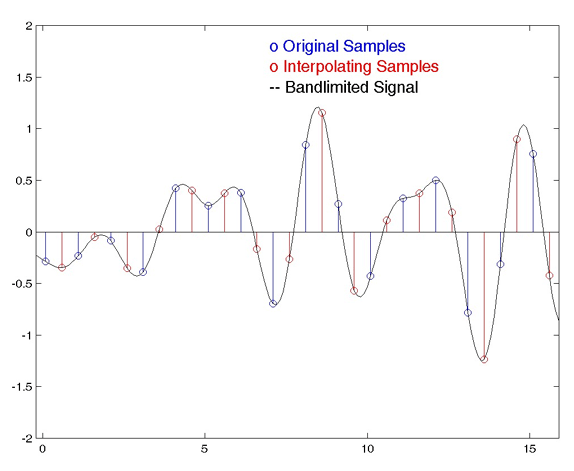
Resampling is the process of changing the sample rate of an audio signal. This can be done to increase or decrease the playback speed of the signal, or to convert it from one sample rate to another.
In this article, I will discuss the concepts and methods of resampling audio. I will also provide some tips on how to resample audio effectively.
What is Resampling?
Resampling is the process of changing the number of samples per second in an audio signal. The sample rate is the number of times per second that an audio signal is sampled. For example, a CD-quality audio signal has a sample rate of 44,100 samples per second.
When you resample an audio signal, you are changing the number of samples per second. This can be done to increase or decrease the playback speed of the signal, or to convert it from one sample rate to another.
Why Resample Audio?
There are a number of reasons why you might want to resample audio. For example, you might want to:
Increase or decrease the playback speed of an audio file.
Convert an audio file from one sample rate to another.
Optimize an audio file for playback on a specific device.
Remove unwanted noise from an audio file.
How Does Resampling Work?
Resampling works by inserting or removing samples from the audio signal. When samples are inserted, the playback speed of the signal is increased. When samples are removed, the playback speed of the signal is decreased.
There are two main types of resampling:
Linear resampling is the most common type of resampling. It works by inserting or removing samples in a linear fashion. This means that the spacing between samples is constant throughout the audio signal.
Non-linear resampling is a more sophisticated type of resampling. It works by inserting or removing samples in a non-linear fashion. This means that the spacing between samples is not constant throughout the audio signal.
Which Type of Resampling Should I Use?
The type of resampling that you should use depends on the specific application. For most applications, linear resampling is sufficient. However, if you need to preserve the quality of the audio signal, then you should use non-linear resampling.
How to Resample Audio
There are a number of software applications that can be used to resample audio. Some popular examples include Audacity, Adobe Audition, and FL Studio.
Resampling Tips
Here are a few tips for resampling audio:
Use a high-quality resampling algorithm. This will help to preserve the quality of the audio signal.
Set the sample rate of the output file to the same sample rate as the input file. This will avoid any changes in the playback speed of the signal.
Use a high-quality audio converter. This will help to ensure that the resampled audio signal is of the highest quality.
Final Words About Resampling Audio
Resampling is a powerful tool that can be used to change the sample rate of an audio signal. It can be used to increase or decrease the playback speed of an audio file, to convert an audio file from one sample rate to another, or to optimize an audio file for playback on a specific device.
When resampling audio, it is important to use a high-quality resampling algorithm and to set the sample rate of the output file to the same sample rate as the input file. This will help to preserve the quality of the audio signal.
Resampling Audio for Beginners
Resampling audio can be a daunting task for beginners. However, it is not as difficult as it seems. Here are a few tips to help you get started:
Start by using a simple resampling algorithm. There are many free and open-source resampling algorithms available online.
Set the sample rate of the output file to the same sample rate as the input file. This will avoid any changes in the playback speed of the signal.
Use a high-quality audio converter. This will help to ensure that the resampled audio signal is of the highest quality.
With a little practice, you will be able to resample audio like a pro!
Conclusion
Resampling audio is a powerful tool that can be used to change the sample rate of an audio signal. It can be used to increase or decrease the playback speed of an audio file, to convert an audio file from one sample rate to another, or to optimize an audio file for playback on a specific device.


