Resampling Audio: Concepts and Methods


Free Download Mp4Gain
picture

Resampling Audio: Concepts and Methods
Resampling Audio
Resampling Audio
Resampling Audio
Resampling Audio

Introduction

Resampling is the process of changing the sample rate of an audio signal. This can be done to increase or decrease the playback speed of the signal, or to convert it from one sample rate to another.

In this article, I will discuss the concepts and methods of resampling audio. I will also provide some tips on how to resample audio effectively.

What is Resampling?

Resampling is the process of changing the number of samples per second in an audio signal. The sample rate is the number of times per second that an audio signal is sampled. For example, a CD-quality audio signal has a sample rate of 44,100 samples per second.

When you resample an audio signal, you are changing the number of samples per second. This can be done to increase or decrease the playback speed of the signal, or to convert it from one sample rate to another.

Why Resample Audio?

There are a number of reasons why you might want to resample audio. For example, you might want to:

Increase or decrease the playback speed of an audio file.
Convert an audio file from one sample rate to another.
Optimize an audio file for playback on a specific device.
Remove unwanted noise from an audio file.
How Does Resampling Work?

Resampling works by inserting or removing samples from the audio signal. When samples are inserted, the playback speed of the signal is increased. When samples are removed, the playback speed of the signal is decreased.

There are two main types of resampling:

Linear resampling is the most common type of resampling. It works by inserting or removing samples in a linear fashion. This means that the spacing between samples is constant throughout the audio signal.
Non-linear resampling is a more sophisticated type of resampling. It works by inserting or removing samples in a non-linear fashion. This means that the spacing between samples is not constant throughout the audio signal.
Which Type of Resampling Should I Use?

The type of resampling that you should use depends on the specific application. For most applications, linear resampling is sufficient. However, if you need to preserve the quality of the audio signal, then you should use non-linear resampling.

How to Resample Audio

There are a number of software applications that can be used to resample audio. Some popular examples include Audacity, Adobe Audition, and FL Studio.

Resampling Tips

Here are a few tips for resampling audio:

Use a high-quality resampling algorithm. This will help to preserve the quality of the audio signal.
Set the sample rate of the output file to the same sample rate as the input file. This will avoid any changes in the playback speed of the signal.
Use a high-quality audio converter. This will help to ensure that the resampled audio signal is of the highest quality.
Final Words About Resampling Audio

Resampling is a powerful tool that can be used to change the sample rate of an audio signal. It can be used to increase or decrease the playback speed of an audio file, to convert an audio file from one sample rate to another, or to optimize an audio file for playback on a specific device.

When resampling audio, it is important to use a high-quality resampling algorithm and to set the sample rate of the output file to the same sample rate as the input file. This will help to preserve the quality of the audio signal.

Resampling Audio for Beginners

Resampling audio can be a daunting task for beginners. However, it is not as difficult as it seems. Here are a few tips to help you get started:

Start by using a simple resampling algorithm. There are many free and open-source resampling algorithms available online.
Set the sample rate of the output file to the same sample rate as the input file. This will avoid any changes in the playback speed of the signal.
Use a high-quality audio converter. This will help to ensure that the resampled audio signal is of the highest quality.
With a little practice, you will be able to resample audio like a pro!

Conclusion

Resampling audio is a powerful tool that can be used to change the sample rate of an audio signal. It can be used to increase or decrease the playback speed of an audio file, to convert an audio file from one sample rate to another, or to optimize an audio file for playback on a specific device.


Free Download Mp4Gain
picture


Mp4Gain Main Window
picture


Mp4Gain Features
picture


Free Download Mp4Gain
picture

24/192 digital audio format and why it doesn’t make sense. Part 4

24/192 digital audio format and why it doesn’t make sense. Part 4

Oversampling

Misunderstand the sampling processOversampling

Sampling theory is often incomprehensible without the context of signal processing. And it’s no wonder that most people, even brilliant doctors in other fields, don’t get it. It’s also not surprising that many people don’t even realize that they are making a mistake.

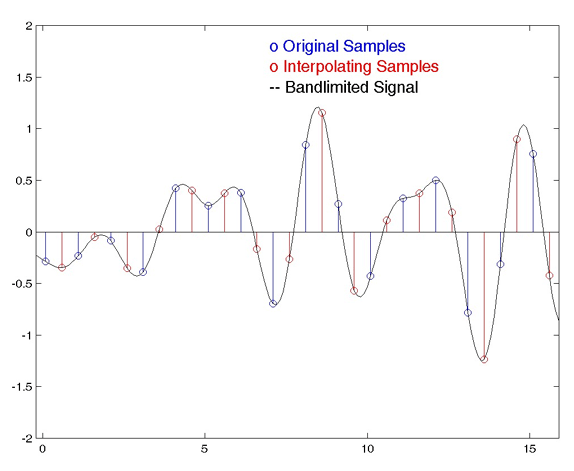
The sampled signals are often represented as a serrated ladder, as in the figure above (in red), which appears to be a rough approximation of the original signal. However, this representation is mathematically accurate, and when converted to an analog signal, its graph becomes smooth (blue line in the figure).

The most common misconception is that sampling is a crude process and leads to loss of information. The discrete signal is often represented as a jagged, angular stepped replica of the original perfectly smooth waveform. If you think so, you can assume that the higher the sample rate (and more bits per sample), the smaller the steps and the more accurate the approximation. The digital signal will look more and more like analog form until it takes shape at a sample rate close to infinity.

Similarly, many people who process non-digital signals will look at the image below and say, “Ugh!” It may appear that the discrete signal does not represent the high frequencies of the analog waveform well, or in other words, as the frequency of the sound increases, the sampling quality drops and the frequency response degrades or becomes sensitive to the phase of the input signal.

It just looks like this. These beliefs are wrong!

All signals below the Nyquist frequency (half the sample rate) will be captured perfectly and completely during sampling, and an infinitely high sample rate is not needed for this. Sampling does not affect frequency response or phase. The analog signal can be recovered without loss, as smooth and synchronous as the original.

You can’t argue with the math, but what are the difficulties? The best known is the bandwidth limitation requirement. Signals above the Nyquist frequency should be filtered before sampling to avoid alias distortion. The infamous anti-aliasing filter acts like this filter. The suppression of sampling noise, in practice, may not be perfect, but modern technologies allow you to get very close to the ideal result. And we come to oversampling.

Oversampling

Sample rates above 48 kHz are not relevant for high fidelity audio, but are necessary for some modern technologies. Oversampling (oversampling) is the most significant of them [7].

The idea of ​​oversampling is simple and elegant. You may remember my video “Digital Media. A Guide for Beginner Geeks ”that the high sample rates provide a much larger gap between the highest frequency that we care about (20 kHz) and the Nyquist frequency (half the sample rate). This enables simpler and more robust anti-aliasing filters and improves fidelity. This extra space between 20 kHz and the Nyquist frequency is essentially a buffer for the analog filter.

The figure above shows diagrams from the video “Digital Media. A beginner’s guide illustrating the transition bandwidth for a DAC or ADC at 48 kHz (left) and 96 kHz (right).

This is only half the battle because digital filters have fewer practical limitations than analog filters and we can complete the smoothing with greater precision and efficiency. The dry high-frequency signal passes through a digital anti-aliasing filter, which has no problem placing the filter’s transition band in tight spaces. Once the straightening is complete, the additional discrete sections in the cushioning space are simply folded back. The oversampled signal is reproduced in reverse.

This means that signals with a low sample rate (44.1 kHz or 48 kHz) may have the same fidelity, smooth response, and low aliasing as signals with a sample rate of 192 kHz or higher, but none of them will appear. . disadvantages (ultrasonic waves causing intermodulation distortion, increased file size). Almost all modern DACs and ADCs oversample at very high speeds, and few people know this because it happens automatically within the device.

DACs and ADCs have not always been able to oversample. Thirty years ago, some recording consoles used high sample rates for sound recording using only analog filters. This high frequency signal was later used to create master records.