Bitrate vs. Video Resolution


Free Download Mp4Gain
picture

Bitrate vs. Video Resolution

Bitrate vs. Video Resolution

which is more important for streaming video?

Bitrate vs. Video Resolution

Many people have this confusion because these two factors can have a profound effect on the encoder’s output.

How do you think it should be chosen?

Choose 1080p or 720p?

Choose 5mbps or 3mbps?

Choose 1080p@5mbps or 1080p@7mbps?

If you don’t know what to choose, great. That’s why I wrote this article: to explain the relationship between bitrate and resolution in simple terms, and to help you choose the right encoder settings.

Let’s start by understanding bitrate.

What is the bitrate of the video?

Video bitrate or bit rate refers to the number of bits transmitted per second of video information. The code rate unit is usually:

kbps or kilobits per second

mbps or megabits per second

When you are compressing video, you usually need to set the video compression software not to exceed a certain bit rate.

For example, if you set the video compression software’s bitrate to 3mbps, the software will compress the video at 3mb per second (on average) and stream it to the decoder or player. This is the code rate.

When you talk about bitrate, you’re really talking about: the relationship between video compression and video quality loss. The more you compress, the lower the quality of the video (and this is not always the case, as we will see later).

When compressing video, the following algorithms can be used for speed control, these are:

CBR (Constant Bitrate) – It is best to keep the bitrate constant if video quality is lost.

VBR (Variable Bitrate) – Maintains consistent video quality, allowing for bitrate fluctuations.

Capped VBR – Keep the video quality as constant as possible, allowing the bitrate to fluctuate within a set range.

This article will not discuss the above frequency control methods in detail. Friends who want to know more, welcome to read: Understanding Frequency Control Modes: What are CBR, VBR, CRF and Capped-CRF?

So when we talk about the bit rate, we should pay attention to the following points:

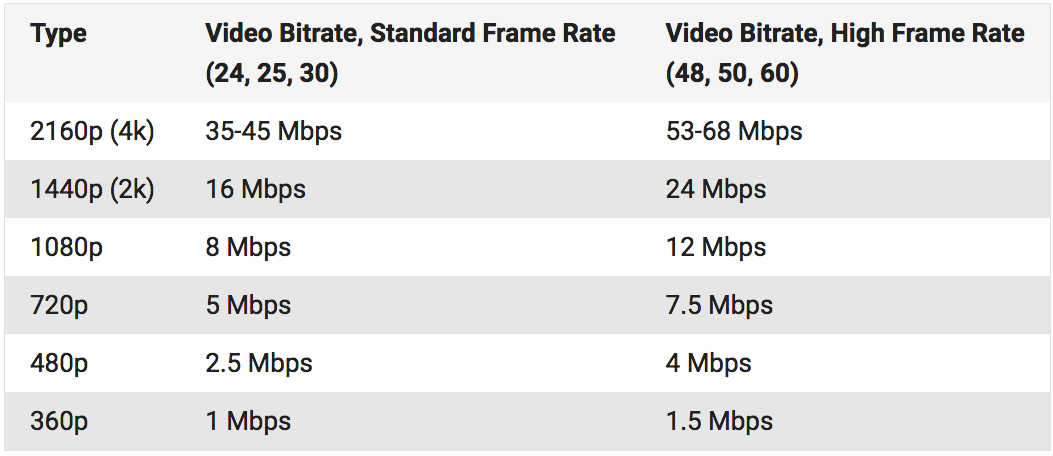
The quality of high bitrate video is usually higher than that of low bitrate video. I say generally, because the video quality reaches a certain point where it will no longer improve (no matter how much the bitrate increases).

The code rate refers to bits (bit) instead of bytes (byte).

The bit rate alone does not determine the quality of the video, you have to take into account factors like resolution, frame rate, screen size, etc.

Codecs for video compression: H.264/AVC, HEVC, VP9, ​​AV1? If you change the video codec and its settings (or encoding tools), the same bitrate will provide a very different video quality.



Free Download Mp4Gain
picture


Mp4Gain Main Window
picture


Mp4Gain Features
picture


Free Download Mp4Gain
picture

Bit rate

Bit rate

Bitrate

Bit rate refers to the number of bits (bit) transmitted per unit of time, in bps (bit per second).

bit rate

Bit rate is also known as “binary bit rate”, commonly known as “code rate”. Indicates the number of bits transmitted per unit of time. It is used to measure the transmission speed of digital information, often written as bit/sec. According to the number of bits occupied by each image storage frame and the transmission bit rate, the digital image information transmission speed can be calculated [1].
In modern digital communication, the transmission volume of digitized video and other information is large, so it is often measured in kilobits per second or megabits per second, which are written as kbit/sec (or kbps) and Mbit/sec. (or Mbps respectively). ). For example, the amount of information digitized from an ordinary color TV signal can reach 216 Mbit/sec. A good digital broadcast channel can transmit dozens of color TV programs, and its capacity can reach several gigabits or gigabits per second (written as Gbit/sec or Gbps) [1] .
Bitrate is often used to measure the quality of video files.
flexibility edit stream
Because each network is unique and each access line has different conditions (such as length, attenuation, crosstalk environment, etc.), access lines from different telephone companies must support different data rates. For ADSL and VDSL modems, it is best to set the data rate to one of many possible data rates. For example, DMT-based ADSL and VDSL can theoretically change the tariff at fine intervals, and CAP-based RADSL (Rate Adaptive ADSL) also provides some flexibility in tariff configuration [2].
However, telephone companies may want to limit xDSL service to a small set of rates sufficient to provide a variety of services. If a limited set of tariffs can be adapted to a wide range of services, then the management of the services in this case is simpler than in the case of variable tariffs. Telephone companies want the choice of modem speed to be under the control of the network, not the user [2] .
In this mode, the selection of the transmission rate set of the xDSL network must be prudent. In this case, there is a possibility that two adjacent systems receive traffic at very different rates and the system must be able to handle such a situation. The other model, the “best match” approach using adaptive rate ADSL (similar to a voiceband modem), is more beneficial to new network operators and Internet Service Providers (ISPs) [2] .
Transmission control method
Most bit rate control schemes consist of two parts. Part of the encoded bit stream output by the encoder is fed into a buffer. For a constant bitrate channel, the data in the buffer is fetched at a constant rate, and if the buffer is large enough, the bitrate variation caused by the MPEG picture type, etc. can be smoothed out. This is necessary for both constant bit rate transmission and variable bit rate transmission in general. However, in practice, the buffer size is always limited. The buffering process will bring a delay to the system, and this delay is proportional to the size of the buffer. Latency is often a serious issue for real-time image communication, so buffers should be kept as small as possible. That is, long-term fluctuations in bitrate due to changes in scene content or changes, etc. they cannot be softened in this way, so another part is needed. This is to send some measure of the output bitrate to the encoder to control the encoding process, thus changing the output bitrate [3] .

Quality (bit rate)

Quality (bit rate)

Bit Rate

In multimedia technology, quality is often used to judge the effect of audio, and quality here is actually bitrate.

Bit Rate

1. Introduction
2 sound control
3 encoding mode
Introductionedit transmission
The term quality is widely used.
In multimedia technology, quality is often used to judge the effect of audio, and quality here is actually bitrate.
On WINDOWS it is called “bit rate” and on some players it is described as ” bit rate “.
Quality refers to the bit rate at which digital sound is converted from analog to digital format. The higher the bitrate, the better the quality of the restored sound.
sound control edit stream
16 Kbps = phone quality
24 Kbps = increase phone quality, shortwave transmission, longwave transmission, European standard medium wave transmission
40 Kbps = American standard medium wave transmission
56Kbps=Voice
64 Kbps = boost voice (best bitrate setting for cell phone ringtones, best setting for cell phone mono MP3 players)
112 Kbps = FM stereo broadcast FM 128 Kbps = tape (best setting for mobile phone stereo MP3 player, best setting for low-end MP3 player)
160 Kbps = HIFI high fidelity (best setting for mid to high end MP3 players)
192Kbps=CD (best setting for high-end MP3 players)
256Kbps=Studio Music Studio (for music enthusiasts)
In fact, with the advancement of technology, the quality of music is also getting higher and higher, the highest quality of MP3 is 320Kbps, but some formats can achieve higher sound quality.
For example, the emerging APE audio format can provide real audiophile level lossless sound quality and smaller volume than WAV format, and its quality is usually 550kbps-950kbps.
encoding modeedit stream
VBR (Variable Bitrate) Dynamic Bitrate means there is no fixed bitrate. The compression software immediately determines which bitrate to use based on the audio data being compressed. This is a method that takes quality as a premise and takes file size into account The recommended encoding mode;
ABR Average Bit Rate (Average Bit Rate) is an interpolation parameter of VBR. LAME created this encoding mode in response to the low file volume ratio of CBR and the variable size of files generated by VBR. Within the specified file size, ABR takes every 50 frames (about 1 second for 30 frames) as a segment. High-frequency and insensitive frequencies use relatively low traffic, and low-frequency and large dynamic performance use high traffic, which can be used as VBR and CBR, a compromise option.
CBR (constant bitrate), constant bitrate means the file has one bitrate from start to finish. Compared to VBR and ABR, the compressed file size is very large and the sound quality will not improve significantly compared to VBR and ABR.

What if the bit rate is high?

What if the bit rate is high?

Bitrate

High bit rate = a lot of data can be transferred per second

bitrate
.

Sounds like a good thing.

The network cameras managed by my company send the captured video data to a personal computer for viewing over the network.

If you want to see the video, you want to see a beautiful video that moves sharply with high image quality, right?
However, the amount of data in a beautiful image is surprisingly large …

In such case, if the bit rate is high, a lot of data can be transferred per second, so you can deliver beautiful images to your computer. On the other hand, if the bit rate is low, the amount of data that can be transferred per second is small, resulting in choppy and poor quality moving images.

“Then the bitrate should be high anyway!”

… That is not the case.
In fact, in a surveillance camera system, there are the following disadvantages to increasing the bit rate.

Disadvantages of high bit rate!
Transferring a large amount of data increases the load on the network line and equipment.

There is an upper limit to the bit rate that can be transferred depending on the network environment. This depends on the LAN cable you are using, the performance of the hub, etc., but it will be difficult so I will skip it. Just think that there is an upper limit for the bit rate depending on the environment.

“So what happens if it exceeds the upper limit?”

In the case of video from a network camera, the connection often drops. If you exceed the upper limit, the line will be punctured and you will lose connection with the camera. The image may be interrupted for a moment, but if it is too bad, you will not be able to see the image from the camera at all.
If this happens, it will be very troublesome …

Also, if the bit rate is high, a large amount of data will reach the browsing computer and the recording NVR. When a lot of data arrives, the computer or NVR will not be able to process the data, which may cause abnormal operation (reboot, etc.).

Therefore, the System Kay NVR defines the maximum bit rate that can be supported as a specification. The bit rate that the entire NVR can process such as performance and bandwidth limit per channel are described in the specifications.

Video distribution Advantages and disadvantages of a high bit rate

Video distribution Advantages and disadvantages of a high bit rate

bit rate

The video bit rate is calculated separately for video and audio and added together.

Bit Rate

The sum of the video and audio bit rates is called the oval bit rate (total bit rate).

Expressed in the formula
Oval bit rate = video bit rate + audio bit rate

Will be.

High bit rate benefits
The higher the bit rate, the better the picture and sound quality, and the lower the bit rate, the worse the picture and sound quality.
However, note that if the video bit rate is high, there are cases where the video bit rate is high and the image quality is good, but the audio bit rate is low and the sound quality is poor. On the contrary, there may be cases where the image quality is poor and the sound quality is good.

High bit rate video basically has the advantage of improving image quality and sound quality, but you also need to understand the disadvantages.

Disadvantages of high bit rate
The higher the bitrate, the more net bandwidth is consumed and the more playback load is applied.
For example, increasing the bit rate from 500 Kbps to 1000 Kbps doubles the net bandwidth usage and doubles the playback load or more.

It is easy to increase the bit rate for high image quality, but if you increase the bit rate too much, the CPU will become overloaded and you may not be able to reproduce it well, so be careful.

Especially when the radio wave of the smartphone is bad or the band is limited, it may not play smoothly at a high bit rate.

Even if the bit rate is increased, the image quality and sound quality do not improve above a certain level.
In fact, increasing the bit rate does not mean that the image quality and sound quality will increase without an upper limit.

For example, if the image quality of the original video material shot by the camera is 100, even if it is converted at a high bit rate by video editing software or encoding software, a high-quality video with a quality of 100 or more image of the original video will be created. You can not.

No matter how high the bit rate is, if the quality of the original video material is poor, the quality will not be better.

Let’s think about the optimal bitrate for each video.
When creating a video, you need to think about how to set the optimal codec, resolution, frame rate, and bit rate yourself.

Then
The higher the bit rate, the better the picture and sound quality.
If the bit rate is high, the network and the playback terminal will be overloaded.
Even if the bit rate is increased, the picture quality and sound quality should not be higher than that of the original video material.
It is useful to remember that.

Also, almost all video editing software, encoding software, YouTube, and other free video publishing services commonly used when creating and publishing videos have preset settings with preset codecs, resolutions, frame rates, and bit rates.

However, the image quality of the presets is not always optimal, so use this bit rate knowledge when you need to make fine adjustments.

What is bit rate and what is it for?

What is bit rate and what is it for?

bitrate

If you become familiar with the term, you can understand that there is nothing supernatural about it.

Bit-Rate

This value can be found in multi-server settings when people are streaming video and audio.

For example, when making desktop and online converters. To understand how to change the video and audio bitrate, you need to go to a specialized site, where, in principle, more information on how to do it.

Also, it should be borne in mind that you can not do without a special program. It should be used 100 percent and only after that will it be possible to see the result on whether the bit rate has been changed in the video or audio file.

There really is a lot that you can achieve with modern software. What features of the term should I pay attention to? It should be noted that the bit rate is translated exactly as the width of the stream. Basically, it is the amount of information that is transmitted or processed per second of time.

This concept is more related to the multimedia sphere, for example, the video information that can be seen on the screen in one second – this is the bit rate. Among the characteristics are the following: To measure bit rate, one must understand what a kilobit per second is. This is the transmitted information that can be viewed. Thanks to the VideoMaster program, the kilobit can be tracked visually.

A video clip where the low bit rate is one that is low quality in digital format. Also, you can see how the video looks blurry, dull, and pixelated during streaming. At a high quality bit rate, you can see a wide color gamut, as well as hear a high enough quality sound, because the music gamut will be really distinguishable and clear. Varieties include: a constant type of bitrate, variable, averaged.

All of them can be viewed using the VideoMaster program, which directly adjusts the video to every second. Bitrate can be used in the program in any specific situation to remove one second or another from the video, or leave it.

What is the bit rate?

What is the bit rate?

What is bit rate

What is the bit rate? It is difficult to do without this term when we talk about audio and video files. It is not difficult to understand what you need to see behind this term. Even someone who is far from any modern technology.

What is bit rate

First, you need to understand that there is a general principle for compressing and encoding files. For example, MP3 encoding assumes that the original audio file must be cut into chunks, the length of which will be 50 milliseconds. Each of these fragments is analyzed separately to break down into harmonics.

A person perceives the sound with the ear so that it throws out those harmonics that it perceives worse. That is, quieter sounds, when the loudest are heard, you do not perceive them. Therefore, due to the inertia of hearing, a person makes masked sounds. This means that you will not be able to hear any short-term signals that will pass in a fraction of a second, for example for a clap.

Information about the harmonics remaining after filtering is recorded in an MP3 file. It is significantly smaller than the original WAV. A WAV file is a complete repository of information about the original sound, which is digitized and quantized at 44 kHz. The resulting information is stored on normal audio CDs.

When playback is in progress, reverse conversion is performed. That is, the remaining harmonics are transformed back into a sound wave. Some of the information about the original signal is lost because the sound does not match the original. Since insignificant sounds were removed, the human ear does not distinguish the signal from the original. The same as it was before packing in MP3.

This means that the bit rate should be called the amount of information per unit of time. The essence of the bit rate is how much information we can spend on each second of recording. The smaller it is, the smaller the size of the files of the same length in time. This means that it will be necessary to eliminate a greater number of “extra” harmonics.

The higher the bit rate, the larger the file size and the higher its quality. For bit rates, units of measure are provided: kilobits per second (Kbps) and megabits per second (Mbps). The MP3 audio compression algorithm is mainly used with 128 kbps compression.

There are also two types: constants and variables. For example, in video compression, when using a constant bit rate, a fixed amount of data is used to encode one second of a movie. With a variable bit rate, depending on the scene in the movie, the codec sets its own bit rate value.