Understanding Video Bitrates and Codecs


Free Download Mp4Gain
picture

Understanding Video Bitrates and Codecs
Video Bitrates and Codecs

Video bitrate and codec are two important concepts that every video creator should understand. In this article, I will explain what they are, how they work together, and how to choose the right settings for your videos.

What is Video Bitrate?

Video bitrate is the amount of data that is encoded per second in a video file. It is measured in bits per second (bps), or kilobits per second (kbps) or megabits per second (Mbps).

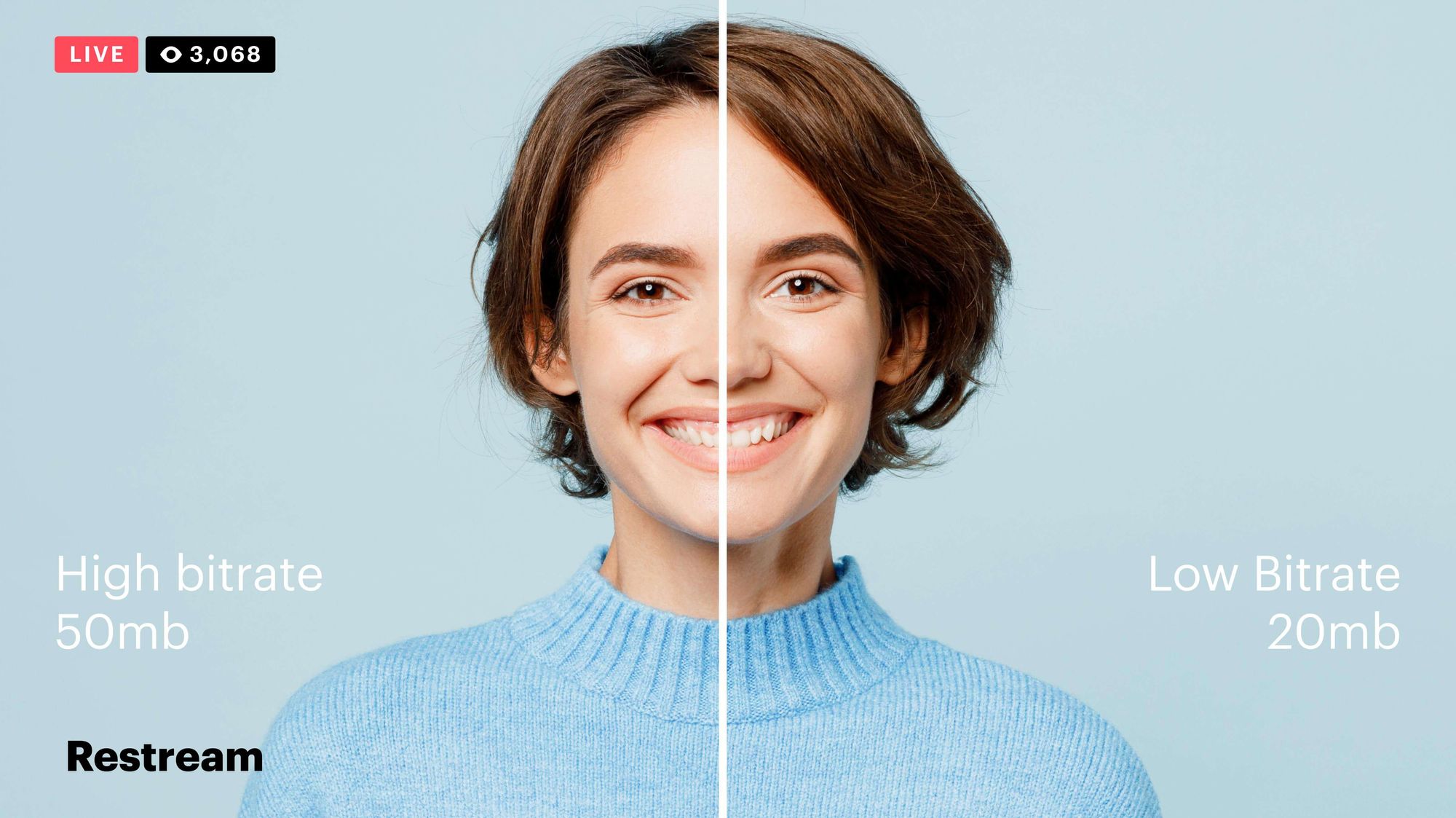
The higher the bitrate, the more data is encoded, and the higher the quality of the video will be. However, a higher bitrate also means a larger file size.

What is a Video Codec?

A video codec is a software program that compresses and decompresses video data. It is responsible for encoding the video data into a format that can be stored or streamed, and then decoding it back into its original form when it is played back.

There are many different video codecs available, each with its own strengths and weaknesses. Some of the most popular video codecs include:

H.264: This is the most widely used video codec. It is a lossy codec, which means that some data is lost during the compression process. However, H.264 is very efficient, and it can produce high-quality video with a relatively small file size.
H.265: This is a newer codec that is designed to be more efficient than H.264. It can produce the same quality of video with a smaller file size.
VP9: This is a free and open-source video codec that is developed by Google. It is similar to H.265 in terms of efficiency, but it is not as widely supported.

How Do Bitrate and Codecs Work Together?

Bitrate and codec work together to determine the quality and file size of a video. The higher the bitrate, the more data is encoded, and the higher the quality of the video will be. However, a higher bitrate also means a larger file size.

The codec determines how the video data is compressed. Some codecs are more efficient than others, and they can produce the same quality of video with a smaller file size.

How to Choose the Right Bitrate and Codec for Your Videos

The right bitrate and codec for your videos will depend on a number of factors, including:

The intended use of the video. If you are uploading your video to YouTube, you will need to choose a bitrate that is compatible with YouTube’s streaming requirements.
The target audience. If you are creating a video for mobile devices, you will need to choose a lower bitrate than if you are creating a video for high-definition televisions.
The file size. If you are limited by the file size, you will need to choose a lower bitrate.

Final Words About Video Bitrates and Codecs

Video bitrate and codec are two important concepts that every video creator should understand. By understanding how they work together, you can choose the right settings for your videos to ensure that they are both high quality and have a reasonable file size.

I hope this article has been helpful. If you have any questions, please feel free to leave a comment below.

Bonus Tips

If you are not sure what bitrate or codec to use, you can always start with a high bitrate and then lower it until you find a balance between quality and file size that you are happy with.
You can use a video bitrate calculator to help you determine the right bitrate for your videos.
There are many different video codecs available, so it is important to do some research to find the best codec for your needs.


Free Download Mp4Gain
picture


Mp4Gain Main Window
picture


Mp4Gain Features
picture


Free Download Mp4Gain
picture

MP4 Bitrate

MP4 Bitrate

MP4 Bitrate
MP4 Bitrate
MP4 Bitrate
MP4 Bitrate

What is MP4 Bitrate?

MP4 is a popular video format that is widely used in digital media. It uses a specific compression algorithm to compress video files to make them smaller and easier to share. The bitrate of an MP4 video refers to the amount of data that is used to represent each second of the video. It is typically measured in kilobits per second (kbps) or megabits per second (Mbps). A higher bitrate means that the video will have more data and will be of higher quality, but the file size will also be larger.

Why is MP4 Bitrate Important?

The bitrate of an MP4 video is important because it affects the quality and size of the video file. If the bitrate is too low, the video may appear pixelated or blurry. On the other hand, if the bitrate is too high, the file size will be larger, and it may take longer to upload or download the video. In addition, a higher bitrate requires more bandwidth to stream the video, which may be an issue for viewers with slower internet connections.

How to Choose the Right MP4 Bitrate

When choosing the bitrate for your MP4 video, you should consider the intended use of the video, the resolution of the video, and the file size. For example, a video that is intended to be viewed on a large screen should have a higher bitrate than a video that will be viewed on a smaller screen. Similarly, a video that has a higher resolution will require a higher bitrate to maintain the same quality as a lower resolution video.

As a general rule of thumb, a bitrate of 5-10 Mbps is suitable for 1080p HD video, while a bitrate of 2-5 Mbps is suitable for 720p HD video. For lower resolution videos, such as 480p or 360p, a bitrate of 1-2 Mbps may be sufficient. It’s also important to consider the file size of the video, as larger files will take longer to upload or download and may be more difficult to share.

How to Change MP4 Bitrate

To change the bitrate of an MP4 video, you will need to use video editing software that allows you to adjust the bitrate settings. There are many different video editing software options available, including Adobe Premiere Pro, Final Cut Pro, and Handbrake. These programs allow you to adjust the bitrate settings and other video parameters to optimize the video for your specific needs.

MP4 Bitrate FAQ

What is the maximum bitrate for MP4 videos?

The maximum bitrate for MP4 videos is 10 Mbps. However, this may vary depending on the specific device or platform where the video will be played.

What is the minimum bitrate for MP4 videos?

The minimum bitrate for MP4 videos will depend on the intended use of the video and the resolution of the video. In general, a bitrate of at least 1 Mbps is recommended for standard definition video, while a bitrate of at least 2 Mbps is recommended for high definition video.

What is the recommended bitrate for streaming MP4 videos?

The recommended bitrate for streaming MP4 videos will depend on the resolution of the video and the available bandwidth. As a general rule of thumb, a bitrate of 5-10 Mbps is suitable for 1080p HD video, while a bitrate of 2-5 Mbps is suitable for 720p HD video. For lower resolution videos, such as 480p or 360p, a bitrate of 1-2 Mbps may be sufficient.

However, it’s important to note that these are just general guidelines, and the optimal bitrate will also depend on factors such as the complexity of the video content, the encoding settings used, and the target audience’s viewing preferences.

For example, videos with fast-moving scenes or complex visual effects may require a higher bitrate to maintain a high level of image quality and avoid compression artifacts, while simpler videos with less motion may be able to use a lower bitrate without sacrificing quality.

Additionally, the target audience’s internet connection speed will also affect the recommended bitrate. For viewers with slower internet connections, a lower bitrate may be necessary to ensure that the video plays smoothly without buffering or interruptions.

What are the advantages of using a higher bitrate?

Using a higher bitrate can result in higher quality video with more detail and fewer compression artifacts. This is because a higher bitrate allows for more data to be transmitted and encoded per second, resulting in a more faithful representation of the original video source.

A higher bitrate can also be beneficial for videos with a lot of movement or detail, as it allows the encoding algorithm to capture more information and produce a more detailed image.

However, it’s important to note that using a higher bitrate will also result in larger file sizes and require more bandwidth to stream or download. This can be a disadvantage for viewers with slower internet connections or limited data plans.

What are the disadvantages of using a lower bitrate?

Using a lower bitrate can result in lower quality video with more compression artifacts, such as blurring or pixelation. This is because a lower bitrate means that less data is being transmitted and encoded per second, resulting in a loss of detail and fidelity.

Lower bitrates may also result in a lower overall resolution or frame rate, which can further degrade the quality of the video.

However, using a lower bitrate can also have benefits, such as smaller file sizes and reduced bandwidth requirements. This can be advantageous for viewers with slower internet connections or limited data plans.

Can the bitrate of an MP4 video be adjusted after it’s been encoded?

Yes, it is possible to adjust the bitrate of an MP4 video after it has been encoded. This can be done using video editing software or specialized tools designed for this purpose, such as MP4Gain.

However, it’s important to note that changing the bitrate of a video after it has been encoded can result in a loss of quality or introduce additional compression artifacts. For best results, it’s recommended to encode the video at the desired bitrate from the beginning.

Conclusion

In summary, the bitrate of an MP4 video is an important factor that can affect its quality, file size, and streaming performance. The optimal bitrate will depend on factors such as the resolution of the video, the complexity of the content, and the available bandwidth.

Using a higher bitrate can result in higher quality video with more detail and fewer compression artifacts, while using a lower bitrate can result in smaller file sizes and reduced bandwidth requirements.

If you need to adjust the bitrate of an MP4 video, it is possible to do so using specialized tools such as MP4Gain. However, it’s recommended to encode the video at the desired bitrate from the beginning for best results.

Overall, understanding how bitrate affects MP4 video quality can help you create and deliver video content that meets your needs and those of your audience.

Bitrate vs. Video Resolution

Bitrate vs. Video Resolution

Bitrate vs. Video Resolution

which is more important for streaming video?

Bitrate vs. Video Resolution

Many people have this confusion because these two factors can have a profound effect on the encoder’s output.

How do you think it should be chosen?

Choose 1080p or 720p?

Choose 5mbps or 3mbps?

Choose 1080p@5mbps or 1080p@7mbps?

If you don’t know what to choose, great. That’s why I wrote this article: to explain the relationship between bitrate and resolution in simple terms, and to help you choose the right encoder settings.

Let’s start by understanding bitrate.

What is the bitrate of the video?

Video bitrate or bit rate refers to the number of bits transmitted per second of video information. The code rate unit is usually:

kbps or kilobits per second

mbps or megabits per second

When you are compressing video, you usually need to set the video compression software not to exceed a certain bit rate.

For example, if you set the video compression software’s bitrate to 3mbps, the software will compress the video at 3mb per second (on average) and stream it to the decoder or player. This is the code rate.

When you talk about bitrate, you’re really talking about: the relationship between video compression and video quality loss. The more you compress, the lower the quality of the video (and this is not always the case, as we will see later).

When compressing video, the following algorithms can be used for speed control, these are:

CBR (Constant Bitrate) – It is best to keep the bitrate constant if video quality is lost.

VBR (Variable Bitrate) – Maintains consistent video quality, allowing for bitrate fluctuations.

Capped VBR – Keep the video quality as constant as possible, allowing the bitrate to fluctuate within a set range.

This article will not discuss the above frequency control methods in detail. Friends who want to know more, welcome to read: Understanding Frequency Control Modes: What are CBR, VBR, CRF and Capped-CRF?

So when we talk about the bit rate, we should pay attention to the following points:

The quality of high bitrate video is usually higher than that of low bitrate video. I say generally, because the video quality reaches a certain point where it will no longer improve (no matter how much the bitrate increases).

The code rate refers to bits (bit) instead of bytes (byte).

The bit rate alone does not determine the quality of the video, you have to take into account factors like resolution, frame rate, screen size, etc.

Codecs for video compression: H.264/AVC, HEVC, VP9, ​​AV1? If you change the video codec and its settings (or encoding tools), the same bitrate will provide a very different video quality.

What is bitrate in a video? | Improve QUALITY

Video Bitrate

Bitrate is, without a doubt, one of the main characteristics that determine the quality of a video.

I’m glad you made it this far to continue learning about video. If you still don’t know about video or editing, remember that you can learn the basics with my video courses (among others).

bit rate

What is video bitrate?

The bitrate or bit rate is the amount of information per second that the video has. It is measured in megabits per second and is directly proportional to its quality.

Generally, we tend to confuse the size of the video with its quality, thinking that 4k size is the video that offers the highest quality. However, this is flatly incorrect.

A high bitrate offers quality: Size VS Quality

Continuing with the topic I was talking about, it is very common for videos with 4k (at least those from professional cameras) have a higher bitrate. This is what makes the video look better quality, mainly, regardless of whether the video is larger or smaller.

How do you notice the difference between a high bitrate and a less high one?

The bitrate tends to show significant differences not simply when recording, but when editing. As I have already told you, with a bitrate of 10-15 mbps / s (at 25 fps) you have more than enough for most jobs. However, and if you are very exquisite, you may want to use a higher bitrate to have more margin for error when correcting and color grading. By the way, if you are interested in learning about color correction and color grading, check out my course.

With a higher bitrate you will notice the following differences than with a lower one:

Sharpness increase.

Superior ability to edit color without the appearance of banding or other unwanted disturbances.
Greater file weight (the higher the bitrate, the larger the file occupies).
However, this is not to say that it will be noticeable for most jobs. If you work in events, I assure you that you will not have a problem.

Bitrate types

If you are one of those who want to know more about everything you study, you can stay and delve deeper with me.

There are two types of bitrate, the constant bitrate and the variable bitrate.

CBR: this is the bitrate that always, whatever is on the plane, the exact same transfer rate will be used. The good news is that a video recorded at a specific size and bitrate will always occupy the same amount. However, it is not the most efficient.
VBR: this is the variable bitrate, and it consists in that a different bitrate will be applied depending on the information that is being recorded. Obviously, if you are recording a super dark black background, you don’t need as much information as if you are recording a scene with a very wide color gamut and a histogram that is padded from blacks to whites. In this case, the bit transfer rate will vary according to the needs of what is being recorded. Of course, we will try to keep an average (the chosen one).
How to know the bitrate of a video, both on Windows and Mac?
I am going to explain to you, both for Windows and Mac, how to find out the bitrate that a video clip has. This is very good because you can see that a video loses quality the more compressed it is. And one of the ways to compress it is by lowering the bitrate.

Windows: right-click on the clip> properties> details tab> video section> total bit rate
Mac: you open the video with the quicktime player> while it is playing press cmd + I> data rate
It is important that you pay attention to whether this data is in kbps or in mbps, because the first is 1000 times less than the second (so that you take it into account in case you want to compare looking from two different computers).

When to compress a video by lowering its bitrate?

There are times when you have already finished editing the video and obviously want to compress it. For this I recommend that you learn about codecs and video formats.

Obviously when you compress the video you will lose quality (the bitrate will decrease). This, a priori, should not be noticed in excess if it is a good compression, since you will no longer edit that video.

Of course I am talking about compressing the final file, never the raw ones used to create the video. You always have to lower the bitrate or compress the final file (in case you want to compress) to avoid losing image quality.

Bit rate factor – how does it contribute to video quality?

Bit rate is a very important factor for good video quality. In the camera settings we now find more numbers next to the resolution. The one behind Mbps interests us more now. This is the information about the bit rate.

Video Bit Rate

This number indicates how much information is processed in the video per second. The higher this rate, the better the quality. Of course, the final file the camera produces will increase with the bit rate.

In this way, you can also calculate how much information is available for each frame, that is, each individual image. Suppose you are shooting with 25p and you have an available bit rate of 100 Mbps. That would mean that each image carries 4 Mbps of information. If you shot 50p at the same bit rate, it would only be 2 Mbps per image! The result would be a loss of image quality.

What Is Video Bitrate

Color depth factor – How does it contribute to video quality?

Bottom line: color depth is the maximum number of different color shades that a camera can display. Of course, the same applies to monitors, printers, televisions, etc.

The colors in general in our image consist of additive combinations of the three basic colors red, blue and green.

The gradations in each tone are again given in bits. Videos consist of pixels, that is, square image points. Each of these pixels carries with it certain color information. The higher the bit rate of the color depth, the more different shades of color each pixel can have.

The total number of color tones is calculated by adding 2 to the power of the number of bits; for an 8-bit camera, for example, that would be 256 colors per base color. Now you have to multiply the other two basic colors again to determine the total number of possible color tones. This means that an 8-bit sensor can display 28 * 28 * 28 colors. That’s over 16 million shades!

Thus, a 10-bit camera can display more than 1 billion colors, a 12-bit camera 68 billion colors, and a 14-bit camera even more than 4 billion color combinations.

Summary:

Many users are not fully aware of how bit rate influences video quality.
People usually see numbers next to the name of the format (Mp4, MOV, AVI) and do not know exactly what it is.

Here we have tried to explain that the higher the bit rate, the more colors.
Perhaps you think that speaking of so many millions of colors, and it is enough, but it is not like that. Actually reality has a practically infinite number of color gamut, so to capture it with realism, it is necessary to have as many colors as possible.