What video bitrate is appropriate for video? Part 2


Free Download Mp4Gain
picture

What video bitrate is appropriate for video? Part 2
Video Bitrate
Video Bitrate

Ultra Clear 720P>=1.5M (Standard 1280×720 resolution, minimum 960*540, this and higher resolutions are in MP4 era) [some websites have this minimum requirement to upload]
Video Bitrate
Video Bitrate

Blu-ray 1080P>=2.5M (1920 × 1080 standard resolution) [optimal 4-8M] [220M when the material is stored] [some websites have this higher requirement for uploading] (it is better to use 720P and 1080P when make videos )

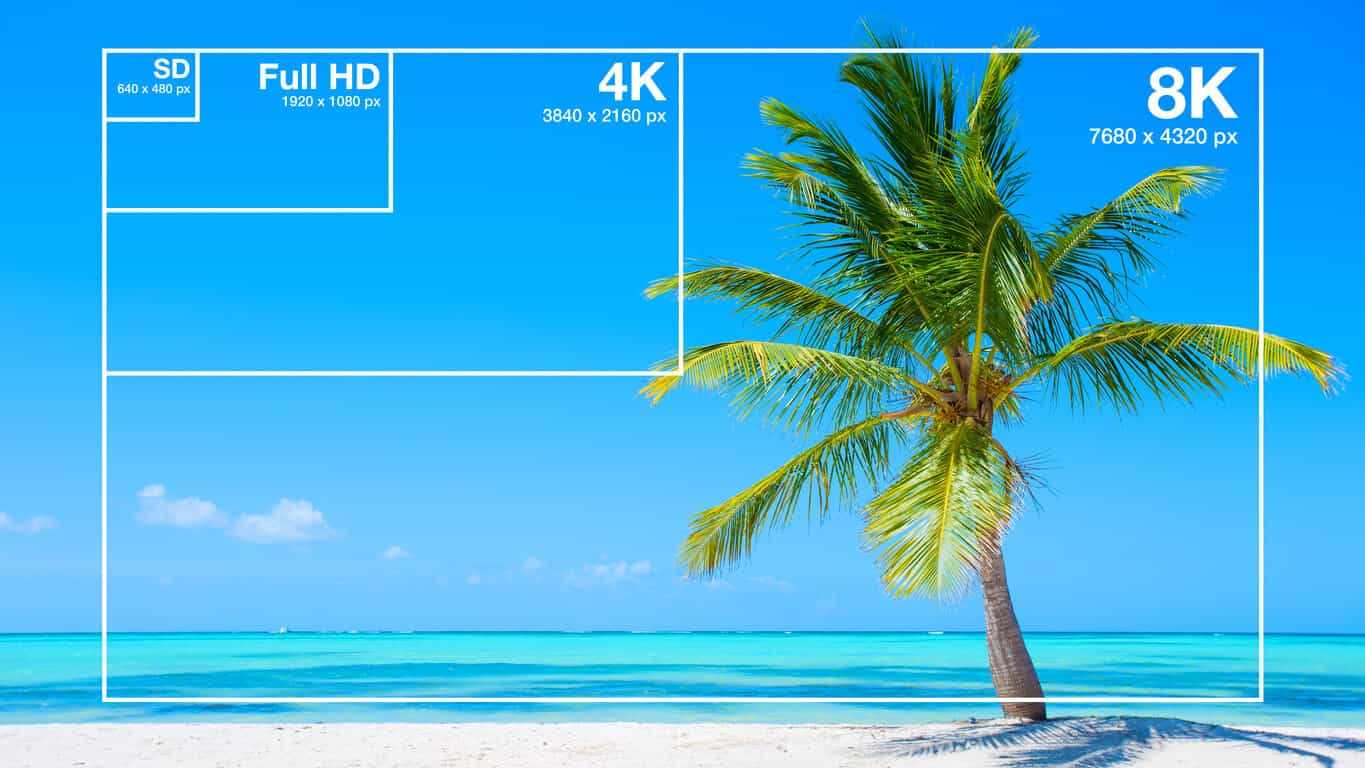
2K=(2048×1080 resolution)
4K=(4096×2160 resolution) [Optimal 8-12M]
The most normative statement is:
reaching 720p resolution is the threshold for high definition signal sources, 720p is called the HD (high definition) standard;
up to 1080p resolution, known as the Full HD (full high definition) Blu-ray standard.
2K refers to 2048 × 1080, and the actual resolution of Quad HD (four times high definition, 2K can be called “four times ultra high definition”) has various specifications, and the ones listed above are just common specifications. ;

4K refers to 3840 × 2160, and the actual resolution of Quad Full HD (four times full HD, 4K is called “four times ultra full HD”) has various specifications, and the ones listed above are just common specifications. .
Blu-ray is the clearest and SD is the worst If your internet speed can’t bring you 1080p, then at least 720p won’t feel blurry to the naked eye.
P refers to the number of horizontal scan lines, and the higher the number, the higher the resolution of the image. The letter P stands for progressive scan.

1. What is the video bitrate?

Video bitrate is the number of bits of video data (color, brightness, and pixels) that are output per second. The unit generally used is kbps.

2. Recommended bitrate for video size and resolution

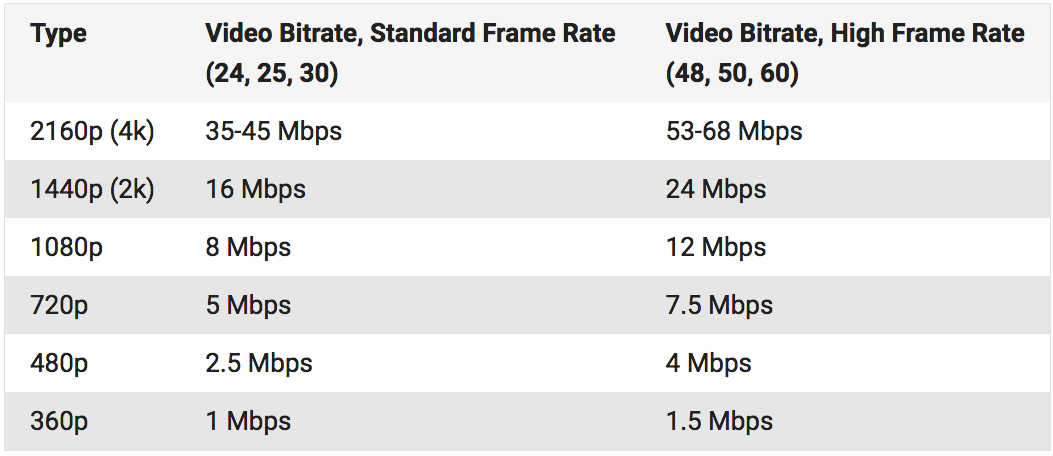
How much video bitrate is appropriate (above H.264 bitrate, 720P, 1080P output bitrate setting)

3. A set of formulas to set the bitrate is shared with you as follows:

How much video bitrate is appropriate (above H.264 bitrate, 720P, 1080P output bitrate setting)

Regarding the two items of “Use the highest rendering quality” and “Process with the maximum depth” when exporting from PR editing software, the effect of image quality is not obvious on the big screen and the output time can increase exponentially depending on the complexity of the track. I also encountered this problem in the morning. I have been there, it is a waste of time and the effect is average. So I usually don’t choose this.


Free Download Mp4Gain
picture


Mp4Gain Main Window
picture


Mp4Gain Features
picture


Free Download Mp4Gain
picture

What video bitrate is appropriate for video?

What video bitrate is appropriate for video?

Video Bit Rate
Video Bit Rate

At present, 720p video recommended minimum bitrate is above, h.264 encoding 2M bitrate is adequate, 1080p is 4M enough
to get a high-quality video, convert it with different bitrates, and then compare the image quality.

Video Bit Rate
Video Bit Rate

The most commonly used are: h.264 encoding, 1080P, 2.5M bit rate or more.
Summary: [h.264 encoding, 2.5M bitrate (up to 4M), maximum 4M bitrate (add 2M to target), most platforms are Blu-ray. 】

1. If the bitrate is higher than the original video, it will not be a bit higher than the original video. When you move, you’ll pick a lower point to compress the file a bit.
2. 1080P 1M bitrate has distortion feeling to watch on computer, and 2M can’t see distortion, you can adjust the bitrate to 4M to get the best.
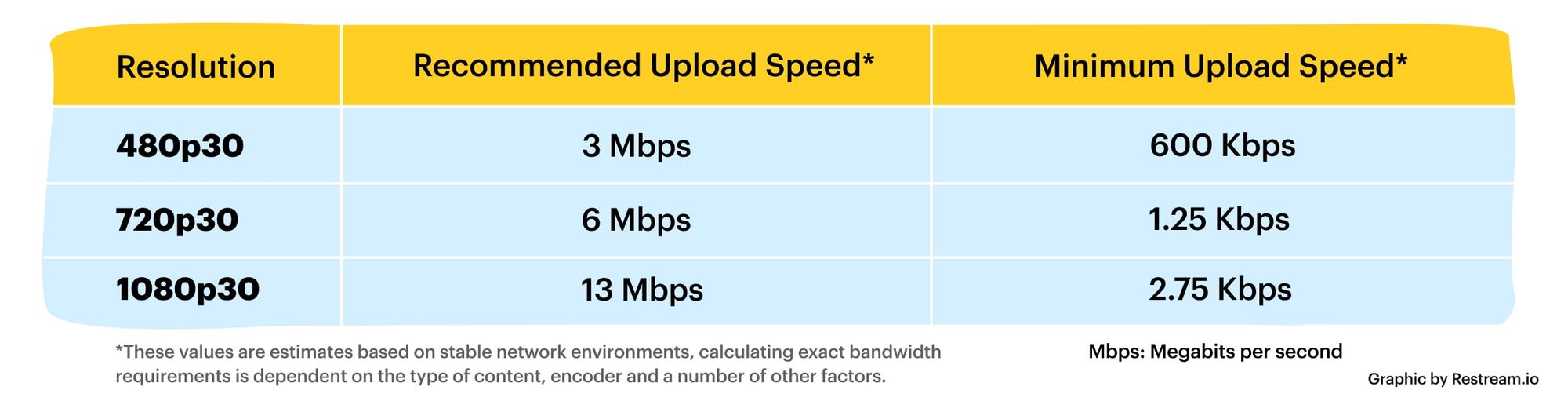
The following are the bitrate upload requirements for a platform:

How much video bitrate is appropriate (above H.264 bitrate, 720P, 1080P output bitrate setting)

How much video bitrate is appropriate (above H.264 bitrate, 720P, 1080P output bitrate setting)

***Normal 240p, 320p SD, 480p HD, 720p Ultra HD, 1080p Full HD (Blu-ray), 2K, 4k Ultra HD ***
Normal 240P (320×240 standard resolution, it was 3GP, this is basically nobody used)
SD 270P<0.8M (360×270 standard resolution, was 3GP, rarely used) [140M when storing 422 materials]

High definition 480P (360P)>=0.8M (standard resolution of 640 × 480, minimum 480 * 360, was 3GP) [480 re-advertising is called high definition, but the normative statement can only be regarded as standard definition]

What if the bit rate is high?

What if the bit rate is high?

Bitrate

High bit rate = a lot of data can be transferred per second

bitrate
.

Sounds like a good thing.

The network cameras managed by my company send the captured video data to a personal computer for viewing over the network.

If you want to see the video, you want to see a beautiful video that moves sharply with high image quality, right?
However, the amount of data in a beautiful image is surprisingly large …

In such case, if the bit rate is high, a lot of data can be transferred per second, so you can deliver beautiful images to your computer. On the other hand, if the bit rate is low, the amount of data that can be transferred per second is small, resulting in choppy and poor quality moving images.

“Then the bitrate should be high anyway!”

… That is not the case.
In fact, in a surveillance camera system, there are the following disadvantages to increasing the bit rate.

Disadvantages of high bit rate!
Transferring a large amount of data increases the load on the network line and equipment.

There is an upper limit to the bit rate that can be transferred depending on the network environment. This depends on the LAN cable you are using, the performance of the hub, etc., but it will be difficult so I will skip it. Just think that there is an upper limit for the bit rate depending on the environment.

“So what happens if it exceeds the upper limit?”

In the case of video from a network camera, the connection often drops. If you exceed the upper limit, the line will be punctured and you will lose connection with the camera. The image may be interrupted for a moment, but if it is too bad, you will not be able to see the image from the camera at all.
If this happens, it will be very troublesome …

Also, if the bit rate is high, a large amount of data will reach the browsing computer and the recording NVR. When a lot of data arrives, the computer or NVR will not be able to process the data, which may cause abnormal operation (reboot, etc.).

Therefore, the System Kay NVR defines the maximum bit rate that can be supported as a specification. The bit rate that the entire NVR can process such as performance and bandwidth limit per channel are described in the specifications.

Video distribution Advantages and disadvantages of a high bit rate

Video distribution Advantages and disadvantages of a high bit rate

bit rate

The video bit rate is calculated separately for video and audio and added together.

Bit Rate

The sum of the video and audio bit rates is called the oval bit rate (total bit rate).

Expressed in the formula
Oval bit rate = video bit rate + audio bit rate

Will be.

High bit rate benefits
The higher the bit rate, the better the picture and sound quality, and the lower the bit rate, the worse the picture and sound quality.
However, note that if the video bit rate is high, there are cases where the video bit rate is high and the image quality is good, but the audio bit rate is low and the sound quality is poor. On the contrary, there may be cases where the image quality is poor and the sound quality is good.

High bit rate video basically has the advantage of improving image quality and sound quality, but you also need to understand the disadvantages.

Disadvantages of high bit rate
The higher the bitrate, the more net bandwidth is consumed and the more playback load is applied.
For example, increasing the bit rate from 500 Kbps to 1000 Kbps doubles the net bandwidth usage and doubles the playback load or more.

It is easy to increase the bit rate for high image quality, but if you increase the bit rate too much, the CPU will become overloaded and you may not be able to reproduce it well, so be careful.

Especially when the radio wave of the smartphone is bad or the band is limited, it may not play smoothly at a high bit rate.

Even if the bit rate is increased, the image quality and sound quality do not improve above a certain level.
In fact, increasing the bit rate does not mean that the image quality and sound quality will increase without an upper limit.

For example, if the image quality of the original video material shot by the camera is 100, even if it is converted at a high bit rate by video editing software or encoding software, a high-quality video with a quality of 100 or more image of the original video will be created. You can not.

No matter how high the bit rate is, if the quality of the original video material is poor, the quality will not be better.

Let’s think about the optimal bitrate for each video.
When creating a video, you need to think about how to set the optimal codec, resolution, frame rate, and bit rate yourself.

Then
The higher the bit rate, the better the picture and sound quality.
If the bit rate is high, the network and the playback terminal will be overloaded.
Even if the bit rate is increased, the picture quality and sound quality should not be higher than that of the original video material.
It is useful to remember that.

Also, almost all video editing software, encoding software, YouTube, and other free video publishing services commonly used when creating and publishing videos have preset settings with preset codecs, resolutions, frame rates, and bit rates.

However, the image quality of the presets is not always optimal, so use this bit rate knowledge when you need to make fine adjustments.

What is the bit rate?

What is the bit rate?

Find a Video's Bitrate in Windows

The bit rate, or as they also say the width of the stream, is the amount of data transmitted or processed in 1 second. The concept mainly applies to multimedia content, for example, video bit rate is nothing more than the amount of video information that is displayed on the screen in one second. To measure the bit rate, the designation “Kbit / s (kbps)” is used, that is, kilobits per second, less frequently Mbit / s, and so on. The more information that is transmitted during a specific period of time, the higher the quality of the image.

Video Bitrate

When people say “low bit rate video” they are generally referring to low quality video. Blur, opacity, and pixelation are characteristic features of such video, while high-bit-rate video has a detailed image with a rich color gamut. Like video, audio also comes with low and high bit rates. Music with a low bit rate loses in the frequency range, words and chords become less distinguishable, and itself takes on an unnatural sound, as if it were an electronic sound.

Bit rate types

It is not enough to understand what the video or audio bit rate is. To successfully work on programs for editing and converting multimedia content, you need to know what types of bit rates exist. These are constant, variable, and average, and each of them can be used in a specific situation.

Constant bit rate

Constant refers to a bit rate that does not change throughout the file, providing an accurate estimate of the size of the output material. On the other hand, it is not very suitable for multimedia with dynamically variable audio and video streams, as it does not provide an optimal balance of size and quality. Constant bit rate is mainly used at home level, as well as when processing files with relatively constant picture and sound characteristics.

Variable bit rate

In files with variable bitrate, the latter is changed by the codec for each frame according to its characteristics. For example, in frames that are not very informative and easy to encode, the video bit rate is lowered, which saves space, and this saving can differ significantly. Variable bit rate technology is often used to achieve the best quality / size ratio. The downside of this method is the unpredictability of the final size of the media file.

Average bit rate

A more flexible option is the averaged bitrate, which is a hybrid of the first and second types. Unlike Variable Bitrate, by choosing Average Bitrate the codec can only work within the user defined range. Professionals use this method when creating large projects, allowing you to achieve high-quality encoding with a relatively small file size. The precision of calculating the size is much higher.

How to find out the bitrate of the file

Novice users are often interested in how to find out the video bit rate and if special programs are needed for this. With few exceptions, it is not necessary to use third-party tools for these purposes, since the bit rate of the file can be obtained by the operating system itself. Right-click on the video file and select “Properties” from the menu. Then switch to the “Details” tab in the window that opens and look for the item “Data transfer rate”. This will be the bitrate of the video. In the case of audio files, the item will be named “Bitrate”. If the required information is missing from the properties, for example in the case of MKV files, use the MediaInfo utility.

What bit rate value to set

But much more relevant is the question of what bit rate should be set for a video when creating or converting it. It will not be possible to answer it unequivocally, it all depends on the situation and the purpose of the content. If you focus on average values, you should configure 2.5-5 Mbit / s for video and approximately 192 kbit / s for audio. When choosing, you should also consider the video format. Therefore, for 1920 x 1080 SDR video, the bit rate is better to set 8 and 12 mbps (60 frames / s), and for HDR video with the same resolution – 10 and 15 mbps, respectively.

What is the bit rate?

Video Bitrate

Bit rate measures the speed at which information can be transmitted between two locations. The standard unit for this speed is “bits per second”, but a kilo or mega value is often prepended to indicate the high speeds of modern digital technology. Communication technology measures speed as a function of bit rate, especially on the Internet. The transfer rate indicates how fast the data can be downloaded. This measure is also widely used to describe audio and video. higher rates mean higher quality.

Video bitrates

In its simplest form, bit rate describes how many bits per second are transmitted between two different locations. The higher the rate, the faster information can be exchanged between them. For this reason, the bit rate can be particularly important for communication technologies such as broadband, as it defines how quickly a user can download or upload information.

The standard unit for bit rate is bits per second (bps). However, this measurement is often too small to be practical in modern communication technology, as millions of bits can be transmitted per second. To solve this problem, the device is usually prefixed by a different letter indicating its size. For example, kbit / s means kilobits per second or 1000 bits per second. Megabits per second are written as Mbit / s and represent millions of bits per second.

Bit rate is an important measure for a large number of different areas of computing. Broadband, for example, is often specified as a certain number of Mbit / s, with speeds of around 2 Mbit / s being common. Fiber broadband, which is much faster, can deliver speeds of up to 5 Mbps. This measure also describes the speed of mobile connections such as 3G and Bluetooth.

Audio and video quality are commonly reported in terms of bit rate, with higher rates indicating a higher quality picture or sound. In multimedia, this metric is a quick way to show how much information is stored in each second of recording, so higher rates lead to increased quality. The bit rate can depend on a variety of factors, including whether the information has been compressed.

The standard bit rate for audio is between 100 and 160 kbit / s, while higher quality recordings can reach up to 320 kbit / s. Video speeds can be significantly higher for Blu-ray discs with speeds up to 40 Mbps. Standard DVDs are only about 9 Mbit / s, so there is a difference in quality.

What is bitrate in a video? | Improve QUALITY

Video Bitrate

Bitrate is, without a doubt, one of the main characteristics that determine the quality of a video.

I’m glad you made it this far to continue learning about video. If you still don’t know about video or editing, remember that you can learn the basics with my video courses (among others).

bit rate

What is video bitrate?

The bitrate or bit rate is the amount of information per second that the video has. It is measured in megabits per second and is directly proportional to its quality.

Generally, we tend to confuse the size of the video with its quality, thinking that 4k size is the video that offers the highest quality. However, this is flatly incorrect.

A high bitrate offers quality: Size VS Quality

Continuing with the topic I was talking about, it is very common for videos with 4k (at least those from professional cameras) have a higher bitrate. This is what makes the video look better quality, mainly, regardless of whether the video is larger or smaller.

How do you notice the difference between a high bitrate and a less high one?

The bitrate tends to show significant differences not simply when recording, but when editing. As I have already told you, with a bitrate of 10-15 mbps / s (at 25 fps) you have more than enough for most jobs. However, and if you are very exquisite, you may want to use a higher bitrate to have more margin for error when correcting and color grading. By the way, if you are interested in learning about color correction and color grading, check out my course.

With a higher bitrate you will notice the following differences than with a lower one:

Sharpness increase.

Superior ability to edit color without the appearance of banding or other unwanted disturbances.
Greater file weight (the higher the bitrate, the larger the file occupies).
However, this is not to say that it will be noticeable for most jobs. If you work in events, I assure you that you will not have a problem.

Bitrate types

If you are one of those who want to know more about everything you study, you can stay and delve deeper with me.

There are two types of bitrate, the constant bitrate and the variable bitrate.

CBR: this is the bitrate that always, whatever is on the plane, the exact same transfer rate will be used. The good news is that a video recorded at a specific size and bitrate will always occupy the same amount. However, it is not the most efficient.
VBR: this is the variable bitrate, and it consists in that a different bitrate will be applied depending on the information that is being recorded. Obviously, if you are recording a super dark black background, you don’t need as much information as if you are recording a scene with a very wide color gamut and a histogram that is padded from blacks to whites. In this case, the bit transfer rate will vary according to the needs of what is being recorded. Of course, we will try to keep an average (the chosen one).
How to know the bitrate of a video, both on Windows and Mac?
I am going to explain to you, both for Windows and Mac, how to find out the bitrate that a video clip has. This is very good because you can see that a video loses quality the more compressed it is. And one of the ways to compress it is by lowering the bitrate.

Windows: right-click on the clip> properties> details tab> video section> total bit rate
Mac: you open the video with the quicktime player> while it is playing press cmd + I> data rate
It is important that you pay attention to whether this data is in kbps or in mbps, because the first is 1000 times less than the second (so that you take it into account in case you want to compare looking from two different computers).

When to compress a video by lowering its bitrate?

There are times when you have already finished editing the video and obviously want to compress it. For this I recommend that you learn about codecs and video formats.

Obviously when you compress the video you will lose quality (the bitrate will decrease). This, a priori, should not be noticed in excess if it is a good compression, since you will no longer edit that video.

Of course I am talking about compressing the final file, never the raw ones used to create the video. You always have to lower the bitrate or compress the final file (in case you want to compress) to avoid losing image quality.

Bit rate factor – how does it contribute to video quality?

Bit rate is a very important factor for good video quality. In the camera settings we now find more numbers next to the resolution. The one behind Mbps interests us more now. This is the information about the bit rate.

Video Bit Rate

This number indicates how much information is processed in the video per second. The higher this rate, the better the quality. Of course, the final file the camera produces will increase with the bit rate.

In this way, you can also calculate how much information is available for each frame, that is, each individual image. Suppose you are shooting with 25p and you have an available bit rate of 100 Mbps. That would mean that each image carries 4 Mbps of information. If you shot 50p at the same bit rate, it would only be 2 Mbps per image! The result would be a loss of image quality.

What Is Video Bitrate

Color depth factor – How does it contribute to video quality?

Bottom line: color depth is the maximum number of different color shades that a camera can display. Of course, the same applies to monitors, printers, televisions, etc.

The colors in general in our image consist of additive combinations of the three basic colors red, blue and green.

The gradations in each tone are again given in bits. Videos consist of pixels, that is, square image points. Each of these pixels carries with it certain color information. The higher the bit rate of the color depth, the more different shades of color each pixel can have.

The total number of color tones is calculated by adding 2 to the power of the number of bits; for an 8-bit camera, for example, that would be 256 colors per base color. Now you have to multiply the other two basic colors again to determine the total number of possible color tones. This means that an 8-bit sensor can display 28 * 28 * 28 colors. That’s over 16 million shades!

Thus, a 10-bit camera can display more than 1 billion colors, a 12-bit camera 68 billion colors, and a 14-bit camera even more than 4 billion color combinations.

Summary:

Many users are not fully aware of how bit rate influences video quality.
People usually see numbers next to the name of the format (Mp4, MOV, AVI) and do not know exactly what it is.

Here we have tried to explain that the higher the bit rate, the more colors.
Perhaps you think that speaking of so many millions of colors, and it is enough, but it is not like that. Actually reality has a practically infinite number of color gamut, so to capture it with realism, it is necessary to have as many colors as possible.