Understanding Video Bitrates and Codecs


Free Download Mp4Gain
picture

Understanding Video Bitrates and Codecs
Video Bitrates and Codecs

Video bitrate and codec are two important concepts that every video creator should understand. In this article, I will explain what they are, how they work together, and how to choose the right settings for your videos.

What is Video Bitrate?

Video bitrate is the amount of data that is encoded per second in a video file. It is measured in bits per second (bps), or kilobits per second (kbps) or megabits per second (Mbps).

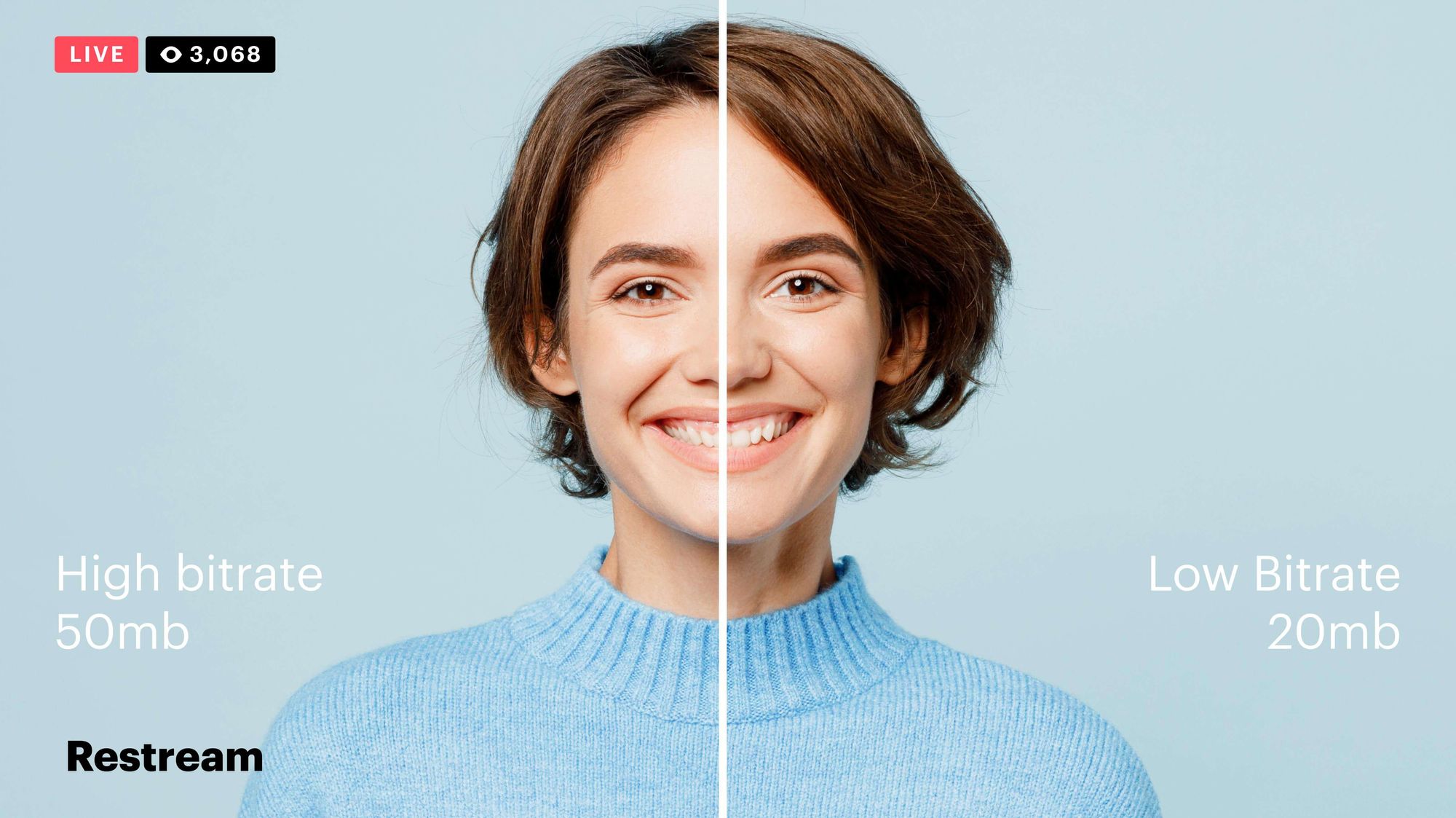
The higher the bitrate, the more data is encoded, and the higher the quality of the video will be. However, a higher bitrate also means a larger file size.

What is a Video Codec?

A video codec is a software program that compresses and decompresses video data. It is responsible for encoding the video data into a format that can be stored or streamed, and then decoding it back into its original form when it is played back.

There are many different video codecs available, each with its own strengths and weaknesses. Some of the most popular video codecs include:

H.264: This is the most widely used video codec. It is a lossy codec, which means that some data is lost during the compression process. However, H.264 is very efficient, and it can produce high-quality video with a relatively small file size.
H.265: This is a newer codec that is designed to be more efficient than H.264. It can produce the same quality of video with a smaller file size.
VP9: This is a free and open-source video codec that is developed by Google. It is similar to H.265 in terms of efficiency, but it is not as widely supported.

How Do Bitrate and Codecs Work Together?

Bitrate and codec work together to determine the quality and file size of a video. The higher the bitrate, the more data is encoded, and the higher the quality of the video will be. However, a higher bitrate also means a larger file size.

The codec determines how the video data is compressed. Some codecs are more efficient than others, and they can produce the same quality of video with a smaller file size.

How to Choose the Right Bitrate and Codec for Your Videos

The right bitrate and codec for your videos will depend on a number of factors, including:

The intended use of the video. If you are uploading your video to YouTube, you will need to choose a bitrate that is compatible with YouTube’s streaming requirements.
The target audience. If you are creating a video for mobile devices, you will need to choose a lower bitrate than if you are creating a video for high-definition televisions.
The file size. If you are limited by the file size, you will need to choose a lower bitrate.

Final Words About Video Bitrates and Codecs

Video bitrate and codec are two important concepts that every video creator should understand. By understanding how they work together, you can choose the right settings for your videos to ensure that they are both high quality and have a reasonable file size.

I hope this article has been helpful. If you have any questions, please feel free to leave a comment below.

Bonus Tips

If you are not sure what bitrate or codec to use, you can always start with a high bitrate and then lower it until you find a balance between quality and file size that you are happy with.
You can use a video bitrate calculator to help you determine the right bitrate for your videos.
There are many different video codecs available, so it is important to do some research to find the best codec for your needs.



Free Download Mp4Gain
picture


Mp4Gain Main Window
picture


Mp4Gain Features
picture


Free Download Mp4Gain
picture

The Importance of Bitrate in Digital Audio and Video

The Importance of Bitrate in Digital Audio and Video

The Importance of Bitrate in Digital Audio and Video

Have you ever watched a video that was all glitchy and the sound was all messed up? Or listened to a song and it sounded like it was being played on a scratched record? Well, that’s because of something called the bitrate.

The Importance of Bitrate in Digital Audio and Video

What is Bitrate?

Bitrate is the number of bits of information that are processed in a certain amount of time. In digital audio and video, it determines the quality of the sound and video. The higher the bitrate, the better the quality, and the more information is processed.

Why is Bitrate Important?

When you watch a video or listen to a song, the bitrate helps to determine the quality of the sound and video. The higher the bitrate, the more information is processed, and the better the quality. If the bitrate is low, then the quality will be poor and you might miss out on important details.

For example, if you’re watching a video of a concert and the bitrate is low, then you might not be able to hear the singer’s voice clearly or see the instruments being played. This can be really frustrating and ruin the whole experience for you.

How Does Bitrate Affect Digital Audio and Video?

Bitrate affects digital audio and video in several ways. For one, it affects the file size. If the bitrate is high, then the file size will be large, and if the bitrate is low, then the file size will be small.

Another way that bitrate affects digital audio and video is by affecting the quality. If the bitrate is high, then the quality will be good, and if the bitrate is low, then the quality will be poor. This can be especially noticeable when you’re watching a video with a lot of movement, like a sports game or a music video.

Finally, bitrate can also affect how long it takes to download or upload a video or audio file. If the bitrate is high, then it will take longer to download or upload, and if the bitrate is low, then it will take less time.

How to Choose the Right Bitrate for Your Digital Audio and Video

When it comes to choosing the right bitrate for your digital audio and video, there are a few things to keep in mind. First, think about what you’re using the video or audio for. If it’s for personal use, then a lower bitrate might be okay, but if it’s for professional use, then a higher bitrate is probably better.

Another thing to consider is the quality of the video or audio. If you want the best quality possible, then a higher bitrate is the way to go. But if you don’t need the best quality and just want something that’s good enough, then a lower bitrate might be fine.

Finally, think about the file size. If you don’t have a lot of storage space, then a lower bitrate might be a good choice, but if you have plenty of storage space, then a higher bitrate might be the way to go.

Bitrate vs. Video Resolution

Bitrate vs. Video Resolution

Bitrate vs. Video Resolution

which is more important for streaming video?

Bitrate vs. Video Resolution

Many people have this confusion because these two factors can have a profound effect on the encoder’s output.

How do you think it should be chosen?

Choose 1080p or 720p?

Choose 5mbps or 3mbps?

Choose 1080p@5mbps or 1080p@7mbps?

If you don’t know what to choose, great. That’s why I wrote this article: to explain the relationship between bitrate and resolution in simple terms, and to help you choose the right encoder settings.

Let’s start by understanding bitrate.

What is the bitrate of the video?

Video bitrate or bit rate refers to the number of bits transmitted per second of video information. The code rate unit is usually:

kbps or kilobits per second

mbps or megabits per second

When you are compressing video, you usually need to set the video compression software not to exceed a certain bit rate.

For example, if you set the video compression software’s bitrate to 3mbps, the software will compress the video at 3mb per second (on average) and stream it to the decoder or player. This is the code rate.

When you talk about bitrate, you’re really talking about: the relationship between video compression and video quality loss. The more you compress, the lower the quality of the video (and this is not always the case, as we will see later).

When compressing video, the following algorithms can be used for speed control, these are:

CBR (Constant Bitrate) – It is best to keep the bitrate constant if video quality is lost.

VBR (Variable Bitrate) – Maintains consistent video quality, allowing for bitrate fluctuations.

Capped VBR – Keep the video quality as constant as possible, allowing the bitrate to fluctuate within a set range.

This article will not discuss the above frequency control methods in detail. Friends who want to know more, welcome to read: Understanding Frequency Control Modes: What are CBR, VBR, CRF and Capped-CRF?

So when we talk about the bit rate, we should pay attention to the following points:

The quality of high bitrate video is usually higher than that of low bitrate video. I say generally, because the video quality reaches a certain point where it will no longer improve (no matter how much the bitrate increases).

The code rate refers to bits (bit) instead of bytes (byte).

The bit rate alone does not determine the quality of the video, you have to take into account factors like resolution, frame rate, screen size, etc.

Codecs for video compression: H.264/AVC, HEVC, VP9, ​​AV1? If you change the video codec and its settings (or encoding tools), the same bitrate will provide a very different video quality.

What video bitrate is appropriate for video? Part 2

What video bitrate is appropriate for video? Part 2

Video Bitrate
Video Bitrate

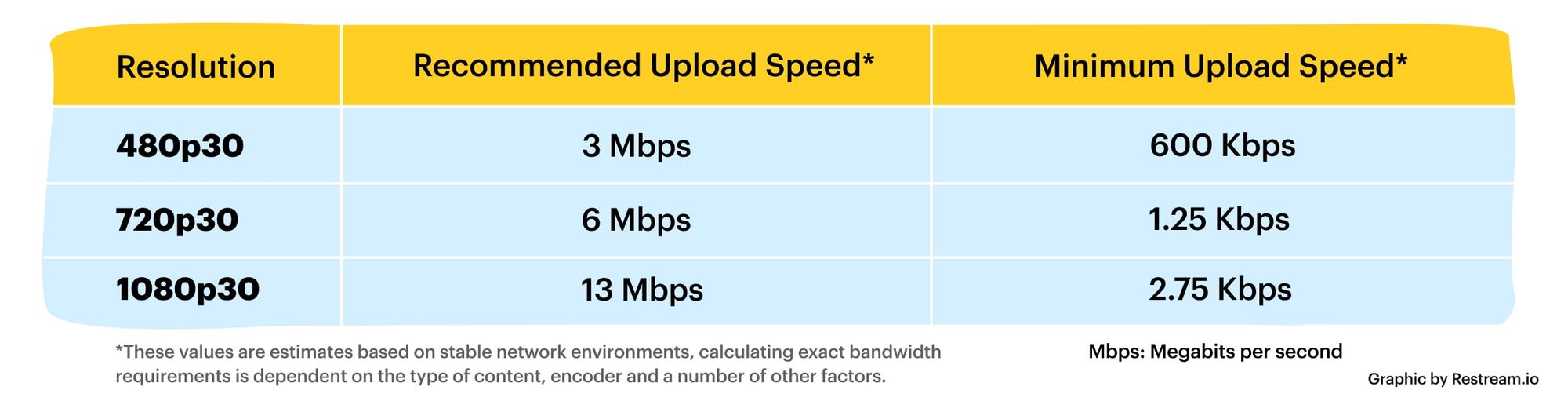
Ultra Clear 720P>=1.5M (Standard 1280×720 resolution, minimum 960*540, this and higher resolutions are in MP4 era) [some websites have this minimum requirement to upload]

Video Bitrate
Video Bitrate

Blu-ray 1080P>=2.5M (1920 × 1080 standard resolution) [optimal 4-8M] [220M when the material is stored] [some websites have this higher requirement for uploading] (it is better to use 720P and 1080P when make videos )

2K=(2048×1080 resolution)
4K=(4096×2160 resolution) [Optimal 8-12M]
The most normative statement is:
reaching 720p resolution is the threshold for high definition signal sources, 720p is called the HD (high definition) standard;
up to 1080p resolution, known as the Full HD (full high definition) Blu-ray standard.
2K refers to 2048 × 1080, and the actual resolution of Quad HD (four times high definition, 2K can be called “four times ultra high definition”) has various specifications, and the ones listed above are just common specifications. ;

4K refers to 3840 × 2160, and the actual resolution of Quad Full HD (four times full HD, 4K is called “four times ultra full HD”) has various specifications, and the ones listed above are just common specifications. .
Blu-ray is the clearest and SD is the worst If your internet speed can’t bring you 1080p, then at least 720p won’t feel blurry to the naked eye.
P refers to the number of horizontal scan lines, and the higher the number, the higher the resolution of the image. The letter P stands for progressive scan.

1. What is the video bitrate?

Video bitrate is the number of bits of video data (color, brightness, and pixels) that are output per second. The unit generally used is kbps.

2. Recommended bitrate for video size and resolution

How much video bitrate is appropriate (above H.264 bitrate, 720P, 1080P output bitrate setting)

3. A set of formulas to set the bitrate is shared with you as follows:

How much video bitrate is appropriate (above H.264 bitrate, 720P, 1080P output bitrate setting)

Regarding the two items of “Use the highest rendering quality” and “Process with the maximum depth” when exporting from PR editing software, the effect of image quality is not obvious on the big screen and the output time can increase exponentially depending on the complexity of the track. I also encountered this problem in the morning. I have been there, it is a waste of time and the effect is average. So I usually don’t choose this.

What video bitrate is appropriate for video?

What video bitrate is appropriate for video?

Video Bit Rate
Video Bit Rate

At present, 720p video recommended minimum bitrate is above, h.264 encoding 2M bitrate is adequate, 1080p is 4M enough
to get a high-quality video, convert it with different bitrates, and then compare the image quality.

Video Bit Rate
Video Bit Rate

The most commonly used are: h.264 encoding, 1080P, 2.5M bit rate or more.
Summary: [h.264 encoding, 2.5M bitrate (up to 4M), maximum 4M bitrate (add 2M to target), most platforms are Blu-ray. 】

1. If the bitrate is higher than the original video, it will not be a bit higher than the original video. When you move, you’ll pick a lower point to compress the file a bit.
2. 1080P 1M bitrate has distortion feeling to watch on computer, and 2M can’t see distortion, you can adjust the bitrate to 4M to get the best.
The following are the bitrate upload requirements for a platform:

How much video bitrate is appropriate (above H.264 bitrate, 720P, 1080P output bitrate setting)

How much video bitrate is appropriate (above H.264 bitrate, 720P, 1080P output bitrate setting)

***Normal 240p, 320p SD, 480p HD, 720p Ultra HD, 1080p Full HD (Blu-ray), 2K, 4k Ultra HD ***
Normal 240P (320×240 standard resolution, it was 3GP, this is basically nobody used)
SD 270P<0.8M (360×270 standard resolution, was 3GP, rarely used) [140M when storing 422 materials]

High definition 480P (360P)>=0.8M (standard resolution of 640 × 480, minimum 480 * 360, was 3GP) [480 re-advertising is called high definition, but the normative statement can only be regarded as standard definition]

How to achieve high-quality videos with low bandwidth

How to achieve high-quality videos with low bandwidth

Video Bandwidth

The bit rate can be reduced, in particular, due to noise reduction. Noise is quite a damaging factor causing clogging of the encoding process. It leads directly to an increase in the bit rate.

Video bandwidth

Optimize bitrate to reduce streaming

The classic noise reduction systems are of two types. Spatial noise reduction techniques are applied within the frame to help reduce noise, while temporal noise reduction averages the pixels over multiple frames. These are very effective techniques for still images, but they can cause problems when there is movement. In the event that temporary noise reduction is applied to a moving image, a ghost image may appear.

By combining spatial and temporal noise reduction with the ability to dynamically adjust them based on lighting levels and the detection of moving objects, we obtain images with low noise, maximum detail and low bit rate. The bit rate can be optimized by adjusting the amount of noise reduction based on the analysis of important moving objects in the surveillance camera’s field of view. When there is no movement, the bit rate is kept to a minimum. If an important object is detected, the bit rate increases, allowing you to capture as much detail as possible. The result is that the network bandwidth requirements remain low until something major happens in the frame.

Other ways to reduce the bit rate
For some megapixel surveillance cameras, the bit rate is limited by default. Constant bit rate is often used for this. The constant bit rate is kept at a fixed level. This can result in a consistently high bit rate, and setting a low bit rate can result in poor image quality.

In contrast, a variable bit rate preset a certain level of image quality that is maintained regardless of whether there is movement in the frame or not. The bit rate will change depending on the shooting conditions and the presence of motion.

Dynamic noise reduction, as described above, works on the same principle as variable bitrate, but with the addition of intelligent decision-making capabilities based on the presence or absence of motion. This can reduce the bit rate by 50 percent over the standard variable bit rate in non-motion scenes.

Priorization
In addition to reducing noise, prioritization can help lower bit rates. By setting priority areas, you adjust the level of compression for different parts of the image. Multiple areas can be marked on the image, each of which is assigned compression level parameters. A less important area can be configured to use a higher compression rate and therefore a lower bit rate, while important areas can be assigned a lower compression rate to display in more detail.

Take video surveillance at the entrance of a building, for example. Some parts of the image showing the sky can be considered unimportant for better compression. The area of ​​the entrance to the building can be marked as important and assigned a lower compression ratio to ensure recognition of facial features and other identifying details. Finally, the driveway can be defined as a zone with normal compression.

Reduce costs with dynamic noise cancellation
The combination of noise reduction and image area prioritization produces measurable results. The key benefit of this combination is that you get a significantly lower bit rate without losing image quality. A lower bitrate, in turn, reduces bandwidth and memory usage.

Take, for example, a shopping center with a video surveillance system with 200 surveillance cameras installed throughout the premises inside and outside the facility. Let’s say the mandatory requirement for 1080p HD video surveillance cameras is to record continuously for 12 hours a day and once the mall closes, they can only record when motion is detected. In this case, storing video recorded at a rate of 10 frames per second will require almost 70 TB, allowing you to store it for 30 days. The introduction of surveillance cameras that use dynamic noise reduction can save more than 7 TB of required storage capacity. This translates to over $ 10,000 depending on the storage devices used …. Additional savings can also be achieved by adding priorities in certain areas, which will further reduce the bitrate.

WHAT IS IT AND WHAT DOES THE BIT RATE AFFECT?

WHAT IS IT AND WHAT DOES THE BIT RATE AFFECT?

Bit Rate

Bit rate, a value that, in digital audio and video material, is the rate of data flow (the number of units of information) transmitted per unit of time (second). It can be indicated as the minimum value required to reproduce the original or compressed format, without delays and stops of video, audio, and the average or maximum quality value for the data storage format used. Most of the time, it is expressed in bits per second for audio and megabits for video.

Bitrate

It can have a constant, average, or variable value.

CBR (constant bit rate): data rate, remains unchanged, from the beginning to the end of the file.
ABR (Average Bit Rate): An average value, usually fixed, is used that is greater than the minimum limit, but less than the maximum possible.
VBR (Variable Bit Rate) – Bit rate varies throughout the file and depends on many factors, the end result can be unpredictable.

The higher the bitrate, the better the video and audio quality? It is not entirely true .

The bit rate, or the number of information units spent per unit of time, one second, is similar to the flow of water, the speed of which will change the filling time of the container, but the quality of the water itself.

The best quality requires high quality source video or audio material, therefore equipment capable of providing it. The same goes for water, for better water quality the composition is important first, not the force of the flow.

In other words, it makes no sense to increase the value of the bitrate (water stream), expecting to improve the quality if the quality of the initial data (water) is worse. Similarly, and vice versa, reducing the bit rate, to obtain a better material, will worsen the final result, but it will reduce the size needed to store data.

Bit rate is not a primary indicator of quality, but rather options for the minimum and maximum allowable flow conditions necessary to meet the remaining conditions to obtain the desired quality, provided that materials similar to the desired quality are used.