Bit rate, what is it?


Free Download Mp4Gain
picture

Bit rate, what is it?

Bit Rate

as a feature of digital audio and video
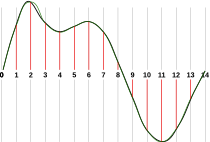
Bit rate

Bitrate: literally, the information bit rate. It is common to use the bit rate when measuring the effective information transmission rate through the channel, that is, the “payload” transmission rate (in addition to that, the channel can transmit service information, for example, start and stop symbols for asynchronous transmission or control symbols for redundant coding). The baud rate, which takes into account the total bandwidth of the channel, is measured in baud.

Bit rate is the number of units of information required to store (transmit) one second of a stream of data (generally audio and video files). It is generally measured in ‘kbps’, kilobits per second.

The term bit rate is used in two basic meanings
: channel or device characteristic: the maximum number of bits that can be transmitted per unit of time.
– The size of the data stream transmitted in real time (the minimum size of the channel that can pass this stream without delay).
– A special case is the compressed video or audio bit rate.
Bitrate is expressed in bits per second (bit / s, bps), as well as values ​​derived with the prefixes kilo, mega, etc.

The term bit rate (in conjunction with subjective quality criteria) is often used as a characteristic to evaluate the performance of lossy compression algorithms.

Bitrate characterizes both the density of the information package and its quality. For example, out of two MP3 files compressed with different bit rates, a file with a higher bit rate will have higher sound quality (close to the original). At the same time, a file of a different format, with the same bit rate, can offer both better and worse sound quality.

On an audio CD, information is losslessly encoded at a constant 1407 kbps bit rate.

The MP3 format allows you to encode audio information with constant or variable bit rates from 32 to 320 kbps, that is, they provide five times the compression compared to CD.

Bit rate as a characteristic of digital video and audio

In streaming video and audio formats (such as MPEG and MP3) that use lossy compression, the bit rate parameter expresses the degree of compression of the stream and therefore determines the size of the channel for which it is compressed data transmission. Most of the time, the audio and video bit rate is measured in kilobits per second (kilobits per second in English – kbps), less often – in megabits per second (for video only).

There are three compression modes for data transmission:

– with a constant bit rate (constant bit rate in English – CBR)
– with a variable bit rate (variable bit rate in English – VBR)
– with an average bitrate (English Average Bitrate – ABR)

Variable and average bit rate

The codec chooses the required bit rate based on the parameters (the level of the desired quality) and, during the encoded chunk, the bit rate may change. When compressing audio, the desired bit rate is determined based on the psychoacoustic model. ABR is a variation of VBR in which the codec is compressed to a specified average value.


Free Download Mp4Gain
picture


Mp4Gain Main Window
picture


Mp4Gain Features
picture


Free Download Mp4Gain
picture

What is the best bit rate for video and sound and what is it?

What is the best bit rate for video and sound and what is it?

Bitrate

Common characteristics of video and audio recordings include the so-called bit rate. Some users do not know how important this figure plays when playing files, along with their size and resolution.

BitRate

What is the bit rate? The bitrate is the number of bits that are used to process and transmit data during a certain period of time. This measurement is used to measure the effective transmission rate on a data stream channel. In other words, this is the minimum value of the channel capable of passing the flow without delay. The measure of video bit rate is bits per second and its derivatives (kbps, Mbps, etc.). In audio and video transmissions that use degrading compression, this term refers to the degree of compression of the transmission. Consequently, it indicates the size of the channel within which compression took place. Compression modes In practice, there are three modes of stream compression that cause quality loss: Constant Bit Rate (or CBR).

In this encoding option, the initial bit rate is set by the user and then does not change for the entire duration of the audio or video. Its advantage is that it is quite easy to calculate the size of the final file. However, this encoding is not very suitable for audio files that have dynamically changing sound, as it does not provide a good size / quality ratio. Variable bit rate (or VBR). The bitrate value is selected by the codec, depending on the parameters (the expected quality level). During the encoded fragment, the value of the bit rate may change. When audio is compressed, the required bit rate is set based on the psychoacoustic model. This encoding achieves the best sound quality ratio, but it is difficult to calculate the exact size of an audio or video recording. It can be very different. Average Bit Rate (or ABR). This is a hybrid of the first two modes.

The initial value of the bit rate is set by the user, but then independently changed by the program within certain limits. At the same time, the difference with VBR is that the codec uses the maximum and minimum values ​​within the limits set by the user, and does not exceed them. This encoding allows you to set the processing speed in the most flexible way and allows you to determine the file size with greater precision. What is the Getcontact application and how to use it

What and how is it measured? When quantifying high data rates, metric or decimal prefixes are used. It looks like this: Speed ​​1000 bps = 1 kbps (one kilobit or one thousand bits per second). Speed ​​1,000,000 bps = 1 Mbps (one megabit or one million bits per second). Speed ​​1,000,000,000 bps = 1 Gbps (one gigabit or one billion bits per second). What bit rate should I choose? In terms of the common MP3 audio format, it is the audio compression that results in data loss. The higher the bit rate, the better the sound quality. Speaking of the choice of the bit rate for this format, we can say the following: 32 kbps: very low quality sound (valid only for voice recording); 96 – May be applicable for low quality audio transmission or voice recording; 128 and 160: allows you to encode music recordings at an entry level; 192 – music encoding in acceptable quality; 256: high quality music recording; 320 is the highest quality you can get in MP3 format. In video formats, this value is calculated differently. For example, for videos on YouTube, a bit rate of 10-16 Mbps at 720p is sufficient. This will achieve a clear image and a small file size.

If better image quality is required, this value can be increased to 18-25 Mbps. The highest image quality will be achieved at 50 Mbps and 1080i resolution. In general, the effect of bitrate on video quality is expressed as follows: Yandex.Direct18 + Make money building websites! SITE.ONLINESCHOOL-PROFI.RU Make money writing articles COPYWRITING.ARTUR-GRANT.RU 400 kbps: low quality video at 240p; 750 kbps, 1 Mbps: can be used for some YouTube videos at 360p and 480p, respectively; up to 1.15 Mbps – compressed video in VCD format; 2.5 and 3.8 are compressed videos for YouTube, recorded at 720p; 4.5 and 6.8 are sharper YouTube videos but still compressed at 1080p resolution. 9.8 – DVD video recordings; 8-15 – high definition video recording using compression; 19 and 25 are HDV (high definition) recordings created at 720p and 1080i, respectively; 29.4 – high quality HD DVD video; 40 – Blu-Ray Disc recorded at 1080p; 250 – DCP format; 4Gbps: Uncompressed 1080p video recording.

WHAT IS IT AND WHAT DOES THE BIT RATE AFFECT?

WHAT IS IT AND WHAT DOES THE BIT RATE AFFECT?

Bit Rate

Bit rate, a value that, in digital audio and video material, is the rate of data flow (the number of units of information) transmitted per unit of time (second). It can be indicated as the minimum value required to reproduce the original or compressed format, without delays and stops of video, audio, and the average or maximum quality value for the data storage format used. Most of the time, it is expressed in bits per second for audio and megabits for video.

Bitrate

It can have a constant, average, or variable value.

CBR (constant bit rate): data rate, remains unchanged, from the beginning to the end of the file.
ABR (Average Bit Rate): An average value, usually fixed, is used that is greater than the minimum limit, but less than the maximum possible.
VBR (Variable Bit Rate) – Bit rate varies throughout the file and depends on many factors, the end result can be unpredictable.

The higher the bitrate, the better the video and audio quality? It is not entirely true .

The bit rate, or the number of information units spent per unit of time, one second, is similar to the flow of water, the speed of which will change the filling time of the container, but the quality of the water itself.

The best quality requires high quality source video or audio material, therefore equipment capable of providing it. The same goes for water, for better water quality the composition is important first, not the force of the flow.

In other words, it makes no sense to increase the value of the bitrate (water stream), expecting to improve the quality if the quality of the initial data (water) is worse. Similarly, and vice versa, reducing the bit rate, to obtain a better material, will worsen the final result, but it will reduce the size needed to store data.

Bit rate is not a primary indicator of quality, but rather options for the minimum and maximum allowable flow conditions necessary to meet the remaining conditions to obtain the desired quality, provided that materials similar to the desired quality are used.

What is bitrate: a clear explanation for beginners

Bit Rate

Once a student was teaching a class and asked me to give him the clearest possible explanation of what bitrate meant.

Today I am going to share with you that explanation that although it does not refer to sound but an image in the background, it is the same and is very easy to understand.

bit rate

Imagine that you put me in front of a beautiful landscape full of rivers and trees, mountains and Valleys with some Villas with Fields full of flowers and animals.

There is a lot of information there if I had to make a detailed description.

Imagine that you ask me to give you a description in 4 words.

It would have to make a very general description that, being very brief, Nova contains details. Maybe I’ll say something like “a beautiful autumn landscape.”

if after that you tell me that now I will have 14 words to describe what I am seeing.
I’ll be able to give more information Although it will really continue to be very summary, but you could already give some details.
“a beautiful autumn landscape with fields and mountains that have houses, flowers and animals”

If they ask me for the following explanation and they already allow me to use 50 words, I will be able to give many more details.
Although of course I will still have to omit a lot of details.

How many words might I need to give a detailed, spoken portrait of what I am looking at?

Well, this example that I just gave of the four words at the beginning then 15 words later have maybe 500 words later is exactly what the bit rate is.

We are talking about what is the amount of information that our audio or video file can transmit per second and obviously The higher the information There will be more details and therefore a higher quality and on the contrary the lower the information the lower the details and therefore lower quality.

That’s why a bit rate of 320 thousand bits per second will have a much higher audio quality than one of 90,000 bits per second.

Because in music, images and video, the quality always depends on the amount of information.

And in the specific case of audio and video, the amount of information is measured by seconds.

This means how much information it can transmit per second, that is, how many bits it can transmit per second, which means How much information and therefore How much detail, which is synonymous with quality.

With this we will understand very easily that as well as the sampling frequency is also very important and we will explain it in another article.
The rate of bits that are transmitted per second is crucial in determining the quality that an audio or video will have.

Of course, it must be understood that the higher the bit rate per second, the larger the size of the audio file will be because the greater the amount of information stored will be, but this will result in higher quality and greater definition.

Because here the definition concept is crucial.
The higher the bit rate the higher the definition and therefore the higher the quality.

The definition would be the detail of our initial explanation, if they let me use 2000 words to describe a landscape, I will be able to give many details and define them with great clarity. And that will mention a lot of quality.

This As-is applies to audio or video files.

Surely with this explanation it has been much clearer what is the rate of bits per second and why it is important.

What is bitrate, a thorough explanation

Normally when people read or listen to some of the terms they use frequently referred to music or video when playing on a digital device, it is possible that some terms are very confusing for the common user.

Sometimes people do not understand at all what these terms refer to and therefore make bad decisions in this regard, it may also happen that they completely ignore this information which generates an unsatisfactory result.

That is bitrate, a complete explanation.

When we play music or video, we are transmitting information from a file to the medium that reproduces that information. Bitrate measures the amount of information What is transmitted every second.

let’s look at an example that will allow us to understand very clearly what exactly bitrate is.
Imagine that I must tell you what happened at a dinner, but I can only use three words to tell you what dinner was like.

I could say For example “it was very tasty” and already there use the three words you could use. Of course the description and information is too short.
and instead, I can use 10 words, my description will have information and therefore it will be a higher quality description.
“It was a tasty dinner, with a very familiar and warm atmosphere” if you look closely at crypto contains more information so much makes a better portrait of what happened that night.

And if instead of using 10 words I can use 300 words it could be a much clearer story, with better quality.

Well that’s exactly what happens with bitrate. when a song or video is played if only a small amount of bits can be transmitted every second, detail that can be displayed will be poor because many details will have to be omitted. on the other hand, as the amount of bits increases every second, the audio will continue to be enriched so much will be of higher quality.

So now we are clear. Because it is important the amount of information transmitted every second, going to have greater wealth is to say higher quality. then act to what the term bitrate refers and now we understand exactly what it means. It is obvious that more bits per second will take up more space on the hard disk. Why the file will contain much more information And in return we will get more details and more richness in reproduction.
We will have to decide if what we want is to save disk space and therefore we will choose a low bit rate or on the contrary our priority will be quality and in that case we will choose a higher bit rate, with much more information per second. but that will take up much more space on the hard drive.
in the same way that a description of three words occupied much less space but transmitted a much poorer description, on the other hand a description of 400 words will occupy much more space But it will offer description in much more detail and therefore with greater quality.
Did you see that it was very easy to understand what bitrate means?