Bitrate Can Help You Get Better Quality in MP3 and MP4


Free Download Mp4Gain
picture

Bitrate Can Help You Get Better Quality in MP3 and MP4
Bitrate Can Help You Get Better Quality in MP3 and MP4

Let’s Talk About Bitrate in MP3 and MP4

Bitrate can make or break the quality of your music or video files. I’ve spent years working with audio and video, and I can tell you that bitrate is a game-changer when it comes to getting the best sound and picture quality. Imagine a water pipe: the bitrate is like the pipe’s width. A wider pipe (higher bitrate) lets more water (data) flow through, giving you a richer sound or clearer video. Lower bitrate, on the other hand, restricts the data flow, which is like squeezing a pipe down; the result is less quality. Let’s dive into how bitrate impacts MP3 and MP4 quality and why understanding this can transform your listening and viewing experience.

What is Bitrate and Why Does It Matter?

Bitrate is the rate at which data is processed and transferred. In MP3s and MP4s, bitrate affects quality more than you might think. Higher bitrate means better quality, but also larger file sizes. Think of it like digital storage in your closet: high-bitrate files store every detail, but they take up more space. Lower bitrate compresses the details, which saves space but sacrifices some quality.

How Bitrate Affects MP3 Quality

For MP3 audio, bitrate is crucial. High-bitrate MP3s preserve more of the original recording’s sound detail, making music sound full and dynamic. I remember testing low-bitrate MP3s on different sound systems, and each time, they sounded flat and lifeless. If you want rich bass and clear vocals, go for a higher bitrate.

Common MP3 Bitrates

  • 128 kbps – Standard quality, good for most casual listeners.
  • 192 kbps – Enhanced clarity, offering decent audio for music enthusiasts.
  • 256 kbps – Higher quality with noticeable improvements in bass and vocals.
  • 320 kbps – Top-notch quality, closest to the original recording without being lossless.

How Bitrate Affects MP4 Quality

With MP4 video files, bitrate impacts both the video and audio components. When I watch a movie in high-bitrate MP4, the colors are vivid, and the sounds are rich. A low-bitrate MP4 might show pixelation and murky audio, especially on larger screens. This is why bitrate matters for video just as much as audio.

Recommended MP4 Bitrates

  • 500-1000 kbps – Suitable for low-resolution video, good for small screens.
  • 1000-2500 kbps – Ideal for standard definition video.
  • 2500-5000 kbps – Recommended for HD quality, providing clearer visuals.
  • 5000+ kbps – Best for Full HD and higher, excellent clarity on large screens.

Choosing the Right Bitrate: Balancing Quality and File Size

When selecting bitrate, it’s essential to balance quality with file size. You don’t always need the highest bitrate—sometimes, it’s more about fitting your needs. For instance, if you’re streaming on a mobile device, a lower bitrate can still provide good quality while saving data. However, if you’re playing files on high-end speakers, go for the highest bitrate possible.

Bitrate and Streaming: What You Should Know

When streaming MP3 or MP4 files, bitrate influences both quality and buffering speed. Higher bitrate streams may deliver better quality but can cause more buffering if your internet speed isn’t up to par. Personally, I recommend adjusting bitrate based on your internet connection to avoid interruptions.

How to Check and Adjust Bitrate

Checking bitrate is straightforward. On most devices, you can view the bitrate information within the file properties. Adjusting bitrate usually requires re-encoding with software that allows you to choose the bitrate. It’s like resizing a photo; changing bitrate affects file quality and size, so choose the right balance based on your needs.

Is Higher Always Better? When to Opt for Lower Bitrate

While high bitrate typically means better quality, there are cases where lower bitrate works just fine. For podcasts or spoken-word audio, for instance, a lower bitrate still delivers good clarity without taking up much space. It’s all about the type of content and how you’re consuming it.

Comparing Bitrate to Sample Rate and Resolution

Though bitrate is vital, sample rate and resolution also play roles in quality. For MP3s, sample rate affects audio fidelity, and for MP4s, resolution impacts video clarity. Together, these factors determine overall quality. I find that focusing on bitrate alone can sometimes mislead; balancing all three aspects yields the best results.

Practical Tips for Optimal Bitrate Selection

To optimize bitrate, consider both your device and personal preferences. For everyday music listening on headphones, 192 kbps MP3 might be enough. But for home theater setups, I suggest 320 kbps or lossless formats. Adjusting based on usage can save storage and still offer great sound.

Latest Words on Bitrate and Quality

Bitrate is a powerful factor in determining the quality of MP3 and MP4 files. Whether you’re listening to music or watching videos, selecting the right bitrate makes a difference. With the right tools, like Mp4Gain, you can achieve the perfect balance between quality and file size for any format or device.

Comments:

Wow, this article really explained bitrate well! I always thought higher was better but now I see it’s not that simple. Good job!

I wish there was more info on sample rates. I think that impacts quality too, right?

My friend shared this with me, and I have to say, it’s been super helpful. I feel like I finally get what bitrate is!

This article cleared up so much for me. I was struggling to understand why my audio files were so big, now I get it. Thanks!

Could you go into detail about bitrate in streaming? I think that’s a big topic too!

I’m not a tech person, but this really helped me understand why my audio files sound different at different bitrates. Nice work!

My son is a musician, and I shared this with him to help with his recordings. He said it’s super helpful, thank you!

I was looking for info on MP4 bitrate specifically, and this nailed it! I’m a video editor, so quality is everything to me.

Love the real-life examples in this! Makes something technical feel easy to understand. Keep up the great work!

I’m kinda new to this and was overwhelmed with all the info about bitrate. This is really straightforward. Appreciate it!

Thanks for explaining bitrate so clearly. I always had a hard time choosing settings, but now I know exactly what to do.

Just what I was looking for! Really needed a simple explanation of bitrate and this article delivered. Thanks!

Can you add a section on bitrate comparison? Like a chart or something. It’d be useful for quick reference!

This article was so informative! I’d been looking for something like this that’s easy to understand. Cheers!

I work in audio production, and I shared this with my team. Great explanations, especially for beginners. Thank you!

https://x.com/ricardo_mx_news/status/1850664808464474479


Free Download Mp4Gain
picture


Mp4Gain Main Window
picture


Mp4Gain Features
picture


Free Download Mp4Gain
picture

Lossy vs Lossless Audio in OGG

Lossy vs Lossless Audio in OGG

Lossy vs Lossless Audio in OGG

Let’s talk about Lossy vs Lossless Audio in OGG

When it comes to audio quality, choosing between lossy and lossless audio can make a big difference. In audio compression, “lossy” means some data gets removed to make the file smaller, while “lossless” keeps all the original audio information. OGG is a popular format known for flexibility with both lossy and lossless compression, so you can get high-quality sound in a smaller file size. As an audio expert, I’ll walk you through the ins and outs of these formats, drawing from my years of experience with audio compression, so you can make the best choice for your needs.

Understanding OGG Format Basics

The OGG format is like a sturdy container, housing different types of audio codecs. It’s especially popular for its open-source, patent-free nature, and high-quality sound. With OGG, you can have lossy or lossless compression, depending on what matters more—quality or file size. Think of it like packing for a trip: sometimes you need to pack light (lossy), and other times, you want to bring everything (lossless). The flexibility of OGG makes it perfect for anyone who values good sound, but also wants control over file size.

What is Lossy Audio Compression?

Lossy audio compression removes “unnecessary” parts of audio that our ears may not easily pick up, which makes the file size much smaller. It’s like skimming off the less noticeable sounds in a song or recording. MP3 and OGG Vorbis are common lossy formats. If you’re streaming music online, lossy formats are everywhere. But while the space savings are great, there’s a trade-off: you lose some detail in sound quality. For casual listeners, it’s often a non-issue, but for audiophiles, those subtle sounds matter.

What is Lossless Audio Compression?

In lossless audio compression, all the original audio data is preserved. This format, like OGG FLAC, doesn’t cut any corners. Imagine you’re saving a photo without changing a single pixel; that’s what lossless does for sound. The file is bigger, yes, but you get pure, untouched audio. In my experience, musicians, DJs, and audio engineers often prefer lossless formats because every sound, every subtle tone, is kept intact. For casual listening, though, the larger file size might be more of a hassle than it’s worth.

Comparing OGG Vorbis (Lossy) with OGG FLAC (Lossless)

Comparing OGG Vorbis and OGG FLAC is a bit like comparing a paperback book to a hardcover. OGG Vorbis reduces file size by about 90%, perfect for quick downloads or streaming. OGG FLAC, on the other hand, maintains top quality, but it’s bigger. OGG Vorbis is great for everyday listening, but if you’re an audio purist, OGG FLAC is where you’ll hear the difference. You’ll notice richer, fuller sounds in OGG FLAC, especially in classical or jazz music where subtlety is key.

  • Quality Differences: Audible or Not?

  • File Size Considerations

  • Performance for Streaming vs. Offline Playback

How Lossy Compression Works in OGG Vorbis

OGG Vorbis, the lossy version of OGG, uses advanced algorithms to remove sounds our ears aren’t as sensitive to. It’s like compressing a sponge and squeezing out the excess water, keeping the sponge itself intact but smaller. This way, you get a smaller file size with audio that’s nearly identical to the original. It’s commonly used for streaming music because it keeps quality high and file size low—essential for avoiding buffering issues on slow networks.

The Science Behind Lossless Compression in OGG FLAC

Lossless compression in OGG FLAC is more like folding a sheet—no material is removed; it’s just compacted in a way that you can unfold it back to its original form. The audio data is untouched, making it a favorite among sound engineers who need top fidelity. OGG FLAC is especially valuable in professional settings, like when recording a song or podcast, where every little detail counts.

Pros and Cons of Using Lossy OGG for Audio

Using lossy OGG has a lot of perks, especially if you need to save space. It’s like having a lighter suitcase for travel—you can take it anywhere without the bulk. However, lossy compression may sacrifice some subtle details, so it’s not ideal for everyone. Here are some quick points:

  • Smaller File Size

  • Great for Streaming and Download Speeds

  • Minor Loss of Audio Detail

  • Not Ideal for High-End Sound Systems

Pros and Cons of Using Lossless OGG for Audio

Lossless OGG, like FLAC, maintains full sound quality. It’s like a heavy-duty suitcase that carries everything you need. While the file size is larger, the quality remains top-notch. Here’s a rundown of pros and cons:

  • Exceptional Audio Quality

  • Perfect for Archival Storage

  • Larger File Size

  • More Demanding on Storage Space

Is Lossy or Lossless Better for Music Streaming?

If you’re streaming music, you’ll likely lean toward lossy OGG, especially with slower internet speeds. Lossy compression keeps file sizes manageable and minimizes buffering. But for platforms dedicated to high-quality sound, lossless is increasingly common. Lossy streaming is a compromise between quality and accessibility, while lossless streaming is all about giving you the best audio, especially on platforms where fidelity is a top priority.

Best Scenarios for Choosing Lossy OGG

Lossy OGG is perfect for everyday listening, especially when you’re on the go. Whether it’s on a jog or commuting, lossy audio offers high-quality sound without filling up your phone’s storage. When you’re not looking for flawless quality but still want something that sounds good, lossy OGG is the way to go. It’s especially great if you’re listening on devices where audio fidelity isn’t as noticeable.

Best Scenarios for Choosing Lossless OGG

Lossless OGG really shines when quality is paramount, like for a professional DJ or a music producer. It’s also ideal for creating a digital archive of your favorite albums. Lossless OGG ensures every note, every instrument, is perfectly preserved. If you’ve got the storage space and care about every detail in the music, go for lossless OGG. It’s also an excellent choice if you plan to listen on high-quality sound systems where every sound matters.

Do File Size and Storage Space Matter to You?

Lossy OGG saves a ton of space, perfect if you’re low on storage. However, if storage is abundant, lossless OGG is a good way to get premium sound without compromise. I always ask myself, “How important is quality versus storage for me?” If I want to fit more music on my phone, I’ll go lossy. If I’m working on a sound project where I need the best quality, lossless OGG it is.

Final Words on Lossy vs Lossless Audio in OGG

Ultimately, the choice between lossy and lossless OGG depends on your needs and setup. For most listeners, lossy OGG offers a great balance between quality and file size. But for audiophiles, sound engineers, and music lovers who want every detail, lossless OGG can’t be beat. If you’re still on the fence, try testing out both formats in your own environment to hear the difference. And when you’re ready to optimize your audio, MP4Gain is here to help ensure every sound, whether lossy or lossless, is just right.

Comments:

Jackson: Really helpful breakdown! I didn’t even know the difference between lossy and lossless. Helped a lot for my project!

Marie123: Finally I get it! All the tech words usually confuse me but this article was simple and super clear.

SoundwaveMike: Good info, but I’d love to see more on how the lossy compression actually affects different genres of music.

LeeGuitarist: Wow, never knew OGG was that versatile! I always stuck with MP3, but now I’m gonna try OGG FLAC!

BobTheBuilder: Too much detail for my taste, but good for people who want to learn everything about audio!

Anna_Loves_Music: This explained a

lot! I’ve been trying to figure out how to save space on my phone without losing my fave tunes.

https://x.com/ricardo_mx_news/status/1850633331957813490

Bitrate Control Methods in MP4 Encoding

Bitrate Control Methods in MP4 Encoding

Bitrate Control Methods in MP4 Encoding

Let’s Talk About Bitrate Control in MP4 Encoding

Bitrate control is more than just a technical setting; it’s the backbone of video quality and file size management. When encoding MP4 files, we decide how much data is used to represent each second of video, and that choice impacts everything from playback clarity to download times. Think of bitrate as the “detail level” you choose to capture in a painting—the more paint (or data) you use, the clearer the image, but with more size to handle. Let’s explore why bitrate control matters in MP4 encoding, how various methods impact your final file, and how you can choose the right one to fit your needs.

Why Bitrate Control is Essential in Video Encoding

In video encoding, bitrate control isn’t just about file size; it affects the visual and auditory experience. Higher bitrates can make an image sharper and richer, while lower bitrates save space but may sacrifice some quality. Imagine watching a movie at different quality levels—at the highest quality, you see every detail clearly, but if it’s too low, it’s like watching through frosted glass. Getting the bitrate right means balancing quality with practicality, and that’s where bitrate control techniques come into play.

Understanding Bitrate Control: Constant Bitrate (CBR) vs. Variable Bitrate (VBR)

Different encoding methods affect how bitrate is distributed across a video file. Here’s an in-depth look at the two primary methods: Constant Bitrate (CBR) and Variable Bitrate (VBR).

  • Constant Bitrate (CBR): Pros, Cons, and Practical Applications

CBR uses a fixed bitrate throughout the video, keeping data usage steady. This method is straightforward and predictable—no matter the scene, the bitrate remains the same, which can be helpful for streaming on low-bandwidth networks. But there’s a downside: since CBR doesn’t adjust to scene complexity, it may waste data on simple scenes or underrepresent complex scenes. Imagine painting every square inch of a mural with the same amount of paint, even on spots that don’t need it.

  • Variable Bitrate (VBR): Advantages, Drawbacks, and Usage Scenarios

VBR adapts the bitrate based on content complexity, dedicating more data to complex scenes while using less for simpler ones. This flexibility improves overall quality while optimizing file size, but it can increase encoding time. It’s like adjusting brush strokes based on the level of detail needed—more for a detailed section, less for plain areas. VBR is excellent for content where quality is a priority, such as HD movies or high-action scenes, but it requires more computing power and time.

  • Real-World Scenarios Using CBR and VBR in Video Encoding

CBR is typically chosen for live streaming, where a steady bitrate keeps the stream stable. VBR, meanwhile, shines in offline content, where the file is created once, and quality can be optimized. Think of it this way: live sports streaming may benefit from CBR’s stability, while VBR’s adaptability suits a blockbuster movie’s intricate scenes.

Advanced Techniques for Bitrate Control

More sophisticated methods allow for even greater control over bitrate distribution and quality.

  • 2-Pass Encoding: What It Is and Why It Matters

Two-pass encoding allows for the best of both worlds in VBR. During the first pass, the encoder analyzes the video, and in the second pass, it adjusts bitrate distribution based on scene complexity. This approach maximizes quality and minimizes file size, though it takes double the time. If you’re creating high-stakes content like a music video, the time investment for a 2-pass VBR could make a big difference in quality.

  • Average Bitrate (ABR): Balancing Quality and File Size

ABR keeps a consistent average bitrate across the file, but unlike CBR, it allows some variation. This hybrid approach combines predictability with flexibility. For instance, encoding a training video where some scenes are complex and others are static can benefit from ABR’s moderate adaptability without the complexity of VBR.

  • Adaptive Bitrate Streaming and Machine Learning in Encoding

Adaptive bitrate streaming takes bitrate flexibility even further, adjusting in real time based on the viewer’s connection speed. Often used by streaming platforms, this technique ensures that viewers experience the best quality possible without buffering. Machine learning enhances this by predicting viewer needs based on past data, making encoding smarter and more efficient.

Factors Influencing Bitrate Control Decisions

Choosing a bitrate control method is more than a technical choice; it’s a matter of balancing multiple factors.

  • Source Video Quality and Resolution

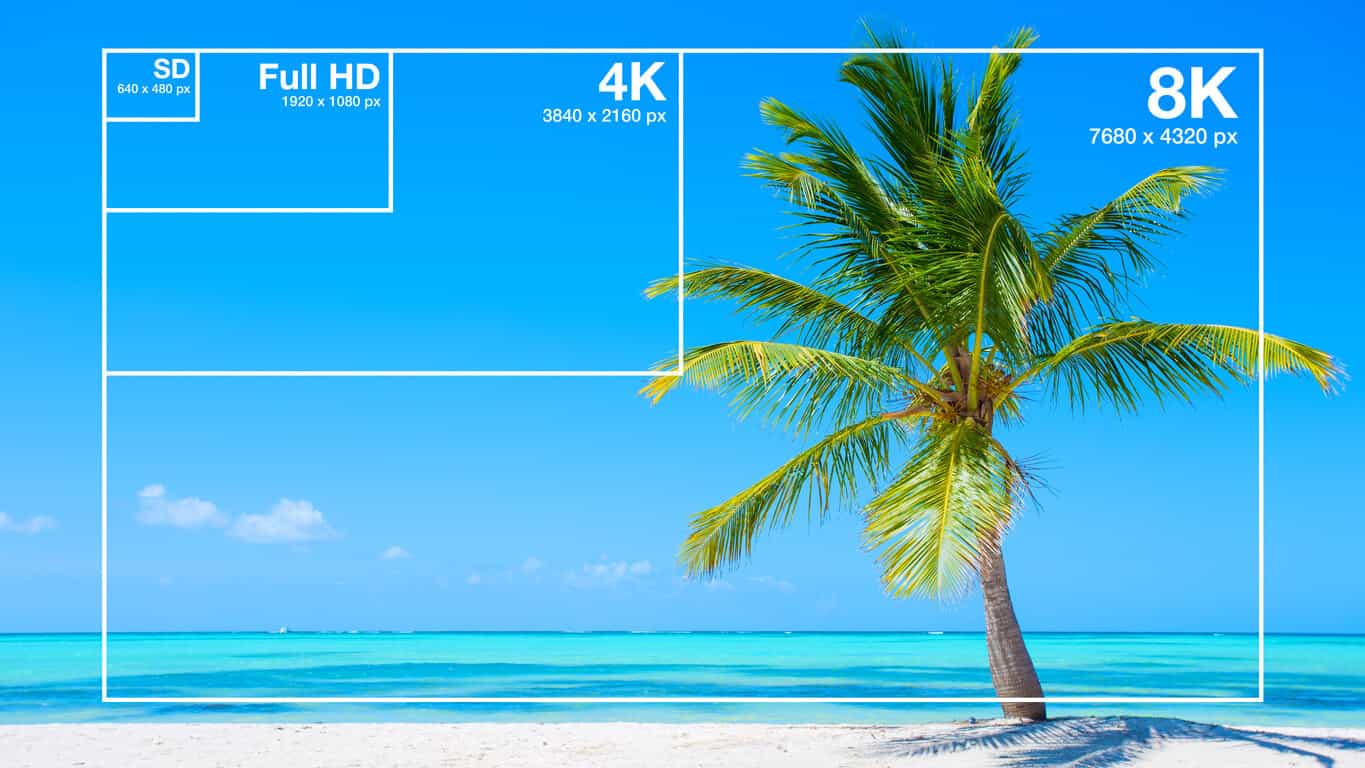
Higher resolution content demands higher bitrate to maintain quality. Encoding a 4K video requires far more data than standard definition to retain clarity, so your bitrate control needs to match the resolution to avoid pixelation.

  • Playback Device Requirements and Limitations

If your content will be viewed on mobile devices, encoding should prioritize smaller file sizes and efficient compression. For larger screens, prioritize quality, as viewers will notice subtle details. It’s like packing for a trip: you’d bring different gear for hiking than for a beach vacation.

  • Bandwidth and Storage Considerations

Encoding for low-bandwidth areas calls for bitrate control methods that preserve quality with minimal data usage. When file storage is limited, efficient compression methods like 2-pass VBR become valuable.

Comparing Different MP4 Encoding Tools and Their Bitrate Control Capabilities

Various encoding tools handle bitrate differently. While all offer CBR and VBR, some excel with advanced features like 2-pass encoding or adaptive bitrate capabilities. High-end tools often support machine learning, analyzing content to maximize compression efficiency without sacrificing quality.

Common Challenges in Bitrate Control and How to Address Them

Bitrate control brings unique challenges, from maintaining quality to managing file size.

  • Maintaining Quality in Low-Bandwidth Conditions

Encoding for low-bandwidth requires carefully balancing bitrate and compression to avoid quality loss. VBR or ABR can help by prioritizing quality in key scenes while conserving data in others.

  • Optimizing for Different Platforms and Devices

Each platform has its playback standards; for instance, social media may require smaller file sizes. Adjust bitrate control to meet these standards without compromising quality.

  • Managing File Size without Losing Quality

It’s tricky to balance quality with small file sizes. Using 2-pass encoding or adaptive bitrate control can help optimize quality by ensuring each scene gets the right amount of data.

Choosing the Best Bitrate Control Method for Your Needs

Selecting the ideal bitrate control method depends on your video type, audience, and storage limits. For a polished product, 2-pass VBR often yields the best results, while live streaming benefits from CBR. Experiment with these methods to find the right fit.

Latest Words on Bitrate Control in MP4 Encoding

Bitrate control continues to evolve, with new tools leveraging machine learning to optimize compression. In the future, we may see real-time adaptive methods that adjust based on user preferences and network conditions, creating smoother viewing experiences than ever. Ultimately, understanding bitrate control empowers you to create videos that balance quality and efficiency.


https://x.com/ricardo_mx_news

MP4 vs FLV: Video Streaming Formats

MP4 vs FLV: Video Streaming Formats

MP4 vs FLV: Video Streaming Formats

MP4 vs FLV: Video Streaming Formats

Let’s Talk about Video Formats

In the dynamic world of online content, the choice of video format can significantly impact streaming quality, compatibility, and user experience. When comparing MP4 and FLV, it’s crucial to understand their unique characteristics and how they influence the delivery of multimedia content.

Why Video Formats Matter

Video formats play a pivotal role in determining how digital video files are compressed, encoded, and delivered over the internet. As an expert in multimedia technologies, I’ve witnessed firsthand the profound effect that selecting the right format can have on the success of online video content.

Understanding MP4

MP4, short for MPEG-4 Part 14, stands as one of the most popular and versatile video container formats. Renowned for its widespread support across devices and platforms, MP4 efficiently compresses audio and video data while maintaining high-quality playback.

Decoding FLV

FLV, or Flash Video, gained prominence as the preferred format for online video streaming during the early 2000s. Developed by Adobe Systems, FLV offers robust streaming capabilities, making it ideal for delivering multimedia content over the internet.

The Advantages of MP4

When it comes to versatility and compatibility, MP4 reigns supreme in the realm of video formats. Its widespread support across devices, operating systems, and web browsers ensures seamless playback experiences for users worldwide.

Universal Compatibility

One of the standout features of MP4 is its universal compatibility across various devices and platforms. Whether you’re streaming videos on a smartphone, tablet, or desktop computer, MP4 ensures consistent playback quality without the need for additional plugins or software.

High-Quality Compression

As an expert in multimedia compression technologies, I can attest to the efficiency of MP4 in balancing file size and video quality. Through advanced compression algorithms, MP4 minimizes storage requirements while preserving the integrity of audio and video data.

Optimized for Streaming

In the era of online streaming platforms and video-on-demand services, MP4 offers optimized streaming capabilities that cater to modern viewing habits. From seamless buffering to adaptive bitrate streaming, MP4 empowers content creators to deliver immersive experiences to their audiences.

The Evolution of FLV

While FLV may have dominated the early days of online video streaming, its relevance has gradually waned in the face of emerging technologies and industry standards. Despite its historical significance, FLV now faces limitations in compatibility and support.

Limited Compatibility

One of the primary drawbacks of FLV is its limited compatibility with modern web browsers and mobile devices. As HTML5 video players become the standard for online streaming, FLV struggles to adapt to the evolving landscape of multimedia technologies.

Legacy Support Challenges

As an expert in digital media preservation, I recognize the challenges associated with maintaining legacy support for outdated formats like FLV. With the gradual phasing out of Adobe Flash Player and the shift towards HTML5, FLV faces uncertain prospects in the ever-changing digital ecosystem.

Migration to MP4

In response to the decline of FLV, many content creators and streaming platforms have migrated to the MP4 format for its superior compatibility and versatility. By embracing MP4, businesses and individuals can future-proof their multimedia content and ensure seamless playback across all devices.

Choosing the Right Format

When it comes to selecting the optimal video format for your streaming needs, it’s essential to weigh the benefits and limitations of each option. Whether you prioritize universal compatibility or streaming performance, making an informed decision can elevate the quality of your multimedia content.

Consideration Factors

As a seasoned multimedia professional, I advise clients to consider various factors when choosing between MP4 and FLV. Factors such as target audience demographics, streaming platform requirements, and content delivery objectives can influence the selection process.

  • Target Audience Preferences
  • Platform Compatibility
  • Streaming Performance
  • Content Security
  • Long-Term Viability

Future-Proofing Your Content

In an era defined by rapid technological advancements, future-proofing your multimedia content is paramount to its long-term success. By embracing formats like MP4 that offer broad compatibility and robust streaming capabilities, you can ensure that your content remains accessible and engaging for years to come.

Latest Words on Video Formats

As a specialist in multimedia technologies, I’ve witnessed the evolution of video formats firsthand. While FLV may have paved the way for online video streaming, the widespread adoption of MP4 signals a new era of compatibility and performance.

Comments:

Wow, this article really helped me understand the differences between MP4 and FLV. I’ve been struggling to choose the right format for my online videos, but now I feel confident in my decision. Thanks!

– VideoEnthusiast23

I never realized how much impact the choice of video format could have on streaming quality until I read this article. The explanations were clear, and I appreciate the expert insights!

– StreamMaster99

This article provided valuable information on the pros and cons of MP4 and FLV. However, I wish there was more emphasis on emerging formats like WebM and AV1.

– TechSavvyUser

As a content creator, I’ve struggled with compatibility issues when using FLV for online streaming. After reading this article, I’m convinced that transitioning to MP4 is the right move for my channel.

– CreativeContent123

I found the comparison between MP4 and FLV to be enlightening, but I was hoping for more in-depth technical analysis regarding encoding algorithms and compression techniques.

– TechNerd456

This article provided a comprehensive overview of video formats, but I wish there were more real-world examples illustrating the impact of format selection on streaming performance.

– StreamWatchDog

Great article! I’ve been debating whether to stick with FLV or switch to MP4 for my website’s video content. This article helped me make an informed decision. Keep up the good work!

– WebDevGuru

Thanks for shedding light on the differences between MP4 and FLV. As a novice in the world of online video, I found this article to be incredibly informative and easy to understand.

– VideoNewbie22</ p>

Although MP4 seems to be the superior choice in terms of compatibility and performance, I’m curious to learn more about the advantages of FLV in specific use cases.

– CuriousStreamer

This article provided valuable insights into the world of video formats, but I would have appreciated more discussion on the evolving landscape of streaming technologies and emerging formats.

– StreamingEnthusiast

FLAC Adaptive Bitrate Control in FLAC Audio Streaming

FLAC Adaptive Bitrate Control in FLAC Audio Streaming

FLAC Adaptive Bitrate Control in FLAC Audio Streaming

FLAC Adaptive Bitrate Control in FLAC Audio Streaming

Let’s talk about FLAC Adaptive Bitrate Control in FLAC Audio Streaming

As an expert in audio streaming technology, I’m thrilled to explore the revolutionary concept of FLAC adaptive bitrate control within FLAC audio streaming. This innovative approach to audio streaming represents a significant advancement in optimizing audio quality while ensuring seamless playback across various network conditions. Imagine enjoying your favorite tunes without interruptions, regardless of fluctuating internet speeds. With FLAC adaptive bitrate control, that dream becomes a reality.

The Science Behind FLAC Adaptive Bitrate Control

FLAC adaptive bitrate control leverages sophisticated algorithms to dynamically adjust the bitrate of audio streams based on network conditions and device capabilities. By continuously monitoring factors such as available bandwidth and network stability, FLAC streaming platforms can deliver an uninterrupted listening experience without sacrificing audio quality. This adaptive approach ensures that listeners receive the highest possible audio fidelity while minimizing buffering and playback issues.

Key Features of FLAC Adaptive Bitrate Control

  • Real-time bitrate adjustment based on network conditions.
  • Seamless transition between different bitrate streams.
  • Optimized audio quality across various devices and network connections.
  • Efficient use of network resources for uninterrupted playback.

Integration of FLAC Adaptive Bitrate Control in FLAC Audio Streaming

Now, let’s delve into how FLAC adaptive bitrate control is integrated into FLAC audio streaming platforms to enhance the listening experience. By analyzing network conditions in real-time, FLAC streaming services can dynamically switch between different bitrate streams to ensure optimal playback quality. Whether you’re streaming music on a crowded Wi-Fi network or using a spotty cellular connection, FLAC adaptive bitrate control adjusts seamlessly to deliver uninterrupted audio playback.

Benefits of FLAC Adaptive Bitrate Control

  • Consistent audio quality across varying network conditions.
  • Reduced buffering and playback interruptions.
  • Improved user satisfaction and retention.
  • Compatibility with a wide range of devices and platforms.

Latest words on FLAC Adaptive Bitrate Control in FLAC Audio Streaming

In conclusion, FLAC adaptive bitrate control represents a groundbreaking advancement in audio streaming technology, offering a solution to the challenges posed by fluctuating network conditions. By dynamically adjusting audio bitrate in real-time, FLAC streaming platforms ensure a seamless listening experience for users, regardless of their network environment. With FLAC adaptive bitrate control, the future of audio streaming looks brighter than ever.

Comments:

This article provided valuable insights into the benefits of FLAC adaptive bitrate control. I’m excited to see how it improves my streaming experience!

As someone who frequently experiences buffering issues while streaming music, I’m eager to try out FLAC adaptive bitrate control. Thanks for the informative article!

Could you elaborate more on the technical aspects of how FLAC adaptive bitrate control works? I’m curious about the algorithms behind it.

FLAC adaptive bitrate control seems like a game-changer for audio streaming platforms. I appreciate the thorough explanation provided in this article!

As a music enthusiast, I’m always looking for ways to enhance my listening experience. FLAC adaptive bitrate control sounds like the perfect solution!

This article convinced me to give FLAC streaming a try. I’m excited to see how adaptive bitrate control improves my music listening sessions!

MP3 Variable Bit Rate (VBR) vs. Constant Bit Rate (CBR)

MP3 Variable Bit Rate (VBR) vs. Constant Bit Rate (CBR): A Sonic Showdown

Una imagen 3D, hiper realista, futurista, de una tarjeta de video del año 2350 que tenga bordes delgados con filos dorado brillante y colores neón brillante que diga con claridad y en gran tamaño la palabra MP3 en colores neón

Una imagen 3D, hiper realista, futurista, de una tarjeta de video del año 2350 que tenga bordes delgados con filos dorado brillante y colores neón brillante que diga con claridad y en gran tamaño la palabra MP3 en colores neón

Understanding Bit Rates in MP3 Audio

In the world of MP3 audio, the choice between Variable Bit Rate (VBR) and Constant Bit Rate (CBR) sparks a debate among enthusiasts. Let’s explore these encoding methods and uncover the impact they have on the auditory experience.

Decoding the Essence of VBR

Variable Bit Rate (VBR) stands out as a dynamic approach to encoding. Unlike CBR, VBR adjusts the bit rate based on the complexity of the audio. Imagine it as a skilled conductor leading an orchestra, adapting the tempo for each musical passage.

Advantages of VBR

  • Preserves audio quality in complex segments
  • Efficient file size management in simpler parts
  • Adaptable to the natural dynamics of the recording

Unveiling the Consistency of CBR

Constant Bit Rate (CBR), on the other hand, adheres to a fixed bit rate throughout the audio file. Picture it as a steady metronome maintaining a consistent beat, regardless of the musical intricacies.

When CBR Shines

  • Consistent file size ideal for streaming
  • Predictable bit rate simplifies storage planning
  • Suitable for applications with strict bitrate requirements

Choosing Your Sonic Champion

Ultimately, the choice between VBR and CBR depends on your priorities. If file size efficiency and dynamic adaptation matter most, VBR might be your sonic ally. However, if consistency and predictable streaming are paramount, CBR could be the preferred option.

Conclusion: Harmonizing Quality and Consistency

Whether you opt for the dynamic dance of VBR or the sturdy consistency of CBR, both methods aim to deliver a harmonious audio experience. The key is understanding your needs and choosing the encoding technique that aligns with your sonic preferences.

Comments:

Interesting read! I’ve always wondered about the differences. – AudioExplorer

Great breakdown! Would love more insights into specific use cases. – MusicBuff

Exploring the World of Bitrate in Digital Video

Exploring the World of Bitrate in Digital Video

Exploring the World of Bitrate in Digital Video


In the dynamic landscape of digital video, Bitrate stands as a linchpin of quality and performance. In this comprehensive guide, we embark on a meticulous journey to unravel the intricacies of Bitrate, unveiling its significance and multifaceted dimensions.

Video Bitrate Essentials

Video Bitrate

Video Bitrate is the pulse of digital video. It signifies the pace at which data flows per unit of time within a video. Picture it as the guardian of video fidelity, affecting every second of your viewing experience.

Bitrate in Digital Video

Bitrate in digital video wields the scepter of influence over the quality and performance of video content. Content creators and streaming platforms navigate its realm with care.

Video Encoding Bitrate

Understanding Video Encoding Bitrate is akin to grasping the intricacies of preserving video quality while managing file sizes efficiently. It’s a crucial element of the video production process.

Bitrate for Video Streaming

For online audiences, Bitrate for Video Streaming is the guardian of a buffer-free and high-quality viewing experience. This parameter is the bridge between content providers and viewers.

Optimal Bitrate for Video

Unlocking the secret of the Optimal Bitrate for Video is a quest for balance. It’s the equilibrium between video quality and storage efficiency, a key decision in content creation.

Decoding the Bitrate-Quality Nexus

Video Quality Bitrate

Video Quality Bitrate is the canvas upon which visual excellence is painted. Elevating the bitrate enhances not only clarity but also detail and motion fluidity—a hallmark of superb video quality.

Bitrate in Video Compression

Bitrate and video compression dance a delicate tango. Adjusting the bitrate influences not just quality but also file sizes. It’s a tightrope act content creators perform with finesse.

Variable Bitrate vs. Constant Bitrate

Variable Bitrate (VBR) and Constant Bitrate (CBR) represent two divergent paths. One adapts to the complexity of video content, while the other maintains a steady course. Knowing when to use each is an art.

Cracking the Bitrate Code

How does Bitrate affect video quality?

Bitrate’s role in shaping video quality is akin to the conductor of an orchestra. It orchestrates the symphony of pixels, ensuring each note is crisp and harmonious.

What is the difference between Bitrate and Resolution?

While Bitrate influences the flow of data, video resolution determines the canvas size. These two pillars of video quality work in tandem, each with its own significance.

How to calculate Bitrate for video streaming?

Calculating the ideal Bitrate for video streaming involves a mix of science and art. Factors like resolution, frame rate, and desired quality come together in a formula that ensures a smooth viewing experience.

Can a higher Bitrate improve low-light video?

Low-light situations challenge video quality, and Bitrate plays a role in addressing this challenge. Explore how increasing Bitrate can illuminate the darkest corners of your footage.

Does Bitrate impact file size?

Bitrate and file size share a symbiotic relationship. As Bitrate climbs, so does the appetite for storage. This understanding is pivotal in managing your video library efficiently.

What is the relationship between Bitrate and compression?

Bitrate and compression are the yin and yang of video storage. One influences quality, the other conserves space. Dive into their intricate relationship and its impact on your videos.

Is there a recommended Bitrate for 4K video?

4K video demands a bit more of everything, including Bitrate. Delve into the recommended Bitrate standards for the ultra-high-definition realm.

How do I choose the right Bitrate for live streaming?

Live streaming introduces real-time dynamics. The right Bitrate choice ensures your audience experiences your broadcast without hiccups. It’s a delicate balancing act.

What happens if my Bitrate is too low for my video?

A low Bitrate can mar the viewing experience, leading to pixelation and buffering. Explore the repercussions and strategies to remedy the situation.

Are there Bitrate standards for different video formats?

Different video formats have unique appetites for Bitrate. Familiarize yourself with the standards for common formats to ensure compatibility and optimal quality.

Navigating the Bitrate Seas

Diversity in Standards

Video formats march to their own drumbeat, each with its Bitrate requirements. Explore these standards to keep your content in harmony with different platforms and devices.

Adapting to Format Demands

Efficiency in video production and streaming comes from aligning with specific Bitrate standards. Embrace the versatility of Bitrate adjustments for an enhanced video journey.
As we conclude our voyage through the world of Bitrate in digital video, remember that mastering this element empowers content creators, streaming platforms, and viewers alike. Bitrate is the silent architect of video quality, and its nuances are yours to explore and leverage.

Adaptive Bitrate Streaming

A Formula for Viewer Satisfaction

Adaptive Bitrate Streaming is the secret sauce behind viewer satisfaction. It dynamically adjusts the video’s Bitrate in real-time to match the viewer’s internet connection speed. This means smoother playback, fewer interruptions, and a superior experience for your audience.

Enhancing User Experience

Imagine a scenario where a viewer with a slow internet connection tries to watch your video. Without adaptive streaming, they might experience constant buffering and frustration. Adaptive Bitrate Streaming, however, steps in to provide the best possible quality that their connection can handle. It’s the difference between a viewer hitting the “close” button in frustration and enjoying your content to the fullest.

Bitrate in Low-Light Video

The Role of Bitrate in Challenging Conditions

Low-light video situations can be tricky. When light is scarce, your camera sensor struggles to capture details. Bitrate becomes critical in these conditions because it determines how much data is allocated to represent the limited visual information. Higher Bitrates can help salvage some detail in low-light scenes.

Enhancing Low-Light Video

To enhance low-light video, you can make adjustments both in terms of hardware and software. Upgrading to a camera with better low-light performance is a hardware solution. On the software side, you can increase the Bitrate to capture more information. It’s all about finding the right balance to produce clear and engaging content even in challenging lighting situations.

Bitrate and File Size

The Trade-Off

Bitrate and file size share an interesting trade-off. As you increase the Bitrate to improve video quality, you simultaneously increase the file size. This can be a double-edged sword. While viewers get to enjoy higher quality, it also means your videos consume more storage space.

Video Compression and Bitrate

Video compression techniques come to the rescue when dealing with large file sizes. They are responsible for reducing the amount of data needed to represent a video while maintaining an acceptable level of quality. Bitrate and compression work hand in hand, allowing you to find the perfect balance between quality and storage efficiency.

Recommended Bitrate for 4K Video

Meeting the 4K Standard

Producing and streaming 4K video is a different ball game. It demands a significantly higher Bitrate compared to lower resolutions like 1080p. The recommended Bitrate ensures that your 4K content retains its stunning clarity and detail.

Variable vs. Constant Bitrate

When working with 4K video, you might consider using Variable Bitrate (VBR) instead of Constant Bitrate (CBR). VBR adapts to the complexity of the content, allocating more data to visually intricate scenes and less to simpler ones. This results in better quality for your 4K videos.

Choosing the Right Bitrate for Live Streaming

Live Streaming Dynamics

Live streaming introduces its own set of dynamics. Unlike pre-recorded content, you have no control over what’s coming next. Choosing the right Bitrate is crucial to ensure a smooth and uninterrupted live broadcast.

Failures and Solutions

In the world of live streaming, hiccups can occur. If your chosen Bitrate is too high for your available bandwidth, viewers may experience buffering. On the other hand, if it’s too low, the quality might suffer. This section explores common issues and provides solutions to keep your live stream running flawlessly.

Bitrate Standards for Different Video Formats

Diversity in Standards

Different video formats have unique Bitrate standards. H.264, H.265, VP9, and others each have their own requirements. Understanding and adhering to these standards is crucial to ensure your videos are compatible with various devices and platforms.

Adapting to Format Demands

To optimize your video content for different formats, you’ll need to adapt your Bitrate settings accordingly. By doing so, you can reach a wider audience and provide a superior viewing experience, regardless of the device or format your viewers choose.
As we conclude this in-depth exploration of Bitrate in digital video, you now possess a comprehensive understanding of its significance and the various factors that influence its utilization. Whether you’re a content creator aiming for the highest quality, a streaming platform seeking seamless viewer experiences, or a viewer looking for the best content, Bitrate is the silent maestro that shapes your digital video journey.

What does MP3 bitrate mean?

What does MP3 bitrate mean?

MP3 bitrate

Bit rate

mp3 bit rate

The rate at which a digital channel transmits digital signals is called the data transfer rate or bit rate.
The word bitrate has many translations, such as bitrate, etc., which indicates how many bits per second the encoded (compressed) audio data should be represented, and a bit is the smallest binary unit, either 0 or 0. 1. The relationship between bitrate and audio and video compression is simply that the higher the bitrate, the better the quality of the audio and video, but the larger the encoded file; if the bitrate is lower, the situation is reversed.

For example: encode audio and video at 500 Kbps.
where bps are bits 1K = 1010 = 1024
b is little
s is the second
p is for (for)
Therefore, encoding at 500 kbps means that the encoded audio and video data must be represented at 500 K bits per second.
In the baseband transmission system, the bit rate is used to represent the code rate of transmitted information.
The bit rate Rb refers to the unit of time
The number of binary bits transmitted within the unit, the unit is b/s. For example, the transmission speed of a computer serial port is up to 115200b/s.
The symbol rate or baud rate Rs refers to the number of modulation symbols transmitted per unit of time, that is, ternary and ternary
The information transmission rate of the multivariate digital code stream in the

In M-ary modulation, the relationship between the bit rate Rb and the baud rate Rs is:
Rb=Rslog2M
The sampling rate refers to the ratio of the sampling samples to the total number of samples, and the sampling rate refers to the number of samples per unit of time. If it is an instrument, the sampling rate is 40MSa/s, which indicates that the number of samples per second is 40M, but it cannot be represented by 40MHz.

The process of converting analog audio to digital audio is called sampling. In a nutshell, how much data is needed to record a 1 second duration of sound via waveform sampling. A sound with a sample rate of 44 KHz requires 44,000 data points to describe a 1-second sound waveform. In principle, the higher the sample rate, the better the sound quality.

What is bit rate? Knowledge of the MP3 audio format.

What is bit rate? Knowledge of the MP3 audio format.

mp3 bit rate

Digital audio formats are audio signals that are recorded, processed, and reproduced in digital form.

Mp3 bit rate

The emergence of digital audio formats is to meet the needs of high-fidelity playback, storage and transmission. Simply put, early analog audio formats had issues with playback distortion and glitches due to media wear. Since the advent of CD discs, audio files in digital format have become popular, but another problem has arisen: the limitation of storage volume and the phenomenon of CD disc wear is still present. Saving to a hard drive (in connection with longer storage time) is also not a good solution when storage media (mainly hard drives) are still expensive at the time. The rise of the Internet has created a requirement for long-distance file transmission. Under the restriction of bandwidth, the demand to reduce file size has become more intense. All this has led to the generation of lossy compressed digital audio formats from external factors!

In terms of internal factors, with the improvement of computing and coding capabilities, the progress of various acoustic psychological models has promoted the emergence of various lossy compressed digital audio formats. Some of the most commonly used audio formats in MP3 players are briefly introduced below: MP3 (CBR, VBR, ABR), WMA, WAV, ADPCM, and the emerging audio formats AAC, ASF, and OGG.

Before introducing various digital audio formats, let’s clarify one concept: bitrate.

In the field of computing, all information is digitized. Bit is the smallest unit of data in a computer, it refers to a number of 0 or 1, which is a mathematical binary number, a “0” or “1” , is a bit. For example, when we say a 2-digit number, it means that it is a two-digit binary number, and there are 4 combinations of “00”, “01”, “10” and “11”, which represent 0, “11” in decimal respectively. 1, 2 and 3 are four numbers.

What is the capacity of the high resolution sound source?

What is the capacity of the high resolution sound source?

Hi-Res audio

High resolution sound source with more information than conventional CDs.

HiRes Audio

Since the data size is large, you can enjoy high-quality sound with a three-dimensional effect, but the problem is that when managing multiple high-resolution audio sources, the required storage capacity becomes huge.

Then I will introduce what is the capacity of the high resolution sound source, including the management method.

What is the capacity of Hi-Res Audio sources compared to CDs?
In determining the capacity (file size) of a high-resolution sound source, the sampling frequency and bit depth of the sound source are important factors.

The sample rate (sample rate) is a numerical value that is used as an index when converting analog data, such as speech, to a digital signal.

It indicates how many times per second an information sample was measured, and is expressed in “Hz (hertz)”.

If sampling is done every 44,100 seconds, it will be “44.1 kHz”.

On the other hand, the bit depth is a numerical value that indicates how many pieces are recorded in each divided data.

It is represented by “bit”.

Both the sample rate and the bit depth mean that the higher the number, the more information there will be, that is, the higher the resolution.

The amount of music data per second is called the bit rate.

Bit rate is the sample rate multiplied by the bit depth and is expressed in “bps”.

The calculation formula is as follows.

Bit rate (bps) = sample rate (Hz) x bit depth (bit) x 2

For example, the bit rate and sample rate of a CD sound source are generally “44.1 kHz / 16 bits”.

Most so-called “CD sound quality” sound sources are based on this number.

The size of the 5 minute 44.1 kHz / 16 bit / sound source file is about 50 MB.

But what about hi-res audio sources?

High resolution sound source capacity per song (5 minutes) varies depending on the music data format, as shown below.

WAV: 192 kHz / 24-bit: capacity for 5 minutes is 330 MB
FLAC: 192 kHz / 24 bit: capacity for 5 minutes is 200 MB
ALAC: 192 kHz / 24 bits: capacity for 5 minutes is 200 MB
What you can see from this is that the capacity of the high resolution sound source is 4 to 6 times that of the CD sound source in 5 minutes.

Large capacity high resolution music management equipment
If you download 5 high-resolution songs for 4 minutes, it will take up about 700MB (for 96kHz / 24-bit WAV files).

In the case of 10 songs, it exceeds 1400MB, that is, 1GB.

If so, I would like to have enough storage to handle that amount of data.

An effective way to do this is to build a NAS-centric network audio system that incorporates a large-capacity hard drive.

For example, if you can prepare a 4TB (terabyte) hard drive, it can store around 20,000 high-resolution songs.

Next, we will explain what NAS and network audio are like.

NAS
NAS stands for “Network Attached Storage” and it reads like aubergine.

It stands for network attached storage, and it is also called a network hard drive or network compatible HDD.

In other words, it is an external hard drive that is used when connecting to a network (LAN).

A normal external hard drive used when connecting to a PC = PC via USB etc. can basically be used with only one PC.

However, if it is a NAS, it can be used with multiple devices participating in the LAN.

Files saved on the hard drive can also be used and shared from, for example, the personal computers of each family member participating in the home LAN, smartphones connected via Wi-Fi, and TVs in the living room to be.

It is also possible to access the data on the NAS from the outside via the Internet.

The NAS is often used in the home to store and share data for music, video (video / TV recording data), photos (images), etc.