MP4 Video Transcoding Techniques


Free Download Mp4Gain
picture

MP4 Video Transcoding Techniques
MP4 Video Transcoding Techniques

Let’s talk about MP4 video transcoding techniques

In the digital world, transcoding is key to maintaining high-quality MP4 video content across various devices. As someone who has worked extensively with video formats, I’ve seen firsthand how critical the right transcoding techniques are. Today, let’s dive into transcoding techniques specifically for MP4 files, how they work, and why they’re essential.

What is Video Transcoding?

Transcoding is the process of converting a video file from one format to another, allowing it to be compatible with different platforms and devices. Imagine having a movie on your computer, but it won’t play on your phone. That’s where transcoding steps in to solve compatibility issues.

Why MP4 Format is Preferred for Transcoding

MP4 is popular because it balances high-quality output with small file sizes. I often recommend MP4 for transcoding due to its versatility in keeping videos accessible without massive storage demands. In a world where space and quality matter, MP4 hits the sweet spot.

Common Transcoding Challenges with MP4

Transcoding is vital, but it’s not without its challenges. These include issues like file compatibility, quality degradation, and processing time. Understanding these challenges helps you avoid common pitfalls and optimize your MP4 videos.

Bitrate Adjustment Techniques

Bitrate directly affects video quality and file size. Lowering the bitrate reduces file size, but can impact quality. Increasing it does the opposite. I always adjust bitrate carefully to ensure the best balance.

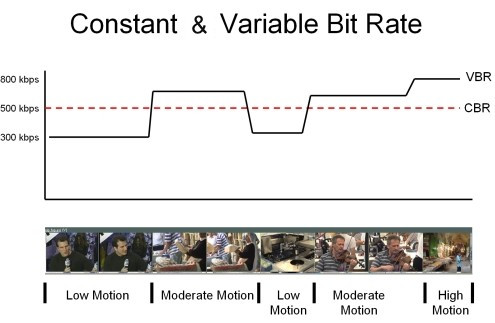
  • CBR (Constant Bitrate): Maintains the same bitrate, ensuring consistent quality.
  • VBR (Variable Bitrate): Adjusts bitrate based on video content, offering efficient compression.

Resolution Scaling for Different Devices

Resolution scaling is essential when you want your video to look good on any device. It’s like making sure a photo prints well at any size.

  • Full HD for larger screens
  • Lower resolution for mobile devices

Frame Rate Optimization Techniques

Frame rate impacts video smoothness. A higher frame rate makes motion look natural but increases file size. Adjust frame rates for better compatibility and smoother playback.

Codec Selection for MP4 Transcoding

Codecs compress and decompress video data. For MP4, H.264 and H.265 are standard. Choosing the right codec ensures efficient compression without sacrificing quality.

Audio Transcoding and Quality Maintenance

Audio quality is just as important. I’ve found that a poor audio experience can ruin a video. Transcoding audio with the right techniques keeps sound crisp.

Maintaining Quality Through Resolution Scaling

Keeping quality intact during resolution changes is challenging. Scaling techniques can help. I often use bicubic scaling for minimal quality loss.

Deinterlacing Techniques in Transcoding

Deinterlacing makes old, interlaced videos play smoothly. By deinterlacing, I convert these to progressive frames, making them look modern and smooth.

Techniques for Minimizing Compression Artifacts

Compression artifacts ruin video clarity. By choosing the right compression techniques, artifacts can be minimized. I use noise reduction filters for a cleaner look.

MP4 Container Optimization

MP4 is more than just a file format; it’s a container for video and audio. Optimizing it enhances playback compatibility and file size efficiency.

Latest words on MP4 video transcoding techniques

Transcoding techniques continue to evolve. Keeping up with these advancements ensures the best possible results for MP4 videos. I use Mp4Gain to simplify the process.

MP4 Video Transcoding Techniques – FAQ

What is MP4 video transcoding?

MP4 video transcoding is the process of converting an MP4 video file from one format or resolution to another, ensuring it is compatible with different devices, platforms, or players. It may involve changing codecs, bitrate, or resolution to achieve better playback or smaller file sizes without compromising quality.

Why is MP4 the most popular video format for transcoding?

MP4 is widely used for video transcoding because it offers a great balance between high video quality and relatively small file sizes. It’s also supported by virtually all devices, making it the go-to choice for delivering content across platforms. The H.264 and H.265 codecs within the MP4 container further optimize video compression while maintaining high-quality visuals.

What is bitrate, and how does it affect MP4 transcoding?

Bitrate refers to the amount of data processed per unit of time in a video file, typically measured in kilobits or megabits per second. In MP4 transcoding, adjusting the bitrate affects the video’s quality and file size. A higher bitrate improves quality but increases file size, while a lower bitrate reduces file size but may degrade quality.

How does resolution scaling work in MP4 video transcoding?

Resolution scaling is the process of changing a video’s resolution to match the display size or the device capabilities. In MP4 video transcoding, this technique ensures the video is optimized for different screen sizes. For example, you might reduce the resolution for mobile devices or keep it higher for large-screen TVs.

What is the difference between CBR and VBR in MP4 video transcoding?

CBR (Constant Bitrate) and VBR (Variable Bitrate) are two encoding methods used in MP4 video transcoding. CBR maintains the same bitrate throughout the entire video, which ensures a consistent quality but can lead to larger file sizes. VBR, on the other hand, adjusts the bitrate based on the video’s complexity, offering better compression while maintaining quality.

What codecs should I use for MP4 video transcoding?

For MP4 video transcoding, the most commonly used codecs are H.264 and H.265. H.264 offers good quality and compatibility with most devices, while H.265 provides even better compression, reducing file sizes without sacrificing quality. The choice of codec depends on the desired balance between quality and file size, as well as device compatibility.

What is deinterlacing, and why is it important in MP4 transcoding?

Deinterlacing is the process of converting interlaced video (often used in older TV broadcasts) into progressive video (where each frame is displayed fully). In MP4 transcoding, deinterlacing is crucial to ensure smooth playback on modern devices that require progressive video. This step is especially important for older content that needs to be optimized for newer screens.

How can I minimize quality loss during MP4 video transcoding?

To minimize quality loss during MP4 transcoding, it’s important to choose the right bitrate, resolution, and codec. Using VBR encoding, choosing a higher bitrate, and avoiding excessive compression will help preserve video quality. Additionally, reducing unnecessary conversions and using advanced filters, such as noise reduction, can further enhance the transcoding process.

Can transcoding affect audio quality in MP4 videos?

Yes, transcoding can affect audio quality in MP4 videos, especially if the audio codec or bitrate is changed. To maintain high-quality sound, use appropriate audio codecs like AAC, and avoid reducing the bitrate too much. Ensure that the audio transcoding settings match the desired quality level, especially if you’re working with high-fidelity audio content.

What are the best practices for transcoding MP4 videos?

Some best practices for transcoding MP4 videos include maintaining the original aspect ratio, using the correct codec (H.264 or H.265), adjusting bitrate and resolution based on the target device, and keeping the file size manageable without compromising quality. It’s also essential to test transcoded files on different devices to ensure compatibility and quality.

Comments:

Honestly, I had no idea about bitrate and all these terms, but this article really broke it down. Thanks!

This is amazing! I tried to transcode MP4s before, but they came out fuzzy. Learned a lot here!

Do you know if adjusting the bitrate will affect playback on older devices? I’m curious about compatibility.

Finally! Someone who explains this stuff simply. I’m bookmarking this.

I’ve been struggling with low audio quality after transcoding. Any advice on which codec to use for audio?

Great article! I’m going to try deinterlacing some old family videos with these tips.

This explanation of codecs was super helpful. I didn’t realize they made such a difference in quality.

Just wanted to say thanks for all the info here. Really useful for a beginner like me.

Some parts went over my head, but I guess that’s just my lack of experience. Still learned a lot!

Has anyone tried these tips and found them useful? Curious to hear real-world results.

More detail on bitrate settings would be nice! Got a bit lost there.

I never thought of adjusting resolution like that. Makes total sense after reading this.

Pretty good read, but would like more on which software supports these features best. Cheers!

Thanks for the advice on minimizing artifacts. My videos always came out blurry till now.

Super helpful guide! Already seeing better results in my transcodes. Appreciate the tips.


Free Download Mp4Gain
picture


Mp4Gain Main Window
picture


Mp4Gain Features
picture


Free Download Mp4Gain
picture

Variable Bitrate Encoding in M4A

Variable Bitrate Encoding in M4A

Variable Bitrate Encoding in M4A

Let’s talk about Variable Bitrate Encoding in M4A

Variable bitrate (VBR) encoding in M4A files is a game-changer for audio quality and file efficiency. I often find that when we’re talking about getting high-quality sound without oversized files, VBR encoding is the best solution. Unlike constant bitrate (CBR), which holds the data rate steady throughout a file, VBR dynamically adjusts. This flexibility means that audio can be compressed differently depending on the complexity of the sound at any given moment, resulting in great sound quality where it’s needed and data-saving where it’s not. Using real-life examples, think of it like a hose: VBR adjusts the “flow” depending on the music’s demands.

How VBR Encoding Differs from Constant Bitrate in M4A

One way I like to explain VBR versus CBR in M4A files is to imagine driving a car. With CBR, you’re holding a constant speed regardless of the road conditions, even if there’s traffic or clear roads. In contrast, VBR is like adjusting speed based on traffic; it slows down in complex audio sections and speeds up when it’s simpler. This approach can capture detailed, high-fidelity audio, while CBR might miss out on some of that nuance. VBR encoding allows M4A files to efficiently adapt the bitrate, creating an optimal balance between sound quality and file size.

Why Variable Bitrate Encoding Enhances Audio Quality

VBR encoding in M4A doesn’t just save space; it also prioritizes sound quality. In my experience, this difference becomes clear with high-energy music like classical or electronic, where subtle audio dynamics are crucial. VBR lets the M4A file devote more data to complex passages, capturing every detail. So, if you’ve ever felt like your favorite tracks sounded “compressed” or “flat,” switching to VBR M4A can make a noticeable difference. It’s like upgrading your audio experience without increasing the file size.

Technical Aspects of VBR Encoding in M4A Files

The technical workings behind VBR can get complex, but let’s break it down simply. VBR in M4A adjusts data allocation based on the audio’s dynamic range. More data is used during complex parts, while simpler sections use less. This dynamic allocation means that an M4A file will rarely waste data on silence or simplicity. As a result, files retain clarity and depth without excessive data. Think of it as only paying for a full tank when you’re on a long road trip – it’s efficient and smart.

Benefits of Using VBR Encoding in M4A

Using VBR in M4A comes with several perks. From my experience, here are some top advantages:

  • Improved Sound Quality

    VBR encodes audio based on complexity, leading to clear sound in all types of music.

  • Efficient File Size

    VBR reduces data use where audio is simpler, making it storage-friendly without compromising quality.

  • Dynamic Audio Capture

    Complex segments retain detail, while quieter parts save on data usage.

For those of us who care about quality and storage, VBR encoding in M4A hits the sweet spot between high-fidelity sound and efficient file size.

VBR Encoding vs. CBR Encoding in M4A

I often get asked why VBR is preferred over CBR in M4A files. It’s simple: VBR offers flexibility that CBR can’t match. While CBR might seem stable, it’s inefficient because it doesn’t adjust based on audio needs. In M4A files, VBR ensures that complex parts get more focus, unlike CBR, which applies the same rate to all parts. Imagine you’re in a bookstore where every book costs the same; with VBR, you pay only for the quality you want, which is why it’s so efficient.

Audio Compression in M4A with VBR

Audio compression in M4A VBR files is like packing a suitcase – you only take what’s needed. VBR helps prevent audio quality loss during compression, making the format excellent for those who prioritize quality over quantity. The difference in quality between compressed VBR and regular CBR audio can be surprising, especially in files with high dynamic range like orchestral pieces. With VBR, every aspect of a song can be heard without feeling over-compressed.

Optimizing File Size and Quality with VBR Encoding

One of my favorite things about VBR encoding is its ability to optimize both size and quality. We don’t always have space to spare on our devices, yet no one wants to compromise on sound. Using VBR in M4A files ensures that you don’t have to make that choice. You get a leaner file that sounds great without eating up unnecessary storage, making it ideal for large music libraries or mobile devices.

Limitations of VBR Encoding in M4A Files

While VBR encoding is effective, it’s not perfect. One challenge is that VBR encoding requires a bit more processing power during playback. This is rarely noticeable with modern devices but could pose a challenge on older hardware. Moreover, not every device or software supports VBR optimally, so there could be some compatibility issues. However, these limitations are minimal compared to the benefits of using VBR for high-quality M4A files.

Real-World Applications of VBR Encoding in M4A

When I’m traveling or out for a run, I often rely on M4A VBR files for music – I get quality without filling up my phone’s storage. For audiobooks or podcasts, VBR is equally efficient, as it doesn’t waste space on silence or long pauses. This application means you can carry more files without needing to sacrifice quality or storage. It’s a practical solution for those of us who enjoy high-quality audio on the go.

How VBR Encoding Adapts to Audio Complexity

VBR encoding’s ability to adjust bitrate based on audio complexity is a defining feature. Think of it like shading in a painting: the encoder decides where more detail is necessary. Quiet passages in M4A files don’t need as much data, while loud, complex segments get more. This flexibility provides a detailed sound that can capture nuances missed by other encoding methods. This is why, especially in music, VBR M4A files offer an experience that feels full and rich.

Latest Words on Variable Bitrate Encoding in M4A

When it comes to getting the best audio experience, Variable Bitrate Encoding in M4A is a top choice. It’s adaptable, offering excellent sound quality while managing file size. Unlike constant bitrate encoding, VBR doesn’t waste data on simple sections, which makes it efficient. For those looking for high-quality audio without massive files, M4A with VBR is a practical choice. And for those who want a powerful tool to optimize their audio experience, Mp4Gain can help you get the most out of your M4A files.

Comments:

Wow, this really helped me understand VBR better! I always thought one bitrate fit all, but now I get why adjusting makes a difference.

I tried switching to VBR on my M4A files, and I can already hear the improvement in sound quality, especially on complex tracks.

This article was really informative, but I wish there were more examples of VBR in real-life applications. Still, it was helpful!

Been using CBR all my life because I didn’t know there was a difference. Going to try VBR now, thanks!

I was so confused about bitrate settings before this. Now I’m excited to re-encode my music in VBR!

Never realized there was an option like VBR for M4A files. Makes so much sense to adjust bitrate based on the music. Thanks for this!

Great read! I think I’ll switch my whole library to M4A with VBR encoding to save on space. Thanks for the tips!

Wish there was more on the limitations of VBR – I think some older devices might struggle with it. But I’ll give it a go on my phone.

VBR encoding really makes the music sound better, like the difference between a regular camera and HD! Appreciate the detail here.

Always wondered if VBR was worth it over CBR. This article convinced me to make the switch. Loving the clarity in sound!

I like that you explain this in a simple way – makes it easier for non-tech folks like me to understand the value of VBR!

This article helped a lot, but I’d love

to know how VBR works with other formats, like MP3.

Been looking for a good VBR guide, and this hit the spot. Can’t wait to re-encode my favorite songs and hear the difference.

VBR sounds like the right choice for people who care about audio quality. Thanks for breaking down the technical side!

https://www.tumblr.com/mp3-mp4/765504331516624896/variable-bitrate-encoding-in-m4a-mp4gaincom

Bitrate Control Methods in MP4 Encoding

Bitrate Control Methods in MP4 Encoding

Bitrate Control Methods in MP4 Encoding

Let’s Talk About Bitrate Control in MP4 Encoding

Bitrate control is more than just a technical setting; it’s the backbone of video quality and file size management. When encoding MP4 files, we decide how much data is used to represent each second of video, and that choice impacts everything from playback clarity to download times. Think of bitrate as the “detail level” you choose to capture in a painting—the more paint (or data) you use, the clearer the image, but with more size to handle. Let’s explore why bitrate control matters in MP4 encoding, how various methods impact your final file, and how you can choose the right one to fit your needs.

Why Bitrate Control is Essential in Video Encoding

In video encoding, bitrate control isn’t just about file size; it affects the visual and auditory experience. Higher bitrates can make an image sharper and richer, while lower bitrates save space but may sacrifice some quality. Imagine watching a movie at different quality levels—at the highest quality, you see every detail clearly, but if it’s too low, it’s like watching through frosted glass. Getting the bitrate right means balancing quality with practicality, and that’s where bitrate control techniques come into play.

Understanding Bitrate Control: Constant Bitrate (CBR) vs. Variable Bitrate (VBR)

Different encoding methods affect how bitrate is distributed across a video file. Here’s an in-depth look at the two primary methods: Constant Bitrate (CBR) and Variable Bitrate (VBR).

  • Constant Bitrate (CBR): Pros, Cons, and Practical Applications

CBR uses a fixed bitrate throughout the video, keeping data usage steady. This method is straightforward and predictable—no matter the scene, the bitrate remains the same, which can be helpful for streaming on low-bandwidth networks. But there’s a downside: since CBR doesn’t adjust to scene complexity, it may waste data on simple scenes or underrepresent complex scenes. Imagine painting every square inch of a mural with the same amount of paint, even on spots that don’t need it.

  • Variable Bitrate (VBR): Advantages, Drawbacks, and Usage Scenarios

VBR adapts the bitrate based on content complexity, dedicating more data to complex scenes while using less for simpler ones. This flexibility improves overall quality while optimizing file size, but it can increase encoding time. It’s like adjusting brush strokes based on the level of detail needed—more for a detailed section, less for plain areas. VBR is excellent for content where quality is a priority, such as HD movies or high-action scenes, but it requires more computing power and time.

  • Real-World Scenarios Using CBR and VBR in Video Encoding

CBR is typically chosen for live streaming, where a steady bitrate keeps the stream stable. VBR, meanwhile, shines in offline content, where the file is created once, and quality can be optimized. Think of it this way: live sports streaming may benefit from CBR’s stability, while VBR’s adaptability suits a blockbuster movie’s intricate scenes.

Advanced Techniques for Bitrate Control

More sophisticated methods allow for even greater control over bitrate distribution and quality.

  • 2-Pass Encoding: What It Is and Why It Matters

Two-pass encoding allows for the best of both worlds in VBR. During the first pass, the encoder analyzes the video, and in the second pass, it adjusts bitrate distribution based on scene complexity. This approach maximizes quality and minimizes file size, though it takes double the time. If you’re creating high-stakes content like a music video, the time investment for a 2-pass VBR could make a big difference in quality.

  • Average Bitrate (ABR): Balancing Quality and File Size

ABR keeps a consistent average bitrate across the file, but unlike CBR, it allows some variation. This hybrid approach combines predictability with flexibility. For instance, encoding a training video where some scenes are complex and others are static can benefit from ABR’s moderate adaptability without the complexity of VBR.

  • Adaptive Bitrate Streaming and Machine Learning in Encoding

Adaptive bitrate streaming takes bitrate flexibility even further, adjusting in real time based on the viewer’s connection speed. Often used by streaming platforms, this technique ensures that viewers experience the best quality possible without buffering. Machine learning enhances this by predicting viewer needs based on past data, making encoding smarter and more efficient.

Factors Influencing Bitrate Control Decisions

Choosing a bitrate control method is more than a technical choice; it’s a matter of balancing multiple factors.

  • Source Video Quality and Resolution

Higher resolution content demands higher bitrate to maintain quality. Encoding a 4K video requires far more data than standard definition to retain clarity, so your bitrate control needs to match the resolution to avoid pixelation.

  • Playback Device Requirements and Limitations

If your content will be viewed on mobile devices, encoding should prioritize smaller file sizes and efficient compression. For larger screens, prioritize quality, as viewers will notice subtle details. It’s like packing for a trip: you’d bring different gear for hiking than for a beach vacation.

  • Bandwidth and Storage Considerations

Encoding for low-bandwidth areas calls for bitrate control methods that preserve quality with minimal data usage. When file storage is limited, efficient compression methods like 2-pass VBR become valuable.

Comparing Different MP4 Encoding Tools and Their Bitrate Control Capabilities

Various encoding tools handle bitrate differently. While all offer CBR and VBR, some excel with advanced features like 2-pass encoding or adaptive bitrate capabilities. High-end tools often support machine learning, analyzing content to maximize compression efficiency without sacrificing quality.

Common Challenges in Bitrate Control and How to Address Them

Bitrate control brings unique challenges, from maintaining quality to managing file size.

  • Maintaining Quality in Low-Bandwidth Conditions

Encoding for low-bandwidth requires carefully balancing bitrate and compression to avoid quality loss. VBR or ABR can help by prioritizing quality in key scenes while conserving data in others.

  • Optimizing for Different Platforms and Devices

Each platform has its playback standards; for instance, social media may require smaller file sizes. Adjust bitrate control to meet these standards without compromising quality.

  • Managing File Size without Losing Quality

It’s tricky to balance quality with small file sizes. Using 2-pass encoding or adaptive bitrate control can help optimize quality by ensuring each scene gets the right amount of data.

Choosing the Best Bitrate Control Method for Your Needs

Selecting the ideal bitrate control method depends on your video type, audience, and storage limits. For a polished product, 2-pass VBR often yields the best results, while live streaming benefits from CBR. Experiment with these methods to find the right fit.

Latest Words on Bitrate Control in MP4 Encoding

Bitrate control continues to evolve, with new tools leveraging machine learning to optimize compression. In the future, we may see real-time adaptive methods that adjust based on user preferences and network conditions, creating smoother viewing experiences than ever. Ultimately, understanding bitrate control empowers you to create videos that balance quality and efficiency.


https://x.com/ricardo_mx_news

What are CBR and VBR?

What are CBR and VBR?

CBR VBR

As you know, the result of encoding a signal using an algorithm such as MPEG-1 Layer III (MP3) (and many other algorithms) is a bit stream with a frame (block) structure. This is due to the fact that the source stream is not encoded in its entirety, but in parts. That is, in fact, the original stream is divided into blocks of some fixed length, then each block (frame) is encoded individually, and the result (encoded information block) is sent to the resulting stream (either a file or a stream of data).

CBR vs VBR

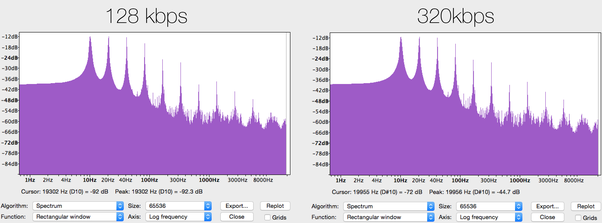
CBR (constant bit rate) is a way of encoding the original audio stream, in which all its blocks (frames) are encoded with the same parameters (with the same bit rate). In other words, the bitrate over the entire length (all frames) of the resulting stream is constant.

VBR (variable bit rate) is a method of encoding the original audio stream, in which each separate block (frame) is encoded with its own bit rate. The choice of the optimal bit rate to encode a given frame is made by the encoder itself by analyzing the “signal complexity” in each individual frame.

What are the differences between CBR, VBR and ABR for Lame Encoder?

Before starting the conversation, let’s clarify two details:

1. MP3 encoding happens block by block: the encoded file is divided into frames (frames) with the same interval, each frame is encoded and written to the output stream; therefore, the output stream also has a frame structure.

2. Frames cannot be encoded at any bit rate, but only at one of the standard MPEG1 Layer III bit rates listed in the table: 32, 40, 48, 56, 64, 80, 96, 112, 128, 160, 192, 224, 256, 320. The standard does not provide encoding at intermediate bit rates (“free format”).

Introduction

People using VBR in Lame often argue this with the phrase, “I want to get constant quality, not constant bitrate.” In fact, in music there are simple passages, for which 128 Kbps is sufficient (for example, pauses between songs), and there are also complex passages, in which a person with good hearing, a good audio card and other audio equipment. audio will hear compression defects even at 320 Kbps / sec. In fact, such an argument is not entirely valid.

CBR

Even in CBR mode, the mp3 encoder can reallocate bits over time, emphasizing more or fewer bits during complex or simple passages, thus improving the overall sound quality. This redistribution of bits is carried out at the expense of the so-called bit deposit: during the encoding of simple passages, the encoder spends not the entire user-specified bit rate on them, but only about 90%, about 10% is saved in the repository to encode complex locations (initially repository is empty). When encoding complex passages, the encoder will use 100% of the specified bit rate and add additional bits from the bucket (if any, that is, if the bucket is not empty). Unfortunately, according to the standard, the size of the tank is limited. This means that if a single signal lasts long enough, the tank builds its volume up to certain maximum allowed limits and then the encoding is already using 100% of the bit rate. And the opposite situation: if a complex signal lasts long enough, all the saved bits are taken from the repository (gradually) and then encoding is done using now 100% of the bit rate.

ABR: Explanation

You could say that the reservoir does a good job with its main function – accumulating “extra” bits during simple passages and issuing them as additional bits when encoding complex passages, if not for one “but”: it has a finite and additionally very limited size, which means that it can only be stored up to certain limits and consequently also until the tank is empty. It is in order to eliminate this major tank drawback that the ABR was developed.

The main difference between ABR and CBR is that in CBR all frames must be the same size (that is, the bitrate for all frames must be the same), but in ABR this restriction is removed, respectively, there is an opportunity to use an almost infinite tank instead of the standard, very limited in size. “virtual” reservoir. Does it look like this.

ABR: mechanism

Suppose user specified ABR mode and a certain bitrate B (user can specify absolutely any bitrate from 32 to 320, even not from standard bitrate grid, for example you can specify 129 as the rate Average Bit Rate). AND