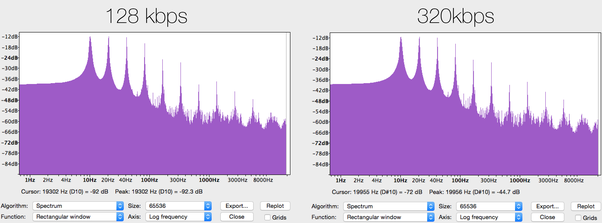
In this article, we will explore the technical aspects of audio bitrates. We will discuss what a bitrate is, how it affects audio quality, and how to choose the right bitrate for your needs.
What is a bitrate?
A bitrate is the number of bits per second that are used to encode an audio file. The higher the bitrate, the more data is used to encode the file, and the higher the quality of the audio will be. However, higher bitrates also result in larger file sizes.
How does bitrate affect audio quality?
Bitrate affects audio quality by determining how much data is used to represent the original sound waves. Higher bitrates allow for more data to be used, which results in more accurate representations of the original sound waves. This results in better audio quality, such as increased clarity and reduced noise.
How to choose the right bitrate
The right bitrate for you will depend on a number of factors, including:
The type of audio you are listening to. For example, music and speech have different requirements.
The quality of your audio equipment. Higher-quality equipment can reproduce higher bitrates without introducing any noticeable distortion.
Your personal preferences. Some people may prefer the sound of higher bitrates, while others may not notice a difference.
General bitrate recommendations
Here are some general bitrate recommendations for different types of audio:
Speech: 32 kbps to 96 kbps
Music: 128 kbps to 320 kbps
High-quality audio: 256 kbps to 512 kbps or higher
It is important to note that these are just general recommendations. The best way to determine the right bitrate for you is to experiment and see what sounds best to your ears.
Final words about audio bitrates
Audio bitrate is an important factor to consider when choosing an audio file format or when setting up an audio streaming service. By understanding how bitrate affects audio quality, you can choose the right bitrate for your needs and get the best possible listening experience.
Talking about some basic differences between VBR and CBR in mp3 files Part 3
CBR vs VBR
For VBR encoded mp3 files, since the bit rate of each frame is not fixed, the data size of each frame is arbitrary.
CBR vs VBR
Obviously, the size of the data reproduced per second is different. In this way, the duration of all the audio cannot be calculated with the above formula and other data fields are needed, which is one of the shortcomings of VBR technology: it is relatively difficult and complicated to calculate the duration of the audio.
There is another disadvantage of VBR technology. When playing an audio file, there will inevitably be an operation to jump to the position of the specified time to play (ie, the so-called seek operation). At this time, it is necessary to convert the time position of the target to the position of the file. Then jump to this file position offset to read and decode. If it is a download and play network playback mode, you must first calculate the position of the file during the search operation. Jump to this position and download a paragraph before continuing to play. . For CBR encoding, the conversion to file position offset is also very simple, using the following formula:
file position (byte) = target time position ( s ) * bitrate (kbps) * 1000/8 + id3v2 field size (if any)
But for VBR encoding, it is obviously impossible to use this formula to convert file position. The reason is also very simple: the bit rate of each frame is not fixed and the length of data per second is not average. Therefore, just like calculating duration, other data fields are needed.
The method to calculate the duration of the audio and implement the seek operation using VBR encoding
To solve the above two problems, VBR encoding adds some data fields. At present, there are mainly two types of VBR encoding technologies, one is the Xing specification proposed by the Xing Company, and the other is the VBRI specification of the Fraunhofer encoder. This article only presents how the Xing specification solves the audio duration computation and the implementation of the seek operation.
The main content of the Xing specification is the Xing header, which means that the first audio frame at the beginning of the VBR-encoded mp3 is not used to store specific audio data, but to store additional audio information. This information is marked with the four characters of “Xing” as the beginning of the field (some files also use the four characters of “Info” as the beginning of the Xing header).
The position of the Xing header in the first audio frame is after the standard 4-byte mp3 audio frame header. Between the table header and the Xing header, there will be a blank part with all 0 data content. This blank The length of the section is specified. After the decoder parses the frame header of the first audio frame, it skips the blank part of the specified length, and then judges whether the next content is the four characters of ‘Xing’ or ‘Info’ to judge the audio If the VBR encoding.
The length of the blank part is determined by the mpeg version and the number of channels, as shown in the following table (unit is byte):
non-mono infectious mononucleosis MPEG version
MPEG 1 18 32 (most common)
MPEG2 9 18
The following figure is an example of the field structure of the first VBR-encoded mp3 data frame:
The field structure and the content of the information stored in the Xing header are as follows:
Location (from marker ‘Xing’) longitude direction Example
0 4 VBR header tag, 4-byte ASCII characters, content is ‘Xing’ or ‘Info’ ‘Xing’
0 4 A flag indicating the specific content of the VBR header, the combination is logical OR. The area is
mandatory
. exists, excluding tags;
0x0004 – TOC index storage area set to exist;
0x0008 – Quality Indication Storage Area set to exist 0x0007 (meaning total number of frames, file length and TOC storage area are valid)
8 4 Stores the Big-Endian value of the total number of frames 7344
8 or 12 4 Stores the Big-Endian value of the file length, in Bytes 45000
8, 12, or 16 100 The TOC table, which is a byte array with a length of 100, is a positional index used for fast addressing in the file and is primarily used to resolve the implementation of the seek operation.
Talking about some basic differences between VBR and CBR in mp3 files Part 2
CBR vs VBR
The appearance of VBR encoding technology is to solve the problem of this waste of space.
CBR vs VBR
VBR technology selects the most suitable bit rate for each audio frame. For audio frames with a lower pitch, the bit rate will be lower and the data size will be smaller. If the pitch is higher, the bit rate will be higher. The size is larger. In this way, the storage space of the audio data can be saved and the size of the mp3 file can be further compressed without losing the audio quality.
The figure above briefly compares the differences in data content between CBR and VBR mp3 files. It can be seen that the bit rate of the VBR encoded mp3 is not necessarily the same due to the difference in data content between frames. Generally, VBR technology will compress and encode in the range of 8~320kbps, so the bit rate of the whole file is higher than that of the whole file. Constant CBR encoding, VBR encoding has a bit rate variable bit rate throughout the file, hence the name VBR (variable bit rate).
In addition to the two encodings CBR and VBR, there is also an ABR (Average Bit Rate, Average Bit Rate) type encoding, which is basically the same as CBR, most audio frames are encoded at the bit rate specified, but they will be The content is encoded with a higher bitrate than specified, but usually this content is short, so there is not much difference in file size compared to CBR, so this type is not common.
Disadvantages of VBR technology compared to CBR technology
Using VBR technology to encode and compress mp3 files can certainly optimize file size, but at the same time, it also brings some new problems in acquiring audio information and monitoring playback progress.
The first is the calculation of the duration of the audio. If it is CBR encoding, since the bit rate is constant, the data size of all audio frames is fixed, so the data size needed to decode for each second of playback is the same, so it is very simple to calculate the audio time length. Just use the following formula:
timelength ( s ) = (total file length (Byte) – total id3 field size (if present)) * 8 / (bitrate (kbps) * 1000 )
In the formula, the id3 field refers to the basic information field that is placed at the beginning or end of the mp3 file, and is generally used to record the audio file name, singer name, and album name. The id3 is divided into two versions, v1 and v2, and v1 only registers. The above three types of information, and the size is fixed, are usually placed at the end of the file; v2 is more flexible than v1, the type of the recorded information is not limited to the above three, and the size is not fixed, it is usually placed at the beginning of the file. The id3 field is an optional field, and the mp3 file doesn’t necessarily have it, so to calculate the audio time of the mp3, you must first read it to see if the id3 exists.
Talking about some basic differences between VBR and CBR in mp3 files
CBR vs VBR
From the perspective of bitrate encoding, one of the most common audio file formats, MP3, can be divided into two types: one is constant bitrate CBR (constant bitrate).
CBR vs VBR
The bit rate of a frame is constant and unique. ; the other is Variable Bit-Rate VBR, which is the opposite of CBR. The bit rate of each frame is not fixed. The bitrate may or may not be the same. Due to the existence of these two types, some jobs that need to be done when playing mp3 files, such as getting audio information and controlling playback progress, need to be handled separately.
Introduction to some basic concepts.
To clearly understand the specific differences between CBR and VBR, you need to understand an important attribute of audio files: bit rate, also known as bitrate or bit rate, refers to the number of bits transmitted per second. The unit is bps (bits per second). The higher the bit rate, the higher the data transmission speed. Bitrate in audio refers to the amount of binary data per unit of time after converting an analog sound signal to a digital sound signal, which is an indirect measure of audio quality.
The bitrate unit of audio files is generally kbps, 1 kbps = 1000 bps. The default bitrate of mp3 is 128kbps, but the mp3 downloaded from the net is more common at 192kbps, and if you want to get high definition mp3 with better sound quality, the bitrate usually reaches 320kbps. The higher the bitrate, the better the sound quality, but the more disk space it will take up.
In general, the higher the pitch of the sound clip, the more space it needs to store and the higher the bitrate. The traditional mp3 file is encoded with CBR, that is, the bit rate of each frame is the same, which brings a problem: if the bit rate of each frame is the same, then the data size of each frame it’s the same way, no matter the pitch of this frame is high or low, the storage space of the audio frame with the highest pitch in all audio is used to store this frame, but for the audio frame with low pitch, not much storage space is needed. This will result in a loss of storage space and will virtually increase the size of the mp3 file.
Generally, there are three mp3 bitrates namely VBR, ABR and CBR.
VBR, ABR and CBR.
1.1 RBC
CBR is short for Constant Bit Rate, which means Fixed Bit Rate in Chinese.
For a CBR MP3 song with a bitrate of 128kbps, the first 128kb of the song describes the sound of the first second, and the second 128kb describes the sound of the second second…if the song is finished, it will take 640 seconds , then the size of the song is 128kb × 640 = 80Mb = 10MB. The so-called 128kbps means 128kb per second.
If you are careful, you will find that the volume compressed by this encoding method will be very large, because the bit rate is fixed. Of course, the sound quality has some advantages over the other two, although this advantage may be minimal.
1.2VBR
Dynamic bit rate VBR (Variable Bitrate). That is, there is no fixed bitrate and the compression software determines on the fly which bitrate to use based on the audio data being compressed.
A simple understanding is that the bitrate will be relatively high at the time the song is rich in detail, and relatively low at other times, so sound quality and size are taken into account. For example: at the beginning of the song, a person sings alone, the sound is relatively simple, we use 64kb to describe the sound within one second; at the climax of the song, everyone sings, the sound is more complicated, we use 256kb to describe a second voice within the species.
1.3 APR
ABR (Average Bit Rate) Average Bit Rate is an interpolation parameter of VBR.
For example, when you specify 192kbps ABR to encode a wav file, Lame will use a fixed 192kbps encoding for 85% of the file, then dynamically optimize the remaining 15%: complex parts are encoded with more than 192kbps, simple parts are encoded with less than 192 kbps. Compared to CBR 192kbps, ABR 192kbps has a similar file size, but the sound quality is much better. ABR encoding is 2 to 3 times faster than VBR encoding and has better quality than CBR in the range of 128 to 256 kbps.
It can be used as a compromise between VBR and CBR. Under normal circumstances, files with this encoding method are rarely found.
For audio compression, such as MP3, the traditional CBR (Constant Bit Rate) is a static bit rate.
vbr
CBR accepts that the MP3 sampling rate is a fixed value. An MP3 is compressed with a fixed value like 128 KBit/s from start to finish. VBR adopts a new compression method with full dynamic adjustment technology to strike a balance between sound quality and file size. When VBR encodes an audio file, the program will try to maintain the selected quality of the entire file and will select different bit rates to encode different parts of the music file. When in the low range (simple part), VBR will automatically use a lower bit rate, such as 32 KBit/s, to compress the sound quality; when in the high range (complex part), it will use a higher bit rate, such as 224 KBit/s. s to compress sound quality Compression is performed; at the high end, use up to 320 KBit/s for compression. VBR MP3 maximizes MP3 sound quality while controlling file size. VBR automatically allocates fewer bits to the simple part of the content during encoding, leaving enough bits to generate high-quality complex parts. The output result of VBR encoding is of better quality than that of CBR encoding, and the encoded file is relatively small and suitable for storage. However, the disadvantage of VBR is that the amount of computation is large, the compression time is long, the size of the compressed file cannot be estimated during encoding, the requirements for the decoding algorithm are also much more complicated, and the Requirements for the hardware (such as the CPU) of the decoder are also high.
Differences between CBR and VBR:
(1) CBR: The size of the FRAME with a fixed bit rate is also fixed. As long as the total file length and frame length are known, the total mp3 playback time can be calculated from the 26 ms required to play each. frame, and can also be controlled by counting the number of frames. Fast forward, fast rewind, slow playback, etc.
(2) VBR: VBR is an algorithm released by XING company, so there will be the keyword “XING” in the FRAME of MP3 (many popular small software can also do VBR compression, whether they abide by this agreement, then it is impossible to Got it), it is stored in the first valid FRAME in the MP3 file, and identifies that the MP3 file is VBR. At the same time, the first FRAME stores the total number of FRAMEs in the MP3 file, making it easy to get the total playing time. At the same time, there are 100 bytes that store the INDEX of the 100 time-sliced FRAMEs. of the total playing time.
beginning
Edit
VBR is a variable encoding rate MP3 compression method. Its principle is to encode the complex part of a song with a high bit rate and the simple part with a low bit rate. Through this dynamic adjustment of the encoding rate, the sound quality can be improved. additionally obtained and the size of the file. Its main advantage is that the entire song can approximately meet our sound quality requirements, but the disadvantage is that the size of the compressed file cannot be estimated during encoding.
Most MP3 players released now support VBR, but although some machines can play songs in VBR format, they cannot display the playing time correctly (especially in car stereos). Many high-quality MP3s today are encoded with VBR. when purchasing, please pay attention to whether MP3 Walkman supports VBR effectively.
other acronyms
Edit
VBR: Valid Business Reason
VBR: Vector Base Register
VBR: Vertebral Body Replacement
VBR: Virginia Blue Ridge Railroad
VBR – Variable Diameter Ram (Oil Drilling)
VBR: Basic Rule Violation (Oregon Traffic Division)
VBR: Kind regards
VBR: ventricle-brain ratio
VBR: Virgin Branson Richard
VBR: Visual Basic custom control file control file,
Visual Basic customization
VBR: VärnamoBygdens Ryttarförening VärnamoBygdens Ryttarförening
VBR: Visions come true
VBR: Vinnell, Brown and Root Vinnell, Brown, Root
VBR: Varsity Brands, Inc. Some brand companies
VBR (variable bit rate) dynamic bit rate. That is, a bit rate is not fixed.
VBR
The audio encoding software immediately determines which bitrate to use based on the complexity of the audio data during encoding. This is an encoding method that is premised on quality and takes file size into account.
Table of Contents
1 Definition
dynamic bit rate
other meanings
2 differences
3 principles
4 Other acronyms
definition
Edit
dynamic bit rate
VBR is also called dynamic bit rate encoding. Using this method, you can choose various transition levels from worst sound quality/maximum compression ratio to best sound quality/minimum compression ratio. When encoding the MP3 file, the program will try to preserve the quality of the entire selected file, the encoding will choose different bit rates suitable for different parts of the music file. The main advantage is that the sound quality of the entire song can approximately meet our quality requirements, but the disadvantage is that the compressed file size cannot be estimated during encoding.
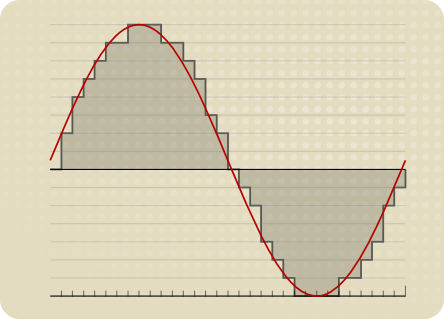
Bitrate is the bitrate (speed) of the waveform [be careful not to confuse with sample rate, MP3 sample rate is generally 44.1 KHz and some higher ones are 48.0 KHz ], sound is naturally a waveform, that is, vibration. The vibration is drawn as an oscillating curve and the computer is on this curve when saved.
The best (highest) mp3 bitrate is 320 kbps (i.e. 320 kilobits per second), the waveform below 320 kbps will be corrupted and a lot of non-sharp detail will be lost (wave clipping) , while 320 kbps MP3 encoding mainly compresses treble details. Above 320 kbps, only a few programs support encoding, and the sound quality improvement is not obvious, so it is better to use lossless compression.
The higher the bitrate, the more accurate the waveform reproduction and the less distorted the sound. VBR is a technology that does not allow all music to take the same bit rate. The encoder determines the bit rate according to the complexity of the audio. Through dynamic adjustment, the music bitrate is high at complex places and the bitrate at simple places is low, so files of the same size will sound higher quality.
other meanings
VBR variable diameter gate (variable bore ram). Oil vocabulary in English (V1)
the difference
Edit
For video, VBR is different from fixed bitrate mode, and its bitrate can vary with image complexity, so its encoding efficiency is relatively high, and there are few mosaics of fast-moving images. When compressing, the encoding software immediately determines which bitrate to use based on the video data, not only ensuring quality but also taking file size into account. In this way, the encoding program can choose from the worst video and audio quality (usually the highest compression ratio) to the best video and audio quality (usually the lowest compression ratio) among various video qualities. When encoding a video file, the encoding program tries to maintain the selected quality of the entire file by choosing different bit rates to encode different parts of the video file.




/CBR-vs-VBR-069b3b5e6d554d53841e7e525092d25b.jpg)
/CBR-vs-VBR-069b3b5e6d554d53841e7e525092d25b.jpg)