In this article, we will explore the technical aspects of audio bitrates. We will discuss what a bitrate is, how it affects audio quality, and how to choose the right bitrate for your needs.
What is a bitrate?
A bitrate is the number of bits per second that are used to encode an audio file. The higher the bitrate, the more data is used to encode the file, and the higher the quality of the audio will be. However, higher bitrates also result in larger file sizes.
How does bitrate affect audio quality?
Bitrate affects audio quality by determining how much data is used to represent the original sound waves. Higher bitrates allow for more data to be used, which results in more accurate representations of the original sound waves. This results in better audio quality, such as increased clarity and reduced noise.
How to choose the right bitrate
The right bitrate for you will depend on a number of factors, including:
The type of audio you are listening to. For example, music and speech have different requirements.
The quality of your audio equipment. Higher-quality equipment can reproduce higher bitrates without introducing any noticeable distortion.
Your personal preferences. Some people may prefer the sound of higher bitrates, while others may not notice a difference.
General bitrate recommendations
Here are some general bitrate recommendations for different types of audio:
Speech: 32 kbps to 96 kbps
Music: 128 kbps to 320 kbps
High-quality audio: 256 kbps to 512 kbps or higher
It is important to note that these are just general recommendations. The best way to determine the right bitrate for you is to experiment and see what sounds best to your ears.
Final words about audio bitrates
Audio bitrate is an important factor to consider when choosing an audio file format or when setting up an audio streaming service. By understanding how bitrate affects audio quality, you can choose the right bitrate for your needs and get the best possible listening experience.
What is the relationship between audio and video bit depth?
audio and video bit depthaudio and video bit depth
Audio Bit Depth and Video Bit Depth
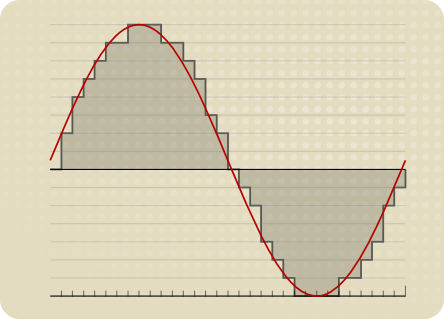
Audio and video quality are two essential components of any multimedia content. Bit depth is one of the key factors that determine the quality of audio and video content. The bit depth of audio refers to the number of bits used to represent the amplitude of a sound wave. In contrast, video bit depth refers to the number of bits used to represent the color and brightness of each pixel in an image or video frame.
The higher the bit depth, the more accurately the audio or video content can be represented. A higher bit depth allows for a greater dynamic range and more subtle variations in sound or image. In general, a higher bit depth is desirable for both audio and video content.
As a personal experience, I have worked with audio and video editing for several years, and I have noticed a significant improvement in quality when using a higher bit depth. I often use a bit depth of 24 bits for audio and 10 bits for video when working on high-quality content.
Audio and Video Synchronization
The synchronization between audio and video is crucial for creating a seamless multimedia experience. When the audio and video are out of sync, it can be distracting and diminish the overall quality of the content.
The bit depth of both audio and video can affect the synchronization. For example, if the audio has a higher bit depth than the video, the audio may appear to be out of sync with the video. This can occur because the audio takes longer to process due to the higher bit depth. To avoid this issue, it is essential to ensure that both the audio and video have the same bit depth.
As a personal tip, I recommend using software that allows for precise synchronization adjustments. I have found that the use of keyframes and markers can significantly improve the accuracy of synchronization between audio and video.
Audio and Video Codecs and File Formats
Audio and video codecs and file formats can also affect the bit depth and overall quality of multimedia content. A codec is a software program that compresses and decompresses audio or video data, while a file format determines how the compressed data is stored.
Lossy codecs, such as MP3 and H.264, compress audio and video data by discarding information deemed unnecessary. This can result in a lower bit depth and lower overall quality. In contrast, lossless codecs, such as FLAC and ProRes, maintain the original quality by compressing the data without discarding any information.
As a personal preference, I usually work with lossless codecs and file formats when editing audio and video content. However, it is essential to consider the intended use and distribution of the content when choosing codecs and file formats. For example, lossy codecs are often used for streaming and web distribution due to their smaller file sizes.
Final Words
In conclusion, bit depth is a critical factor in determining the quality of audio and video content. A higher bit depth allows for greater accuracy and dynamic range. Ensuring that the audio and video have the same bit depth is crucial for synchronization. Codecs and file formats can also affect the bit depth and overall quality of multimedia content. Choosing the right codecs and file formats depends on the intended use and distribution of the content.
Remember that mp4gain is a great solution to normalize and convert audio and video files to ensure they have the same bit depth and quality.
How to Calculate Audio Bitrate: A Comprehensive Guide
Audio Bitrate
Calculating audio bitrate is an essential skill for anyone working with digital audio files. Bitrate is the amount of data used to encode one second of audio, and it plays a significant role in the quality of audio files. In this comprehensive guide, we will discuss everything you need to know about audio bitrate and how to calculate it.
Audio Bitrate
What is Audio Bitrate?
Bitrate is the number of bits used to encode one second of audio. It is typically measured in kilobits per second (kbps) and determines the audio file’s size and quality. The higher the bitrate, the larger the audio file’s size and the better the audio quality.
Audio bitrate is determined by several factors, including:
The audio format
The audio codec
The audio signal characteristics
Audio Format and Codec
The audio format and codec are two critical factors that determine audio bitrate. Audio format refers to the type of audio file, such as MP3, WAV, or FLAC. Each audio format has its own advantages and disadvantages, including file size, compatibility, and audio quality.
The audio codec, on the other hand, is the software used to compress and decompress audio data. Codecs determine how efficiently audio data is compressed and how much data is used to encode one second of audio.
It is essential to choose the right audio format and codec for your needs, as they can significantly impact the audio bitrate and quality. For example, MP3 files are smaller in size but lower in quality than WAV or FLAC files.
Audio Signal Characteristics
The characteristics of the audio signal, such as its frequency range and amplitude, can also affect the effectiveness of audio compression and the resulting audio bitrate. Higher frequencies and amplitudes require more data to encode accurately, resulting in a higher bitrate.
Other factors that can affect audio bitrate include the number of audio channels and the audio’s dynamic range. Stereo audio files require more data than mono audio files, while audio files with a wide dynamic range require more data than those with a narrow dynamic range.
Calculating Audio Bitrate
Calculating audio bitrate requires you to know the audio file’s duration, size, and format. Once you have this information, you can use the following formula to calculate audio bitrate:
Bitrate = (File size in bits / Duration in seconds) / 1000
For example, if you have a 3-minute MP3 audio file with a size of 4,320,000 bytes:
Convert the file size to bits: 4,320,000 x 8 = 34,560,000 bits
Convert the duration to seconds: 3 x 60 = 180 seconds
In this example, the audio file has a bitrate of 192 kbps.
Conclusion
Calculating audio bitrate is an essential skill for anyone working with digital audio files. Understanding audio format, codec, and signal characteristics can help you choose the right audio settings for your needs and ensure the best audio quality possible. By following the formula above, you can easily calculate the required bitrate for your audio files and adjust the settings accordingly. Keep in mind that bitrate is not the only factor that affects audio quality, so be sure to consider other factors such as the audio format, codec, and signal characteristics when selecting your settings.
When working with audio, it’s important to strike a balance between file size and audio quality. Higher bitrates generally result in better audio quality, but also larger file sizes. It’s up to you to determine the optimal balance for your specific needs and use case.
Final Thoughts
Calculating audio bitrate may seem like a daunting task, but with the right tools and knowledge, it can be a straightforward process. By understanding the different factors that affect audio quality and file size, you can make informed decisions when selecting your audio settings.
Remember, bitrate is just one of many factors that affect audio quality. Other factors, such as the audio format and codec, can also have a significant impact. By taking these factors into consideration and making informed decisions, you can achieve the best possible audio quality for your needs.
Whether you’re an audio professional or simply someone who enjoys working with digital audio files, understanding how to calculate audio bitrate is an important skill to have. By following the guidelines outlined in this article, you can ensure that your audio files are optimized for the best possible quality and file size.
Note: The information provided in this article is for educational purposes only and should not be construed as professional advice. Always consult a professional audio engineer or other qualified expert for advice on specific audio projects or issues.
The Importance of Bitrate in Digital Audio and Video
The Importance of Bitrate in Digital Audio and Video
Have you ever watched a video that was all glitchy and the sound was all messed up? Or listened to a song and it sounded like it was being played on a scratched record? Well, that’s because of something called the bitrate.
The Importance of Bitrate in Digital Audio and Video
What is Bitrate?
Bitrate is the number of bits of information that are processed in a certain amount of time. In digital audio and video, it determines the quality of the sound and video. The higher the bitrate, the better the quality, and the more information is processed.
Why is Bitrate Important?
When you watch a video or listen to a song, the bitrate helps to determine the quality of the sound and video. The higher the bitrate, the more information is processed, and the better the quality. If the bitrate is low, then the quality will be poor and you might miss out on important details.
For example, if you’re watching a video of a concert and the bitrate is low, then you might not be able to hear the singer’s voice clearly or see the instruments being played. This can be really frustrating and ruin the whole experience for you.
How Does Bitrate Affect Digital Audio and Video?
Bitrate affects digital audio and video in several ways. For one, it affects the file size. If the bitrate is high, then the file size will be large, and if the bitrate is low, then the file size will be small.
Another way that bitrate affects digital audio and video is by affecting the quality. If the bitrate is high, then the quality will be good, and if the bitrate is low, then the quality will be poor. This can be especially noticeable when you’re watching a video with a lot of movement, like a sports game or a music video.
Finally, bitrate can also affect how long it takes to download or upload a video or audio file. If the bitrate is high, then it will take longer to download or upload, and if the bitrate is low, then it will take less time.
How to Choose the Right Bitrate for Your Digital Audio and Video
When it comes to choosing the right bitrate for your digital audio and video, there are a few things to keep in mind. First, think about what you’re using the video or audio for. If it’s for personal use, then a lower bitrate might be okay, but if it’s for professional use, then a higher bitrate is probably better.
Another thing to consider is the quality of the video or audio. If you want the best quality possible, then a higher bitrate is the way to go. But if you don’t need the best quality and just want something that’s good enough, then a lower bitrate might be fine.
Finally, think about the file size. If you don’t have a lot of storage space, then a lower bitrate might be a good choice, but if you have plenty of storage space, then a higher bitrate might be the way to go.
24 bits vs. 16 bits are there audible differences?
The experiment
The author of the experiment plans to determine if there are audible differences between 24 and 16 bit audio trying to use an objectivist approach.
For this, it selects 3 audio fragments at 96/24, 2 of them edited by the renowned 2L label and a third belonging to the well-known Goldberg Variations performed by Kimiko Ishizaka. Particularly difficult passages are selected for their musical content or dynamic characteristics.
16-bit versions are generated from the 3 original samples, maintaining the sampling rate of 96 khz. Simple dithering is used in the process. In addition, special measures are taken (addition of noise at -140dB, offsets, use of flac compression with more or less efficiency) to avoid that the characteristics of the files themselves could reveal their nature.
The resulting audio files maintain a DR of between 12 and 14, with no evidence of clipping or compression of the dynamics.
The 6 files are arranged so that both versions of each of them are sequentially reproduced, but it is not known a priori if the 16 or 24 bit version sounds first.
In total 140 people participate, who must:
– Determine when one or the other version of each fragment sounds.
– Indicate the degree of certainty with which they have responded.
– Explain if they have used an ABX type comparison tool or similar.
– Provide a series of data, let’s say demographic, including whether they are musicians, have professional experience or not in audio editing and if they regularly analyze equipment.
– Describe the audio equipment used in the tests and indicate their cost.
The test runs for 2 months. Participants are encouraged to take their time.
Participants
Most of the test participants:
– They are men.
– Between 41 and 50 years old.
– They are not musicians (although 22% say they are).
– They have no experience in music production (although 24% do claim to have it).
– They use equipment whose cost is between $ 1,000 and $ 3,000.
The results
– The hit rate is practically 50%. Or what is the same, pure fluke.
– Participants who claimed to be more sure of their answers were not more correct than the rest.
– The group of “musicians” has failed more than the average.
– The group of “audio engineers” has made it a tad better than the average, but without exceeding 55% of hits in any fragment.
– The group of audio equipment analysts has also done worse than the average, but the size of the sub-sample is considered low (8 participants).
– Participants with expensive equipment (44 people with equipment over $ 6,000) did no better than average.
– The use of headphones has not been an advantage.
The conclusions
I translate more or less literally:
In a real study carried out over 2 months in which 140 people have participated and in which high-quality sound samples obtained from digital audio at 96/24 have been used, no evidence has been found that Digital audio with a 24-bit depth could be appreciably differentiated from its corresponding 16-bit versions obtained through Adobe Audition 3 using a basic algorithm (1/2 bit flat triangular dither).