In this article, we will explore the technical aspects of audio bitrates. We will discuss what a bitrate is, how it affects audio quality, and how to choose the right bitrate for your needs.
What is a bitrate?
A bitrate is the number of bits per second that are used to encode an audio file. The higher the bitrate, the more data is used to encode the file, and the higher the quality of the audio will be. However, higher bitrates also result in larger file sizes.
How does bitrate affect audio quality?
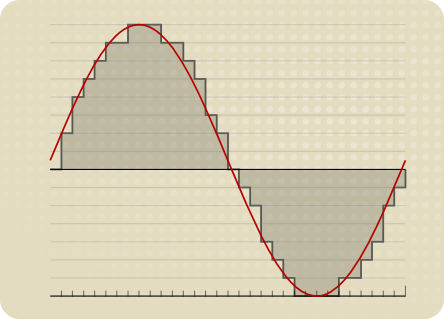
Bitrate affects audio quality by determining how much data is used to represent the original sound waves. Higher bitrates allow for more data to be used, which results in more accurate representations of the original sound waves. This results in better audio quality, such as increased clarity and reduced noise.
How to choose the right bitrate
The right bitrate for you will depend on a number of factors, including:
The type of audio you are listening to. For example, music and speech have different requirements.
The quality of your audio equipment. Higher-quality equipment can reproduce higher bitrates without introducing any noticeable distortion.
Your personal preferences. Some people may prefer the sound of higher bitrates, while others may not notice a difference.
General bitrate recommendations
Here are some general bitrate recommendations for different types of audio:
Speech: 32 kbps to 96 kbps
Music: 128 kbps to 320 kbps
High-quality audio: 256 kbps to 512 kbps or higher
It is important to note that these are just general recommendations. The best way to determine the right bitrate for you is to experiment and see what sounds best to your ears.
Final words about audio bitrates
Audio bitrate is an important factor to consider when choosing an audio file format or when setting up an audio streaming service. By understanding how bitrate affects audio quality, you can choose the right bitrate for your needs and get the best possible listening experience.
MP3 bitrate is the amount of data that is used to encode an MP3 audio file. The higher the bitrate, the higher the quality of the audio file. However, higher bitrates also result in larger file sizes.
How is MP3 Bitrate Calculated?
MP3 bitrate is calculated using a variety of factors, including the complexity of the audio signal, the desired quality of the audio file, and the target file size.
What are the Different Types of MP3 Bitrate Calculation Methods?
There are two main types of MP3 bitrate calculation methods:
Constant bitrate (CBR): This method uses a constant bitrate for the entire audio file. This results in a consistent audio quality throughout the file, but it can also result in larger file sizes for complex audio signals.
Variable bitrate (VBR): This method uses a variable bitrate, which means that the bitrate changes depending on the complexity of the audio signal. This results in smaller file sizes for complex audio signals, but it can also result in a slight variation in audio quality.
Which MP3 Bitrate Calculation Method is Best?
The best MP3 bitrate calculation method depends on your needs. If you need a consistent audio quality throughout the file, then CBR is the best option. If you are more concerned about file size, then VBR is the best option.
How to Choose the Right MP3 Bitrate for Your Needs
When choosing the right MP3 bitrate for your needs, you should consider the following factors:
The type of audio signal: Complex audio signals, such as those that contain a lot of high-frequency content, require a higher bitrate than simple audio signals.
The desired quality of the audio file: If you want the highest possible quality, then you should use a higher bitrate. If you are more concerned about file size, then you can use a lower bitrate.
The target file size: If you have a specific file size in mind, then you can use a bitrate calculator to determine the bitrate that you need.
Conclusion
MP3 bitrate is an important factor to consider when encoding audio files. By understanding the different types of MP3 bitrate calculation methods and how to choose the right bitrate for your needs, you can ensure that your audio files sound great and have a reasonable file size.
Here are some additional details about the different types of MP3 bitrate calculation methods:
Constant bitrate (CBR): This method is the simplest to understand and implement. It is also the most reliable, as it ensures that the audio quality is consistent throughout the file. However, it can result in larger file sizes for complex audio signals.
Variable bitrate (VBR): This method is more complex than CBR, but it can result in smaller file sizes for complex audio signals. This is because VBR allows the encoder to use a lower bitrate for less complex parts of the audio signal, and a higher bitrate for more complex parts of the audio signal. However, VBR can result in a slight variation in audio quality, depending on the complexity of the audio signal.
Ultimately, the best MP3 bitrate calculation method for you depends on your specific needs. If you need a consistent audio quality throughout the file, then CBR is the best option. If you are more concerned about file size, then VBR is the best option.
FLAC, or Free Lossless Audio Codec, is a popular format for high-quality digital audio. It uses lossless compression, which means that the audio is compressed without losing any of the original data. This is in contrast to lossy compression, which compresses the audio by removing data that is considered unnecessary. FLAC files typically have a high bit rate, often around 1000 kbps, which allows for the preservation of more audio information.
Why the High Bit Rate?
The reason why FLAC has a high bit rate is that it uses lossless compression. This means that all the audio data is preserved, and the file size is not reduced as much as it would be with lossy compression. While a lossy format like MP3 might have a bit rate of 128 kbps or even lower, FLAC can have a bit rate of up to 5000 kbps or more, depending on the audio content. This high bit rate ensures that the audio is of the highest quality possible.
The Benefits of FLAC
One of the biggest benefits of FLAC is that it offers high-quality audio without sacrificing any of the original data. This means that the audio is reproduced exactly as it was recorded, with no loss of quality. Additionally, FLAC files can be compressed to a smaller size without any loss in quality, which makes them easier to store and share.
The Drawbacks of FLAC
The main drawback of FLAC is that it has a larger file size compared to lossy formats like MP3. This can make it more difficult to store and share, especially when dealing with large collections of audio files. Additionally, not all devices and media players support FLAC playback, which can limit its usefulness in certain situations.
Final Words
In conclusion, the high bit rate of FLAC is a result of its lossless compression, which preserves all the original audio data. While this makes FLAC files larger in size, it also ensures that the audio is of the highest quality possible. Despite its drawbacks, FLAC remains a popular format among audiophiles and music enthusiasts who demand the best possible audio experience.
High bitrate music has become a buzzword in the music industry in recent years. It refers to audio files with a higher bitrate, or the number of bits of information processed per second, than the standard compressed audio formats like MP3 or AAC. The higher the bitrate, the more information can be captured and the better the quality of the sound. In this article, we will dive deep into the world of high bitrate music, discussing its benefits, potential drawbacks, and answering frequently asked questions about this topic.
What is High Bitrate Music and Why is it Important?
High bitrate music refers to audio files that contain more data than standard compressed audio formats. It is important because it offers a more accurate representation of the original sound recording, resulting in better sound quality. The higher the bitrate, the more information is captured, resulting in a more detailed and nuanced sound.
Benefits of High Bitrate Music
There are several benefits to high bitrate music, including:
1. Better sound quality: As mentioned earlier, high bitrate music captures more information, resulting in better sound quality.
2. More accurate representation of the original recording: High bitrate music captures more detail in the original recording, resulting in a more accurate representation of the artist’s intended sound.
3. Increased dynamic range: High bitrate music can capture a wider range of sound, from the quietest whispers to the loudest screams, resulting in increased dynamic range.
4. Improved listening experience: High bitrate music provides a more immersive and engaging listening experience.
Potential Drawbacks of High Bitrate Music
While high bitrate music offers many benefits, there are also some potential drawbacks to consider, including:
1. Larger file sizes: High bitrate music files are larger than standard compressed audio files, which can take up more storage space on your device.
2. Increased bandwidth requirements: High bitrate music files require more bandwidth to stream or download, which can be an issue for those with slower internet connections.
3. Compatibility issues: Some devices and software may not be able to play high bitrate music files.
How to Access High Bitrate Music
There are several ways to access high bitrate music, including:
1. Purchasing high-resolution audio files: Many online music stores offer high-resolution audio files in various formats.
2. Streaming services: Some streaming services offer high-quality audio streaming, including Tidal and Qobuz.
3. Local music libraries: Some users may have their own high bitrate music files stored locally on their devices.
Common Formats for High Bitrate Music
There are several formats for high bitrate music, including:
1. FLAC: FLAC stands for Free Lossless Audio Codec and is a popular format for high-resolution audio files.
2. ALAC: ALAC stands for Apple Lossless Audio Codec and is the Apple version of FLAC.
3. WAV: WAV stands for Waveform Audio File Format and is a popular format for high-quality audio files.
FAQ
Q: Can high bitrate music be played on any device?
A: Not all devices are compatible with high bitrate music. Some older devices or software may not be able to play high bitrate music files.
Q: Is high bitrate music worth the extra cost?
A: This is a personal preference. If you value high-quality sound and are willing to invest in it, then high bitrate music may be worth the extra cost. However, if you are content with standard compressed audio formats, then high bitrate music may not be worth the added expense.
Q: Can high bitrate music improve the sound of low-quality recordings?
A: High bitrate music can only capture what is in the original recording. It cannot improve the quality of a low-quality recording or fix any issues with the original source. However, it can provide a more accurate representation of the original recording and may sound better than a compressed version of the same recording.
Q: Do I need special equipment to listen to high bitrate music?
A: While you don’t necessarily need special equipment to listen to high bitrate music, you will need a device that is compatible with the format and can handle the larger file sizes. Additionally, high-quality headphones or speakers can enhance the listening experience.
Q: How can I tell if a music file is high bitrate?
A: The bitrate of a music file can usually be found in the file’s properties or metadata. It is typically measured in kilobits per second (kbps) or megabits per second (mbps). High bitrate music files will typically have a bitrate of 1,411 kbps or higher.
Q: Can high bitrate music improve the sound of streaming services?
A: Some streaming services offer high-quality audio streaming, including high bitrate music. However, the quality of the sound will also depend on the quality of your internet connection and the device you are using to stream the music.
Q: Is there a noticeable difference between high bitrate music and standard compressed audio formats?
A: Yes, there is a noticeable difference between high bitrate music and standard compressed audio formats. High bitrate music captures more detail in the original recording, resulting in a more accurate and nuanced sound.
Q: Are there any free sources of high bitrate music?
A: While most high bitrate music sources require payment, some websites offer free high-resolution audio downloads, such as the Free Lossless Audio Codec website.
Q: How do I convert standard compressed audio files to high bitrate music?
A: You cannot convert standard compressed audio files to high bitrate music, as the information captured in the original recording cannot be added back. To access high bitrate music, you will need to acquire a high-resolution audio file in the desired format.
Q: Are there any downsides to converting standard compressed audio files to high bitrate music?
A: Yes, converting compressed audio files to high bitrate music will not improve the quality of the original recording and may result in larger file sizes without any added benefits.
Conclusion
High bitrate music offers many benefits, including better sound quality, increased dynamic range, and an improved listening experience. However, there are also potential drawbacks to consider, including larger file sizes and compatibility issues. Understanding the formats and sources for high bitrate music can help you access and enjoy this high-quality audio format.
How to Calculate Audio Bitrate: A Comprehensive Guide
Audio Bitrate
Calculating audio bitrate is an essential skill for anyone working with digital audio files. Bitrate is the amount of data used to encode one second of audio, and it plays a significant role in the quality of audio files. In this comprehensive guide, we will discuss everything you need to know about audio bitrate and how to calculate it.
Audio Bitrate
What is Audio Bitrate?
Bitrate is the number of bits used to encode one second of audio. It is typically measured in kilobits per second (kbps) and determines the audio file’s size and quality. The higher the bitrate, the larger the audio file’s size and the better the audio quality.
Audio bitrate is determined by several factors, including:
The audio format
The audio codec
The audio signal characteristics
Audio Format and Codec
The audio format and codec are two critical factors that determine audio bitrate. Audio format refers to the type of audio file, such as MP3, WAV, or FLAC. Each audio format has its own advantages and disadvantages, including file size, compatibility, and audio quality.
The audio codec, on the other hand, is the software used to compress and decompress audio data. Codecs determine how efficiently audio data is compressed and how much data is used to encode one second of audio.
It is essential to choose the right audio format and codec for your needs, as they can significantly impact the audio bitrate and quality. For example, MP3 files are smaller in size but lower in quality than WAV or FLAC files.
Audio Signal Characteristics
The characteristics of the audio signal, such as its frequency range and amplitude, can also affect the effectiveness of audio compression and the resulting audio bitrate. Higher frequencies and amplitudes require more data to encode accurately, resulting in a higher bitrate.
Other factors that can affect audio bitrate include the number of audio channels and the audio’s dynamic range. Stereo audio files require more data than mono audio files, while audio files with a wide dynamic range require more data than those with a narrow dynamic range.
Calculating Audio Bitrate
Calculating audio bitrate requires you to know the audio file’s duration, size, and format. Once you have this information, you can use the following formula to calculate audio bitrate:
Bitrate = (File size in bits / Duration in seconds) / 1000
For example, if you have a 3-minute MP3 audio file with a size of 4,320,000 bytes:
Convert the file size to bits: 4,320,000 x 8 = 34,560,000 bits
Convert the duration to seconds: 3 x 60 = 180 seconds
In this example, the audio file has a bitrate of 192 kbps.
Conclusion
Calculating audio bitrate is an essential skill for anyone working with digital audio files. Understanding audio format, codec, and signal characteristics can help you choose the right audio settings for your needs and ensure the best audio quality possible. By following the formula above, you can easily calculate the required bitrate for your audio files and adjust the settings accordingly. Keep in mind that bitrate is not the only factor that affects audio quality, so be sure to consider other factors such as the audio format, codec, and signal characteristics when selecting your settings.
When working with audio, it’s important to strike a balance between file size and audio quality. Higher bitrates generally result in better audio quality, but also larger file sizes. It’s up to you to determine the optimal balance for your specific needs and use case.
Final Thoughts
Calculating audio bitrate may seem like a daunting task, but with the right tools and knowledge, it can be a straightforward process. By understanding the different factors that affect audio quality and file size, you can make informed decisions when selecting your audio settings.
Remember, bitrate is just one of many factors that affect audio quality. Other factors, such as the audio format and codec, can also have a significant impact. By taking these factors into consideration and making informed decisions, you can achieve the best possible audio quality for your needs.
Whether you’re an audio professional or simply someone who enjoys working with digital audio files, understanding how to calculate audio bitrate is an important skill to have. By following the guidelines outlined in this article, you can ensure that your audio files are optimized for the best possible quality and file size.
Note: The information provided in this article is for educational purposes only and should not be construed as professional advice. Always consult a professional audio engineer or other qualified expert for advice on specific audio projects or issues.
The bitrate and its relationship with the audio quality in an MP3
The bitrate and its relationship with the audio quality in an MP3
The bitrate is a measure of the amount of audio information that is encoded per second in a compressed audio file, such as an MP3. Bit rate is measured in kilobits per second (kbps).
The bitrate and its relationship with the audio quality in an MP3
The higher the bitrate, the higher the audio quality. However, a larger file size will also be required to store the same amount of audio time. Therefore, it is important to choose a suitable bitrate to balance quality and file size.
For music files, a bitrate of at least 128 kbps is recommended for decent sound quality. However, if you want higher sound quality, you can go for a higher bitrate, such as 256 kbps or even 320 kbps.
For voice audio files, a bit rate of 64 kbps is sufficient for clear sound quality. However, if you want higher sound quality, you can go for a higher bitrate, such as 96 kbps or 128 kbps.
In short, bitrate is an important factor in the audio quality of an MP3 file. It is important to choose a suitable bitrate to balance quality and file size.
Also, it’s important to note that bitrate isn’t the only factor that affects the audio quality of an MP3. Other important factors include the sample rate and the number of channels. The sample rate refers to the number of times the sound is measured per second, while the number of channels refers to the number of audio channels in the file.
For example, an audio file with a bit rate of 128 kbps and a sample rate of 44.1 kHz and 2 audio channels will have higher sound quality than a file with the same bit rate but a sample rate of 22 kHz and 1 audio channel.
In conclusion, if you want to get the best audio quality from an MP3 file, it’s important not only to choose a suitable bitrate, but also to consider the sample rate and number of channels. It is advisable to choose an optimal combination of these factors to obtain the best sound quality.
In addition, it is important to mention that there are other audio formats, such as WAV, FLAC, AIFF, which, unlike MP3, are not compressed, which means that they do not lose audio quality to the compression process. However, these formats often have much larger file sizes than compressed formats like MP3.
So, if you want the best audio quality, it’s recommended to use uncompressed formats like WAV or FLAC, but it’s also important to consider storage space and compatibility with different devices and audio players. In case of opting for compressed formats, it is important to choose an appropriate bitrate and take into account other factors such as the sampling frequency and the number of channels.
In summary, bitrate is an important factor in the audio quality of an MP3 file, but it is not the only factor to consider. It is important to choose a suitable bitrate, as well as take into account the sample rate and the number of channels to obtain the best sound quality. In addition, there are other uncompressed audio formats that offer higher sound quality, but also have a larger file size.
When downloading music, we often see these options: lossless sound quality and normal sound quality, lossless sound quality requires members to download, otherwise only normal sound quality can be downloaded. Since it is a fee, the lossless sound quality must be higher than the normal sound quality, so what are the differences between them?
What does kbps mean?
Different compression encoding methods
Commonly seen MP3, WMA, OGG are called lossy compression. As the name suggests, lossy compression is to reduce the audio sample rate and bit rate, and the output audio file will be smaller than the original file, which is normal sound quality. we often see.
Another audio compression is called lossless compression, which can compress the volume of the audio file to a smaller size on the premise of saving 100% of all the data in the original file. Same size, same bitrate. Lossless compression formats include APE, FLAC, WAV, WavPack, LPAC, WMALossless, AppleLossless, TTA, Tak, TAC, La, OptimFROG, Shorten, while common and conventional lossless compression formats today include APE, FLAC, TTA, TAK, WAV, Generally CDs are lossless music.
What does kbps mean?
different file sizes
Common MP3, WMA and other formats occupy about 1M-5M space for single-handed songs, while for music in lossless formats such as ape and flac, the space occupied by a single song can generally reach tens of megabytes, or even more than 100M.
different bit rates
Bit rate (Kbps) refers to the transmission rate of digital signals, that is, how many thousands of bits of information are transmitted per second (K means thousands of bits, Kb means how many thousands of bits). For music, theoretically this The higher the value, the better the sound quality. Ordinary music, such as WMA, is generally 128kbps music, MP3 is mostly 128 or 192 or 320kbps/, while the bit rate of lossless music generally reaches 800-900kbps, and traditional CD even reaches 1411 Kbps. Using lossless compression, the sound quality is the most perfect.
What does kbps mean?
different sound
The feature of lossless music is that regardless of whether there is sound between the beats, its data always flows smoothly, so the fast magnetic vibration in your headphones is stable, and the sound is natural and real; while lossy formats such as MP3 are due to the loss of people The ear can not hear part of the data, so the magnetic block in the earphone vibrates unnaturally, causing it to vibrate when there is sound, and do not vibrate when there is no sound, so the magnet block vibrates excessively and unstable, which will produce burr noise. If professional equipment is used, it is easy to hear right and wrong.